Companies are no longer struggling to build Power Apps, as AI tools like Microsoft Copilot can generate forms, screens, and even formulas. This major shift has altered the skills they want to hire for. They focus more on whether candidates understand business logic, security, integrations, performance optimization, Dataverse design, and the ability to solve real business problems.
If you are preparing for a Power Apps interview, you should expect questions that assess both your technical knowledge and practical problem-solving skills. I have collected the best Power Apps interview questions in this guide to help you prepare with confidence and improve your chances of success. It will help you understand what type of questions to expect and how to answer them.
Let's start with the basic Power Apps interview questions and answers. The foundational knowledge proves the skills and motivation of candidates for a job role. This is why interviewers often start with these questions only. This filters out the unworthy individuals instantly. These questions include very basic concepts of this tool like its definition, components or features.
PowerApps is a combination of different apps, services, data platforms and adapters. These elements combine to create an agile development environment for creating mobile applications. These mobile applications are capable of managing different platforms including Android, iOS, Windows and web browsers. These apps can also interface with your organizational data.
The six major components of PowerApps are -
A model-driven app should be preferred over a canvas app when it comes to creating an app where the data is manageable with Dataverse-defined tables.
Each screen can be configured to ensure its layout adapts to its current available space. The app's 'scale to fit' setting should be turned off.
A collection refers to a standalone form of data source since it's local to the app and isn't connected to a cloud service. It is often employed as the local storage of the device, which is unshareable between devices. Collections are managed with Collect, Clear Function and ClearCollect.
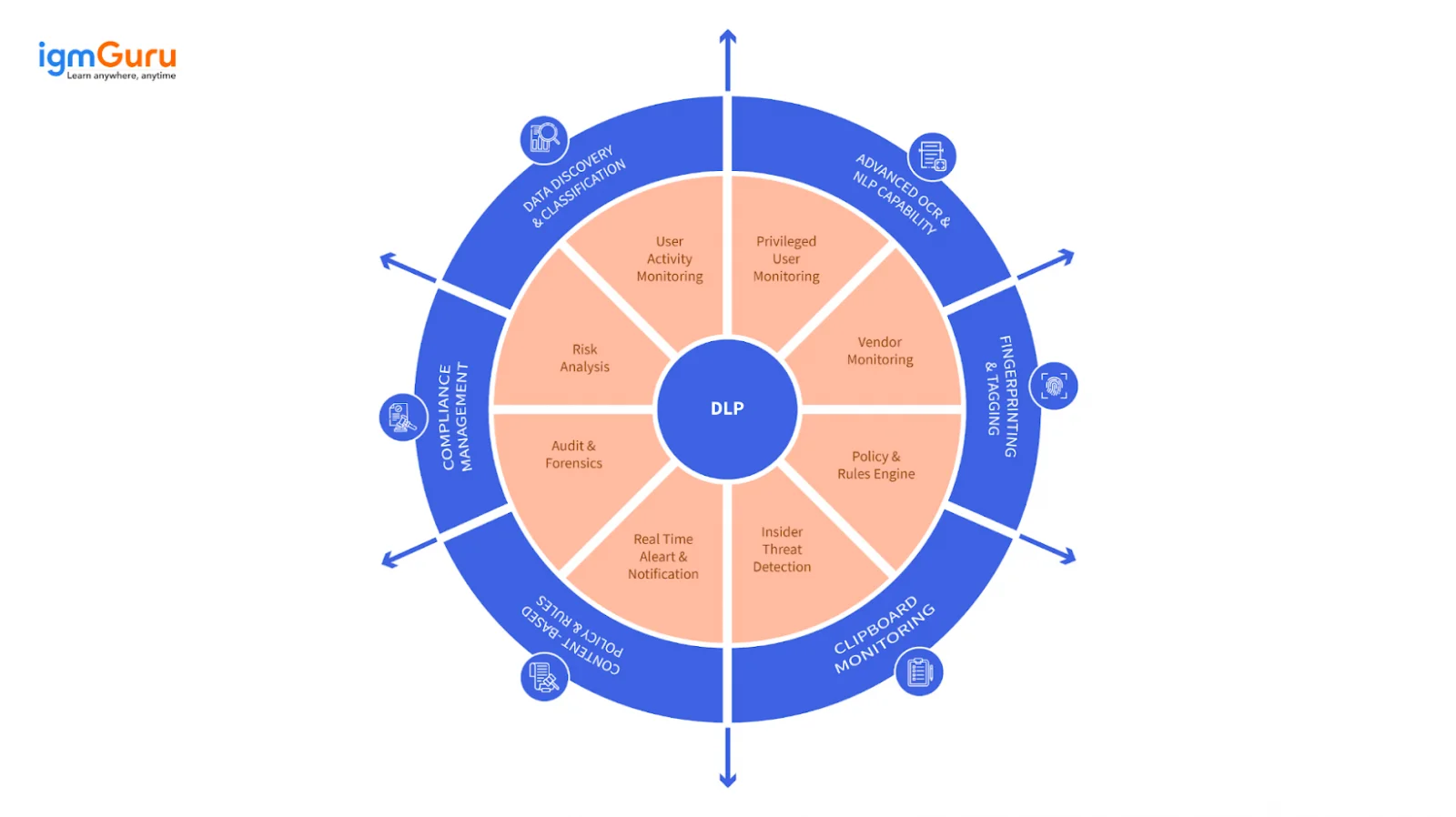
DLP or Data Loss Prevention policies are designed to work as guardrails for the data. These policies ensure no organizational data is unintentionally exposed to the outside environment. This feature can only be used by a tenant admin or an environment admin.
Dataverse in Power Apps is a data platform that enables organizations to store and even model business data securely. It uses a set of tables for storing this data. This table comprises columns and rows.
Also Read - Power Apps Tutorial- A Step-By-Step Guide For Beginners
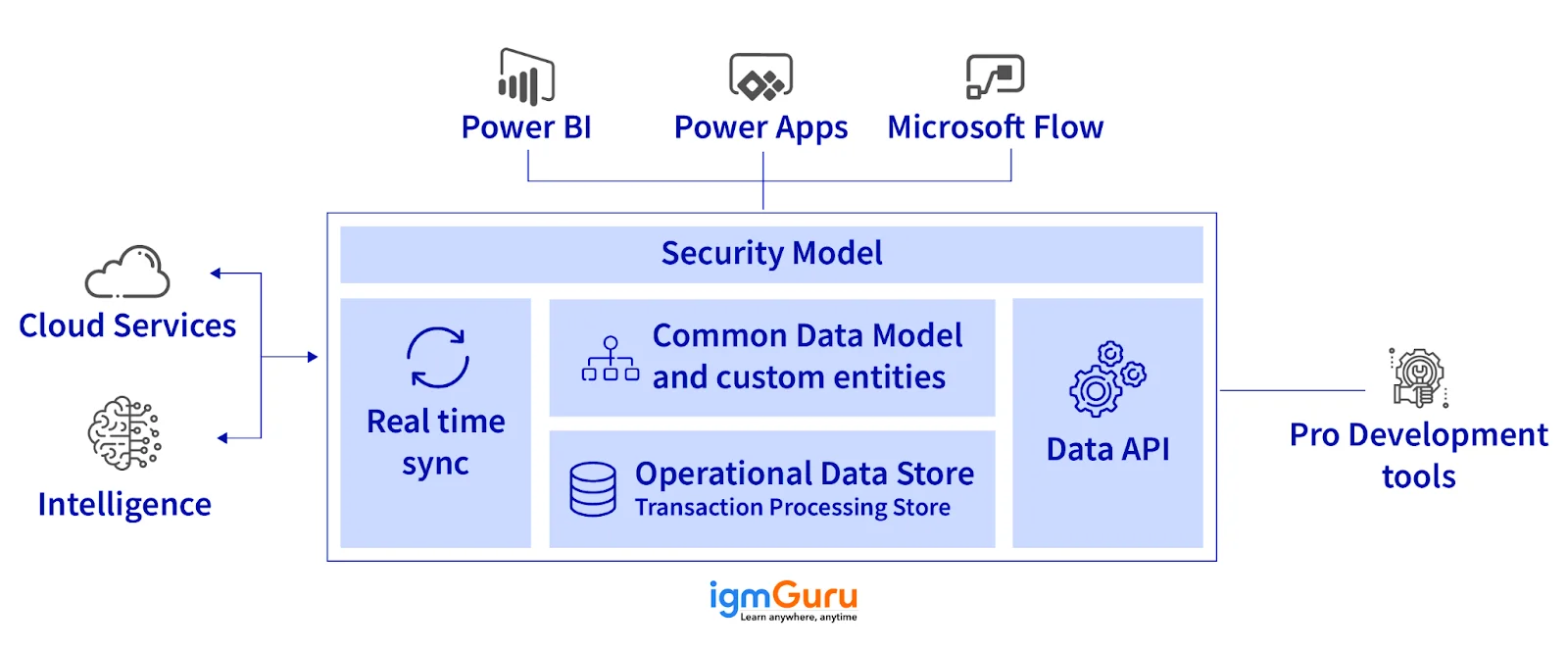
Common data services enable the amalgamation of data from various sources into a unified store. Data on this unified store can be used in the four aspects of the Power Platform, namely Power Virtual Agent, PowerApps, Power Automate and Power BI.
Yes, it is possible to share a canvas app with external business partners or contractors via Azure AD B2B.
'Environment' in Power Apps refers to the location where business processes, apps and data are stored and managed.
Continuously developing and refining skills is very important to achieve success in any field. This is why individuals always want to learn new skills and techniques. It can boost their career and salary. Here are some of the top Power Apps interview questions for intermediates. These will assist them get into higher job positions.
Model-driven apps use a component-based methodology to create significant applications. These components are dashboards, forms, charts, business processes, views and entities. Their combination forms an interactive user interface. Canvas Apps use a different methodology for the same purpose. They focus on user experience and give customization options through different UI. These are charts, drop-down lists, media, text input boxes, labels and more.
It is definitely possible to create more responsive Canvas Apps. Developers achieve it by using the Measurement attributes of app screens like heights and widths. They also use container controls and conditional logic in this case.
Formula logic is one of the features of this tool for creating complicated terms and logic using different formulas. These formulas can control the behavior of applications like making decisions, computing values and updating data. For instance, one can use a formula to find the total due for a consignment based on the quantity and prices of items.
A PowerApps environment is a great place for creating and managing Power Apps applications. Creating a new environment involves signing up on the PowerApps plan and using the admin center to build a new environment. The admin center also manages security, authenticates access, monitors usage and configures settings.
Debugging tools troubleshoot common bugs and issues in PowerApps. These tools are basically error messages and logs that detect the root cause of the issue. One can also use the View menu in this instance. Here they can access the app settings to check the data resources and connectivity settings.
To optimize performance:
Read Also- What Are The Different Types of Microsoft Power Apps
Copilot helps developers create and improve Power Apps applications by using natural language instead of writing everything manually. Developers can describe the business requirement, generate app structures, work with data, and get assistance with Power Fx formulas. However, developers should still validate the generated formulas, data model, security settings, and business logic before deploying the application.
Modern controls are updated Power Apps controls designed to provide better performance, accessibility, responsiveness, and a more consistent user experience. They also provide improved styling options and better formula validation through enum-based properties. Developers should understand the updated properties because Microsoft introduced significant modern control updates in 2026 that may require changes to existing formulas.
The Power Apps MCP Server allows AI agents to communicate with Power Apps and perform actions using the Model Context Protocol. It can support agentic workflows where an AI agent works with app data and creates tasks for human review. This is useful when organizations want AI to automate repetitive processes while keeping humans involved in important decisions.
The choice depends on the business requirement. A canvas app is suitable when the user interface needs extensive customization, while a model-driven app is better when the application is centered around Dataverse data, forms, views, and business processes. An AI-powered experience can be added when users need natural-language interaction, data analysis, or intelligent assistance. In many enterprise applications, these approaches can also work together.
The developer is one of the most demanding job roles for experts in this tool. They get up to INR 23,00,000 per annum in India and $155,000 per annum in the USA. Here are the top Power Apps developer interview questions. These are best to become a developer with this tool.
This tool develops customized applications and automates operations based on different user inputs or events. Let's understand this with an instance. In order to automate a request and approval workflow, we will develop an app that takes all the requests from customers and then automatically sends an email for approval or rejection.
There are two functions for submitting data. First one is the SubmitForm function. This function saves changes made inside a form control and data source by just clicking on the Submit button. The other function is Patch. This function directly manipulates information inside a collection or outer data source, depending on the requirement.
Creating separate environments for each user requires implementing access control. Here experts will build different environments on the admin center and authenticate their access to some particular users only. These accesses are controlled while considering all the tasks and requirements of the application.
This tool has a feature, namely, a custom connector to build custom APIs. Developers use this feature to connect external services while determining a custom API with its parameters, endpoints, and response structure. It also creates a bridge between the app and external data sources that do not have a connector.
Here are the formulas you can mention -
| S.No | Function | Function Type |
| 1. | Concatenate() | Text Functions |
| 2. | If() | Logical Functions |
| 3. | Round() | Math Functions |
| 4. | Now() | Date & Time Functions |
| 5. | Filter() | Data Table Functions |
| 6. | Patch() | Record & Table Functions |
| 7. | IsBlank() | Error Handling Functions |
| 8. | User() | User & Environment Functions |
| 9. | Navigate() | Navigation Functions |
| 10. | Launch() | Action Functions |
Now we will explore the top Power Apps interview questions for experienced professionals. These are based on the top advanced concepts of this tool like loading spinner, delegation, language support and more. These questions are mostly apt for individuals who already have significant experience in this area. Exploring these will boost their knowledge and sharpen their skills to go for higher position job roles.
The implementation of different language support in an application means that it is available in many languages. This implementation can be performed by developing a district version of apps for each language or using specific resources within apps. The management of these applications requires a complete understanding of internationalization and localization concepts.
Delegation is the point where limitations have to be implied on network data transfer by using formulas. The application will outsource data processing to the sources rather than transmitting data for local processing at this point. This often occurs when working with humongous data sets.
It is a visual tool for displaying an animated circle or similar graphic. These animations show that the app is currently loading or processing information. It often appears in slow data loading. This means it informs the user about the busy process mode and may take some time.
A page is basically a visual interface of an application. Anyone can access and see it. Here they can interact with all data and their forms. Workflows represent automated processes that run behind the scenes to transfer data between different systems or trigger actions. Only authenticated users and the developer of the workflow can access them.
There are two types of authentication available in PowerApps: OAuth and password authentication. OAuth authentication authenticates the app that requests access to its service. This tool handles all authentication and authorization. Password authentication uses both a username and a password for authentication. It is configured by using its attributes (Form > Security Type).
Read Also- Top 7 Innovative Power Apps Examples To Look
Now we will discuss the most advanced Power Apps interview questions. These are generally asked to check the proficiency of candidates in handling complicated tasks and scenarios. Experts with this knowledge can go for higher job positions like administrators and senior developers.
Handling humongous amounts of data on this tool requires using techniques like pagination and data caching. The pagination technique splits up a humongous amount of data into smaller packages. It is quite easy to work with these packages. Data caching stores data locally that is easily accessible. This technique also works without an Internet connection.
This tool has security features for managing application and data access. The other option is to set rules and permissions to restrict the access and capabilities of the users. Administrators are responsible for overseeing users within a company. They keep track of who is accessing any information unauthorisedly.
AI Builder is an important component of this tool that gives artificial intelligence capabilities to apps. Developers can incorporate AI models into apps without extensive coding. It gives models for object detection, form processing, prediction and many more.
This Portal extends the capabilities of this tool by enabling the development of external-facing websites. External users interact with information and perform actions without accessing workflow with this feature. Portals are fully customizable based on the organizational requirements and branding. They can host different types of functionalities including customer support, service portals and community forums.
This tool can export and import any apps. This means it is possible to transfer them from one environment to another. It is useful when transferring an application from the development environment to the production environment. Developers package the application as a solution and then import it to another environment. This way all the data sources, components and settings are transferred efficiently.
Data caching in Power Apps is achieved through the use of Collections combined with the SaveData and LoadData functions for offline persistence. You can access this feature from the PowerApps.com website > Apps > Other > Portal Application > and Settings. Click on the administration here and select the Portal Actions from the left menu. You can then restart it. This will create the server-side cache.
Here are some of the most asked scenario based Power Apps Interview Questions and Answers moslty asked to check you experince on solving real-world problems.
I would design the application using a human-in-the-loop approach. The AI agent could classify requests, collect information, and complete low-risk tasks automatically. However, requests involving refunds, sensitive customer information, or unusual cases would be routed to an authorized employee for review. I would also apply Dataverse security roles, environment-level controls, auditing, and appropriate DLP policies to protect the data.
First, I would use Monitor and the available performance analysis tools to identify slow operations and unnecessary connector calls. I would then check whether the formulas are delegable and move filtering, sorting, and searching operations to Dataverse wherever possible. I would also review the data model, indexes and columns being queried, reduce unnecessary controls and data loading, and avoid loading the complete dataset into collections.
I would evaluate the Power Apps MCP Server and Copilot Studio agent capabilities for the requirement. The agent could perform appropriate business actions and create tasks for human review when an exception or approval is required. I would define the agent's permissions carefully, restrict the data and actions it can access, and test the human approval flow before deploying it to production.
I would first create a development copy and identify the controls and formulas affected by the modern control changes. Then I would migrate the controls gradually, update any affected properties and formulas, and test the application on desktop and mobile layouts. I would also verify accessibility, performance, navigation, and data operations before publishing the updated version to users.
I would first identify which Dataverse tables and business data the AI experience actually needs to access. I would then configure the appropriate Copilot or agent experience and enforce Dataverse security roles so users only receive information they are authorized to access. I would test the AI responses against known business records, define safeguards for sensitive questions, and provide a fallback path when the AI cannot confidently answer a request.
The average salary earned by a Power Platform consultant in the US is $163k annually. The better you perform in your interview, the better your salary bracket can be. So, prepare well with the right resources. With Microsoft continuously expanding Copilot AI capabilities inside Power Apps, developers are now able to generate app layouts, formulas, and workflows faster using natural language prompts.
Learning these top Power Apps interview questions will undoubtedly benefit individuals in successfully securing a job. There is a great demand for application development on this tool as clients expect fresh developments and advancements. Development companies are continuously making efforts to create better applications, and they require knowledgeable and skilled experts to achieve this goal.
Explore Our Trending Articles
Coding knowledge is not necessary for learning Power Apps. However, familiarity with Power Fx (its formula language) is important to build advanced applications.
While certification is not a necessary requirement, it can be beneficial. Certifications like PL-100 (Power Platform App Maker Associate) or PL-400 (Power Platform Developer Associate) are the best choice for these professionals.
You can build your first app within a week, but for job readiness could take up to six weeks of consistent practice on data modeling, formulas and application design.
Learning Power Apps interview questions is important as mastering a tool is not enough to crack an interview. The interviewers not only check the knowledge of candidates but also their skills and personality. These questions teach how to answer the questions effectively to impress interviewers.
Share, connect and build are the main concepts of this tool. They emphasize data connectivity, collaborative sharing and app creation.
This tool can only store 2,000 items due to its connected data source like SQL, SharePoint and Oracle. Developers can remove this limitation by using delegation points. Here they offload data filtering and sorting to the back end.
Course Schedule
| Course Name | Batch Type | Details |
| Power Apps Training | Every Weekday | View Details |
| Power Apps Training | Every Weekend | View Details |