Have you ever run a SQL query that takes several minutes to return results, even when you need just a few records? As your database grows, searching millions of rows can slow applications and hurt performance. SQL Server indexing helps solve this problem by making data retrieval faster and more efficient.
In this blog, you will learn how indexing works, explore different index types, create indexes using practical SQL examples and discover how to maintain them.
An index in SQL Server is a data structure that helps the database find and retrieve records faster. It works similarly to the index section of a book. Instead of going through every page to find a particular topic, you can use the index to locate the information directly.
SQL Server uses indexes to reduce the amount of data it needs to scan when executing queries. This improves query performance, especially when working with large tables.
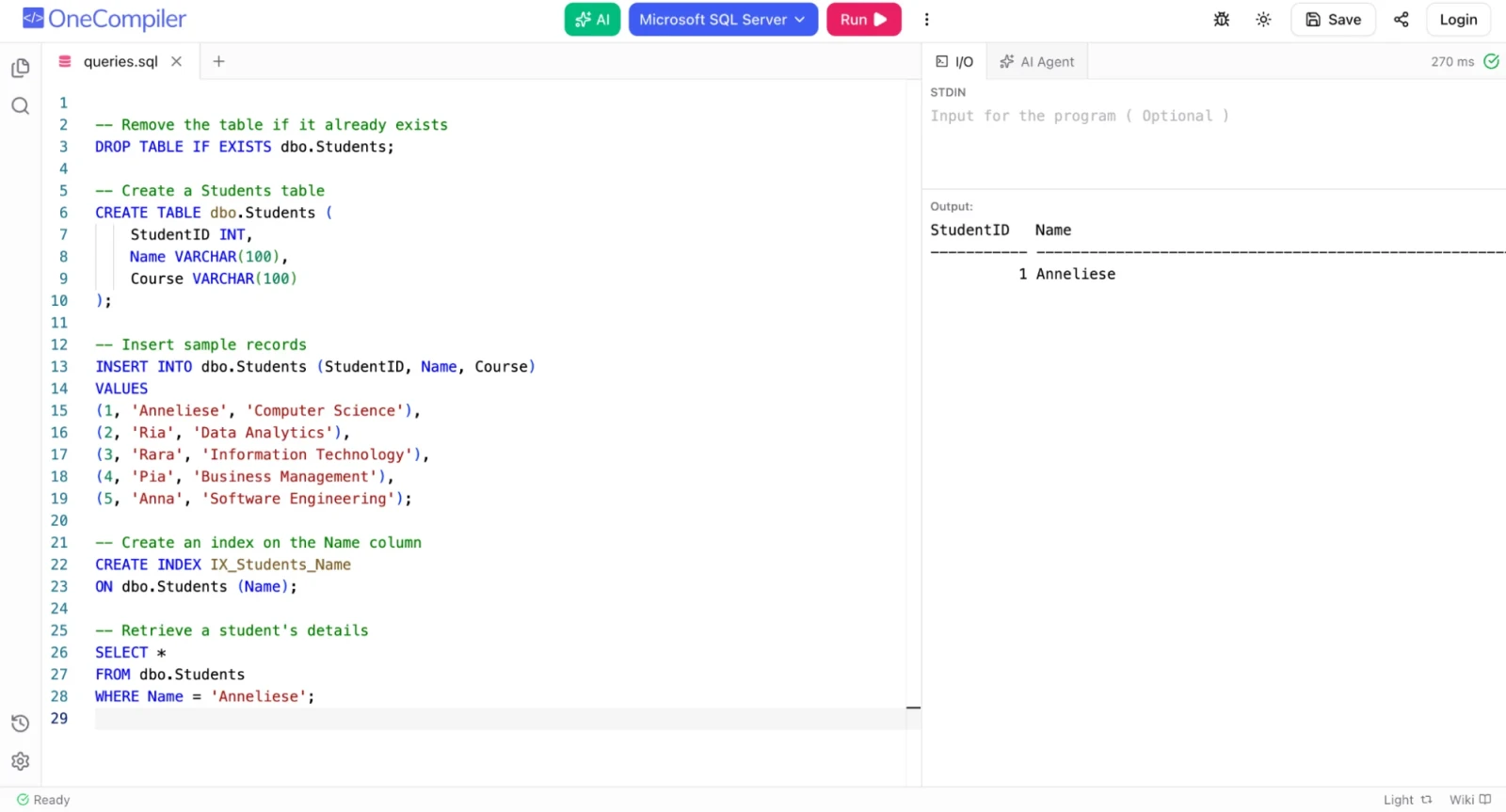
Imagine you have a Students table containing 10,000 student records. You want to find the details of a student named Annelies.
Here is a simple SQL example:
| -- Remove the table if it already exists DROP TABLE IF EXISTS dbo.Students; -- Create a Students table CREATE TABLE dbo.Students ( StudentID INT, Name VARCHAR(100), Course VARCHAR(100) ); -- Insert sample records INSERT INTO dbo.Students (StudentID, Name, Course) VALUES (1, 'Anneliese', 'Computer Science'), (2, 'Ria', 'Data Analytics'), (3, 'Rara', 'Information Technology'), (4, 'Pia', 'Business Management'), (5, 'Anna', 'Software Engineering'); -- Create an index on the Name column CREATE INDEX IX_Students_Name ON dbo.Students (Name); -- Retrieve a student's details SELECT * FROM dbo.Students WHERE Name = 'Anneliese'; |
SQL Server stores data on 8 KB pages. Eight pages form one extent. An index organizes these pages in a structure called a B-tree, short for balanced tree.
A B-tree has three levels of pages:
When you run a query with a filter, SQL Server starts at the root. It follows the pointers down the tree until it reaches the leaf page that holds your value. This takes only a few page reads, even for very large tables.
The query optimizer decides whether to use an index. It checks statistics about your data and picks the plan with the lowest estimated cost. You will see three common operations in an execution plan:
Your goal should be to help the optimizer choose the most efficient access method for each query. An Index Seek works well for selective queries, while an Index Scan can be more efficient when SQL Server needs to read a large portion of the data
A nonclustered index returns only the columns it contains. If your query asks for more columns, SQL Server must perform a key lookup for each matching row. That is fine for ten rows. It becomes expensive for ten thousand rows.
As a rule of thumb, once a query matches a large share of the table, often around a quarter to a third of its pages, the optimizer usually prefers a scan over a seek plus lookups. This point is called the tipping point. You can avoid many lookups with a covering index, which we cover in the examples below.
The optimizer does not guess. It reads statistics, which are small summaries of how values spread across a column. Each index has its own statistics object. These statistics include a histogram and the optimizer uses it to estimate how many rows a filter will return.
Good estimates lead to good plans. Stale statistics lead to poor plans, even when the right index exists. You can inspect statistics with this command:
| DBCC SHOW_STATISTICS ('dbo.Orders', 'IX_Orders_CustomerID'); |
Look at the Updated date and the Rows value in the output. If the data has changed a lot since the last update, refresh the statistics.
Indexes speed up reads, but they add work to writes. Every INSERT, UPDATE and DELETE must change the table and every index that includes the affected columns. A table with eight nonclustered indexes means nine structures to update for each new row. Indexes also use disk space and memory.
This is the main reason to avoid creating indexes on a hunch. Each index must earn its place.
Follow these steps to check whether SQL Server uses your index:
For numbers you can compare, add these two settings before your query:
| SET STATISTICS IO ON; SET STATISTICS TIME ON; |
The logical reads value in the Messages tab is the best simple measure of index efficiency.
SQL Server offers several index types. Each one solves a different problem.
1. Clustered index: This index sorts and stores the data rows of the table in key order. A table can have only one clustered index, because the data can follow only one order.
2. Nonclustered index: This index lives separately from the data. It holds the key values and a pointer to the matching row. A table can have many nonclustered indexes.
3. Unique index: This index makes sure that no two rows share the same key value. SQL Server creates one automatically when you add a primary key or unique constraint.
4. Covering index: This is a nonclustered index that includes every column a query needs. SQL Server can answer the query from the index alone. It does not need to look up the table.
5. Filtered index: This index covers only a subset of rows. It uses a WHERE clause. It is smaller and faster to maintain than a full index.
6. Columnstore index: This index stores data by column instead of by row. It works very well for analytics and data warehouse queries on large tables.
7. Full-text index: This index supports advanced text searches, such as searching for words and phrases inside large text columns.
8. XML and spatial indexes: These indexes speed up queries on XML data and geographic data.
For most OLTP workloads, you will use clustered, nonclustered, covering and filtered indexes. Columnstore indexes shine in reporting systems.
| Index type | Best for | Main trade-off |
| Clustered | Primary keys, range queries, sorted output | Only one per table and the key choice affects every other index |
| Nonclustered | Filters, joins and sorts on non-key columns | Extra storage and write cost |
| Unique | Enforcing unique values and fast lookups | Rejects duplicate values |
| Covering (INCLUDE) | Frequent queries that read a few columns | Larger index size |
| Filtered | Queries on a small slice of rows | Helps only queries that match the filter |
| Columnstore | Analytics and aggregations over many rows | Weak for single-row lookups and frequent small updates |
| Full-text | Word and phrase searches in text | Needs a catalog and its own query syntax |
| XML | XQuery on XML columns | Large and costly to maintain |
| Spatial | Distance and area queries | Specialized use only |
A unique index stops two rows from sharing the same key value. SQL Server also uses it to find rows quickly. A primary key or a UNIQUE constraint creates one for you. You can also create it yourself.
| CREATE UNIQUE NONCLUSTERED INDEX UX_Customers_Email ON dbo.Customers (Email); |
A unique index allows only one NULL value. If many rows can have a NULL email, combine uniqueness with a filter:
| CREATE UNIQUE NONCLUSTERED INDEX UX_Customers_Email ON dbo.Customers (Email) WHERE Email IS NOT NULL; |
A covering index holds every column that a query needs. SQL Server answers the query from the index and skips the key lookup.
A covering index has two kinds of columns:
| CREATE NONCLUSTERED INDEX IX_Orders_Status_Covering ON dbo.Orders (Status, OrderDate) INCLUDE (CustomerID, TotalAmount); |
Included columns do not count toward the index key size limit. That limit is 900 bytes for a clustered key and 1,700 bytes for a nonclustered key in current versions. Keep the INCLUDE list short, because every extra column makes the index larger.
A filtered index covers only the rows that match a WHERE clause. It is smaller, faster to maintain and has more accurate statistics for that slice of data.
| CREATE NONCLUSTERED INDEX IX_Orders_Open ON dbo.Orders (CustomerID, OrderDate) WHERE Status IN ('Pending', 'Processing'); |
There are two things to remember. First, your query must include a predicate that matches the filter, or SQL Server cannot use the index. Second, parameterized queries may not use a filtered index, because the optimizer cannot know the parameter value in advance.
A columnstore index stores data by column instead of by row. SQL Server compresses each column heavily and processes the data in batches. This design suits reports that scan millions of rows and calculate totals.
| -- Clustered columnstore: the whole table is stored by column CREATE CLUSTERED COLUMNSTORE INDEX CCI_SalesHistory ON dbo.SalesHistory; -- Nonclustered columnstore: adds analytics to a normal table CREATE NONCLUSTERED COLUMNSTORE INDEX NCCI_Orders ON dbo.Orders (OrderDate, CustomerID, TotalAmount); |
SQL Server groups columnstore data into row groups of up to about one million rows. Fewer, fuller row groups give better compression and faster scans. Use columnstore for data warehouses and reporting tables. Avoid it for tables where queries mostly fetch single rows.
A regular index cannot search inside long text efficiently. A full-text index can. It breaks text into words and lets you search for words, phrases and word forms.
| CREATE FULLTEXT CATALOG ftCatalog AS DEFAULT; CREATE FULLTEXT INDEX ON dbo.Products (Description) KEY INDEX PK_Products; SELECT ProductID, Name FROM dbo.Products WHERE CONTAINS(Description, 'waterproof AND jacket'); |
The key index must be a unique, single-column, non-nullable index on the table.
Use an XML index when you often query XML columns with XQuery. Create the primary XML index first. Then add secondary indexes for specific query patterns. The table needs a clustered primary key.
| CREATE PRIMARY XML INDEX PXML_Documents_Payload ON dbo.Documents (Payload); CREATE XML INDEX IXML_Documents_Path ON dbo.Documents (Payload) USING XML INDEX PXML_Documents_Payload FOR PATH; |
Use a spatial index for geography or geometry columns, such as store locations.
| CREATE SPATIAL INDEX SIDX_Stores_Location ON dbo.Stores (Location) USING GEOGRAPHY_AUTO_GRID; |
Use this short checklist:
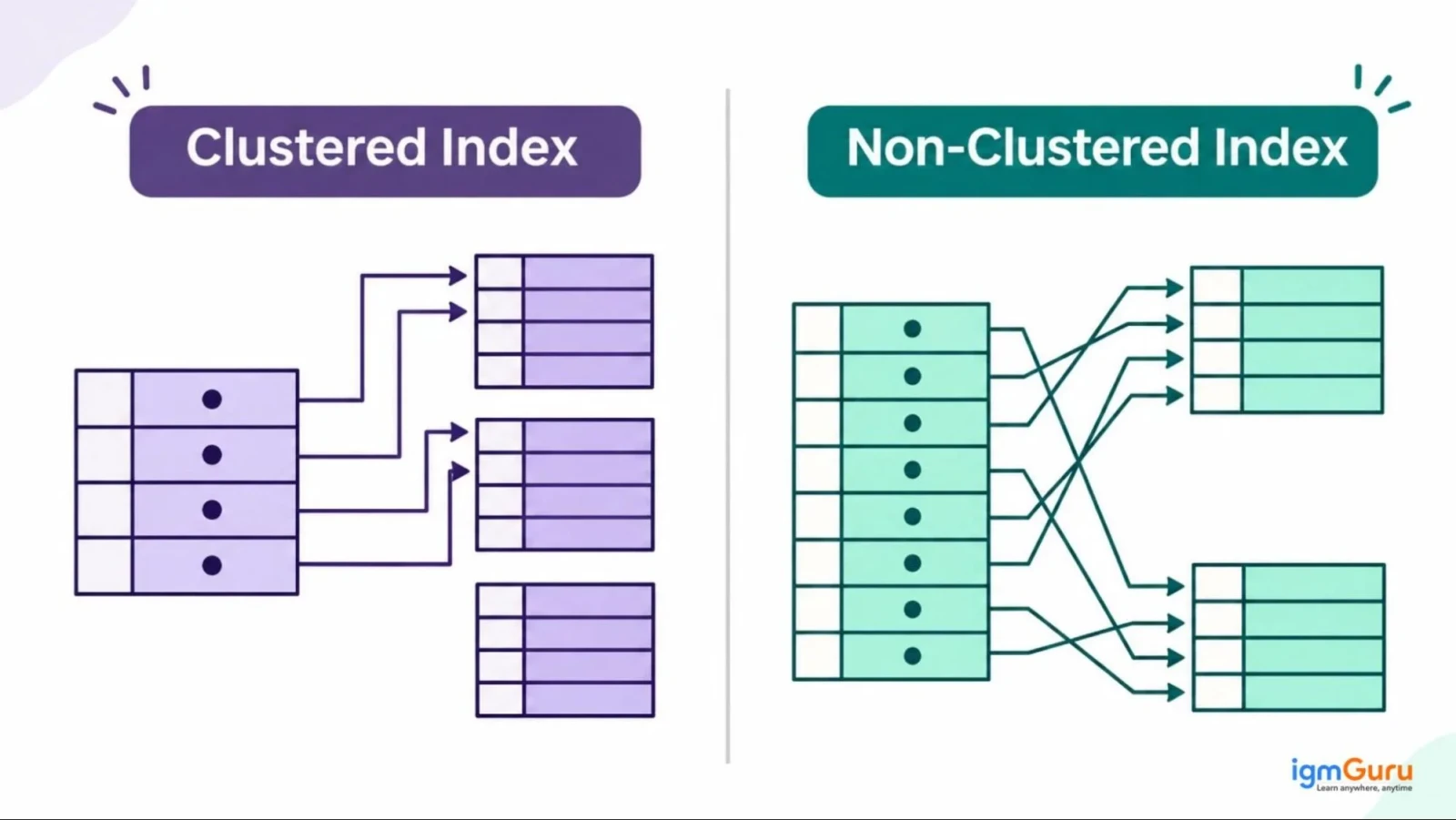
This is the most common question beginners ask about SQL Server indexing. The table below shows the key differences.
| Feature | Clustered Index | Non-Clustered Index |
| Number per table | One | Up to 999 |
| Data storage | Sorts and stores the actual table rows | Stores key values and pointers in a separate structure |
| Leaf level holds | The data pages | Index keys and row locators |
| Speed for range queries | Very fast | Fast, but may need extra lookups |
| Extra storage | Almost none | Needs additional space |
| Best use | Primary key or a column used for sorting and ranges | Columns used in WHERE, JOIN and ORDER BY |
A table without a clustered index is called a heap. SQL Server stores heap rows in no particular order. Most tables should have a clustered index, because it avoids many problems that heaps cause.
A good clustered index key is narrow, unique, static and ever-increasing. An identity column or a sequential ID fits this pattern well. A wide or random key, such as a GUID created with NEWID(), often causes page splits and heavy fragmentation.
Remember that every nonclustered index stores the clustered key as its row locator. A wide clustered key makes every nonclustered index larger. That is why you should keep it short.
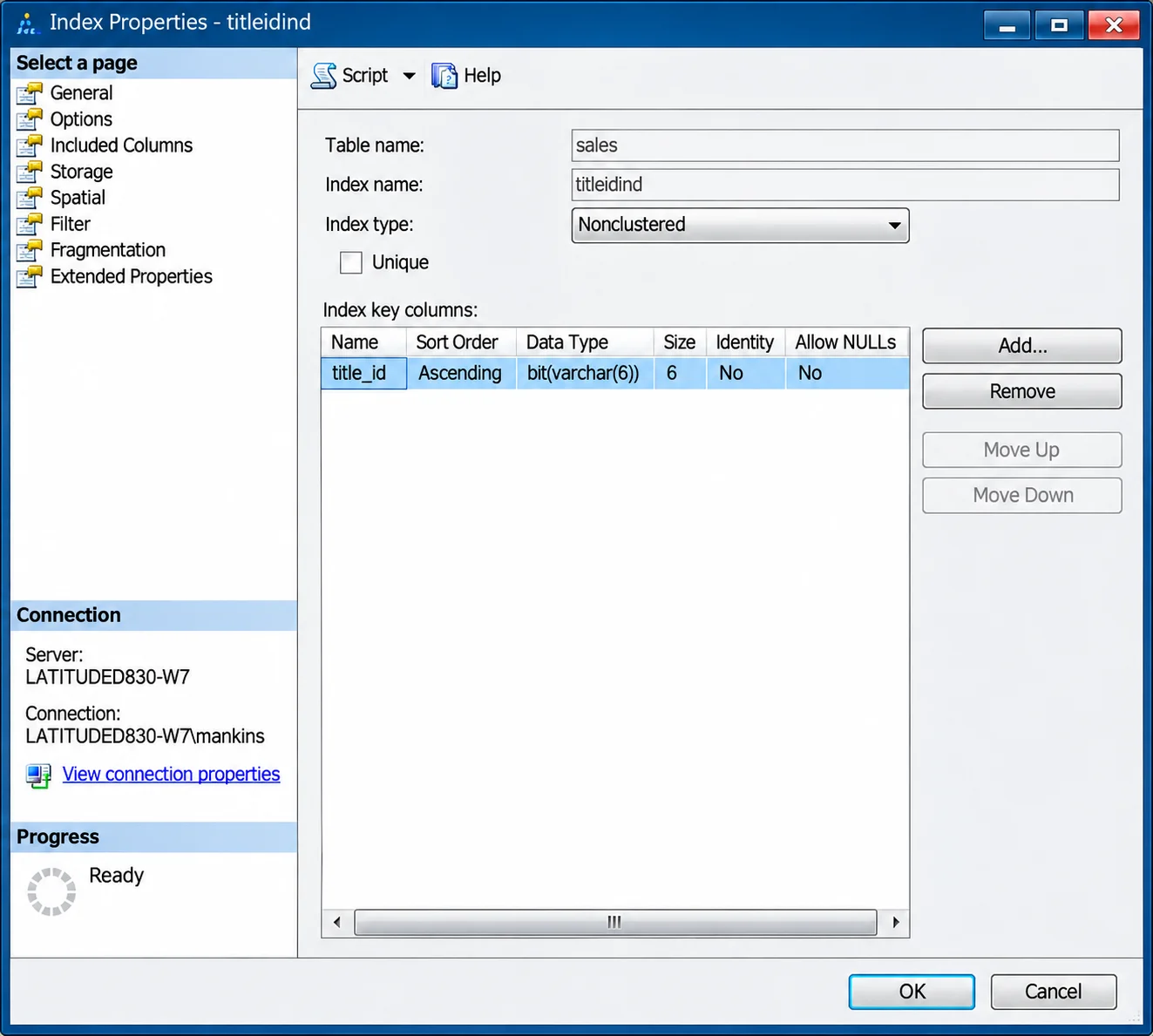
You can create indexes with T-SQL or with SQL Server Management Studio (SSMS). T-SQL gives you more control and works well in scripts, so we will focus on it here.
When you add a primary key, SQL Server creates a clustered index by default.
| CREATE TABLE dbo.Orders ( OrderID INT IDENTITY(1,1) NOT NULL, CustomerID INT NOT NULL, OrderDate DATETIME2 NOT NULL, Status VARCHAR(20) NOT NULL, TotalAmount DECIMAL(10,2) NOT NULL, CONSTRAINT PK_Orders PRIMARY KEY CLUSTERED (OrderID) ); |
| CREATE NONCLUSTERED INDEX IX_Orders_CustomerID ON dbo.Orders (CustomerID); |
Use DROP_EXISTING to change an index in one step.
| CREATE NONCLUSTERED INDEX IX_Orders_CustomerID ON dbo.Orders (CustomerID, OrderDate) WITH (DROP_EXISTING = ON); |
| -- Disable an index (keeps the definition) ALTER INDEX IX_Orders_CustomerID ON dbo.Orders DISABLE; -- Drop an index completely DROP INDEX IX_Orders_CustomerID ON dbo.Orders; |
Let us use the Orders table to see how indexes change query behavior.
This query looks for all orders from one customer.
| SELECT OrderID, OrderDate, TotalAmount FROM dbo.Orders WHERE CustomerID = 1054; |
Without an index on CustomerID, SQL Server scans the whole table. After you create IX_Orders_CustomerID, the optimizer can use an Index Seek. Turn on I/O statistics to measure the improvement.
| SET STATISTICS IO ON; |
Compare the logical reads before and after you create the index. The drop is often dramatic.
In Example 1, SQL Server finds the rows through the index. Then it performs a key lookup to get OrderDate and TotalAmount. You can remove that extra step with the INCLUDE clause.
| CREATE NONCLUSTERED INDEX IX_Orders_CustomerID_Covering ON dbo.Orders (CustomerID) INCLUDE (OrderDate, TotalAmount); |
Now the index holds every column the query needs. SQL Server skips the lookup and finishes faster.
A composite index covers more than one column. Column order matters. Put the column used for equality filters first. Put range filters after it.
| CREATE NONCLUSTERED INDEX IX_Orders_Customer_Date ON dbo.Orders (CustomerID, OrderDate); |
This index supports queries like these:
| SELECT OrderID FROM dbo.Orders WHERE CustomerID = 1054 AND OrderDate >= '2026-01-01'; |
It also helps queries that filter only on CustomerID. It does not help queries that filter only on OrderDate, because OrderDate is not the leading column.
Suppose your app often searches for pending orders and only a small share of orders stay pending.
| CREATE NONCLUSTERED INDEX IX_Orders_Pending ON dbo.Orders (OrderDate) WHERE Status = 'Pending'; |
This index stays small, uses less storage and costs less to maintain.
A query is sargable when SQL Server can use an index seek for it. Some common patterns block that. The index exists, but the optimizer cannot use it well.
| -- Not sargable: the function hides the column from the index SELECT OrderID FROM dbo.Orders WHERE YEAR(OrderDate) = 2026; -- Sargable: a range lets SQL Server seek SELECT OrderID FROM dbo.Orders WHERE OrderDate >= '2026-01-01' AND OrderDate < '2027-01-01'; |
| -- Not sargable: a leading wildcard forces a scan SELECT CustomerID FROM dbo.Customers WHERE LastName LIKE '%son'; -- Sargable: a trailing wildcard allows a seek SELECT CustomerID FROM dbo.Customers WHERE LastName LIKE 'Mac%'; |
Watch for implicit conversions too. If the column is VARCHAR and you pass an NVARCHAR value, SQL Server may convert every row in the column before it compares. Match the data type of the parameter to the data type of the column.
Review each pair before you drop anything. One index may carry INCLUDE columns that the other lacks.
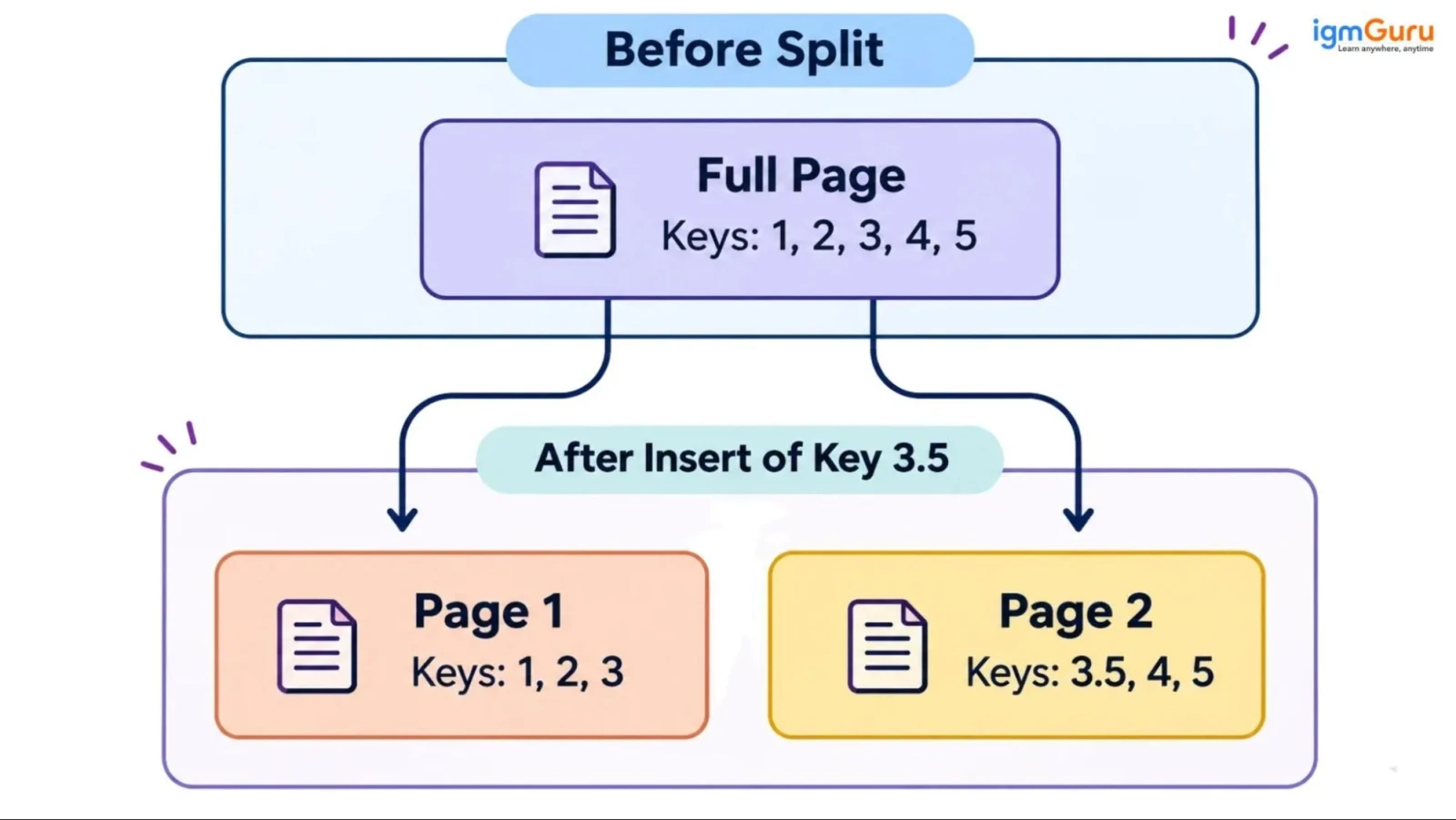
Index fragmentation occurs when index pages become disorganized or contain too much unused space. It can happen when SQL Server inserts or updates records and needs to split full pages. Over time, this can increase disk reads and affect query performance.
There are two main types of fragmentation:
Heavy fragmentation leads to more I/O, slower scans and wasted memory.
Use the sys.dm_db_index_physical_stats function.
| SELECT OBJECT_NAME(ips.object_id) AS TableName, i.name AS IndexName, ips.avg_fragmentation_in_percent, ips.page_count FROM sys.dm_db_index_physical_stats(DB_ID(), NULL, NULL, NULL, 'LIMITED') AS ips JOIN sys.indexes AS i ON ips.object_id = i.object_id AND ips.index_id = i.index_id WHERE ips.page_count > 1000 AND ips.avg_fragmentation_in_percent > 5 ORDER BY ips.avg_fragmentation_in_percent DESC; |
The page_count filter matters. Small indexes often show high fragmentation, but fixing them gives little benefit.
Fill factor determines how full SQL Server makes index pages during creation or rebuilding. For example, a fill factor of 90 leaves approximately 10% free space on each page. This space can help reduce page splits when new records are inserted. However, a lower fill factor also increases storage requirements.
SQL Server gives you two ways to fix fragmentation.
Reorganize defragments the leaf level in place. It runs online, uses little log space and you can stop it at any time without losing completed work. It does not update statistics.
Rebuild drops the old index and builds a new one. It fixes all fragmentation, compacts pages and updates statistics with a full scan. It uses more resources. In Enterprise edition, you can run it online. In other editions, it locks the table during the operation.
| Factor | Reorganize | Rebuild |
| Typical fragmentation | 5% to 30% | Above 30% |
| Online | Always | Edition dependent |
| Resource use | Low | High |
| Updates statistics | No | Yes |
| Can you stop it? | Yes, progress stays | Rolls back if stopped (non-resumable) |
The 5% and 30% thresholds are common guidelines, not strict laws. Treat them as a starting point and adjust them based on your workload.
| -- Reorganize ALTER INDEX IX_Orders_CustomerID ON dbo.Orders REORGANIZE; -- Rebuild ALTER INDEX IX_Orders_CustomerID ON dbo.Orders REBUILD WITH (FILLFACTOR = 90, ONLINE = ON); -- Rebuild all indexes on a table ALTER INDEX ALL ON dbo.Orders REBUILD; |
Schedule these tasks with SQL Server Agent during low-traffic hours. Many teams use free maintenance scripts, such as Ola Hallengren's solution, to automate the work.
On SSD storage, fragmentation matters less for scan speed than it does on spinning disks. It can still waste memory and space, so you should not ignore it.
Statistics matter as much as fragmentation. After a reorganize, update statistics yourself.
| -- One index UPDATE STATISTICS dbo.Orders IX_Orders_CustomerID WITH FULLSCAN; -- One table UPDATE STATISTICS dbo.Orders; -- Every table in the database that has changed rows EXEC sp_updatestats; |
SQL Server can also update statistics automatically when enough rows change. On very large tables, this automatic trigger may fire too late, so schedule extra updates for your busiest tables.
You can control how a rebuild behaves with a few options.
| ALTER INDEX IX_Orders_CustomerID ON dbo.Orders REBUILD WITH ( ONLINE = ON, RESUMABLE = ON, MAX_DURATION = 60 MINUTES, SORT_IN_TEMPDB = ON, MAXDOP = 4, FILLFACTOR = 90 ); |
Control a resumable rebuild with these commands:
| ALTER INDEX IX_Orders_CustomerID ON dbo.Orders PAUSE; ALTER INDEX IX_Orders_CustomerID ON dbo.Orders RESUME; ALTER INDEX IX_Orders_CustomerID ON dbo.Orders ABORT; |
Fragmentation checks are not enough. These three queries give you a fuller picture.
Index size:
| SELECT i.name AS IndexName, SUM(ps.used_page_count) * 8 / 1024.0 AS SizeMB FROM sys.dm_db_partition_stats AS ps JOIN sys.indexes AS i ON ps.object_id = i.object_id AND ps.index_id = i.index_id WHERE ps.object_id = OBJECT_ID('dbo.Orders') GROUP BY i.name ORDER BY SizeMB DESC; |
Indexes with heavy page allocation activity. This count includes page splits and new page allocations at the end of an index. A very high number on a non-sequential index often points to page splits.
| SELECT TOP 10 OBJECT_NAME(ios.object_id) AS TableName, i.name AS IndexName, ios.leaf_allocation_count, ios.nonleaf_allocation_count FROM sys.dm_db_index_operational_stats(DB_ID(), NULL, NULL, NULL) AS ios JOIN sys.indexes AS i ON ios.object_id = i.object_id AND ios.index_id = i.index_id WHERE OBJECTPROPERTY(ios.object_id, 'IsUserTable') = 1 ORDER BY ios.leaf_allocation_count DESC; |
Unused indexes. These indexes cost writes but get no reads. Check them only after the server has run for a full business cycle.
| SELECT OBJECT_NAME(i.object_id) AS TableName, i.name AS IndexName, ISNULL(u.user_updates, 0) AS Writes FROM sys.indexes AS i LEFT JOIN sys.dm_db_index_usage_stats AS u ON i.object_id = u.object_id AND i.index_id = u.index_id AND u.database_id = DB_ID() WHERE i.type_desc = 'NONCLUSTERED' AND i.is_primary_key = 0 AND i.is_unique_constraint = 0 AND OBJECTPROPERTY(i.object_id, 'IsUserTable') = 1 AND ISNULL(u.user_seeks, 0) + ISNULL(u.user_scans, 0) + ISNULL(u.user_lookups, 0) = 0 ORDER BY Writes DESC; |
| Task | How often | Tool |
| Check fragmentation | Weekly | sys.dm_db_index_physical_stats |
| Reorganize indexes at 5% to 30% | Weekly, off-peak | ALTER INDEX REORGANIZE |
| Rebuild indexes above 30% | Weekly or monthly, off-peak | ALTER INDEX REBUILD |
| Update statistics on busy tables | Daily or weekly | UPDATE STATISTICS |
| Review missing index suggestions | Monthly | Missing index DMVs |
| Remove unused and duplicate indexes | Quarterly | Usage DMVs and duplicate check |
Create a SQL Server Agent job so maintenance runs without manual work. You can automate index maintenance using SQL Server Agent and Ola Hallengren's free IndexOptimize procedure. It follows the same 5% and 30% thresholds and updates statistics too.
| EXECUTE dbo.IndexOptimize @Databases = 'USER_DATABASES', @FragmentationLow = NULL, @FragmentationMedium = 'INDEX_REORGANIZE,INDEX_REBUILD_ONLINE,INDEX_REBUILD_OFFLINE', @FragmentationHigh = 'INDEX_REBUILD_ONLINE,INDEX_REBUILD_OFFLINE', @FragmentationLevel1 = 5, @FragmentationLevel2 = 30, @UpdateStatistics = 'ALL', @OnlyModifiedStatistics = 'Y'; |
Use these habits to build a healthy indexing strategy.
There is no magic number of indexes for a table. Each workload is different, so test and measure.
SQL Server indexing plays an important role in improving database performance. Choosing the right indexes can help queries retrieve data faster, while proper maintenance keeps indexes efficient.
To get started, identify your slowest queries, review their execution plans and test suitable indexes. Monitor their performance regularly and remove indexes that no longer provide value. A good indexing strategy balances query performance, storage and maintenance costs.