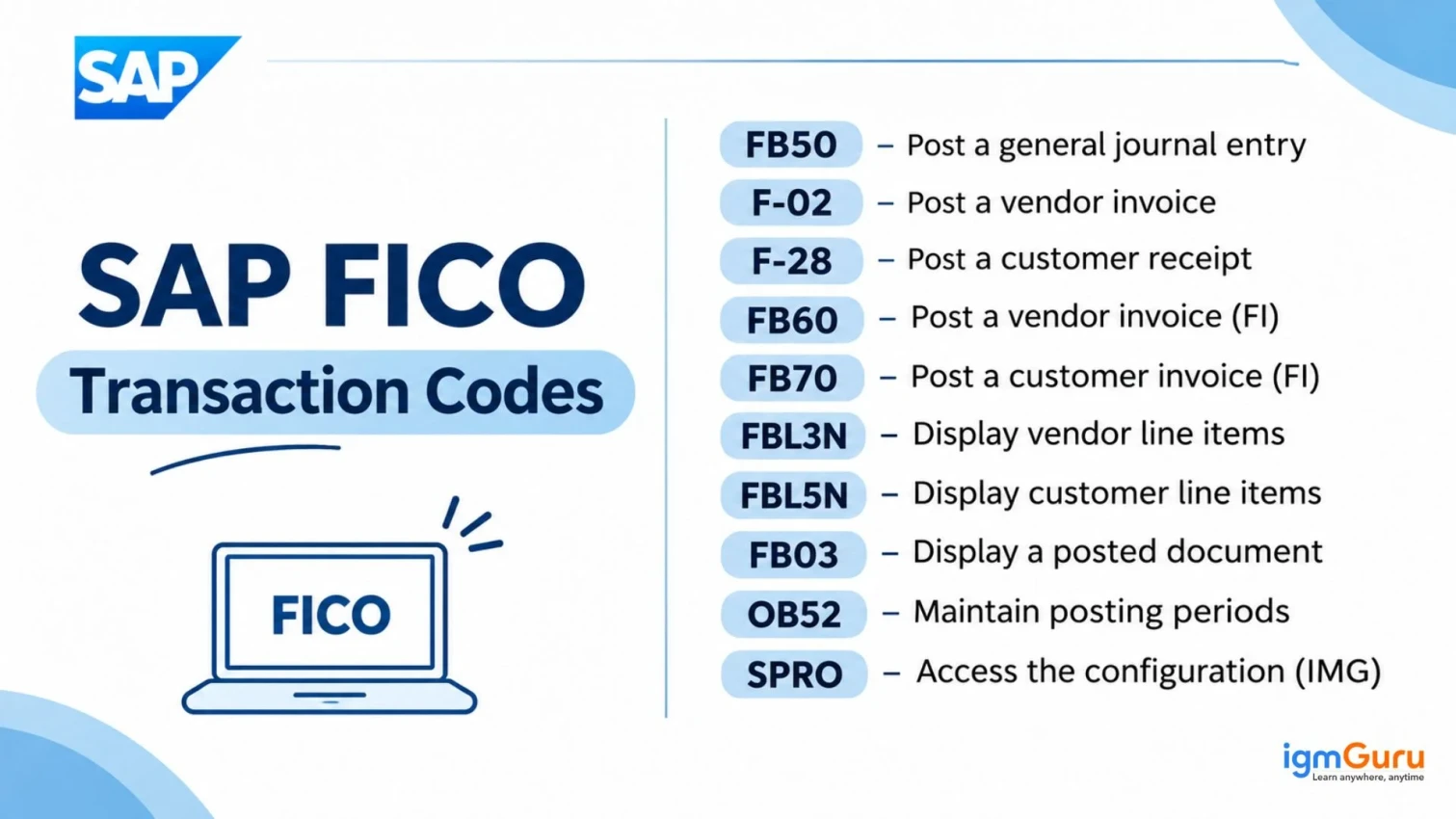
SAP FICO requires participation in various financial duties that include posting journal entries and payment processing, as well as invoicing and generating financial reports. Understanding the use of transaction codes (T-codes) can make it much easier to fulfill these financial tasks.
The SAP FICO T-codes provide direct access to functions within SAP. Whether you are a beginner, a user, or an experienced professional, learning these codes can make it easier to use the SAP system.
This guide includes all the essential T-codes in SAP FICO for General Ledger (GL), Accounts Payable (AP), Accounts Receivable (AR), Asset Accounting, Bank Accounting, and Controlling along with their description and SAP S/4HANA relevant details.
SAP FICO is a core functional module in the SAP ERP suite that organizations use to manage financial data, record transactions and streamline reporting.
Both modules share data. For example, an expense posted in FI can flow into a cost center in CO. This is why finance teams learn FI and CO T-codes together.
Read Also: What is SAP Joule?
T-codes are the base of daily work in SAP. This section covers what each of them means and how they are used.
SAP FICO T-codes are short codes of letters and numbers. Each code opens one function. For example, FB50 opens the screen to enter a general ledger document, and F110 opens the automatic payment program.
You can use T-codes in three ways:
| Entry | What It Does |
| /n + code | Opens the code in the same session (example: /nFB03) |
| /o + code | Opens the code in a new session (example: /oFBL3N) |
| /nex | Closes all sessions and logs you off |
| /n | Ends the current transaction |
Tip: If you do not know a T-code, open the menu path, then choose System, then Status. SAP shows the code of the current screen. You can also search the table TSTC in SE16 to find any code.
This section covers the codes that set up your financial structure. Consultants use them during implementation. Most end users never need them.
| T-Code | Description |
| OX15 | Define company |
| OX02 | Define, edit, or delete company code |
| OX16 | Assign company code to company |
| EC01 | Copy company code |
| OB13 | Define chart of accounts |
| OB62 | Assign chart of accounts to company code |
| OB29 | Define fiscal year variant |
| OB37 | Assign fiscal year variant to company code |
| OB22 | Define additional local currencies |
| OB08 | Define exchange rates |
| OBY6 | Maintain company code global parameters |
| OB52 | Open and close posting periods |
| OBA7 | Define document types |
| OB41 | Define posting keys |
| OBC4 | Define field status variants |
| FBN1 | Define number ranges for FI documents |
| OBA4 | Define tolerance groups for employees |
| OBB8 | Define payment terms |
| FTXP | Define tax codes |
| OBCL | Assign tax codes for non-taxable transactions |
Why they matter: A wrong setting in these codes can affect every posting. Test all changes in a development or quality system before applying them to the live environment.
Also Explore: SAP ABAP Tutorial for Beginners
The General Ledger holds the main accounts of the company. These SAP general ledger T-codes are used daily by accountants.
| T-Code | Description | When to Use It |
| FS00 | Maintain GL account centrally | Create, change, or display a GL account in one place |
| FSP0 | Maintain GL account in chart of accounts | Edit chart-level data only |
| FSS0 | Maintain GL account in company code | Edit company code data only |
| FS10N | Display GL account balances | Check balances by period |
| T-Code | Description | When to Use It |
| FB50 | Enter GL account document | Post a simple journal entry |
| FB01 | Post document | Post any document type with posting keys |
| F-02 | Enter GL account posting | Post a journal entry in the classic screen |
| FV50 | Park GL document | Save a document for approval before posting |
| FBV0 | Post parked document | Post a document after review |
| FBD1 | Enter recurring entry | Create a monthly entry, such as rent |
| F.14 | Recurring entry run | Run recurring documents in bulk |
| FB02 | Change document | Change permitted document fields, such as certain reference or assignment information, subject to SAP document-change rules. You cannot freely modify posted accounting amounts or all document fields |
| FB03 | Display document | View a document and its line items |
| FB08 | Reverse document | Cancel a wrong posting |
| F.80 | Mass reversal | Reverse many documents together |
| F-03 | Clear GL account | Clear matching open items in a G/L account configured for open-item management |
| FBRA | Reset cleared items | Undo a clearing |
| T-Code | Description |
| FBL3N | Display GL account line items |
| FAGLL03 | Display GL line items in New General Ledger |
| FAGLB03 | Display GL balances in New General Ledger |
| F.01 | Financial statement report |
| S_ALR_87012326 | Chart of accounts list |
| S_ALR_87012289 | Compact document journal |
| S_ALR_87012301 | Ledger balances |
| F.05 | Foreign currency valuation (classic) |
| FAGL_FCV | Foreign currency valuation (New GL) |
| F.16 | Balance carryforward (classic) |
| FAGLGVTR | Balance carryforward (New GL) |
Practical advice: Use FB50 for simple journal entries. Use FB01 only when you need full control over posting keys. FBL3N is the best code to check why a GL balance looks wrong.
Read Also: What is SAP Analytics Cloud (SAC)?
Accounts Payable manages money the company owes to vendors. These SAP accounts payable T-codes cover vendor setup, invoices, and payments.
| T-Code | Description | When to Use It |
| FK01 | Create vendor (classic) | Add a new vendor |
| FK02 | Change vendor | Update bank or address data |
| FK03 | Display vendor | View vendor master data |
| XK01 | Create vendor centrally | Create FI and purchasing data together |
| FB60 | Enter vendor invoice | Post an invoice without a purchase order |
| F-43 | Enter vendor invoice (posting keys) | Post an invoice with manual posting keys |
| FB65 | Enter vendor credit memo | Record a credit from the vendor |
| MIRO | Enter incoming invoice | Post an invoice linked to a purchase order |
| F-53 | Post outgoing payment | Pay a vendor manually |
| F-58 | Post payment with printout | Pay and print a check |
| F110 | Automatic payment program | Pay many vendors in one run |
| F-44 | Clear vendor account | Match invoices and payments |
| FBL1N | Display vendor line items | Check open and cleared invoices |
| FK10N | Display vendor balances | See total balances by period |
| MB5S | GR/IR balance list | Review goods received but not invoiced |
Practical advice: Run F110 in three steps. First set parameters, then run a proposal, and then run the payment. Always review the proposal before you pay.
Also Read: What is SAP MM?
Accounts Receivable manages money customers owe to the company. These SAP accounts receivable T-codes help you bill, collect, and report.
| T-Code | Description | When to Use It |
| FD01 | Create customer (classic) | Add a new customer |
| FD02 | Change customer | Update customer data |
| FD03 | Display customer | View customer master data |
| FB70 | Enter customer invoice | Post a customer invoice in FI |
| FB75 | Enter customer credit memo | Record a credit to the customer |
| F-28 | Post incoming payment | Record a customer payment |
| F-32 | Clear customer account | Match invoices and payments |
| F150 | Dunning run | Send payment reminders |
| FBL5N | Display customer line items | Check open invoices |
| FD10N | Display customer balances | See balances by period |
| F.21 | A/R open items | Run an open item list |
| F.22 | A/R open items sorted list | Run a sorted open item list |
| F.23 | A/R account balances | Run a balance list |
| F.24 | A/R interest for days overdue | Calculate interest on late payments |
Practical advice: FBL5N is the first report most collectors open. You can filter by due date to find late payments fast.
Asset Accounting tracks fixed assets from purchase to retirement. These SAP asset accounting T-codes cover the full asset life cycle.
| T-Code | Description | When to Use It |
| AS01 | Create asset master | Add a new asset |
| AS02 | Change asset master | Edit asset data |
| AS03 | Display asset master | View asset details |
| AS06 | Set deletion flag | Mark an asset for deletion |
| F-90 | Acquisition from vendor | Buy an asset and link it to a vendor invoice |
| ABAA | Unplanned depreciation | Post a one-time depreciation |
| ABAVN | Retirement by scrapping | Scrap an asset |
| ABUMN | Intracompany asset transfer | Transfer an asset or its values to another asset within the same company code. |
| AFAB | Execute depreciation run | Post monthly depreciation |
| AW01N | Asset explorer | Review values and transactions of an asset |
| AJRW | Fiscal year change | Open the next asset fiscal year |
| AJAB | Year-end closing | Close the asset year |
| AS91 | Create legacy asset | Load assets during migration |
Practical advice: Run AFAB at the end of each month. Check the log for errors before you close the period.
Also Read: What is SAP ABAP?
Bank Accounting connects SAP to your bank. These codes help you set up house banks, enter bank statements, and check cash. Finance teams use them to keep bank balances accurate.
| T-Code | Description |
| FI12 | Define house banks |
| FF67 | Manual bank statement entry |
| FF.5 | Import electronic bank statement |
| FF7A | Cash position report |
| FF7B | Liquidity forecast |
Controlling helps managers understand costs and profits. These SAP CO transaction codes cover master data, planning, posting, and reports.
| T-Code | Description |
| OKKP | Maintain controlling area |
| OX19 | Assign company code to controlling area |
| KS01 | Create cost center |
| KS02 | Change cost center |
| KS03 | Display cost center |
| KSH1 | Create cost center group |
| KA01 | Create primary cost element (classic) |
| KA06 | Create secondary cost element (classic) |
| KE51 | Create profit center |
| KO01 | Create internal order |
| KO02 | Change internal order |
| KO03 | Display internal order |
| OKB9 | Maintain default account assignment |
| T-Code | Description |
| KP06 | Plan cost elements and activity inputs |
| KP26 | Plan activity type and prices |
| KB21N | Enter activity allocation |
| KB11N | Reposting of costs |
| KSU5 | Execute actual assessment |
| KSV5 | Execute actual distribution |
| T-Code | Description |
| KSB1 | Cost center line items |
| KOB1 | Internal order line items |
| KO88 | Settle internal order |
| OKP1 | Open and close CO periods |
| KEA0 | Maintain operating concern (CO-PA) |
| KE21N | Post profitability analysis line item |
| KE30 | Run profitability report |
Practical advice: KSB1 is the best report to check actual costs of a cost center. Use KO88 each month to settle internal orders to their receivers.
Also Explore: What is SAP EWM (Extended Warehouse Management)?
Short on time? This section gives you the codes you will use most often. They cover most daily work for accountants.
| Task | T-Code |
| Post a journal entry | FB50 |
| Display a document | FB03 |
| Reverse a document | FB08 |
| Check GL line items | FBL3N |
| Check vendor line items | FBL1N |
| Check customer line items | FBL5N |
| Post a vendor invoice | FB60 |
| Post a customer invoice | FB70 |
| Run the payment program | F110 |
| Post incoming payment | F-28 |
| Run depreciation | AFAB |
| View cost center report | KSB1 |
Many companies now move from SAP ECC to SAP S/4HANA, and this move changes some FICO T-codes. You should check these points before you move.
Note: Code availability depends on your release. Always confirm in your own system.
Even experienced users make errors with T-codes. Most of these errors are easy to avoid. Here are the mistakes you should watch for.
There are hundreds of T-codes, so you do not need to memorize them all. These simple habits will help you learn the important ones quickly.
Read Also: What is SAP GRC (Governance, Risk, and Compliance)?
Knowing the right SAP FICO transaction codes helps you work faster and make fewer errors. Start with the quick reference list, then build your knowledge module by module. Use the configuration codes only with care, and always test first.
Save this guide for later. Share it with your finance team. If you plan to work as an SAP FICO consultant, practice these codes in a training system every week.
FB01 is a general posting transaction. It lets you choose document types and posting keys. FB50 is a simpler screen made for GL journal entries. Most users prefer FB50 for daily work.
F110 is the T-code for the automatic payment program. It pays vendors in bulk based on due dates and payment methods.
KS01 is used to create a cost center. You can change it with KS02 and display it with KS03.
AFAB is the T-code for the depreciation run. You should run it every month after all asset postings are complete.
Open the screen, then go to System, then Status. SAP shows the program and transaction code of the current screen.
Many codes stay the same, but some change. Vendor and customer codes move to the Business Partner transaction, and cost elements move to the GL account. Check your release for details.