Selenium is one of the most widely popular and well-known open-source software testing frameworks. It is used extensively to automate web apps, functional testing, performance testing and regression testing. It supports a lot of different programming languages like Java, Python, Ruby and C#. This is what makes it accessible to different kinds of developers. This Selenium Tutorial covers its key tests, types, and career opportunities.
TL;DR
This Selenium tutorial is designed to help learners understand and master web automation testing across different browsers and platforms. It helps software testers, QA engineers, automation engineers, developers, and beginners learn Selenium WebDriver, key terminologies, automation frameworks, test creation techniques, and career opportunities in automation testing. By learning Selenium, users can automate repetitive testing tasks, improve software quality, increase testing efficiency, reduce manual effort, and build valuable skills for careers in software testing and quality assurance.
This is an open-source framework used mainly for automating tests throughout platforms and browsers. Programming languages like Java, Python, Ruby, Perl, PHP help in creating Selenium Test Scripts. It's not a single tool but a collection of tools. This collection encompasses everything needed for testing by an organization.
The list of tools making it a popular and often picked choice for automation are WebDriver, Selenium Integrated Development Environment, Selenium Remote Control and Selenium Grid. Lets Start with 'what is Selenium WebDriver'.
Enroll in igmGuru's Selenium course program to become master in Selenium.
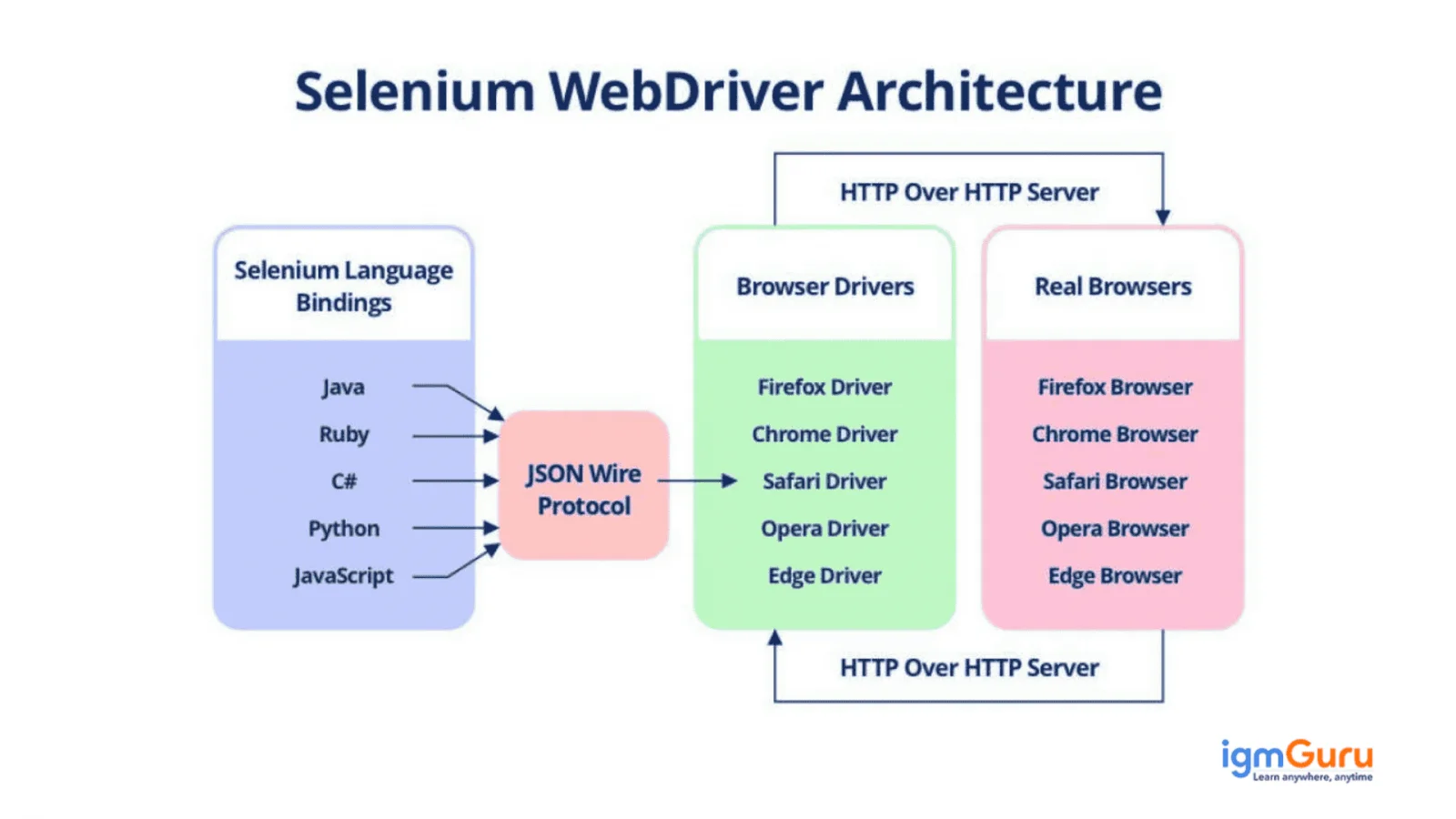
Selenium WebDriver refers to a web framework that executes cross-browser tests. This tool automates web-based app testing as well as its performance verification. Test scripts are created by using a programming language. It does have the capability to handle window components but this drawback is often overcome by utilizing tools like Auto IT, Sikuli, etc.
Ready to dive into web automation? Well, you need to first know how to install and download Selenium. It involves setting up the Java Development Kit (JDK), an IDE like Eclipse, and the Selenium WebDriver. This process can seem complex but with the right guidance, you will be automating in no time. Learn the essential steps with our complete guide on how to download and install Selenium.
Understanding of key Selenium terminologies is essential to effectively automate web browser interactions. These concepts empower the creation of robust and maintainable test scripts that enable efficient web application testing. Let’s explore some of these terminologies:
Locators identify and choose specific web elements within an HTML document. Think of them as the addresses of elements on a web page. This platform provides a variety of locator strategies to accommodate different element attributes and document structures. The most common locators include:
Choosing the right locator accurately targets elements, which enables precise automation of user interactions and minimizes test failures due to element changes.
WebDriver commands manage the browser's behavior and navigation that allow the test script to simulate user actions. These also help in managing cookies, handling alerts and switching between frames or windows. Some common WebDriver Commands include:
WebElement commands are generally given to the specific web elements once they have been located. These commands simulate user interactions with individual elements for detailed testing of web application functionality. They also enable the platform to interact with web elements in a way that closely mimics real user behavior. This way users can perform comprehensive testing of web application functionality. Common WebElement commands include:
Flash Application Testing simulates user interactions within Flash-based elements, such as clicking buttons, entering text and verifying content. This is definitely a good practice, but is no longer useful for this platform due to its security concerns except when maintaining legacy applications. Selenium could automate interactions with Flash applications through external libraries like FlashSelenium or by embedding JavaScript code.
Configuration annotations are used in test frameworks like JUnit and TestNG to control the setup, execution and teardown of test methods and classes. These annotations allow developers to define the lifecycle of test execution. This ensures that necessary actions are performed at the appropriate times.
Using configuration annotations is crucial for organizing test suites, managing test dependencies and ensuring that tests are executed according to requirements. Common annotations include:
It is important to learn about the different Selenium types. There are three types to learn and know about. This knowledge is important to every professional thinking about using this tool.
The data-driven framework stands on the various data sets that are created into an external file and then imported to the automation testing tool. Altering the script's values every single time for conducting the test is difficult. This is in case the data sets' quantity used by the test framework as input is towards the higher end.
These data sets are stationed separately from the original script. The original can grab the needed input every single time from the dataset excel sheet. The tester can modify the script conveniently without hindering the data sets (or vice versa). It also becomes quite robust because of this feature. Modifying each code is not needed to apply a single test in case of all the data sets that are available in the table.
The keyword driven framework in this tool is dependent on keywords that make up the functionality's basis. It takes in various parameters and inserts key relevant output. It might also need repetitive writing in case the code has to involve plenty of functionality for some of its sections. Keywords are written to abstract the code's complexity.
The methods or operations that have to be performed are written distinctly from the script as keywords. When these keywords are placed in an external file they are referred to as using the code. Testers can keep every single functionality separate. The keywords are present in the table and can be modified individually without affecting others.
The Hybrid Driven Framework pertains to a combination of both the above mentioned frameworks- data-driven and keyword-driven. It uses various data sets & keywords. Independent files are used for storing the functions and inputs listed here. Various data sets use the same code just like in the data-driven framework.
It can be a challenge to effectively create automated tests. But not when professionals follow these tips and abide by best practices and industry standards. This section mentions the top tips to follow:
It's important to create a clear and clean test plan outlining specific test objectives & goals even before writing test scripts. This aligns the test scripts with testing goals and objectives.
Utilize meaningful and descriptive names for test methods, test data and test cases. This identifies and understands each test's doings.
Write a reusable & modular code for making the test scripts more effective. Maintenance costs are reduced and new test cases are added to avoid any duplication of code in the future.
Assertions are an important & indispensable part of any test script with this tool. These ensure that the expected results have been produced by the test. Assertions should be included to verify the correct functioning of the application.
Debugging and logging identifies and then fixes problems or issues that may arise in the future. Logging traces the code execution and debugging identifies the error source.
This tool is counted amongst the most preferred picks for developers leading in the software industry. Its adoption rate is also at the very top in open-source automation testing tools. Selenium career opportunities and job roles differ from company to company. Different domains also use this tool differently and may require different job profile holders to learn it. Industry experience plays a huge role in undertaking a specific job role associated with this tool.
Many skills are needed to take up a job related to this. Some of the top job roles related to this tool are mentioned below. To get there, certain skills play a big role. These include security testing, performance testing, regression testing, testing QA automation, Java and Java APIs, Selenium, knowledge of automation frameworks, JIRA & functional testing. Of course, a lot of other skills can be mentioned in the job description as per the profile's nature.
Some popular job roles offered by an automation testing company are:
Coding knowledge is needed for this tool.
It is an automation tool and built to mimic human interactions. It replicates basic human actions to test and further help companies.
Yes, you can learn Selenium using tutorials. Just ensure the resource provides detailed information about the tool.
Selenium is used to automate web browser testing. It ensures web applications work properly across different browsers and systems.
Yes, Selenium is beginner-friendly if basic programming knowledge is available. Understanding core concepts makes learning easier.
Course Schedule
| Course Name | Batch Type | Details |
| Selenium Training | Every Weekday | View Details |
| Selenium Training | Every Weekend | View Details |