In today's fast-paced software development landscape, efficiency and portability are essential for many businesses across the world. Docker, the most popular open-source platform, has rapidly become the go-to solution among developers or IT teams. And the reason is that it simplifies the creation, deployment, and management of applications in a better manner. Docker, with containers, lets you to package code and dependencies together, maintaining uniform environments across development, testing, and production stages. This approach eliminates the infamous "it works on my machine" problem and streamlines collaboration across teams.
In this Docker tutorial, we will guide you through the fundamentals, including installation, components, running a container, and more. No matter your experience level, understanding Docker is a must-have skill for modern software engineering. Let's start.
Docker is an open-source containerization platform with a unique capability for application development. It provides containers that run consistently across various environments from development to production. These containers store applications and their dependencies and are separate from the underlying infrastructure and other containers. Therefore, developers use them to run their applications in different environments easily.
Isn't it an interesting platform? Well, there is more that you will discover throughout the article. First, we will go through its installation process.
Installing Docker on Windows involves understanding the system requirements and following multiple steps to follow.
You can also install it on Ubuntu. This involves a multistep process with some specific requirements.
Open the terminal and update the system package index by running.
sudo apt update && sudo apt upgrade -y |
Install the prerequisites by executing the following code.
|
sudo apt install apt-transport-https ca-certificates curl software-properties-common -y |
curl -fsSL https://download.docker.com/linux/ubuntu/gpg | sudo gpg --dearmor -o /usr/share/keyrings/docker-archive-keyring.gpg
|
Add Docker's stable repository to the package source list.
|
echo "deb [arch=amd64 signed-by=/usr/share/keyrings/docker-archive-keyring.gpg] https://download.docker.com/linux/ubuntu $(lsb_release -cs) stable" | sudo tee /etc/apt/sources.list.d/docker.list > /dev/null |
Update the package list and install Docker.
|
sudo apt update sudo apt install docker-ce docker-ce-cli containerd.io -y |
Check the Docker version to confirm installation.
docker --version |
Start and enable Docker to run on system boot.
|
sudo systemctl start docker sudo systemctl enable docker |
Add your user to the Docker group to run the commands without sudo.
sudo usermod -aG docker $USER |
Logout and login again to access the platform.
Explore all Cloud Computing Certification Courses by igmGuru for an all-rounder development.
Docker has a client-server architecture where clients interact with the Docker daemon for building, hosting and distributing containers. The client and daemon either will work on the same system or will be connected remotely. This connection is built with the help of the REST API over a network or a UNIX socket.
This architecture gives an efficient container deployment and management for developers and includes many components.
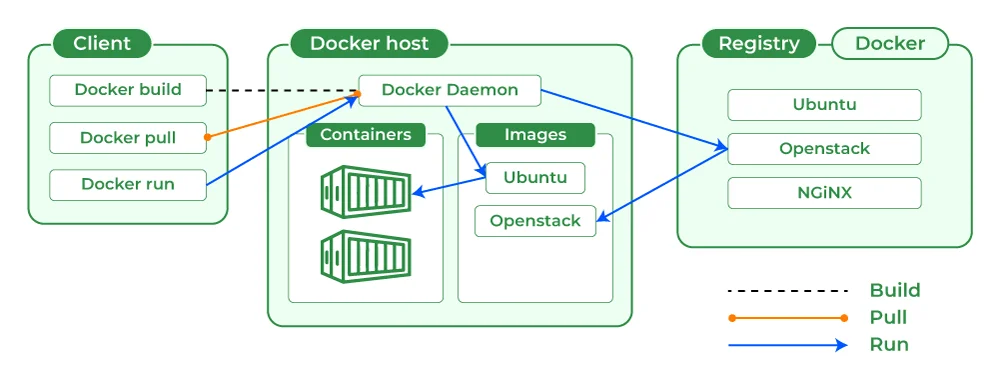
Compare Docker Architecture with Kubernetes Architecture for better analysis and understanding.
Docker has many components that work cumulatively to give an efficient application development environment. Exploring these components can give you an in-depth understanding of the workings and usages of this tool. Here you will also get to know how to use this tool in a better way. Let's start!
It is basically a command line instructed solution. It uses the terminal on Linux or Mac systems to give commands from the client to the daemon. These commands are given by using a REST API. Developers can use it to issue similar commands like Pull.
This will send an instruction to the daemon for performing the operation through communicating with other components like image, container or registry. The daemon is basically a server that communicates with the OS to perform services. The daemon is constantly listening from the REST API to know if it requires running any particular requests.
It is a template that holds instructions for the container. This template is built on YAML (Yet Another Markup Language). It is built within the YAML file and hosted as the Docker registry. The image consists of many key layers and each of them depends on the layer present below.
These layers are developed by running each command from the Dockerfile and are in read only state. Developers can start with the base layer which typically includes the base image and base operating system. Then they will get a dependencies layer above that. These comprise the commands in a read only file that will become the Dockerfile.
The Docker registry is used for hosting and distributing different types of images. It has a collection of images called a repository which is built using instructions written in YAML. Developers can share and store this repository. They can give the name tags to images so people can detect and share them within the registry.
This registry is managed by using the Docker hub registry. It is available publicly which means anyone can access them. One can also create a registry of their own. This personal registry can contain both public and private images. It is created via the Push and Pull command.
A container is an executable collection of applications and their dependencies bundled together. This gives all the commands for the solution one wants to run. It is generally lightweight and portable as it has a built-in structural redundancy. Another benefit of this component is that it can be run entirely in isolation.
Docker environments do not affect host operating system security or specific configuration settings. Furthermore their storage can be shared among multiple containers. It is something particularly beneficial when working with virtual machines that only give specific amounts of storage per environment.
Docker compose is an advanced component of this tool. It is designed to run many containers as a single service. It is done by running every container in isolation but at the same time interacting with each other.
The compose environments are also built using YAML. It is used for running an Apache server that only has a single database. It creates multiple additional containers that run additional services at a single time.
Docker swarm is another advanced component of this platform. It is basically a service for containers that assists developers and IT administrators in creating and managing a cluster of swarm nodes. Each of these nodes is a daemon that interacts using API.
A swarm holds two types of nodes which are the manager node and the worker node. The manager node handles cluster management operations. The worker node performs the tasks commanded by a manager node.
Related Article - Kubernetes vs Docker: What's the Difference?
Now that you understand the basic concepts of Docker, let us get our hands dirty and run your first container! This will help solidify your understanding and show you how easy it is to get applications up and running with this platform. For this example, we will use a very simple Hello World image with the following command:
docker run hello-world
This command will check if the hello-world image is available locally on your system. If it is not, the image will be automatically downloaded from Docker Hub. A new container from that image will also be created to run it.
The hello-world container is designed to simply print a message to the console and then exit. Now, if you see an output similar to given below means your installation is working correctly
Hello from Docker!
Also Explore: Docker Alternatives
Once the containers are running, you need to know how to manage them. Docker provides several commands to control the lifecycle of your containers. Here are some of the most common and essential ones:
Use this command to see a list of containers that are currently running. This command will show the information about each running container with a table, such as its ID, image, command, status and ports.
docker ps
Use the -a flag to see all containers including those that are stopped.
docker ps -a
This command will stop the container.

This command can start a container that is already stopped.

This command will first stop and then again start the container.

These commands give you the basic control you need to manage your containers and keep your applications running smoothly.
Over time, working on this platform can lead to the accumulation of unused images and stopped containers. This can take up disk space. Therefore, it is important to clean up these resources periodically.
Use the docker rm command to remove a container that is not running.

Use the following command to remove all stopped containers at once:
docker rm $(docker ps -a -q -f status=exited)
This command uses a combination of docker ps options:
-a: Show all containers (stopped and running).
-q: Only display the container IDs.
-f status=exited: Filter containers by their status.
Use the Docker rmi command to remove an image.

Before you can remove an image, you must make sure that no containers are using it. If there are containers based on the image, it will cause an error. You'll need to remove those containers first.
By regularly removing unused containers and images, you can keep your Docker environment clean and efficient.
This platform has many roles in modern application deployment strategies. This is why skilled experts on this platform are in high demand in the job market. The global monitoring market of this tool is projected to grow from $740 million in 2026 to $2.8 billion by 2032. Here are some of the good careers for Docker experts -
Docker is an advanced software development framework. This platform gives many advantages to companies across the development industry and beyond. These include such tasks as packaging and running applications in virtual servers on server platforms. This updates apps across servers without configuring hardware configuration.
Docker tutorial gives many details of this tool and we hope this information is enough to familiarize you with it. Then why wait? Start your preparation by joining an online course if you want to build a career on this platform.
It is mostly used for building, testing and deploying applications quickly across different servers. This framework has software standardized units called containers for everything software requires. It runs system tools, code, libraries and runtime.
Docker is an open platform designed to develop, deploy and run applications using virtual machines. Developers can write code quickly without worrying about infrastructure changes and administration overheads. They isolate applications from their infrastructures quickly while offering users control over both infrastructures as well as applications directly within Docker itself. Docker makes application development and deployment seamless across platforms!
Dockerfile contains two stages. One for binary use and another for replication of stages. Individuals only require one Dockerfile as they will not need additional build scripts to make Docker work for them.
There are many reasons behind the popularity of this development framework. It gives portability, consistency and scalability for hosting apps in various environments. It has lightweight containers that are isolated and easy to deploy.
Yes, Docker is widely used in DevOps to deploy apps quickly and manage environments easily.
You can also read our latest blogs:
Course Schedule
| Course Name | Batch Type | Details |
| Docker Training | Every Weekday | View Details |
| Docker Training | Every Weekend | View Details |