Hadoop is a leading data framework that provides utilities to help multiple computers solve queries around huge data volumes. It's reliant on the MapReduce pattern wherein a big data problem is distributed into many nodes. All these nodes' results are consolidated into a final result. It's written in Java programming language which has led to it ranking highest amongst Apache projects. It works on a single server with a multitude of machines along with storage. A magnanimous datasets collection is supported in a computing environment. In this guide, we will discuss Hadoop tutorial.
Let's get started.
This Hadoop tutorial acts as a complete guide towards understanding and exploring Hadoop and big data in detail. It begins with an introduction to Hadoop, moving on to an introduction to big data for complete understanding of this framework. A brief history is discussed, along with its features and architecture. Finally, Uber's usage of this framework for handling big data is discussed.
Big Data is plenty of information comprising different insights. It's about gathering useful insights from voluminous structured, semi-structured and even unstructured data. It's all finally used for effective decision making for business. All this information is accumulated from different sources gradually and managing them through traditional database tools is cumbersome.
Enroll in igmGuru's Hadoop Admin Course program to accelerate career growth.
The history of Apache Hadoop is traceable to a compilation of publications by Google. This especially includes the Google File System (GFS) in 2003 along with MapReduce in 2004. These papers outline and detail methods to store and process huge data sets throughout distributed systems. These concepts inspired Doug Cutting and Mike Cafarella to develop an open-source implementation titled Hadoop.
There are plenty of features of Hadoop that make it such a widely loved framework. Let's discuss a bit about them-
Handling unstructured information can be a problem for a lot of organizations. This framework manages structured, unstructured or other kinds of information.
It's an open-source platform that works well on proper industry-standard hardware. This makes it highly scalable where various nodes easily unite in the system to replicate data blocks.
Data is saved in HDFS and then automatically duplicated at three distinct locations. The file remains present on a system even if two systems collapse.
It's highly efficient at batch processing at a very high volume because it performs parallel processing. Batch processes are implemented 10x quicker as compared to a mainframe or single-thread server.
Its robust ecosystem aligns well with the analytical needs of developers as well as small/ large organizations.
Parallel computing and commodity servers leads to significant reduction in the cost incurred per terabyte of storage.
This framework uses a huge hardware cluster for storing and managing big data. The Hadoop architecture comprises four key components and they're discussed here.
HDFS is a distributed file system with a master/slave architecture. Commodity machines are used to run the NameNode and the DataNode. It gives access to the app information & works with different file systems like FTP, Windows Azure Storage Blobs (WASB), Amazon S3, etc. Here the information is stored in nodes wherein the NameNode works like the master and the DataNodes work as slaves.
MapReduce runs on the YARN framework and performs job scheduling & resource management. Job Scheduler divides large tasks into smaller ones so that everyone one of these small jobs is assignable to specific slaves in this cluster. This maximizes the processing. The priority of the jobs can be tracked and their dependency on one another is understood amongst other things.
It's a parallel processing system that's dependent on the YARN framework. This data structure performs parallel distributed processing in this cluster through key-value pairs for fast running. It's divided into two phases- the reduce task and the map task. The map task accumulates the input data to transform it for computability with key-value pairs. The output of the map task is then consumed by the reduced task to provide the desired result.
It's a set of utilities for supporting the other three above-mentioned components of the architecture. It's a set of Java scripts and libraries that are needed by YARN, HDFS & MapReduce for running the Hadoop cluster as a whole.
Related Article- Splunk Analytics For Hadoop
This data framework plays nicely with both Ubuntu and Microsoft Windows. However, most experts choose the Ubuntu environment. Therefore, we are discussing the installation process for Ubuntu. It involves the following steps -
As we have discussed earlier, it is based on the Java programming language, therefore, we need to download the Java Development Kit (JDK) first. Ubuntu provides both Java 8 and Java 11 versions. We will use Java 8 due to its great compatibility with Hive.
sudo apt update && sudo apt install openjdk-8-jdk
java -version
Output

SSH (security shell) is a crucial security protocol of this framework. It facilitates a secure connection between its nodes and clusters. This provides efficient and distributed data processing and manages data integrity and confidentiality. To install SSH use the following command:
sudo apt install ssh
Only a registered user can access and run Hadoop components and log in to its web interface.
sudo adduser hadoop
Output
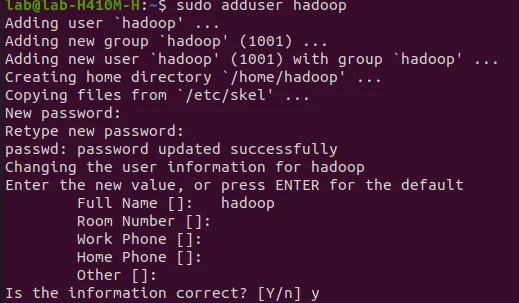
su - hadoop
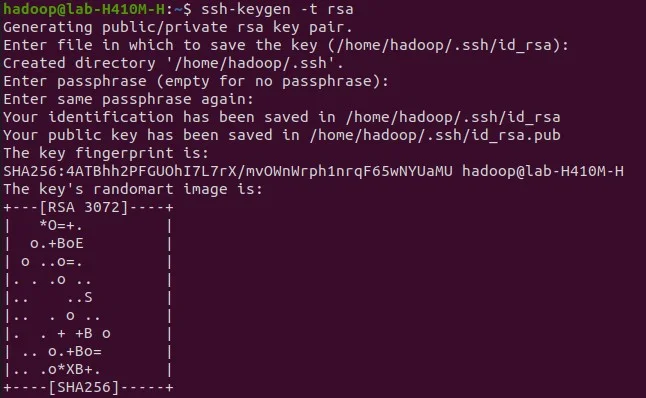
It is also possible to set password-less authentication access for users. This requires generating an SSH keypair. This way users don't have to enter the password each time.
ssh-keygen -t rsa
cat ~/.ssh/id_rsa.pub >> ~/.ssh/authorized_keys
chmod 640 ~/.ssh/authorized_keys
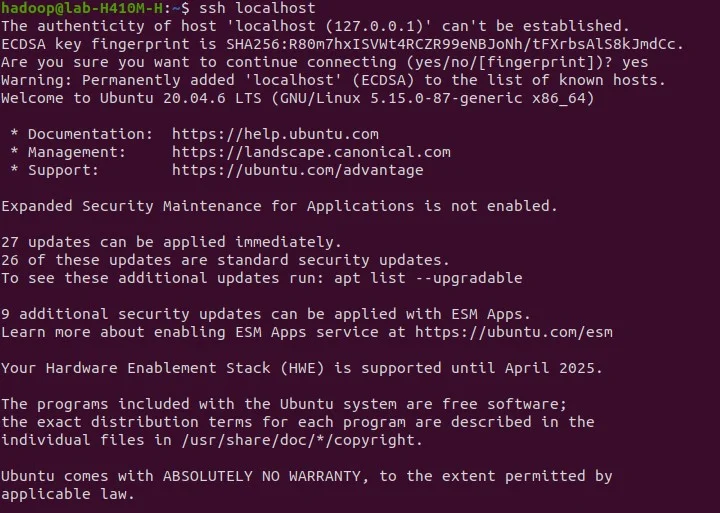
ssh localhost
Output
su - hadoop
wget
https://dlcdn.apache.org/hadoop/common/hadoop-3.3.6/hadoop-3.3.6.tar.gz
tar -xvzf hadoop-3.3.6.tar.gz
mv hadoop-3.3.6 hadoop
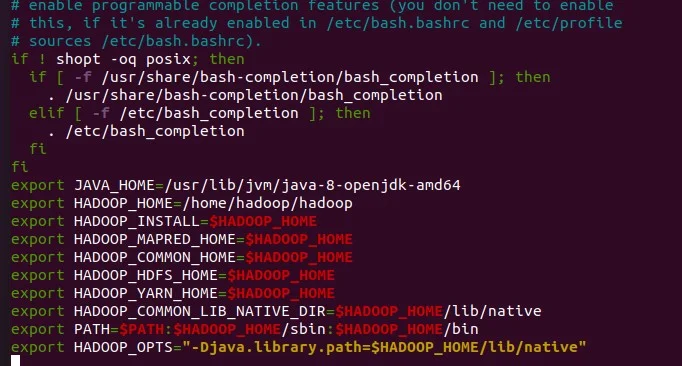
nano ~/.bashrc
Code:
export JAVA_HOME=/usr/lib/jvm/java-8-openjdk-amd64
export HADOOP_HOME=/home/hadoop/hadoop
export HADOOP_INSTALL=$HADOOP_HOME
export HADOOP_MAPRED_HOME=$HADOOP_HOME
export HADOOP_COMMON_HOME=$HADOOP_HOME
export HADOOP_HDFS_HOME=$HADOOP_HOME
export HADOOP_YARN_HOME=$HADOOP_HOME
 export HADOOP_COMMON_LIB_NATIVE_DIR=$HADOOP_HOME/lib/native
 export PATH=$PATH:$HADOOP_HOME/sbin:$HADOOP_HOME/bin
 export HADOOP_OPTS="-Djava.library.path=$HADOOP_HOME/lib/native"
Output:
source ~/.bashrc
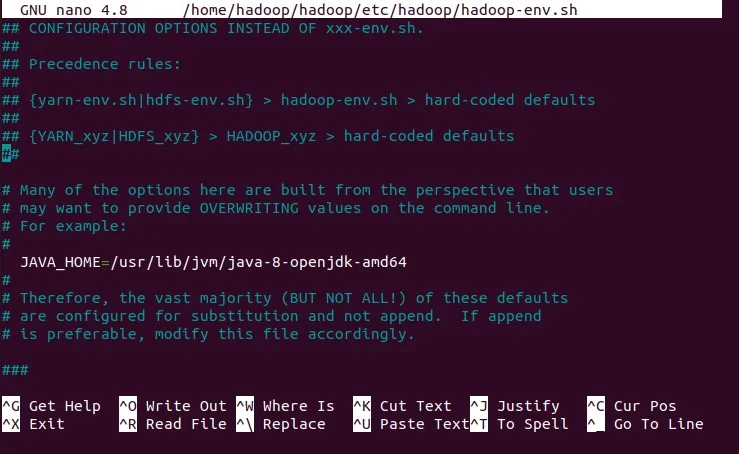
nano $HADOOP_HOME/etc/hadoop/hadoop-env.sh
JAVA_HOME=/usr/lib/jvm/java-8-openjdk-amd64
Output:
You've successfully installed this framework but it is not ready to use. This requires some configurations.
cd hadoop/
mkdir -p ~/hadoopdata/hdfs/{namenode,datanode}
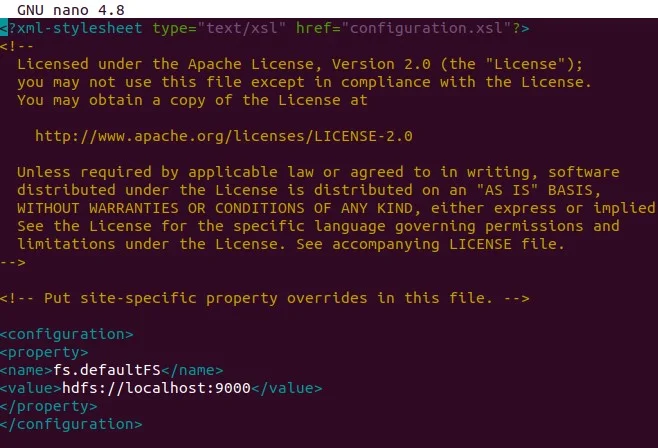
nano $HADOOP_HOME/etc/hadoop/core-site.xml
<configuration>
</property>
</configuration>
Output:
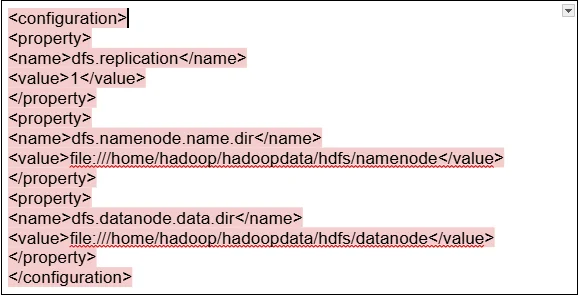
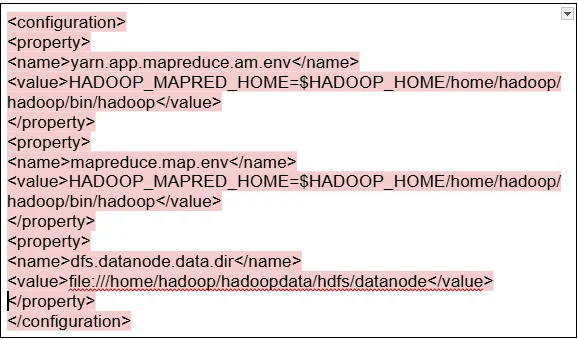
For mapred-site.xml file
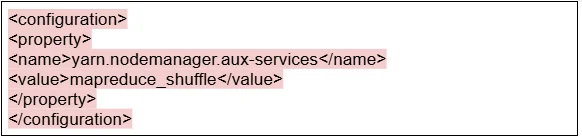
Read Also: What is ELT?
Understanding the key terminologies is essential for effectively working with this framework. These terms relate to core components and functionalities that define how data is stored, processed and managed within the environment.
The Hadoop Ecosystem refers to the collection of related projects and tools that work together with HDFS and MapReduce. It encompasses a wide range of technologies including:
Understanding this ecosystem is crucial for using the full power of this framework for processing and analysis of humongous information.
DataFrame schemas define the structure of information stored in a DataFrame, which is a distributed collection of data organized into named columns. In tools like Spark and Hive, DataFrame schemas specify the data types and names of columns. These enable efficient processing and analysis. Properly defining DataFrame schemas is crucial for managing consistency and enabling accurate transformations of information.
The HDFS Balancer is a tool used to redistribute data blocks across the nodes in an HDFS cluster. It ensures that information is evenly distributed, preventing hotspots and optimizing storage utilization. The balancer moves data blocks between nodes to achieve a balanced distribution, which improves overall cluster stability. Regular use of the HDFS Balancer is crucial for maintaining a healthy and efficient Hadoop cluster.
Cloudera Manager is a comprehensive management tool for Hadoop clusters. It provides a centralized interface for deploying, configuring, monitoring and managing different services of this framework. It also simplifies cluster administration for administrators to easily perform tasks such as adding and removing nodes, configuring services and monitoring cluster health. Using Cloudera Manager can significantly reduce the complexity of managing humongous clusters.
Apache Oozie is a workflow scheduler to define and manage complex workflows consisting of multiple jobs. These jobs include MapReduce, Pig and Hive. It enables the automation of processing pipelines to ensure that jobs are executed in the accurate order and at the suitable times. Using Oozie is essential for automating complex processing tasks and ensuring efficient data flow.
Read Also: How to Become a Big Data Engineer?
Big data was a big problem for Uber. It re-architected its big data platform atop Hadoop. Simply put, it designed an Apache Hadoop data lake wherein all the raw data from different online datastores was ingested into it at once. All this was done without making any transformation during this process. This one change in the design lessened the data load that was on its online datastores. There was a shift to a scalable ingestion platform from ad-hoc ingestion jobs.
Uber also introduced a series of innovations like Apache Spark, Apache Hive & Presto. This enabled interactive user queries as well as access to information. It became possible to serve larger queries leading to Uber's big data platform being more flexible. Data transformation and modeling became the need of the moment platform scalability. Data recovery became quick during any issues.
Uber also benefited by making sure that only modeled tables got transferred onto its warehouse. This paved the path for reduced operational cost behind running a gigantic data warehouse. It became famous as the second generation of its big data platform. Once all this happened, the ad-hoc data ingestion jobs were seamlessly exchanged with the standard platform. All the data was transferred in the original formats into the Hadoop lake.
Hadoop has had a profound impact on industry over the years. It has democratized big data analytics to make sure organizations are able to harness the power brought by gigantic datasets for better innovation & insights. Facebook, Netflix and LinkedIn are some top companies that have used this framework for developing new products, improving user experiences & optimizing operations.
While Hadoop's written in Java, it supports Scala and Python too. Proficiency in either of these programming languages is a must to make the most of its tools and libraries.
It's used for storing and processing humongous datasets in an efficient manner.
It does not always require programming knowledge. Some of them start from the fundamental programming concept of Python, Java or Scala.
It depends on its depth and your prior knowledge. Basic ones will only take a few hours, while more advanced ones may require weeks of study and practice.
A Hadoop Tutorial teaches you big data processing, a high-demand skill in industries like finance, healthcare, and e-commerce, boosting career opportunities.
Basic knowledge of Java, Linux commands, and SQL is helpful. However, many Hadoop Tutorials start from scratch for beginners.
Hadoop has a learning curve, but a well-structured Hadoop Tutorial simplifies concepts like HDFS, MapReduce, and YARN with practical examples.
Course Schedule
| Course Name | Batch Type | Details |
| Hadoop Developer Training | Every Weekday | View Details |
| Hadoop Developer Training | Every Weekend | View Details |