Linux is easy to start with, but Linux interview questions can become challenging when you are expected to explain what happens behind the commands you use. Interviewers may test your understanding of processes, permissions, file systems, networking, troubleshooting, and real-world server management rather than simply asking you to define a command.
That is why practicing the right Linux interview questions and answers can make a big difference. In this article, I will cover questions for freshers, intermediate, experienced, and advanced professionals, including practical and scenario-based questions to help you prepare for different levels of Linux interviews.
Let’s begin!
Following are some of the Linux interview questions and answers for freshers, which are asked to check how strong a candidate’s basic knowledge is:
Linux is an open source operating system, which means it is free and customizable. Windows is paid and owned by Microsoft. This operating system is more secure and used for servers, while Windows is more common for personal computers with a graphical interface.
The Linux kernel is the main component of the OS that manages hardware resources like CPU, memory and devices. It acts as a bridge between software and hardware, which will make sure that your system’s communication and efficient resource allocation across processes.
Some of the popular Linux distributions are:
The terminal is a command-line interface that allows users to interact with the system by typing commands. It provides more control and efficiency for tasks like file management, system monitoring and automation compared to graphical interfaces.
GUI (Graphical User Interface) uses visual elements like icons and windows, making it user-friendly. CLI uses text commands, offering more power, speed and automation capabilities.
Basic commands help navigate and manage files:
|
These commands are essential for interacting with the file system via terminal.
A Linux file system organizes data into directories and files using a hierarchical structure. Common types include ext4, xfs and btrfs. It defines how data is stored, retrieved and managed on storage devices.
The root directory (/) is the top-level directory in Linux. All files and directories originate from it, forming a tree structure. Important directories like /home, /etc and /var exist under root.
For example:
|
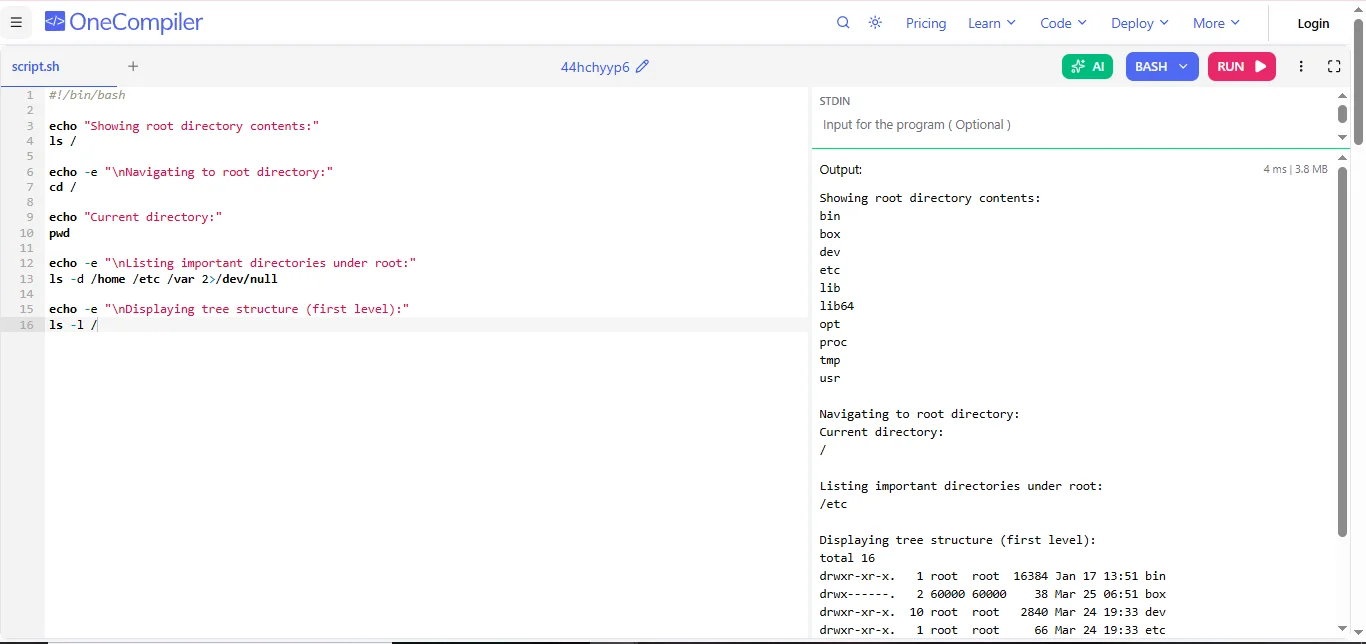
Code Explanation:
Absolute and relative paths describe how file locations are specified in a file system, either from the root or from the current directory. Following is their brief differentiation:
| Features | Absolute Path | Relative Path |
| Definition | Full path starting from the root directory. | Path based on the current working directory |
| Starting Point | Always begins from root (/ in Linux, C:\ in Windows). | Starts from the current directory |
| Dependency | Independent of current location | Depends on current directory |
| Usage | Used for precise file location | Used for shorter, flexible navigation |
| Example | /home/user/docs/file.txt | docs/file.txt or ../file.txt |
A package manager is a tool used to install, update, configure and remove software packages on a system efficiently. It handles dependencies automatically. Examples include APT (Debian/Ubuntu), YUM/DNF (RHEL/CentOS/Fedora), Pacman (Arch Linux) and Zypper (openSUSE).
Read Also: Basics of Linux for DevOps
The following Linux interview questions for intermediates are asked to candidates to check what they have learned in their previous job:
File permissions in Linux control who can access or modify a file. There are three main permissions: r (read) allows viewing the file, w (write) allows editing or deleting it and x (execute) allows running it as a program. These permissions are set for three groups: owner, group and others. They help keep files secure and organized.
For example:
|
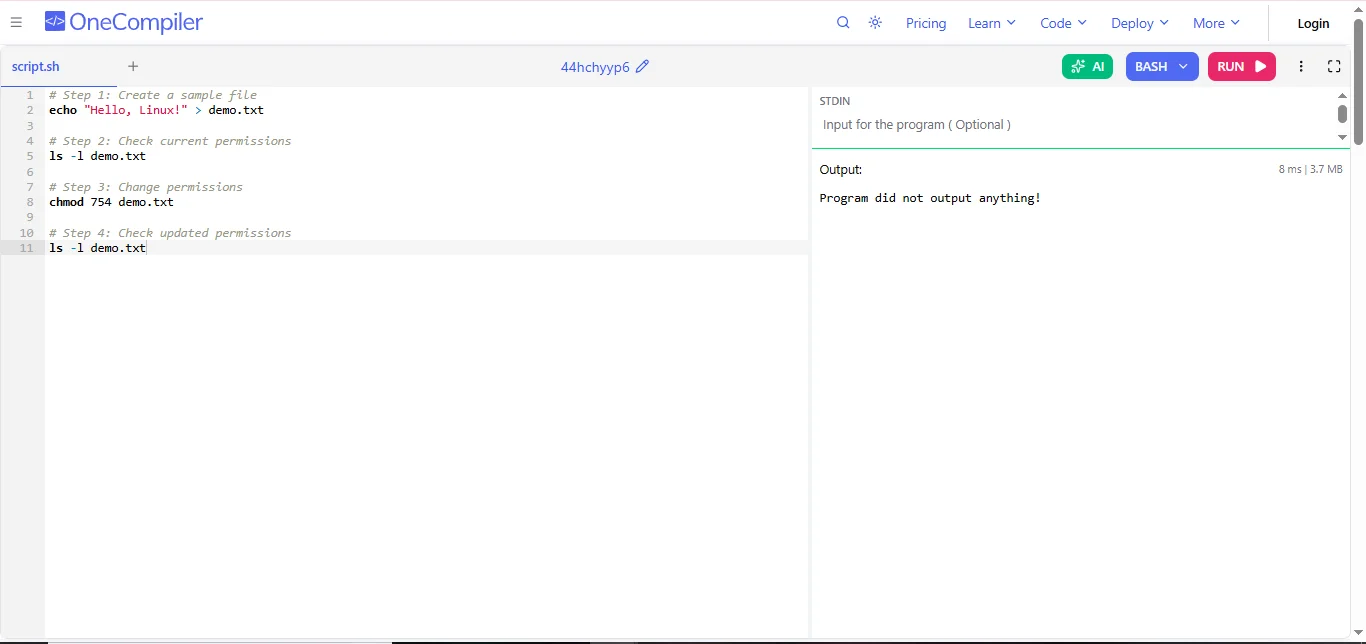
Code Explanation:
These commands manage file permissions and ownership. chmod is used to change file permissions like read, write and execute. chown changes the owner of a file or directory. chgrp changes the group ownership. These commands are important for controlling access and ensuring that only the right users can use or modify files.
For example:
|
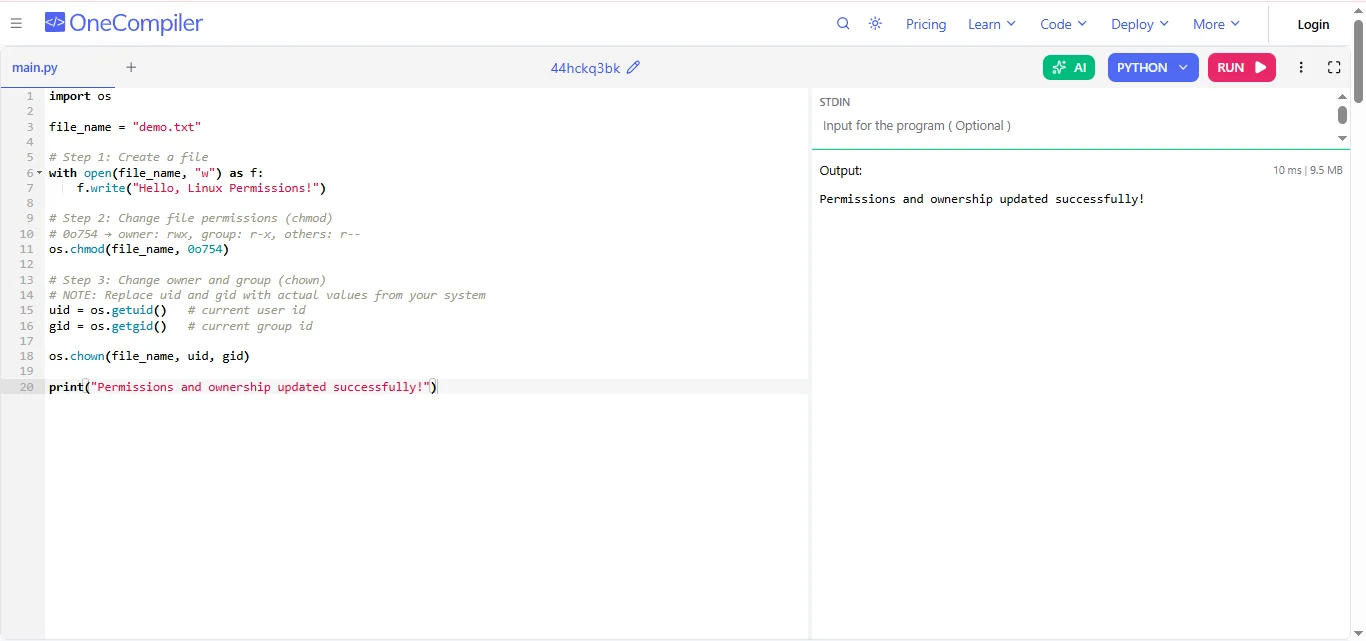
Code Explanation:
A process in Linux is a running program. When you open an application or run a command, it becomes a process. Each process has a unique ID called PID. Processes can run in the foreground or background. The system manages multiple processes at the same time, which allows multitasking and efficient use of system resources like CPU and memory.
You can check running processes using commands like ps, top or htop. The ps command shows a list of current processes. top provides a real-time view of system activity.
The kill command sends a signal to stop a process. By default, it sends a gentle signal (SIGTERM) that allows the process to close safely. kill -9 sends a stronger signal (SIGKILL) that immediately stops the process without cleanup. kill -9 is used when a process does not respond, but it should be used carefully.
A shell is a program that allows users to interact with the Linux system by typing commands. It acts as a bridge between the user and the operating system. Common types of shells include Bash (Bourne Again Shell), Sh (Bourne Shell), Zsh (Z Shell) and Csh (C Shell).
Environment variables are system variables that store important information used by the operating system and programs. They define things like system paths, user settings and configurations. For example, the PATH variable tells the system where to find executable files. They help programs run correctly and allow users to customize their working environment.
Piping and redirection control how data flows in Linux. Piping (|) sends the output of one command as input to another command. Redirection (>) sends output to a file and overwrites it, while (>>) appends output to a file without deleting existing content. These features help combine commands and manage output easily.
A soft link is like a shortcut that points to another file. If the original file is deleted, the soft link breaks. A hard link is a direct reference to the actual file data. Even if the original file is deleted, the hard link still works. Hard links cannot link directories, but soft links can.
To check disk usage, use commands like df (shows disk space) and du (shows folder size). To check memory usage, use free or top. The free command shows available and used memory, while top gives a real time view of memory and CPU usage. These tools help monitor system performance and manage resources.
Read Also: Bash Cheat Sheet
The following questions are asked to those candidate who have atleast 4+ years of work experince in the relevant industry:
The Linux kernel uses the Completely Fair Scheduler to manage process scheduling. It allocates CPU time fairly among processes using a virtual runtime. Processes with less CPU usage get higher priority. Real time scheduling uses FIFO and Round Robin. The scheduler ensures efficient CPU utilization, low latency and balanced system performance across multiple processes.
Linux uses virtual memory to give each process its own address space. It uses RAM and swap space to manage memory efficiently. Paging is used to move inactive data from RAM to disk. The kernel also uses caching and buffering to improve performance. Tools like free and vmstat help monitor memory usage and detect bottlenecks.
I would start by using tools like top, htop or ps to identify processes consuming high CPU. Then I would analyze logs to find root causes. I would renice or kill the process. I would also check for infinite loops or misconfigured services. Monitoring tools help ensure the issue does not happen again.
ext4, XFS and Btrfs are Linux file systems with different strengths. ext4 is highly stable and widely used for general purposes. XFS is optimized for high performance, especially with large files and parallel workloads. Btrfs is a modern file system offering advanced features like snapshots, compression and self-healing, but it is slightly less stable.
I would check IP configuration using ip addr, then test connectivity with ping. I would verify DNS using dig or nslookup. I would also check firewall rules and open ports using ss or netstat. Logs help identify deeper issues. Step by step troubleshooting isolates the exact cause.
I would disable unnecessary services and keep the system updated. I would configure firewall rules and secure SSH with key based authentication, disabling root login. File permissions would be properly set. I would also use SELinux or AppArmor for additional security and monitor logs regularly for suspicious activity.
I would use set -x to debug and trace execution. I would remove redundant commands and optimize loops. Proper error handling and logging would be added. Breaking the script into functions improves readability and maintainability. Testing in different scenarios ensures reliability and performance.
Package managers like APT or YUM automatically resolve dependencies by installing required libraries and packages. They maintain a database of installed packages and versions. When installing software, they fetch missing dependencies and ensure compatibility, making installation smooth and avoiding conflicts.
I use tools like top, htop, iostat, vmstat and sar to monitor system performance. Based on analysis, I tune system parameters using sysctl. I optimize services, remove unnecessary processes and adjust resource limits. Continuous monitoring ensures the system remains stable and performs efficiently.
Linux provides the foundation for containers using kernel features like namespaces and cgroups for isolation. Docker packages applications into containers, while Kubernetes manages them across clusters. Linux ensures performance, stability and scalability, making it ideal for DevOps and cloud-native environments.
Read Also: Top Docker Interview Questions
Here are some scenario-based questions are asked in Linux interviews to evaluate how well you can apply your knowledge to solve real world system and troubleshooting problems.
In this situation, I would rely on AI based monitoring and observability tools instead of manually going through logs. These tools can automatically analyze system metrics like CPU, memory, disk usage and logs to detect unusual patterns such as spikes or memory leaks. I would integrate log collection tools and feed that data into an AI-driven system, which can highlight the root cause. Once the issue is identified, I would take corrective actions like restarting affected services, optimizing resource usage or scaling the system.
To handle sudden traffic spikes, I would use cloud auto-scaling. First, I ensure proper monitoring is in place so I can track CPU usage or incoming requests. Then I configure auto scaling rules so that when the load crosses a certain threshold, new instances are automatically launched. I would also use a load balancer to distribute traffic evenly across all instances. This ensures that no single server gets overloaded, maintaining performance and availability during high traffic.
This is usually due to environmental differences. To solve this, I would use Docker to containerize the application. I would create a Docker image that includes the application code along with all its dependencies, libraries and configurations. This ensures consistency across environments. Once the container is built, it can run the same way on any system that supports Docker. This eliminates compatibility issues and makes deployment much more reliable and efficient.
In this case, I would use Kubernetes for container orchestration. I would define deployments with a desired number of replicas so multiple instances of the application are always running. Kubernetes continuously monitors container health and if any container crashes, it automatically restarts or replaces it. I would also configure health checks and auto-scaling policies. This ensures high availability and fault tolerance without manual intervention.
I would implement a CI/CD pipeline using tools like Jenkins or GitHub Actions. The idea is to automate the entire process from code commit to deployment. Whenever new code is pushed, the pipeline would automatically build the application, run tests and deploy it to the server. I can also use configuration management tools like Ansible for server setup. This reduces human error, speeds up the process and ensures consistent deployments.
I would first identify which partition is full using the df -h command. Then I would locate the directories consuming the most storage with du -sh. After identifying the cause, I would remove unnecessary files, rotate or compress old log files, clear temporary files, and verify whether any deleted files are still being held by running processes using lsof. Finally, I would configure log rotation and monitoring alerts to prevent the problem from occurring again.
I would begin by checking the service status using systemctl status and reviewing detailed logs with journalctl. Next, I would verify configuration files, file permissions, required dependencies, and available system resources. If the root cause is identified, I would fix the configuration, restart the service, and confirm that it starts automatically during future reboots. Finally, I would document the incident and update monitoring to detect similar failures earlier.
I would first identify the affected files and compare their permissions with backups or similar systems. I would restore the correct ownership using chown and appropriate permissions using chmod. Before making changes, I would verify the impact on dependent applications and users. After restoring access, I would implement stricter permission management, regular backups, and auditing to reduce the risk of similar mistakes.
I would first verify network connectivity using ping and then test DNS resolution using dig, nslookup, or host. Next, I would inspect the DNS configuration in /etc/resolv.conf, verify firewall rules, and check whether the configured DNS servers are reachable. If required, I would analyze DNS logs, switch to backup DNS servers, and monitor the system to ensure stable name resolution.
I would use configuration management tools such as Ansible to automate tasks like package updates, security patches, user management, service configuration, and scheduled maintenance. All automation scripts would be stored in version control and tested in a staging environment before production deployment. I would also integrate monitoring and reporting so administrators receive notifications about failed tasks, ensuring consistent and reliable server management at scale.
Senior Linux Administrator, DevOps Engineer, Site Reliability Engineer (SRE), and Cloud Engineer interviews often focus on advanced Linux concepts used in production environments. The following questions cover modern Linux technologies, performance optimization, security, and cloud-native infrastructure.
eBPF (Extended Berkeley Packet Filter) is a Linux kernel technology that allows developers to run sandboxed programs inside the kernel without modifying kernel source code. It is widely used for networking, security monitoring, performance analysis, and observability. Modern tools like Cilium, Falco, and Pixie use eBPF to monitor system calls, network traffic, and application behavior with minimal performance overhead.
Control Groups (cgroups) manage CPU, memory, disk I/O, and other system resources allocated to processes. cgroups v2 provides a unified hierarchy with improved resource management, better security, and simplified administration compared to cgroups v1. Container platforms such as Docker and Kubernetes rely on cgroups v2 to isolate workloads and ensure fair resource allocation across multiple containers.
systemd is the default initialization and service management system for most modern Linux distributions. It starts services in parallel, reducing boot time and improving system performance. It also provides advanced features such as dependency management, automatic service recovery, logging through journald, socket activation, and resource control. These capabilities make Linux systems more reliable and easier to manage in enterprise environments.
Securing a Linux server involves following multiple best practices. These include regularly applying security updates, disabling unused services, enforcing SSH key-based authentication, disabling root login, configuring firewalls, implementing SELinux or AppArmor policies, monitoring logs, enabling multi-factor authentication where applicable, and following the principle of least privilege. Continuous security auditing and vulnerability scanning further strengthen server security.
Immutable infrastructure is a deployment approach where servers are never modified after deployment. Instead of updating existing servers, new server images are built with the required changes and deployed to replace the old ones. Linux plays a central role in this model by serving as the base operating system for virtual machines and containers. Combined with Docker, Kubernetes, Infrastructure as Code (IaC), and CI/CD pipelines, immutable infrastructure improves consistency, scalability, security, and rollback capabilities.
eBPF (Extended Berkeley Packet Filter) allows developers and administrators to observe kernel-level events without modifying the Linux kernel. To troubleshoot performance issues, I would use eBPF-based tools such as bpftrace, bcc, or Pixie to analyze CPU usage, system calls, network latency, and disk I/O in real time. Since eBPF introduces very low overhead, it is widely used in modern cloud-native environments for production debugging and observability.
Confidential computing protects data while it is being processed by executing workloads inside hardware-based Trusted Execution Environments (TEEs). Linux supports technologies such as AMD SEV, Intel TDX, and Intel SGX, allowing sensitive applications to remain encrypted even during execution. This approach is increasingly adopted for financial services, healthcare, and AI workloads running in public cloud environments.
I would start by minimizing the operating system installation, disabling unnecessary services, and applying security patches regularly. SSH access would be restricted using key-based authentication and MFA where possible. SELinux or AppArmor would be enforced, audit logging enabled, and container runtimes secured. I would also monitor the node using tools like Falco or eBPF-based security solutions to detect suspicious activities in real time.
I would analyze GPU utilization, memory bandwidth, disk I/O, NUMA configuration, and network latency instead of focusing only on CPU metrics. Tools such as iostat, vmstat, perf, nvidia-smi, and eBPF tracing can help identify bottlenecks. I would also verify container resource limits, storage performance, and model loading times before optimizing workload placement or hardware allocation.
Linux namespaces isolate system resources such as processes, network interfaces, file systems, users, and hostnames, allowing multiple containers to run independently on the same host. Combined with cgroups, namespaces provide the foundation for Docker, Kubernetes, and other container technologies by ensuring workload isolation, improved security, and efficient resource utilization in cloud-native environments.
This article has covered a comprehensive list of Linux interview questions with detailed answers. Exploring them will make you ready to tackle your next interview with full confidence. Keep practicing and exploring new trending technologies to stay updated with the real time knowledge to get your desired job.
Common commands include ls (list files), cd (change directory), pwd (show path), cp (copy), mv (move), rm (delete) and cat (view file). These are essential for navigating and managing files.
A process is an independent program with its own memory space, while a thread is a smaller unit within a process that shares memory with other threads. Threads are faster but less isolated.
chmod is used to change file permissions in Linux. It controls who can read, write or execute a file using symbolic or numeric modes.