Are you preparing for a .NET interview? You might already be wondering where to begin and what to focus on. Should you revise C# fundamentals first, or dive into ASP.NET and real-world scenarios? With so many topics involved, it is easy to feel unsure about how to structure your preparation. I have seen many candidates face this exact situation.
Let me clear one thing for you: the .NET interviews are not just about writing code or remembering syntax, it tests your understanding of concepts like the .NET framework architecture, CLR, memory management, object-oriented programming, and web development using ASP.NET. They also pay close attention to how you approach problems and explain your solutions clearly.
That is exactly what this guide to .NET interview preparation explains. In this article, we will walk through the most commonly asked .NET interview questions, covering everything from basic to advanced topics. Whether you are a fresher starting your journey or an experienced developer preparing for your next role, this guide will help you build a strong foundation, gain confidence and perform better in your .NET interviews.
Let’s begin with the most asked .NET interview questions and answers for beginners. These are mostly definition-based, as companies expect them to have fundamental knowledge, not real-world experience.
The .NET Framework is a software development platform developed by Microsoft that provides a controlled environment for building, running, and managing applications. It includes a large class library and a runtime environment called the Common Language Runtime (CLR), which handles memory management, security, and exception handling.
It is mainly used to build and deploy Windows applications, web applications using ASP.NET, enterprise-level software and web services. The .NET Framework supports multiple programming languages like C#, VB.NET and F#. It allows developers to write applications in their preferred language while using the same underlying infrastructure.
It is important to note that the .NET Framework is now in maintenance mode and mainly used for legacy Windows applications. Modern development is done using the latest unified .NET platform.
This framework offers various features that make it reliable for building secure, scalable and high-performance applications. These features simplify development and ensure consistency across applications. Here are some of the most important ones:
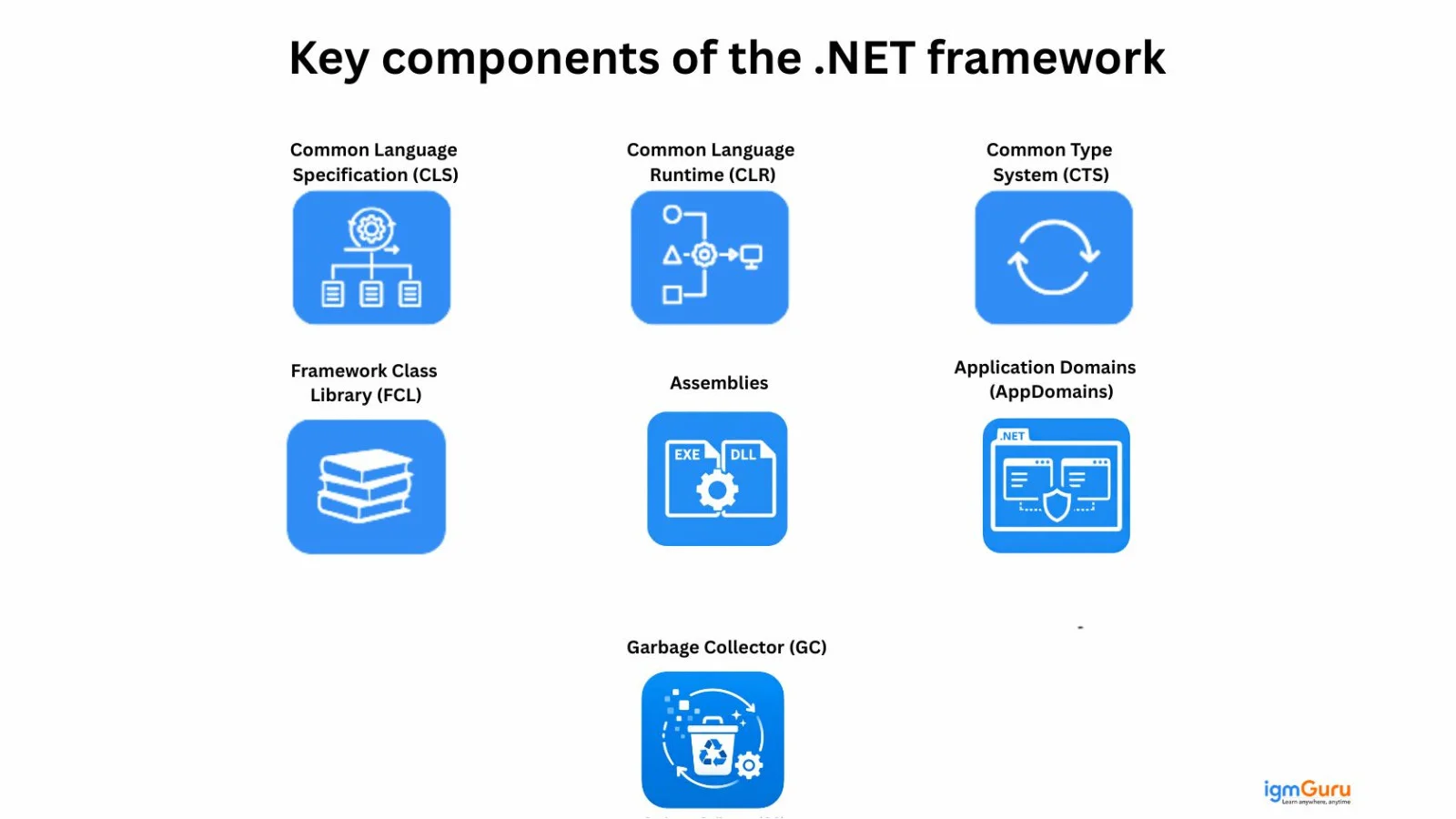
It is built on several core components that work together to provide its features and functionality. These components ensure a smooth development environment.
| Component | Description |
| Common Language Runtime (CLR) | The execution engine of the .NET Framework. It manages memory, performs garbage collection, handles exceptions, ensures type safety, and converts Intermediate Language (IL) code into machine code using JIT compilation. |
| Framework Class Library (FCL) | A large collection of reusable classes, interfaces, and APIs used for file handling, database connectivity, networking, security, web development, and more. It reduces development effort and promotes code reusability. |
| Common Type System (CTS) | Defines how data types are declared, used, and managed in .NET. It ensures consistency and interoperability between different .NET programming languages. |
| Common Language Specification (CLS) | A set of rules that all .NET languages must follow to ensure cross-language compatibility and seamless integration. |
| Assemblies | Compiled code libraries (EXE or DLL files) that contain IL code, metadata, and resources. Assemblies are the fundamental building blocks of .NET applications. |
| Application Domains (AppDomains) | Provide isolation between applications running in the same process, improving security, reliability, and fault tolerance. |
| Garbage Collector (GC) | A component of the CLR that automatically manages memory allocation and deallocation, preventing memory leaks and improving application performance. |
The Common Language Runtime is the core execution engine of the .NET Framework. It is responsible for running the applications and managing the execution of code written in languages like C#, VB.NET and F#. When we compile a .NET application, the code is first converted into Intermediate Language (IL) and then the CLR converts that IL into machine code using Just-In-Time (JIT) compilation.
The difference between these three mainly lies in platform support, performance, architecture and future roadmap. Here is a quick overview for you:
| Feature | .NET Framework | .NET Core | .NET 5+ (Unified .NET) |
| Release Year | 2002 | 2016 | 2020 (.NET 5 onwards) |
| Platform Support | Windows only | Cross-platform (Windows, Linux, macOS) | Fully cross-platform |
| Open Source | Partially open source | Fully open source | Fully open source |
| Performance | Moderate | High performance | Higher performance with continuous optimization |
| Microservices Support | Limited | Strong support | Strong, production-ready microservices support |
| Cloud Optimization | Limited | Designed for cloud | Cloud-native and container-friendly |
| Side-by-Side Versioning | Limited | Supported | Fully supported |
| Deployment Model | System-wide installation | Self-contained & framework-dependent | Flexible deployment models |
| Best For | Legacy enterprise Windows apps | Cross-platform web apps & APIs | Modern apps, cloud, microservices, MAUI |
| Future Support | Maintenance mode | Merged into .NET 5+ | Actively developed and future roadmap |
CIL is also known as MSIL (Microsoft Intermediate Language). It is a platform-independent code generated when a .NET application is compiled. Instead of directly converting C# or VB.NET code into machine code, the compiler first converts it into CIL. This CIL code is then executed by the Common Language Runtime, which converts it into native machine code using Just-In-Time compilation.
The managed code and unmanaged code differentiate mainly on whether the code runs under the control of the Common Language Runtime. Managed code is executed under the supervision of the CLR, which handles memory management, security, garbage collection and exception handling.
Unmanaged code runs directly on the operating system without CLR support. This means the developer is responsible for managing memory and system resources manually.
| Basis | Managed Code | Unmanaged Code |
| Execution | Runs under the control of the CLR | Runs directly on the operating system |
| Memory Management | Automatic memory management via Garbage Collector | Manual memory management by developer |
| Compilation | Compiled into Intermediate Language (IL) and executed by CLR | Compiled directly into machine code |
| Security | CLR provides built-in security and type safety | No runtime security enforcement |
| Performance | Slight overhead due to runtime management | Generally faster as it runs directly on OS |
| Examples | C#, VB.NET, F# applications | C, C++, Win32 APIs |
| Interoperability | Can interact with unmanaged code via P/Invoke | Cannot directly use CLR features |
Garbage Collection is an automatic memory management feature provided by the CLR. Its primary role is to allocate and release memory automatically, which helps prevent memory leaks and improve application stability. As a developer, I don’t need to manually free memory like in C or C++. The CLR handles it for managed code. It works in the following steps:
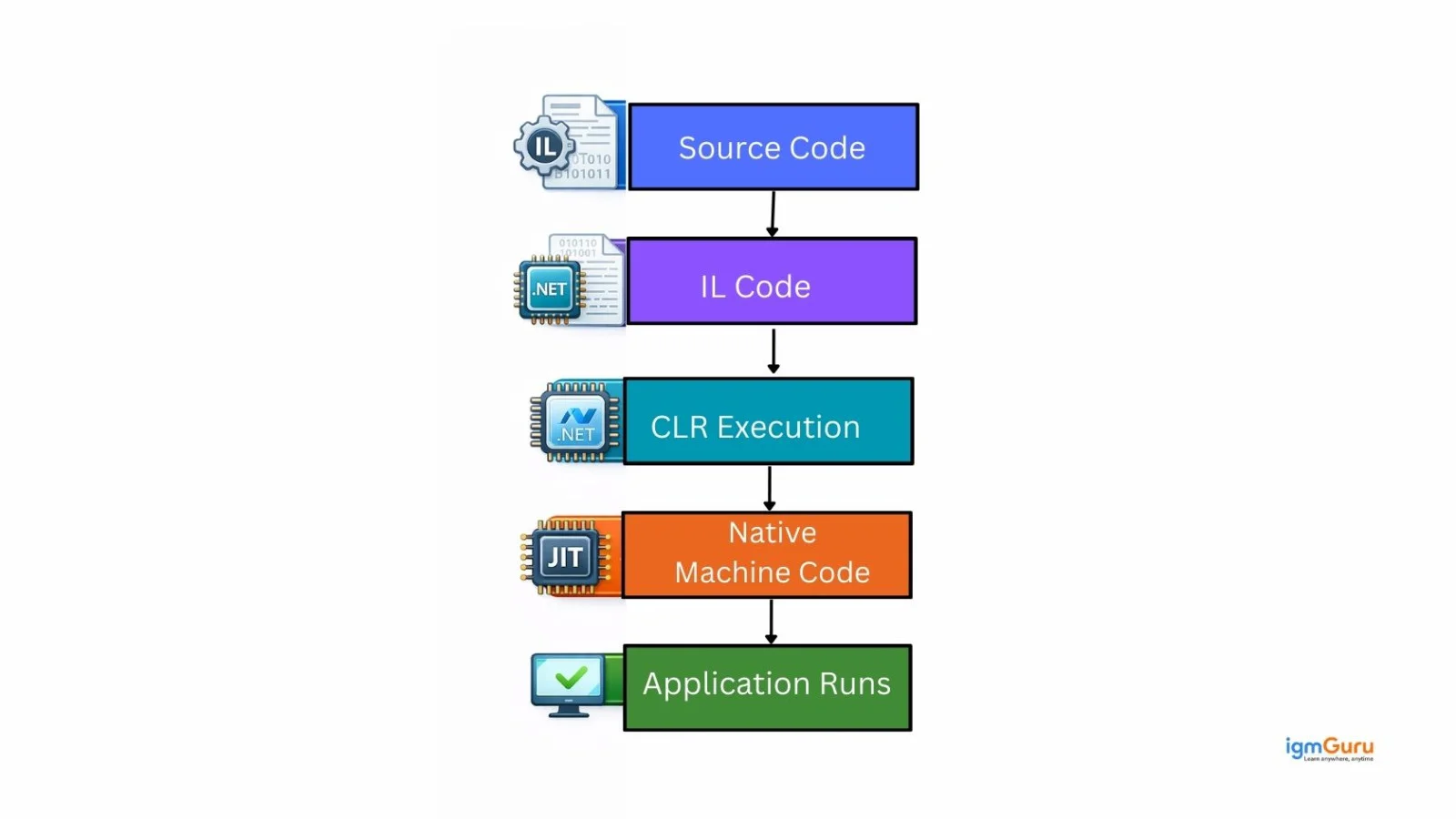
The working of the .NET Framework follows a structured execution process that ensures secure, managed and optimized application performance. Here are the steps:
The application also uses the Framework Class Library to access pre-built functionalities such as file handling, database connectivity, networking and web services.
EXE (Executable) files are standalone programs that run independently in their own memory space when launched. They usually act as the main application. DLLs (Dynamic Link Libraries) are supportive libraries containing functions or resources used by EXEs. They cannot run directly and are loaded into an EXE's memory space.
Common Type System and Common Language Specification are foundational components of the .NET framework that enable cross-language interoperability, type safety and code execution. CTS defines how types are declared, used and managed, while CLS is a subset of rules that ensures different .NET languages can work together seamlessly.
In the .NET Framework and C#, data types are broadly classified into Value Types and Reference Types. The key difference lies in how they store data in memory and how they behave during assignment and method calls.
| Basis | Value Type | Reference Type |
| Memory Storage | Stored directly in stack memory (generally) | Stored in heap memory |
| Data Storage | Holds the actual value | Holds reference (address) to the actual object |
| Memory Allocation | Allocated when declared | Allocated when instantiated using new |
| Performance | Faster access due to stack storage | Slightly slower due to heap allocation |
| Garbage Collection | Not directly managed by GC (stack-based) | Managed by Garbage Collector |
| Examples | int, float, double, bool, struct, enum | class, string, array, object |
| Assignment Behavior | Creates a copy of the value | Copies the reference, not the object |
Read Also: Python Tutorial for Beginners
Now, we will discuss the most asked .NET interview questions and answers for intermediate professionals. These questions dives into more technicality to check your advanced skills.
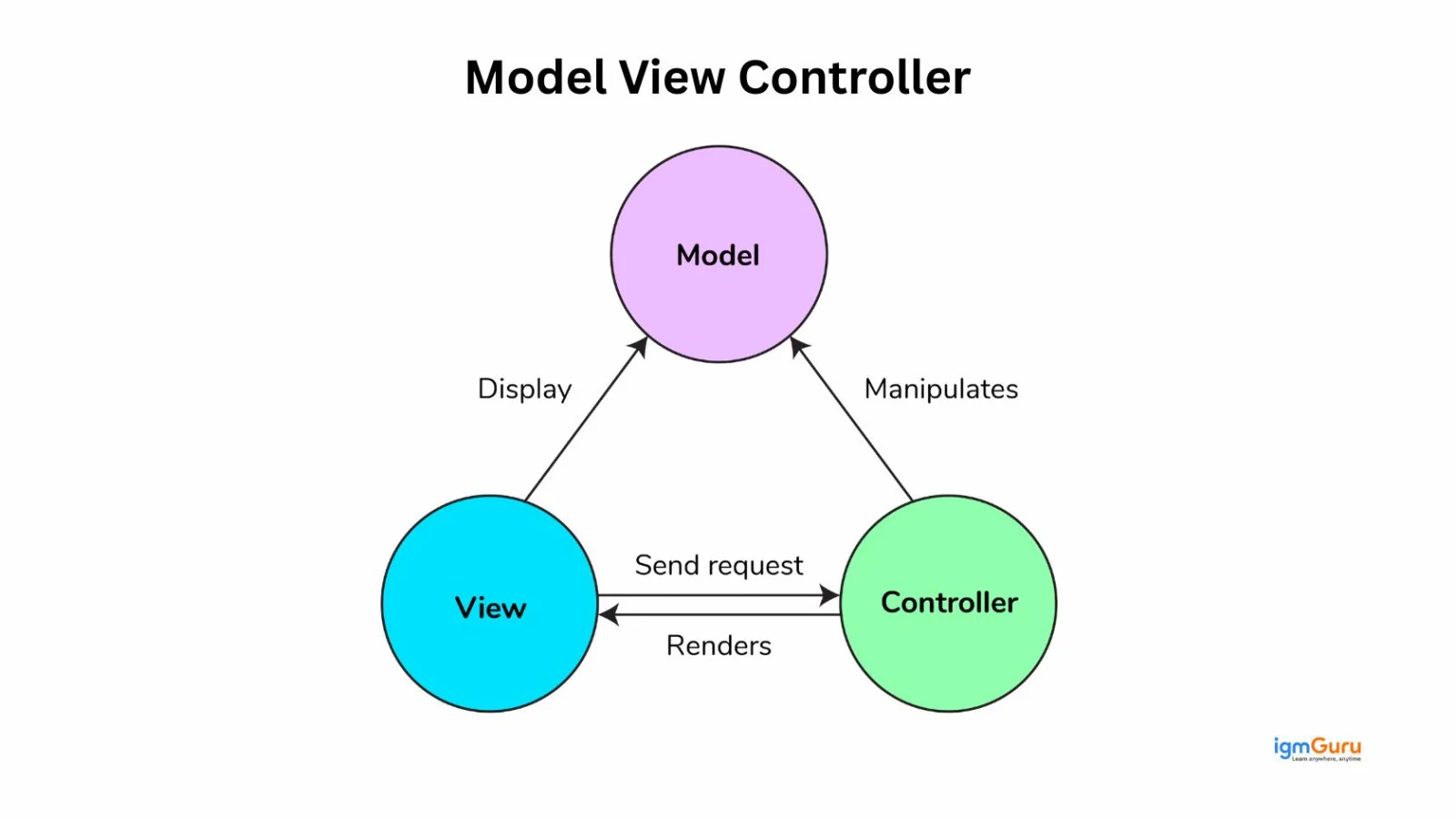
MVC is a design pattern used in ASP.NET and ASP.NET Core to build scalable and maintainable web applications. It separates an application into three main components, each with a specific responsibility. This separation improves code organization, testability and maintainability.
The Model represents the business logic and data of the application. It interacts with the database, processes data and enforces business rules. For example, in an e-commerce application, the Product, Order or Customer classes would be part of the Model.
The View is responsible for the user interface. It displays data to the user and sends user inputs back to the Controller. In ASP.NET MVC, views are typically written using Razor syntax.
The Controller acts as a mediator between the Model and the View. It receives HTTP requests, processes them (often by calling the Model) and returns the appropriate View as a response.
There are mainly three primary security controls available in ASP.NET to protect web applications. These controls help manage authentication, authorization and overall application security.
Authentication verifies the identity of a user. ASP.NET supports multiple authentication methods such as:
This ensures that only valid users can access the application.
Authorization determines what an authenticated user is allowed to access. It provides:
This helps restrict access to controllers, actions, or specific resources.
Code Access Security controls what resources the code itself can access, based on permissions. Although CAS was more relevant in earlier versions of this Framework, it played an important role in restricting untrusted code.
Boxing and unboxing are processes that allow value types to be treated as reference types and vice versa. This typically happens when a value type needs to be converted into an object type.
Example:
|
Here, the integer value 10 is boxed into an object.
Example:
|
Explicit casting is required during unboxing.
MIME (Multipurpose Internet Mail Extensions) in web development are used to identify the type of content being sent between a client and a server over HTTP. When a browser requests a resource such as an HTML page, image, CSS file or JSON data, the server responds with a Content-Type header. This header contains the MIME type, which tells the browser how to process and display the content.
For example:
| MIME Type | Description |
| text/html | Used to send HTML web pages to the browser. |
| application/json | Used to send JSON formatted data, commonly in Web APIs. |
| image/png | Used to send PNG image files. |
| application/pdf | Used to send PDF documents. |
In ASP.NET or ASP.NET Core applications, MIME types are important when:
If the MIME type is incorrect, the browser may not render the content properly or may download it instead of displaying it.
Code Access Security (CAS) was a security model in older versions of .NET that restricted code access to resources based on its origin. However, CAS is now deprecated and no longer used in modern .NET applications. Today, security is handled using role-based, claims-based, and policy-based authorization along with modern authentication protocols.
Instead of focusing on the user like role-based security does, CAS focuses on the code itself. For example, if some code is downloaded from the internet, it shouldn’t automatically get permission to access the local file system or call unmanaged APIs. CAS was designed to restrict that kind of access.
Dependency Injection (DI) is a fundamental design pattern and a built-in feature of the framework that promotes loose coupling, testability and maintainability by providing a class with its dependencies from an external source, rather than the class creating them itself.
Both interface and abstract class are used to achieve abstraction, but they serve slightly different purposes. An interface defines a contract that a class must follow, while an abstract class provides a base implementation that can be shared among derived classes. Here is complete difference:
| Basis | Interface | Abstract Class |
| Purpose | Defines a contract (what to implement) | Provides a base class with shared behavior |
| Method Implementation | Cannot contain method implementation (except default methods in newer C# versions) | Can contain both abstract and fully implemented methods |
| Access Modifiers | Methods are public by default | Can have public, protected, or private members |
| Multiple Inheritance | A class can implement multiple interfaces | A class can inherit only one abstract class |
| Fields / Variables | Cannot have instance fields | Can have instance variables and constructors |
| Constructors | Not allowed | Allowed |
| When to Use | When unrelated classes need to follow the same contract | When classes share common base functionality |
LINQ stands for Language Integrated Query. It is a feature in .NET that allows us to write queries directly in C# to retrieve and manipulate data from different sources like collections, databases, XML or even APIs. You can do this all using a consistent syntax. Before LINQ, if we wanted to filter or sort data from a collection, we had to write loops and conditional statements. LINQ makes that much cleaner and more readable.
It works in the following three main steps:
1. Define the Data Source: This could be a list, array, database table (via Entity Framework), or XML document.
2. Write the Query: We write a query using either:
3. Execute the Query: LINQ uses deferred execution, meaning the query is not executed until we iterate over the result (like using foreach or calling .ToList()).
Example:
|
There are two main types of memories supported in this framework, including:
Stack memory is used for storing value types and method call information. It works in a Last-In-First-Out manner. Whenever a method is called, a new stack frame is created and when the method finishes, that memory is automatically released. Value types like int, double, bool, and structs are typically stored in the stack (unless they are part of a reference type object).
Stack memory is:
Heap memory is used for storing reference types such as classes, objects, arrays, and strings. Memory in the heap is allocated dynamically using the new keyword. The Heap is managed by the Garbage Collector (GC), which automatically removes objects that are no longer referenced.
Heap memory is:
Localization and globalization are concepts used in .NET and web applications to make software usable across different languages, regions and cultures.
Middleware are software components that handle HTTP requests and responses in ASP.NET Core. They are arranged in a pipeline where each middleware can process the request, modify it or pass it to the next component.
Examples of middleware include authentication, logging, routing and exception handling. Middleware is configured in the Program.cs file using methods like UseAuthentication(), UseAuthorization() and UseRouting().
Entity Framework Core (EF Core) is an open-source Object Relational Mapper (ORM) used in .NET applications to interact with databases using C# instead of writing raw SQL queries. It simplifies database operations by allowing developers to work with objects and LINQ queries.
EF Core supports multiple approaches such as Code First, Database First and Model First. It is widely used in modern applications for data access and integrates seamlessly with ASP.NET Core.
Async and await are keywords in .NET used for asynchronous programming. They allow applications to perform non-blocking operations, improving performance and responsiveness.
Instead of waiting for a task to complete, async methods allow the program to continue execution and resume once the task finishes. This is especially useful in web APIs, database calls and external service requests.
.NET Core was introduced as a cross-platform and open-source version of the .NET ecosystem. However, from .NET 5 onwards, Microsoft unified all platforms into a single framework now simply called .NET. Today, modern development is done using .NET (including .NET 6, .NET 7, and .NET 8). Therefore, you should focus on these modern .NET concepts for interviews.
The Managed Extensibility Framework is a .NET library designed to create lightweight, loosely coupled and extensible applications. It enables dynamic discovery and composition of components at runtime without hard-coded dependencies. It allows developers to build plugin-based systems where extensions can be easily added, managed and reused.
Dependency Injection is a built-in feature of ASP.NET Core that is managed through an Inversion of Control container. This container is responsible for registering services, managing their lifetimes and injecting them into dependent classes automatically.
Kestrel is used in ASP.NET Core because it provides a high-performance, cross-platform and lightweight web server. This server serves as the foundation for all ASP.NET Core applications. It is the default and recommended server, designed specifically for the modern needs of the .NET ecosystem.
The .NET Core SDK is a free, cross-platform and open-source collection of tools and libraries used by developers to create, build and run modern .NET applications. It provides everything needed for the base developer experience, including the ability to compile and publish code.
.NET Core is the underlying cross-platform runtime and development framework, while ASP.NET Core is a web framework built on top of .NET Core for building web applications, APIs and microservices. Here is a detailed differentiation between them:
| Basis | .NET Core | ASP.NET Core |
| Definition | A cross-platform development framework and runtime | A web framework built on top of .NET Core |
| Purpose | Used to build console apps, desktop apps, services, and web apps | Specifically used to build web apps, Web APIs, and microservices |
| Type | General-purpose framework | Web development framework |
| Includes | Runtime (CLR), libraries, SDK | MVC, Razor Pages, Web API, Middleware, Dependency Injection |
| Platform Support | Cross-platform (Windows, Linux, macOS) | Cross-platform (inherits from .NET Core) |
| Usage Example | Building console tools or background services | Building REST APIs or web applications |
Minimal APIs are a lightweight approach for building HTTP APIs with less boilerplate code. They allow developers to define API endpoints directly in the application startup code without creating separate controller classes. They are useful for small services, microservices and APIs where a simple endpoint structure is preferred.
Example:
|
Minimal APIs reduce the amount of configuration and code required for simple HTTP services. They are particularly useful when building small, focused APIs or microservices, while controller-based APIs can still be preferable for larger applications that require more structured organization.
Records are reference types designed primarily for working with immutable data and value-based equality. They were introduced in C# 9 and are commonly used in modern .NET applications for representing data transfer objects, configuration models and other objects where the values are more important than object identity.
Example:
|
Records provide value-based equality, concise syntax and built-in support for non-destructive updates. For example, the with expression can create a new record with selected values changed while keeping the original record unchanged.
Native AOT (Ahead-of-Time) compilation allows a .NET application to be compiled directly into native code before it is deployed. Unlike traditional JIT-based execution, the application does not need to compile the application code at runtime in the same way. This can reduce startup time, memory usage and application size for suitable workloads.
Native AOT is particularly useful for applications where fast startup and low resource consumption are important, such as command-line tools, serverless workloads and some containerized services.
Example command:
|
However, Native AOT has compatibility considerations because some .NET features that depend heavily on runtime code generation, reflection or dynamic loading may require additional configuration or may not be supported.
The .NET Generic Host provides a common infrastructure for applications that need dependency injection, configuration, logging and application lifetime management. It is not limited to web applications and can be used for worker services, background processes, console applications and other long-running workloads.
The Generic Host brings these application services together so that developers can configure them consistently. In ASP.NET Core applications, the host infrastructure is integrated into the application's startup model, while worker applications can use it to manage background processing.
Example:
|
This approach provides a standardized way to configure and run applications that need services such as dependency injection, configuration and logging.
Rate limiting controls how many requests a client can make to an application within a specified period. It helps protect APIs from excessive traffic, accidental request bursts and certain types of abuse. ASP.NET Core provides built-in rate-limiting capabilities that can be configured for specific endpoints or across an application.
Example:
|
Rate limiting is especially useful for public APIs and high-traffic applications because it helps prevent a single client from consuming an excessive amount of server resources. Different policies can be applied depending on the application's traffic and security requirements.
Read Also: Python Interview Questions And Answers
Here are some of the most asked .NET developer interview questions. These are especially designed around some basic development problems and their solutions.
I would implement authentication and authorization using the built-in Identity system and middleware-based security configuration. The authentication will verify who the user is and the authorization will determine what the user is allowed to access. Here are the steps I would follow:
It includes using ASP.NET Core Identity if it’s a web application with user management. Identity provides:
In APIs, especially in microservices, I prefer JWT (JSON Web Token) authentication because it is stateless and scalable. In Program.cs, I configure authentication like this:
|
This ensures that every request is validated before accessing protected endpoints.
After authentication is configured, I apply authorization using:
For example:
|
Or using policy-based authorization:
|
I always ensure the middleware is added in the correct order:
|
Authentication must come before authorization.
I manage global exception handling differently depending on the type of application.
1. ASP.NET Core: I use centralized exception handling middleware. Typically, I configure it in Program.cs using:
For example, I create a custom middleware or use a centralized error-handling endpoint to log exceptions and return a consistent error response.
2. APIs: I usually implement custom exception-handling middleware so that all unhandled exceptions return a standardized JSON response with proper status codes. I also:
I follow a systematic approach that ensures sustainable and scalable performance improvements in the applications. I first try to identify the bottleneck before optimizing. I usually start with profiling and logging to determine whether the issue is in the database, business logic, external API calls or infrastructure.
Here’s how I approach performance optimization:
I implement caching to improve performance and reduce unnecessary database or external API calls. Caching helps store frequently accessed data temporarily so the application can serve responses faster. ASP.NET Core mainly supports three types of caching:
This stores data in the server’s memory. It’s fast and simple to implement but works only for a single server instance. I use IMemoryCache like this:
|
Then inject IMemoryCache into services to store and retrieve data.
It is best for:
This stores cached data in an external system like Redis or SQL Server. It works across multiple servers, making it suitable for scalable applications. ASP.NET Core supports:
It is best for:
This caches entire HTTP responses. It reduces server processing for repeated requests. We can enable it using:
|
And apply [ResponseCache] attribute to controllers.
It is best for:
To create and consume a RESTful Web API in .NET Core, I follow a structured approach.
1. Creating a RESTful Web API: I create a new ASP.NET Core Web API project using the .NET CLI or Visual Studio. Then:
Example:
|
This creates a REST endpoint like:
|
2. Consuming a RESTful API: To consume a Web API in .NET Core, I use HttpClient.
Example:
|
In production applications, I use IHttpClientFactory to manage HttpClient instances efficiently.
Let’s discuss some of the most asked .NET interview questions and answers for experienced professionals. These types of questions are mostly asked to professionals with more than 5 years of experience.
There are two main Common Type System in this framework that defines how data types are declared, used and managed in memory. Under CTS, all types are broadly classified into two main categories:
1. Value Types: Value types store the actual data directly. They are typically stored in stack memory and hold their own values independently. Here are some common examples:
When you assign one value type variable to another, a copy of the value is created.
2. Reference Types: Reference types store a reference (memory address) to the actual object stored in heap memory. They do not contain the data directly. Here are some of them:
When you assign one reference type variable to another, both point to the same object in memory.
It is a cross-platform development framework used to build modern, high-performance applications. It allows developers to create applications that run on Windows, Linux and macOS. You can use it for:
One of the key reasons it is widely used is its high performance, lightweight architecture and strong support for cloud environments. It is optimized for scalability and works very well in distributed systems.
C# and F# are both programming languages that run on the .NET platform, but they follow different programming paradigms. Here is complete difference between them:
| Basis | C# | F# |
| Type | Object-Oriented (supports OOP + functional features) | Functional-first (supports functional + OOP) |
| Primary Use | Web apps, APIs, enterprise systems | Data science, financial systems, complex algorithms |
| Syntax Style | More verbose and structured | More concise and expression-based |
| Learning Curve | Easier for most developers | Slightly steeper due to functional concepts |
| Community & Adoption | Very large and widely adopted | Smaller but strong in specific domains |
| Common Use in Industry | ASP.NET Core, desktop apps, microservices | Data-heavy, analytical, and financial applications |
The WebHostBuilder is used in ASP.NET Core versions, as it is now obsolete in favor of the generic HostBuilder and minimal APIs with WebApplicationBuilder to configure and build the application's host. It follows the Builder design pattern that allows developers to incrementally assemble all the necessary components and services the application needs before it runs.
CoreFX refers to the foundational class libraries of .NET Core. It contains the core APIs and reusable libraries that developers use to build applications, such as collections, file handling, networking, threading and security. If the CLR is the execution engine, then CoreFX is the library layer that provides the actual functionality developers use in their code. CoreFX includes namespaces like:
These libraries are modular and optimized for performance, which makes .NET Core lightweight and cross-platform compared to the older .NET Framework. One important thing to note is that in modern .NET (from .NET 5 onward), CoreFX and CoreCLR were unified into a single runtime and library structure. So we do not commonly use the term “CoreFX” anymore, but conceptually, it represents the base class libraries of .NET Core.
Explicit compilation is the process where source code is manually compiled into assemblies before execution, instead of being dynamically compiled at runtime. In this framework, web pages like .aspx files could be compiled dynamically when first requested. However, with explicit compilation, we precompile the application using tools like MSBuild or Visual Studio before deployment. This improves startup performance and reduces runtime compilation overhead.
In modern .NET and ASP.NET Core, applications are typically compiled explicitly during the build process and the output DLL is deployed. This makes deployment faster, more secure and more predictable.
.NET Core and Mono are both implementations of the .NET platform, but they were designed with different goals and use cases in mind. Here is complete difference between them:
| Basis | .NET Core | Mono |
| Developed By | Microsoft | Originally by Xamarin (now Microsoft) |
| Primary Goal | Modern, high-performance, cross-platform development | Cross-platform support for .NET Framework |
| Performance | Optimized for high performance | Generally lower performance compared to .NET Core |
| Use Cases | Web apps, APIs, microservices, cloud apps | Mobile apps (Xamarin), Unity games |
| Runtime | CoreCLR | Mono Runtime |
| Cloud Support | Strong cloud and container support | Limited cloud focus |
| Current Status | Actively developed and unified into modern .NET | Integrated into modern .NET ecosystem |
Universal Windows Platform is a Microsoft application platform used to build apps that run across multiple Windows devices using a single codebase. The main idea behind UWP was “write once, run on many Windows devices.” That includes:
UWP apps are built using C#, XAML and .NET and they run in a secure sandboxed environment. This improves security and stability because the app has limited access to system resources unless explicitly granted. One key feature of UWP is adaptive UI. Developers can design responsive layouts that automatically adjust based on screen size and device type.
UWP apps are distributed through the Microsoft Store and support features like:
However, in recent years, Microsoft has shifted focus toward WinUI and the Windows App SDK for modern Windows development.
However, UWP is now largely replaced by modern technologies like WinUI and the Windows App SDK, and it is rarely used in current industry projects.
ASP.NET Core 3.1 and ASP.NET Core 6 differ mainly in hosting model, performance improvements, long-term support and overall modernization. Here is some core differences between these two versions:
| Basis | ASP.NET Core 3.1 | ASP.NET Core 6 |
| Release Year | 2019 | 2021 |
| Platform Model | Based on .NET Core | Part of unified .NET (no separate Core) |
| Hosting Model | Uses Startup.cs and Program.cs separately | Minimal hosting model (simplified Program.cs) |
| Performance | High performance | Improved performance and reduced memory usage |
| Minimal APIs | Not available | Supported |
| LTS (Long-Term Support) | LTS (support ended Dec 2022) | LTS (longer support cycle) |
| Cloud & Containers | Good support | Better cloud-native and container optimization |
| Developer Experience | More configuration required | Simplified configuration and cleaner setup |
I implement logging and monitoring using a structured and centralized approach to ensure observability, debugging and production stability.
1. Built-in Logging: ASP.NET Core provides built-in logging through the ILogger interface. I inject ILogger
This ensures structured logging across the application.
2. Structured Logging with External Tools: For production environments, I integrate structured logging frameworks like:
I usually configure logs to be stored in:
This allows centralized log tracking and analysis.
3. Monitoring & Application Insights: For monitoring, I integrate tools like:
These tools help track:
4. Health Checks: I also implement health checks using:
|
This helps load balancers and orchestration tools like Kubernetes determine if the application is healthy.
5. Best Practices I Follow:
Let’s discuss some of the most common scenario-based ASP.NET interview questions and answers. These are generally asked to check your experience and expertise in real-world scenarios.
I would first use profiling and Application Performance Monitoring (APM) tools to identify bottlenecks. I would check database queries, API response times, memory usage, and CPU utilization. Depending on the findings, I could optimize slow queries, add caching, use asynchronous programming with async and await, implement pagination, reduce unnecessary API calls, and configure connection pooling. For high-traffic applications, I would also consider horizontal scaling and load balancing.
I would monitor the application's memory usage and collect memory dumps to identify objects that are not being released. I would check for common causes such as undisposed resources, static references, event handlers that are never unsubscribed, and large object allocations. I would use using statements or properly implement IDisposable for unmanaged resources. Profiling tools can also help identify memory leaks and objects with unexpectedly long lifetimes.
I would implement concurrency control. With Entity Framework Core, optimistic concurrency can be implemented using a concurrency token such as a rowversion column. If another user modifies the record before the current transaction is completed, EF Core can throw a DbUpdateConcurrencyException. The application can then reload the latest data, ask the user to retry, or apply an appropriate conflict-resolution strategy.
Since the API calls are independent, I would execute them concurrently using asynchronous programming. I could start all three operations without immediately awaiting them and then use Task.WhenAll() to wait for their completion. This reduces the overall response time because the application does not have to wait for each API request to finish before starting the next one.
I would implement centralized exception handling using ASP.NET Core's exception-handling middleware or a custom exception handler. Detailed exception information and stack traces should be logged internally but not returned to clients in production. The API should instead return standardized error responses, such as Problem Details, with appropriate HTTP status codes and safe messages that do not expose database details, connection strings, file paths, or internal implementation information.
I would implement caching to reduce unnecessary database queries. For a single application instance, in-memory caching may be sufficient. For applications running across multiple servers, I would use distributed caching, such as Redis. I would also define an appropriate expiration policy and invalidate or refresh the cached data when the underlying information changes.
I would use the built-in Dependency Injection container in .NET. I would register the service with an appropriate lifetime, such as Transient, Scoped, or Singleton, and inject it through the constructor of the dependent class. This approach reduces tight coupling, improves maintainability, and makes unit testing easier because dependencies can be replaced with mocks or test implementations.
I would avoid executing the long-running operation directly within the HTTP request. Instead, I would move it to background processing. Depending on the application's requirements, I could use a hosted service such as BackgroundService or a reliable background job or messaging system. The API could immediately return a response indicating that the request has been accepted while the background process handles the task asynchronously.
I would first examine application and server logs to identify the actual exception. Then I would compare environment-specific configuration, connection strings, environment variables, file permissions, runtime versions, database connectivity, and external service dependencies. I would also verify that production configuration is loaded correctly and that required secrets are available through the configured secret-management mechanism rather than being hardcoded.
Authentication alone is not sufficient because the application must also enforce authorization for each requested resource. I would validate that the authenticated user has permission to access the requested record before returning or modifying it. This check should be performed on the server side for every relevant operation. Depending on the application, I could implement policy-based authorization or resource-based authorization to centralize and consistently enforce access-control rules.
I focus on loose coupling, independent deployment and horizontal scalability to design a scalable and high-performance microservices architecture using .NET Core. I design each microservice around a single business capability following the Single Responsibility Principle. Each service has its own database to ensure data isolation and avoid tight coupling.
Architecture Approach: I typically structure it like this:
Scalability Strategy: To ensure scalability:
Performance Optimization:
Observability and Monitoring: I also implement:
Experiencing high response times during peak traffic is a basic issue in these applications. I usually follow a structured approach starting from first identifying the bottleneck and then optimize the right layer accordingly. Here are the steps:
Step 1: Identify the Bottleneck
I would start with monitoring and profiling:
The goal is to determine whether the issue is in:
Step 2: Optimize Based on Findings
If the issue is database-related:
If it’s application-related:
If it’s traffic-related:
Step 3: Improve Scalability
For long-term stability, I would:
This kind of situation requires implementing role-based authorization using the built-in authorization system. I usually solve it by ensuring authentication is properly configured using JWT authentication for APIs or ASP.NET Core Identity for web applications. Once users are authenticated, their roles (like Admin, Manager, User) are included as claims in the token.
Step 1: Configure Authorization
|
|
Step 2: Protect Endpoints
Then I secure controllers or specific actions using the [Authorize] attribute.
Example:
|
If multiple roles are allowed:
|
Step 3: Ensure Role Claims Are Included
When generating JWT tokens, I make sure to include role claims so the system can validate them during authorization.
This framework has a built-in feature for globalization and localization that helps to support multiple languages and regions. I would use this feature starting with making the application culture-aware. That means I avoid hardcoding dates, currency formats or text. Instead, I rely on culture-specific formatting using CultureInfo.
Step 1: Enable Localization Services
In Program.cs, I configure localization:
|
Then I configure supported cultures:
|
Step 2: Use Resource Files (.resx)
I create .resx resource files for each language:
Then I inject IStringLocalizer into controllers or views to fetch localized text.
Step 3: Handle Culture-Specific Formatting
For globalization, I rely on:
This ensures the application automatically adapts based on the user’s region.
Solving this kind of issue requires a systematic approach, starting with confirming the leak, then identifying the source and finally fixing it. Here are the steps to follow:
Step 1: Confirm the Memory Issue
I would start by monitoring:
I’d use tools like:
If memory keeps growing without dropping after garbage collection, that usually indicates a leak.
Step 2: Analyze the Heap
Next, I would collect a memory dump and analyze:
Common causes in ASP.NET Core include:
Step 3: Fix the Root Cause
Depending on findings, I would:
Step 4: Validate the Fix
After implementing changes, I would:
I usually approach this type of migration in phases instead of trying to move everything at once. Legacy .NET Framework applications often contain tightly coupled components, older libraries and Windows-specific dependencies, so the first step is understanding the current architecture and identifying compatibility challenges.
Step 1: Analyze the Existing Application
I generally use the .NET Upgrade Assistant and Portability Analyzer to speed up this assessment process.
Step 2: Choose the Migration Strategy
Depending on the application size, I usually follow one of these approaches:
Step 3: Modernize the Architecture
During migration, I also modernize the application by:
Step 4: Testing and Deployment
I ensure proper testing throughout the migration:
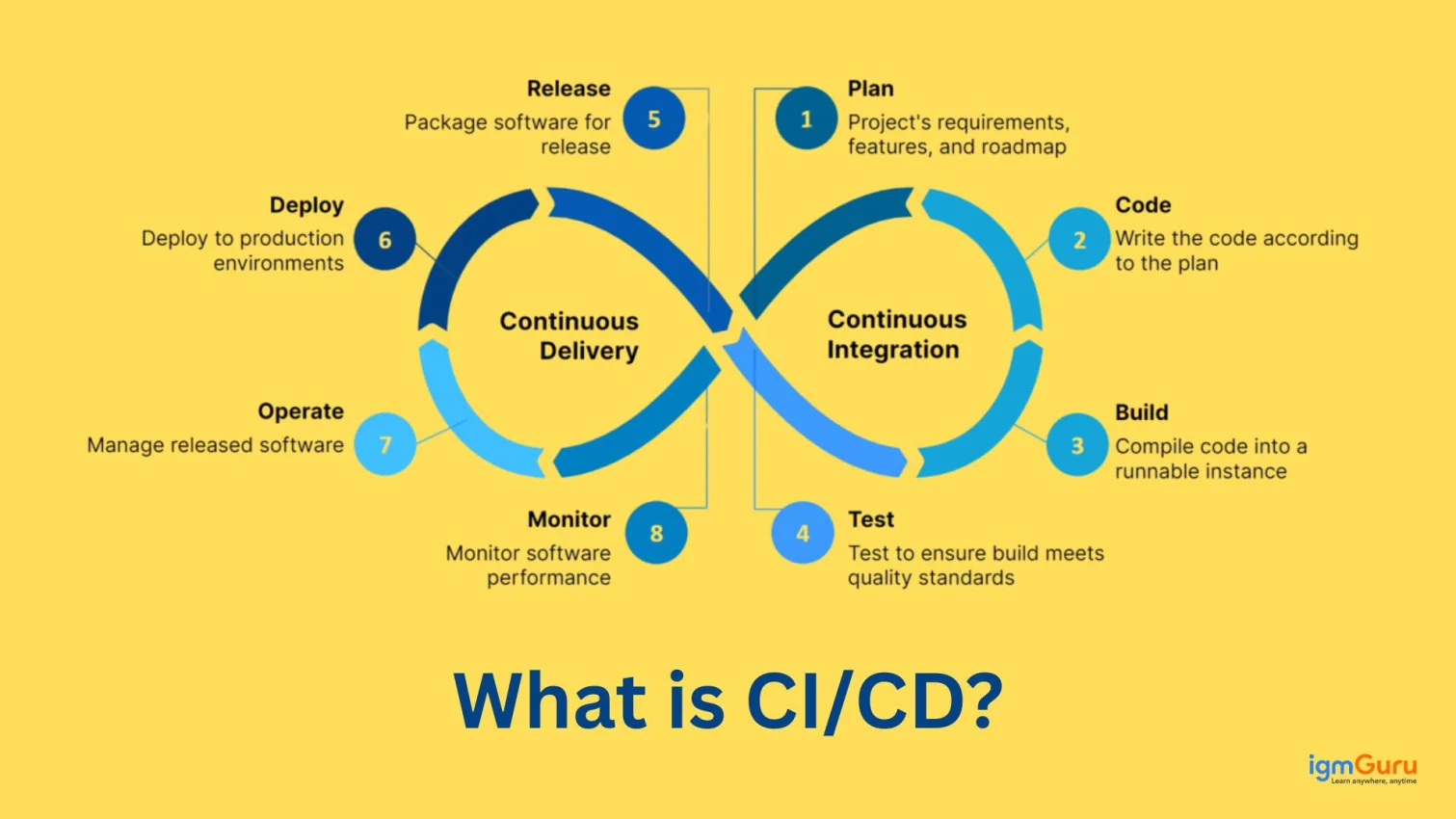
Finally, I deploy gradually using CI/CD pipelines and monitor the application closely after release to catch any production issues early.
When I see continuously increasing memory usage in a .NET application, I first try to confirm whether it is actually a memory leak or simply high memory consumption due to caching or heavy workloads. After that, I follow a structured troubleshooting approach.
Step 1: Monitor and Identify the Source
I start by monitoring the application using tools like:
I mainly look for:
Step 2: Check Common Causes
In my experience, memory leaks in .NET usually happen because of:
I also review IDisposable implementations because unmanaged resources like database connections, streams or file handlers must be released properly.
Step 3: Optimize and Fix
Once the root cause is identified, I usually:
I also verify that async operations are not accidentally creating memory retention issues.
Step 4: Validate the Fix
After implementing fixes, I run load testing and monitor memory patterns again to ensure RAM usage stabilizes properly under continuous traffic.
When designing communication between microservices and external systems, I always assume that failures will happen. External APIs may become slow, unavailable or unstable, so resilience must be built into the architecture from the beginning.
Step 1: Use HttpClientFactory
I usually use IHttpClientFactory because it manages HTTP connections efficiently and prevents socket exhaustion problems in high-traffic applications.
Step 2: Implement Resilience Patterns
I commonly use Polly with ASP.NET Core to implement resilience strategies like:
For example:
|
Step 3: Add Monitoring and Logging
I also implement:
This helps quickly identify which external dependency is causing failures.
Step 4: Design for Graceful Degradation
Instead of completely failing the application, I try to design graceful fallback behavior wherever possible. For example, cached data or partial responses can still keep the system usable during temporary outages.
When database queries start slowing down an ASP.NET Core application, I first focus on identifying the exact query causing the bottleneck instead of optimizing blindly. Most performance issues usually come from inefficient queries, missing indexes or excessive database calls.
Step 1: Identify Slow Queries
I begin by monitoring:
I often use SQL Server Profiler, Query Store or Application Insights to analyze slow-performing queries.
Step 2: Optimize Queries
Once identified, I usually improve performance by:
Step 3: Improve Entity Framework Usage
In Entity Framework Core, I also:
Step 4: Add Caching Where Appropriate
If certain data is frequently requested but rarely changes, I implement caching using:
This significantly reduces repeated database hits during peak traffic.
Step 5: Validate Under Load
Finally, I perform load testing to ensure the optimizations actually improve performance in real-world traffic conditions and do not create new bottlenecks later.
I would first identify whether the failures are caused by CPU, memory, database connections, thread pool exhaustion, external dependencies, or excessive request volume. I would use application metrics, distributed tracing, logs, and infrastructure monitoring to identify the actual bottleneck before applying changes.
Step 1: Control Incoming Traffic
Step 2: Protect Dependencies
I would use appropriate resilience strategies for database and external API calls, such as timeouts, retries for transient failures, and circuit breakers. I would also avoid retrying requests aggressively because excessive retries can increase the load during an outage.
Step 3: Reduce Application Load
Step 4: Monitor and Validate
Finally, I would perform load and stress testing to reproduce the traffic spike and verify how the system behaves under pressure. I would monitor latency, error rates, throughput, CPU, memory, database performance, and dependency failures to ensure the application remains stable as traffic increases.
We have discussed the most asked .NET interview questions and answers from very basic to advanced ones. Exploring them will prepare you for .NET technical interview rounds. Further you can also explore our additional guides and tutorials to understand any specific topics.
You will need to prepare for the following key topics to crack a .NET interview:
It has not replaced the .NET Framework completely, but it has become the modern and preferred platform for new development.
You need strong working knowledge of C# to become a .NET developer because it is the primary language used in the .NET ecosystem.
You can build practical, real-world projects that demonstrate both backend logic and API development skills.
Explore Our Trending Articles-