Imagine running applications without buying servers, storing terabytes of data without any hardware, and scaling your business with just a click. Sounds powerful, right? That’s exactly what Cloud Computing brings to the table. It has transformed how companies build, manage, and deliver technology, making everything faster, smarter, and more cost-efficient.
In this Cloud Computing Tutorial, we’ll break down the concepts in the simplest way possible, so even complete beginners can follow along with comfort. From how the cloud works to real-world use cases and essential tools, this guide will help you start strong, build confidence, and step into the future of tech. Let’s dive in!
Explore our cloud computing AWS course for a better career growth.
This tutorial is apt for the beginners and will help them understand all important concepts from the basic level to the advanced ones. Before proceeding ahead, one should have basic knowledge of -
Cloud computing is the delivery of different computer resources and services through the internet. It has established itself as a strong means for personal use cases like backing up phones on Google One or iCloud. Additionally, it also has a plethora of applications for both small and large companies alike. For instance, it can easily scale services with the growth of the company or even allow the organization to access ground-breaking technologies, like blockchain or large language models (LLMs).
Read Also - Okta Tutorial
The idea of cloud computing has been around since the 1960s but its implementation gained some traction around the 1970s, with the launch of IBM's virtual machines. This launch shook the world as users could now have their own virtual machine run on hardware and they didn't even have to maintain and manage it. After this breakthrough, the 1980s computer boom added fuel to the fire. When companies wanted to connect their computers in-house and share their data, VPNs enabled them to do so.
Salesforce became a pioneer in cloud computing in 1999 when it commenced delivering enterprise apps via a simple website. AWS was launched in 2006, closely followed by Microsoft Azure in 2008. Both of these took the world by storm and are also currently leading the market sphere, followed by Google Cloud Platform (GCP) in third place.
Cloud computing is popular because it aids SMEs in accessing app software over the internet, and that too without spending heavily on computer hardware and software. More businesses today want to outsource their storage needs as it gives them space to focus on more important tasks. Thus, contributing to the increasing popularity of this technology.
Read Also - Data Science Tutorial
Based on deployment, there are three main types that you should know about.
The public cloud, as the name suggests, is open to all. Anyone can store and access data over the internet. The cloud service provider (CSP) manages and runs the computing resources, and the users go for a pay-per-use scheme.
Some brilliant examples of public cloud are Azure, AWS, IBM SmartCloud, Google App Engine, etc.
Private cloud incorporates using exclusive space, which can either be run locally or outsourced to a CSP. It is strictly run on a private network and those in the network can access it.
Some brilliant examples of private cloud are Amazon VPC, IBM, VMware, and HPE.
Those who seek the best of both worlds go for the hybrid cloud. These are partially secure as services run on both private and public clouds.
Great examples of hybrid cloud include Google apps, Google Drive, One Drive and Gmail.
Related Article- 6 Appealing Reasons To Learn Cloud Computing
Cloud computing services can be segregated into three sections.
The IaaS service model delivers computer infrastructure as an outsourced entity. Here, users pay on the basis of how much they use, as underlying security, servers, operating systems and networking are provided to develop services and apps.
It is highly cost effective and secure, as well as eliminates the need to manage and maintain the underlying data center. It is often also called Hardware-as-a-Service.
PaaS is where an environment and platform are provided to help the developers in building services and apps over the internet. These are hosted in the cloud and can simply be accessed by the users through a web browser. The provider hosts the software and hardware on their infrastructure, which means the user does not have to incur those costs.
It is highly efficient, convenient and cost effective. It aids the user in managing the lifecycle efficiently.
SaaS facilitates delivering apps and services over the internet. There is no need to install or maintain any of the wares as it can be accessed through the internet. A pay-as-you-go scheme can be opted for from the CSP. Since most SaaS apps run directly from the browser, it is also called web-based software.
It offers scalability, cost effectiveness, and automatic updates. The total time taken is also heavily reduced.
Identity as a Service is an on-cloud subscription model for identity and access management. This model is typically offered by third-party sources instead of on-premises. It is used to set the user permission and access for the digital elements, ensuring security of organizations. It is a great solution for emerging companies who prefer to use low cost solutions.
Network as a Service is a cloud based model that involves purchasing networking services from any third-party provider. It eliminates the need of creating and managing own infrastructure, providing a scalable, flexible and cost-effective solution. It offers a range of services, such as VPNs, load balancers, firewalls and MPLS connections. SD-WAN, virtual networks, routers and switches are some of its examples.
Related Article: Difference between SaaS, PaaS ans IaaS
Understanding key terminologies is essential to navigating the rapidly evolving cloud landscape. It involves a variety of technical terms, techniques and concepts important for leveraging the true potential of this networking system. Let's begin:
Cloud computing architecture is the underlying design of the whole cloud system on which all services run. It is an amalgam of both SOA (Service Oriented Architecture) and EDA (Event Driven Architecture). This architecture is segregated into two parts including front-end and backend and involves a variety of components.
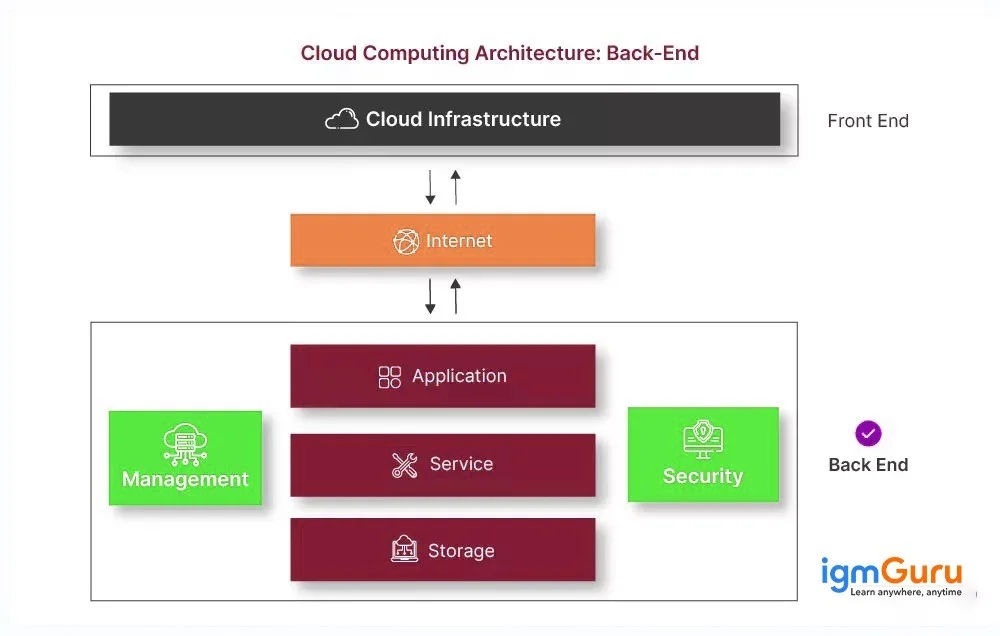
Cloud computing infrastructure encompasses multiple hardware and software components to enable the delivery of cloud computing services. These components are virtualization software, management tools, storage, networking, and servers. Each of these elements work together to provide on-demand access to computing resources and services. Its components include:
Virtualization is a technique of virtualizing the hardware, software and network resources to enable efficient resource sharing and management. It provides better scalability, flexibility and cost effectiveness of cloud services like Infrastructure-as-a-Service. It also allows professionals to share an instance or application over multiple customers at a particular time. Here are some additional benefits of using virtualization:
Service-oriented architecture is a software development method that involves creating business applications using different components and services. These services communicate with each other over the Internet to provide better business capability. Many developers encompass this method to make reuse of services in different systems to perform complex tasks.
Let's say an organization wants to implement user authentication functionality in their business processes. Here they can use SOA to build a single authentication service to perform each process. It will complete the task way quicker than the traditional approach.
Grid computing is a process where multiple computers are connected to each other in order to perform complicated tasks. These tasks are highly intensive in terms of computing power and nearly impossible to complete on a single system.
This process segregates these tasks into different parts and assigns them to different systems. These systems communicate over a network to perform the task with careful considerations and steps.
Utility computing is a service delivery model where an operator makes computer resources and infrastructure administration accessible to customers as needed. This concept enables users to pay just for the resources they consume, similar to how they pay for utilities such as electricity or water. This on-demand access and pay-as-you-go model makes it highly cost-effective and scalable for businesses of all sizes.
Think of it like renting a car where you only pay for the time and mileage you use, rather than buying the entire vehicle. Utility computing offers the same flexibility for computing resources, ensuring you only pay for what your business truly requires.
VMware Workstation is a sophisticated desktop virtualization program which enables individuals to run several operating systems on a single physical machine. It creates virtual machines (VMs) that emulate complete hardware environments. These VMs enable experts to test software, develop applications and run different operating systems concurrently without any additional hardware.
Imagine you are a software developer needing to test your application on various operating systems. VMware Workstation allows you to create virtual environments for Windows, Linux, and other OSs right on your desktop, simplifying the testing process and saving you from needing multiple physical machines.
A hypervisor is kind of a software or firmware that helps to create and run virtual machines (VMs). It allows multiple operating systems to run concurrently on a single physical host, allocating resources like CPU, memory and storage to each VM. Hypervisors are essential for virtualization and cloud computing, enabling efficient resource utilization and scalability. Hypervisors are the core of virtualization.
The Internet of Things (IoT) is an interconnected system that includes various physical objects, like automobiles, household appliances, etc, and different equipment like sensors, software and network connectivity. These devices can interact with one another as well as internet platforms, enabling automation, remote monitoring and data-driven insights.
Cloud computing plays a crucial role in processing and storing the massive amounts of data generated by IoT devices. This technology is used in almost every sector from smart thermostats that adjust your home's temperature to industrial sensors that monitor machinery performance.
Load balancing is a technique used to distribute network traffic or application workloads across multiple servers or resources. This distribution ensures that no single server becomes overloaded, improving performance, reliability and availability of applications and services. Load balancers can distribute traffic based on different algorithms, such as round-robin, least connections or weighted distribution.
Let's say a website is experiencing a high surge in traffic during a sale. This is where we use load balancing to distribute the incoming requests across multiple servers. It prevents any single server from crashing and ensures a smooth user experience. This crucial aspect of cloud infrastructure ensures high availability and optimal performance.
Read Also - RAG Tutorial
There are plenty of benefits that have rendered this technology a leading name today.
The upfront cost incurred in getting a license gets switched with a nominal monthly or annual subscription fee. This cost is scalable and depends on your usage.
Remote working has become more feasible as apps can be logged into from anywhere and at any time. The VPN is not needed and thus, there is no need to create a backup for the data.
New products and services can be availed in a small amount of time. Hence, companies do not have to spend long hours trying to adopt new solutions and get down to revenue generation in no time.
Cloud computing has found its way to be used in Google apps, business continuity, Salesforce, hosted file share, and much more.
All IT service and resources are available on the cloud at all times. This speeds up the process of getting the service or product in the market for enhanced profits.
Read Also-Hadoop Tutorial
Companies like Instagram, Netflix, Apple and Etsy, among many others, use cloud computing. These multi-million companies resorting to incorporating this technology pertains to the fact that there is something incredibly beneficial that it offers. This cloud computing tutorial and a good training program together will help you excel in this field.
You can also read: DevOps Interview Questions with Answers
Cloud computing is great for saving money, scaling up easily, and accessing your data from anywhere at any time.
There are three main types: public, private, and hybrid clouds, each with different setups and access levels.
Cloud computing lets you store and access data and applications over the internet instead of on your computer's hard drive.
Yes, it starts from the very basic concepts of cloud computing and is best for begginers to learn this technology.
Basic networking knowledge, operating systems and understanding of virtualization concepts are helpful.
Explore Our Trending Articles -
Couse Schedule
| Course Name | Batch Type | Details |
| Cloud Computing Courses | Every Weekday | View Details |
| Cloud Computing Courses | Every Weekend | View Details |



Top Advantages And Disadvantages of Artificial Intelligence (AI)
October 16th, 2026
File Handling in Python: Understand Step-by-Step With Examples
October 16th, 2026