Choosing between UiPath and Power Automate is a common struggle for automation teams. Both tools can automate repetitive work. Both can save hours every week. But they are built for different needs and the wrong choice can cost you time and money.
In this guide, we compare UiPath vs Power Automate in plain language. We cover features, pricing, ease of use, AI, integrations and scalability. We also share what we have seen while working with both tools. By the end, you will know which RPA tool fits your business.
Let’s start with the basics.
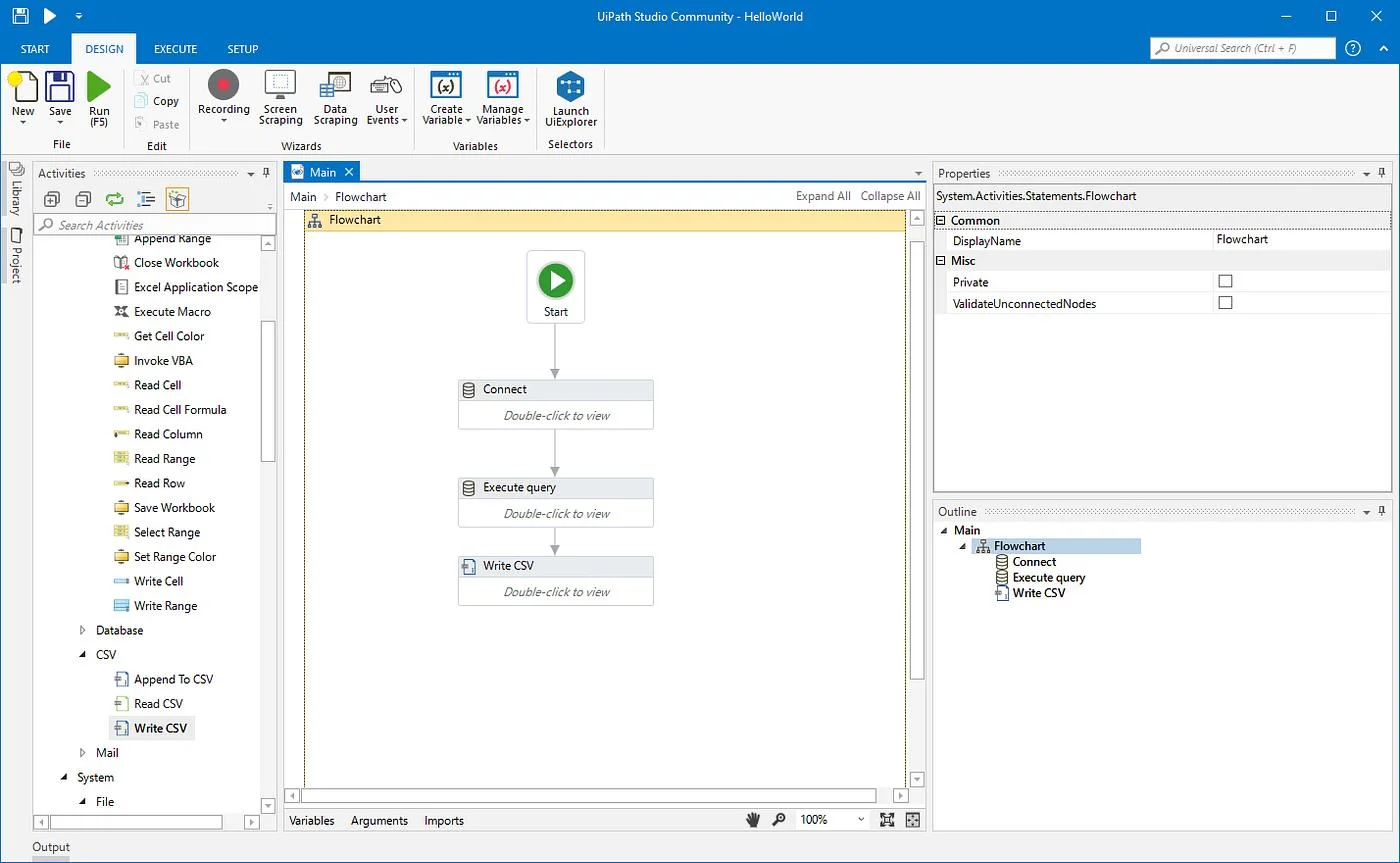
UiPath is a leading robotic process automation (RPA) platform. Companies use it to build software robots that handle rules-based tasks across apps, websites and legacy systems. It is known for strong enterprise features and deep automation control.
| Attribute | Details |
| Type | Enterprise RPA and automation platform |
| Main Tools | UiPath Studio, StudioX, Orchestrator, Assistant, Automation Cloud |
| Best For | Large, complex and high-volume automation programs |
| Skill Level | Beginner to advanced developers |
| Standout Strength | Automation of legacy apps, governance and scale |
| AI Capabilities | Document Understanding, Communications Mining and agentic automation |
| Free Option | Community edition for individuals and small teams |
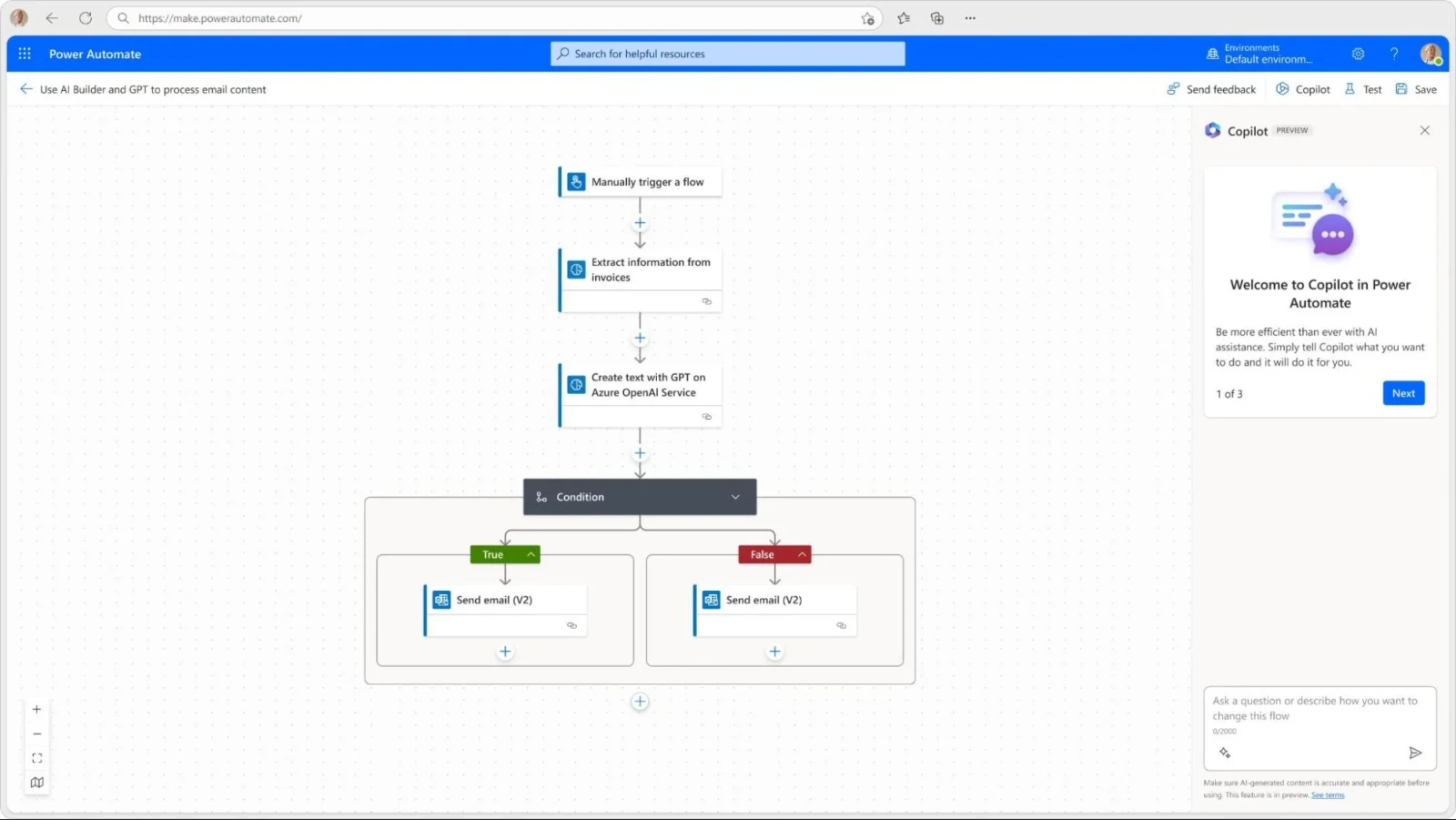
Microsoft Power Automate is a low-code automation tool from Microsoft. It is part of the Power Platform. Users build cloud flows to connect apps and desktop flows to automate Windows tasks. It works best inside the Microsoft ecosystem.
| Attribute | Details |
| Type | Low-code workflow and RPA tool |
| Main Tools | Cloud flows, desktop flows, Power Automate Desktop, AI Builder, Copilot |
| Best For | Microsoft 365 users and teams that want fast, simple automation |
| Skill Level | Business users and citizen developers |
| Standout Strength | Easy start, wide connector library, Microsoft integration |
| AI Capabilities | AI Builder and Copilot for flow creation |
| Free Option | Power Automate Desktop is available in Windows for attended automation |
The detailed comparison is coming up, but here’s the key takeaway:
Power Automate is a great choice for automating everyday tasks within the Microsoft ecosystem, whereas UiPath is suitable for advanced automation involving complex workflows, multiple applications and legacy systems.
| Factor | UiPath | Power Automate |
| Core Focus | Enterprise RPA | Low-code workflows plus RPA |
| Ease of Use | Moderate learning curve | Easier for beginners |
| Legacy App Automation | Very strong | Good, but less deep |
| Microsoft 365 Fit | Good | Excellent |
| Scalability | Built for large programs | Best for small to mid-size programs, growing for enterprise |
| Governance and Control | Advanced through Orchestrator | Solid through Power Platform admin tools |
| Pricing Style | Tiered plans and bot-based licenses | Per-user and per-bot plans |
| Best For | Complex, high-volume automation | Fast, Microsoft-centered automation |
Now let’s break down each area that matters when you compare these RPA tools.
| Area | UiPath | Power Automate |
| Interface | Visual designer with many options and panels | Clean, simple interface with drag-and-drop steps |
| Learning Time | A few weeks to feel confident | A few days to build first flows |
| Target User | Developers, RPA specialists and citizen developers | Citizen developers and business users |
| Training Resources | UiPath Academy offers free courses | Microsoft Learn offers free modules |
| Verdict | More power, more to learn | Faster start, simpler design |
| Area | UiPath | Power Automate |
| UI Automation | Highly mature, with strong selectors and recorders | Good, improving with each release |
| Process Orchestration | Orchestrator manages queues, schedules and robots | Cloud flows trigger and manage desktop flows |
| Document Processing | Document Understanding is a deep, dedicated tool | AI Builder handles common document needs |
| Testing | Built-in test automation tools | Limited testing tools |
| Attended and Unattended Bots | Both are fully supported | Both are supported through licensing |
| Verdict | Better for complex and varied automation | Better for simple to moderate automation |
| Area | UiPath | Power Automate |
| Connector Count | Large library through Integration Service and Marketplace | Over a thousand prebuilt connectors |
| Microsoft Apps | Works well with Microsoft apps | Native and seamless |
| Third-Party Apps | Strong, including SAP, Salesforce and ServiceNow | Strong, but some need premium licenses |
| Legacy and Mainframe Apps | Excellent support | Limited compared to UiPath |
| Verdict | Best for mixed and older systems | Best for Microsoft and cloud apps |
| Area | UiPath | Power Automate |
| AI Direction | Agentic automation and AI-powered robots | Copilot helps build flows using plain language |
| Document AI | Advanced extraction and validation | AI Builder for forms, invoices and text |
| Process Discovery | Process Mining and Task Mining | Process mining and task mining available |
| Verdict | Deeper AI for enterprise automation | Easier AI for everyday users |
Pricing changes often, so always check the official pages before you decide.
| Area | UiPath | Power Automate |
| Free Option | Community edition | Power Automate Desktop in Windows |
| Pricing Model | Tiered plans and custom enterprise quotes | Per-user, per-bot and hosted RPA plans |
| Cost for Small Teams | Can feel higher at the start | Often lower, especially with Microsoft 365 |
| Cost at Scale | Predictable with enterprise agreements | Can grow as you add flows, bots and premium connectors |
| Verdict | Better value for large programs | Better value for small and Microsoft-heavy teams |
| Area | UiPath | Power Automate |
| Bot Management | Orchestrator gives full control | Power Platform admin center |
| Monitoring | Detailed logs, queues and analytics | Run history and analytics |
| Role-Based Access | Advanced | Strong, tied to Microsoft Entra ID |
| Large Deployments | Proven in global enterprises | Growing, with strong Microsoft support |
| Verdict | Stronger for big automation programs | Good for teams that start small |
| Area | UiPath | Power Automate |
| Credential Storage | Secure vaults and integrations with vault tools | Azure Key Vault and Microsoft security tools |
| Compliance | Supports major global standards | Supports major global standards through Microsoft |
| Data Policies | Governance policies in Automation Ops | Data loss prevention policies in Power Platform |
| Verdict | Both are secure when you configure them well | Both are secure when you configure them well |
The tool you pick should match the work you plan to automate.
| Use Case | Better Fit | Why |
| Approval flows in Microsoft Teams or SharePoint | Power Automate | Native connectors make setup fast |
| Invoice processing at high volume | UiPath | Document Understanding handles complex layouts |
| Automating a legacy desktop app | UiPath | Strong selectors and mature UI automation |
| Sending alerts from Outlook to Teams | Power Automate | Simple trigger and action steps |
| Banking or insurance back-office tasks | UiPath | Governance, queues and scale |
| Small team automating Excel reports | Power Automate | Low cost and quick start |
| Automation across SAP, Salesforce and mainframes | UiPath | Broad enterprise app support |
When exploring automation systems, I came across two solutions: UiPath and Power Automate by Microsoft. I found that both these automation solutions help reduce the time spent on tedious tasks and consequently enhance productivity.
My experience with UiPath was both exciting and useful. The drag-and-drop interface proved to be helpful as I created workflows with the help of this system. I learned how UiPath provided accurate invoicing, data entry and document management services. However, I still needed some time to master advanced features such as selectors, variables and exception handling.
Power Automate, on the other hand, proved to be a more user-friendly solution, especially because it integrates smoothly with Microsoft products. I could successfully utilize Outlook, Excel, SharePoint and Teams to automate different mundane processes. For instance, I managed to create workflows that saved email attachments automatically or sent notifications and updates without any effort from me.
As a conclusion, I can say that UiPath is a better option for sophisticated automation tasks while Power Automate is great for less complicated automated processes.
In summary: I would prefer using UiPath for complex robotization projects while Power Automate is more suitable for simpler tasks, especially those that are
Start with your goal. Then match the tool to your needs.
Power Automate is a good choice when:
Choose UiPath if:
Ask yourself three questions before you decide. What apps do we need to automate? Who will build and maintain the automations? How many processes do we plan to run in two years? Your responses will help you choose the most suitable tool.
Finally, run a small pilot. Build the same process in both tools. Compare the build time, the stability and the total cost. A pilot gives you real data, not guesses.
Yes, they can. Many companies use both tools in the same environment.
Here is how it often works. Power Automate handles cloud workflows inside Microsoft 365. UiPath handles heavy desktop automation and legacy systems. A Power Automate flow can start a UiPath job through an API or a connector. UiPath robots can also call Power Automate flows through HTTP requests.
This hybrid approach lets each tool do what it does best. However, it also adds more tools to manage. So keep your design simple and assign clear owners for each platform.
The UiPath vs Power Automate debate has no single winner. UiPath leads in depth, scale and legacy app automation. Power Automate leads in simplicity, speed and Microsoft integration.
If you run a Microsoft-first company and want quick wins, start with Power Automate. If you need enterprise-grade control and complex automation, choose UiPath. If you need both then use them together.
Whichever path you take, start small, run a pilot and measure the results. That approach will help you pick the best RPA tool with confidence.
Ready to decide? List your top three processes today and test them in both tools. The results will make your choice clear.