DataStage is an amazing tool that deals with high-quality data to gather business insight. It's used by large organizations as a bridge between many of the platforms they use. It takes care of extraction, transformation and loading (ETL) of data from one location to another. This DataStage tutorial covers key fundamental aspects needed by an expert in this field.
Let's get started.
This DataStage tutorial begins with the very basics of this tool. All important concepts related to this tool are covered here. These aspects as well as concepts should be learned by professionals and aspirants. The outcome of learning this tool is high level success in the tech world. This tutorial begins with an introduction to DataStage and moves on to its components, architecture and projects. An important question that's covered here is - how to create projects in IBM DataStage tool.
It's an ETL (extract, transform, load) tool. The main purpose it serves is evoking data, measuring as well as transforming data from the source to the final destination. There are different sources in this context and may include sequential files, relational databases, external data files, enterprises and archives. It also promotes business reports through quality data for better business knowledge.
It's used as an interface amongst various systems. It is in charge of extracting the data to translate it and then finally load it from source to destination. Many different versions of this tool have been available in the market so far. These versions include Enterprise Edition (PX), MVS Edition, Server Edition, DataStage for PeopleSoft and many others. IBM InfoSphere DataStage is the latest edition.
Enroll in igmGuru's DataStage Course program to learn Data Integration Tool.
Setting up IBM DataStage correctly is the first step to building reliable ETL pipelines. Whether you're running DataStage on-premises or using the cloud-based version, the installation process follows a structured workflow. Below is a simple step-by-step guide to help beginners install, configure, and start using DataStage without confusion.
IBM offers DataStage in three main editions:
Pick the edition that fits your project requirements and environment.
Before installing, ensure your system supports DataStage. Typical requirements include:
Always verify requirements from IBM’s official documentation for your version.
You can download DataStage from:
Depending on your setup, you may need to install:
These components ensure DataStage functions smoothly post-installation.
Once prerequisites are ready, start the installer:
Follow on-screen instructions to complete the installation without errors.
After installation:
You can do this using the Information Server console.
This section of this DataStage tutorial covers DataStage components and architecture. Having an in-depth understanding of both these aspects is crucial for optimum usage. Each of these aspects have been detailed out separately.
Its components have been divided into two different parts namely server components and client components. Each of these are further categorized into distinct parts for better understanding -
1.1 Server Components
1.2 Client Components
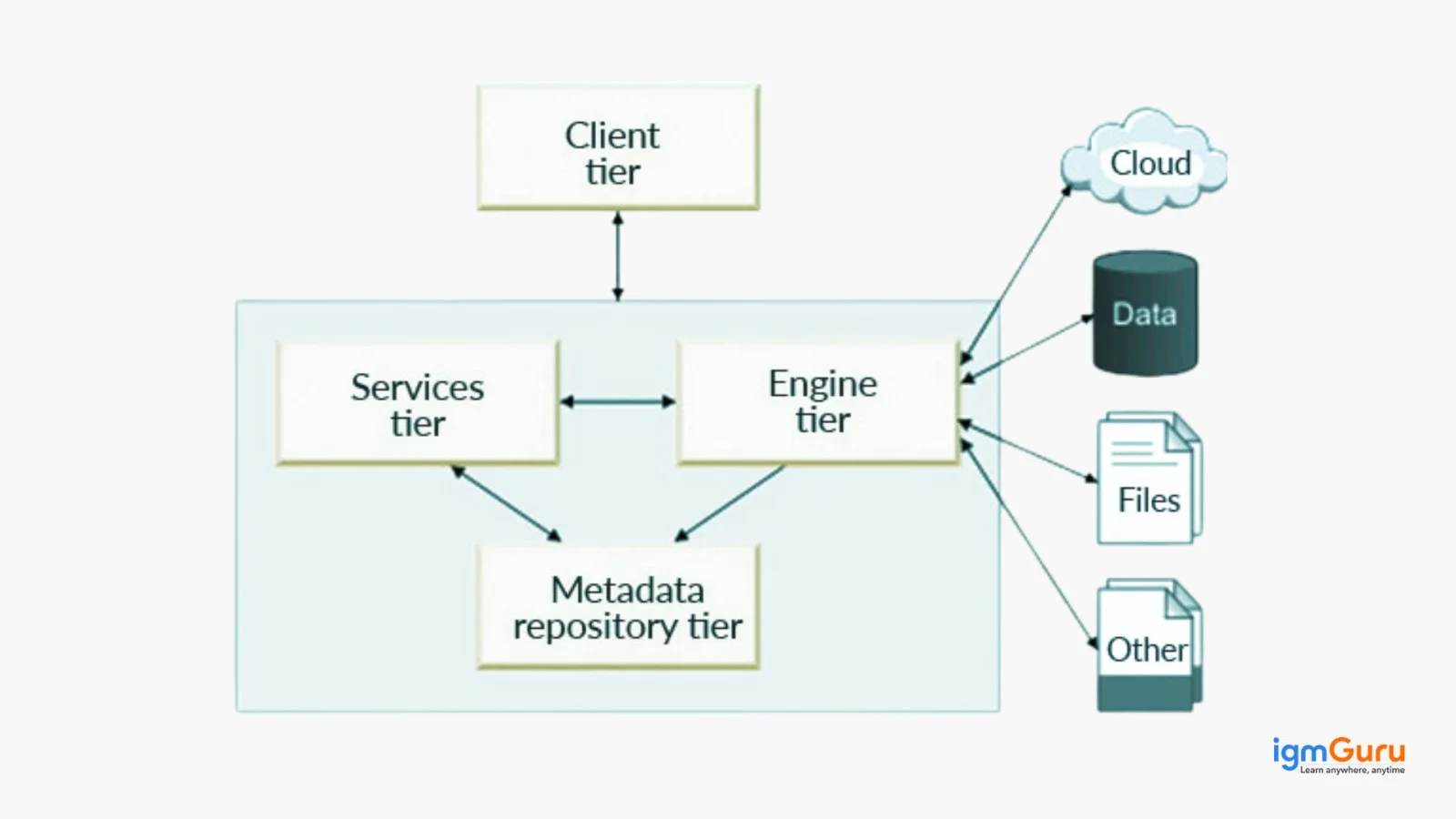
This tool follows the client-server architecture. Different versions have different kinds of client-server architecture. The architecture of DataStage7.5 is explained here. It's a standalone version wherein its engine, service and repository (metadata) are all installed in the server.
The client is installed on a local PC. These can then access the servers by the ds-client. Users are created in Unix or Windows servers. New Windows/ UNIX users have to be created in the DS server for them to get the access permission. These are then added to the Data Stage group. This gives access to this tool's server from the client. Dsadm refers to its server while dstage refers to its group.
Projects in reference to this tool pertain to a method that's used for organizing data. Data files and stages are defined while jobs are built in a specific project. These projects are used by IBM InfoSphere QualityStage for creating and storing files on the client & server. Every project includes these components mentioned below -
The right procedure to create projects should be followed for the best outcomes. This is also needed to optimally use this tool and make the most of it.
Step 1. Launch the DataStage & QualityStage Administrator. Click on 'Start'. Go to 'All programs'.
Step 2. Go to 'IBM Information Server'. Choose 'IBM WebSphere DataStage & QualityStage Administrator'.
Step 3. The 'Attach to DataStage' window opens. Enter domain, password, server information & user ID to connect to the server from the client.
Step 4. The WebSphere 'DataStage Administration' window opens > click on the 'Projects' tab > click on 'Add'.
Step 5. The 'Add Project' window opens > name the project 'testrepl' > then click 'OK'.
Setting up the project with this tool may take several minutes. Completion of this process finishes the work related to the Administrator tool too.
Every DataStage project follows a structured ETL workflow to move data from source systems to target destinations. This lifecycle ensures that data is extracted, cleaned, transformed, validated, and loaded efficiently while maintaining quality and consistency. Understanding the DataStage lifecycle helps beginners visualize how data flows through an ETL process and how different DataStage components work together to deliver reliable business data.
| Stage | Description |
| 1. Data Extraction | DataStage extracts data from multiple sources such as relational databases, flat files, XML files, cloud platforms, ERP systems, and data warehouses. |
| 2. Data Validation | The extracted data is checked for completeness, consistency, duplicates, and invalid records before processing begins. |
| 3. Data Transformation | Business rules are applied to cleanse, standardize, filter, aggregate, sort, merge, and convert data into the required format. |
| 4. Data Integration | Data from multiple sources is combined into a unified structure to provide a consolidated view of information. |
| 5. Data Loading | The transformed data is loaded into target systems such as databases, data marts, data warehouses, or business intelligence platforms. |
| 6. Job Monitoring | DataStage Director monitors job execution, identifies failures, reviews logs, and ensures successful completion of ETL processes. |
| 7. Reporting and Analysis | The processed data becomes available for reporting, analytics, dashboards, and business decision-making. |
The following workflow summarizes how data moves through a typical DataStage project:
| Source Systems | → | Data Extraction | → | Data Transformation | → | Data Loading | → | Reports & Analytics |
For example, a retail company may extract customer data from multiple databases, clean and standardize the records using DataStage transformations, merge the information into a centralized data warehouse, and then use the processed data for reporting and business intelligence dashboards. This complete ETL workflow is what makes DataStage one of the most widely used enterprise data integration tools.
DataStage supports multiple types of jobs to handle different data integration and transformation requirements. Each job type is designed for a specific purpose, such as processing large datasets, executing server-side transformations, or performing administrative tasks. Understanding these job types helps developers choose the most efficient approach for building ETL workflows.
| Job Type | Description | Best Used For |
| Parallel Job | Processes data in parallel across multiple nodes to achieve high performance and scalability. | Large-scale ETL processing and enterprise data integration. |
| Server Job | Executes data transformation tasks on a single server process. | Small to medium-sized ETL workloads. |
| Sequence Job | Controls and coordinates the execution of multiple DataStage jobs. | Workflow orchestration and job scheduling. |
| Mainframe Job | Processes and integrates data from IBM mainframe environments. | Mainframe modernization and legacy system integration. |
| Real-Time Job | Provides real-time data processing and integration capabilities. | Event-driven applications and real-time analytics. |
| Job Sequence | Links multiple ETL jobs together and defines execution dependencies. | Complex ETL workflows involving multiple stages. |
Among these options, Parallel Jobs are the most widely used in modern DataStage implementations because they provide better performance and can process large volumes of data efficiently. Sequence Jobs are also commonly used to automate ETL workflows and manage dependencies between multiple jobs.
This tool is considered to be a leading name for measuring and transforming data through various systems. This DataStage tutorial emphasizes on the fact that as opposed to many ETL tools in the market right now, this one is highly powerful for data warehousing. Professionals like data scientists, data analysts & business intelligence experts find this tool highly useful and beneficial for their career.
This is a globally used tool that integrates semi-structured, unstructured and structured data. It connects XML files, databases, online services and flat files.
DataStage refers to an ETL (extract, transform, load) tool that carries out all these functions for data.
The average salary earned in India is around INR 7.2 LPA. The bracket lies between INR 3.8 LPA to INR 12.0 LPA. The final package depends on many other factors too.
Yes, you can learn it using Datastage tutorial, giving detailed explanation.
Yes, DataStage is easy to learn for beginners who understand basic data concepts. With practice, freshers can quickly learn to build and manage ETL jobs.
Course Schedule
| Course Name | Batch Type | Details |
| DataStage Training | Every Weekday | View Details |
| DataStage Training | Every Weekend | View Details |