Arrays in Go or Golang programming languages are pretty much similar to other programming languages. Sometimes, in the program, we need to store a collection of data of the same kind, for instance, a list of student names of the same class. This kind of collection is stored in a program through an Array. This blog will give a deeper understanding of Go arrays, types, how to create and access them and so much more. So let's begin!.
In Golang, arrays are a fixed-sized, ordered sequence of elements of the same data type. They have a defined length, which is a part of their type and cannot be changed after the declaration. Meaning, [5]int and [10]int are calculated as two distinct and incompatible types.
Arrays aren't put to use that often as slices in typical Go code due to their inflexibility. Here are some of the characteristics of Go arrays to remember.
In Golang, arrays are a foundational data structure that is used for storing a fixed-size sequential collection of elements of the same type. Whereas there aren't definite 'types' of Go arrays in the same way, there are various kinds of data structures such as lists or trees.
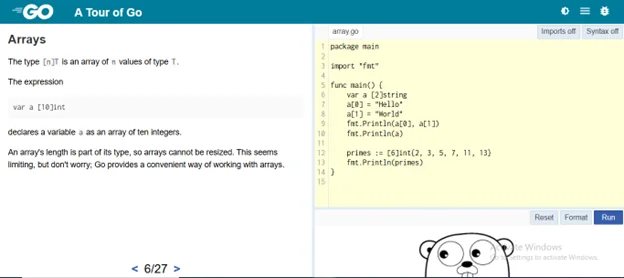
These arrays can be differentiated by their dimensionality and how their length is declared. Let us now take a look at the types of Go arrays with their examples, to make things easier for you to understand.
This single-dimensional array is a simple, linear collection of elements of the same type with a fixed size. Its syntax is '[size]type' and has a fixed length, with elements accessed by index (0-based). Let us take a look at an example of this to make it easier for you.
package main import "fmt" func main() { // Declare and initialize a one-dimensional array var numbers [3]int = [3]int{1, 2, 3} fmt.Println(numbers) // Output: [1 2 3] fmt.Println(numbers[1]) // Output: 2 (accessing index 1) } |
This array is an array of arrays, typically used to represent matrices or grids. In Golang, you can make arrays with various dimensions by nesting array types. Its syntax is '[size1] [size2] type' which is for 2D and can extend to more dimensions. They are fixed-sized for each dimension and accessed through multiple indices. Let us take a look at an example of this to make it easier for you.
package main import "fmt" func main() { // Declare and initialize a 2D array var matrix [2][2]int = [2][2]int{{1, 2}, {3, 4}} fmt.Println(matrix) // Output: [[1 2] [3 4]] fmt.Println(matrix[1][0]) // Output: 3 (accessing row 1, column 0) } |
It is an array with a size of 0. It's used rarely but is valid in Go, usually for placeholder purposes or to satisfy interface requirements. Its syntax is '[0] type'. In this, no elements can be stored, but the array type stays valid. Let us take a look at an example of this to make it easier for you.
package main import "fmt" func main() { // Declare a zero-length array var empty [0]int fmt.Println(len(empty)) // Output: 0 (length is 0) } |
Main Points To Remember:
In Golang, arrays are fixed-size collections of elements of the same type. The size is part of the array's type and should be known at compile time. For creating and accessing an array, you declare it with a particular size and type, such as [size]type. It can be initialized with values during declaration or leave it uninitialized, elements default to zero values, like 0 for ints. The arrays are passed by value, this means that copies are made when assigned or passed to functions. Here is a short example explaining how to create and access an array.
package main import "fmt" func main() { // Creating an array: Declare a fixed-size array of 3 integers, initialized with values var scores [3]int = [3]int{85, 92, 78}
// Accessing elements: Use zero-based indexing (e.g., scores[0] for first element) fmt.Println("First score:", scores[0]) // Output: First score: 85 fmt.Println("Second score:", scores[1]) // Output: Second score: 92
// Modifying an element scores[2] = 95 fmt.Println("Updated third score:", scores[2]) // Output: Updated third score: 95 } |
Here is an explanation to the given example above:
As we know that arrays are contiguous, fixed-sized, indexed data structures that store homogeneous elements, allowing efficient random access and utilization of memory. Here are the important observations about the array given below, so you don't miss out on anything.
All the elements in an array must be of the same data type like all integers, all characters or all strings.
They store elements in a continuous block of memory, which is important for their efficiency.
Each and every element in an array has a unique integer index, which starts from zero, permitting for direct access to any element.
Its contiguous memory and indexed access allow very fast, constant-time access to any element, a procedure called random access.
Once it's created, the size of a standard array can not be changed. It needs programmers to know the needed capacity beforehand.
It stores elements contiguously, making arrays memory-efficient as they make use of a single block of memory.
Now, let us take a quick look at the examples of Go arrays, to make things easier for you to understand.
This example makes a simple array of integers and prints it. Arrays in Go are fixed-sized and hold elements of the same type.
package main import "fmt" func main() { var colors [3]string = [3]string{"red", "green", "blue"} fmt.Println(colors) // Output: [red green blue] } |
Here is an explanation to this example:
This declares an array 'color' with 3 string elements, initialized with values. The size(3) is fixed and elements are accessed through index, like colors[0] is 'red'.
In this example, we access particular elements from an array and update one. Indexing starts at 0.
package main import "fmt" func main() { numbers := [4]int{10, 20, 30, 40} fmt.Println("Second number:", numbers[1]) // Output: Second number: 20 numbers[2] = 35 fmt.Println("Updated array:", numbers) // Output: Updated array: [10 20 35 40] } |
Here is an explanation to this example:
It uses shorthand syntax ':=' for creating and initializing an array of 4 integers. Access numbers[1] to get the second element (20) and then modify numbers[2] to change 30 to 35. Arrays can not grow and size is set at creation.
This example portrays a 2D array, like a grid for showing rows and columns.
package main import "fmt" func main() { matrix := [2][3]int{{1, 2, 3}, {4, 5, 6}} fmt.Println(matrix[0][1]) // Output: 2 (first row, second column) fmt.Println(matrix) // Output: [[1 2 3] [4 5 6]] } |
Here is an explanation of the example given above:
It creates a 2x3 array where every row is an array of 3 integers. Access elements with two indices such as matrix[0] [1] for row 0, column 1 (value 2). It is useful for grids or tables, where dimensions are fixed.
Read Also: Top 50+ Golang Interview Questions And Answers
As we read, Go arrays provide a lightweight, fixed-sized foundation for efficient data storage and manipulation in our programs. Whereas, slices usually steal the spotlight for their flexibility. Mastering arrays equips you with the precision required for performance-critical tasks. You can experiment with them in your next task and watch how they smooth your Go coding journey.
Slices are like arrays but are more strong and flexible. These are also used for storing various values of the same type in a single variable.
Golang arrays are pretty straightforward. They are fixed size whereas slices are dynamic.
We can use arrays in Go, whenever we want to group a chain of elements of the same type. These can be done in two ways, through arrays or slices.
Elements in Arrays in Go are accessed using zero-based indexing.
Yes, Arrays in Go can be passed to functions, but they are copied by value.
If not initialized, all elements of an array get default zero values (0 for int, empty string for string).
Course Schedule
| Course Name | Batch Type | Details |
| Golang Training | Every Weekday | View Details |
| Golang Training | Every Weekend | View Details |