Go Packages are the foundational unit of code organization which permits developers to group relevant functions, variables and data structures altogether in reusable and manageable units. Each and every Go program is made up of at least one package. In this blog we will read on understanding Go Packages programming, types, use cases and much more with examples.
So let’s get down to it!
Read Also: Control Statements in Golang
Go Packages serve as a foundational unit of code organization and reusability. It's basically a bunch of Go source files living within the same directory, sharing the same purpose or set of functionalities.
It is a file or a bunch of files with a namespace and some code or related code. Meaning, that a package can live in a file like math.go or all over various files like add.go, subcrtact.go, multiply.go and more. Here is a short example of Go Packages.

Go Packages are of service to organizing and reusing code. They are made in use for reusability, modularity and better readability. It's a bunch of source files in the same directory that all share the same package declaration on top. Below, we provided a table on the types of Go Packages to make things easier for you to understand.
| Types of Packages | Definition | Main Characteristics | Examples |
| Main Package | This package describes an executable program with a main() function. | It is a must have package. It produces a binary when compiled with go build. | package main func main() { fmt.Println("Hello") } |
| Library Package | This package has reusable code (functions, types, etc.) for other packages to import. | This package was named after its directory (e.g., mathops ). Exported identifiers begin with uppercase. | package mathops func Add(a, b int) int { return a + b } |
| Standard Library Package | In this, it has in-built packages given by Go for common tasks. | Its included in the Go installation. And is imported with short paths like, fmt, os . | import "fmt" fmt.Println("Hello") |
| Third-Party Package | In this, the external packages are made by the community and hosted on repositories like GitHub. | It is added through go get . Defined in external modules. | import "github.com/gorilla/mux" mux.NewRouter() |
Also Read: Strings in Golang
Go packages are the basics to organize and manage code in the programming language. They have many uses and advantages, so let us read on why we should use Go Packages.
They offer a logical way to group related functions, types and variables in clear units. This modularity produces huge codebases easy to understand, locate and manage. They promote a clear separation of concerns.
Through encapsulating particular functionalities within packages. These units can be reused by developers all over various parts of the same project or even a whole separate project. It lessens redundant code and fastens the development.
They make distinct namespaces, which prevents naming conflicts between identifiers like functions, variables and more, which may have similar names but serve different motives in various parts of an application.
The well structured packages with clear names and responsibilities improve code readability. Making it easier for developers to understand the purpose of various code segments and facilitating future modifications and improvements.
Through code organized in packages, many developers can work on various parts of a huge project simultaneously with less risk of interference. As each and every package can be created and tested freely.
Read Also- Golang Interview Questions And Answers
The Go Packages assist in organizing code into reusable units. A package is a folder with Go files sharing the same package name. The main package makes an executable program, whereas other packages are libraries. We will learn how to write a Go Package, through steps to make things easier for you to understand.
Run in the myproject folder:
| go mod init myproject |
This makes a go.mod file:
module myproject go 1.21 |
File: calc/calc.go
package calc // Sum adds two numbers func Sum(a, b int) int { return a + b } |
File: main.go
package main import ( "fmt" "myproject/calc" ) func main() { result := calc.Sum(2, 3) fmt.Println("2 + 3 =", result) } |
In the myproject folder, run:
| go run . |
Here is the Output:
| 2 + 3 = 5 |
Here is the detailed explanation-
The Go Packages are put to use for organizing and sharing code, making it modular and reusable. You can create a package for your own use or publish it for others, basically on a platform like GitHub. Creating a package includes defining its functionality and publishing it includes hosting it in a public repository and making sure whether it’s accessible via Go modules. Below is a short, beginner-friendly example with steps on how to create a Go package and publish it.
Directory Structure
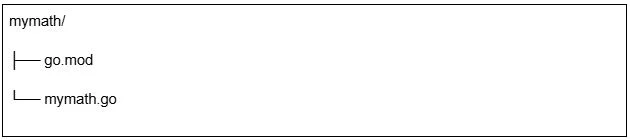
In the mymath folder, run:
| go mod init github.com/yourusername/mymath |
This creates a go.mod file:
module github.com/yourusername/mymath go 1.21 |
File: mymath/mymath.go
package mymath // Add returns the sum of two integers func Add(a, b int) int { return a + b } |
Create a separate program to use the package.
File: test/main.go
package main import ( "fmt" "github.com/yourusername/mymath" ) func main() { result := mymath.Add(2, 3) fmt.Println("2 + 3 =", result) } |
Run it:
cd test go mod init test go mod tidy go run . |
Output:
| 2 + 3 = 5 |
cd mymath git init git add . git commit -m "Initial commit" git remote add origin https://github.com/yourusername/mymath.git git push -u origin main |
Go modules use version tags (e.g., v1.0.0) for releases. Tag your package:
git tag v1.0.0 git push origin v1.0.0 |
Others (or you) can now import the package in their Go programs.
Example consumer program:
File: consumer/main.go
package main import ( "fmt" "github.com/yourusername/mymath" ) func main() { result := mymath.Add(5, 7) fmt.Println("5 + 7 =", result) } |
Install and run:
cd consumergo mod init consumer go get github.com/yourusername/mymath@v1.0.0 go run . |
Output:
| 5 + 7 = 12 |
Read Also: Error Handling in Go
Replace yourusername with your actual GitHub username.
Here is a clean and beginner-friendly Go Packages Cheat Sheet. It covers the most commonly used packages across different areas of Go development.
| Area | Important Go Packages | What They’re Used For |
| Basic I/O & Utilities | fmt, bufio, io, strconv | Printing output, reading input, I/O operations, and type conversions. |
| Working with Files | os, io/ioutil, path/filepath | Reading/writing files, directory operations, and file paths. |
| Strings & Text Processing | strings, unicode, regexp | String manipulation, Unicode handling, and regular expressions. |
| Networking & APIs | net/http, net, url, http | Creating HTTP servers, clients, sockets, and parsing URLs. |
| JSON & Data Encoding | encoding/json, encoding/xml, encoding/csv, encoding/base64 | Working with JSON, XML, CSV, and Base64 encoding/decoding. |
| Concurrency | sync, sync/atomic, context, time | Goroutines, locks, atomic operations, time handling, and cancellation. |
| Data Structures | container/list, container/heap, sort | Lists, heaps, priority queues, sorting algorithms. |
| Cryptography & Security | crypto/md5, crypto/sha256, crypto/hmac, crypto/rand, crypto/tls | Hashing, encryption, secure random numbers, TLS support. |
| HTTP Routing (External) | gorilla/mux, gin-gonic/gin, echo | Popular third-party frameworks for building REST APIs. |
| Database | database/sql, plus drivers like pq (PostgreSQL), mysql, sqlite | SQL operations with different databases. |
| Testing | testing, testify | Unit testing, assertions, test helpers. |
| Logging | log, zap, logrus | Logging, structured logs, production logging. |
| Configuration Management | viper, envconfig | Reading configs from files, environment variables. |
| WebSockets | gorilla/websocket | Real-time applications, WebSocket server/client. |
| CLI Development | cobra, urfave/cli | Building command-line applications. |
| Working with Time | time | Time formatting, duration, timers. |
| Templates | text/template, html/template | Rendering dynamic text and HTML templates. |
| Math & Computation | math, math/rand, big | Math functions, random numbers, big integers. |
| Category | Function(s) | Purpose |
| Print Functions | Print(), Println(), Printf() | Print text to standard output. Println adds a newline, Printf supports formatting. |
| Formatted Printing | Fprint(), Fprintln(), Fprintf() | Write formatted output to io.Writer like files, buffers, or HTTP responses. |
| String Formatting (Returns String Instead of Printing) | Sprint(), Sprintln(), Sprintf() | Same as print functions but return a string instead of printing. Useful for building dynamic text. |
| Scanning (Input) | Scan(), Scanln(), Scanf() | Read input from standard input (stdin) in different formats. |
| Formatted Scanning From Writer | Fscan(), Fscanln(), Fscanf() | Read input from an io.Reader (files, strings, network connections). |
| String Scanning | Sscan(), Sscanln(), Sscanf() | Read values from a string using formatting rules. |
| Error Formatting | Errorf() | Format an error message and return it as an error object (commonly used in Go). |
| Verbs (Formatting Codes) | %d, %s, %t, %v, %f, %p, %T | Control how variables are formatted: integers, strings, booleans, structs, floats, pointers, types, etc. |
Go offers us a very easy tool to share code between our projects and teams that we should take good advantage of. Multiple teams usually solve the need to share code through thousands of microservices. As we read, Go packages serve us in many good ways.
Also Read: How To Learn Golang?
As the syntax of Golang is smaller as compared to a lot of other programming languages and only has a minimalistic set of features to get the work done. So yeah, it is easy to learn.
Absolutely yes, it is faster than C++ and is over four times faster than its interpreted and dynamic colleagues.
It usually takes 1-2 months to learn Golang basics, depending on your prior programming experience.
You can import Go Packages using the import keyword followed by the package path.
Go Packages promote modular programming, code reusability, and maintainability.
The main package runs the program. Other packages are used to organize and reuse code in different parts of the application.