Struggling with duplicate rows in your SQL database? These can potentially compromise data integrity, slow down queries, give inaccurate results and waste storage space. Cleansing duplicate records from our database is a major maintenance task for making sure of data accuracy and performance. The duplicate rows in a SQL table might lead to data inconsistencies and performance issues. This makes it important to identify and remove them successfully.
This article is all about how to delete duplicate rows in SQL. It is designed with the help of experienced professionals to explain every step in detail, from identification to deleting duplicate rows in SQL through different techniques. With this note, let's first understand what duplicate rows are in SQL.
Duplicate rows are basically records with identical values in one or more columns of SQL databases. This issue mostly occurs due to user errors, multiple imports or missing constraints like unique indexes or primary keys. These are typically deleted by using SQL queries. It involves identifying them using different functions like COUNT() or ROW_NUMBER() and then deleting them with different techniques.
The presence of duplicate rows in SQL can lead to the following issues -
Related Article - SQL Server Interview Questions And Answers

There are many reasons to delete duplicate rows in SQL. The ultimate goal of this task is to improve the performance of the database. This involves eliminating redundant data to solve problems related to data inaccuracy like performance issues, heavy storage use and slow query performance.
Now we will discuss how to delete duplicate rows in SQL. Deleting a duplicate row in SQL is a two-step process. First, we have to find the duplicate data and then delete it.
Also Read: What is ELT?
Companies nowadays use humongous datasets and it is complicated to find duplicate rows in them. It is something that needs to be done using different queries. SQL mostly stores data in a tabular form and the same data can be anywhere in it.
There are two clauses, namely GROUP BY and HAVING. This combination of clauses can find duplicate rows. GROUP BY groups all the rows based on a specific column. The HAVING filters the identical groups from them.
Let's take an example of a table to understand this process. Use the query given below to group rows by Name and Section. The condition HAVING COUNT(*) > 1 filters the groups that have more than one appearance in the table.
| Name | Section |
| XYZ | A1 |
| ABC | A2 |
| XYZ | A1 |
SELECT Name, Section FROM tbl GROUP BY Name, Section HAVING COUNT(*) > 1; |
| Name | Section | CNT |
| XYZ | A1 | 2 |
Duplicate data can also be available in columns. The query given below identifies identical names from columns. The condition HAVING COUNT(Name) > 1 finds the name from columns that appear more than once.
| ID | Name |
| 1 | SQL |
| 2 | MySQL |
| 3 | SQL |
SELECT Name, COUNT(*) AS CNT FROM Person GROUP BY Name HAVING COUNT(Name) > 1; |
| Name | CNT |
| SQL | 2 |
What if you have a temporary table? The query given below uses a subquery that creates a temporary table. This table counts the repetition of each Name in the table. The outer query then finds the rows that have appeared more than once.
SELECT Name FROM ( SELECT Name, COUNT(*) AS num FROM Person GROUP BY Name ) AS statistic WHERE num > 1; |
| Name | CNT |
| SQL | 2 |
Related Article - What is PL/SQL- Everything You Need To Know
There are many ways to do it and the choice of a perfect one depends on the situation the individual is dealing with. Let's create a sample table and then apply different methods to it to understand it better.
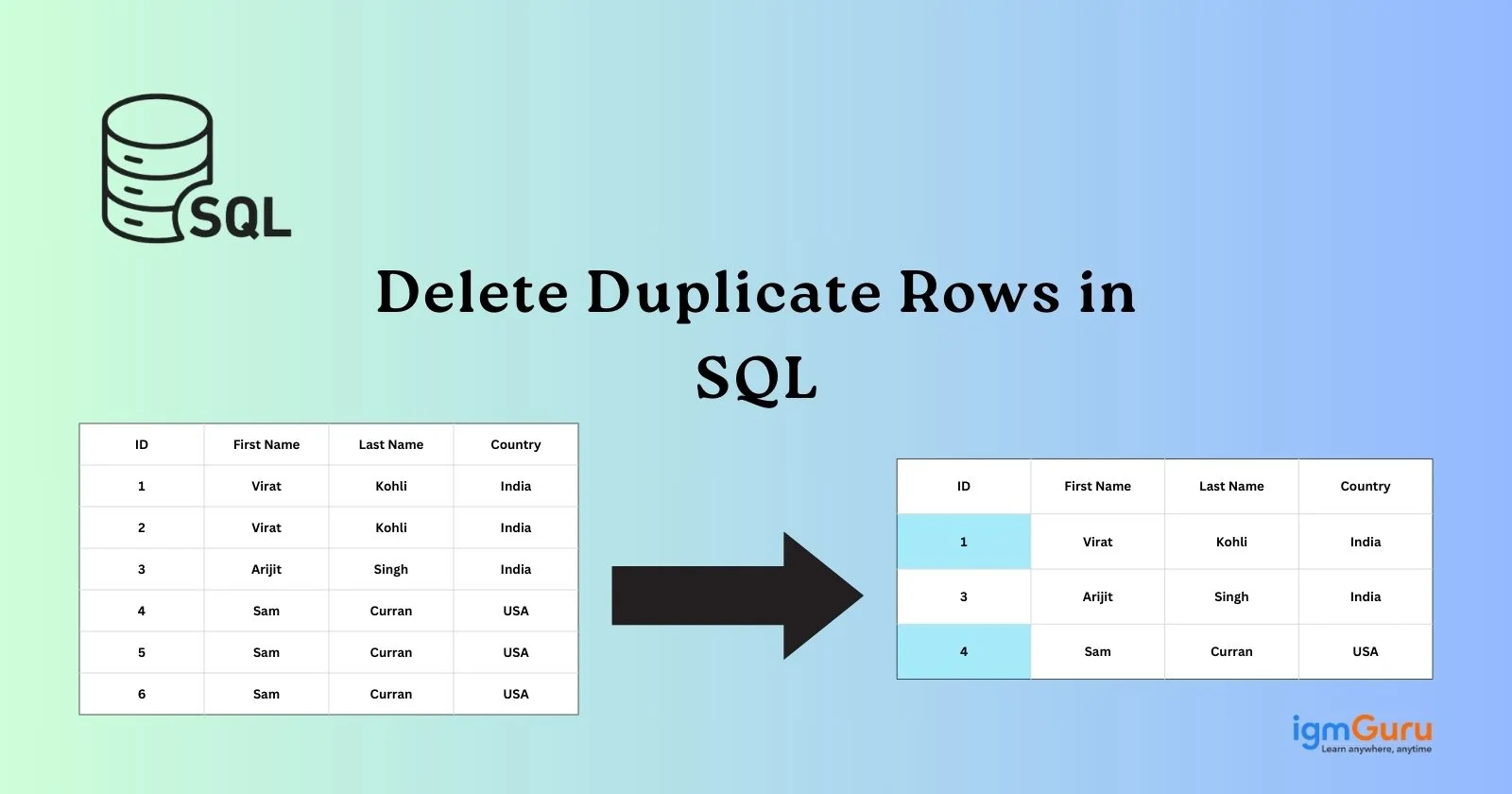
CREATE TABLE Employee ( [ID] INT IDENTITY(1,1), [FirstName] VARCHAR(100), [LastName] VARCHAR(100), [Country] VARCHAR(100) ); GO INSERT INTO Employee ([FirstName], [LastName], [Country]) VALUES ('Virat', 'Kohli', 'India'), ('Virat', 'Kohli', 'India'), ('Arijit', 'Singh', 'India'), ('Sam', 'Curran', 'USA'), ('Sam', 'Curran', 'USA'), ('Sam', 'Curran', 'USA'); |
| ID | First Name | Last Name | Country |
| 1 | Virat | Kohli | India |
| 2 | Virat | Kohli | India |
| 3 | Arijit | Singh | India |
| 4 | Sam | Curran | USA |
| 5 | Sam | Curran | USA |
| 6 | Sam | Curran | USA |
1. Start with identifying the duplicate rows by using the same methods we have discussed in the above section. This will give you all the duplicate rows with the number of their repetition. The output will be as follows -
| ID | First Name | Last Name | Country | CNT |
| 1 | Virat | Kohli | India | 2 |
| 4 | Sam | Curran | USA | 3 |
2. Now we need to remove only duplicate rows from our table. Use the SQL MAX function and the max ID of duplicate rows.
SELECT FirstName, LastName, Country, COUNT(*) AS CNT FROM Employee GROUP BY FirstName, LastName, Country HAVING COUNT(*) > 1; |
3. Now use SQL delete statements to remove the duplicate rows as shown below.
DELETE FROM Employee WHERE ID NOT IN ( SELECT MAX(ID) FROM Employee GROUP BY FirstName, LastName, Country ); |
| ID | First Name | Last Name | Country |
| 2 | Virat | Kohli | India |
| 6 | Sam | Curran | USA |
Using CTE is one of the best methods and is only applicable on SQL Server starting from 2005.
1. It uses the SQL ROW_NUMBER function and adds unique sequential numbers for each row.
WITH CTE AS ( SELECT ID, FirstName, LastName, Country, ROW_NUMBER() OVER(PARTITION BY FirstName, LastName, Country ORDER BY ID) AS RowNum FROM Employee ) DELETE FROM CTE WHERE RowNum > 1; |
| ID | First Name | Last Name | Country | Dupilcate Count |
| 1 | Arijit | Singh | India | 1 |
| 2 | Sam | Curran | USA | 1 |
| 3 | Sam | Curran | USA | 2 |
| 4 | Sam | Curran | USA | 3 |
| 5 | Virat | Kohli | India | 1 |
| 6 | Virat | Kohli | India | 2 |
2. Now use the CTE function to remove the duplicate rows.
WITH CTE([FirstName], [LastName], [Country], DuplicateCount) AS (SELECT [FirstName], [LastName], [Country], ROW_NUMBER() OVER(PARTITION BY [FirstName], [LastName], [Country] ORDER BY ID) AS DuplicateCount FROM [SampleDB].[dbo].[Employee]) DELETE FROM CTE WHERE DuplicateCount > 1; |
| ID | First Name | Last Name | Country |
| 1 | Virat | Kohli | India |
| 3 | Arjit | Singh | India |
| 4 | Sam | Curran | USA |
Use of SQL RANK gives a unique ID to each row, including the identical ones.
1. This query uses a PARTITION BY clause that prepares a data subset and gives a rank to each partition of it.
WITH Ranked AS ( SELECT ID, FirstName, LastName, Country, ROW_NUMBER() OVER(PARTITION BY FirstName, LastName, Country ORDER BY ID) AS RowNum FROM Employee ) DELETE FROM Ranked WHERE RowNum > 1; |
| ID | First Name | Last Name | Country | Rank |
| 1 | Virat | Kohli | India | 1 |
| 2 | Virat | kohli | India | 2 |
| 3 | Arijit | Singh | India | 1 |
| 4 | Sam | Curran | USA | 1 |
| 5 | Sam | Curran | USA | 2 |
| 6 | Sam | Curran | USA | 3 |
2. Now use the following query and remove the rows that have more than one rank -
DELETE E FROM [SampleDB].[dbo].[Employee] E INNER JOIN ( SELECT *, RANK() OVER(PARTITION BY firstname, lastname, country ORDER BY id) rank FROM [SampleDB].[dbo].[Employee] ) T ON E.ID = t.ID WHERE rank > 1; |
| ID | First Name | Last Name | Country |
| 1 | Virat | Kolhi | India |
| 3 | Arijit | Singh | India |
| 4 | Sam | Curran | USA |
Data impurities like duplicate rows in SQL can lead to major performance issues for companies. This may affect all the tasks related to data, from decision-making to business intelligence. This is why it is important to find and delete duplicate rows in SQL before it's too late. There are many ways to establish data integrity and this article has already explained many of them.
Duplicate records in SQL are rows that repeat more than once. It is a type of data impurity that can reduce the performance of a company. These have to be deleted as soon as possible.
The use of unique constraints in a table can prevent duplicate rows. Many experts use this best practice in their work. There are still some chances where duplicate rows can occur such as human error, application bug or uncleaned data.
This often occurs when data is refreshed in upstream systems or ETL jobs. It can also arise due to incorrect joins, duplicate data in source tables, etc.