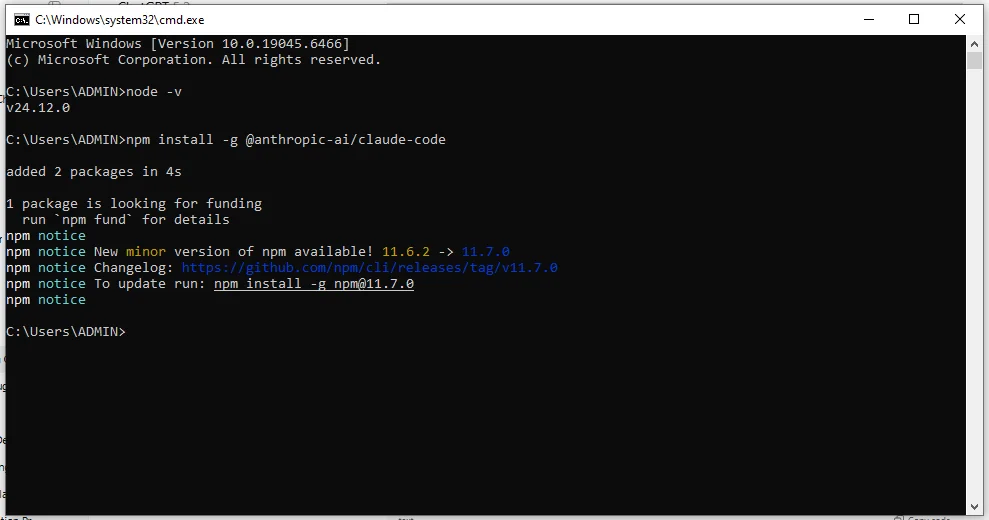
Claude Code is a terminal-based AI coding assistant by Anthropic. To get started right now: install it with npm install -g @anthropics/claude-code, then run claude from your project root to start an interactive session.
This Claude Code cheat sheet is a fast reference for beginners and developers using this AI assistant in real projects. It is designed for quick lookup, revision, and daily use, covering the most common commands, workflows, and prompt patterns without long explanations.
What is Claude Code?
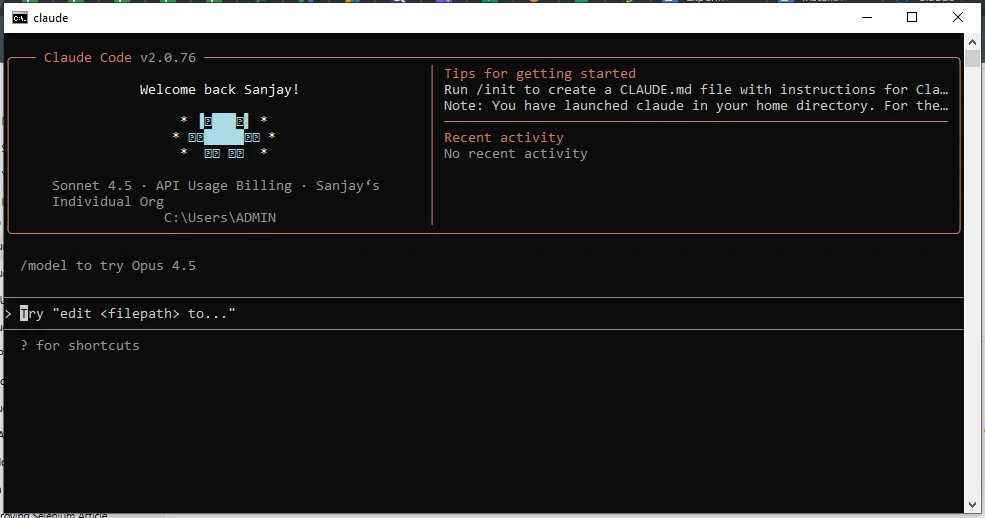
Claude Code is a terminal-based AI coding assistant by Anthropic that works directly with your local files and repositories. It understands project context, helps write, debug, refactor, and document code, and acts like an AI pair programmer inside your development workflow.
Mental Model
- AI pair-programmer in your terminal
- Works on local files + full repo context
- Best used from the project root
Install & Authenticate
| Command | Description |
|---|
npm install -g @anthropics/claude-code | Install Claude Code globally |
claude auth login | Authenticate with Anthropic |
claude auth status | Check login status |
Start / Resume / One-Shot
| Command | Use |
|---|
claude | Start interactive session |
claude --resume | Resume last session |
claude "prompt" | Run a one-shot task |
Most Useful Claude Code Keyboard Shortcuts
| Shortcut |
Action |
Ctrl + C |
Interrupt current operation |
Ctrl + L |
Clear terminal screen |
Arrow Up |
Recall the previous command |
Arrow Down |
Navigate command history |
Tab |
Autocomplete commands or paths |
Ctrl + D |
Exit current session |
Ctrl + R |
Search command history |
Esc | Interrupt Claude's current response or operation |
Esc + Esc | Open rewind/checkpoint options |
Shift + Tab | Cycle through permission modes |
Ctrl + O | Show the detailed transcript view |
@ + path | Reference a file or directory in a prompt |
/ | Open the command menu |
? | Show available keyboard shortcuts |
Session & Slash Commands
| Command | Description |
|---|
/help | Show available commands |
/clear | Clear current context |
/exit | Exit session |
/version | Show version info |
/status | Show account, model, working directory and version information |
/doctor | Diagnose Claude Code installation and environment issues |
/agents | List, create or edit subagents |
/skills | List available Skills |
/hooks | View configured hooks |
/resume | Resume a previous session |
File & Code Operations
| Command | Purpose |
|---|
claude "read file.py" | Read and explain a file |
claude "edit index.js" | Edit existing file |
claude "create utils.py" | Create a new file |
claude "refactor this file" | Refactor code |
Quick Tasks (One-Liners)
| Task | Command |
|---|
| Explain code | claude "explain this file" |
| Summarize project | claude "summarize project" |
| Fix lint issues | claude "fix lint errors" |
| Optimize function | claude "optimize this function" |
Understand a Codebase
| Command | Use Case |
|---|
claude "analyze repo" | High-level analysis |
claude "explain folder structure" | Understand layout |
claude "find unused code" | Detect dead code |
claude "suggest improvements" | Codebase cleanup ideas |
Debugging & Fixes
| Scenario | Command |
|---|
| Runtime error | claude "debug this error" |
| Stack trace | claude "fix stack trace" |
| Failing logic | claude "why is this failing?" |
| Hidden bug | claude "find logical bug" |
Refactoring & Optimization
| Goal | Command |
|---|
| Simplify code | claude "simplify logic" |
| Improve readability | claude "improve readability" |
| Remove duplication | claude "remove duplication" |
| Performance | claude "optimize performance" |
Testing & Quality
| Task | Command |
|---|
| Write tests | claude "write tests" |
| Fix tests | claude "fix failing tests" |
| Add edge cases | claude "add edge cases" |
| Coverage review | claude "analyze test coverage" |
Git & Pull Requests
| Task | Command |
|---|
| Review changes | claude "review git diff" |
| Commit message | claude "suggest commit message" |
| Fix conflicts | claude "fix merge conflicts" |
| PR summary | claude "prepare PR summary" |
Documentation
| Task | Command |
|---|
| Create README | claude "create README" |
| Document function | claude "document this function" |
| Inline comments | claude "add inline comments" |
| API docs | claude "generate API docs" |
Memory & Context
| Command | Purpose |
|---|
claude --memory | Enable memory |
claude "show memory" | View stored context |
claude "clear memory" | Reset memory |
CLAUDE.md: Project Memory File
| Task | Command / Action |
|---|
| Generate initial file | claude /init |
| Define coding conventions | Add rules directly in CLAUDE.md |
| Set folder structure notes | Describe layout and purpose |
| Log past mistakes | Write them in so Claude avoids repeating them |
MCP (Model Context Protocol): External Integrations
| Task | Command |
|---|
| Add MCP server | claude mcp add |
| List connected servers | claude mcp list |
| Remove a server | claude mcp remove <name> |
| Use MCP tool in session | Claude invokes automatically when relevant |
Hooks: Automated Triggers
| Hook Event | When It Fires |
|---|
SessionStart | On every new or resumed session |
PreToolUse | Before Claude runs any tool |
PostToolUse | After a tool completes |
UserPromptSubmit | Every time you submit a message |
Stop | When the session ends |
Subagents — Parallel Execution
| Task | Command |
|---|
| Spawn a subagent | claude "run this task in a subagent" |
| Background shell session | claude agents ! <command> |
| Isolate heavy analysis | Define agent in .claude/agents/<name>.md |
Slash Commands (Advanced)
| Command | Description |
|---|
/init | Generate a CLAUDE.md for your project |
/cost | Show token usage and cost breakdown |
/model | Switch or save your active model |
/compact | Compress context to save tokens |
/code-review | Run a code review on current changes |
/code-review --fix | Review and auto-apply fixes |
/simplify | Cleanup-only refactor review |
Permissions & Safety
| Command | Purpose |
|---|
claude --allowedTools "Bash,Edit" | Restrict which tools Claude can use |
claude --disallowedTools "Bash" | Block specific tools |
claude --no-permission-check | Skip confirmation prompts (use carefully) |
| Review changes before commit | Always diff before git commit on production |
.claude/ Folder Structure (Power User)
Most engineers using Claude Code leave roughly 80% of the product on the floor by not using the .claude/ directory.
.claude/
├── CLAUDE.md          ← Project memory & conventions
├── agents/            ← Specialized subagent definitions
├── skills/            ← Reusable slash command workflows
├── rules/             ← Path-scoped behavior rules
└── settings.json      ← Hooks, permissions, model config
Headless Mode & Automation
| Command / Option | Use |
|---|
claude -p "prompt" | Run Claude Code non-interactively with a prompt |
claude -p "run tests and explain failures" | Run an automated development task |
claude -p "review this code" | Use Claude Code in scripts or CI workflows |
Headless mode allows Claude Code to run without an interactive terminal session. It is useful for automation, CI/CD pipelines, scheduled code reviews, testing workflows, documentation generation, and other repeatable development tasks.
Checkpoints & Rewind
| Action | Purpose |
|---|
Esc | Interrupt Claude's current operation |
Esc + Esc | Open the rewind/checkpoint menu |
/rewind | Return to an earlier checkpoint when available |
Claude Code provides checkpoints that make it easier to recover from unwanted changes during an interactive session. Before accepting a large refactor or experimental change, you can use the rewind functionality to return to an earlier state instead of manually undoing every modification.
Claude Code Skills
Skills are reusable workflows that extend Claude Code with specialized instructions, procedures, templates, and supporting files. Unlike CLAUDE.md, which provides project instructions that are loaded into the session context, Skills can be loaded when they are relevant to a task. You can also invoke a Skill directly using its slash command.
| Feature | Purpose |
|---|
SKILL.md | Defines the Skill's instructions and behavior |
.claude/skills/ | Stores project-level Skills |
~/.claude/skills/ | Stores personal Skills available across projects |
/skill-name | Explicitly invoke a Skill |
CLAUDE.md vs Skills vs Subagents vs Hooks
| Feature | Best Used For |
|---|
CLAUDE.md | Project-wide instructions, conventions, architecture and commands |
| Skills | Reusable workflows and specialized procedures |
| Subagents | Delegating isolated or specialized tasks |
| Hooks | Automatically running actions when specific events occur |
| MCP | Connecting Claude Code to external tools and services |
The easiest way to remember the difference is: use CLAUDE.md for persistent project knowledge, Skills for reusable workflows, subagents for delegated work, Hooks for automatic event-driven actions, and MCP for external integrations.
Extended Thinking (Advanced)
| Command | Use |
|---|
claude --think | Deep reasoning mode |
claude "deeply analyze architecture" | Design & performance review |
Prompt Upgrade (Revision)
| Avoid | Use Instead |
|---|
Fix this | Fix this Python KeyError and explain why |
Write code | Create a Node.js API with validation |
Real-World Go-To Prompts
1. "Create a Python script to validate emails from CSV"
2. "Find and fix the error in this file"
3. "Optimize this function for performance"
One-Line Reminder
Treat Claude Code like a pair programmer, not an autopilot.
Also Explore: Best Claude Alternatives
Wrapping Up Claude Code Cheat Sheet
Claude Code is most effective when used as a daily development companion rather than a one-time code generator. This Claude Code cheat sheet is designed to help you quickly recall commands, patterns, and workflows, allowing you to stay productive without disrupting your coding flow.
FAQs on Claude Code Cheat Sheet
Q1. Is Claude Code beginner-friendly?
Yes. Basic commands are easy to use, and you can gradually move to advanced workflows.
Q2. Does Claude Code work offline?
No. It runs locally but requires an internet connection to access Claude models.
Q3. Is it safe to use on production code?
Yes, but always review changes before committing, especially in critical systems.
Q4. Can Claude Code replace developers?
No. It assists developers but does not replace human judgment or experience.
Course Schedule