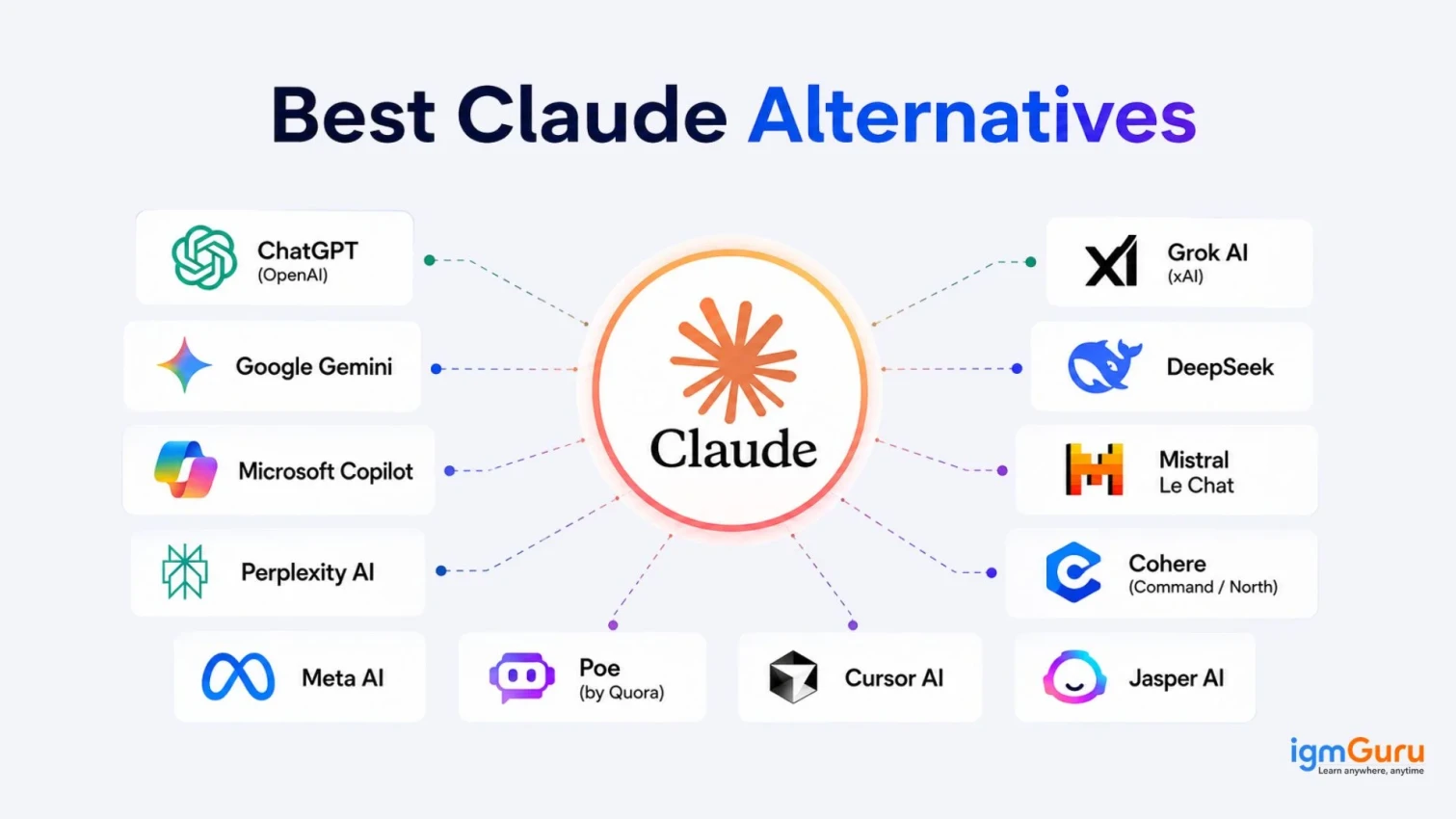
The best Claude alternatives depend on your requirements and the tasks you want to perform with it. There are many options available, including Grok, Jasper, Meta, Cursor, ChatGPT, Gemini, and more. Each of these AI tools is best in different areas. This means you need to understand their features, pros, cons, best use cases, and pricing before choosing the best one.
I am also an AI enthusiast just like you who has tested many AI chatbots and AI assistants in different areas based on different parameters. This article explains the same. It explores everything I found on those best Claude alternatives, along with practical examples to help you understand the real difference.
Let's begin!
Read Also: What Is Janitor AI? Features, Pricing and How to Use
| Tool Name | Best For | Unique Features | Pricing |
| ChatGPT (OpenAI) | General-purpose assistant, broad ecosystem | Largest plugin/app ecosystem, voice mode, image generation, memory | Free; Plus: $20/mo; Pro: $200/mo; Team/Enterprise: custom |
| Google Gemini | Real-time data, Google Workspace users | Live Google Search access, multimodal (voice, image, text), deep Workspace integration | Free; Gemini Pro: ~$19.99/user/mo |
| Microsoft Copilot | Enterprise productivity, Office workflows | Deep Microsoft 365 integration, Microsoft Graph context-awareness | Free (limited); Copilot Pro: $20/user/mo |
| Perplexity AI | Web-backed research and citations | Real-time search with sources, research reports, AI browser "Comet" | Free; Pro: $20/mo or $200/yr |
| Grok AI (xAI) | Real-time trends, social/creative content | X platform integration, multimodal, "truth-seeking" tone | Free tier; SuperGrok: $30/mo; Heavy: $300/mo |
| DeepSeek | Cost-efficient reasoning and coding | Ultra-low token pricing, strong math/coding performance | V4 Flash: $0.14/1M input tokens; V4 Pro: $0.435/1M input |
| Mistral Le Chat | Open-weight flexibility, EU data residency | Open-source models, fast inference, strong multilingual support | Free; Pro tier available |
| Cohere (Command / North) | Enterprise NLP and internal search | Retrieval-augmented workflows, enterprise-grade deployment | Custom/enterprise pricing |
| Meta AI | Social/hardware integration | Works across WhatsApp, Instagram, Facebook, smart glasses | Free |
| Poe (by Quora) | Access to multiple AI models in one place | Switch between Claude, GPT, Gemini, and others in a single app | Free; subscription for premium models |
| Cursor AI | AI-assisted coding within IDEs | Deep IDE integration, project-aware refactoring, "vibe coding" | Pro: $20/mo (other tiers available) |
| Jasper AI | Marketing content, brand voice | Brand voice training, campaign templates, team workflows | Pro: $69/mo ($59/mo billed annually) |
Claude is a family of advanced large language models and conversational AI assistants created by Anthropic. It is designed for natural conversation, analysis, and coding. It uses a safety-focused training approach called Constitutional AI to provide helpful, accurate, and reliable responses.
Claude family has different models, each designed for specific tasks, including:
| Model | Tier | Core Capabilities |
| Claude Opus (4.8) | Premium | Anthropic's most capable model for deep reasoning, complex multi-step tasks, advanced coding, and detailed long-document analysis. Best suited for high-stakes or highly complex work where accuracy matters most. |
| Claude Sonnet (5) | Mid-tier/balanced | A strong balance of intelligence and speed, built for everyday use, coding, writing, analysis, and general-purpose conversation at a lower cost than Opus. |
| Claude Haiku (4.5) | Lightweight/fast | Anthropic's fastest and most cost-efficient model, optimized for quick responses, simple tasks, and high-volume or latency-sensitive applications. |
| Claude Fable 5 | Mythos-tier | Sits above Opus in Anthropic's model lineup, sharing the same underlying architecture as Mythos 5 but with added safety guardrails around biology, cybersecurity, and LLM research use cases. |
| Claude Mythos 5 | Mythos-tier | Anthropic's current top-tier model, built on the same base as Fable 5, aimed at pushing capability further for advanced reasoning and research-grade tasks. |
| Claude Mythos Preview | Not publicly available | An early-access, next-generation model currently limited to a small number of trusted organizations under Anthropic's Project Glasswing; not available to general users. |
Claude is really one of the excellent AI tools without any doubt, but the following limitations create the need to consider alternatives:
Related Article: DeepSeek vs OpenAI
Claude is indeed considered one of the best all-rounder tools, but we know all-rounders do not always work as the best or the only choice. For example, a cricket team should have batsmen and ballers along with all-rounders to win the match easily.
Below is a list of the top Claude alternatives with a small intro, features, use cases, pros, cons, and examples of using them. It will help you know which Claude alternative you should consider for a particular task.
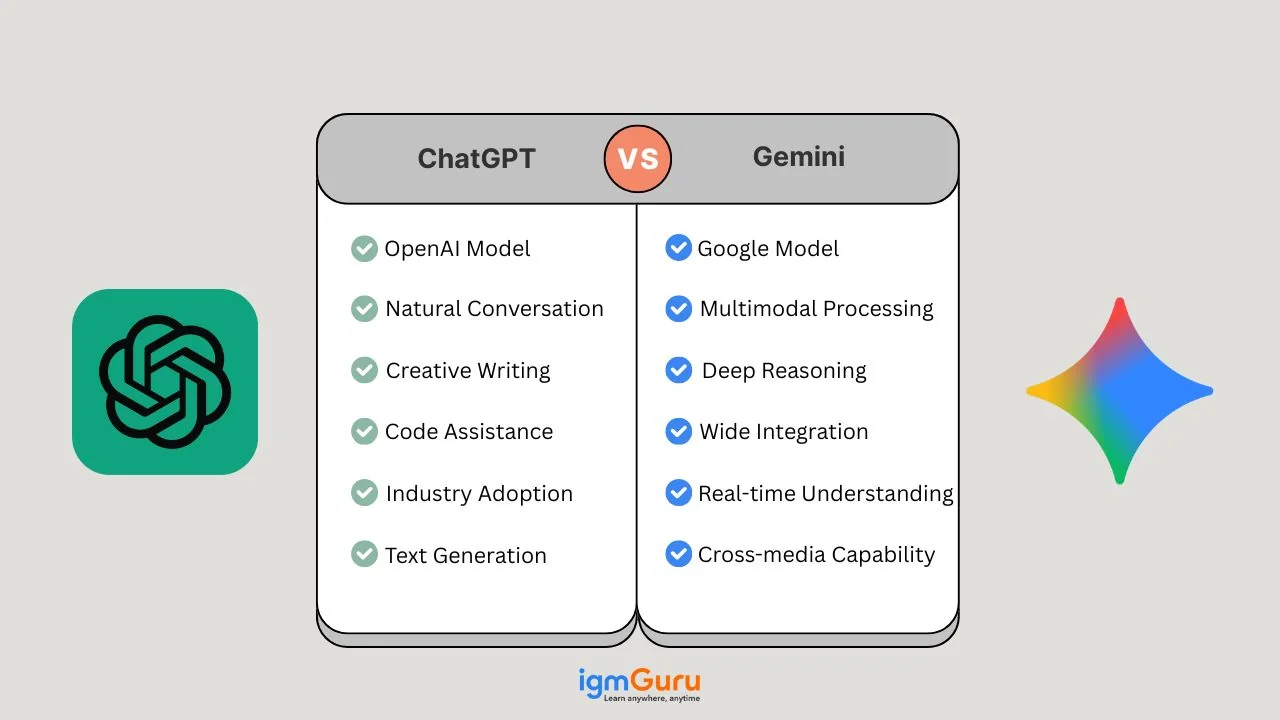
ChatGPT is an advanced artificial intelligence chatbot created by OpenAI. It uses large language models to understand text inputs and generate human-like written, audio, or visual responses. You can use it to write content, answer questions, translate languages, and solve coding problems.
ChatGPT is used for everything from everyday conversation and writing help to coding, image generation, voice interaction, and custom GPT-based workflows. This makes it the most versatile option for users who do not want to switch between tools.
Massive plugin and custom GPT ecosystem
Voice mode and image generation are built in
Memory across conversations
Broad third-party integrations
Regular model updates across multiple tiers
General writing, brainstorming, and editing
Image generation and editing
Coding assistance and debugging
Voice-based conversations
Custom GPTs for specific workflows
Free tier available
ChatGPT Plus: $20/month
ChatGPT Pro: $200/month
Team/Enterprise: custom pricing
| Pros | Cons |
| Largest ecosystem of integrations and plugins | Can feel less rigorous on long, complex reasoning tasks |
| Multimodal: text, image, and voice in one app | Free tier has usage caps |
| Frequent updates and new features | Context handling can degrade in very long threads |
| Strong general-purpose performance | Higher tiers get expensive fast |
Let's try a basic example to understand how ChatGPT compares to Claude on a reasoning task. I asked it:
"Review this 10-page contract draft and flag any clauses that could be interpreted two different ways."
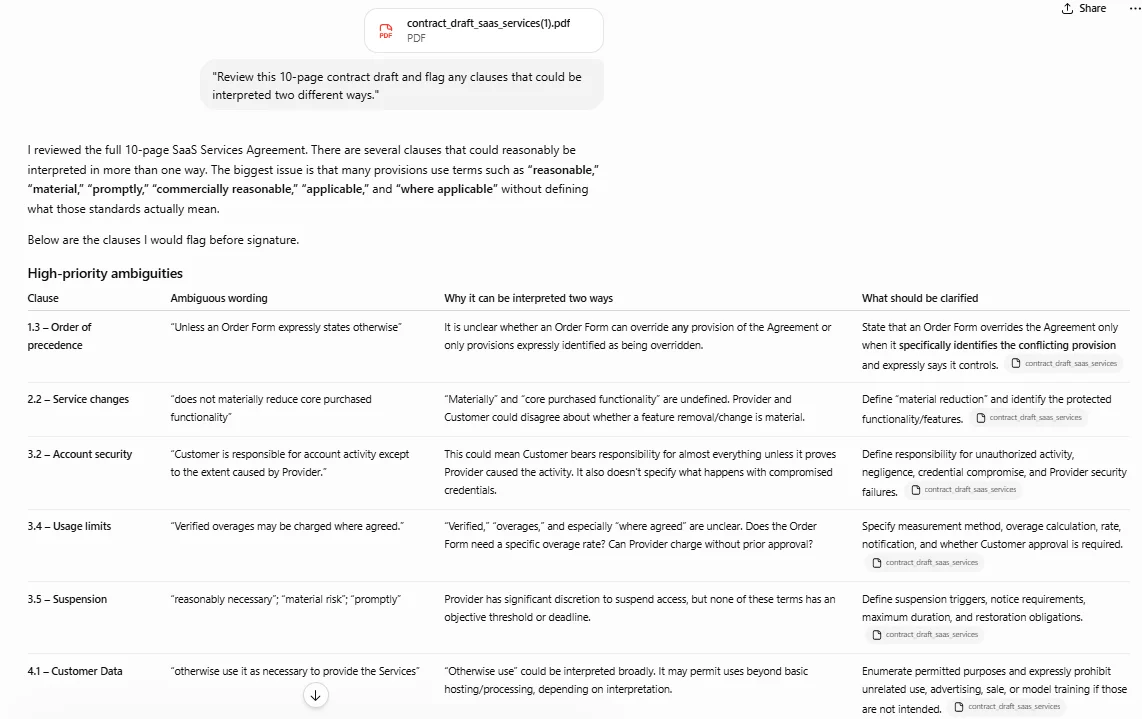
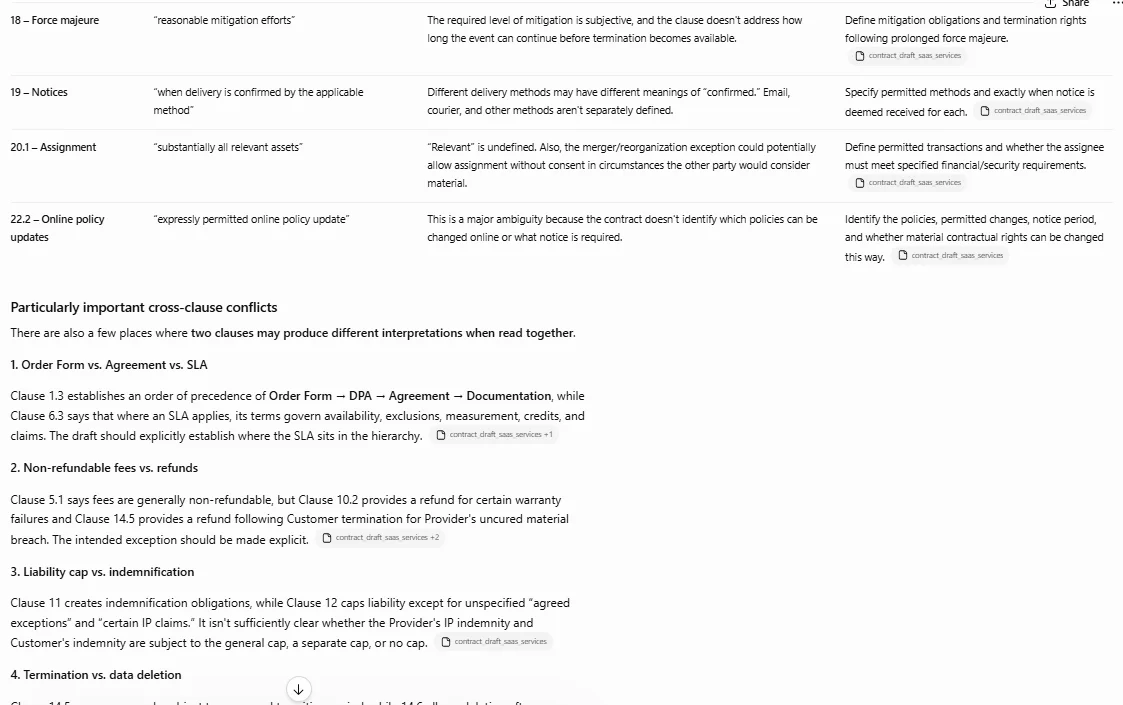
Here's what I found: ChatGPT caught most of the ambiguous clauses and explained the risk in plain language, and it moved through the document quickly.
The one thing it missed: It missed one clause where the ambiguity depended on a cross-reference to an earlier section. This is something Claude has typically been stronger at catching in long-document tests.
For In-Depth Comparison Explore: Claude vs. ChatGPT
Google Gemini (formerly known as Bard) is a family of multimodal artificial intelligence models and a virtual chatbot assistant developed by Google. It is designed to understand and work with text, code, images, audio, and video. You can access it on the web or via mobile apps to write, code, analyze media, and get answers.
Gemini is widely used for research, real-time queries, productivity inside Google Workspace, and image-based problem-solving. It is mostly used by individuals whose work deeply involves Gmail, Docs, and Sheets.
Real-time Google Search access
Multimodal input (text, image, voice)
Google Workspace integration
Image understanding and generation
Regular model updates
Real-time question answering and research
Gmail and Google Docs assistance
Image-based problem solving
Voice-based interactions
Cross-app productivity in Google Workspace
Free version available
Gemini Pro: ~$19.99/user/month
| Pros | Cons |
| Real-time access to Google Search | Inconsistent output quality at times |
| Multimodal input (text, image, voice) | Requires Google account |
| Strong integration with Google apps | Less rigorous reasoning on long, dense documents than Claude |
| Free tier available | Less control over response tone and structure |
Let's try a basic example to compare Gemini against Claude on a research-style query. I asked it:
"What were today's top business headlines in India, and summarize the RBI's latest policy stance in two lines?"

Here's what I found: Gemini pulled current headlines with source links attached and correctly grounded the RBI section with a date-stamped reference, noticeably faster than Claude's web search for the same query.
The one thing it missed: It missed a regional business story that was trending on Google News at the same time, suggesting its real-time index isn't fully complete for regional coverage yet.
Also Read: Advantages And Disadvantages of Artificial Intelligence (AI)
Microsoft Copilot is an AI assistant developed by Microsoft. It helps you write text, search the web, create images, and use data in apps like Word, Excel, and Teams. It is integrated into each Microsoft app to make your workflow smooth.
Microsoft Copilot is mainly used to improve workplace productivity. It assists users inside Word, Excel, Outlook, PowerPoint, and Teams by understanding internal data, emails, files, and meetings to deliver context-aware output. It is something Claude can not do natively since it has no office suite of its own.
Microsoft 365 integration (Word, Excel, Outlook, Teams)
Context-aware responses using Microsoft Graph
AI-powered document drafting and summarization
Meeting notes and action items
Enterprise-grade security and compliance
Writing and summarizing emails in Outlook
Creating reports, slides, and documents in Word and PowerPoint
Data analysis and formula generation in Excel
Meeting summaries and action items in Teams
Enterprise knowledge retrieval using Microsoft Graph
Free version (limited access)
Copilot Pro: $20/user/month
| Pros | Cons |
| Deep integration with Microsoft 365 apps | Limited value outside the Microsoft ecosystem |
| Context-aware responses using work data | Paid plan required for full functionality |
| Strong enterprise security and compliance | Less flexible for open-ended reasoning than Claude |
| Saves time on repetitive office tasks | Not ideal for long, freeform document analysis |
Let's try a basic example to see how Copilot compares to Claude on a workplace task. I asked it, inside Excel:
"Summarize this quarter's sales data and draft a two-line email highlighting the top-performing region."

Here's what I found: The AI assistant read the sheet correctly and extracted the right numbers into the report without any error. The draft email was usable with minor tweaks, all without leaving Excel, which Claude can't replicate natively.
The one thing it missed: It didn't flag an obvious outlier row skewing the regional average, something a careful manual read (or a longer Claude-style reasoning pass) would likely have caught.
Read Also: Copilot vs. ChatGPT
Perplexity is an AI-powered conversational search engine and answer engine that uses real-time web data to respond to user queries. Instead of presenting a standard list of links like traditional search engines, it synthesizes information into a direct summary and cites its sources with numbered inline links.
Perplexity AI is mainly used for academic research, factual queries, market analysis, and any task where verified, source-backed answers matter more than conversational depth. This is an area where it edges out Claude's web search.
Real-time web search with citations
Research-focused answer generation
Clean and fast interface
Context-aware questioning
Regular knowledge updates
Academic and market research
Fact-checking and citations
News and trend analysis
Technical documentation support
Free version available
Perplexity Pro: $20/month
| Pros | Cons |
| Provides cited, factual answers | Less creative and conversational than Claude |
| Real-time web access | Weaker at long-form reasoning and analysis |
| High trustworthiness for factual queries | Pro plan needed for advanced features |
| Clean and fast UI | Not built for long-document synthesis |
Let's try a basic example to compare Perplexity against Claude on a research task. I asked it:
"What are the latest findings on AI's impact on entry-level tech jobs? Give me sources."
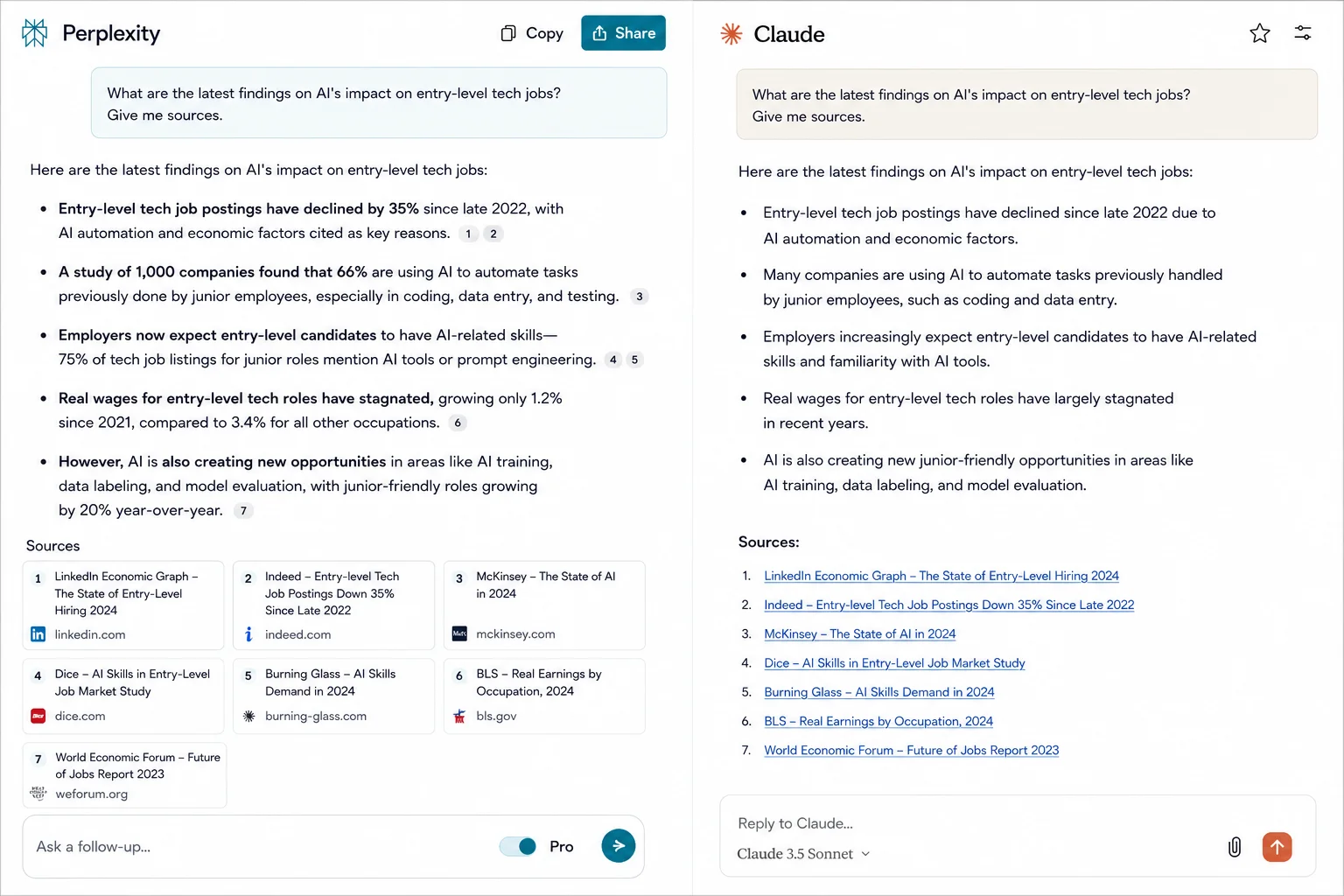
Here's what I found: Every claim I saw in the response was with a clickable citation right next to it. It lets me verify the numbers in seconds. Claude's responses don't consistently offer even with web search enabled.
The one thing it missed: Many secondary write-ups are shown there as cited sources rather than the original research. Therefore, I still had to dig one layer deeper myself.
Read Also: How to Write Effective Prompts For ChatGPT?
Grok is a conversational AI chatbot developed by xAI (Elon Musk's artificial intelligence company). It was launched in November 2023 and instantly stands out for its real-time access to live data from the social media platform X (formerly Twitter), a witty and sarcastic personality, and fewer content restrictions than traditional AI models.
Grok AI is mainly used for real-time news analysis, trend discovery, social content creation, and conversational exploration of current topics.
Real-time internet access
Conversational and witty tone
X platform integration
Multimodal capabilities
Trend analysis tools
Real-time trend and news tracking
Social content creation
Casual conversational exploration
Multimodal (text/image) tasks
Free tier available
SuperGrok: $30/month
Heavy: $300/month
| Pros | Cons |
| Real-time insights from X | Limited enterprise use |
| Engaging, conversational responses | Weaker at structured, long-form reasoning than Claude |
| Social platform integration | Not ideal for deep research or document analysis |
| Fast on trending topics | Can feel one-sided without broader source cross-checking |
Let's try a basic example to compare Grok against Claude on a real-time topic. I asked it:
"What's trending on X right now around the AI industry, and give me a quick, no-fluff take."
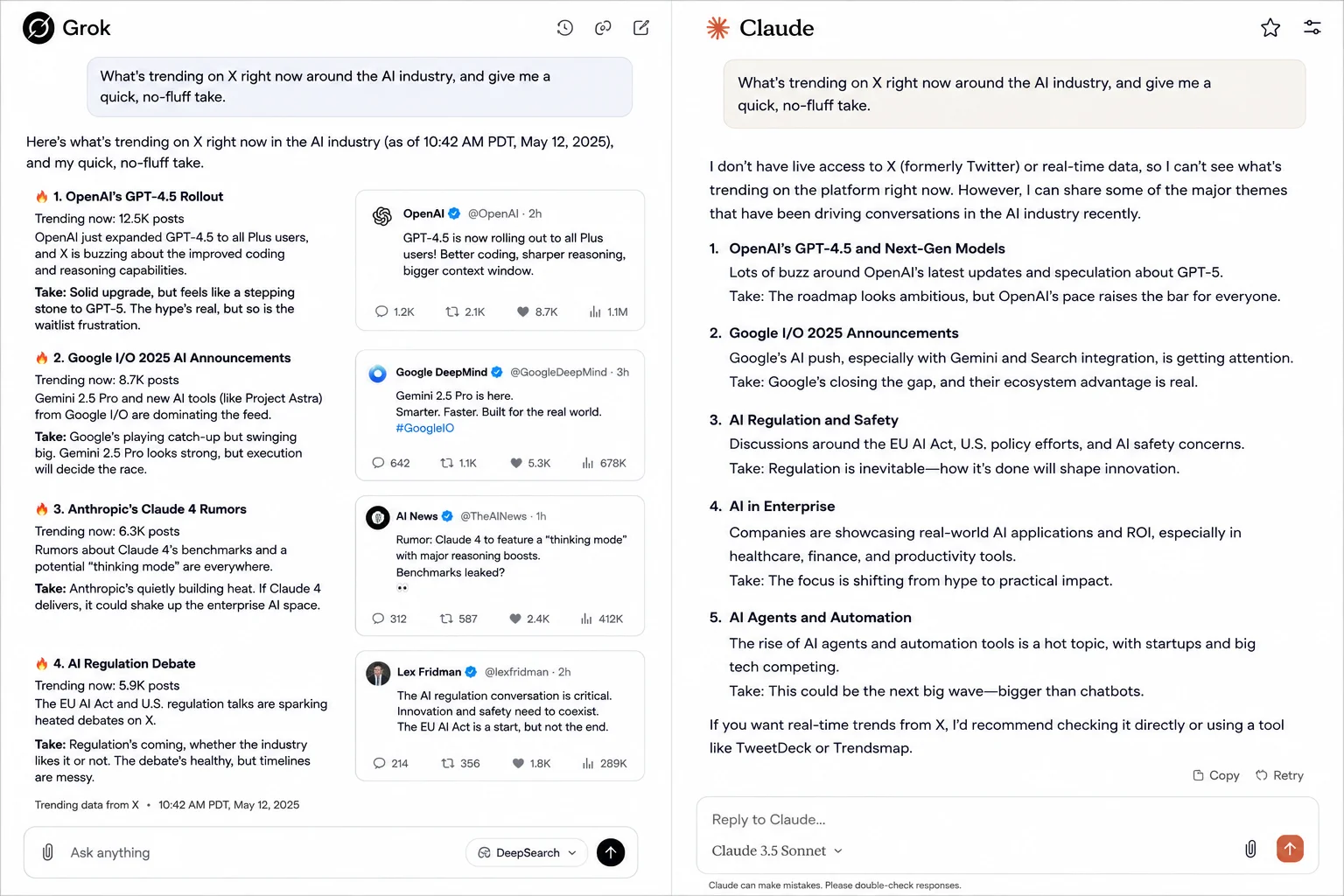
Here's what I found: The response felt current and conversational, pulling in posts that were genuinely trending at that moment, something Claude simply can't do without live social platform access.
The one thing it missed: It leaned heavily on X-native chatter and didn't cross-check against broader news coverage, so the "take" was more one-sided than I'd want for anything beyond casual browsing.
Related Article: Grok AI vs. ChatGPT
DeepSeek is an AI company that builds advanced LLMs and cost-efficient AI chatbots capable of complicated coding, math, and reasoning. It gained global attention for matching top-tier Western AI performance at a fraction of the development cost.
DeepSeek is used for coding, debugging, mathematical reasoning, and AI API experimentation. It is especially attractive for teams that want strong reasoning without Claude's higher per-token costs.
Advanced reasoning and logic
Ultra-low token pricing
Image and document upload support
Strong math and coding performance
Developer-friendly API access
Coding and debugging
Mathematical problem solving
Scientific reasoning tasks
API-based AI implementations
Cost-sensitive enterprise experimentation
API pricing: V4 Flash at $0.14 per 1M input tokens; V4 Pro at $0.435 per 1M input tokens
| Pros | Cons |
| Extremely low token pricing compared to Claude | Limited brand trust in some regions |
| Strong reasoning and coding performance | Fewer enterprise integrations |
| Supports document and image uploads | UI less polished than Claude's |
| Open and developer-friendly | Data residency concerns for some enterprises |
Let's try a basic example to compare DeepSeek against Claude on a reasoning task. I asked it:
"Solve this calculus problem step-by-step and show your reasoning."
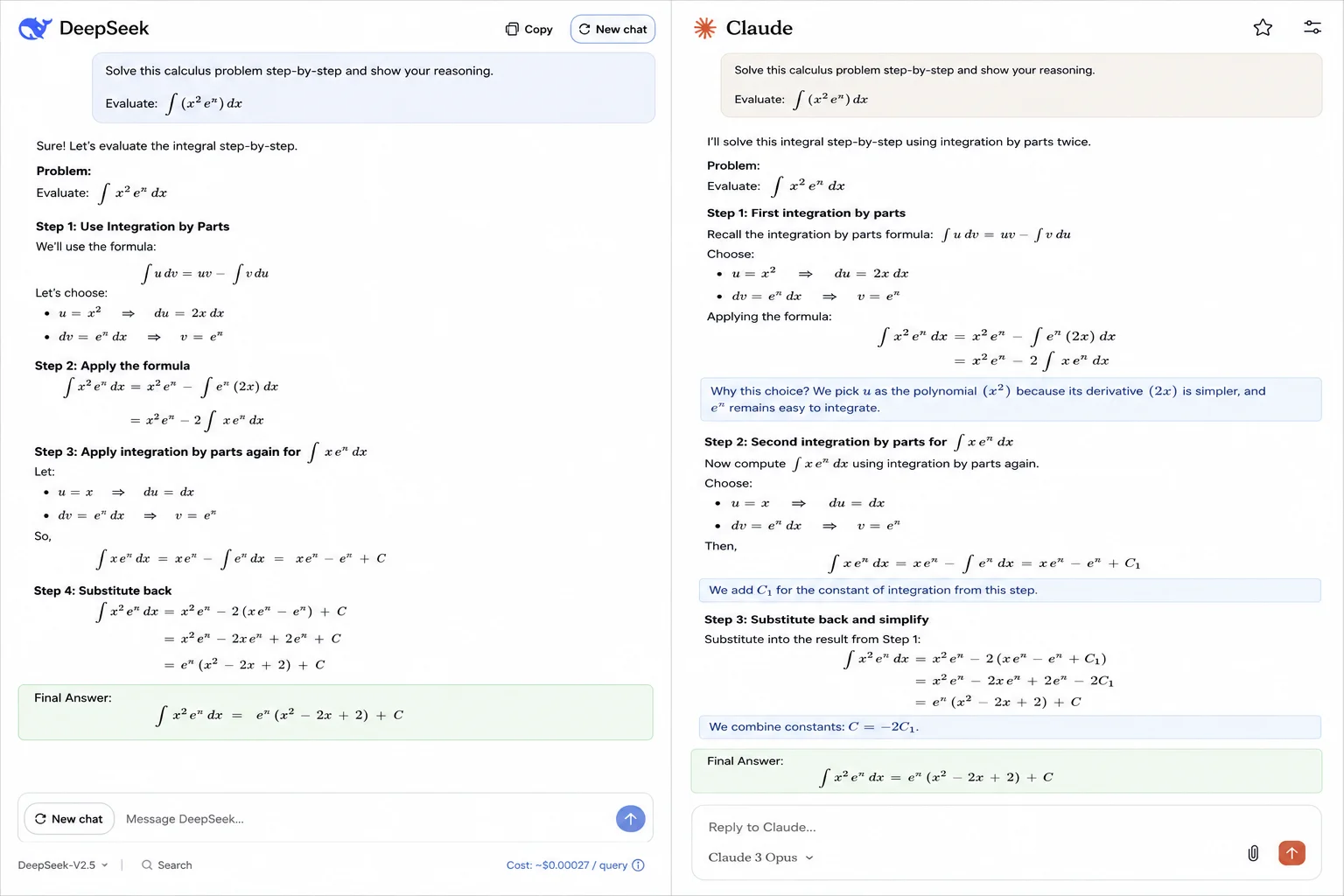
Here's what I found: The step-by-step reasoning here was easy to follow, and it got the final answer right. It's impressive how little this costs per query compared to Claude's Opus tier.
The one thing it missed: There is one intermediate step whose explanation was terser than I'd like for someone actually trying to learn the method. Claude wins here with more thoroughness.
Le Chat (recently rebranded as Mistral Vibe) is a generative AI conversational assistant developed by French startup Mistral AI. It functions similarly to ChatGPT, allowing users to chat, write code, search the web with citations, and generate images through a web and mobile interface.
Mistral Vibe is used for everyday conversation, coding assistance, document analysis, and multilingual tasks. It is mostly popular among European users and businesses that value data residency and open-weight transparency.
Open-weight model architecture
Fast inference speeds
Strong multilingual support
EU-based data handling
Web search and document upload support
Multilingual conversation and translation
Coding assistance
Document summarization
Enterprise deployment with data residency needs
Free tier available
Pro tier available (pricing varies by plan)
| Pros | Cons |
| Open-weight models offer more deployment flexibility than Claude | Smaller ecosystem and community than Claude or ChatGPT |
| Strong multilingual performance | Less refined at very long-document reasoning |
| Appealing for EU data residency requirements | Fewer enterprise-grade integrations |
| Fast response times | Less mature safety tooling than Anthropic's Constitutional AI approach |
Let's try a basic example to compare Le Chat against Claude on a multilingual task. I asked it:
"Translate this French legal clause into English and flag any terms that don't have a direct English equivalent."
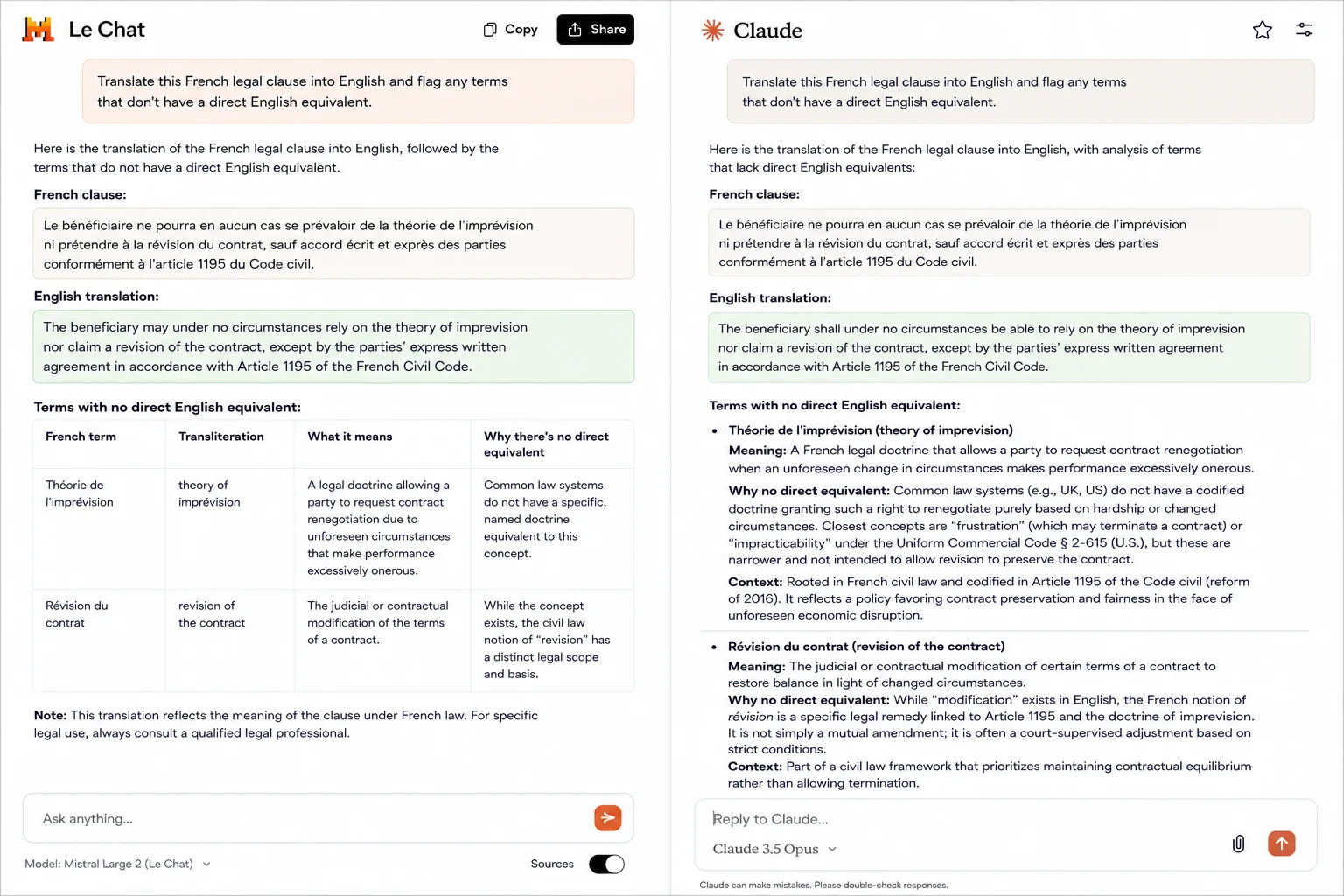
Here's what I found: Le Chat produced a clean, accurate translation and correctly flagged two legal terms with no direct English equivalent, a genuine strength given its multilingual training focus.
The one thing it missed: It didn't provide as much surrounding legal context for those flagged terms as Claude typically does when asked to reason through ambiguity.
Read Also: Generative AI Models
Cohere Command and North are enterprise artificial intelligence offerings by Cohere, consisting of high-performance large language models and a secure agentic workspace platform designed for business automation.
Cohere is used by enterprises to build AI-powered search, internal knowledge assistants, and retrieval-augmented workflows that pull answers directly from company documents and databases rather than general web knowledge.
Retrieval-augmented generation (RAG) built in
Enterprise-grade deployment and security
Strong semantic search capabilities
Customizable for internal data sources
API-first architecture
Internal knowledge base search
Enterprise chatbots grounded in company data
Semantic search across large document sets
Custom AI infrastructure for large organizations
It has a Custom/enterprise pricing model
| Pros | Cons |
| Excellent at grounding answers in company-specific data | Not designed for casual conversational use |
| Strong retrieval-augmented search | Requires technical setup, unlike Claude's chat interface |
| Enterprise-grade security and deployment options | Pricing isn't transparent for smaller teams |
| Built for scale and internal integration | Steeper learning curve than a ready-to-use assistant |
Let's try a basic example to compare Cohere against Claude on an internal-data task. I asked it, connected to a sample internal knowledge base:
"Based on our internal policy documents, what's our current remote work reimbursement limit?"
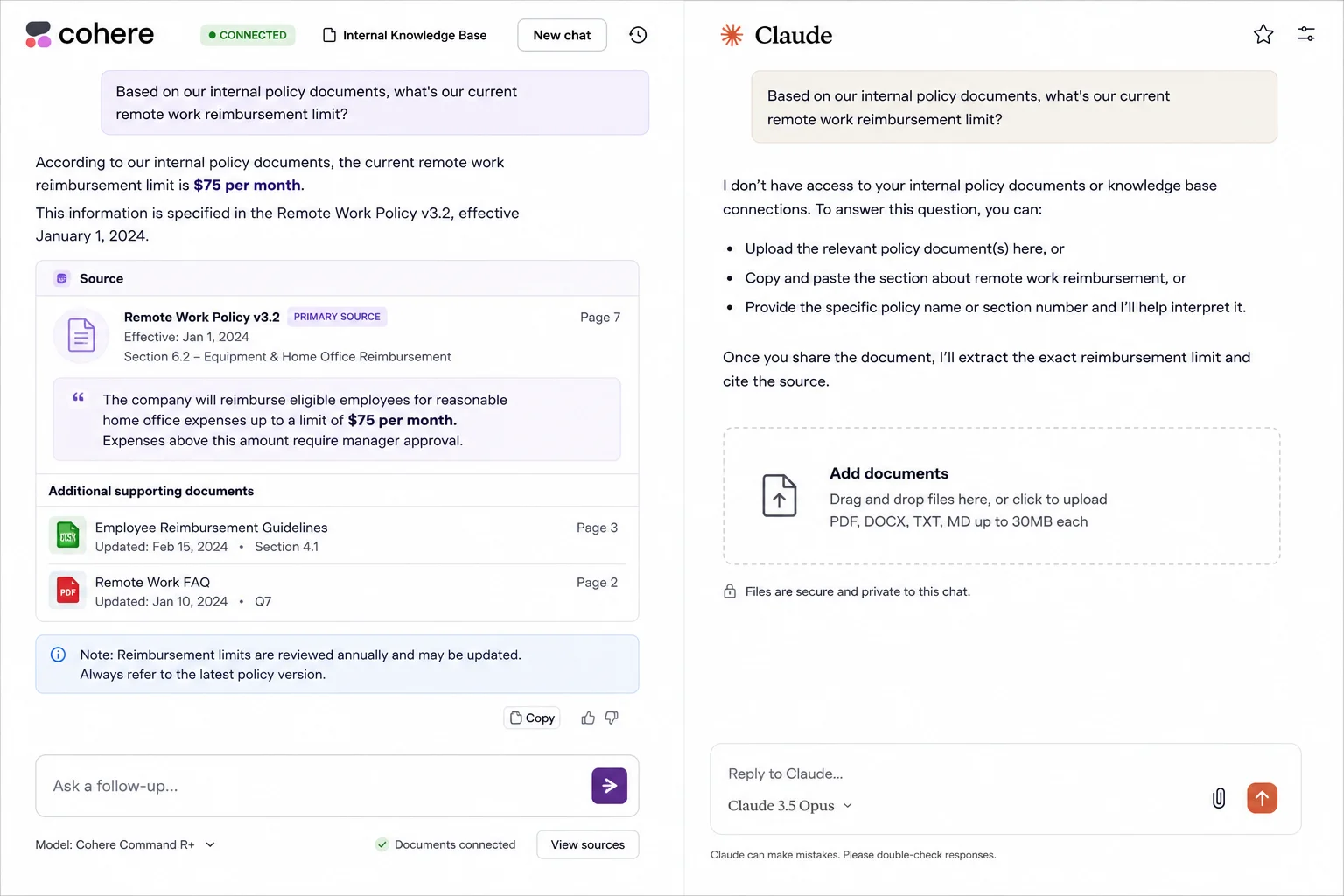
Here's what I found: Cohere pulled the exact figure directly from the connected internal documents with a source reference, something Claude can't do without the document being manually uploaded first.
The one thing it missed: Without a live connector, testing this required more setup than Claude's drag-and-drop file upload, which is a real trade-off for smaller teams without engineering resources.
Related Article: OpenAI's Codex: A Complete Guide with Practical Examples
Meta AI is a free virtual assistant built by Meta (Facebook). It answers questions, writes text, and creates pictures. You can use it inside apps like WhatsApp, Instagram, Facebook, and Messenger, or visit Meta AI on the web.
Meta AI is primarily used for social interactions, image creation, and conversational assistance inside Meta's apps.
Built-in AI across Meta platforms
Image generation and editing
Voice interaction support
Group chat AI assistance
Visual recognition features
AI-powered chats on WhatsApp, Instagram, Facebook
Image generation and editing
Group chat assistance
Voice-based AI interactions
Free
| Pros | Cons |
| Seamless social platform integration | Not suitable for professional or technical tasks |
| Free to use | Far less rigorous reasoning than Claude |
| Image and visual AI features | Minimal customization |
| Easy for casual users | Privacy concerns for some users |
Let's try a basic example to see how Meta AI handles a casual, social task. I asked it, inside WhatsApp:
"Generate an image of a cozy reading nook for my Instagram story, and suggest a short caption."

Here's what I found: The image came back fast and looked genuinely postable straight out of the chat, with no separate app or export step needed — a convenience Claude's more analysis-oriented interface doesn't prioritize.
The one thing it missed: It did not show a second variation that I asked for. Both of them looked almost identical, which means it lacks creativity.
Also Read: What is Black Box AI?
Poe (Platform for Open Exploration) is an AI aggregator platform built by Quora. It lets you chat with many different AI models, such as ChatGPT, Claude, and Gemini in one single place. This means you do not need to visit multiple websites to use different AI tools.
Poe is used by people who want the flexibility to switch between multiple AI models depending on the task, without maintaining separate subscriptions or accounts for each one.
Access to multiple AI models (including Claude) in one app
Easy side-by-side model comparison
Bot creation and customization tools
Simple, consumer-friendly interface
Mobile and web support
Comparing responses across different AI models
Switching models based on task type
Casual conversation and general Q&A
Trying new models without separate sign-ups
Free tier available
Subscription required for premium model access (varies by model)
| Pros | Cons |
| Access to Claude and multiple other models in one place | Doesn't unlock any Claude capabilities beyond what Anthropic offers directly |
| Convenient for comparing model outputs | Premium models consume message credits quickly |
| Simple, approachable interface | Less depth of integration than using Claude natively |
| No need for multiple subscriptions | Not built for enterprise-grade workflows |
Let's try a basic example to see how Poe's model-switching works in practice. I asked the same prompt to two different models through Poe:
"Summarize the key risks in this business proposal in three bullet points."
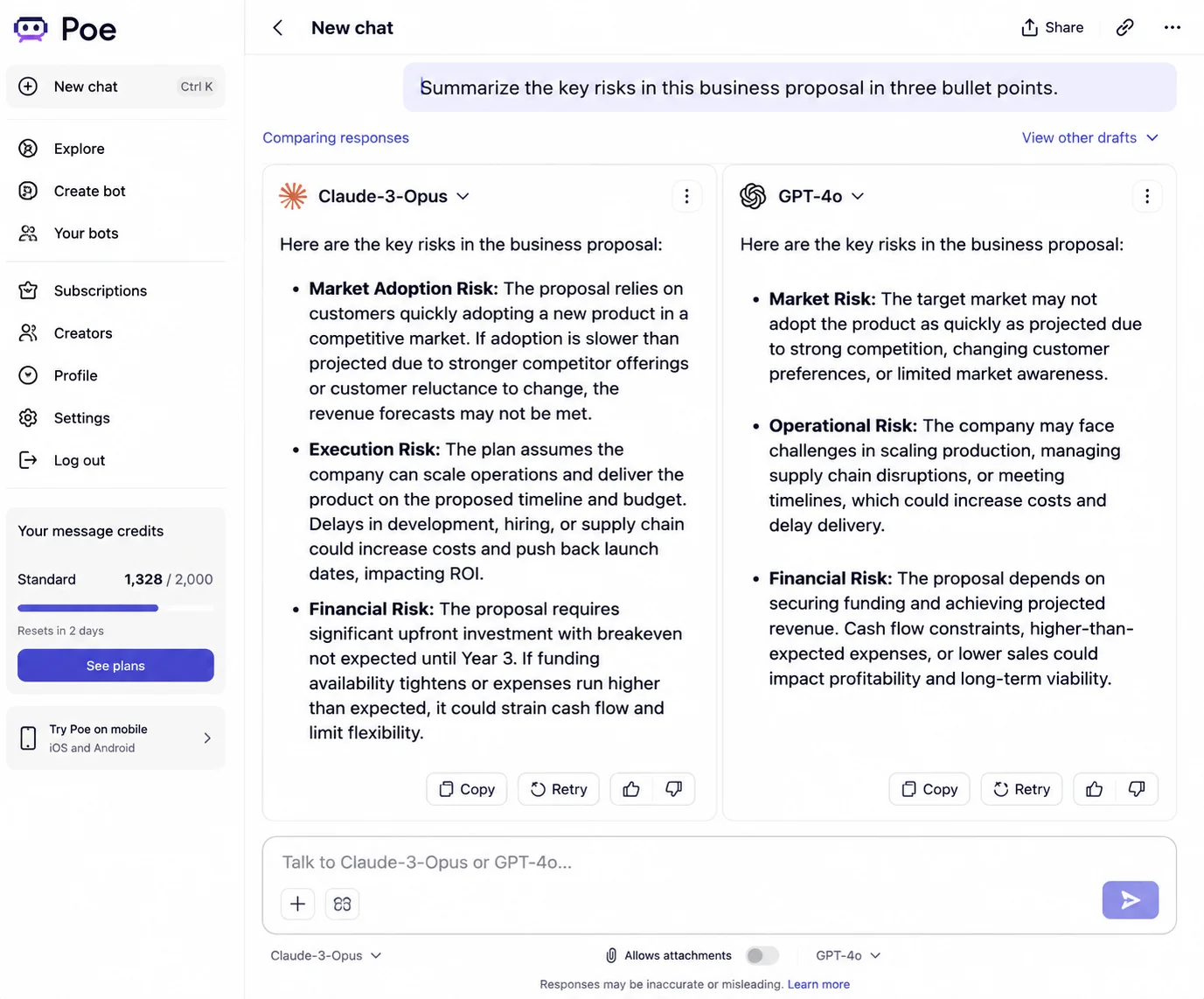
Here's what I found: Poe made it easy to run the same prompt against Claude and another model back-to-back, which was genuinely useful for spotting where responses diverged.
The one thing it missed: Message credits for premium models burned through faster than expected. This makes it less cost-effective than just using Claude directly for repeated heavy use.
Cursor AI is an advanced, AI-powered code editor built as a fork of Visual Studio Code (VS Code). It integrates artificial intelligence directly into the core development environment that allows developers to write, refactor, chat with, and debug entire codebases using natural language.
Cursor AI is used by developers to write, refactor, and debug code inside IDEs, enabling faster development and collaborative coding workflows without switching between a chat window and the editor.
AI-powered code generation
IDE-level integration
Intelligent debugging
Real-time collaboration
Multi-language support
In-editor code generation and refactoring
Debugging within live projects
Collaborative coding workflows
Multi-language development support
Free version (limited access)
Pro: $20/month (other plans available)
| Pros | Cons |
| Deep IDE integration Claude's chat interface can't match | Not useful for non-developers |
| Boosts in-editor productivity | Learning curve for new users |
| Strong project-level code understanding | Less suited for non-coding reasoning tasks |
| Real-time collaboration features | Pricing can add up for teams |
Let's try a basic example to compare Cursor against Claude on a coding task. I asked it:
"Refactor this Python function to reduce time complexity and explain the change."
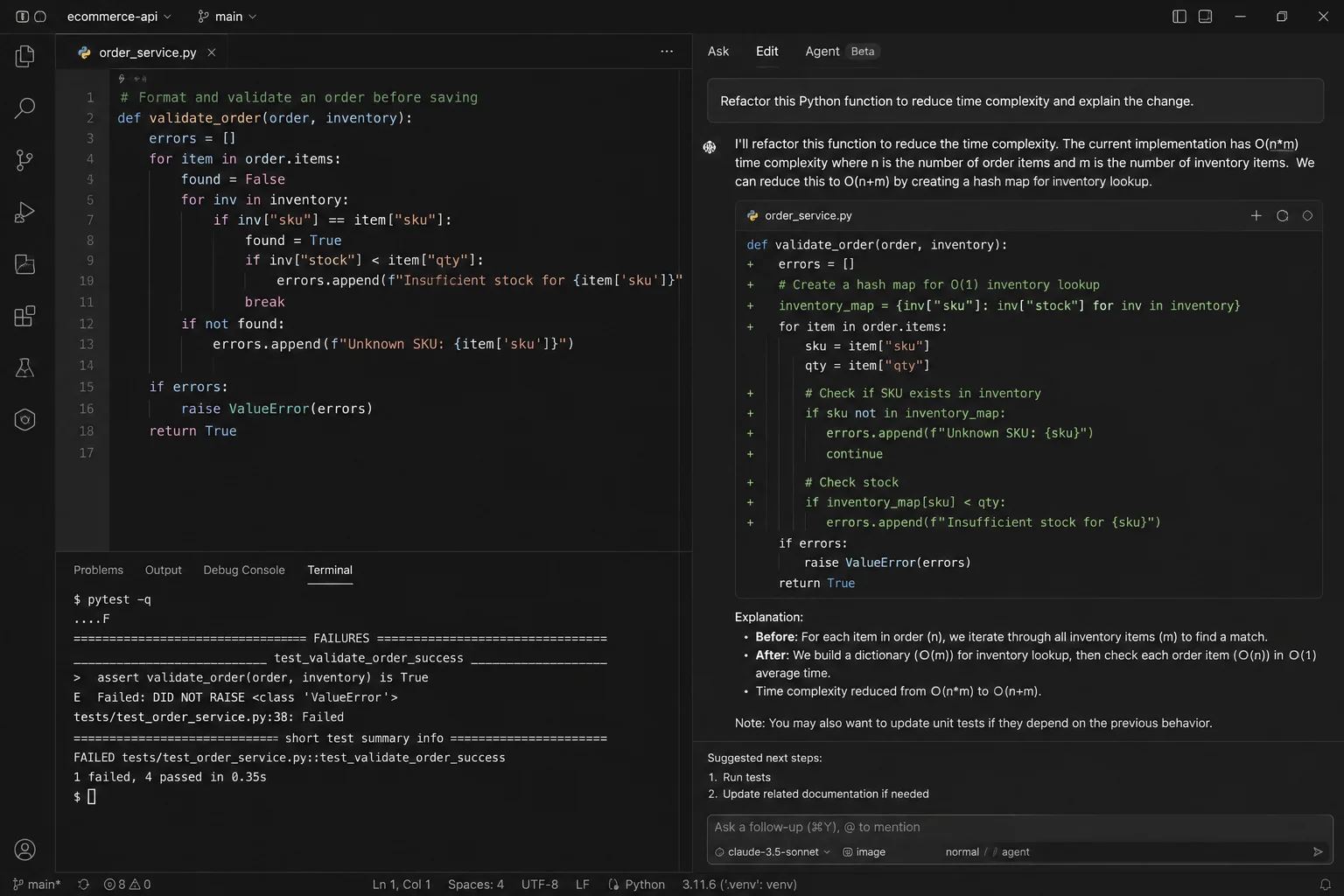
Here's what I found: The tool has understood the surrounding project context, not only the function in isolation. The refactor also cut the complexity down with a clear explanation, with the added benefit of editing the file directly in place, unlike Claude's copy-paste chat workflow.
The one thing it missed: It didn't update the existing unit test to match the new logic, which means we still have to catch and fix that manually.
Jasper AI is a purpose-built generative AI platform and content-creation tool designed for digital marketing teams and businesses. It helps users scale marketing campaigns, write on-brand blog posts, social media posts, and emails, and maintain a consistent brand voice across all content.
Jasper AI is used for marketing campaigns, branded content, email copy, ads, and large-scale content creation that requires consistent tone and messaging across a team, backed by templates Claude doesn't offer natively.
Brand voice training
Marketing content templates
Campaign-level workflows
Team collaboration tools
Content optimization features
Brand-aligned marketing content
Email campaigns and ads
Social media and blog posts
Agency-level content production
Free trial (7 days)
| Pros | Cons |
| Strong brand voice control once trained | High pricing relative to Claude's Pro tier |
| Marketing-focused templates and workflows | Overkill for individuals or one-off writing |
| Scales well for teams and agencies | Requires setup and training time |
| Built-in content optimization tools | Weaker general-purpose reasoning than Claude |
Let's try a basic example to compare Jasper against Claude on a branded content task. I asked it:
"Write a LinkedIn ad in our brand's confident-but-friendly tone promoting a new SaaS feature launch."
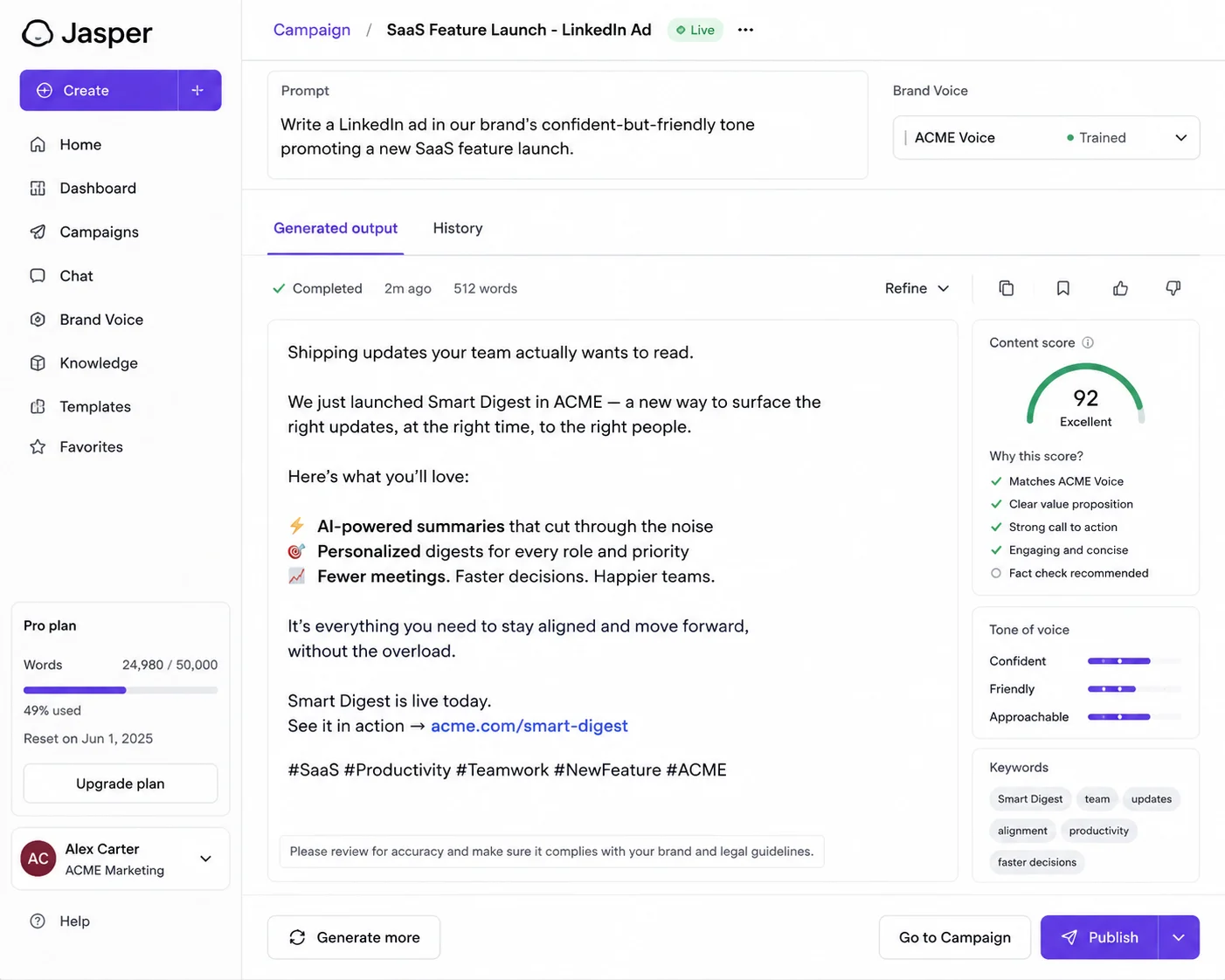
Here's what I found: The copy actually sounded like us once the brand voice profile was trained, not a generic ad template. It is something Claude can approximate with a detailed prompt but doesn't retain as a reusable profile.
The one thing it missed: Its first draft claims a feature that is not quite accurate, so it still needed a fact-check pass before anything went live.
Read Also: Claude Code Cheat Sheet for Beginners and Developers
The best Claude Alternative depends on what you want to accomplish. Instead of choosing a tool simply because it is popular, match it to your primary goal, whether you need better research, coding support, real-time information, enterprise integration, content creation, or a lower-cost option. Here is a practical breakdown to help you choose:
| If Your Main Goal Is | Choose | It is Best For |
| Getting one AI tool for everyday tasks | ChatGPT | Writing, brainstorming, analysis, coding, research, and general assistance |
| Finding answers with verifiable sources | Perplexity AI | Research, fact-checking, academic searches, and source discovery |
| Working with Google apps and current information | Google Gemini | Gmail, Google Docs, Drive, Search, and real-time queries |
| Automating work inside Microsoft 365 | Microsoft Copilot | Word, Excel, PowerPoint, Outlook, Teams, and enterprise workflows |
| Getting strong reasoning and coding at a lower cost | DeepSeek | Reasoning, programming, technical problem-solving, and API experimentation |
| Coding directly inside an IDE | Cursor AI | Code generation, debugging, refactoring, and multi-file development |
| Tracking trends and discussing fast-moving topics | Grok AI | Current events, social trends, news exploration, and real-time discussions |
| Handling multilingual tasks or exploring European AI options | Mistral Le Chat | Translation, multilingual conversations, writing, and general AI assistance |
| Connecting AI to private company knowledge | Cohere | Enterprise search, internal knowledge bases, retrieval, and RAG applications |
| Creating marketing content at scale | Jasper AI | Blog content, campaigns, advertising copy, and brand voice |
| Comparing multiple AI models from one platform | Poe | Model comparison, experimentation, and access to multiple AI assistants |
| Using AI casually inside social and messaging apps | Meta AI | Casual conversations, social interactions, and image generation |
There are, of course, more than 12 Claude alternatives on the market, and not all of them are worth knowing. However, I have some tools that offer impressive capabilities for specific use cases that have almost made it to the list of the best Claude alternatives. They may be a better fit depending on your requirements, so let's explore them:
Microsoft Azure AI is worth considering for businesses that need to build and deploy AI solutions at scale. Its enterprise-focused infrastructure, security features, and access to multiple AI models make it a strong option for organizations with more advanced deployment requirements.
GitHub Copilot is another strong contender, particularly for developers. It provides AI-powered code completion, code generation, debugging assistance, and development support directly within popular coding environments. However, its more specialized focus on software development kept it outside the main list of general-purpose Claude alternatives.
Amazon Q is designed for developers and businesses working within the AWS ecosystem. It can assist with coding, troubleshooting, business questions, and enterprise workflows. It almost made the list because of its strong enterprise and cloud capabilities, but its value is more specific to users already invested in AWS.
Character AI focuses more on conversational experiences and interactions with AI characters than professional productivity. It is a popular option for creative conversations, role-playing, and entertainment, but it does not offer the same breadth of professional capabilities as the alternatives featured above.
These tools are still worth exploring if your needs are more specialized. The best Claude alternative is ultimately the one that fits your workflow, budget, and preferred features rather than simply the tool with the most capabilities.
Claude is, of course, one of the most popular AI chatbots, but not for every task. It can be a great choice for long-document reasoning, careful analysis, or safety-conscious conversation. It also comes with many drawbacks and concerns where you need to consider Claude alternatives.
The article has already compared the tools that can outperform Claude for a specific job. The right choice comes down to matching the tool to what you actually do day to day, not picking whichever name is most familiar.
ChatGPT is one of the best overall alternatives to Claude because it supports a broad range of tasks, including writing, coding, image generation, voice interaction, and custom AI workflows. However, the best choice depends on your needs. Perplexity is better suited for source-backed research, Gemini for Google Workspace users, Copilot for Microsoft 365 workflows, and Cursor for AI-assisted coding.
Yes, several Claude alternatives offer free versions or free tiers. ChatGPT, Google Gemini, Microsoft Copilot, Perplexity AI, Grok, DeepSeek, Mistral Le Chat, Meta AI, and Poe provide free access with different feature and usage limitations.
Cursor AI is a strong Claude alternative for software developers because it integrates AI directly into an IDE and supports code generation, debugging, refactoring, and project-level code understanding. DeepSeek is another option for developers who prioritize reasoning, coding performance, and cost-efficient API experimentation.
Perplexity AI is a strong choice for research because it combines real-time web search with cited answers. It is particularly useful for academic research, fact-checking, market analysis, and current-event research where verifying sources is important.
ChatGPT can be a better choice than Claude for users who want a versatile AI assistant with a broad ecosystem of integrations, multimodal capabilities, voice interaction, image generation, and custom workflows. Claude may be preferable for users who prioritize long-document reasoning, careful analysis, and safety-conscious conversations. The better tool ultimately depends on the specific task.
Choose a Claude alternative based on the tasks you perform most often rather than simply selecting the AI model with the highest benchmark score.