Salesforce Billing is not an independent system. It is an integral part of Salesforce platform that integrates with CRM (customer relationship manager) and ERP (enterprise resource planning) systems. It has powerful capabilities with intuitive interface and automation prowess. This unlocks a new level of efficiency in billing processes of businesses.
It is now one of the best choices for many individuals and companies. The future of this system is expected to grow tremendously across different CRM platforms. But how will this system help you? This is why we have curated this blog post as a complete overview of Salesforce Billing. Here you will find out how this platform can help you along with its features and pricing.
Salesforce Billing is a platform that manages and automates invoicing processes for businesses. It is a part of the Salesforce platform and integrates with CRM and ERP systems. It is a fact that the buyer will engage again if they are satisfied with the company's process. This means investing in the most important practice (billing and revenue) is a nice place to begin!
Salesforce was firstly focused only on improving the sales process, but now they work on enhancing overall customer relationships. The billing process is indeed one of the most important processes for an organization. No company can survive without following the right process of payment collection. This system connects every buyer to the companies with an enriching experience through many practices like -
Explore igmGuru's Salesforce Billing Course program to learn with industry experts.
Now you know the fundamentals of this system. Let's go through the top features of billing in Salesforce platform -
Orders and invoices management is the elementary feature of this system. It automates the order creation process. This removes the requirement of spending hours of time working manually with ERP systems. This process also automatically manages the order delivery process. Here the invoice feature sends message or email alerts to buyers. Now both individuals and companies can track the order whenever they require.
The payment collection is the most important and challenging part for a business. Large enterprises usually have to maintain many payments and set up reminders for them at a particular time. Sometimes they have to chase the buyers manually for payments. This is where this feature benefits them by automating the whole process from payment management to setting up reminders.
Revenue recognition is a complicated process where businesses have to record sales and revenue. This process records cash transactions, sold products, delivery costs, etc. This process has to be performed without any error which consumes a lot of time. The revenue recognition feature of this platform automates the entire process. It just requires an initial set up.
Sometimes customers do not like the product for any reason and might want to return it. Here the company has to deal with a complete process that involves return, replace, refund, etc. This too is a complicated and time consuming process in which they have to ensure the custom satisfaction also.
This platform automatically manages credit notes, debit notes and refunds. It manages the entire process while giving a good experience to the buyers. The best part of this feature is that it performs the tasks on immediate instance.
Reports and dashboards show the sales, transactions and buyer details on a single view. It is the best way to analyze the entire data for improving customer experience. This feature automatically creates these reports and dashboards by including all details. With this feature, businesses create reports on bookings versus billings and analyze that data for improvement.
Related Article- Salesforce Developer Salary [India & USA] in 2026
Salesforce offers a flexible billing system that supports a wide range of business models. Given below are the primary types of billing methods, which are supported by Salesforce:
This model charges customers on a recurring basis monthly, quarterly or annually for access to a product or service. It is ideal for SaaS businesses and ensures a predictable revenue stream. Salesforce automates the renewal, proration and invoicing processes for seamless subscription management.
In this model, customers are billed based on their actual usage of a product or service. For instance, a telecom company can bill on the basis of minutes used or data consumed. Salesforce tracks the usage of data and calculates charges accordingly. They offer transparency and flexibility to both providers and customers.
One-time billing is used for products or services that are purchased with a single, non-recurring payment. For instance, you can think of setup fees, training sessions or a consulting firm who charges customers at the end of completion of a project. Salesforce allows these charges to be invoiced independently or alongside recurring charges.
This type of billing is essential when revenue needs to be recognized over time, rather than at the point of sale. In this type, the payments are received in advance. It is common in subscription or contract based services.
Salesforce offers a smooth and automated billing process which covers everything from setting up to collecting payments. Let's understand its working:
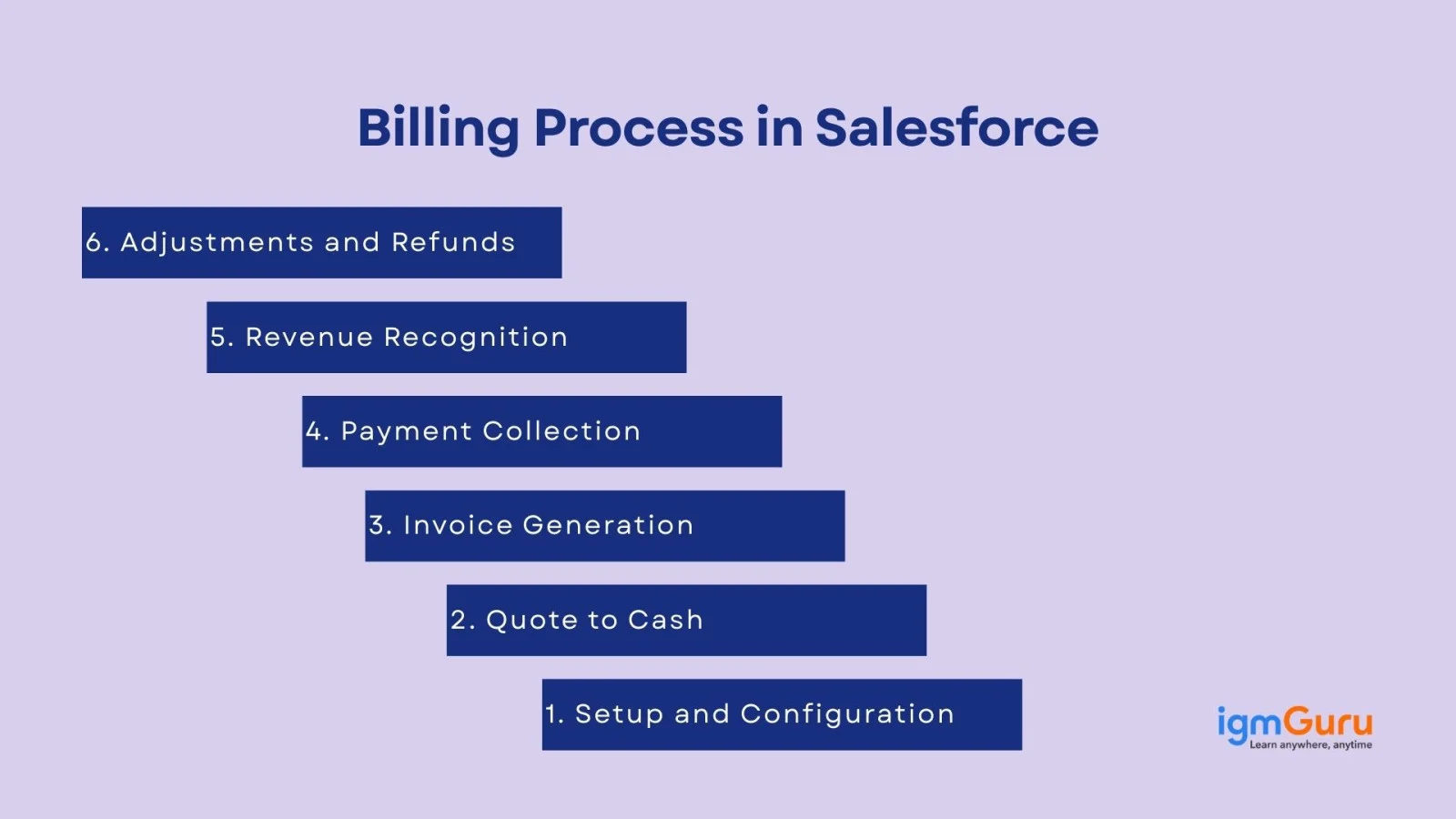
This is the foundation. In this step, businesses set up product catalogs, pricing models, tax settings, billing schedules and payment terms. The Salesforce Billing allows custom configurations based on company needs.
Quote to Cash refers to the full cycle from giving a price quote to a customer, converting it into an order and completing the transaction. Salesforce CPQ (Configure, Price, Quote) helps automate this flow, making it faster and error-free.
Once the order is created, Salesforce Billing generates invoices automatically. It Depends upon the billing model (monthly, usage-based or one time) invoices are created and can be sent with the help of email or integrated systems.
Salesforce tracks payment status, after invoices are sent. It supports integration with multiple payment gateways like Stripe, PayPal, etc.for quick and secure online payments. It can also send reminders for pending payments.
This step ensures that the revenue is recognized at the right time whether it is immediately or over a period of time. It depends upon the service or product delivered. Salesforce also follows accounting standards like ASC 606 for accurate reporting.
In adjustments and refunds, if a customer cancels a service, returns a product or needs a discount adjustment, then Salesforce allows easy creation of credit notes, invoice edits or refunds. By this, it maintains customer trust and ensures accurate financial records.
Setting Up Salesforce Billing gives many benefits for businesses. Here is the complete process to implement this system to a business -
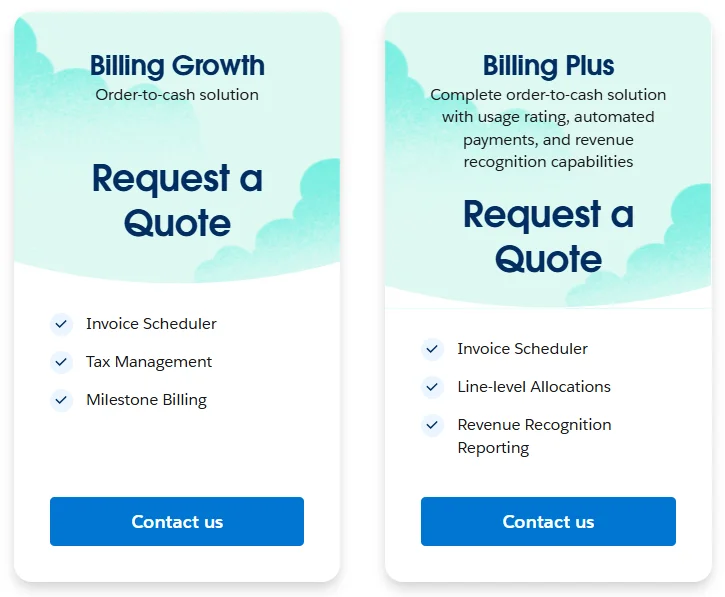
Salesforce Billing pricing is divided into two editions and both of them have their own features. It can be purchased from the official website. One may have to select the desired edition to get a quote for purchase. The two editions are billing growth and billing plus as given below -
Related Article- How Can A Salesforce Certification Accelerate Your Career
It is important to impediment the best practices of this system to enhance the effectiveness and efficiency. Let's discuss which practices are the best -
Regular audit is a must practice to perform better. It identifies discrepancies and areas of improvement. It detects unauthorized transactions and errors from the system before they escalate. This executes the entire billing process without any error. It is implemented by both the finance team and IT department.
This practice builds trust and transparency between companies and their customers. This removes the chances of misunderstandings and disputes between them. It implements automated notifications for invoices, upcoming due dates and payment receipts. This leads to better customer satisfaction and retention. Personalize the communication to address consumers by their name and include entire information about billing.
It is important to stay updated with the current technology. They can organize workshops and training sessions for the related teams. This equips them with better skills for improving their productivity and efficiency. Certification and training programs are another option for the same. Some additional techniques like offering incentives for certified employees and a healthy learning culture are also beneficial.
Analyzing the billing data detects the key performance indicators (KPIs), trends and area of improvement. It gives effective information for driving strategic decisions and improving the billing procedure. To implement this technique, customize dashboards to view key metrics like outstanding invoices, payment trends and revenue. Use the insights from the dashboard to make informed decisions and detect bottlenecks.
Finding the bottlenecks in the billing process on our own does not always satisfy the consumers. This is why running feedback is important too. It gives valuable insights for improving enterprise processes. This practice shows customers that the company is committed to giving better experience. It can be done by building a portal or a channel.
Explore igmGuru's best Salesforce Certification Courses to learn more about them.
Salesforce Billing automates the entire billing process with improved performance. We already have discussed its features in the above section along with its best practices. If you are really planning to work on this platform then it is the best time to start. You just have to understand its practices to use this system in an effective way.
You can also read: Salesforce interview questions and answers
Ans - Salesforce Billing is a solution for managing and automating billing processes. It streamlines the entire revenue cycle from quotes to cash.
Ans - Billing rule defines how invoice lines are produced during an invoicing process. It manages the integrity of the entire invoicing process throughout the billing process.
Ans - The billing process usually does not require the features of CPQ, but it has to be installed in the system. It runs internal validations contrary to the CPQ package for many workflows & features.
Ans - OTC is an important business procedure for making purchases, payments and processes. This process includes many steps like invoicing, fulfillment and payment collection.
Course Schedule
| Course Name | Batch Type | Details |
| Salesforce Billing Training | Every Weekday | View Details |
| Salesforce Billing Training | Every Weekend | View Details |