Are you stepping into the world of high-performance programming language- Go (also known as Golang) and still confused about its installation process? Then, you are definitely at the right place.
Go programming language is a smart choice. It is known for its speed, simplicity, and efficiency in building fast and scalable applications. Go has become a favorite language among backend developers, cloud engineers and even data professionals. Additionally, Go in comparison to Java and C has been showing great growth over the last few years.
In this blog, we will guide you through the entire installation process of Go on Windows, macOS and Linux. No matter which operating system you use, this blog covers everything with clear and step-by-step instructions to help you set up your Go environment quickly and correctly.
Yet, before we dive into the installation process, knowing about its prerequisites is important. Let's begin.
Read Also: control statements in Golang
There are certain prerequisites you must consider before installing the Go programming language on your system. There are numerous running Go versions, including 1.20, 1.21, 1.22, 1.23, 1.24. The latest major version is Go 1.24 released on February 11, 2025.
Additionally, there are minor releases within each major version, like Go 1.24.3. All these versions have their specific requirements of operating systems, disk space, and RAM.
| Go Version | Supported Operating Systems | Disk Space | RAM |
| 1.20 | Windows: 7, 8, 10, Server 2008/2012 macOS: 10.13 High Sierra, 10.14 Mojave Linux: Kernel 2.6.32+ | 250 MB | 512 MB+ |
| 1.21 | Windows: 10, Server 2016+ macOS: 10.15 Catalina+ Linux: Kernel 2.6.32+ | 260 MB | 1 GB+ |
| 1.22 | Windows: 10, Server 2016+ macOS: 10.15 Catalina (last supported) Linux: Kernel 2.6.32+ | 260 MB | 1 GB+ |
| 1.23 | Windows: 10, Server 2016+ macOS: 11 Big Sur+ Linux: Kernel 2.6.32+ (last supported) | 270 MB | 1 GB+ |
| 1.24 | Windows: 10, Server 2016+ macOS: 11 Big Sur (last supported) Linux: Kernel 3.2+ | 280 MB | 1 GB+ |

This section explains how to install Golang programming language on a Windows system.
Step 1. Open the command prompt and run the command to check if you already have Go installed in your system. If Golang is installed in the system, you will see its details on your screen. Otherwise, an error message like shown below will appear.
| $ go version |

Step 2. Visit the go.dev page to download the latest version of Golang for Windows.
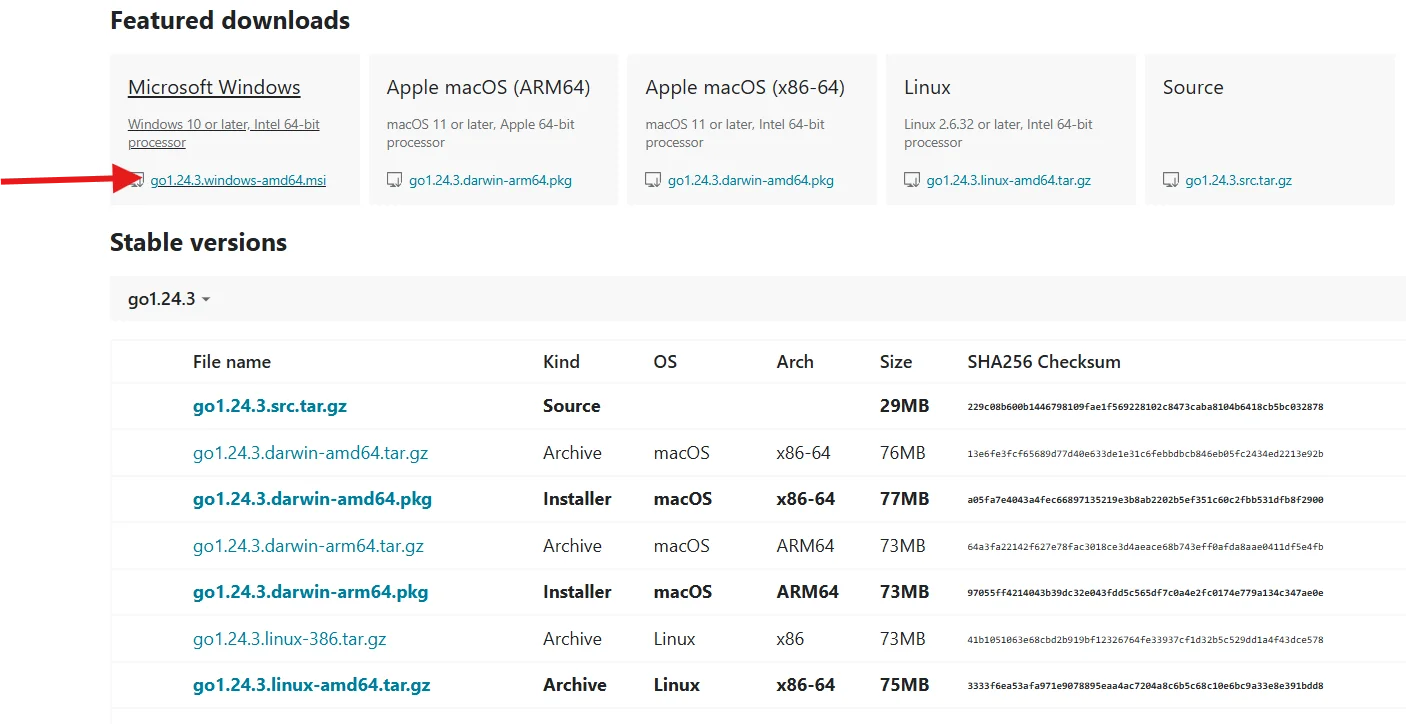
Step 3. The version shown in the above image is the latest one. You can also choose previous ones from the Stable versions section according to your system requirements.
Step 4. Now extract the archive file you have just downloaded. You can then find the unzipped folder 'go' from the current directory.
Step 5. Cut and paste this folder to the place wherever you want to install it. We are pasting in the C folder.
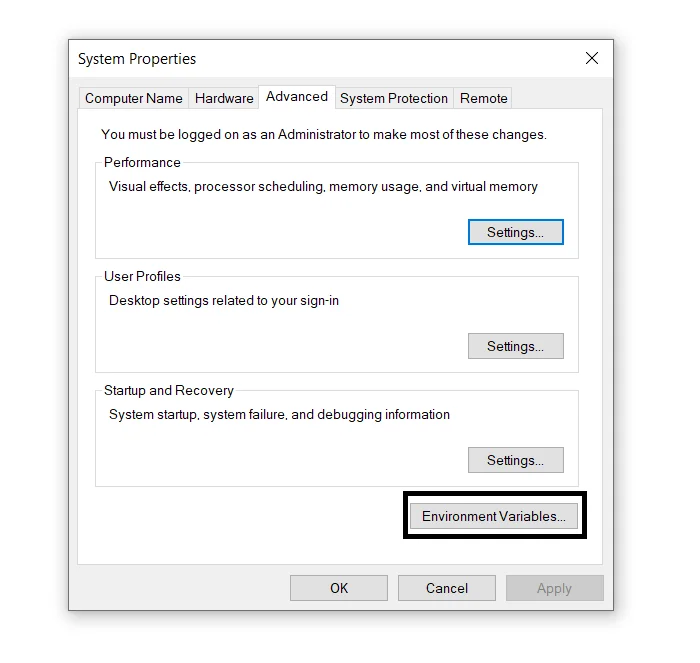
Step 6. Go to My PC, right-click on it, choose properties, select advanced system settings and click on the Environment Variables as shown below:
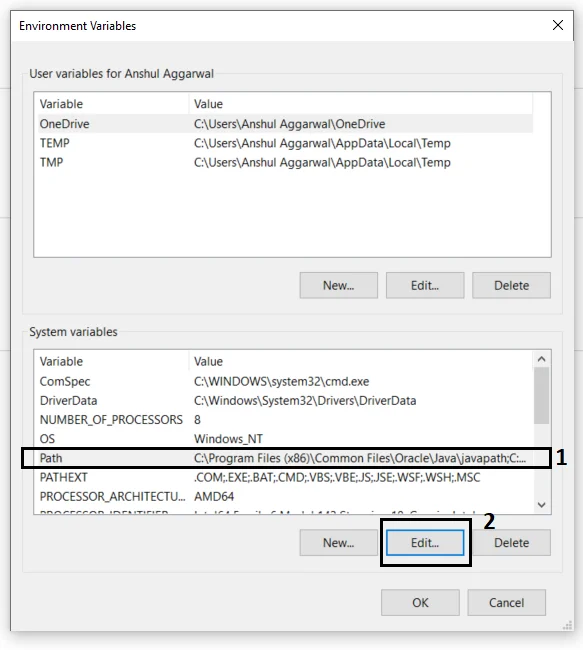
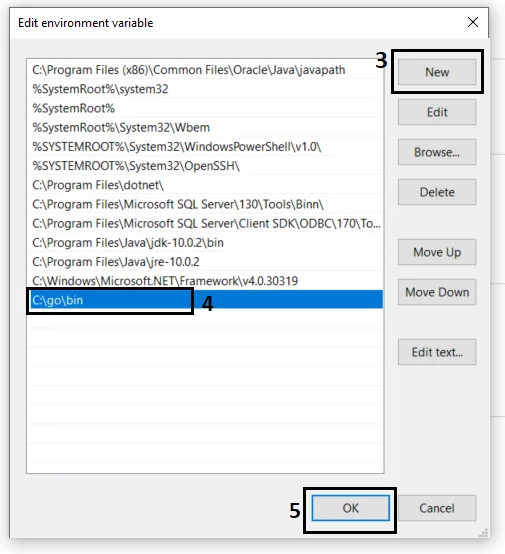
Step 7. Select the Path and click on the Edit button. Next click on New, add the Path of Go folder with the bin directory. Here we are choosing the C:\go\bin path.
Step 8. Click on the New button as shown below.
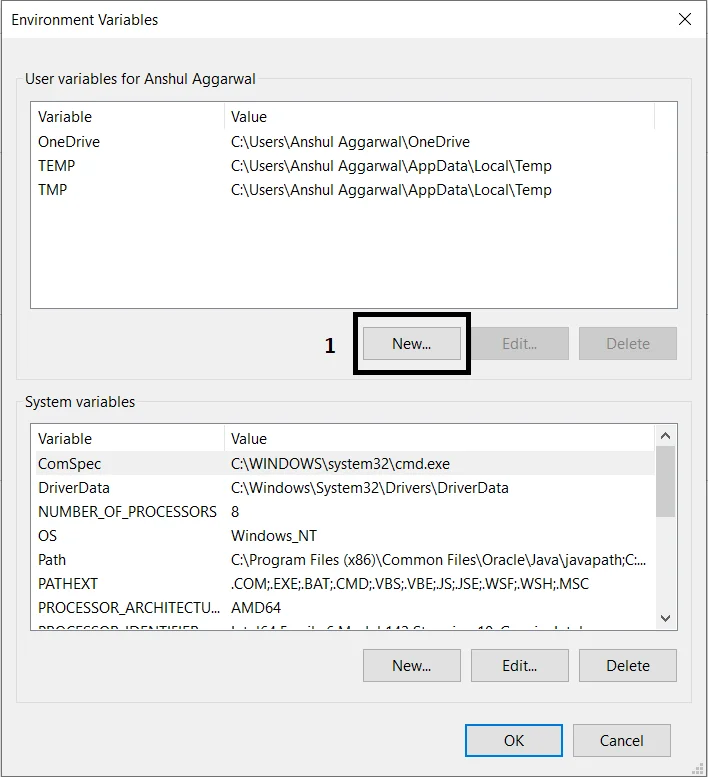
Step 9. Create a new user variable with GOROOT as variable name and C:\go\ as variable value and click on the Ok button. It will inform the Go command about the location of Golang libraries.
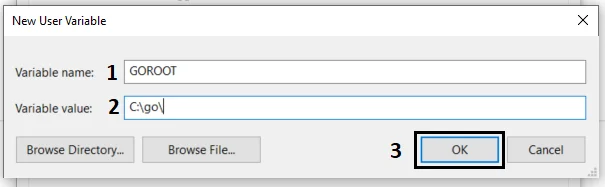
Step 10. Now click on the Environment Variable and the setup will be completed. You can check it with the 'go version' command.
Related Article- Top Golang Interview Questions And Answers
Consider the following steps to install the Go programming language on macOS.
1) Run the following command to check if you have a Go version installed on your system or not.
| $ go version |
2) Visit the go.dev page to download the latest version of Golang for macOS.
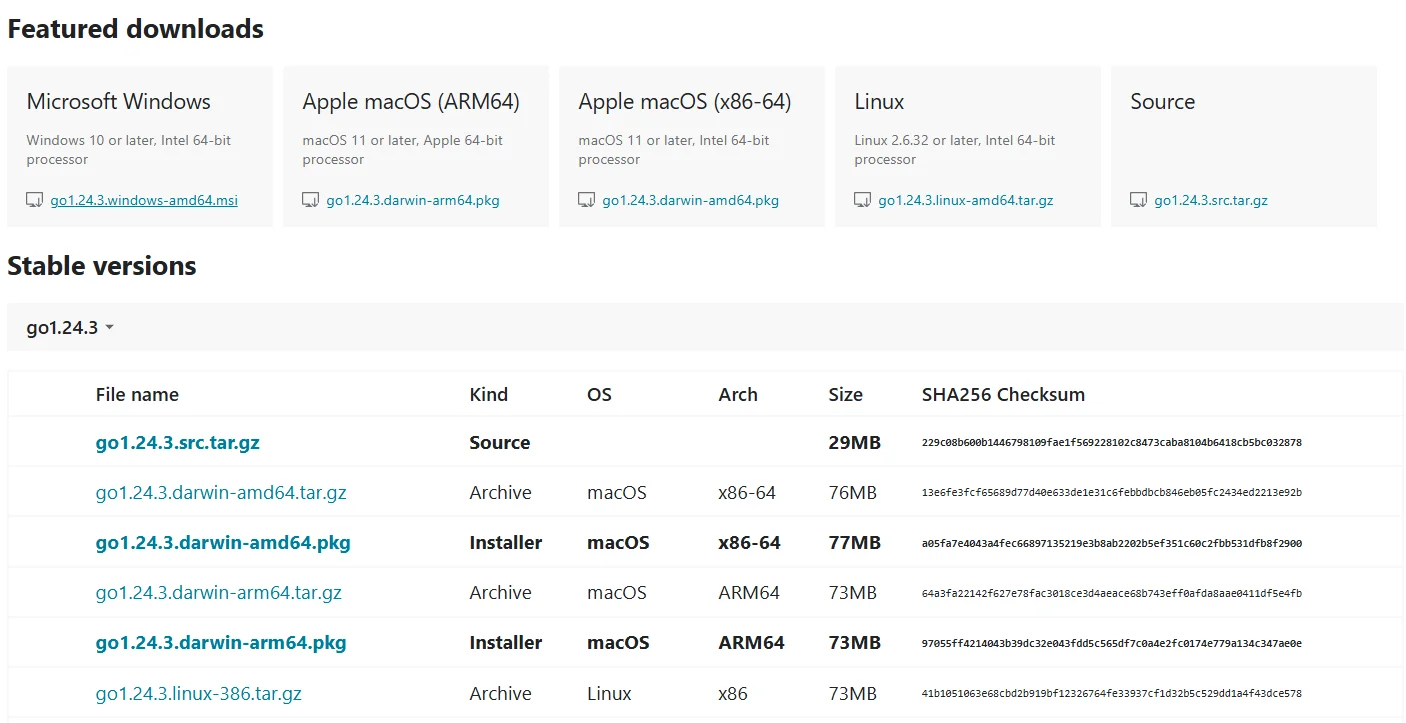
3) Download the .pkg installer file to your system.
4) Navigate and run the .pkg file.
5) Follow the instructions of the installer and it will automatically install Go to /usr/local/gosystem.
6) Now open the terminal and run the following command. It will add Go to the path in a .bash_profile or .zshrc file.
$ echo "export PATH=$PATH:/usr/local/go/bin" >> ~/.bash_profile source ~/.bash_profile |
7) Finally verify the installation with the following command.
| $ go version |
Let's now understand how to install Golang programming language on Linux.
Step 1. Ensure you do not have a pre-installed Go version on your system.
| $ go version |
Step 2. Now use the following command to download the latest version of Golang.
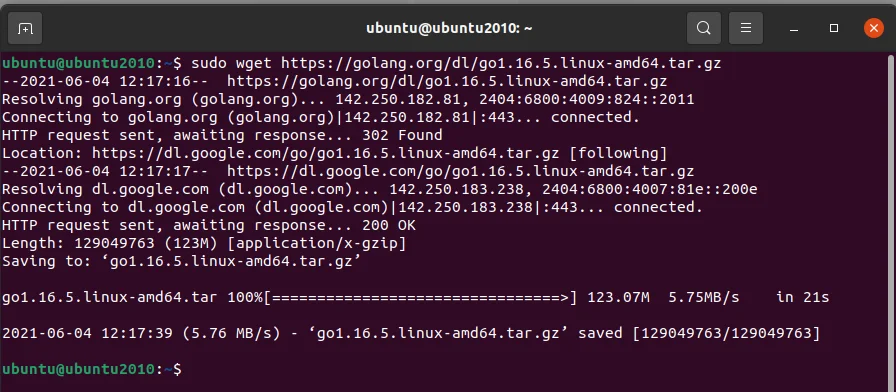
Step 3. Verify that you have downloaded the accurate version with the following command.
$ sha256sum go1.16.5.linux-amd64.tar.gz |
Step 4. Run the following command to extract the downloaded file.
$ sudo tar -C /usr/local -xzf go1.16.5.linux-amd64.tar.gz |

Step 5. Change the group and owner of the go directory from /usr/local directory to root recursively.
$ sudo chown -R root:root /usr/local/go |

Step 6. Run the command given below to construct the directory structure of your Go workspace.
$ mkdir -p $HOME/go/{bin,src} |

Step 7. Open /.profile to add the global variables to it. This will set your $GOPATH.
$ nano ~/.profile |
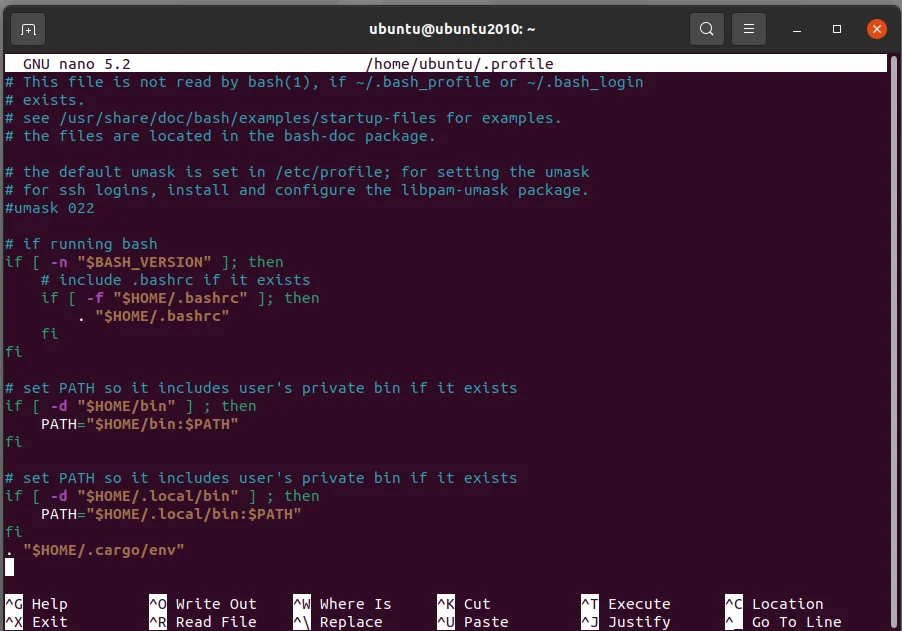
Step 8. Append the lines given below to save and close.
export GOPATH=$HOME/go export PATH=$PATH:$GOPATH/bin export PATH=$PATH:$GOPATH/bin:/usr/local/go/bin |
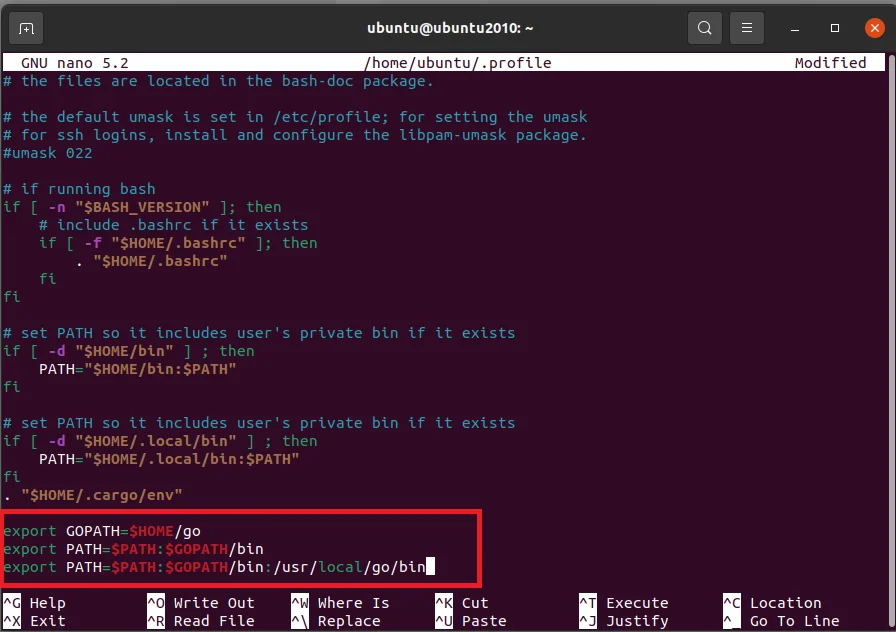
Step 9. Load global variables by running the following command in your terminal.
$ . ~/.profile |

Step 10. Check your $PATH with the echo command.
$ echo $PATH |

Step 11. Now verify the installation with the command given below.
| $ go version |

Read Also: Golang Tutorial
This article has given a comprehensive guide on how to install Go programming language on different operating systems. Use it to set up your Golang environment, practice to improve your coding skills and build your own project to become a proficient Go developer. The industry is waiting with various impressive opportunities for you.
Golang's syntax is designed for readability and is easy to learn. It is particularly the best option for individuals with C or Java experience.
Consider a leveraging Golang tutorial, enrolling in an instructor-led online course and prepare with proper dedication. You will easily become an in-demand Go developer.
According to Glassdoor, the average salary of a Go developer is around INR 6,30,000 per annum in India and $122,458 per annum in the USA.