Programming or coding sits at the core of almost each tech in today’s industry. It all started with the development of C programming, also known as the ‘mother of programming languages.’ Most developers start with this programming language only. Do you know why? The answer lies in its working, structure, application, features and more. This means you will need to understand ‘what is C programming’ first.
This helps you to look closely at how a computer operates. It helps you understand memory usage, data flow and program interaction with system hardware. It is simple in structure and strong in logic. Learning C builds confidence and makes it easier to approach other programming languages later. Let us first understand what C programming is:
C is a programming language that focuses on logic and step-by-step instructions. It gives you more control over memory and how the system works, which is why it runs fast and stays reliable. People use C to build programs that solve problems, manage data, and handle tasks efficiently. It may look simple at first, but it works very closely with the machine, helping you understand how computers actually think.
C is often called the mother of programming languages because many modern languages are built on its ideas. Before moving ahead, let’s take a look at where C came from.
C programming began in the early 1970s. It was developed by Dennis Ritchie at Bell Labs. Before C, there was a language called B that was very simple but limited. It did not have many important features. Dennis Ritchie decided to create a better language. His goal was to design something more powerful and easier to control.
After creating this new language, Dennis Ritchie did not keep it limited to theory or small programs. He wanted to use it for something meaningful and practical. That is why C was used to rewrite the UNIX operating system. When UNIX was written in C, it became faster and worked more efficiently. This practical success helped C gain trust and popularity, and over time, it became one of the most widely used programming languages.
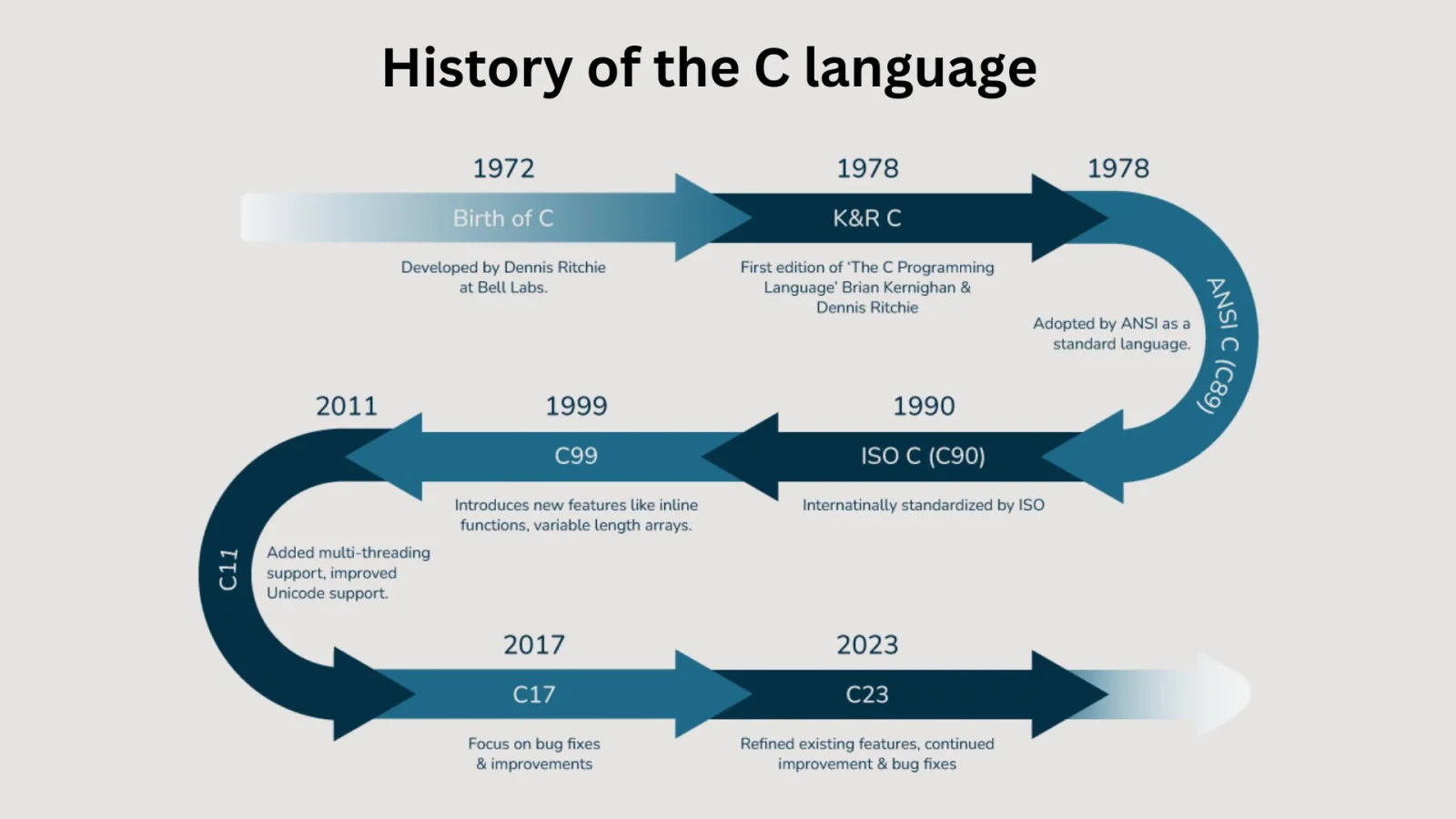
| Year | Version | Details |
| 1978 | K&R C | This version was named after its authors, Brian Kernighan and Dennis Ritchie, who wrote the famous book The C Programming Language. |
| 1989 | ANSI C (C89) | The first official C standard approved by the American National Standards Institute (ANSI), ensuring consistency across different compilers. |
| 1999 | C99 | Introduced several new features, including inline functions, variable-length arrays (VLAs), the // single-line comment syntax, and improved data types. |
| 2011 | C11 | Added support for multi-threading, improved security features, Unicode support, anonymous structures/unions, and other modern enhancements. |
| 2018 | C17 (C18) | A maintenance release that fixed defects and clarified ambiguities in the C11 standard without introducing major new language features. |
| 2024 | C23 | The latest C standard, introducing features such as nullptr, bool as a built-in type, improved type inference, enhanced Unicode support, standard attributes, and other modern language improvements. |
After knowing its origin, you must be wondering why learn C programming when you have various options. There are many reasons to learn it. Here are some of them:
It is often used where speed and performance are important as it is way faster as compared to other modern languages. For example: operating systems, medical machines or gaming engines.
You can write a program once and use it on different systems. In some cases, you only need to make small changes for it to work on another platform.
There are so many modern languages like C++, Python and Java. As they follow some of its basics. Even new languages follow the same basics.
It will teach how to think clearly and solve problems without any errors.
C is a very strong language, but it is not that complicated. Its rules are simple and it follows a proper structure: Big programs are divided into smaller parts that make them easier to understand.
You do not require many things to start C programming; all you need are some essentials before you start working on it:
A text editor is used to write C programs. Examples are Notepad, Notepad++, VS Code, Code::Blocks, and Dev-C++. This program is saved with a .c file.
Writing code is not enough because your computer does not understand English or symbols directly, so you need a compiler that will translate the code for your computer to understand it. The most common compiler that is used today is GCC (GNU Compiler Collection). Some people still use Turbo C++, but it's a bit outdated.
An IDE is a software that has both a code editor and a compiler in one place. It will help you in writing the program, checking errors, and running the code using the same software. Code::Blocks and VS Code can be used as IDEs.
For beginners, Code::Blocks is usually the easiest to use.
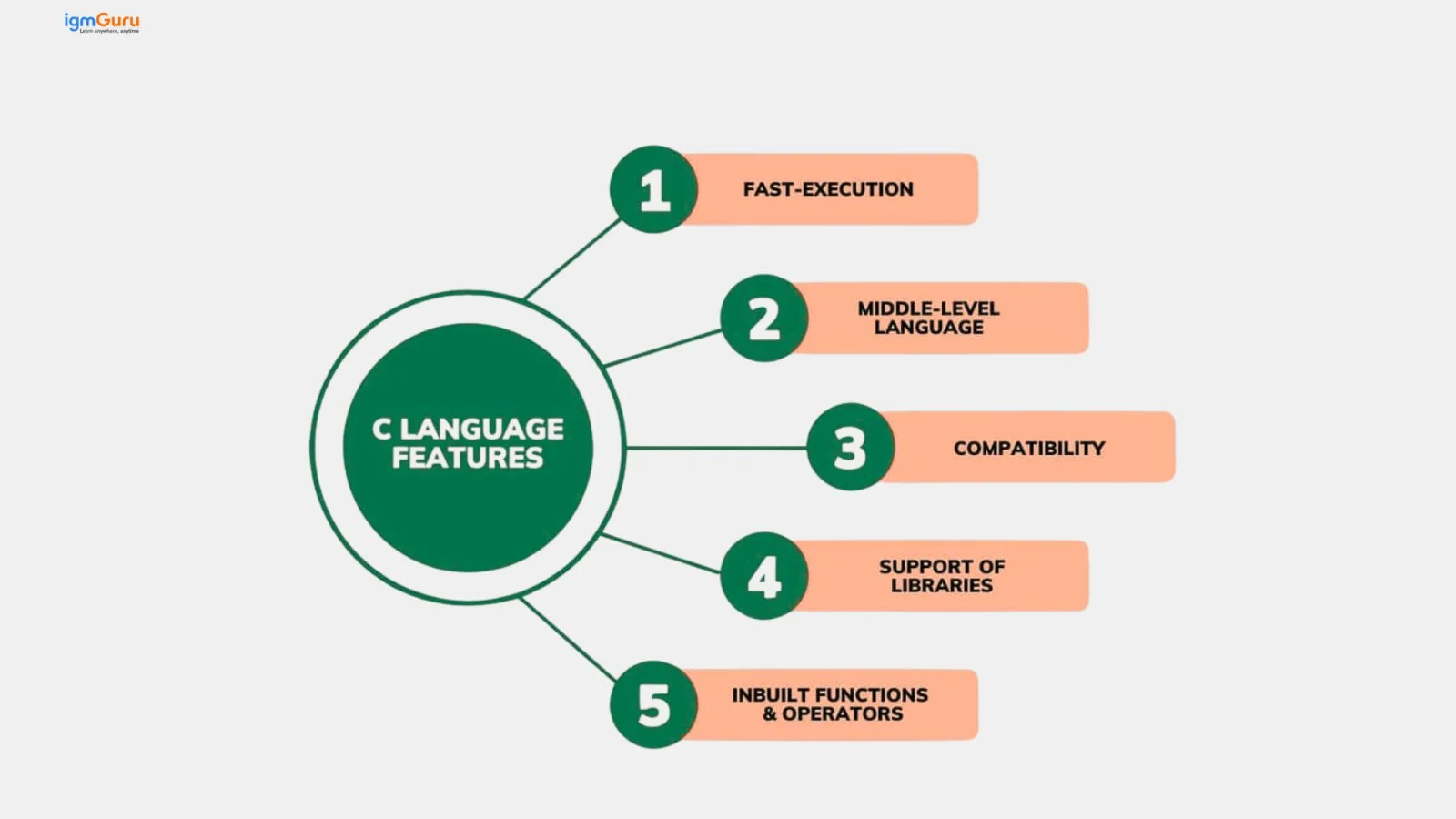
The following are some basic features of C:
Once the basic idea of C becomes clear, then writing programs becomes very easy and enjoyable.
In C, variables are just like small containers that will store your information while you are running the program. For example, if you want to store somebody’s age so you can use the variable :
int age = 20;
In this variable age is the container and 20 is the value stored in it.
Data types tell you what kind of value your variable will store. There are some common data types in C:
| Data Types | Meaning | Examples |
| int | Whole numbers | 78,89 |
| float | Decimal numbers | 66.8, 77.7 |
| char | Single letters | v, a,t |
These are a group of keywords in C that already have some meaning because they are already being used by the programming language. You cannot use them as names of our variables or functions. They are very reserved, and only the system can use them.
For example for these VIP words are:
You cannot change these because they tell your computer what to do.
These operators help you perform actions like addition, subtraction, comparison, etc.
Example:
int result = 5 + 3; // result becomes 8
A control statement decides what a program should do under certain conditions. They help the program make decisions and repeat tasks.
Common control statements:
if: for decisions
for, while: for repeating tasks
Example: if (age >= 18) {
printf("You can vote!");
}
Functions help break a large program into smaller parts. Each function is written to do one specific task that makes the program easier to manage and understand.
Read Also: Variables and Data Types in Go
Now you understand the basics of C. Let me give you a step-by-step guide on how this language works with a small example of Hello World.
You first start writing your code in a text editor or a code editor like Code::Blocks, VS Code, or even Notepad. Then you start your instructions using C language keywords and rules, and then save the file with the extension .c.
Example: program.c
C Hello World Program:
|
As soon as you save your file your next step is compilation. A compiler is a tool that checks your code for errors and converts it into machine language (0s and 1s) because computers only understand machine code.
If your program has mistakes, then your compiler will show messages like you need to fix those errors and compile again.
For example, if you wrote:
|
And you forgot the semicolon, the compiler will show an error like:
|
This tells that something is missing, so after fixing the mistake and writing:
|
When your code has no errors, you compile and create an executable file. This file usually has the .exe extension on Windows.
Now you can run your executable file.
|
It is a whole process where your written code goes through before becoming a program that the computer can run. Since the computer cannot understand this language directly, it needs to convert your code into machine language (0s and 1s). The whole conversion has a few following steps:
It will look for things like #define and #include in your code and replace or add the required content. You can think of this step as "cleaning and arranging the code" before moving forward.
Now your computer checks your code for any mistakes, so if there are any errors, you fix them. If there are no errors, the code gets converted to another simpler form.
The simpler form of your code converts into machine language (0s and 1s).
At last, your code is connected with the other needed files, then you get the final executable file that can run.
C programming is one of the oldest and most powerful languages. Many modern systems and applications are built using C. Because it is very fast, reliable, and close to machine-level coding, which makes it very useful for real time and performance based programs. The following are some real-life areas where it is used:
1. Operating systems: Many operating systems are made using the C language. It includes Windows, Linux, and macOS. C works closely with the computer’s hardware, which helps the system run fast and smoothly.
2. Game development: Many games are developed by using either C or C++ which helps their games run faster, especially when graphics and sound require high speed.
3. Devices with embedded systems: C is used in machines that have built-in computers. These are things we use daily, like microwaves, washing machines, remote controls, cars (engine control, airbags, sensors), and smart televisions. These machines do not have much memory. They cannot handle heavy programming languages.
4. Networking and communication systems: They are used in devices like routers, Bluetooth devices, and Wi-Fi systems. It helps these devices send and receive data fast.
5. Database systems: There are a few databases such as MySQL, Oracle, and PostgreSQL that use this language as they work with a lot of data and C helps them run faster.
Read Also: Top 40+ Software Engineering Interview Questions
It is very common to make mistakes. The following are some of the common mistakes you should avoid:
Sometimes beginners get confused between C, C++and C#, as they look similar. The following table has some key differences between them:
div class="text-left" bis_skin_checked="1">
| Parameters | C | C++ | C# |
| Language | C works step by step. You write instructions and the computer follows them. | C++ works step by step and also lets you use objects and classes. | C# is a fully object-oriented language made for modern software development. |
| Focus | It focuses on writing instructions and functions. | Used to make programs by creating objects and classes. | Focuses on creating full applications using objects and ready-made parts. |
| Memory management | Uses malloc() and free(). | Uses new and delete. | Automatic memory management using a Garbage Collector. |
| Object-oriented program (OOP) | It does not support OOP. | Full support of OOP, allowing features like classes, inheritance, encapsulation, and polymorphism. | Fully supports OOP with additional features like interfaces, properties, and events. |
| Input/ output | Uses printf() and scanf() for output and input. | Uses easy commands like cout and cin. | Uses Console.WriteLine() and Console.ReadLine(). |
| Error handling | There is no proper system to handle errors. | Errors can be handled in a safer way | Errors are easy to handle and well managed. |
| Speed | The program runs very fast. | Their programs also run very fast. | Programs are a little slower but work well for large applications. |
| Function | You cannot use the same function name again. | You can use the same function name in different ways. | You can do the same and also change how functions behave. |
| Learning level | Good for beginners who are new to coding. | You will need more time and practice to learn. | Easy to learn and beginner-friendly. |
Learning C gives you a strong base and helps you explore many career options, especially in areas where speed and hardware matter.
C is a powerful and useful language that helps beginners understand how coding truly works. As it helps your logical thinking, helps in understanding memory, tells you how your computer behaves in real-world situations, and most importantly, the other modern languages will become easy for you to understand quickly and smoothly.
Explore Our Trending Articles-
In the starting phase, you might find it difficult but with consistency and practice it will be easier for you to understand.
C is the foundation of many modern languages, such as Python, C++, Java and PHP, which are all based on its concepts.
It is being used by many industries like embedded systems, operating systems, robotics, and hardware programming because it is fast and reliable.
It is suitable for building fast, efficient system-level software like operating systems and embedded systems.