Error handling in Golang is done through returning error values rather than using try-catch like in Python or in Java. This method makes sure of handling explicit errors, improving code clarity and control. This blog will give an in-depth understanding on error handling in Go, what it is, why it is needed, creating and returning errors in Go and so much more. So let's get into it.
Related Article: Golang vs Java
The error handling in Go is done through treating errors as values returned from functions, instead of using a 'try-catch' method. At the same time, the standard approach is for multiple return values, where the last value is of the 'error' interface type, which is built in. Here is an example given, which will help you understand it in an easy way.
|
Here in Golang, errors are handled explicitly through the 'error' type. The 'divide' function returns two values, the result and an 'error'. These are considered 'nil' if no error is shown. Here, if 'b' is zero, it returns an error through 'errors.New'. Whereas in main, we check whether 'err' is not 'nil'. If it actually is, we handle the error (print it and exit), or else we put the result to use. The example's pattern encourages explicit error checking and makes code stronger. Here is the output of this example.
|
Also Read: Control Statements in Go language
Now, you might be wondering why is error handling required in Go? It is needed to make sure of the reliability, strength and maintainability of applications. Golang's design cheers explicit error handling which is different from the exception-based mechanisms which are found in every other language. Read on to have an in-depth understanding on why error handling in Go is required.
Golang's philosophy highlights making error handling an integral part of the code logic. Through returning errors as values, Golang forces developers to check for explicitly and address potential threats after every function call. It prevents errors from being silently ignored or implicitly grown, which leads to more reliable applications that fail fast and predictably.
The explicit and predictable error handling makes Go code easier to manage over time. Developers can quickly locate potential error points and understand how they are being managed, easing up the procedure of debugging and refining the codebase.
Golang's error handling design eases up the clear debugging. Errors that are values can be wrapped with additional context like function names, parameters or other related information. These give more insight into the cause of a failure without the need to sift through tough stack traces.
In serious systems like network applications or concurrent programs, unhandled errors may lead to serious consequences. Golang's emphasis on explicit error checking assists in preventing these catastrophic failures by making sure that the errors are addressed at their source.
Golang's error interface offers an easy yet strong mechanism of representing errors with its single 'Error() string' method. This method avoids tough exception hierarchies and permits for direct manipulation and checking of error values, providing developers with elegant control over the error management.
Read Also: Golang Tutorial- Learn Go Programming Language
The error type in Golang is basically an interface type. The error variable shows any value that can define itself as a string. Take a look at the declaration of the interface.
|
Here, the error type with all in-built types is predeclared in the universe block. Now, let us go through an example to make things easier for you to understand the error type in Go.
|
Here in Golang, the 'error' type is an interface which is used to represent errors. The 'errors.New' function makes a basic error with a custom message. Here, the 'checkAge' function returns a string and an 'error'. If the 'age' is below 18, it returns an error, otherwise it returns a successful message with 'nil' error. In 'main', we check whether 'err' is not 'nil'. If an error is there, we print it and exit, or else we print the result. This explicit error handling through the 'error' type is the main part of Go's design for reliable code. Below is the output for this example.
|
Read Also: Strings in Golang
Golang's errors are basically values which implement the in-built error interface. This interface represents single method:
|
The above shows that any type which implements an 'Error()' method returning a string can be taken as an error.
In Golang, errors are created and returned to manage issues in a program.
Now, let us understand returning and creating errors in Go through an example, to make things easier for you to understand.
|
Here is the explanation of the example given above:
The given example represents the Go convention of returning errors as a separate return value and checking them explicitly.
Read Also: Five Best Ways To Learn Golang- A Complete Roadmap
As we read about error handling in Go, let us take a look at some examples for you to understand this well.
|
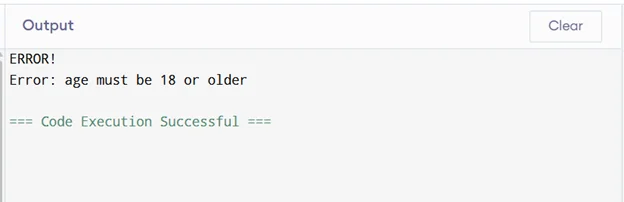
Explanation to this example:
|
|
Read Also: Top 50+ Golang Interview Questions And Answers
So basically, effective error handling in Go is simple yet powerful, relying on explicit error returns and clear control flow. Through making use of error types, if err != nil checks and custom errors when required, you can create robust, readable and manageable code. Adopt and embrace Go's straightforward approach to handle errors flawlessly and make sure your programs are resilient.
It checks that a given error matches a particular error value. It's specially useful with wrapped or nested errors, letting us identify particular error types or sentinel errors in a chain of errors.
panic() is either raised by the program itself when an unexpected error comes or the programmer throws the exception on purpose for handling specific errors.
It is an object applying the http.Handler interface. A well known way to write a handler is through using the http. HandlerFunc adapter on functions with the appropriate signature.
You typically return an error from functions and check it using if conditions.
Beginners can practice by writing functions that return errors, checking them with if err != nil, and handling different cases like file operations or network requests.
Course Schedule
| Course Name | Batch Type | Details |
| Golang Training | Every Weekday | View Details |
| Golang Training | Every Weekend | View Details |