Business applications have become an integral part of organization these days. They give them the ability to improve customer experiences, automate processes and increase operational efficiency. But it takes a lot of time and requires complex coding to build these types of applications. This is where Pega comes as an effective solution that helps to build business apps without complex coding.
Its intuitive interface and robust features make it possible to translate business requirements into working applications faster than ever before. In this Pega tutorial, we will dive into the core concepts of Pega, its architecture, installation and BPM methodology. The BPM methodology is also covered along the way to learn a major usage of this tool. Let's get started!
Pega is one of the top and most highly revered low-code app development platforms. It is being extensively used for deploying and building enterprise software solutions. It's a quite simple-to-use platform for a lot of business users. Non-technical professionals can easily step up to use it for creating complicated apps. This guide will cover everything in the Pega tutorial.
The demands presented by the company and the experience of the client are the two basis that make up everything here. It is presented on many years of constant and continuous progress done by business apps. The greatest benefit of this tool is that one does not have to start from scratch. No coding knowledge is necessary to become an app developing professional.
Pega architecture makes up the core of this app development framework. It is broadly divided into four layers. Learning about these layers will enable the aspirant to quickly grasp high level knowledge about this platform. This tool has a distributed architecture by making use of a 3-tier client-server architecture. Let's first understand the four layers.
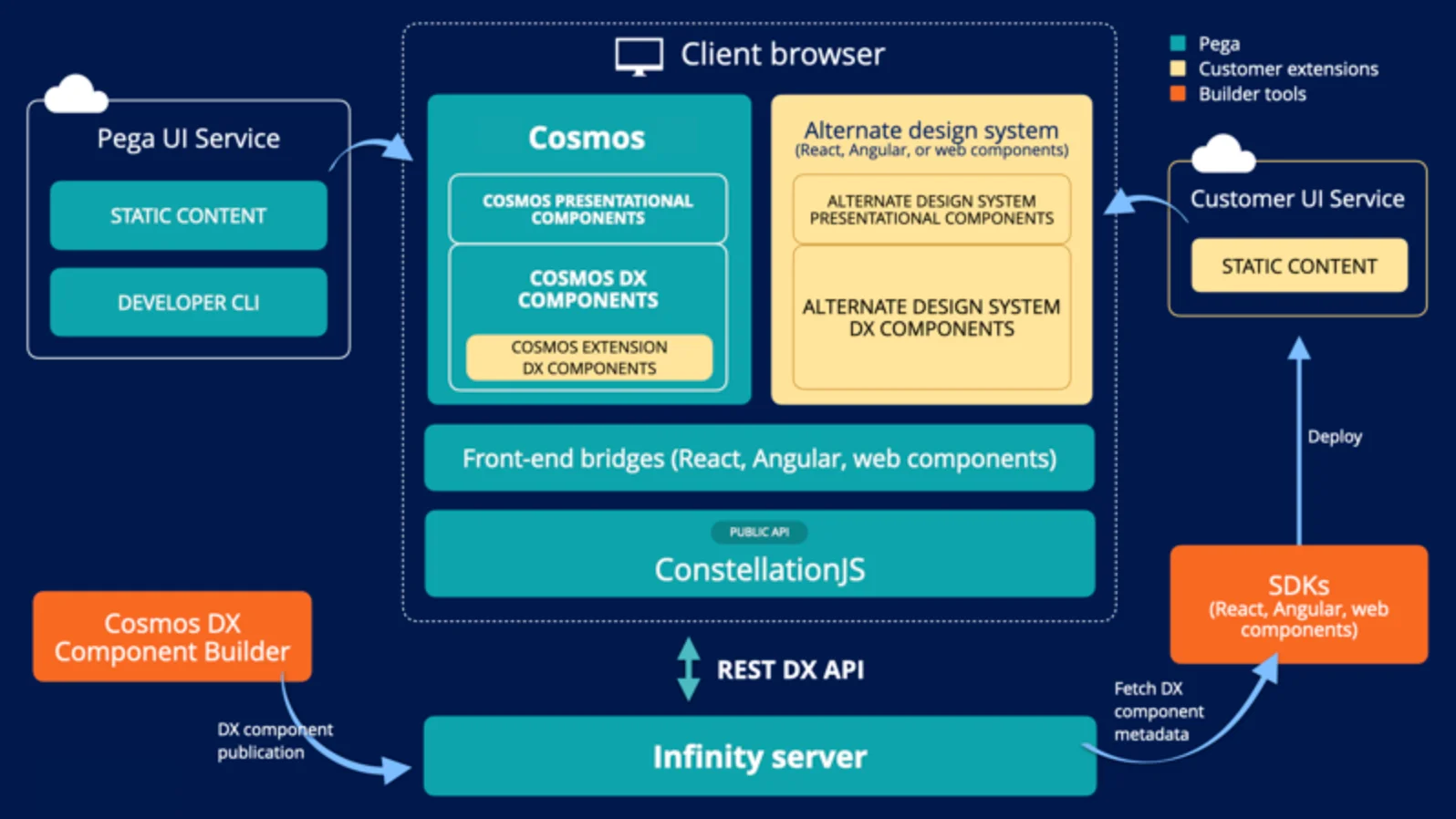
The complete architecture of this tool is built around a Service Layer.
The second layer or the business object layer comprises all of the app's business methods. All clients request that the app pass via a service layer and then send the data. CRUD operations are carried out on the data by the business methods. This exposes it as web services.
The third layer of its architecture encompasses all DB-related objects. This includes Database schema, Database access objects and Stored procedures.
The infrastructure layer comprises database and web services connectivity components. Business methods are deployed on the servers.
BPM is the acronym for business process management. It is an organizational culture and management philosophy. This mindset continuously thrives and advances on making the company perform better. It connects people, technology, processes, roles & responsibilities, compliances and business rules. The aim is simple and commonly associated with adding value both to the stakeholders and the customers.
Understanding the BPM methodology through this Pega tutorial means understanding the approach it takes. It's a step-by-step approach that is undertaken to achieve the desired outcome. Here is an apt depiction with a simple use case- Transfer of amount via Online.
Step 1. Login to the system
Step 2. Begin the transfer by inserting the account details and amount.
Step 3. The next to do is to invoke the transaction.
Step 4. Verify whether the intended amount has been debited from the account.
Step 5. Verify whether the amount has been received or been credited to the target account.
Step 6. Send email notifications along with the important transaction details.
Step 7. Put an end to the transaction.
The above example has helped in defining a step-by-step approach used to get the desired outcome. This is often referred to business or use case flows. Flows pertain to the key part of defining the use cases present in the system. Learning about flows is important to learn more about this tool as a whole.
You May Also Like- Mendix Tutorial For Beginners
Pega Case Lifecycle Management (PCLM) is a core capability of this platform. It provides a structured approach to defining, automating and managing the entire journey of a business process. It is also represented as a case. It involves all the stages, steps and decisions involved in resolving a particular business need or transaction.
PCLM focuses on visually modeling the lifecycle of a case, breaking it down into distinct stages. These stages represent the high-level phases a case progresses like intake, investigation, resolution, etc. Each of these stages includes one or more steps, which are the specific actions or tasks that need to be completed. These steps can be automated tasks performed by the system, manual tasks assigned to users or decisions that need to be made.
Pega testing aims to test the performance, interface design and functionality of a Page-based application. It is used to ensure that all the developed apps cater to each condition and requirements. There are various stages to perform this testing you can see in the image given below -
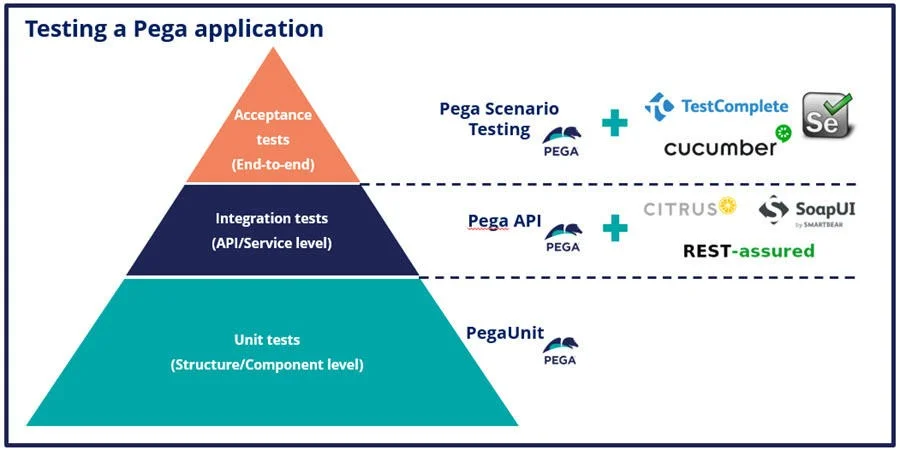
Image Source - Pega test strategy
Other important stages in Pega testing include system testing, user acceptance testing (UAT), performance testing and security testing. A comprehensive testing strategy can help to deliver robust and reliable apps to meet business requirements.
Read Also- Pega Interview Questions and Answers
Pega installation can be a challenging task for those who are new. But knowing about installation is as important as it gets. One has to have in-depth knowledge about it for a smooth and flourishing career. Here is how this platform can be downloaded and installed.
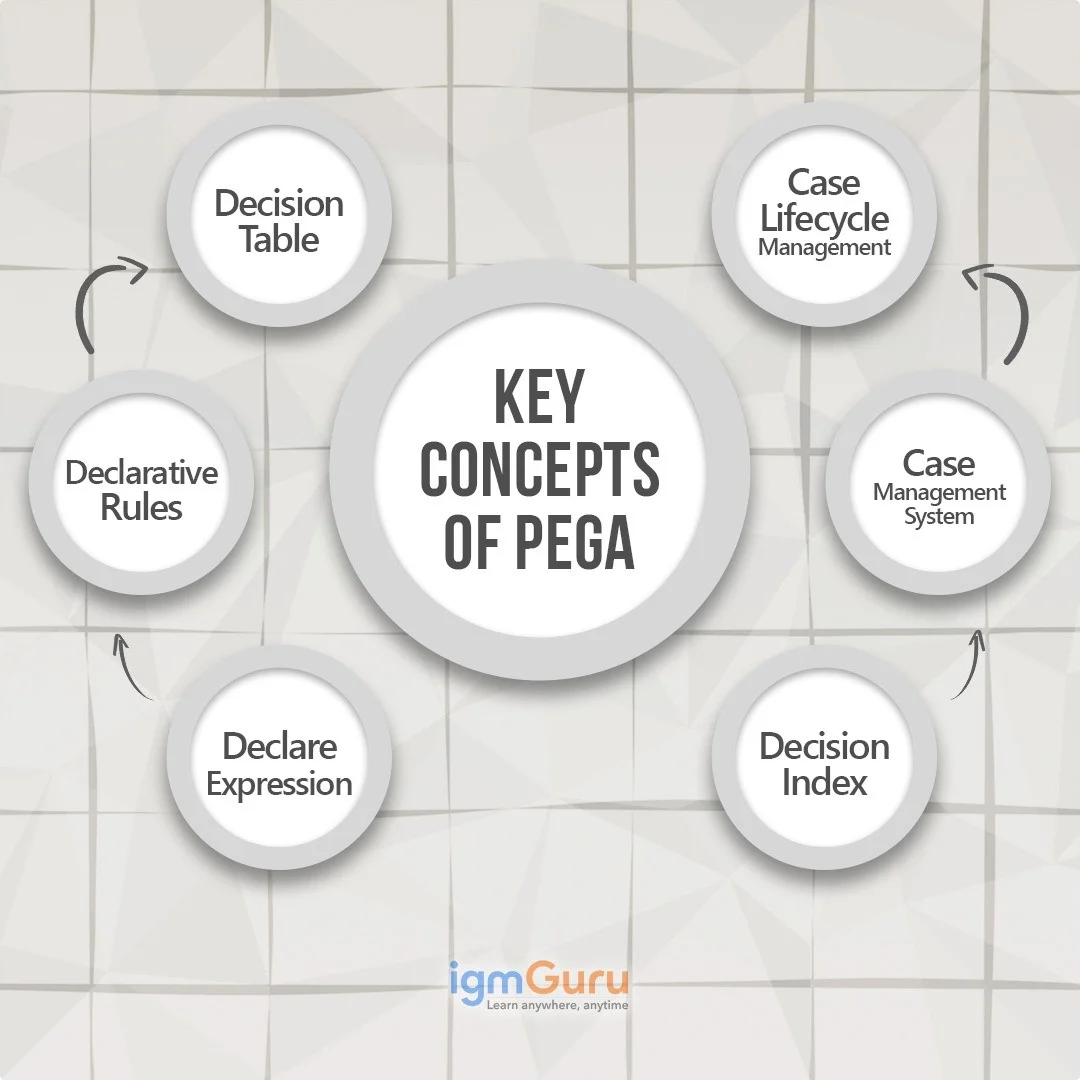
Understanding these key concepts is fundamental for effectively building and managing applications within this Platform. These terms represent core functionalities and rule types that drive the behavior and structure of applications.
A Decision Table is a rule type that defines a series of conditions and corresponding actions in a tabular format. It provides a clear and visual way to implement complex business logic based on multiple input parameters. Decision Tables are often used to determine outcomes, routing decisions or property values based on a combination of factors. This makes them a powerful tool for implementing business rules.
Declarative Rules define the what of the application's behavior, focusing on the desired outcome rather than the procedural steps to achieve it. These rules automatically trigger and maintain property values or relationships based on defined conditions. Declarative rules promote efficiency and maintainability by automating rule execution and reducing the need for explicit procedural coding. Examples include -
Declare Expressions are a type of Declarative Rule that automatically calculate and maintain the value of a property based on a defined formula or relationship with other properties. When the input properties in the expression change, the target property's value is automatically updated. This ensures data consistency and reduces the need for manual calculations or procedural code.
A Decision Index (Declare Index) rule creates secondary indexes on the PegaRULES database to optimize query performance for specific search criteria. By defining a Declare Index, one can enable faster retrieval of data based on properties that are not part of the primary key. This is particularly useful for improving the performance of list views, reports and case searches based on frequently queried properties.
Pega is fundamentally a Case Management System that provides a framework for managing and automating business processes that revolve around specific cases or work items. This system enables the definition of case types, stages, steps and data elements to guide the progression of work from initiation to resolution. It provides tools for tracking case status, managing assignments and ensuring process adherence.
Case Lifecycle Management (CLM) refers to the process of defining, automating and managing the entire lifecycle of a case within an application. This involves modeling the different stages a case goes through, the tasks or steps within each stage and the transitions between them.
CLM ensures that cases progress, adhering to defined business processes and service level agreements (SLAs). It provides visibility into case status and enables continuous improvement of business processes.
Read Also- Best RPA Robotic Process Automation Tools
Pega Platform Studios refers to the four role-based authoring workspaces provided by this platform. Each of these workspaces offers specific features and tools for app development. Using the right workspace leads to team members completing their tasks by using apt tools. Each tool used aligns well with their expertise. These studios are of four kinds-
An app studio refers to a low-code workspace. This is designed for citizen developers, system architects and business architects.
A dev studio is a low-code workspace. It has many advanced configuration options for the different technical team members and even system architects.
The prediction studio is an analytics workspace. It's used by business decision-makers and data scientists.
This is a software administration workspace that's managed by the IT staff and is solely for system administration.
Pega is a top choice for users everywhere now. This Pega tutorial is a testament to the fact that how much this platform is used globally. It helps users perform changes way more quickly. It also helps develop different apps for different kinds of businesses. Learning it can be a great addition to one's resume.
Learning Pega can be easy with the right guidance. It is also comparatively easier because coding knowledge is not needed.
Pega uses Java and OOP since it was created in Java.
Yes, with a comprehensive Pega tutorial that includes detailed explanations, you can learn Pega.
The four phases of Pega are Build, Deploy, Test and Run, covering application development, deployment, testing and production use.
No, Pega mainly uses a low-code visual interface, so most tasks don’t need coding.
Basic coding can help for advanced customizations.