Flutter pertains to one of the most staggering growing mobile app development frameworks. It's developed by Google and is designed to develop mobile & web apps with a single code base. These said apps can also be exported as native apps for iOS and Android. This blog discusses 'what is Flutter', what it's used for, its features and benefits as well. A brief comparison is also added with React Native for better understanding of this framework. Let's get started with the most basic question.
It's a tool for building native cross-platform applications with a single programming language and a single codebase. It doesn't create an application that runs in the browser or gets wrapped by native apps. On the contrary, a native app is created for both Android and iOS that can be easily published to the stores later.
This app can be created just by only using one programming language. The developer does not have to use separate ones for building an Android or an iOS app. This also means that there is only one code base to look after. It's an SDK or a Software Development Kit. It helps in compiling the codebase into native machine code so that it runs on the platforms that are already mentioned above.
In addition to its compilation tools, it also acts as a framework. It does so by offering a compilation of various UI (user interface) building blocks (widgets). The list includes tabs, buttons, dropdowns, etc. Some packages and utility functions are also included to get compiled with the help of SDK.
Explore igmGuru's Flutter Course program and learn Flutter with industry experts.
What is Flutter used for? There are many ways in which this framework comes handy for companies and even individual developers. Let's understand a few of the common ones-
Flutter is a mobile app SDK that makes it easy to create great-looking apps for iOS and Android. It's also a key tool for building apps that run on Google's Fuchsia operating system.
With Flutter, you can design user interfaces that are not only nice to look at but also run smoothly. The framework lets you add new features easily whenever you need to.
When you start building a Flutter app, you'll be working with widgets. Widgets are the basic parts of a Flutter app that help you create visual elements like buttons and text, as well as functional parts like Stateless Widgets.
There are two kinds of widgets: Stateless Widgets and Stateful Widgets. Stateless Widgets don't hold any internal state, which makes them simple and often used for items like buttons or text labels.
On the flip side, Stateful Widgets do have internal state, and this state can change over time, affecting how the widget behaves and looks. You'll typically use Stateful Widgets for things like user input fields or animations.
You can create both types of widgets using Dart, the programming language for Flutter. Plus, there are other handy development tools you can use, like the Dart Analyzer and the Flutter Inspector, to make the process smoother.
Related Article: Top Front-end language you need to Know
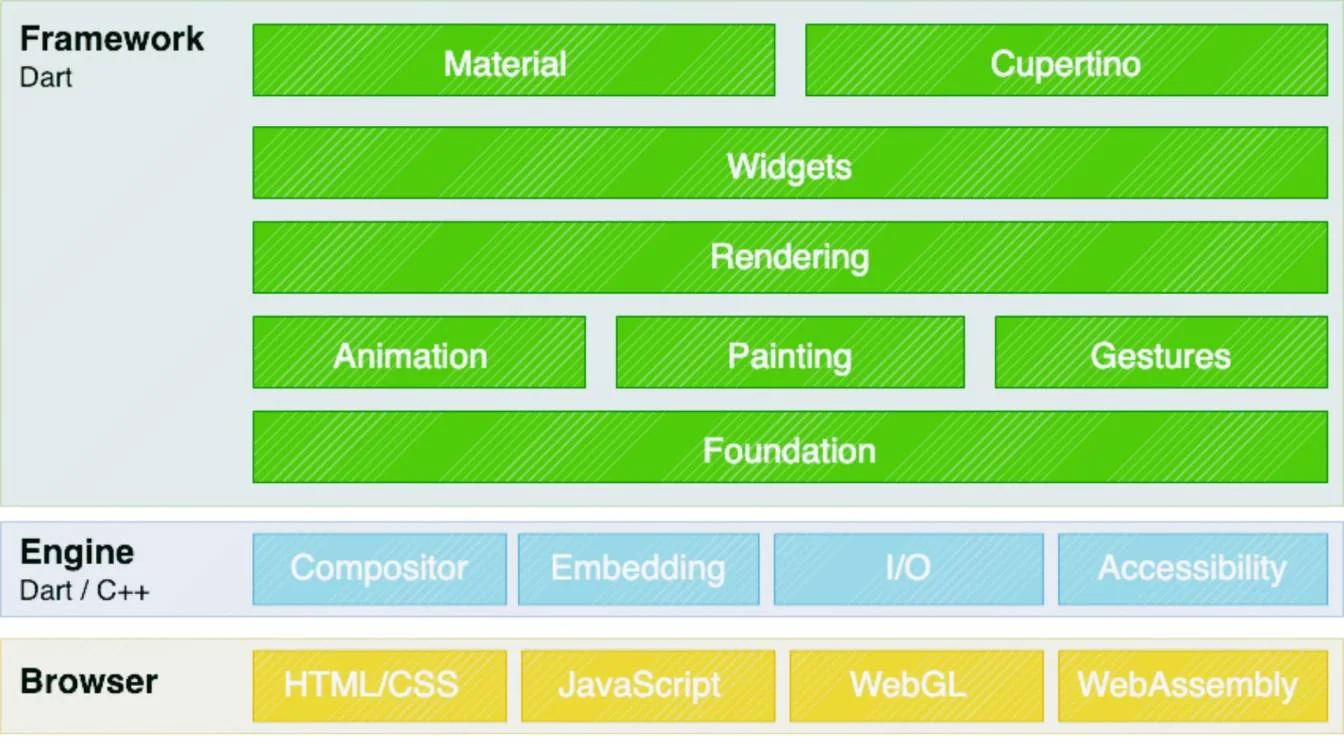
The setup of Flutter is known for being speedy and user-friendly. It consists of three primary parts which are put together to build apps with ease and ensure their seamless run. This section breaks down each of these parts.
The topmost is Flutter Framework, built with Dart. It provides various ready-to-use widgets which are useful to create visually appealing user interfaces. On top of that, it has libraries to seek assistance for things like animations, gestures, input from users and other UI elements.
The framework looks after everything that users can see, from handling users actions, showing content on the screen to ensuring that the app is meeting user's expectations. One can write code that works across different platforms like Web, Linux, Windows and macOs without making changes.
The next one is Flutter Engine which is built in C++. This part is accountable for displaying the application's UI. It utilizes an impressive graphics library called Skia to draw the UI on the screen. The engine takes care of nitty-gritty stuff like making smoother transitions, rendering graphics or handling animations. It also connects with the native code of the platform, which lets the app use features like camera Bluetooth and GPS.
At last, Embedder layer which connects the Flutter app to the operating system. It assists Flutter to work with the native code and utilize the platform's APIs. Each platform (iOS, Android, desktop,web) consists of their own embedder. This helps Flutter run seamlessly on different devices.
This layer takes care of things which are specific to each platform. For instance, managing application's lifecycle, linking up with system services, dealing with devices like keyboard and touch. It makes sure that Flutter apps work smoothly on all kinds of devices.
Related Article - Flutter Tutorial For Beginners
The key features of Flutter have made it a compelling framework amongst developers. These features are the reason behind its growth and expansion as a popular tool.
One of the cool things about Flutter is that you can build apps for different platforms with just one codebase. This means you can write your code once and run it on iOS, Android, web, and desktop. It really cuts down on the time and effort needed to create apps for various systems.
The hot reload feature is a game changer for developers. You can see any changes you make to the code right away on the emulator or your device, without having to restart the app. This helps speed up the process, letting you try things out and improve your work more quickly.
Flutter has a ton of pre-designed widgets that you can easily customize. These widgets are the basic building blocks of a Flutter app, making it simple to create complex UIs with less code. They follow Google's Material Design and Apple's Cupertino styles, so you can build user interfaces that look good and feel consistent across platforms.
Flutter apps run fast because the engine is built with C++ and uses Dart for coding. The framework turns Dart code into native machine code, which helps keep everything running smoothly on both iOS and Android. Plus, it uses the Skia graphics engine for quick rendering of graphics and animations without needing a JavaScript bridge, which often slows things down.
With support for Material Design and Cupertino widgets, Flutter makes it easy to craft visually stunning apps that match the design guidelines for each platform. Its architecture allows for a lot of customization, letting you mix and match widgets to create unique and engaging interfaces.
Since Flutter came out, it's built up a vibrant community. There are lots of packages and plugins in the Flutter ecosystem that can help you add features to your apps without starting from scratch. Plus, the community is supportive and offers resources for developers, no matter their skill level.
Related Article- React Native Tutorial
There are many benefits of Flutter app development that makes it stand out. This cross-platform development framework is being used globally by many companies and the perks it offers are a driving force in this widespread use.
It uses the Dart programming language to compile into machine code. Host devices can understand this code for an effective & faster performance.
Google built this tool by throwing an emphasis on its being easy to use. Developers use tools like hot reload to preview how the code changes will reflect without losing state. Widget inspector is another tool that makes visualizing and solving issues with UI layouts easy.
It does not rely upon platform-specific rendering tools but instead uses Skia - Google's open-source graphic library for rendering UI. Users get consistent visuals irrespective of the platform they are using for accessing the application.
The same code is usable for building apps for both Android & iOS devices. A single codebase can be used rather than having to switch between different platforms. This leads to a lot of saved time and efforts during the process of mobile app development. It can be also used for web development for creating web apps.
It's a Google product and receives an unprecedented amount of support from this tech giant. Google works tirelessly to make it better.
Flutter has a lot to offer, but it's good to keep its downsides in mind when you're thinking about it for app development. Here are some drawbacks:
Flutter doesn't support every native feature out of the box, so you might have to rely on third-party plugins or write your own code for different platforms. This can make things a bit trickier and take more time.
The number of libraries and tools available for Flutter is growing, but it's still not as extensive as what you find with other frameworks like React Native. This could leave developers searching for plugins or packages that aren't there, leading to more work.
Flutter apps can end up being bigger than native ones. This happens because Flutter packs in its rendering engine and framework components, which makes the app size bulkier than a comparable native app.
Since Flutter uses its own rendering engine for a consistent look on both Android and iOS, sometimes it can end up not looking or feeling as native on iOS devices.
Flutter's main programming language is Dart, which isn't as widely used as JavaScript, Kotlin, or Swift. This could be a challenge for developers who aren't familiar with Dart.
Related Article- A Guide to Learn React Native
The debate around Flutter vs React Native is still a much prevalent one. The former is an open-source that's used for developing cross-platform applications using a single codebase. The latter is an open-source that's employed for building native applications that run on Android and iOS platforms. Here are some key differences between them-
There are too many things to learn regarding 'what is Flutter' and that blog compiles some of the must-knows. It's a great framework that is being used globally. There are many aspects to be explored about it and our blog taps into its features, benefits and uses for the same.
Explore Our Trending Articles:
What Is Java Used For? Everything You Need To Know
What is Full Stack Development? Everything You Need To Know
What is Mendix? Everything You Need To Know
It supports both backend and frontend development. Majority of the developers use it for frontend because it creates interactive and beautiful user interfaces.
The average salary in India is around INR 4.5 LPA. Many factors may affect the final salary offered to a person.
Course Schedule
| Course Name | Batch Type | Details |
| Flutter Training | Every Weekday | View Details |
| Flutter Training | Every Weekend | View Details |