TypeScript has become one of the most talked-about tools in modern web development. Whether you are a beginner trying to learn JavaScript or an experienced developer building large-scale applications, TypeScript is a name you will keep hearing. This guide breaks down everything you need to know about TypeScript, from what it is to how it works and when you should use it.
Read Also: What is React and Why Use It For Your App?
JavaScript is a web language. It is flexible, fast to write, and runs everywhere. But as projects grow larger, that flexibility starts working against you. Variables can hold any value. Functions can receive wrong arguments. Bugs hide until they reach your users.
TypeScript fixes this. It is an open-source programming language developed by Microsoft that adds a static type system on top of JavaScript. You define what kind of data a variable should hold, what a function should accept, and what it should return. The compiler checks all this before your code runs.
Every valid JavaScript file is also valid TypeScript. You do not rewrite your existing code. You adopt it gradually, at your own pace. When you are ready to run it, the TypeScript compiler converts your .ts files into plain JavaScript that works in any browser or Node.js environment.
JavaScript was originally designed for small interactions on web pages. Nobody planned for it to power entire applications with hundreds of thousands of lines of code. But that is exactly what happened.
As JavaScript codebases grew, the cracks became obvious. There was no way to enforce data contracts between functions. Errors only surfaced at runtime, often in production. Large teams had trouble understanding each other's code without reading every line.
Microsoft built TypeScript to solve this. The goal was to make JavaScript scale for real teams and real applications. Anders Hejlsberg led the project. He wanted developers to get the safety of a statically typed language while still writing code that runs in the JavaScript ecosystem.
The result was a language that felt familiar to JavaScript developers but gave them tools to catch mistakes early, understand code faster, and work together more effectively.
Related Article: What is Java? Java Programming Language Explained
TypeScript is not just about adding types. It brings a full set of features that make development smoother and more productive.
Here are the key TypeScript features you should know:
TypeScript lets you define types for variables, function parameters, and return values. This catches errors during development instead of at runtime. For example, if a function expects a number and you pass a string, TypeScript will flag it immediately.
Interfaces let you define the shape of an object. They act as a contract that objects must follow. If an object is missing a required property or has the wrong type, TypeScript will warn you right away.
Enums let you define a set of named constants. Instead of using plain strings or numbers throughout your code, you use meaningful names. This makes your code more readable and less prone to typos.
Generics let you write reusable components that work with multiple data types while still keeping full type safety. You write the logic once and TypeScript handles the types based on how you use it.
Even when you do not explicitly define a type, TypeScript can often figure it out on its own. If you assign a string to a variable, TypeScript knows it is a string and will warn you if you try to assign something else to it later.
TypeScript supports public, private, and protected keywords inside classes. These give you control over which parts of your code can access which data, which leads to better-organized and more secure class structures.
Also Read: What is JDBC (Java Database Connectivity)
Knowing what happens under the hood helps you use TypeScript more effectively.
TypeScript uses a compiler (called tsc) that converts TypeScript code into JavaScript. This process is called transpilation. The output is clean, readable JavaScript that any browser or JavaScript runtime can execute.
Here is the basic workflow:
.ts files using TypeScript syntax..js files.TypeScript (.ts) → TypeScript Compiler (tsc) → JavaScript (.js) → Browser / Node.js
You can configure the compiler using a tsconfig.json file. This file allows you to control aspects such as which JavaScript version to compile to, which files to include, and the level of strictness in type checking.
| tsconfig.json |
|---|
|
Read Also: Write Your First Java Program - Hello World
Getting started with TypeScript is straightforward, even if you are new to it.
TypeScript requires Node.js. Download and install it from the official website.
Use npm to install TypeScript globally on your system.
| Install TypeScript |
|---|
|
Confirm that TypeScript is installed correctly.
| Check TypeScript Version |
|---|
|
Create a file called hello.ts and add some TypeScript code.
| hello.ts |
|---|
|
Related Article: How to Learn Java from Scratch?
Compile the TypeScript file to JavaScript, then run it with Node.js.
| Compile and Run |
|---|
|
The ts-node package lets you run TypeScript directly without a manual compile step.
| Run with ts-node |
|---|
|
While TypeScript is often considered enterprise-level technology and is typically associated with sizable businesses or developers, this does not mean its use is limited to large organizations. Developers of all experience levels and from many different industries use TypeScript.
Some of the largest technology companies use TypeScript in their applications:
There are also a number of libraries and frameworks that are open-source or free to the public, regardless of size or level of commercial support, which either leverage TypeScript's type definitions or are entirely written using TypeScript.
TypeScript vs JavaScript: What Is the Difference?
This is one of the most common questions developers ask when they first hear about TypeScript.
| Feature | TypeScript | JavaScript |
|---|---|---|
| Definition | A strongly typed superset of JavaScript | A lightweight scripting language for web development |
| Developed By | Microsoft | ECMA International |
| Typing System | Supports static typing | Uses dynamic typing |
| Error Detection | Detects errors during development | Errors usually appear during runtime |
| Compilation | Must be compiled into JavaScript | Runs directly in browsers |
| Learning Curve | Slightly harder for beginners | Easier to start with |
| Code Maintenance | Better for large and complex projects | Can become difficult in large applications |
| Tooling Support | Excellent IDE support with autocomplete and type checking | Good support but less strict |
| Performance | Same runtime performance after compilation | Direct execution in browsers |
| File Extension | .ts | .js |
| Object-Oriented Features | Advanced support for interfaces, generics, and decorators | Basic object-oriented programming support |
| Scalability | Ideal for enterprise-level applications | Better for small to medium projects |
| Browser Support | Cannot run directly in browsers | Runs natively in all modern browsers |
| Community Usage | Popular in modern frontend and backend frameworks | One of the most widely used languages in the world |
| Best Use Case | Large applications with teams | Quick scripting and interactive web pages |
The biggest difference is when errors are caught. JavaScript will let you run broken code and fail at runtime. TypeScript catches most errors before running the code.
Here is a side-by-side example:
| JavaScript Example |
|---|
|
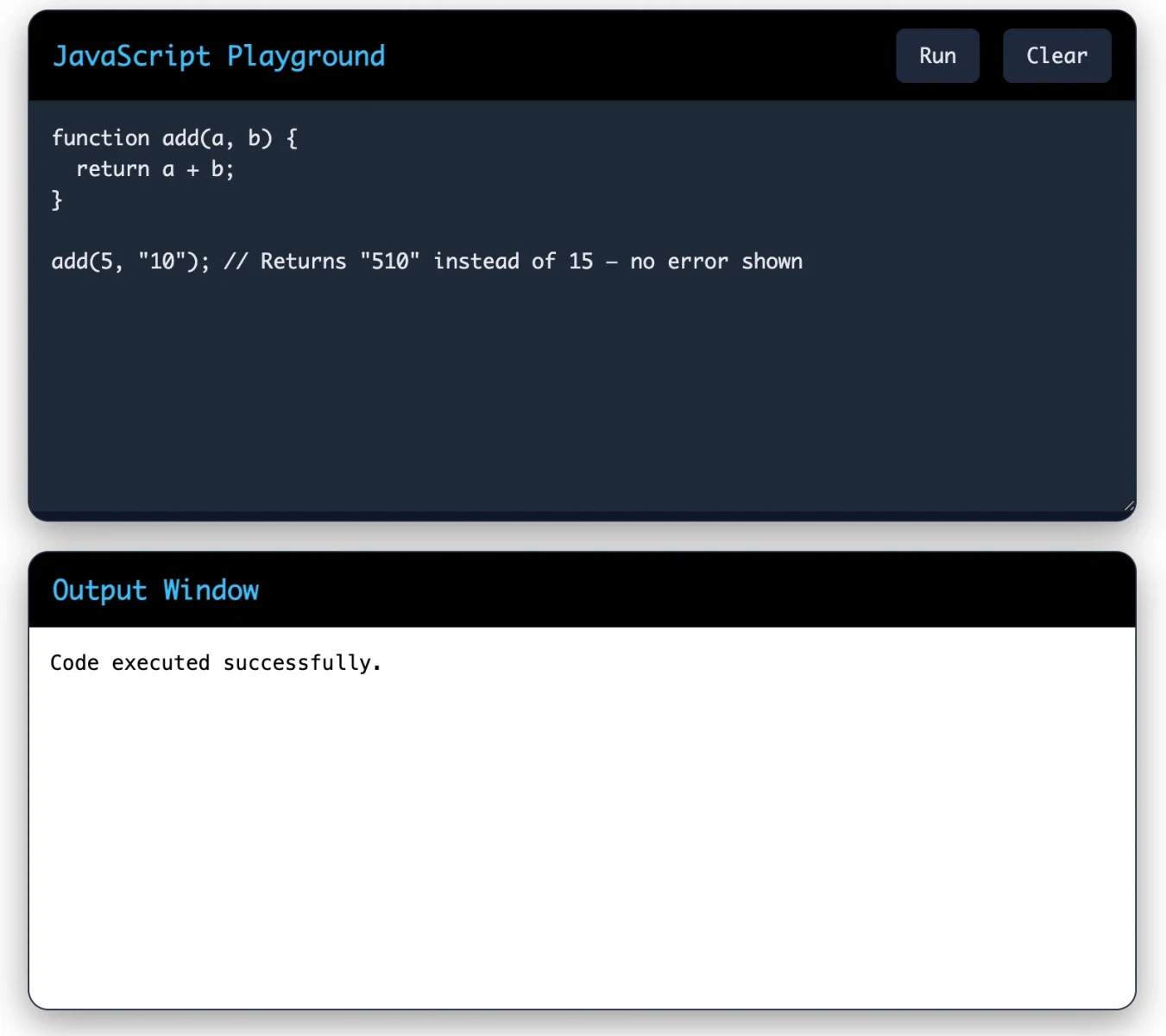
Test your JavaScript code here: Online JavaScript Compiler
| TypeScript Example |
|---|
|
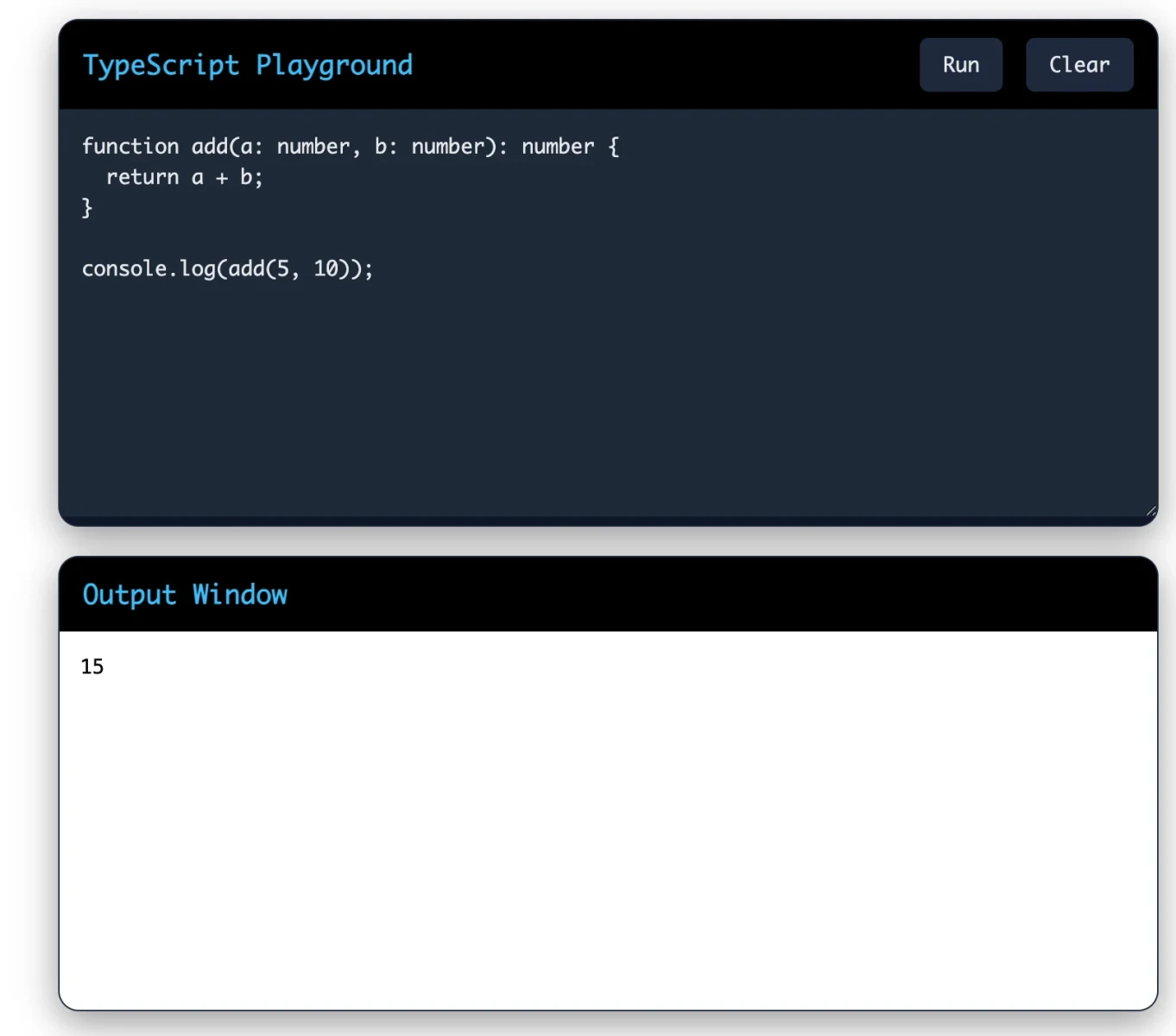
Test your TypeScript code here: Online TypeScript Compiler
TypeScript does not replace JavaScript. It builds on top of it. Your TypeScript code will always compile to JavaScript in the end.
TypeScript is not just a theoretical improvement. It solves real problems that development teams face every day.
TypeScript helps developers catch errors before users even submit a form. This makes applications more reliable and user-friendly.
Example: User Registration Form Validation
| TypeScript Code |
|---|
|
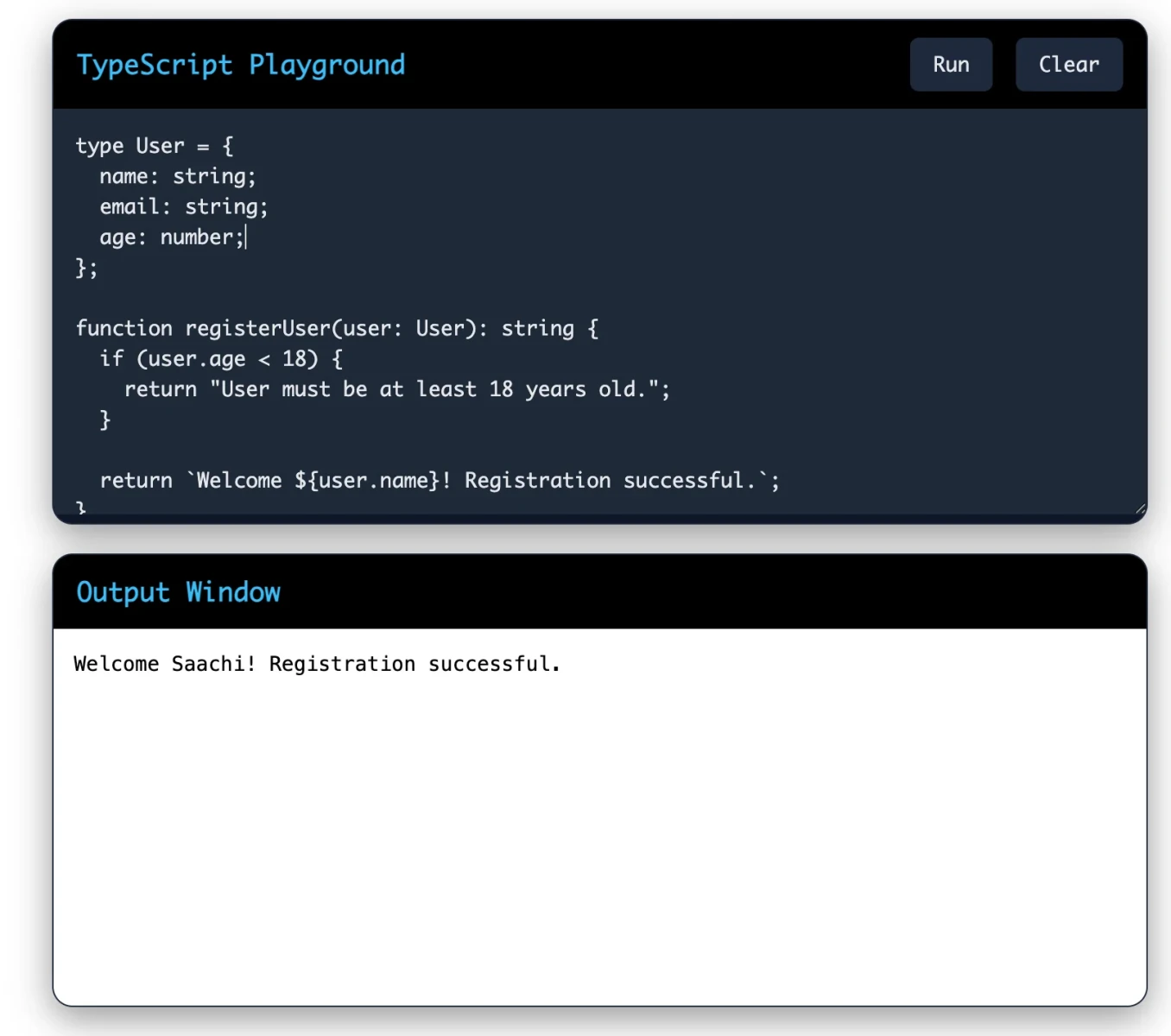
Why Companies Use This
Many companies building dashboards, SaaS platforms, and e-commerce applications use TypeScript for safer form handling.
Also Read: Classes and Objects in Java
Modern applications constantly fetch data from APIs. TypeScript ensures the API response structure stays correct.
Example: Fetching User Data with Console Output
| TypeScript Code |
|---|
|
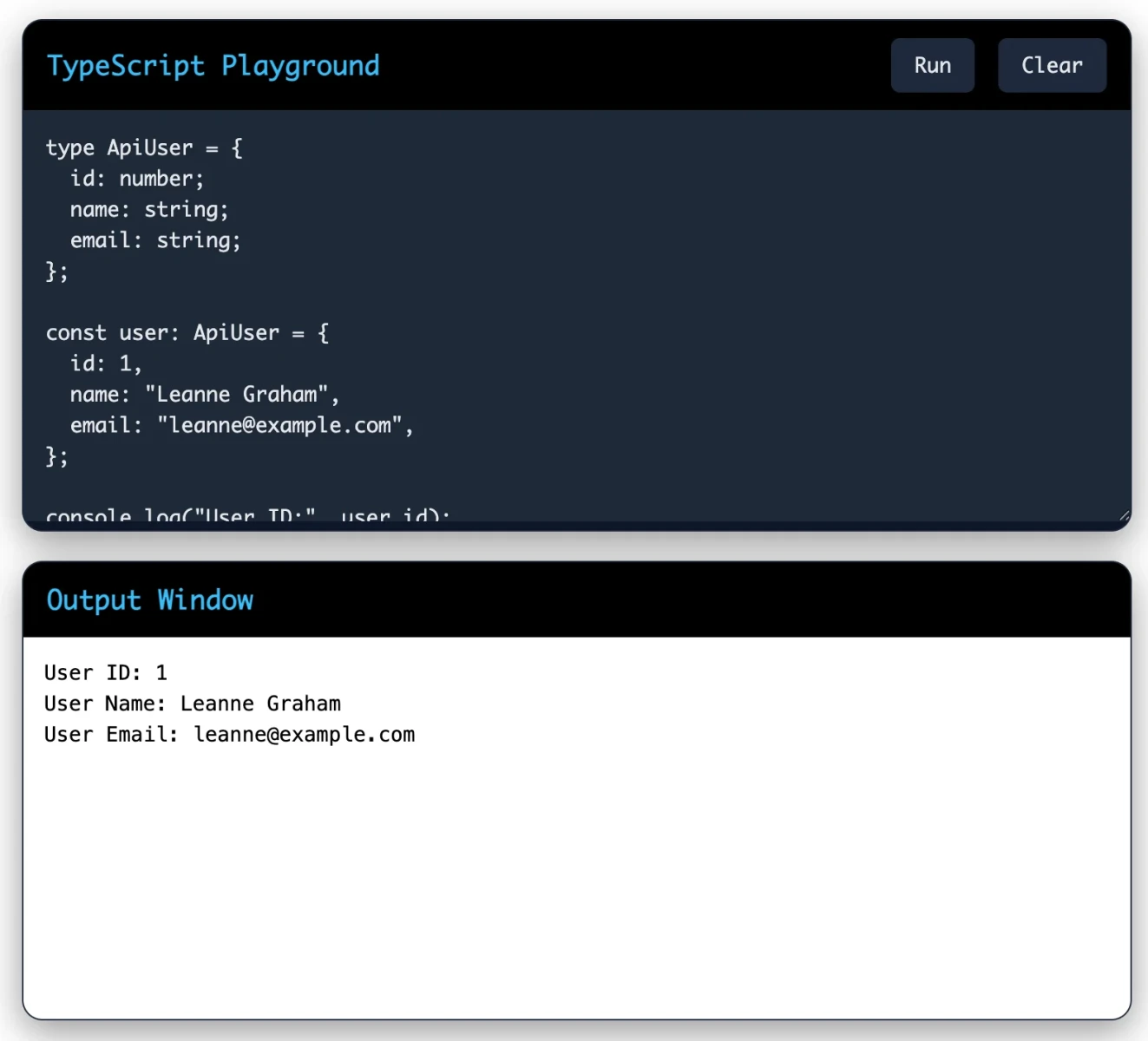
Why This Matters
Popular platforms like Airbnb and Slack heavily utilize TypeScript for frontend reliability.
Backend developers use TypeScript with Node.js to create secure APIs with better type safety.
Working Code Example
| TypeScript Code |
|---|
|
Why It Matters
One of the best things about TypeScript is that you can use it everywhere JavaScript runs.
On the frontend, TypeScript works seamlessly with HTML and CSS-based web applications. You can use it to build interactive user interfaces, handle browser events, and manage application state with full type safety.
| Frontend TypeScript Example |
|---|
|
On the backend, TypeScript works with Node.js to build APIs, servers, and services. It helps you model your data clearly and keep your business logic organized.
| Backend TypeScript Example |
|---|
|
Using TypeScript across both the frontend and backend also lets teams share type definitions. For example, you can define an API response type once and use it in both the client and server code.
Read Also: Pattern Program in Java (Different Patterns to Practice)
TypeScript works seamlessly with modern frontend and backend frameworks. It improves code quality, developer productivity, scalability, and error detection, making it a preferred choice for building professional web applications.
| Framework | How TypeScript Helps | Real World Usage |
|---|---|---|
| React | Adds type safety to components, props, and state management. Makes large frontend projects easier to maintain. | Used by Facebook, Netflix |
| Angular | Built with TypeScript by default. Helps create structured enterprise applications with strong tooling support. | Used by Google and enterprise apps |
| Vue.js | Improves component reliability and developer experience with better autocomplete and error checking. | Popular in startups and modern SaaS platforms |
| Next.js | Makes server-side rendering and full-stack React development more scalable and secure. | Used by TikTok and ecommerce platforms |
| Node.js | Helps developers build safer backend APIs and scalable server-side applications with fewer runtime errors. | Used by PayPal and fintech apps |
Let's look at the specific reasons many developers and teams choose TypeScript.
TypeScript catches type errors at compile time. This means you find bugs while writing code, not after deploying to production.
When you define types and interfaces, you are forced to think carefully about your data structures. This leads to better-designed code overall.
TypeScript unlocks powerful IDE features like autocomplete, go-to-definition, and inline documentation. These features save time and reduce mistakes.
In a team environment, TypeScript acts as a communication tool. Types make it clear what a function expects and what it returns. This reduces misunderstandings and makes code reviews easier.
Changing code in large projects is risky in JavaScript. TypeScript makes it much safer by flagging every place where a change breaks something.
Related Article: What are Constructors in Java?
TypeScript is not suitable for every situation. Here are the honest trade-offs you should know.
If you are new to static typing, TypeScript has a learning curve. Concepts like generics, utility types, and declaration files can take time to learn properly.
TypeScript requires compilation before it runs. This adds complexity to your build pipeline, especially in smaller projects where simplicity matters.
TypeScript code can be more verbose than JavaScript. Adding types to everything takes more keystrokes and can slow down rapid prototyping.
For small scripts or quick tools, TypeScript may add more overhead than it is worth. The benefits scale with project size and team size.
Not every JavaScript library has high-quality TypeScript type definitions. Sometimes you will find outdated or incomplete types that require workarounds.
The answer depends on your project, your team, and your goals.
The good news is that you do not have to make a permanent choice. TypeScript is designed to be adopted gradually. You can start by renaming a few .js files to .ts and adding types incrementally as you go.
Also Read: volatile Keyword in Java: Usage & Examples
TypeScript has earned its place as one of the most important tools in modern JavaScript development. It takes everything JavaScript offers and adds a layer of safety, structure, and tooling that makes it easier to build reliable software at scale.
If you are a JavaScript developer who has not yet tried TypeScript, now is a great time to start. The ecosystem is mature, the community is large, and the benefits are real. Begin with a small project, get comfortable with the basics, and build from there.
TypeScript does not make you a better developer overnight. But it does give you better tools to write code that is easier to understand, easier to maintain, and harder to break.
No, TypeScript is a superset of JavaScript. All JavaScript code is valid TypeScript, but TypeScript adds features like static typing that JavaScript does not have. TypeScript must be compiled to JavaScript before it can run.
Yes, TypeScript builds on JavaScript. You should have a solid understanding of JavaScript fundamentals before you start learning TypeScript.
Yes, it is completely free and open source. Microsoft develops and maintains it, and the source code is available on GitHub.
Not directly. It must be compiled to JavaScript first. The compiled JavaScript then runs in the browser normally.