Imagine a programming language or API that allows a seamless connection between different relational database systems. This is exactly what Java database connectivity (JDBC) is used for. It connects to a variety of relational database management systems (RDBMS) like MySQL, PostgreSQL, Oracle and more. But how does it do that?
Well it is an API that empowers developers to couple, query and handle data across multiple sources with extensive efficiency and simplicity. Continue to explore this article and understand what is Java Database Connectivity, its architecture, components and steps to establish JDBC. It also provides a glance on the classes and interfaces used in this connectivity, along with a simple example to create a JDBC application.
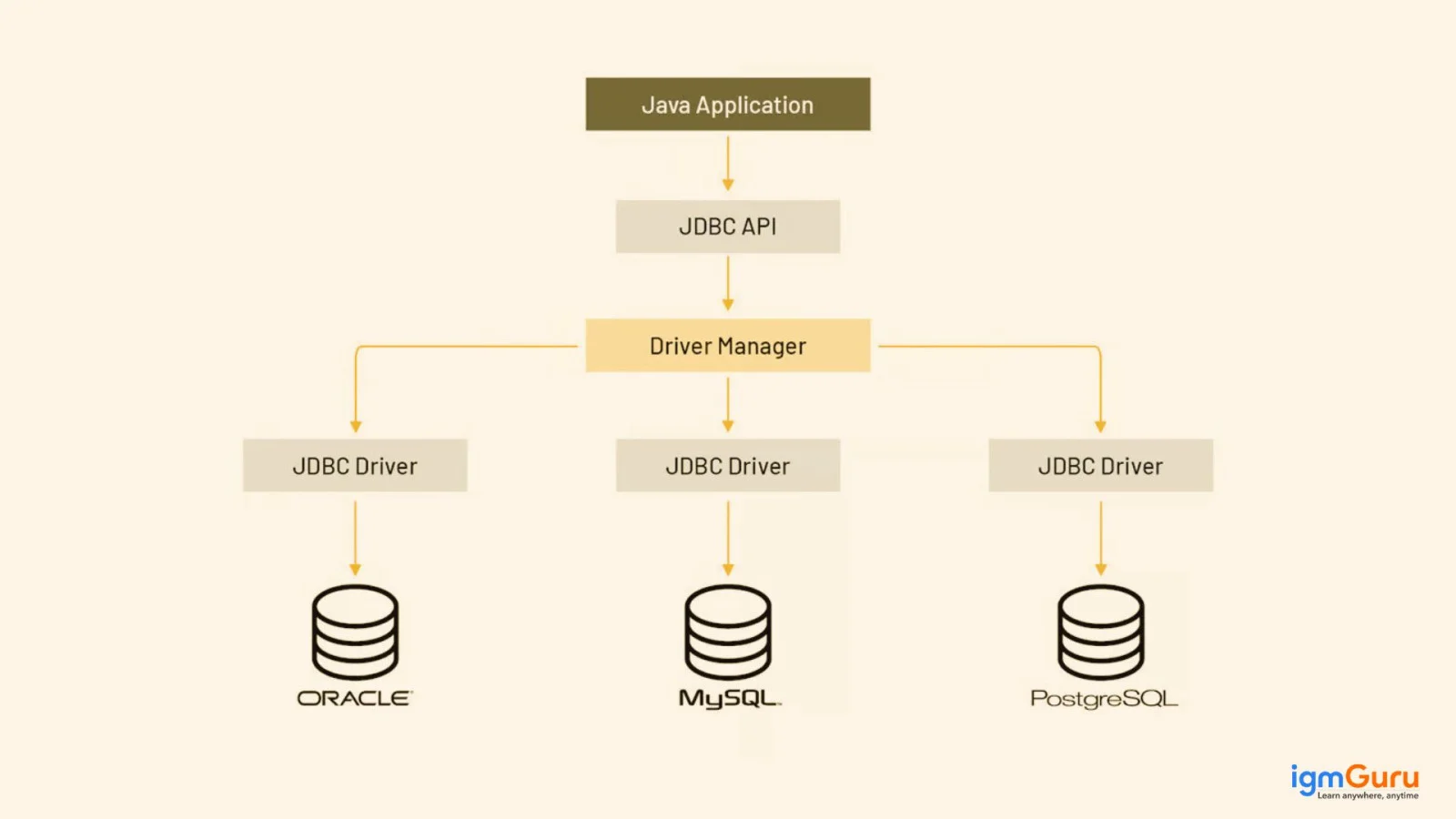
JDBC is a Java API that helps to connect and interact Java applications with databases. It provides a standardized way for Java code to access and manipulate data stored in relational database management systems and other data sources. It was originally developed by Sun Microsystems (acquired by Oracle in 2010) in 1997 with Java Development Kit (JDK) 1.1.
JDBC allows developers to establish connections with data sources, execute SQL queries and process result sets effectively. Think of it as a translator between databases and Java applications. A particular JDBC application capable of accessing numerous data sources regardless of its Java Virtual Machine (JVM). as a result, it provides unprecedented flexibility and portability.
Explore igmGuru's Java Course program to learn Java from Industry experts.
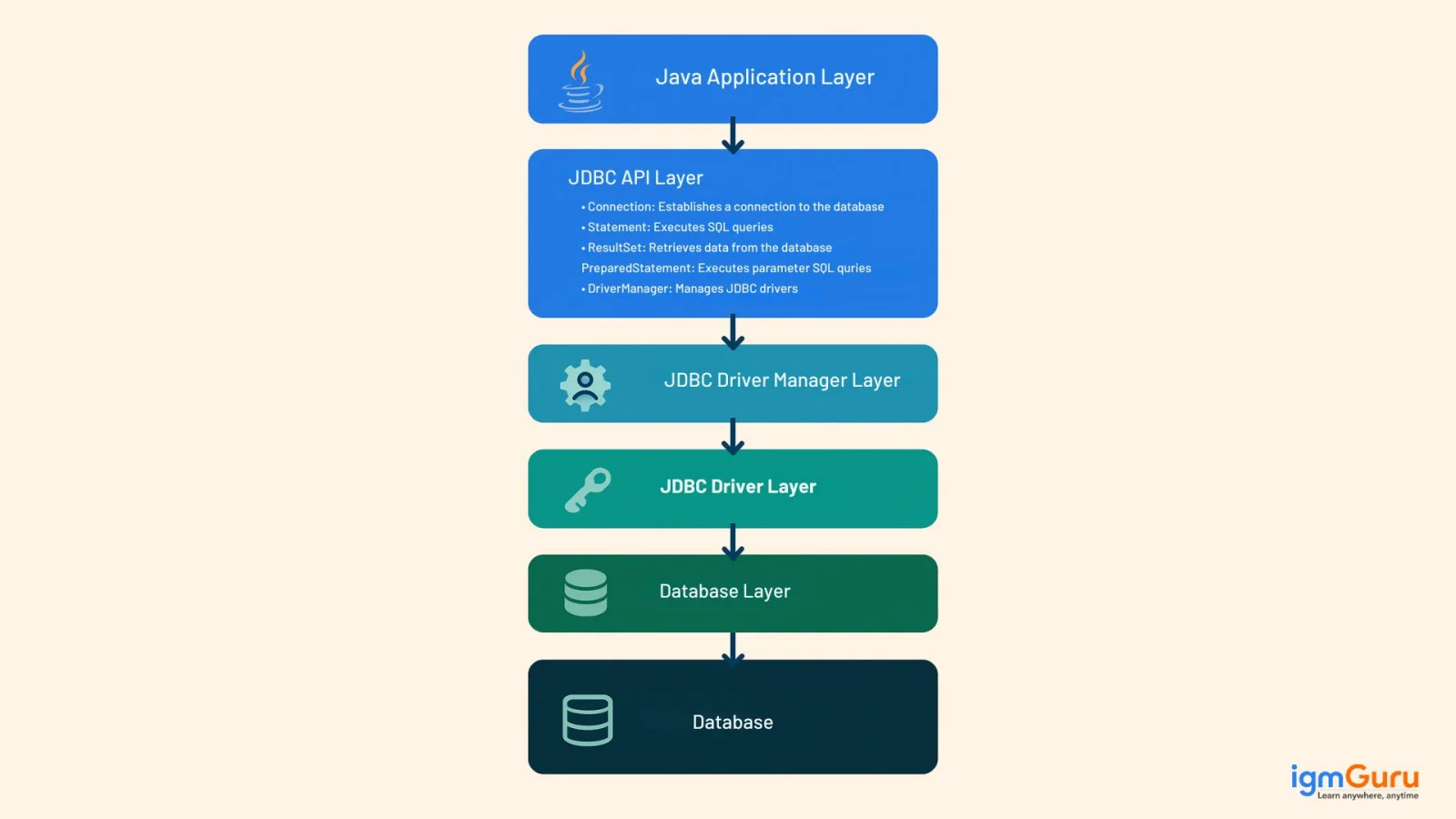
Let's come to the point of discussion: How does it do it? To understand it better, one must explore the JDBC architecture and its underlying components. It is a multilayer architecture, which includes the following layers:
This is where the Java program resides that uses the JDBC API to interact with the database.
This layer provides interfaces and classes that enable Java applications to interact with databases. Key interfaces include:
This layer is responsible for loading and managing JDBC drivers. It acts as a central component for finding and loading the appropriate driver to connect to a specific database.
Each database system has its own JDBC driver, which is a piece of software that handles the actual communication with the database. It also translates JDBC API calls into database-specified commands.
This is where the data resides and it is the actual database system that the Java application is interacting with.
Further, this architecture follows a two-tier and three-tier model for processing. Their working is described below:
In this architecture model, the application directly communicates with the required database using JDBC driver. It involves sending queries to that database and then sending the result back to the application. To understand it better, imagine a client/server setup. Here the system acts like a client that directly communicates with one of the remote database servers. Its structure will look like this:
|
This architecture model involves sending the user queries to the middle-tier service. Now the service will interact with the database. In essence, results of the database are processed and then shared with the user by the middle tier. It's sure to look like this:
|
Related Article- What are Packages in Java? A Comprehensive Guide
JDBC components play a crucial role in interacting with a database. There are mainly five types of components in JDBC, including:
Classes and interfaces are also among the most crucial elements to establish Java database connectivity. Here's a table outlining the essential JDBC classes and interfaces:
| Class/Interface | Description |
| DriverManager | It manages a set of JDBC drivers and is the most used way to establish a connection to a database. |
| Connection | It portrays a session with a specified database. All SQL statements are executed within the context of a connection. |
| Statement | It is used for executing static SQL statements and returning the results produced by them. |
| PreparedStatement | It is more efficient for executing the same statement multiple times and provides protection against SQL injection attacks. |
| CallableStatement | It extends PreparedStatement and is used to execute stored procedures in the database. |
| ResultSet | It represents a table of data generated by executing a SQL query. It provides methods to navigate through the rows and retrieve column values. |
| ResultSetMetaData | It provides information about the columns in a ResultSet object, such as the number of columns, column names, data types, etc. |
| DatabaseMetaData | It provides information about the database as a whole, including supported SQL, database product name and version, driver name and version and information about tables, procedures and functions. |
| SQLException | It is an exception that provides information on a database access error or other errors. |
| SQLWarning | It is a warning that provides information on a database access warning. Warnings are silently chained to the object whose method produced it. |
In this section, we will implement all the above knowledge to establish a database connection using JDBC. It involves the following five steps:
Start with registering a driver class, which is a Java class that will implement a JDBC API of the database. The driver class is responsible for managing the communication between the Java application and database. It is necessary to load and register the driver class before establishing the connection.
|
Once you register the driver class, continue with creating the connection. Here you will need to use a connection object that represents a session between both ends. This allows a seamless SQL statements sharing and results retrieval. This will require some specific details like username, database URL and password.
|
Now you have to create a statement object. It will update statements and enable SQL queries against the database. Creating a statement involves using the createStatement() method. This method is provided by the Connection object.
|
The next step is to execute queries. JDBC supports a variety of queries including INSERT, SELECT, DELETE and UPDATE. Executing them will allow modifying the existing data and retrieving data from the database. It is done by using the method provided by the same Statement object.
|
It is also important to close the connection after the purpose of the connection is achieved. It releases the data sources and ensures complete cleanup. Closing the connection also helps to free up system resources and avoid potential memory leaks.
|
This Java program demonstrates how to connect to a PostgreSQL database using JDBC and execute a SELECT query to retrieve data.
|
Output:
PostgreSQL JDBC Driver registered! Connection established successfully. --- Data from 'users' table --- ID: 1, Name: Alice ID: 2, Name: Bob ID: 3, Name: Charlie ResultSet closed. Statement closed. Connection closed. |

This article has explained Java database connectivity, its architecture, components and classes and interface, along with practical examples. It is a complete demonstration of how you can use this feature to connect different database systems to your Java application. Continue to learn more about this programming language with our Java tutorial to become an expert.
Related Articles
The main purpose of database connectivity is to enable clients to interact with different databases from a particular application. With this connection, they can send commands to get answers in the form of a result set.
It provides developers with a standardized way for their applications to interact with databases. This enables them to connect, query and manipulate data without requiring creating complicated codes.
JDBC provides a standardized way for Java programs to establish a connection with various relational database management systems (RDBMS) like MySQL, Oracle, PostgreSQL, SQL Server, and more.
It can connect most of the relational database management systems including MySQL, Oracle, PostgreSQL, Microsoft SQL Server, IBM DB2, MariaDB, Derby, HSQLDB, Sybase, etc.
Yes, JDBC is easy to learn. Basic knowledge of Java and SQL is enough to get started.
Course Schedule
| Course Name | Batch Type | Details |
| Java Training | Every Weekday | View Details |
| Java Training | Every Weekend | View Details |