Java is one of the most popular and beginner-friendly programming languages in the world. From Android apps to enterprise-level applications to backend systems - Java is used everywhere. But when I first started exploring Java, I remember facing the same confusion most beginners feel today: Where do I begin?
There were countless tutorials, videos, and blogs available online, but none of them gave me a clear, structured path. I kept jumping from one concept to another without understanding how the pieces fit together. Some days I understood a topic easily, and on other days even a simple program felt frustrating. Over time, I realised something important: Learning Java becomes easy only when you follow a proper roadmap.
Once I broke everything down into small steps - installing Java, understanding syntax, learning OOP, and building mini projects - the language suddenly started making sense. That experience shaped the way I view Java today, and it's the reason I created this guide.
In this blog, you'll find a simple, clear, step-by-step roadmap that will help you learn Java from absolute zero- for free. Whether you're a student, a complete beginner, or someone switching from another programming language, this guide is built to give you clarity, direction, and confidence, based on what actually worked for me.
Let's begin with the definition of Java.
This guide is perfect for anyone who wants to know how to learn Java for beginners. Especially:
If your goal is to confidently learn Java and build real projects, you're in the right place.
Want to explore more? Check out our Java training program to learn from industry experts.
Java is a high-level, object-oriented programming language developed by Sun Microsystems in 1995 and now maintained by Oracle. Its biggest superpower is that Java can run on any device- Windows, Mac, Linux- without changing your code.
This is possible because of the JVM (Java Virtual Machine), which allows Java to follow the principle: Write Once, Run Anywhere.
Java is widely used in:
Its syntax is readable, its concepts build strong fundamentals, and its demand is stable across the world, making it one of the best languages for beginners.
Related Article- What is Java Used For? Key Applications and Benefits Explained
Java's popularity hasn't decreased even after 25+ years. Here's why it remains a top choice:
According to recent surveys, Java continues to remain among the top 10 most-used programming languages globally in 2026.
One thing I've learned from my own journey is that the time it takes to learn Java is different for everyone. It depends less on "how smart you are" and more on how consistent you can be. When I started, I used to think mastering Java would take a year or more, but once I followed a structured routine, the progress came much faster than I expected.
Here is the timeline I would like to share based on what worked for me:
This is usually enough time to comfortably understand:
When I first learned Java, the basics took me around this time because I practiced small programs daily. Even simple exercises like printing patterns or reversing strings helped build confidence.
Once you understand the basics, the next stage involves:
This is where Java starts to "click". For me, things became easier when I began applying each concept in small projects - that's when Java stopped feeling theoretical and started feeling practical.
If your goal is to start a career as a Java developer, you'll need additional skills like:
Most learners - even those starting from zero - reach a job-ready level within 6-9 months if they maintain consistency. That was the case for me as well. A few projects, a solid understanding of concepts, and regular practice can make a huge difference.
Related Article- 60+ Java Interview Questions and Answers (2026)
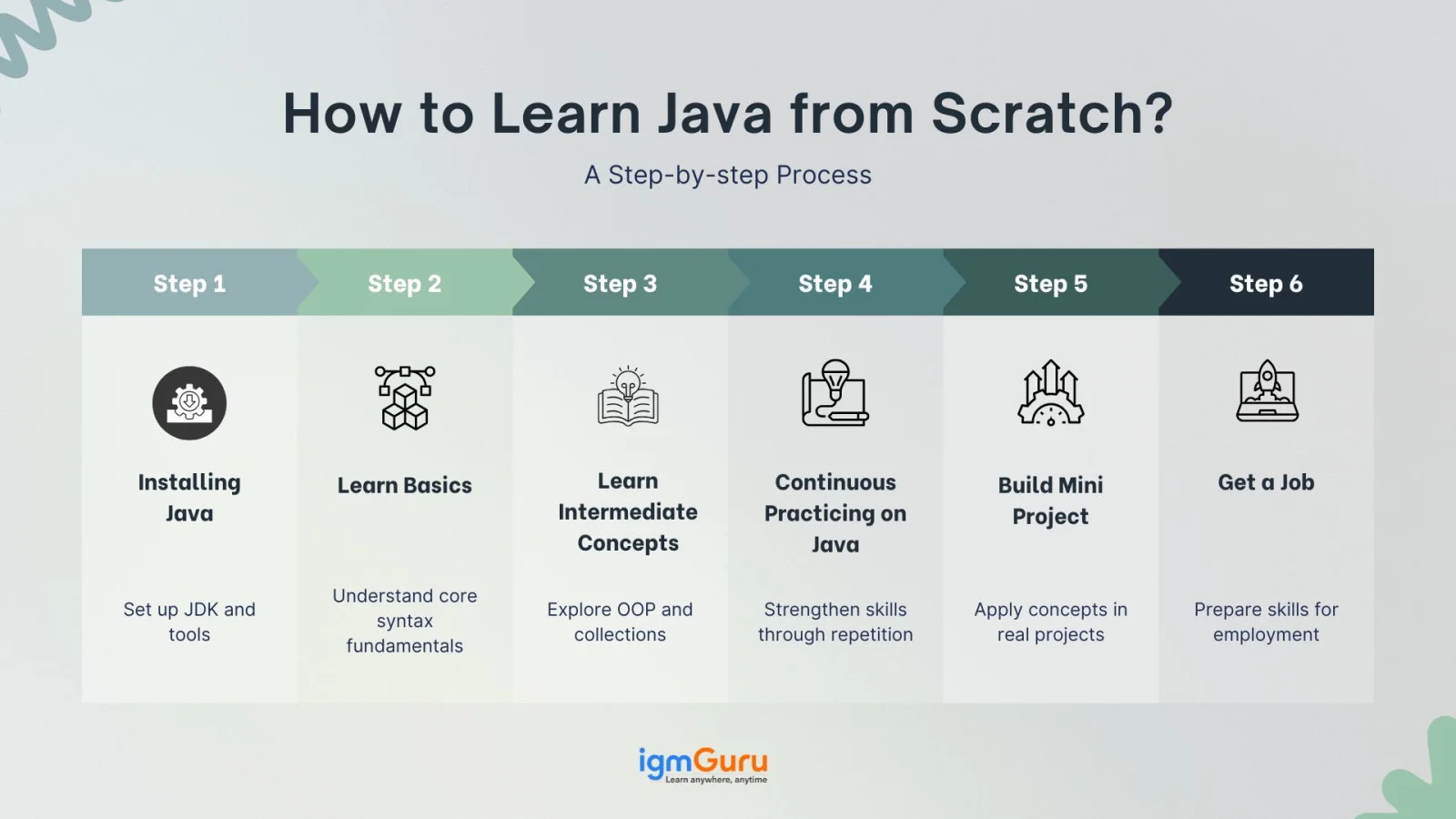
Learning Java can be an exciting journey, but only if you have a clear roadmap. Regardless of your background, when you have a step-by-step guide that helps you to learn, it becomes easy. The steps are:
In the first step, you need to install the Java Development Kit (JDK). You can install it from the official Oracle website. This tool helps your system to understand and run the Java code and also includes all the essentials.
Then, Install an IDE for Easier Coding. If you are a beginner, then using an IDE (Integrated Development Environment) will be helpful. By IDE, you can ease the writing, running and debugging of the code. Some popular IDEs are:
You can install any of these, but this is optional. Its programs can also run through the Java command line.
This is where the real journey starts. When you start learning any programming language, understanding its basic concepts is very important, as they create a strong base. You need to start by understanding:
Then practicing these in Java will give you more clarity about the basic concepts that will lead to a strong foundation.
When you start writing the basic commands comfortably, then move towards the intermediate level, which will help you build strong code or projects. The intermediate concept includes:
Only understanding the theory is not enough; you need to do continuous practice if you want to be skilled with it. By only reading, you cannot learn coding. You can start with simple things like Print "Hello World", adding two numbers, If-else conditions, Loops (for, while), Arrays, and Strings.
Here are some tiny codes for the same:
// Example: Hello World public class HelloWorld { public static void main(String[] args) { System.out.println("Hello, World!"); } } |
Output:
| Hello, World! |
public class AddTwoNumbers { public static void main(String[] args) { // Declare two integer variables int number1 = 15; int number2 = 25; // Add the two numbers int sum = number1 + number2; // Print the result to the console System.out.println("The first number is: " + number1); System.out.println("The second number is: " + number2); System.out.println("The sum of the two numbers is: " + sum); } } |
Output:
The first number is: 15 The second number is: 25 The sum of the two numbers is: 40 |
public class CheckNumberSign { public static void main(String[] args) { // Declare an integer variable and give it a value int myNumber = 10; // You can change this to -5, 0, etc., to test different outcomes // Use an if-else statement to check the condition if (myNumber > 0) { // This code runs IF myNumber is GREATER THAN 0 (positive) System.out.println("The number " + myNumber + " is positive."); } else { // This code runs IF the condition above is FALSE (myNumber is not positive) // This means myNumber is either zero or negative System.out.println("The number " + myNumber + " is zero or negative."); } // Let's try with a negative number int anotherNumber = -7; if (anotherNumber > 0) { System.out.println("The number " + anotherNumber + " is positive."); } else { System.out.println("The number " + anotherNumber + " is zero or negative."); } } } |
Output:
The number 10 is positive. The number -7 is zero or negative. |
Other than practising these basic codes, you can also practice challenges from HackerRank and from Leetcode (For advanced). This will help you a lot in your Java practice.
Now, when you are done practising enough for your basics, you can start creating mini projects. By creating projects, you'll be able to learn real-life applications. This will make your Java syntax, logic and error handling strong.
In the beginning, try to make easy and simple projects which will help you boost your confidence.
Some easy project ideas for beginners are:
For instance, you can look at this password generator idea:
import java.util.Random; // Needed for generating random numbers public class SimplePasswordGenerator { public static void main(String[] args) { int passwordLength = 10; // You can change this to make passwords longer or shorter // Define the characters that can be used in the password String allowedChars = "ABCDEFGHIJKLMNOPQRSTUVWXYZ" // Uppercase letters + "abcdefghijklmnopqrstuvwxyz" // Lowercase letters + "0123456789" // Numbers + "!@#$%^&*()-_=+[]{}|;:,.<>?"; // Special symbols // Create a StringBuilder to build the password efficiently StringBuilder password = new StringBuilder(); // Create a Random object to pick characters randomly Random random = new Random(); // Loop to generate each character of the password for (int i = 0; i < passwordLength; i++) { // Get a random index from the allowedChars string int randomIndex = random.nextInt(allowedChars.length()); // Get the character at that random index char randomChar = allowedChars.charAt(randomIndex); // Append the random character to our password password.append(randomChar); } // Print the generated password System.out.println("Generated Password: " + password.toString()); } } |
Output:
| Generated Password: Bz?)^6h0Qv |
This is how a code for a password generator looks like. Start learning from this type of easy project, then gradually increase the complexity.
You can build this on your downloaded Java, and then you can upload it on GitHub, which will help you in your portfolio building.
It is that type of language in which regular learning is required. If you want your coding skills to be strong over time, then you will need to read, learn, and be updated about it regularly. Here are some trusted sources that you can include in your routine:
Oracle Java Tutorials - This has Java's official tutorials, from here you can take regular, authentic, and structured knowledge.
Java Weekly - This is a free newsletter that keeps you updated with the latest Java tips, articles, and tools and sends them straight to your inbox.
Stack Overflow - Java - When any of your errors or concepts are clear, then this community can give you real-time help and practical solutions.
By following these 3 resources, you can keep yourself updated and build your confidence in Java. Now you know how to get started, but before you dive in, let's quickly talk about what not to do while learning it.
Related Article- Golang vs Java: What Should You Choose in 2026
Beginners often make some common mistakes that slow their progress down. If you try to avoid those mistakes, your learning journey can become faster and smoother.
There are a lot of beginners who try to study advanced topics. But till you are not clear with your basic syntax, loops, and data types, it will be difficult to learn.
Only watching tutorial videos is not enough. Until you don't code by yourself, you will not be able to understand properly.
Whenever you get any errors, do not ignore them. It gives clear error messages, which is very clear. Read them properly and try to understand.
Copying code from Google or any other source can be a solution, but without understanding those pasting it is not learning. Try to understand every line of code, even if you copied.
Don't try to learn everything at once. It is vast, try to learn step by step. Start with the basics, then OOPs, then projects.
Avoiding mistakes is the first step, but staying consistent is what truly helps you master this. Let's talk about how to keep that momentum going.
Consistency is the real key when it comes to learning any programming language, especially Java. Sometimes the motivation can be low, but if you try to be disciplined and follow a smart strategy. So, your journey becomes smooth.
1. Fix a Study Routine: Try to fix a time for Java in your day, maybe an hour. When you set a routine, it eventually becomes a habit.
2. Start Small but Daily: Read a small topic or practice a small code daily. Daily effort is better than learning for 5 hours on the weekend.
3. Set Weekly Goals: Set clear goals at the start of a week. Like building a new project by the end, or learning a new concept.
4. Track Your Progress: Just note everything somewhere, it can be a Notebook, Notion, or Google Docs. When you see what all you have completed, you'll feel motivated.
5. Make Learning Fun: Try to solve game-style challenges (HackerRank), or you can see Java memes. With little fun, everything becomes a bit easier.
Learning Java is not a race, but a journey, slow and steady work here. Only consistency matters.
Learning Java can look tough in the start, but when you do it by following the steps. Everything becomes clear with time. In this blog 'how to learn Java language', we have covered a complete roadmap, from how to install, to basic and intermediate concepts, from where to practice, what trusted resources to follow and so on.
But always remember, you are not required to be perfect initially, but to practice consistently. Small efforts daily give big results.
Yes, Java is one of the best fits for beginners. Its syntax is clear and documentation is easily available. With practice, you can understand this easily.
Both languages are good. But if you want a strong programming base and want to go into Android, backend or enterprise development, then Java is the best.
It totally depends on your consistency. If you give some time daily (1-2 hours), then in 2-3 months, you will have a solid base.
For beginners, IntelliJ IDEA Community Edition and BlueJ are easy and helpful. At an advanced level, you can try Eclipse.
You can do so many things like creating Android apps, developing backend systems, applying for software engineering jobs, and uploading mini-projects on GitHub for building a portfolio. Java opens up many doors.
Course Schedule
| Course Name | Batch Type | Details |
| Java Training | Every Weekday | View Details |
| Java Training | Every Weekend | View Details |