


Many Java developers often struggle to understand why some parts of their code can be accessed from anywhere, while others throw errors when you try to use them from a different class. You might also have faced confusion about visibility in your programs. That’s exactly where Access Modifiers in Java come into play.
Access modifiers are special keywords that control who can see and use your classes, methods, variables, and constructors. They help you build secure, organized, and professional code by deciding the level of access, from completely hidden to openly available. It also has an important role in object-oriented programming (OOP).
In this guide, I’ll walk you through everything you need to know about access modifiers in Java, including the four types (public, private, protected, and default), how they actually work with clear examples, key differences, best practices, and common mistakes that trip up both beginners and experienced developers.
Read Also: Java Tutorial
Access modifiers are keywords in Java that set the accessibility (visibility) of classes, interfaces, variables, methods, and constructors. It specifies which parts of the program can interact with or access them. It also defines the scope and behaviour of these components, along with accessibility.
Modifiers in Java form the groundwork for building secure code while building large applications.
Let's take a look at the following example of access modifiers to understand it better.
// In the same package |

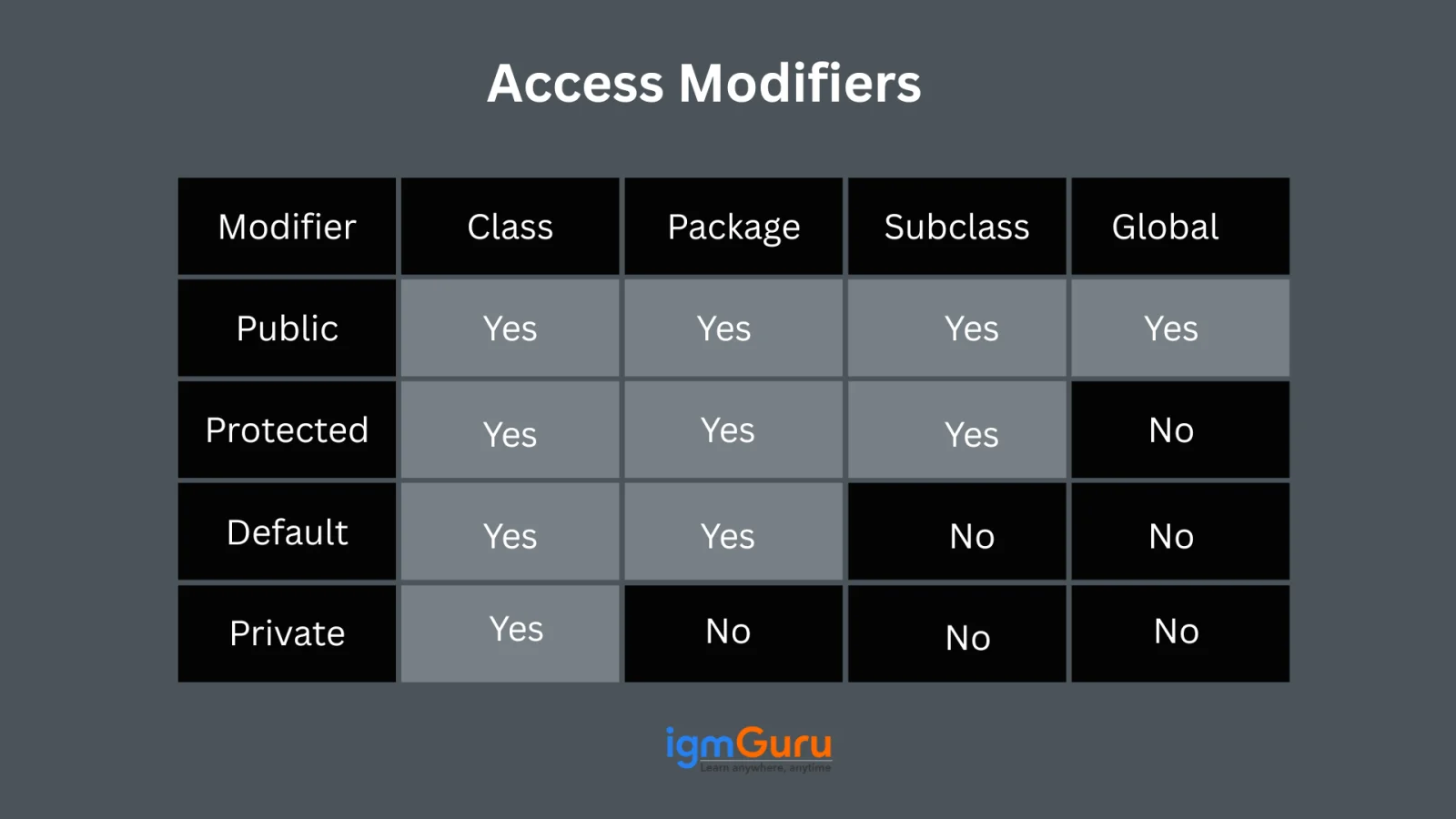
As discussed above, Java Modifiers are in charge of determining the visibility of classes, methods and variables. It is also important to note the other four types of access modifiers-
When you do not directly specify a class, method and field in Java, it naturally gets the default access called package-private. It means the element is accessible only by other classes within the same package. Other packages cannot access it.
We are going to make two packages in this example. Both packages have classes with default access and we try to access a class from one package within a class in the other package.
igm.java
// default access modifier package p1; // Class igm is having // Default access modifier class igm { void display() { System.out.println("Hello World!"); } } |
igmNew.Java
// error while using class from different // package with default modifier package p2; import p1.*; // importing package p1 // This class is having // default access modifier class igmNew { public static void main(String args[]) { // Accessing class igm from package p1 igm o = new igm(); o.display(); } } |
Attempting to access a class with default access from a different package results in a compile-time error in the above program.
Also Explore: Java Cheat Sheet
The private access modifier in Java is specified with the private keyword. It restricts access to methods and data members so that they are only accessible within their own class.
In Java, top-level classes and interfaces cannot be declared as private or protected. The private modifier means visibility is limited to the enclosing class. The protected modifier means that it allows access within the same package.
In this example, the private access modifier ensures that the field and method in the igmGuru class are only accessible from within that class.
class igmGuru { private String secretTip = "Use private wisely!"; private void whisperTip() { System.out.println(secretTip); } public void shareTip() { whisperTip(); // OK: private method accessed from within the class } } public class Main { public static void main(String[] args) { igmGuru guru = new igmGuru(); guru.shareTip(); // Works: uses public method that internally accesses private members // guru.secretTip; // Compile-time error: secretTip has private access in igmGuru // guru.whisperTip(); // Compile-time error: whisperTip() has private access in igmGuru } } |
Only the shareTip() public method can internally invoke the private whisperTip() and access the secretTip.
The public access modifier is declared using the public keyword. It has the broadest visibility in Java among all other modifiers. Classes, fields and methods marked as public can be accessed from anywhere in the program without any blockages.
Here is an example of the code showing that a public method is accessible within the same package.
// public modifier package p1; public class A { public void display() { System.out.println("igmGuru"); } } |
You specify the protected access modifier using the protected keyword in Java. Members declared protected are accessible within the same package and also by subclasses, even if they reside in different packages.
In this example, a subclass in a different package is allowed to use the parent class's protected method.
// In package animals package animals; public class Animal { protected void makeSound() { System.out.println("Animal sound"); } } |
// In package zoo package zoo; import animals.Animal; public class ZooKeeper extends Animal { public void demonstrate() { makeSound(); // Allowed: accessing protected method via inheritance } public static void main(String[] args) { new ZooKeeper().demonstrate(); } } |
The protected method makesound() in Animal is accessible to its subclass zooKeeper even though it resides in a different package. It showcases permission granted through inheritance.
Read Also- Java Interview Questions and Answers
Non-access modifiers in Java bring additional capabilities. This includes managing inheritance, allowing immutability and specifying special behaviour for components. Here are some common non-access modifiers -
Without knowing how to use Modifiers in Java, there will be no use of this knowledge. You will need to follow a systematic approach to do it. It requires you to follow the given strategy:
Understand what parts of your system should be publicly accessible versus internal. This assessment will guide your access level choices for each class, method and field.
Start with private wherever possible and only widen the scope if necessary. This helps reduce unintended interactions and maintain encapsulation.
Apply protection to members that should be accessible within subclasses. This also includes those in other packages but remain hidden from unrelated classes.
Reserve public access for methods and fields that form your external API. It is intended for use across different packages or systems. You must avoid making everything public.
Annotate each choice with a brief rationale. Future developers can then understand why a member is private versus public, which supports architectural consistency.
It is safe to conclude that Java Modifiers are more than just normal keywords. They lay the groundwork for building clean, secure and maintainable code. I hope this guide was helpful enough to understand what modifiers in java matters and how mastering these would assist you in writing effective code.
Related Articles:
A top-level class can only be public or default (package private). Inner (nested) classes can have any access modifier.
The default access level is package private when no access modifier is specified. This means the class or method is only accessible within classes in the same package.
The private modifier provides the highest level of restriction because it limits access to within the same class only.





