Data Economy is a real winning term these days and the reason behind its raging success is our increasing ability to consume, read, and gather actionable insights from the data at hand. Employees and executives of any company need reports, however, the procedure is time-consuming and complex. This often leads to the insights becoming obsolete by the time the reports arrive. This guide 'Looker Tutorial' will help you understand it better.
It is under these circumstances that Looker emerges as a valuable name. Looker brings a flexible data platform to the table that allows teams throughout the business to visualize data as well as collaborate on insights. This Google Looker tutorial will take you on a journey to understand how to become a successful Looker developer.
Let's begin.
Looker is a globally used data visualization and business intelligence (BI) platform that facilitates businesses in transforming their raw data into actionable insights. All this exploring, sharing, and analyzing is done in real-time and thus, proves to be a good competition to Tableau and Power BI.
Looker is both browser-based and completely on the cloud. It also consists of a reliable data model as well as a language called LookML.
If you are interested in learning more about its language, then a LookML tutorial will be more beneficial. In this blog, however, we will give you a peek into the key aspects of this platform.
It is important to understand the fundamentals of any field and that is what a good Looker course online will do. Be it data exploring, visualizing, or modeling, be it building impactful and timely dashboards and reports, or be it sharing fresh insights, Looker does it all!
Read Also - Salesforce Developer Tutorial: A Guide For Beginners
Looker comes loaded with advanced features. Here are a few key features of Looker:
| Feature | Description |
| LookML | Used for creating reusable data models and generating SQL queries automatically. |
| Dashboards | Helps users create interactive reports and visual analytics dashboards. |
| Real-Time Analytics | Allows organizations to analyze fresh data without waiting for ETL refresh cycles. |
| Cloud-Based Access | Provides browser-based access without requiring desktop installation. |
| Multi-Database Support | Supports platforms like BigQuery, Redshift, Snowflake, and SQL Server. |
It is a structured model language which facilitates in doing complex operations like filters, aggregations, and joining and is widely used for constructing SQL queries based on a particular DB.
Create reports and dashboards for saving and replaying your work, along with adding custom filters.
With Looker, you can create a complete data model in LookML in addition to your raw data. This facilitates in clearly defining the connection between the standard metrics and your data.
Everything happens in real-time as the need to create ETLs every time is not needed. Thus, Looker allows you to tap into your raw data directly.
Looker is totally browser-based and 100% on the cloud. There are a lot of perks of this including the elimination of the need to manage a desktop software, while facilitating easy deployment.
Looker is often termed as a user-friendly and curative platform since it is easy to use, has various helper tools, and boasts various no-code features.
It is possible to use Looker on a plethora of underlying SQL Servers such as AWS, Microsoft SQL server, BigQuery, etc. Hence, it provides support to a wide range of SQL languages.
Related Article- Power BI Tutorial For Beginners
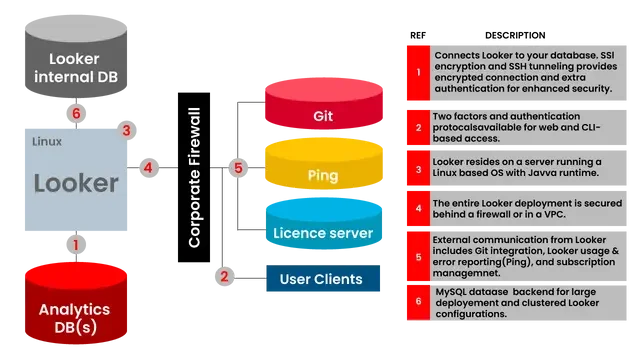
Looker architecture is made up of a Linux server with the below-mentioned components.
The first layer in the architecture is the Application Layer, which facilitates the users to interact with this application. The Application Layer also enables and manages the interactions that take place between the users and the various other layers.
Next comes the AI Layer. A secure HTTPS connection is used to facilitate communication between the Looker API and the Application Layer.
The Data Access Layer is the third layer, which acts as a host to the data source that is connected to the Looker app. Multiple data access layers such as NoSQL DBs and SQL dialects are used by Looker for providing efficient analytics.
LookML Model Layer is the next in line. LookML is the syntax used by Looker for modeling the data inside, which ultimately aids in creating a rough representation of the data structures.
If you are wondering where all the connections, user data, and session data is stored, then this fifth layer is the answer. The Persistence Layer comprises two DBs, namely primary and replica.
Read Also - Data Warehousing Tutorial: A Guide For Beginners
Here are a few reasons that will give you a push towards learning Looker.
Looker is widely used across different industries because it helps teams explore data, build interactive dashboards, and make smarter decisions. All this is achieved without any heavy technical dependencies. No matter which sector you belong to, Looker offers flexible, scalable ways to turn raw data into meaningful insights.
Retail and online businesses use it to understand customer behavior and improve overall sales performance. Common use cases include:
It gives financial institutions a secure and reliable way to analyze transactions, risks, and investments. Typical use cases are:
Healthcare organizations use it to improve patient outcomes and increase operational efficiency. Common examples include:
It helps supply chain and logistics teams gain end-to-end visibility of their operations. Key use cases:
Tech companies rely on Looker for product analytics and growth insights. Examples include:
Manufacturers use Looker to optimize production and maintain quality standards. Common use cases:
Before you set out to learn Looker, it is very important to know what career opportunities open up after you complete your Looker certification training. Here are a few of the top job titles you can go for -
Read Also - Generative AI Tutorial: A Guide For Beginners
Whether you wish to better your chances of succeeding in your current organization or you wish to switch to a better company, the right Looker training and Looker tutorial can do wonders for you.
With Looker, organizations get flexibility as needed while also getting the feature of scalability to. Both these aspects come together to provide a 360-degree support to organizations across the globe and working in almost all industries. "According to research from the Bureau of Labor Statistics, computer and IT jobs are expected to grow much faster than average from 2023 to 2033, with a projected 356,700 job openings annually."
Earning a Looker certification will help you showcase your proficiency in the field, along with your aptitude and skills.
Looker uses LookML, its own dependency language, which is built around SQL. Thus, anyone who has prior SQL experience will be able to get started on easily.
There is no charge for Looker Studio self-service BI. However, it charges $9 per user for every project every month for Looker Studio Pro.
Ans. No, Looker is not an ETL (Extract, Transform, Load) tool in itself. Rather, it is a data analytics and BI platform.
Looker can feel harder at first because it uses LookML, which involves coding. Tableau is easier for beginners since it focuses more on drag-and-drop visualizations.
Basic use of Looker does not need coding but coding in LookML is required for advanced data modeling and customization.
Explore Our Trending Articles -
Course Schedule
| Course Name | Batch Type | Details |
| Looker Training | Every Weekday | View Details |
| Looker Training | Every Weekend | View Details |