SAP is one of the world's leading enterprise resource planning (ERP) platforms, helping organizations streamline operations, manage business processes, and drive digital transformation. Are you preparing for your next SAP ABAP interview? You are in the right place. Having participated in and conducted SAP ABAP interviews, I've seen the questions employers commonly ask to assess technical skills and real-world experience.
This blog covers the most frequently asked questions, from core concepts to advanced SAP S/4HANA topics. Let's start!
These questions are designed for candidates of all experience levels, including beginners, intermediates, and experienced professionals. This guide will enhance your preparation for your next SAP ABAP interview, covering a comprehensive range of topics.
This section covers essential SAP ABAP interview questions for freshers. These questions focus on core terminology, database fundamentals, and introductory programming concepts that every ABAP developer must know before entering the job market.
SAP ABAP is an advanced, object-oriented programming language for creating and customizing applications within the SAP ecosystem. It is the core technology for various SAP functionalities, including report generation, interactive applications, data transfer, form design, and custom enhancements. It is primarily used to extend the functionality of SAP's enterprise resource planning systems like SAP S/4HANA and SAP ERP.
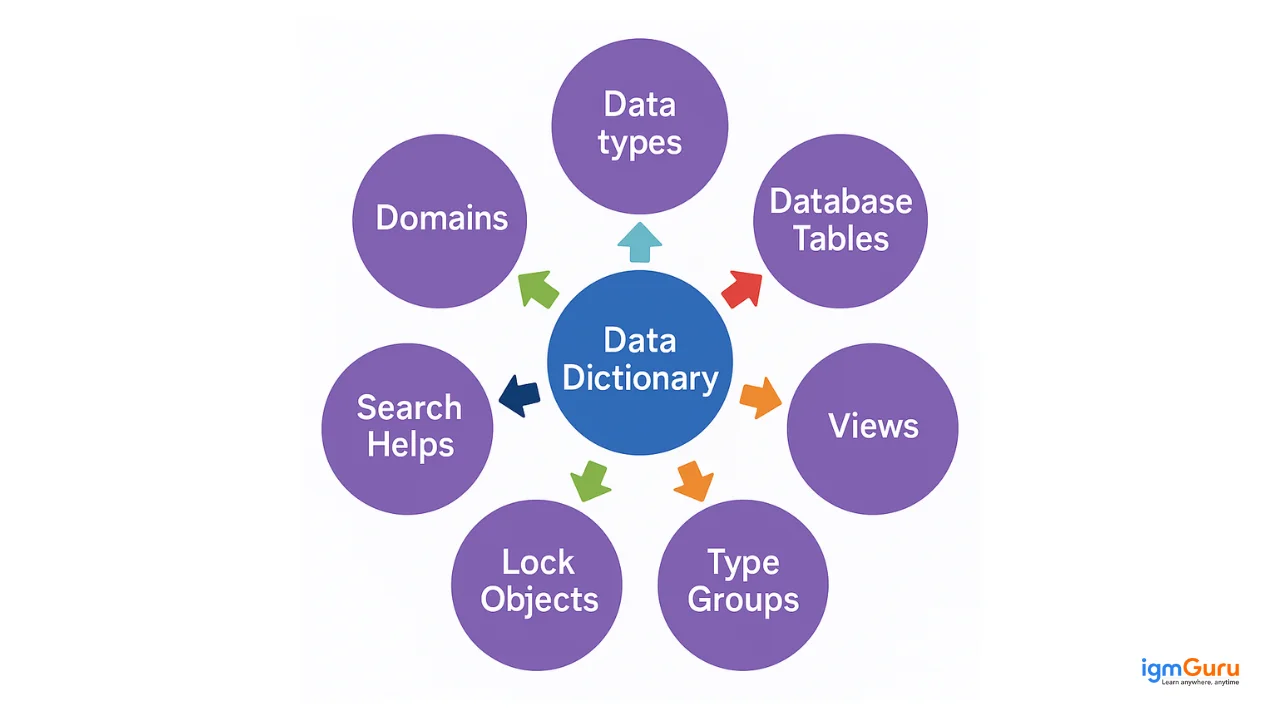
The ABAP Data Dictionary (DDIC) is a central repository that stores metadata for a SAP system’s database. It defines the logical structure of objects used in application development and maps them to the relational database. It includes database objects like data types, domains, views, type groups, tables, lock objects, and search help.
Transparent and pooled tables are types of database tables with the following differences:
| Feature | Transparent Table | Pooled Table |
|---|---|---|
| Database Relation | One-to-one | Many-to-one (with a table pool) |
| Data Storage | Direct, in its own database table | Logical, within a shared table pool |
| External SQL Access | Yes | No (generally) |
| Secondary Indexes | Possible | Not possible |
| Buffering | Can be buffered (optional) | Always buffered |
| Primary Use | Control, customizing, and system data | Small configuration data |
Web Dynpro ABAP (WD4A or WDA) is a standard SAP technology for developing web applications within the ABAP environment. It provides both development and runtime environments for creating web-based user interfaces for SAP applications.
Modularization techniques improve code reusability and maintainability. Common techniques include:
Read Also- What is SAP MM: Beginner’s Guide to Materials Management (2026)
This section covers intermediate-level concepts that build on foundational knowledge. Topics include performance optimization, advanced database operations, and system-level concepts that demonstrate deeper understanding of ABAP programming and production-level code.
The TABLES statement declares database tables used in a program, enabling direct access to table fields without explicit data declarations. It links the program to DDIC tables, facilitating operations like INSERT, SELECT, UPDATE, and DELETE.
Code optimization techniques include:
SELECT statements to minimize database calls.READ TABLE for faster access.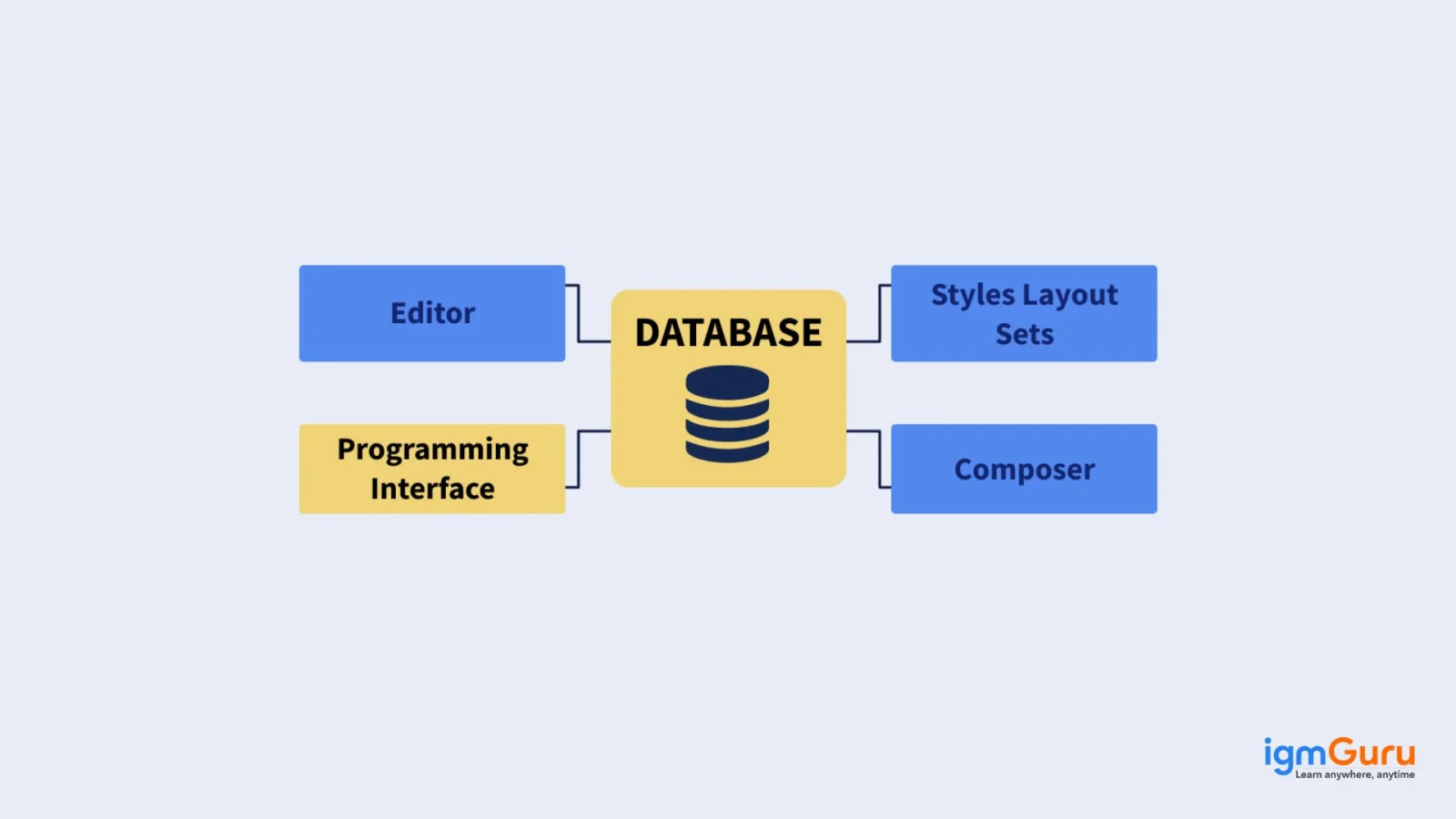
SAP Script is a tool for creating and managing forms in SAP systems, used for formatted document output like invoices or purchase orders. Its components include:
EXCEPTIONS define error conditions in Function Modules, allowing them to be raised during execution. The caller can handle specific errors using the CALL FUNCTION...EXCEPTIONS construct, enabling precise error detection and response.
These parameter-passing methods are used in subroutines and function modules:
Example:
CALL FUNCTION 'DEMO_FM'
  EXPORTING
    VAR = lv_var.
In Pass by Value, VAR receives a copy of lv_var. In Pass by Reference, VAR and lv_var share the same memory address.
This section covers advanced ABAP concepts, system architecture, and integration patterns. These questions test your understanding of system design, data movement, error handling, and advanced database operations required for senior-level ABAP roles.
A drill-down report allows analysts to explore data hierarchically, starting from a summary and delving into specific details by interacting with data points. For example, a sales report might start with regional data and allow drilling down to individual transactions, enhancing data analysis and insights.
Open SQL and Native SQL are ABAP database access methods with the following differences:
| Feature | Open SQL | Native SQL |
|---|---|---|
| Definition | SAP-specific SQL integrated with ABAP. | Standard SQL for specific databases. |
| Database Independence | Database-independent, abstracts specific syntax. | Database-dependent, uses specific SQL dialects. |
| Syntax | Consistent across databases. | Uses database-specific syntax. |
| Integration | Fully integrated with ABAP data types and structures. | Requires manual data type management. |
| Performance | Optimized for SAP environments. | Depends on the database. |
| Security | Includes SAP authorization checks. | Uses database-specific security. |
| Error Handling | Uses ABAP exception handling. | Uses database error handling. |
A Transport Request is a container for moving development objects (e.g., programs, tables) and customization settings between SAP systems (development, test, production). It ensures changes are consistently applied across environments.
BAPI (Business Application Programming Interface) and RFC (Remote Function Call) are mechanisms for SAP system interaction:
| Feature | BAPI | RFC |
|---|---|---|
| Purpose | Standardized interface for business processes. | General protocol for remote function execution. |
| Implementation | RFC-enabled function modules or Business Object methods. | Function modules. |
| Naming | Starts with "BAPI_". | Flexible naming. |
| Stability | Designed for long-term stability. | Depends on the function module. |
| Error Handling | Uses return tables for messages. | Uses exceptions. |
| Business Context | Tied to SAP Business Objects. | Business object unaware. |
An IDoc (Intermediate Document) is a standard data container for exchanging information between SAP systems or with external systems. It supports data transfers like purchase orders or invoices via Application Link Enabling (ALE) for SAP-to-SAP communication or Electronic Data Interchange (EDI) for external systems.
AMDPs are ABAP methods implemented in database-specific languages (e.g., SQLScript for HANA) for complex data processing directly in the database. They are used when:
Related Article: SAP Analytics Cloud Tutorial
Below are the most commonly asked SAP ABAP coding interview questions and answers.
REPORT zdisplay_user_time_sum.

PARAMETERS: p_num1 TYPE i,
            p_num2 TYPE i.

DATA: lv_sum  TYPE i,
      lv_user TYPE sy-uname,
      lv_date TYPE sy-datum,
      lv_time TYPE sy-uzeit.

START-OF-SELECTION.
  lv_user = sy-uname.
  lv_date = sy-datum.
  lv_time = sy-uzeit.
  lv_sum = p_num1 + p_num2.

  WRITE: / 'Username:', lv_user,
         / 'Current Date:', lv_date,
         / 'Current Time:', lv_time,
         / 'Sum of inputs:', lv_sum.
Output:
|
Username: USER123 Current Date: 20250512 Current Time: 141230 Sum of inputs: 42 |
REPORT zalv_display_demo.

TYPES: BEGIN OF ty_employee,
         emp_id   TYPE i,
         emp_name TYPE string,
         salary   TYPE p DECIMALS 2,
       END OF ty_employee.

DATA: it_employee TYPE STANDARD TABLE OF ty_employee,
      wa_employee TYPE ty_employee,
      it_fieldcat TYPE slis_t_fieldcat_alv,
      wa_fieldcat TYPE slis_fieldcat_alv.

START-OF-SELECTION.
  wa_employee-emp_id = 101.
  wa_employee-emp_name = 'Alice'.
  wa_employee-salary = 5000.
  APPEND wa_employee TO it_employee.

  wa_employee-emp_id = 102.
  wa_employee-emp_name = 'Bob'.
  wa_employee-salary = 6200.
  APPEND wa_employee TO it_employee.

  wa_employee-emp_id = 103.
  wa_employee-emp_name = 'Charlie'.
  wa_employee-salary = 7100.
  APPEND wa_employee TO it_employee.

  CLEAR wa_fieldcat.
  wa_fieldcat-fieldname = 'EMP_ID'.
  wa_fieldcat-seltext_m = 'Employee ID'.
  APPEND wa_fieldcat TO it_fieldcat.

  CLEAR wa_fieldcat.
  wa_fieldcat-fieldname = 'EMP_NAME'.
  wa_fieldcat-seltext_m = 'Name'.
  APPEND wa_fieldcat TO it_fieldcat.

  CLEAR wa_fieldcat.
  wa_fieldcat-fieldname = 'SALARY'.
  wa_fieldcat-seltext_m = 'Salary'.
  APPEND wa_fieldcat TO it_fieldcat.

  CALL FUNCTION 'REUSE_ALV_GRID_DISPLAY'
    EXPORTING
      i_callback_program = sy-repid
      it_fieldcat        = it_fieldcat
    TABLES
      t_outtab           = it_employee
    EXCEPTIONS
      program_error      = 1
      OTHERS             = 2.
Output:
| Employee ID | Name | Salary |
|---|---|---|
| 101 | Alice | 5000.00 |
| 102 | Bob | 6200.00 |
| 103 | Charlie | 7100.00 |
REPORT zread_display_db_table.

TYPES: BEGIN OF ty_flight,
         carrid   TYPE sflight-carrid,
         connid   TYPE sflight-connid,
         fldate   TYPE sflight-fldate,
         price    TYPE sflight-price,
         currency TYPE sflight-currency,
       END OF ty_flight.

DATA: it_flights TYPE STANDARD TABLE OF ty_flight,
      wa_flight  TYPE ty_flight.

START-OF-SELECTION.
  SELECT carrid connid fldate price currency
    INTO TABLE it_flights
    FROM sflight
    UP TO 10 ROWS.

  IF sy-subrc = 0.
    LOOP AT it_flights INTO wa_flight.
      WRITE: / 'Carrier:', wa_flight-carrid,
               'ConnID:', wa_flight-connid,
               'Date:', wa_flight-fldate,
               'Price:', wa_flight-price,
               'Curr:', wa_flight-currency.
    ENDLOOP.
  ELSE.
    WRITE: 'No data found in table SFLIGHT.'.
  ENDIF.
REPORT zsort_internal_table.

TYPES: BEGIN OF ty_flight,
         carrid TYPE sflight-carrid,
         connid TYPE sflight-connid,
         price  TYPE sflight-price,
       END OF ty_flight.

DATA: it_flights TYPE STANDARD TABLE OF ty_flight,
      wa_flight  TYPE ty_flight.

START-OF-SELECTION.
  SELECT carrid connid price
    INTO TABLE it_flights
    FROM sflight
    UP TO 10 ROWS.

  IF sy-subrc = 0.
    SORT it_flights BY price ASCENDING.
    WRITE: / 'Carrier', 10 'ConnID', 20 'Price'.
    WRITE: / '-------', 10 '------', 20 '-----'.
    LOOP AT it_flights INTO wa_flight.
      WRITE: / wa_flight-carrid, 10 wa_flight-connid, 20 wa_flight-price.
    ENDLOOP.
  ELSE.
    WRITE: 'No data found in SFLIGHT.'.
  ENDIF.
Function Module Parameters:
| Parameter | Type | Description |
|---|---|---|
| IV_CARRID | SFLIGHT-CARRID | Carrier ID |
| IV_CONNID | SFLIGHT-CONNID | Connection ID |
| IV_FLDATE | SFLIGHT-FLDATE | Flight Date |
| IV_PRICE | SFLIGHT-PRICE | New Price |
FUNCTION z_update_sflight_price.
*"----------------------------------------------------------------------
*"*"Local Interface:
*"  IMPORTING
*"     VALUE(IV_CARRID) TYPE SFLIGHT-CARRID
*"     VALUE(IV_CONNID) TYPE SFLIGHT-CONNID
*"     VALUE(IV_FLDATE) TYPE SFLIGHT-FLDATE
*"     VALUE(IV_PRICE)  TYPE SFLIGHT-PRICE
*"  EXCEPTIONS
*"     RECORD_NOT_FOUND
*"     UPDATE_FAILED
*"----------------------------------------------------------------------
  DATA: ls_flight TYPE sflight.

  SELECT SINGLE * INTO ls_flight
    FROM sflight
    WHERE carrid = iv_carrid
      AND connid = iv_connid
      AND fldate = iv_fldate.

  IF sy-subrc <> 0.
    RAISE record_not_found.
  ENDIF.

  ls_flight-price = iv_price.
  UPDATE sflight FROM ls_flight.

  IF sy-subrc = 0.
    COMMIT WORK.
  ELSE.
    ROLLBACK WORK.
    RAISE update_failed.
  ENDIF.
ENDFUNCTION.
@AbapCatalog.sqlViewName: 'ZFLIGHT_VIEW'
@AccessControl.authorizationCheck: #NOT_REQUIRED
define view Z_CDS_FLIGHT as
select from sflight
{
  key carrid,
  key connid,
  fldate,
  price,
  currency
}
This CDS view fetches flight details directly from the database and improves performance by pushing logic to the database layer.
DATA(lv_sum) = 10 + 20.
WRITE: / 'Sum:', lv_sum.

DATA(it_numbers) = VALUE #( ( 1 ) ( 2 ) ( 3 ) ).
LOOP AT it_numbers INTO DATA(lv_num).
  WRITE: / lv_num.
ENDLOOP.
This example uses modern ABAP syntax like inline DATA declaration and VALUE constructor.
DATA(it_table) = VALUE #( FOR i = 1 UNTIL i > 5 ( i * 2 ) ).

LOOP AT it_table INTO DATA(lv_value).
  WRITE: / lv_value.
ENDLOOP.
The FOR expression is a modern ABAP feature used to generate internal table data efficiently.
DATA: lo_http_client TYPE REF TO if_http_client,
      lv_url TYPE string VALUE 'https://api.example.com/data'.

CALL METHOD cl_http_client=>create_by_url
  EXPORTING
    url                = lv_url
  IMPORTING
    client             = lo_http_client.

lo_http_client->send( ).
lo_http_client->receive( ).

DATA(response) = lo_http_client->response->get_cdata( ).
WRITE: / response.
This demonstrates how modern ABAP integrates with external systems using REST APIs.
define behavior for Z_I_Employee alias Employee
implementation in class zbp_employee unique
{
  create;
  update;
  delete;
}
RAP is a modern ABAP programming model used in SAP S/4HANA for building scalable and cloud-ready applications.
This section covers advanced SAP ABAP interview questions focused on modern S/4HANA development, ABAP Cloud, clean core principles, RAP, APIs, extensibility, and performance. These questions are especially useful for experienced ABAP developers preparing for senior and technical lead roles.
ABAP Cloud is SAP's modern development model for building cloud-ready applications and extensions using released APIs and cloud-compliant ABAP language features. Unlike traditional ABAP development, it emphasizes a restricted and controlled set of development objects to support upgrade stability and the clean core approach.
In ABAP Cloud, developers should avoid directly accessing unreleased SAP objects or modifying the SAP standard. Instead, they use released APIs, CDS views, RAP, and supported extension mechanisms. This makes applications easier to maintain and more compatible with SAP's cloud-based S/4HANA strategy.
The clean core principle means keeping the SAP standard system as close to the original product as possible and implementing custom requirements through supported extension mechanisms. It helps organizations reduce technical debt and makes future SAP upgrades and releases easier to manage.
As an ABAP developer, I would avoid modifying SAP standard objects and would first look for released APIs, BAdIs, CDS-based extensions, RAP, or side-by-side extensions on SAP BTP. This approach allows custom business requirements to be implemented without creating unnecessary dependencies on SAP's internal objects.
Released APIs are SAP interfaces that are officially exposed for consumption and are intended to provide stable access to SAP business data and functionality. They can include APIs, CDS views, business objects, and other development artifacts that SAP has made available for supported use.
Using released APIs is important because directly accessing internal or unreleased SAP objects can create compatibility problems during upgrades. In modern ABAP development, I would first search for an appropriate released API before creating a custom workaround or accessing an internal object directly.
The RESTful ABAP Programming Model (RAP) provides a modern framework for developing transactional applications and services using ABAP, CDS, and OData. It supports a structured development approach for creating business objects that can be exposed through modern APIs and user interfaces.
RAP separates areas such as the data model, behavior definition, behavior implementation, and service exposure. It supports operations such as create, update, and delete and can be used for both managed and unmanaged business scenarios. This makes RAP an important technology for building cloud-ready SAP applications.
In a managed RAP scenario, the RAP framework handles many standard transactional operations such as creating, updating, and deleting business object instances. This reduces the amount of application logic that the developer needs to implement manually.
In an unmanaged scenario, the developer has greater control over the implementation of transactional behavior. This is useful when existing business logic, legacy applications, or complex processing must be integrated into the RAP business object. The choice depends on how much control the application requires over the transactional lifecycle.
I would start by identifying the actual performance bottleneck using tools such as ST05 SQL Trace, SAT ABAP Runtime Analysis, and SQL Monitor where appropriate. I would then determine whether the problem is caused by inefficient database access, excessive application-server processing, or inefficient internal table operations.
For database-heavy applications, I would optimize Open SQL, avoid unnecessary fields and records, reduce database round trips, and push suitable data-intensive operations to the HANA database using CDS or other appropriate techniques. I would also review internal table types and avoid unnecessary nested loops or repeated database access inside loops.
Event-driven development allows an application to react to business events rather than continuously checking whether a particular condition has occurred. In modern SAP landscapes, events can be used to connect SAP business processes with other applications and services.
I would use an event-driven approach when a business process needs to trigger another process asynchronously. For example, when a business object is created or changed, an event can initiate downstream processing or integration with another application. This approach can reduce tight coupling between systems and support scalable integration architectures.
These scenario-based SAP ABAP interview questions focus on real-world development problems that experienced ABAP developers may face while working with SAP S/4HANA, ABAP Cloud, RAP, integrations, and production systems.
I would first compare the development, quality, and production environments to identify differences in configuration, authorization, master data, database content, and software versions. I would check the application logs, short dumps in ST22, system logs, and relevant job logs to identify the exact failure point.
I would then verify the transport request to ensure that all dependent objects were included and successfully imported. If the program uses APIs, CDS views, or other development objects, I would also verify that the required objects are available and that the production user has the necessary authorizations. I would reproduce the issue in the quality system whenever possible before making any production change.
I would first identify why the application depended on the table and determine which business data it actually requires. Instead of replacing the table with another database table immediately, I would search for a released CDS view, API, or business object that provides the required data.
If an appropriate released interface exists, I would redesign the application to consume it. If no suitable interface is available, I would evaluate the supported extensibility options based on the business requirement. This approach follows the clean core principle and reduces the risk of the same application breaking during future upgrades.
I would first check the RAP behavior definition and determine whether the create operation is correctly defined and implemented. Then I would review the behavior implementation class and validate the business validations, determinations, authorizations, and transactional logic involved in the save process.
I would also check the application logs and error messages to identify whether the failure is caused by validation, authorization, database constraints, or custom business logic. I would reproduce the issue with a controlled test case and verify each part of the transactional flow before correcting the implementation.
I would not immediately rewrite the entire report. First, I would analyze the database access using SQL Trace or other performance analysis tools to identify the expensive SQL statements. I would check the selection conditions, joins, filters, calculated fields, and amount of data being transferred from the database.
I would then optimize the CDS view and ABAP consumption logic by restricting unnecessary data, improving filtering, avoiding inefficient joins, and ensuring that calculations are performed at the appropriate layer. I would test the performance with realistic data volumes and compare the execution time before and after the optimization.
I would first understand the exact business requirement and determine whether the required field can be added through a supported extension mechanism. I would check for available BAdIs, enhancement points, CDS extensions, released APIs, or other standard extensibility options.
I would avoid modifying the SAP standard program directly because such modifications can create upgrade and maintenance problems. If the requirement cannot be fulfilled through in-app extensibility, I would evaluate an appropriate developer extensibility or side-by-side extension approach based on the system architecture and business requirement.
I would first identify the required customer data and check whether SAP already provides a released API or standard service for the required business object. I would prefer a supported API-based integration rather than allowing the external application to access SAP database tables directly.
I would then define the required authentication, authorization, data mapping, error handling, and monitoring approach. If the integration needs asynchronous processing, I would also consider an event-driven architecture. This keeps the integration loosely coupled and aligns with modern SAP integration and clean core principles.
I would first check whether the volume of processed data has increased and review the background job details and runtime history. I would analyze the relevant application and database performance using tools such as ST12, ST05, SAT, or SQL Monitor where appropriate, while following the organization's production-access and change-control procedures.
I would look for inefficient SQL statements, database locks, changes in execution plans, excessive internal table processing, failed parallel processing, or unusually high system load. After identifying the bottleneck, I would reproduce and test the optimization in a non-production environment before transporting the corrected code to production. I would also compare the new runtime with historical baselines to confirm that the issue has actually been resolved.
SAP ABAP continues to evolve with the adoption of cloud technologies, SAP BTP, and S/4HANA. While traditional ABAP programming focused on SAP GUI-based applications, modern ABAP development emphasizes API-driven architectures, cloud extensions, and scalable services.
Technologies such as CDS views, RAP, ABAP Cloud, and AI-powered development tools like SAP Joule are transforming how developers build SAP applications. These innovations allow businesses to develop faster, maintain cleaner core systems, and integrate SAP with modern cloud services.
As organizations continue migrating from SAP ECC to SAP S/4HANA, the demand for skilled ABAP developers who understand modern SAP architecture will continue to grow.
Mastering SAP ABAP requires a deep understanding of its concepts. This comprehensive list of SAP ABAP interview questions and answers covers key areas to help you succeed in interviews.
ABAP has a relatively easier learning curve than many programming languages, but mastering it requires understanding SAP’s business processes and environment.
Yes, SAP ABAP is a strong career choice due to its prominence in the ERP market and high demand for skilled professionals.
SAP ABAP developers earn an average of INR 5.31 lakh per year in India and approximately $144,321 per year in the USA, depending on experience and location.
SAP ABAP is mainly used to create and customize programs in SAP systems. It helps develop reports, forms, and business applications.
SAP MM mainly deals with business processes like procurement and inventory, while SAP ABAP is mainly used for programming and customizing SAP applications.