


Data has now become a valuable asset for many industries. It is used for different processes by many companies. You may have heard of many tools related to data processing. Azure Databricks is one of them. But what is it and where is it used? This Azure Databricks tutorial gives a complete understanding of this platform.
Big data is all around the industry and comes from different origins like transactional data and social media. Data is only valuable when managed effectively. This is where this tool is used. It is now a popular choice for many companies due to this functionality. Job search websites like naukri.com and Indeed have many job openings in this field.
This Azure Databricks tutorial gives an in-depth understanding of this tool. Here you will learn many aspects of this tech like its architecture, working, instances and use cases. This also discusses its relation with Spark and detailed overview of its workspace. It is the right spot for beginners who want to make a career in this field. Let's start!
So, what is Azure Databricks? It is an analytics tool that gives the combined functionalities of Apache spark and Azure. This tool manages and builds cloud infrastructure, connects with cloud storages and gives security features. It has an interactive workspace where business analysts, data engineers and data scientists can work together. This tool gives optimized workflows for analyzing big data and extracting valuable insights from them.
It is developed as a collaboration of Databricks with Microsoft. This collaboration gives a quick and easy deployment environment. It can integrate different Azure storage and computing resources like SQL data warehouse, data lake store and HDinsights. Data engineers can execute humongous Spark workloads to achieve unequaled speed and cost-efficiency.
Azure Databricks comes with several powerful features that make big data processing and analytics easier for organizations. It combines the scalability of Apache Spark with the flexibility of Microsoft Azure to deliver a fast, secure, and collaborative analytics environment.
1. Auto-Scaling Clusters: Azure Databricks automatically scales clusters up or down depending on workload requirements. This helps organizations optimize performance while reducing cloud costs.
2. Collaborative Notebooks: Teams can collaborate in real time using interactive notebooks. Developers, analysts, and data scientists can write code, visualize data, and share insights within the same workspace.
3. Multi-Language Support: Azure Databricks supports multiple programming languages, including Python, SQL, Scala, and R. This flexibility allows professionals to work using their preferred language.
| Language | Primary Usage |
| Python | Data engineering, machine learning, ETL pipelines |
| SQL | Data querying and analytics |
| Scala | Native Apache Spark development |
| R | Statistical analysis and data visualization |
The platform is optimized for Apache Spark workloads, allowing users to process massive datasets much faster compared to traditional data processing systems.
5. Delta Lake Integration: Azure Databricks integrates with Delta Lake to provide reliable data lakes with ACID transactions, schema enforcement, and better data governance.
6. Machine Learning Support: The platform includes built-in machine learning libraries and MLflow integration for tracking experiments, managing models, and deploying machine learning workflows.
You may have noticed the term Spark in the above section. Did you wonder 'how is Azure Databricks related to Spark.' It is basically an implementation of Apache Spark on Azure. It gives the functionalities of both tools on a single platform. The fully managed Spark clusters perform different operations on big data workflows like -
Many beginners get confused between Apache Spark and Azure Databricks. Although both technologies are closely related, they are not the same. Apache Spark is an open-source distributed computing framework, while Azure Databricks is a fully managed cloud platform built on top of Apache Spark.
| Feature | Apache Spark | Azure Databricks |
| Management | Manual cluster management | Fully managed platform |
| Setup Complexity | Requires configuration | Easy deployment on Azure |
| Collaboration | Limited collaboration features | Built-in collaborative workspace |
| Scalability | Manual scaling | Auto-scaling clusters |
| Security | Requires manual setup | Enterprise-grade Azure security |
| Integration | Requires additional integrations | Native integration with Azure services |
In simple terms, Azure Databricks simplifies Apache Spark usage by offering a managed cloud environment with better collaboration, automation, and integration capabilities.
It is important to understand the Azure Databricks architecture & diagram to learn its working. This platform operates out of a compute and control plane. The compute plane is where your data is processed. It has two types of computes- serverless and classic. Serverless compute run in a serverless plane of the system. Classic compute is the network in Azure subscription and its resources.
Web application is stored in a control plane. The control plane involves the backend services of this tool. Each workspace of this platform has an associated storage account. It is known as the workspace storage account. The diagram given below explains the overall Azure Databricks architecture -
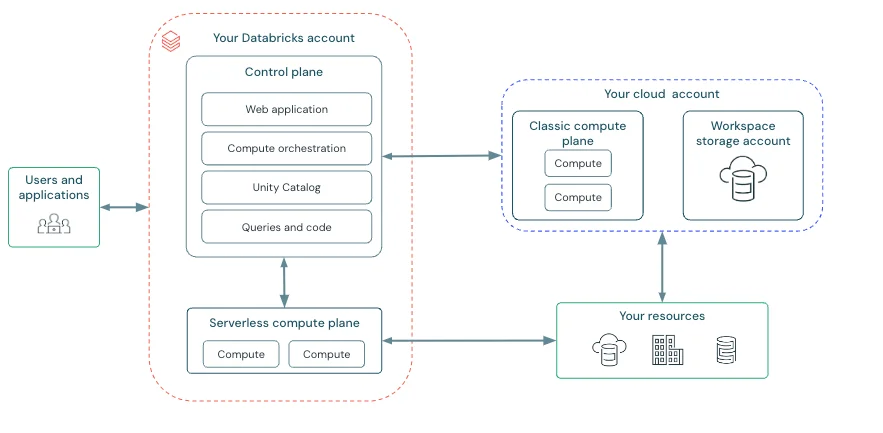
Diagram: Databricks architecture
Compute resources run within a compute layer of the Databricks account in this plane. It builds a serverless computer plane in the same region as a classic compute plane. Users have to select this region while building a workspace. These run in a network boundary with different security layers to protect customer data. This isolates different customer workspaces from additional network controls.
Compute resources run in the Azure subscription in this plane. Here new compute resources are developed within the virtual network of each workspace. It has a natural isolation feature as it runs in each individual's subscription. This gives a secure cluster connectivity.
This storage account is created with the workspace. It contains different elements including workspace system data, DBFS and unity catalog (workspace catalog).
Related Article - Get a complete understanding of What is Microsoft Azure.
Let's learn how to create a Databricks instance and cluster. Creating these requires the subscription of Azure. Create a free Microsoft account if you do not have one. You can follow the steps listed below after creating an account -
1. Sign in to your Azure account from the portal.
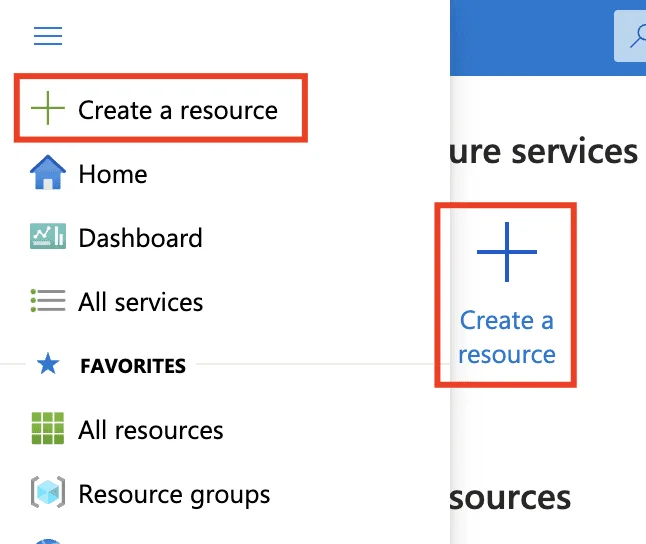
2. Now click on the + Create a resource icon from the portal.
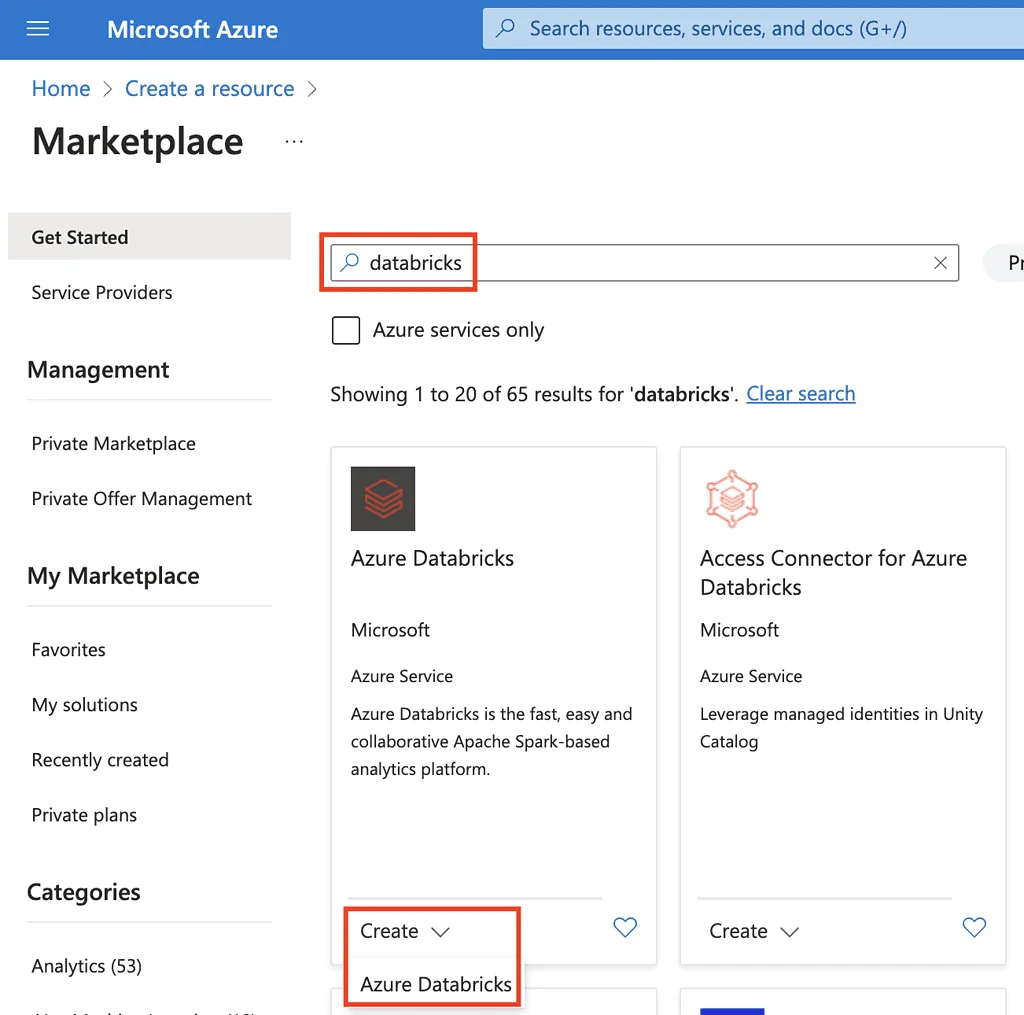
3. A new screen page will be shown. Click on the Search the Marketplace text and type Databricks. Then select the Azure Databricks option from the new list.
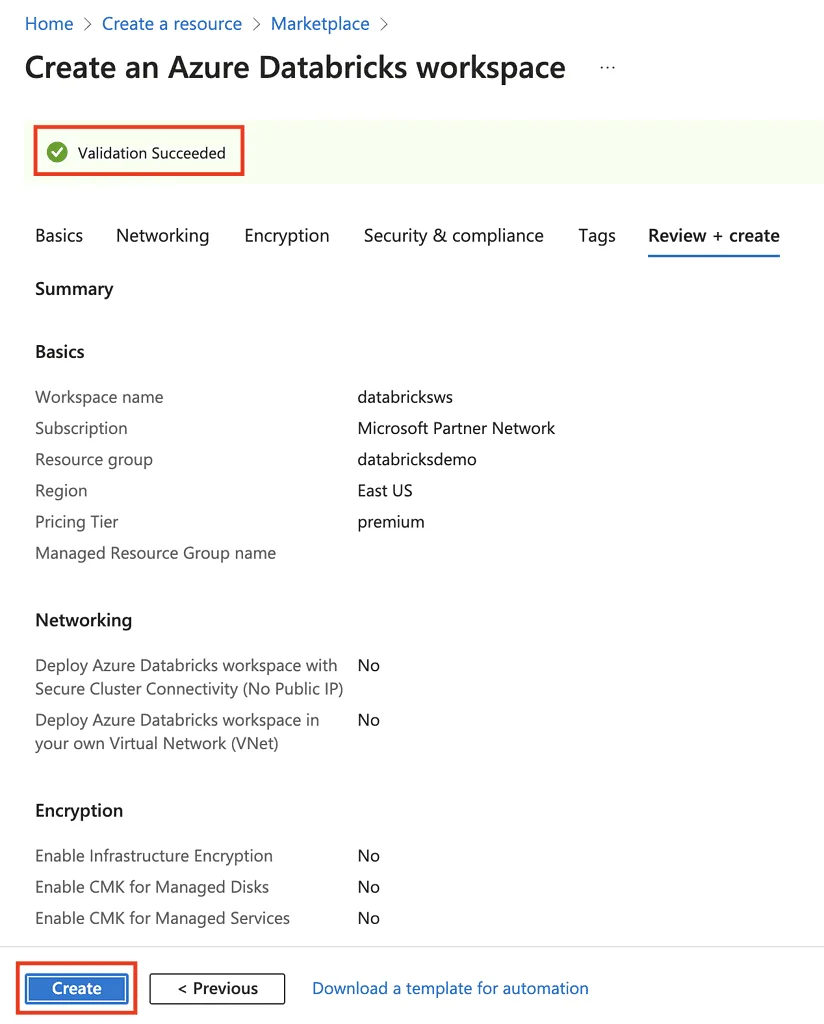
4. It will show a service page. Now build a Workspace with the given settings.
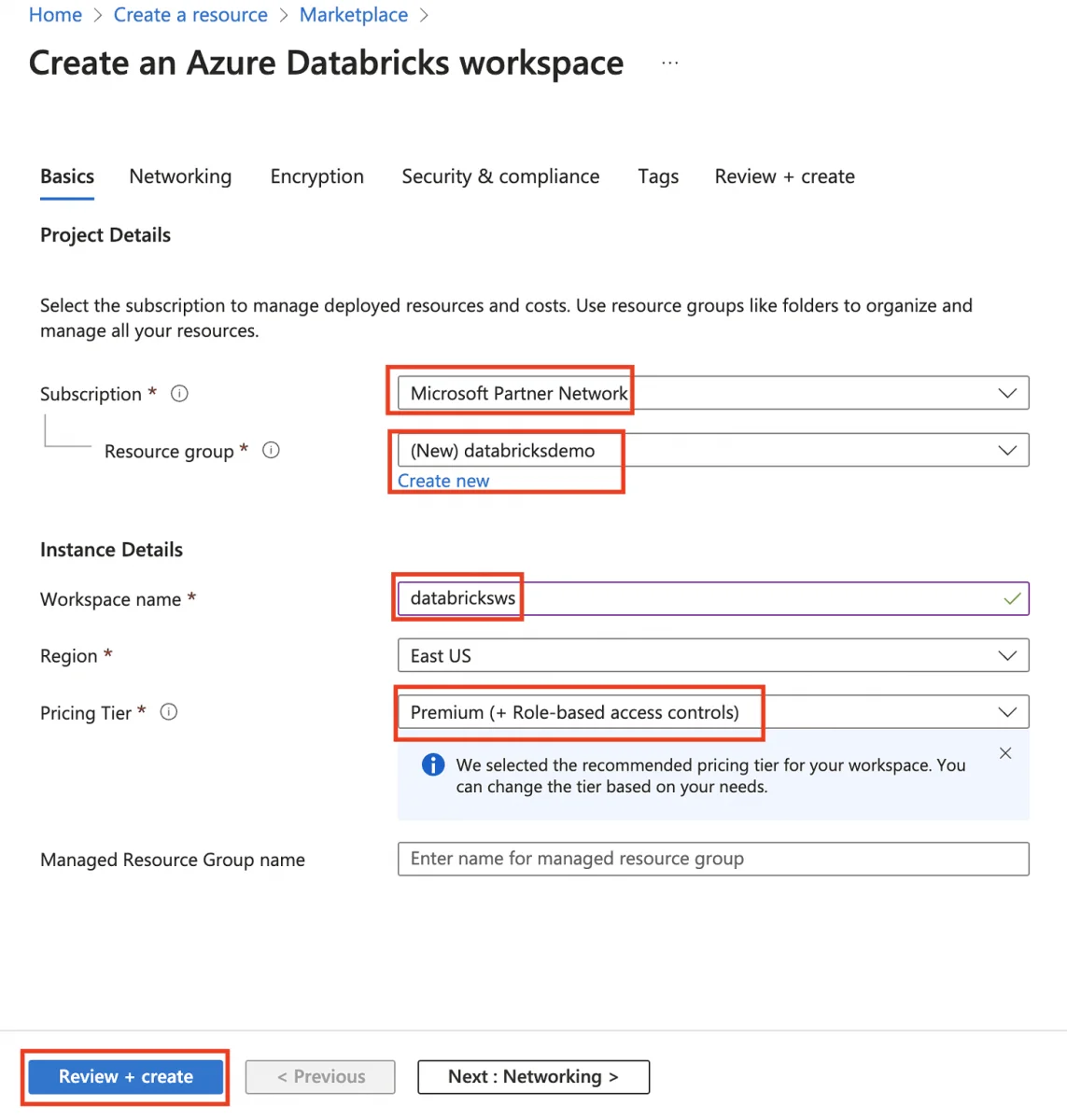
5. Now click on the Create from service table.
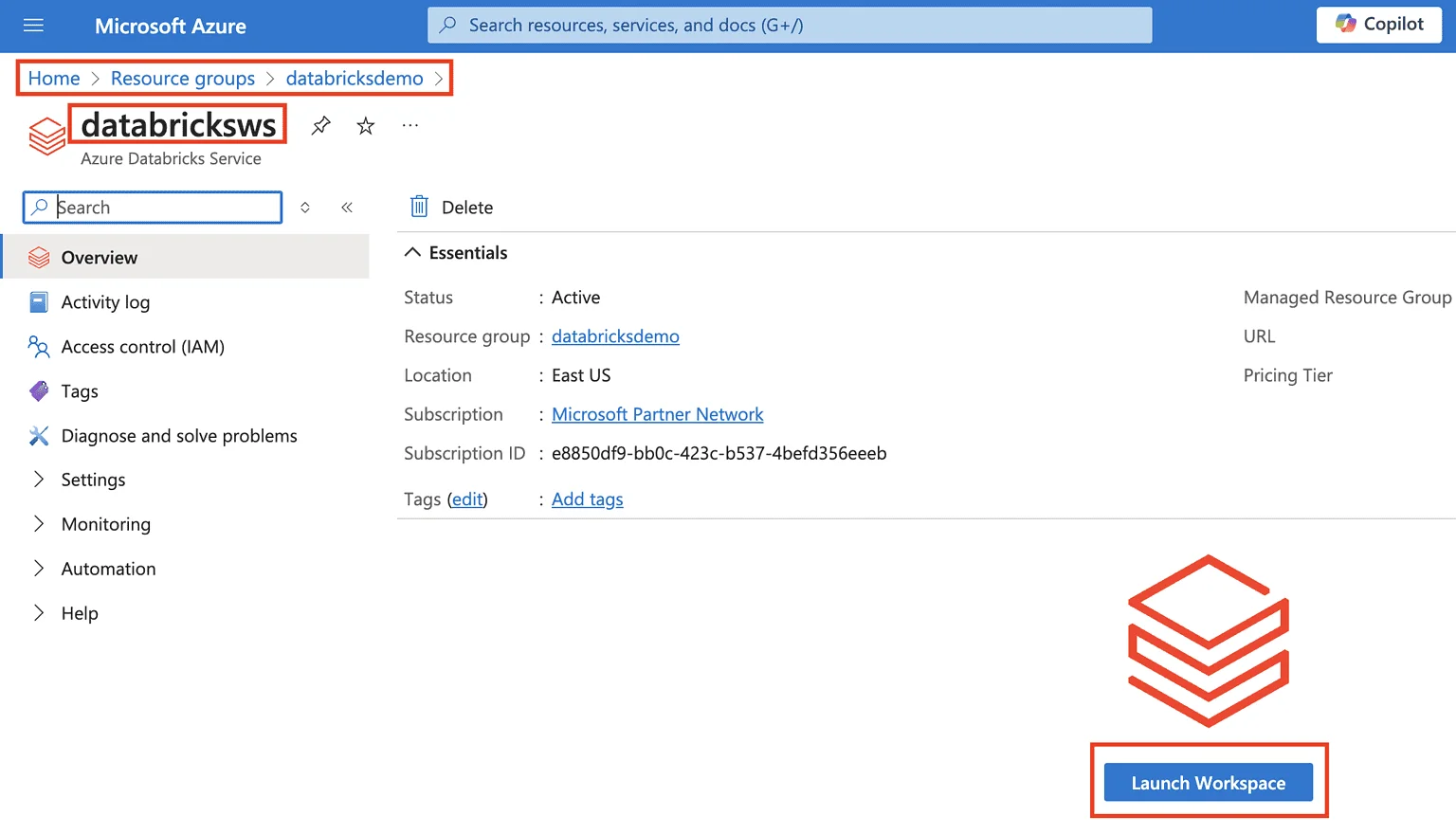
6. Go to the resource in the demo screen and select the Launch Workspace button.
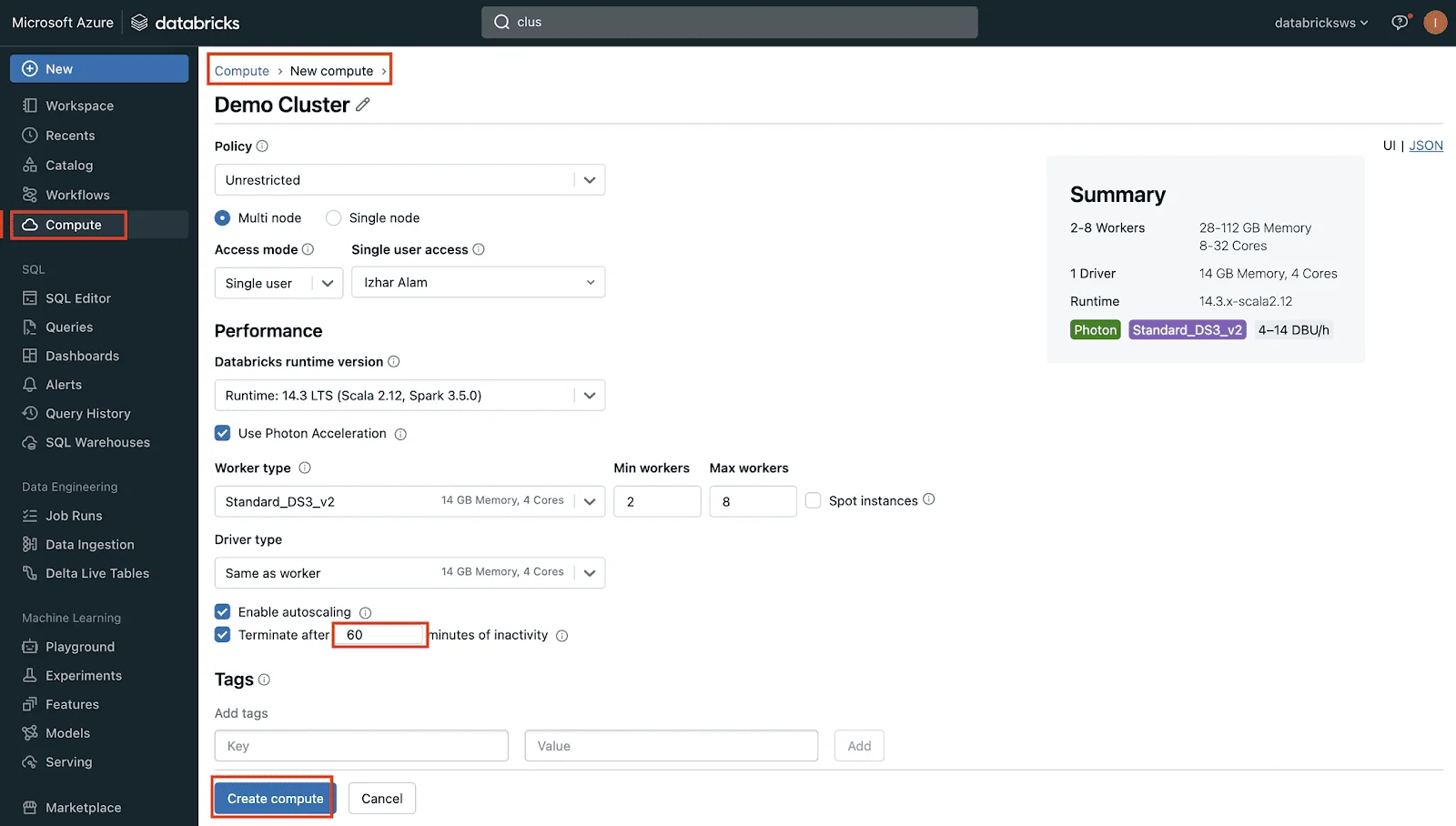
7. Now select New Cluster from Common Tasks with the following settings.
After creating a cluster, the next step is creating and running your first notebook in Azure Databricks. Notebooks are interactive environments where developers can write code, analyze data, and visualize results. Follow these steps to create your first notebook:
Now run the following sample PySpark code:
data = spark.range(10) display(data) |
This command creates a small dataset containing numbers from 0 to 9 and displays it in a tabular format. This is one of the simplest ways to test whether your Azure Databricks cluster is working properly.
Beginners can use notebooks to perform data engineering, machine learning, ETL operations, and real-time analytics tasks.
Azure Databricks has evident relevance and importance in big data processing for a couple of reasons. It gives multiple language support and integrates seamlessly with different Azure services like SQL Database, Data Lake Store, Blob Storage and BI tools. It is a great collaborative platform for sharing clusters and workspaces to achieve higher productivity.
Azure Databricks Workspace is a run time environment that gives a simple UI for managing different assets like notebooks, jobs, libraries, cluster, etc. Teams can collaborate and execute different operations on this workspace. These operations include creating spark clusters, building pipelines, running data analytics, scheduling workloads, etc. Here is a detailed explanation of workplace assets -
These are unified computational resources. Data engineers, scientists and machine learning experts generally use these for different applications. These applications include running analytics, ML workloads, pipelines, etc.
It is an online interface for developers to build and execute programs. It is beneficial for developers in adding texts, creating visualizations, building narratives and working with files. This acts like an interactive document that can only be accessed or updated by authorized developers.
Jobs execute operations in a scheduled pattern. It is a popular way to automate some operations like ETL, model building, etc. Multiple sequential jobs are stored in the pipeline to run in a sequence for executing specific tasks.
These deploy third party or local code to notebooks. Developers use libraries to install required tools. There are three types of libraries available in its workspace including workspace libraries, cluster libraries and notebook scoped libraries.
Explore more Microsoft Certification Courses for Better Career Opportunities.
Let's get an answer to the common use cases for Azure Databricks. The use cases of this tool are as varied as the functionalities of this tool. Many individuals work with big data as part of their job roles. Listed below are some of the use cases of this tool -
A data lakehouse assembles the entire strengths of business data and data lakes for building, improving and simplifying business solutions. Data scientists, analysts, engineers and production systems use data lakehouses. It gives timely access to consistent information and minimizes the difficulties of creating, managing and syncing different distributed information systems.
Data engineering is the backbone of data centric companies. This technology comes with many features for extracting, transforming and loading data. This platform combines the capabilities of Apache Spark with Delta Lake and custom tools to give an unmatched ETL (extract, transform, load) experience. One can use Scala, Python and SQL for composing ETL logic and orchestrating organized task deployment with a few clicks.
This tool has machine learning libraries like Hugging Face Transformers. These libraries give the ability to integrate with pre-trained models or integrate different open-source libraries into the workflow. It has an additional MLflow tracking service for transformer pipelines, processing components and models. All these features and integration together customize large language models to the workflow.
It has an easy to use interface with low costing compute resources and an affordable storage system. This feature gives a robust platform for executing analytic queries. Compute clusters are configurable just like the SQL warehouses. It is beneficial for end users in running queries without facing any difficulty in a cloud environment.
Explore best career opportunities in Business Intelligence now.
Following best practices in Azure Databricks helps improve performance, reduce cloud costs, and maintain a secure analytics environment. Beginners should understand these practices before working on large-scale projects.
Always enable auto-termination to prevent unused clusters from running continuously. This helps reduce unnecessary cloud expenses.
Maintain separate folders for ETL workflows, machine learning projects, and analytics tasks. Proper organization improves collaboration and project management.
Use Delta Lake whenever possible for better performance, data consistency, and faster query execution.
Regularly monitor CPU usage, memory consumption, and workload distribution to optimize Spark jobs efficiently.
Use Azure security features such as role-based access control, encryption, and network isolation to protect enterprise data.
Azure Databricks skills are highly demanded in industries that work with big data, cloud analytics, machine learning, and artificial intelligence. Companies across finance, healthcare, e-commerce, and technology sectors actively hire professionals with Databricks expertise.
Some popular job roles include:
Professionals with Azure Databricks knowledge often work with technologies such as Apache Spark, Python, SQL, Azure Data Factory, and Delta Lake.
Learning Azure Databricks can open opportunities in cloud computing, analytics engineering, and enterprise AI solutions.
Explore our advanced Microsoft Azure certifications.
Azure Databricks is a go-to solution for different businesses and individuals. It gives a range of features and functionalities for different applications. This Azure Databricks tutorial has given an in-depth understanding into its architecture, function and applications. Practice and keep learning to build a career on this platform.
The average salary of these experts is INR 25.6 L per annum in India and $177,456 per annum in the USA. Explore this Azure Databricks tutorial if you are also interested in becoming one of them.
Databricks is a data and AI platform for big data processing and machine learning. SAP Databricks is Databricks integrated with SAP systems, making it easier to analyze SAP data easily.
Yes, it starts with basics and explains concepts step by step, making it easy for beginners to follow.
Azure Databricks Tutorial is ideal for beginners, data analysts, data engineers and anyone who wants to work with big data, analytics and machine learning on Azure.





![Image of Azure Cosmos DB Training [DP-420]](https://cdn.shopaccino.com/igmguru/products/dp-420-3739370621028378m-65235313653703_m.webp?v=549)


