A big challenge when working with gigantic datasets is managing the data pipelines' complexity. Azure Databricks builds and manages complicated pipelines by using different programming languages like Python, R and Scala. It provides a unified interface for easy management of data ingestion, analysis and transformation tasks. Let's understand 'what is Azure Databricks' in this article, along with its features, benefits and relation with machine learning.
TL;DR
Azure Databricks is a cloud-based analytics platform built on Apache Spark and optimized for Microsoft Azure that enables organizations to process big data, perform data engineering, build machine learning models, and run advanced analytics in a collaborative environment. This blog, from the Cloud Computing, Big Data, and Data Engineering category, explains what Azure Databricks is, its architecture, core components, features, advantages and limitations, how to use it, its role in ETL processing, data governance, machine learning, and real-time analytics, along with key use cases for data science, predictive analytics, and large-scale data processing.
So, what is Azure Databricks? It is an easy, collaborative and fast Apache Spark-oriented analytics platform built atop the Microsoft Azure cloud. This interactive and collaborative workspace is for easily performing machine learning tasks and big data processing. It simplifies the process of data exploration, model training and data engineering with its interactive and collaborative environment.
This platform is optimized for Azure and is integrated tightly with Azure Data Factory, Azure Data Lake Storage, Power BI, Azure Synapse Analytics and other Azure services. This integration is for storing all the data on a simple and open Lakehouse for unifying all the analytics and AI workloads.
A separate Databricks introduction is also needed for a better understanding of this platform. It was developed originally by Apache Spark' creators for delivering a unified platform. This platform was supposed to give space to all data scientist & engineers to work together for building complete machine learning solutions. These solutions begin at data discovery and go up to production.
Users log in and work on this platform. It is built atop Apache Spark computing technology and can also be mounted in a cloud setup or on-premises. Users get all the computing power to work in a simplified and abstracted way.
Many people get confused whether Databricks in Azure is any different from Azure Databricks. The answer is simply no. It is a collaborative, fully managed and fast cloud platform that is optimized for machine learning and big data analytics. It combines different capabilities related to Microsoft Azure and Databricks for a unified environment for data science, analytics and data engineering teams. These teams can process gigantic scales of data for developing machine learning models.
Explore our advanced Microsoft Azure certifications.
Azure Databricks is an adaptable platform that takes care of multiple analytics and data processing requirements. Let's discuss some of the main uses of this platform.
Azure Databricks manages incremental data updates and streaming data through Apache Spark Structured Streaming. This platform consistently updates outputs as fresh data arrives, processing incoming streaming data. Its abilities makes it ideal for processing, analyzing and deploying machine learning and artificial intelligence algorithms on streaming data.
This platform provides a suitable environment for smoothly executing the extraction, transformation and loading of ETL operations. One can easily build ETL logic through Scala, Python or SQL. After that, one can orchestrate scheduled job deployment with ease. This process makes sure that the data is thoroughly processed, cleaned and organized into models for effective discovery and application.
A robust data governance model is supported by Azure Databricks through the Unity Catalog which integrates with its data lake house architecture with no complications. The platform's administrators can refine permissions for one's team at an advanced level once the cloud administrators have been done with configuration and integration of coarse-grained access controls.
Here are the five steps to follow in order to utilize Azure Databricks in the right way.
The first step is to set up a workspace by creating an Azure Databricks account and then forming a workspace within it. Azure Databricks documentation mentions the steps to follow in order to create a workspace.
The second step is creating a cluster once the workspace is established. Cluster refers to a collection of nodes for processing data and running jobs. It also offers an automated cluster provisioning feature to make the creation and management of clusters easier and efficient.
The third step is to import the data once the cluster is made. A number of data sources are supported by this process, including Azure SQL Database, Azure Blob Storage and Azure Data Lake Storage. The Azure Databricks documentation also highlights the steps to import data.
The next step is to conduct data engineering and exploration tasks after the data is imported successfully into the workspace. It offers robust tools for performing data cleaning, transformation and visualization tasks seamlessly.
The final step takes you to building and training models once the data is thoroughly explored and prepared. It gives support for well-known machine learning frameworks like scikit-learn, TensorFlow and PyTorch. Azure Databricks documentation outlines the steps required to build and train models.
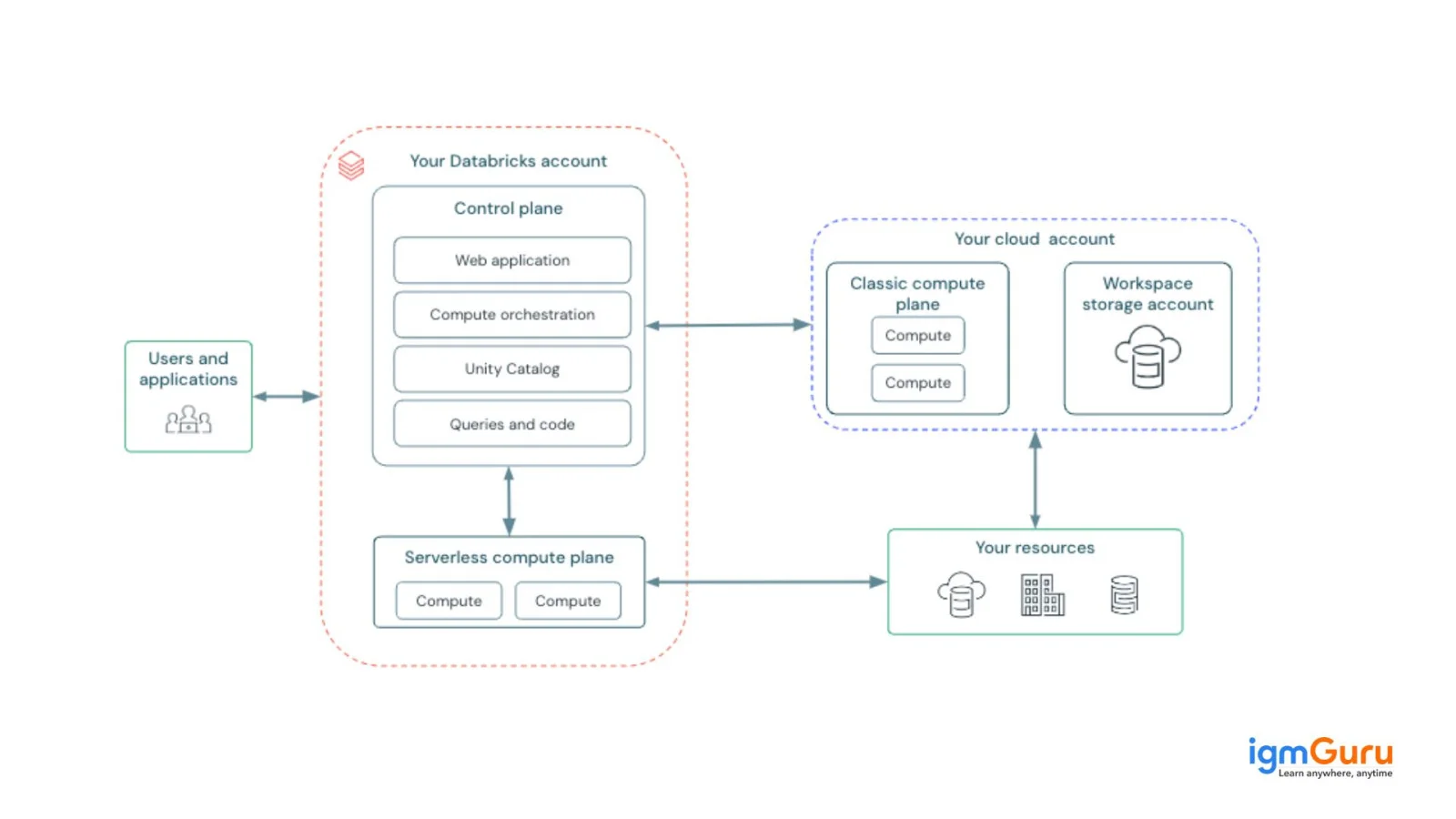
To get the most out of Azure Databricks, it's important to know how it's set up. It mainly has two parts: the Control Plane and the Compute Plane. Let's break these down:
This is the management area where Azure Databricks takes care of your workspace. It handles things like notebooks, settings, and your clusters. Essentially, the web app you use is part of the Control Plane.
This is where all the data processing happens. The Compute Plane has two setups:
With this setup, you can use Azure Databricks computing resources through your Azure account. These resources are created within your virtual network, giving you a secure and isolated environment since they operate in your Azure subscription.
In this setup, Azure Databricks takes care of the computing resources in a shared space. This model makes things easier because you don't have to manage the resources yourself. It also has strong security to keep your data safe and separate from others, making sure everything runs smoothly even when sharing the infrastructure.
Read Also: Top Azure Databricks Interview Questions
Apache Spark is an open-source tool that handles data processing in memory, which is why it's a go-to choice for big data and machine learning tasks. It's the main engine that runs workloads and queries on the Databricks platform. Databricks was started by the people who originally created Spark and still plays a big role in contributing to the open-source Spark community.
SQL Analytics is a new feature that provides a dedicated space for SQL analysts in Databricks. When you switch to the SQL Analytics workspace, it feels more like a typical SQL workbench. Here's what you can do:
The backend runs on SQL Endpoints, which are Spark clusters designed for SQL tasks. You can use these endpoints not just within the SQL Analytics interface in Databricks but also connect to them with tools like Tableau and Power BI, making it easier to work with your data.
Understanding features of Azure Databricks is necessary for moving ahead in completely understanding 'what is Azure Databricks'. These are the top features -
This platform is integrated tightly with the Microsoft Azure cloud. Users can integrate it very easily with a lot of other Azure services like Azure Data Lake Storage, Azure SQL Database and Azure Blob Storage.
It has a unified environment for data engineering, analytics and data science. Teams can thus work together more seamlessly and collaboratively across different projects and tasks.
It has many automation features for simplifying the creation, management and deployment of workloads related to machine learning and big data processing. Automated cluster provisioning, job scheduling and auto scaling are also some useful features.
This platform integrates with many different Azure services like Azure Event Hubs, Azure Blob Storage and Azure Data Factory. Teams can easily build complete data pipelines for ingesting, processing and analyzing data in real time.
It has many unprecedented frameworks and tools for building, deploying and training machine learning models. The most globally used libraries include PyTorch, Scikit-learn and TensorFlow.
There are multiple advantages of Azure Databricks and the top four are discussed below. It is very scalable and secure due to its collaborative environment. Let's discuss ahead -
This section discusses certain limitations of Azure Databricks that one must be aware of.
Related article - Azure Interview Questions
Databricks Machine Learning is now called Mosaic AI. It is an integrated environment that exists within the Databricks platform. It is designed especially for the complete deep learning and machine learning projects' lifecycle. This environment is built atop the Databricks Lake House architecture.
It is known for offering data scientists, machine learning engineers and data engineers the needed tools for managing all main aspects of machine learning. These aspects begin at the data preparation stage and go on to experimentation and model deployment.
Understanding this environment involves understanding the benefits it brings along. This list outlines a few top advantages it brings to the table.
Related Article - Azure Databricks Tutorial: A Guide For Beginners
Let's discuss some use cases of Azure Databricks.
This cloud analytics platform fulfills needs put forth by data engineers as well as data scientists for building complete big data solutions and even deploying it in production. This article begins with an answer to 'what is Azure Databricks' because many data engineers often ask this question. It sets up the entire architecture by setting up clusters, connections to data sources and scheduling and running jobs.
It is a cloud oriented platform for processing, analyzing, sharing and storing data. It solves other purposes like data discovery, data processing, machine learning, data governance and data visualization.
It is a tool on Azure by Microsoft for integration, collaboration, data warehousing and much more.
It is used as an ETL tool (extract, transform, load) for different ETL workflows because of its unified platform. It has all aspects needed to become a good tool in this segment in terms of scalability, Lakehouse architecture and collaboration.
Course Schedule
| Course Name | Batch Type | Details |
| Microsoft Azure Training | Every Weekday | View Details |
| Microsoft Azure Training | Every Weekend | View Details |