The tech landscape changes fast, and right now, everyone's talking about ChatGPT. It's an incredible AI tool, but let's be honest- it's only as good as the instructions you give it. Think of it like a brilliant intern: it can do incredible work, but you have to be super clear about the task.
I've spent hours experimenting with this tool for everything from drafting outlines to explaining complex concepts. That experience taught me one thing: writing effective prompts is a skill in itself.
In this article, I'll share my experience and battle-tested approach on how to write ChatGPT prompts that consistently deliver high-quality and relevant outputs.
Let's start with what a ChatGPT prompt is.
A prompt is basically a sentence you give to the AI chatbot to tell it what you want. But here's the catch: AI chatbots like ChatGPT don't think like a human.
It is a large language model that understands context, patterns, and intent, but only as much as you give it. If your prompt is vague, you'll get vague results. If your prompt is sharp, contextual, and detailed, it will become a digital super-assistant.
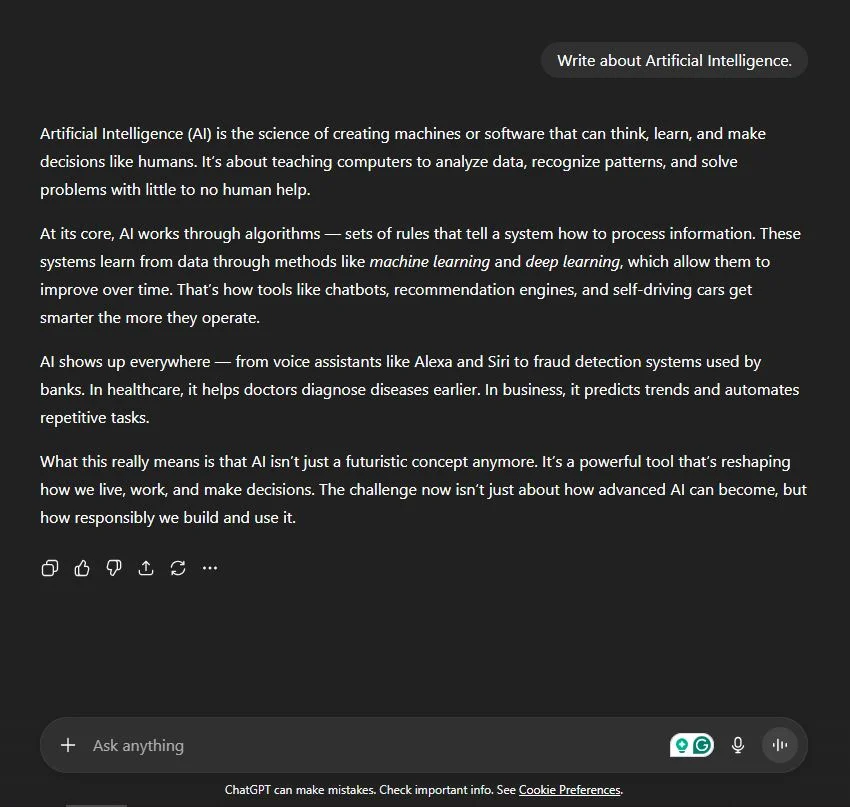
Example 1: The Average Prompt
"Write about Artificial Intelligence."
You'll get a Wikipedia-style essay with no soul.
Example 2: The Better Prompt
"You're a senior AI engineer explaining Artificial Intelligence to final-year IT students. Write a 700-word article with real-world examples and a friendly, conversational tone."
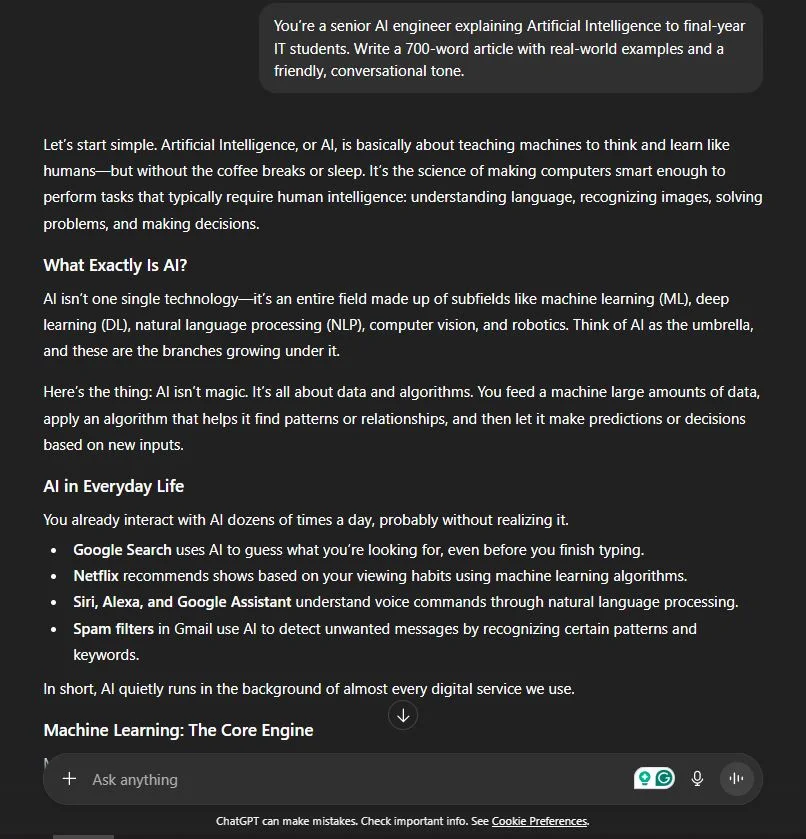
Now, that's clarity. The AI knows who it's pretending to be, who it's writing for, and how it should sound.
There are many reasons to write good and effective prompts, including:
Honestly, it's a bit like ordering food. If you just say "I want something spicy," you could get anything- noodles, curry, or pizza. But if you say, "I want spicy paneer tikka with less oil," you'll get exactly what you wanted.
"ChatGPT doesn't create magic - your prompts do."
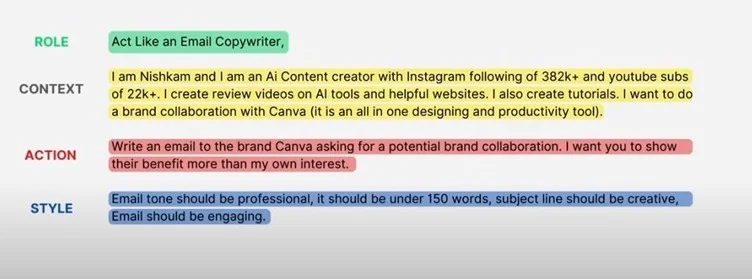
I usually give a proper time with the right strategy to create an effective prompt to get the output I want on the first attempt. And that experience taught me one thing: writing effective prompts is a skill in itself. The secret? Be specific and set constraints. Don't just suggest a topic; direct the model on the role, the task, the context, and the format. If you combine all four, you've practically built an autopilot for good results.
Here is my 4-Step Formula for Killer Prompts
I break down every good prompt into four essential components. If you include these four pieces, you'll see a massive improvement in the quality of the output.
This is perhaps the most underrated step. When you tell ChatGPT who it is, you immediately align its tone, vocabulary, and perspective with your needs.
Generic Prompt (Vague) | "Explain how a REST API works." |
Better Prompt (Defines Role) | "Act as a senior software architect and explain how a REST API works to a junior developer. Use clear diagrams and analogies." |
My Personal Touch: I often ask it to be a "Technical Content Writer," a "DevOps Engineer," or a "Certified AWS Solutions Architect." This immediately injects expertise into the response.
Weak Goal | "I need help with this code." |
Stronger Goal | "Refactor the following Python code snippet to improve its time complexity. Analyze the original code's bottleneck first." |
Clearly articulate the action you want the model to perform. Use strong action verbs like Analyze, Compare, Draft, Refactor, or Summarize.
Weak Goal: "I need help with this code."
Stronger Goal: "Refactor the following Python code snippet to improve its time complexity. Analyze the original code's bottleneck first."
This is where you load the model with the necessary information and crucially set boundaries on the output. Think about your audience and their knowledge level.
What to include in the context:
Real-Time Example:
I was writing an article on CI/CD pipelines. Instead of a generic explanation, I provided context: "My audience is migrating from Jenkins to GitLab CI."
How should the final output look? A brilliant response is useless if it's a massive wall of text when you needed a bulleted list.
Always specify the structural elements:
Here is a full, robust prompt writing techniques that integrate all four steps, which you can easily adapt for your next technical article:
My Final Prompt Template:
[Role] Act as a Certified Cloud Solutions Architect.
[Task] Draft an introductory guide on securing a basic Kubernetes cluster.
[Context] My audience is experienced IT professionals, but they are new to Kubernetes. Focus on the top 5 most critical security risks and their mitigation. The tone should be authoritative but easy to follow.
[Format] Present the information as an article. Use the following structure:
1. An introductory paragraph.
2. Five distinct sections, one for each risk, using an H3 heading.
3. Within each section, use a bold heading for the risk and a bulleted list for the mitigation steps.
4. The entire article must be under 700 words.
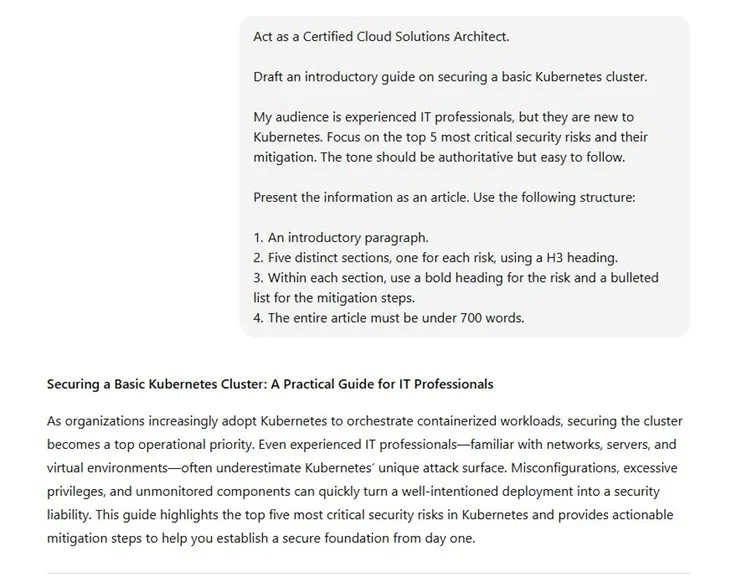
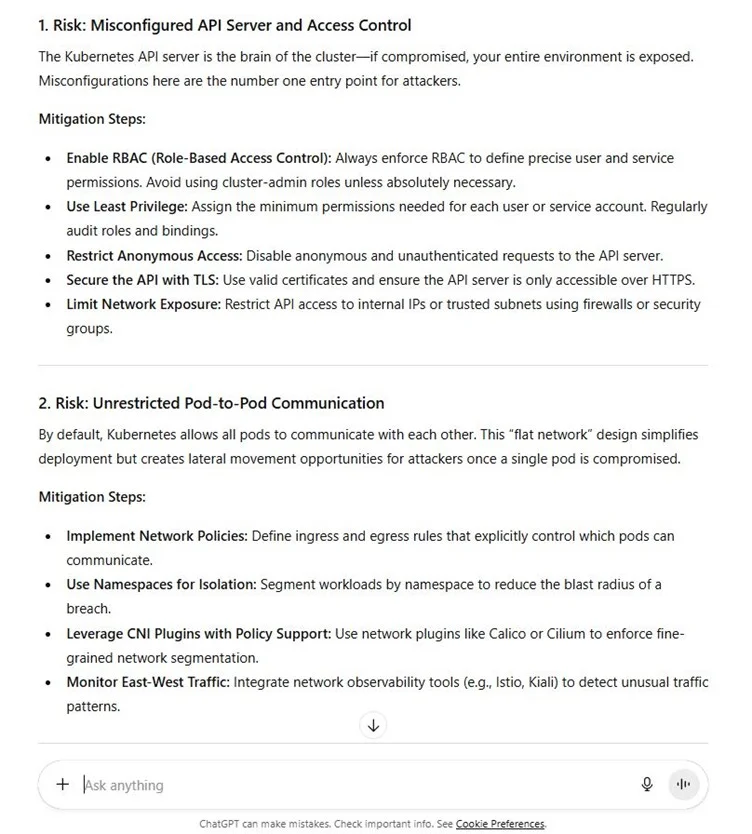
See how that leaves almost nothing to chance? You've guided the model every step of the way, dramatically increasing your chances of getting a perfect, human-quality draft on the first try.
Read Also: How To Become A Prompt Engineer: A Comprehensive Guide
As we already know that ChatGPT understands and responds to a wide variety of prompts. Depending on your purpose, you can use it for learning, creating, problem-solving, or simply having a conversation. Here are the main types of prompts ChatGPT supports:
These prompts are used to gather facts, data, or explanations. For example, you can ask, "What are the benefits of cloud computing?" or "Which countries have the fastest-growing economies?"
These involve asking ChatGPT to perform a task, such as summarizing content, rewriting text, generating documentation, or explaining code.
Use these prompts to spark creativity. You can request poems, stories, slogans, marketing captions, or even character ideas for your novel.
ChatGPT can hold natural conversations. You might start with something like, "I'm nervous about my interview. Can you help me prepare?" and continue the discussion interactively.
These prompts help you find solutions to real-world challenges such as improving productivity, managing teams, or making business decisions.
Ideal for students and learners, these prompts help explain academic concepts, theories, or historical events in a clear and simple manner.
Each type of prompt helps you get the most out of ChatGPT whether you're seeking knowledge, creativity, or support.
Read Also: How To Use ChatGPT - A Guide For Beginners
If you're a developer, product manager, analyst, or content creator, ChatGPT can be your ultimate productivity partner. The trick isn't asking questions; it's knowing how to prompt effectively.
Here are 30 ready-to-use ChatGPT prompt examples for everyone.
ChatGPT can identify logical errors, performance issues, and missing dependencies faster than manual debugging. It helps you fix complex issues efficiently with clear explanations and optimized code.
Prompt Example
Don't do this: "Fix my Python code."
Do this: "Act as a senior Python developer. Review my code, identify performance bottlenecks, explain bugs clearly, and rewrite the optimized version with inline comments for clarity."
Save hours by letting ChatGPT create structured, developer-friendly documentation that others can easily understand, ensuring your code stays readable, reusable, and maintainable for long-term projects.
Prompt Example
Don't do this: "Write documentation."
Do this: "Generate detailed documentation for this JavaScript function, including purpose, parameters, return value, and a short example of proper usage in JSDoc format."
Old code can be confusing and cluttered. ChatGPT can refactor your legacy code into cleaner, more efficient, and modern versions while keeping the same logic intact.
Prompt Example
Don't do this: "Make this code better."
Do this: "Refactor this C++ script to enhance readability and performance. Explain each modification briefly and why it improves maintainability."
ChatGPT breaks down tough topics like recursion, loops, or pointers into simple, relatable explanations, making it perfect for learning or teaching technical concepts.
Prompt Example
Don't do this: "Explain recursion."
Do this: "Explain recursion in Python using an analogy, like opening nested boxes. Then show a small working code example step by step."
Use ChatGPT as your AI code reviewer to find inefficiencies, errors, or inconsistencies and receive clear, professional suggestions for improvement.
Prompt Example
Don't do this: "Review my code."
Do this: "Act as a senior Java developer. Review this code for naming conventions, readability, and performance. Suggest improvements and justify them."
ChatGPT can help you organize your ideas into a clear, time-bound roadmap with deliverables, milestones, and KPIs to align your teams toward common product goals.
Prompt Example
Don't do this: "Make a roadmap."
Do this: "Create a 6-month roadmap for a SaaS analytics platform focused on customer retention. Include milestones, KPIs, and measurable goals."
Creating detailed PRDs manually is time-consuming. ChatGPT can draft them quickly with user stories, technical dependencies, and success metrics aligned with your product goals.
Prompt Example
Don't do this: "Write a PRD."
Do this: "Write a PRD for a new 'dark mode' feature in a mobile app, including objective, user story, and acceptance criteria."
Understanding your audience helps build better products. ChatGPT can create accurate, realistic personas with motivations, frustrations, and goals.
Prompt Example
Don't do this: "Create a persona."
Do this: "Create three detailed user personas for a fitness app, including demographics, goals, challenges, and behavioral patterns."
Analyzing competitors manually can take hours. ChatGPT quickly summarizes competitive data, helping you spot feature gaps and opportunities.
Prompt Example
Don't do this: "Compare Slack and Teams."
Do this: "Compare Slack, Microsoft Teams, and Notion in terms of pricing, features, usability, and integrations in a table format."
Deciding what to build next is easier when using frameworks like RICE. ChatGPT can calculate scores and create logical justifications.
Prompt Example
Don't do this: "Prioritize features."
Do this: "Use the RICE framework to prioritize features like AI chatbot, referral program, and 1-click checkout. Include scoring details."
Large reports can overwhelm stakeholders. ChatGPT can summarize them into concise executive summaries highlighting insights, challenges, and actions.
Prompt Example
Don't do this: "Summarize this report."
Do this: "Summarize this 10-page report into three insights, three challenges, and three recommendations for management."
Turn raw numbers into meaningful patterns that stakeholders can easily understand and act on.
Prompt Example
Don't do this: "Analyze this data."
Do this: "Analyze quarterly sales data. Identify trends, anomalies, and provide possible business explanations in bullet format."
Use ChatGPT to generate focused KPIs that measure true business impact, grouped logically for tracking performance.
Prompt Example
Don't do this: "List KPIs."
Do this: "List 10 KPIs for an online education platform divided into customer, financial, and operational categories."
Design data dashboards that highlight the right metrics with clarity and purpose.
Prompt Example
Don't do this: "Make a dashboard."
Do this: "Outline a Power BI dashboard for an e-commerce company tracking sales, customer churn, and profits."
A quick SWOT helps identify strengths and risks before launching new projects.
Prompt Example
Don't do this: "Do SWOT."
Do this: "Perform a SWOT analysis for a new fintech startup expanding globally. Present it in a table with short points."
Save time cleaning messy data by letting ChatGPT generate Python code for imputation, transformation, and anomaly detection.
Prompt Example
Don't do this: "Clean data."
Do this: "Write Pandas code to detect and handle missing values, duplicates, and outliers with explanations for each step."
Understand machine learning algorithms intuitively through examples and analogies.
Prompt Example
Don't do this: "Explain gradient descent."
Do this: "Explain Gradient Descent like teaching a beginner. Use a hill analogy and show one numerical example updating weights."
Evaluate algorithms quickly to choose the best fit for your project.
Prompt Example
Don't do this: "Compare models."
Do this: "Compare Random Forest, XGBoost, and Logistic Regression by accuracy, interpretability, and runtime for a churn prediction task."
Create smarter model inputs using creative transformations and derived features.
Prompt Example
Don't do this: "Do feature engineering."
Do this: "Suggest five feature engineering techniques for a customer churn dataset with one short code example each."
Visualize trends easily using ChatGPT's code generation capabilities.
Prompt Example
Don't do this: "Make a graph."
Do this: "Write Python code using Matplotlib to visualize sales trends (2020–2024) with axis labels, legends, and insights."
Simplify complex health conditions for patients to improve understanding and trust.
Prompt Example
Don't do this: "Explain diabetes."
Do this: "Explain Type 2 Diabetes in simple terms for patient education. Include causes, symptoms, and preventive habits."
Turn lengthy research articles into concise, clear summaries for professional discussions.
Prompt Example
Don't do this: "Summarize this paper."
Do this: "Summarize this study on AI in radiology in 200 words, including objective, method, and findings."
Craft empathetic, professional communication to inform or update patients clearly.
Prompt Example
Don't do this: "Tell patient results delayed."
Do this: "Write a polite message informing a patient about delayed lab results with reassurance and expected timeframe."
Create balanced treatment comparisons for clarity and patient education.
Prompt Example
Don't do this: "Compare therapies."
Do this: "Compare chemotherapy and immunotherapy by mechanism, side effects, and effectiveness in treating cancer."
Summarize complex healthcare policies into digestible, professional summaries.
Prompt Example
Don't do this: "Explain NDHM."
Do this: "Summarize India's National Digital Health Mission in under 150 words, focusing on objectives and benefits."
Automate your onboarding plans with detailed schedules that boost engagement from day one.
Prompt Example
Don't do this: "Make an onboarding plan for new joiners."
Do this: "Create a 2-week onboarding plan for new software engineers. Include daily goals and learning activities."
Standardize interviews with structured and competency-based question sets.
Prompt Example
Don't do this: "Write interview questions."
Do this: "List 10 behavioral and 5 technical interview questions for hiring a data analyst, with key evaluation criteria."
Condense survey data into meaningful, actionable insights for HR leadership.
Prompt Example
Don't do this: "Summarize feedback."
Do this: "Summarize 50 employee feedback responses into top five concerns and three action points for improvement."
Design structured review templates that align employee growth with company goals.
Prompt Example
Don't do this: "Make review form."
Do this: "Create a quarterly performance review template with sections for achievements, challenges, and development goals."
Keep employees connected with well-planned virtual or in-person events.
Prompt Example
Don't do this: "Plan fun activity."
Do this: "Write an agenda for a 2-hour virtual team event with three fun activities and clear objectives."
Learning how to write effective ChatGPT prompts is just like learning to communicate with a smart assistant- once you understand how it "thinks," everything becomes smoother and more predictable. When I first started using ChatGPT or any other AI tools, I used to type random questions and often got confusing or irrelevant answers/outputs. Over time, I realized the secret: ChatGPT isn't guessing - it's responding to the clarity you provide. Now, I treat it as my collaborator- a smart partner that performs best when given clear instructions, context, and structure.
So, don't just ask ChatGPT a question; give it a role, a goal, and a tone. Because when your prompts are thoughtful, your results will be exceptional.
And if you're ready to take your skills even further, consider exploring igmGuru's Prompt Engineering training, where you can learn advanced prompting techniques directly from industry experts. It's a great way to deepen your understanding and make your AI interactions truly impactful.
Read Our Trending Articles:
There's no fixed length. It should be long enough to give context but short enough to stay readable. Generally, 2-4 sentences work best.
Absolutely. Many content strategists, marketers, and developers use it daily- as long as you fact-check and personalize the content.
ChatGPT responses can vary based on phrasing, length, and system updates. Always refine or rephrase your prompt for consistency.
Yes- indirectly. If you feed it a few writing samples and say, "Write in this tone," it can mimic your style remarkably well.
Add specifics like: "Use professional terminology," or "Include relevant statistics." The AI adjusts its depth accordingly.
Course Schedule
| Course Name | Batch Type | Details |
| Prompt Engineering Course | Every Weekday | View Details |
| Prompt Engineering Course | Every Weekend | View Details |