After the advent of ChatGPT, the world of AI chatbots didn't just evolve- it exploded. What started as a single conversational AI quickly turned into an entire ecosystem of tools built for specific needs like coding, research, content creation, marketing, customer support, and even real-time search. Today, AI chatbots are no longer one-size-fits-all solutions. Each tool is designed with a particular purpose in mind.
There's no denying that ChatGPT set the benchmark. It remains one of the most powerful and widely used AI tools, capable of handling a wide range of tasks effectively. However, as usage grew, so did its limitations. From context handling and pricing concerns to workflow-specific gaps, many individuals and businesses began exploring alternatives that better align with their goals.
In this guide, I've listed the top 12 ChatGPT alternatives for 2026 that I've personally used across different scenarios. Each tool stands out for a specific reason, making it easier for you to choose the right AI for your needs. Let's get started.
Here is the table explaining all these alternatives in short.
| Tool Name | Best For | Unique Features | Pricing (as of 2026) |
| Copilot | Code generation and dev workflows | Deep IDE integration supports multiple models and real-time code suggestions | Free tier (limited); Pro: $10/mo or $100/yr |
| Claude (Anthropic) | Conversation, coding, reasoning | Large context window, handles text/code/images, features like Artifacts, JS Analysis | Free; Pro: $20/mo; Team: $20/seat/mo (annual) or $25/seat/mo (monthly); Max plan: $100–$200/mo; Enterprise: custom |
| Google Gemini | Real-time data, Google ecosystem users | Live data access, multimodal (voice, image, text), deep Google integration | Pricing not detailed |
| DeepSeek | Cost-efficient reasoning and API use | Ultra-low token pricing, strong reasoning, pay-as-you-go model | V4 Flash runs $0.14 per 1M input tokens on a cache miss and $0.28 per 1M output; V4 Pro runs $0.435 input and $0.87 output |
| Meta AI | Social/hardware integration | Works with Meta apps and hardware (e.g. smart glasses), conversational interface | Free |
| Perplexity AI | Web-backed research and summarization | Real-time search with citations, research reports, AI browser “Comet” | Free; Pro: $20/mo or $200/yr |
| Writesonic | SEO content, marketing copy | Blog/SEO writing, templates, AI search visibility tracking | Starter $79/mo; Basic $199/mo; Growth $399/mo; and a custom Enterprise tier |
| Semrush ContentShake AI | SEO-optimized article generation | Idea generation, SEO-rich articles, WordPress publishing | $60/mo |
| Jasper AI | Marketing content, brand voice | Brand voice training, templates, campaigns, image generation | Pro at $69/month ($59/month billed annually) |
| Chatsonic | AI marketing agent, ChatGPT alternative | Multiple models, SEO features, marketing workflows | NNo pricing available |
| Grok AI (xAI) | Creative content, text-to-image/video | Multimodal (text, images, soon video), "truth-seeking" approach | SuperGrok: $30/mo; Heavy: $300/mo |
| Cursor AI | AI-assisted coding within IDEs | Built into coding environments, supports "vibe coding" | $20/month |
ChatGPT is a cutting-edge language model created by OpenAI. It chatbot is trained on large amounts of text data from different sources. The bot learns patterns and structures of human language with the given data. And then the bot creates texts that look like it was written by a human.
Reminiscent of ChatGPT as a highly intelligent and well-read conversationalist. This chatbot is undeniably the go-to AI tool. Regardless of the hype, it has constraints that can make for some frustrating interactions.
No doubt, ChatGPT is the go-to choice for many, thanks to its wide range of uses. But like any tool, it has its limits. In this section, we'll dig into those limitations and see where it might not fully deliver.
Its responses have a fixed baseline, which makes it unsuitable for more creative workflows.
Unless one spends their time training ChatGPT through in-chat prompts or custom instructions, it isn't great at understanding the context of the content immediately.
When it comes up against certain subjects, it has had insufficient training on, ChatGPT is most likely to fabricate information in its responses.
This chatbot has limited in-built tools for managing tasks or creating complicated workflows.
One needs third-party apps for integrating with project management or content tools.
Related Article - How to Use ChatGPT
Focus on their use cases when judging any ChatGPT alternative. Consider aspects that impact usability and the quality of one's experience while opting for different AI agents or tools than this one.
If a student, marketer or professional requires summaries and analysis. Then conversation flow and customization options affect how effectively the tool meets one's needs. Here is why we need ChatGPT alternatives.
Also Explore - Copilot vs ChatGPT
ChatGPT might be a go-to AI assistant, but depending on one's needs, there may be better options out there. Here is a list of the top free ChatGPT alternatives with unique features. These can be plugged directly into existing workflows or better integrations, as they are among the best AI chatbots available today.
Google Gemini is a multimodal AI assistant built for real-time information access and seamless integration with Google products, supporting text, image, and voice-based interactions.
Gemini is widely used for research, real-time queries, productivity inside Google Workspace, video creation, and image-based problem-solving, especially by users already invested in Google's ecosystem.
| Pros | Cons |
| Real-time access to Google Search | Inconsistent output quality at times |
| Multimodal input (text, image, voice) | Requires Google account |
| Strong integration with Google apps | Limited customization options |
| Free tier available | Less control over responses |
Let’s try a basic example to understand how Gemini really works to give the best answer. I asked it:
"What were today's top business headlines in India, and summarize the RBI's latest policy stance in two lines?"

Microsoft Copilot is an enterprise-focused AI assistant that works deeply within Microsoft 365 applications. It helps professionals automate documents, emails, meetings, and data analysis using organizational context.
Microsoft Copilot is mainly used to improve workplace productivity. It assists users inside Word, Excel, Outlook, PowerPoint, and Teams by understanding internal data, emails, files, and meetings to deliver context-aware output.
| Pros | Cons |
| Deep integration with Microsoft 365 apps | Limited value outside the Microsoft ecosystem |
| Context-aware responses using work data | Paid plan required for full functionality |
| Strong enterprise security and compliance | Less flexible for creative writing |
| Saves time on repetitive office tasks | Not ideal for developers or researchers |
Let’s try a basic example to understand how Copilot really works inside Microsoft 365. I asked it, inside Excel:
"Summarize this quarter's sales data and draft a two-line email highlighting the top-performing region."

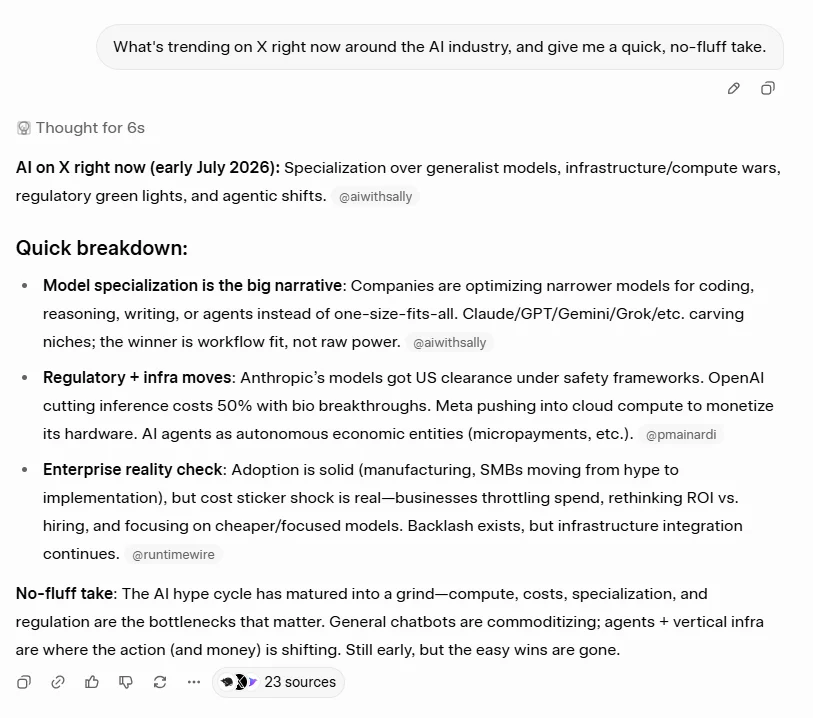
Grok AI is a real-time conversational assistant integrated with X (Twitter), designed for trend analysis, current events, and fast information discovery.
Grok AI is mainly used for real-time news analysis, trend discovery, social content creation, and conversational exploration of current topics.
| Pros | Cons |
| Real-time insights | Limited enterprise use |
| Engaging responses | Still evolving |
| Social platform integration | Not ideal for deep research |
Let’s try a basic example to understand how Grok really works for real-time trends. I asked it:
"What's trending on X right now around the AI industry, and give me a quick, no-fluff take."
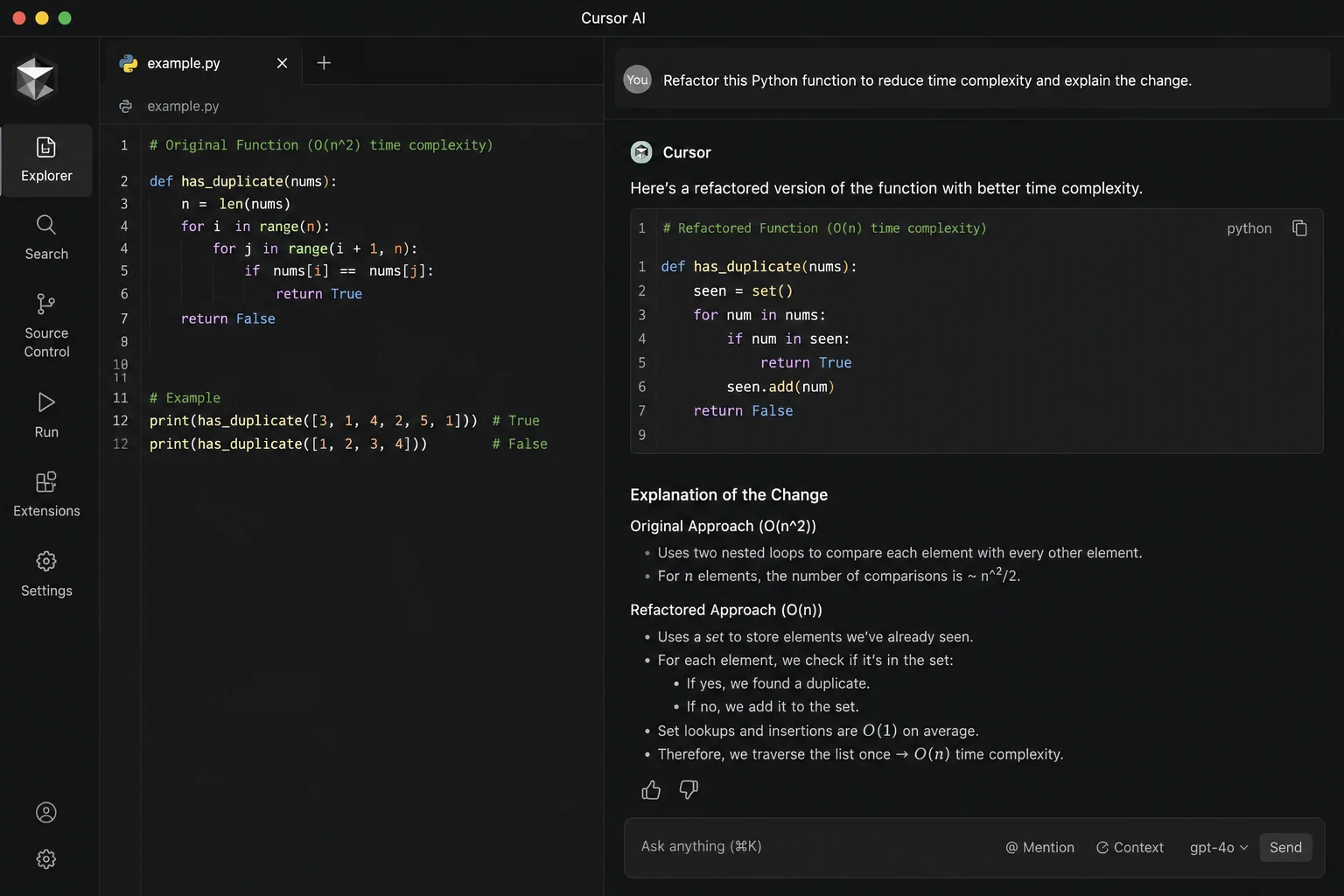
Cursor AI is one of the best developer-focused AI coding assistants that works directly inside code editors to speed up writing, debugging, and collaboration.
Cursor AI is used by developers to write, refactor, and debug code inside IDEs, enabling faster development and collaborative coding workflows.
| Pros | Cons |
| Deep IDE integration | Not useful for non-developers |
| Boosts productivity | Learning curve |
| Strong code understanding | Pricing unclear |
Let’s try a basic example to understand how Cursor really works inside a live codebase. I asked it:
"Refactor this Python function to reduce time complexity and explain the change."
Claude is a reasoning-focused AI assistant known for handling long documents, ethical AI design, and reliable contextual understanding, making it ideal for research, analysis, and structured writing tasks.
Claude is used for long-form reasoning, document analysis, academic writing, and structured explanations. It performs well when users need deep context retention and safer, more predictable responses.
| Pros | Cons |
| Excellent long-context understanding | No native workspace or office suite |
| More reliable and less hallucination-prone | Fewer integrations than competitors |
| Strong ethical and safety focus | Not optimized for SEO or marketing |
| Natural, human-like conversations | Advanced features require Pro plan |
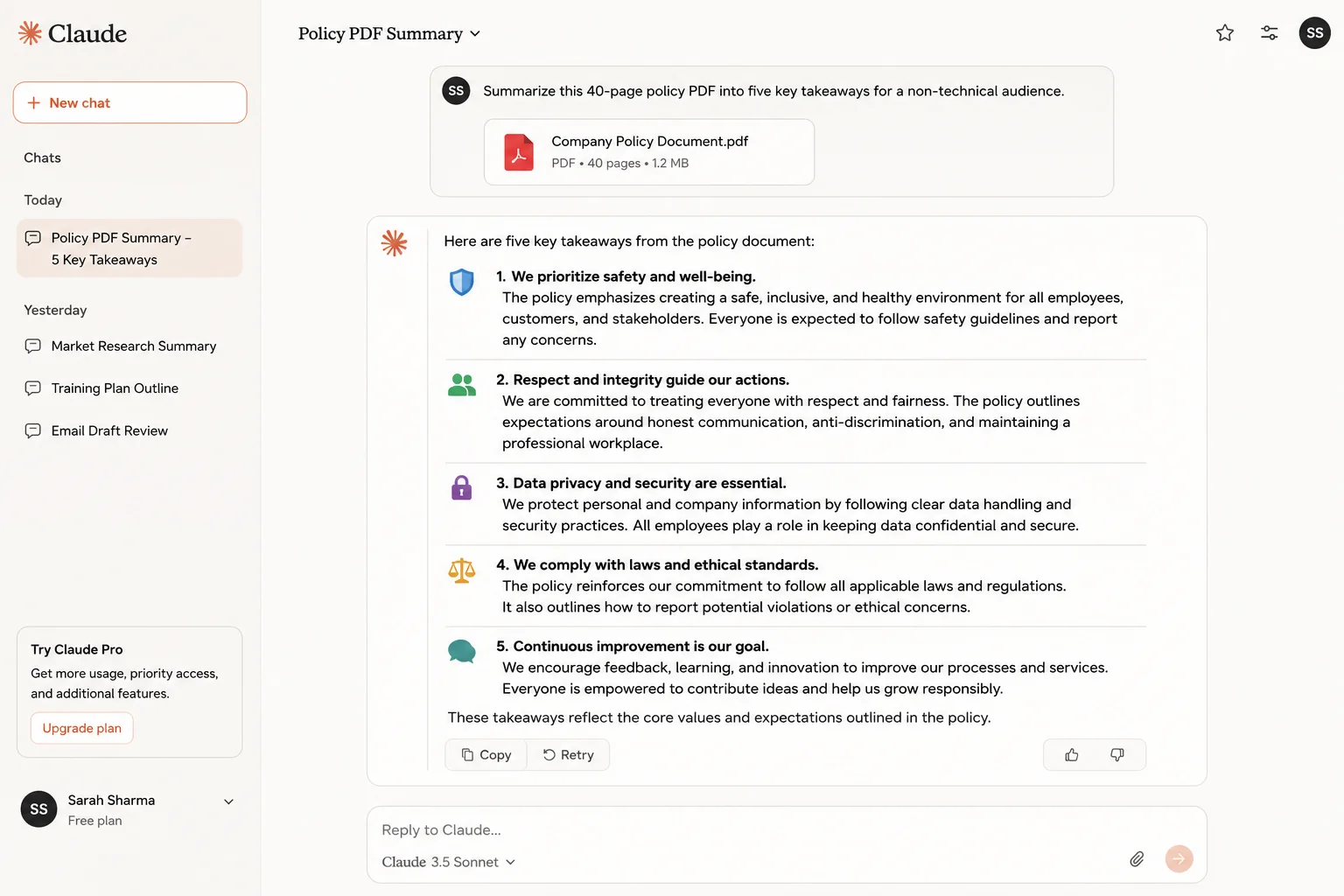
Let’s try a basic example to understand how Claude really works on long documents. I asked it:
"Summarize this 40-page policy PDF into five key takeaways for a non-technical audience."
DeepSeek is a cost-efficient, reasoning-focused AI model popular among developers and researchers for coding, math, and technical problem-solving at very low token costs.
DeepSeek is used for coding, debugging, mathematical reasoning, and AI API experimentation. It is especially attractive for users who need strong reasoning without high operational costs.
| Pros | Cons |
| Extremely low token pricing | Limited brand trust in some regions |
| Strong reasoning and logic | Fewer enterprise integrations |
| Supports document and image uploads | UI less polished than competitors |
| Open and developer-friendly | Data residency concerns for enterprises |
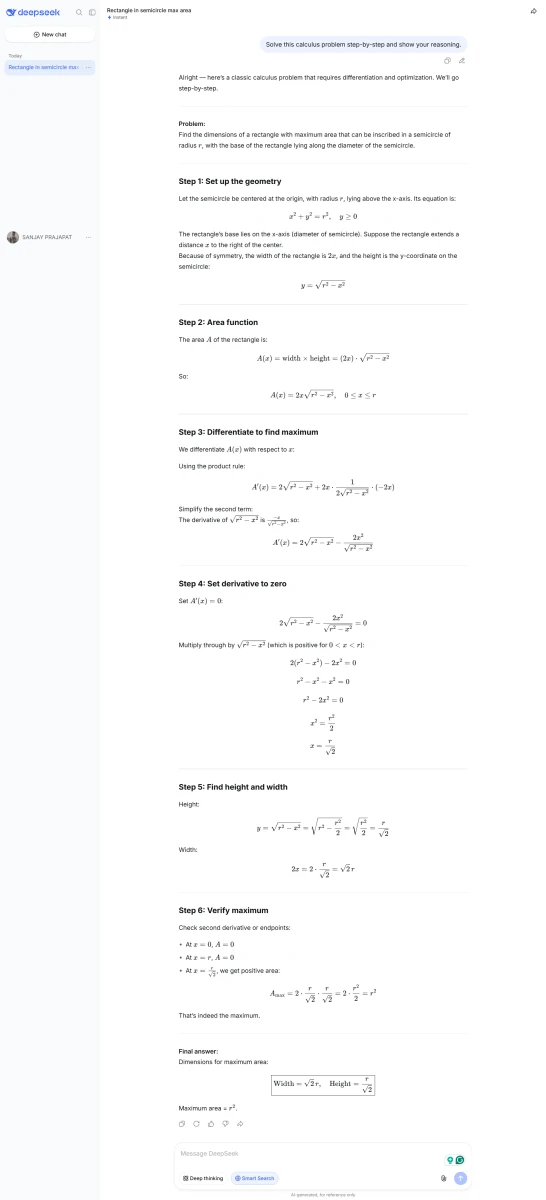
Let’s try a basic example to understand how DeepSeek really works on reasoning tasks. I asked it:
"Solve this calculus problem step-by-step and show your reasoning."
Meta AI is a socially integrated AI assistant designed for casual conversations, image generation, and visual interactions across Meta platforms like WhatsApp, Instagram, and Facebook.
Meta AI is primarily used for social interactions, image creation, and conversational assistance inside Meta's apps rather than professional or enterprise workflows.
| Pros | Cons |
| Seamless social platform integration | Not suitable for professional tasks |
| Free to use | Limited depth in reasoning |
| Image and visual AI features | Minimal customization |
| Easy for casual users | Privacy concerns for some users |
Let’s try a basic example to understand how Meta AI really works for casual, social use. I asked it, inside WhatsApp:
"Generate an image of a cozy reading nook for my Instagram story, and suggest a short caption."
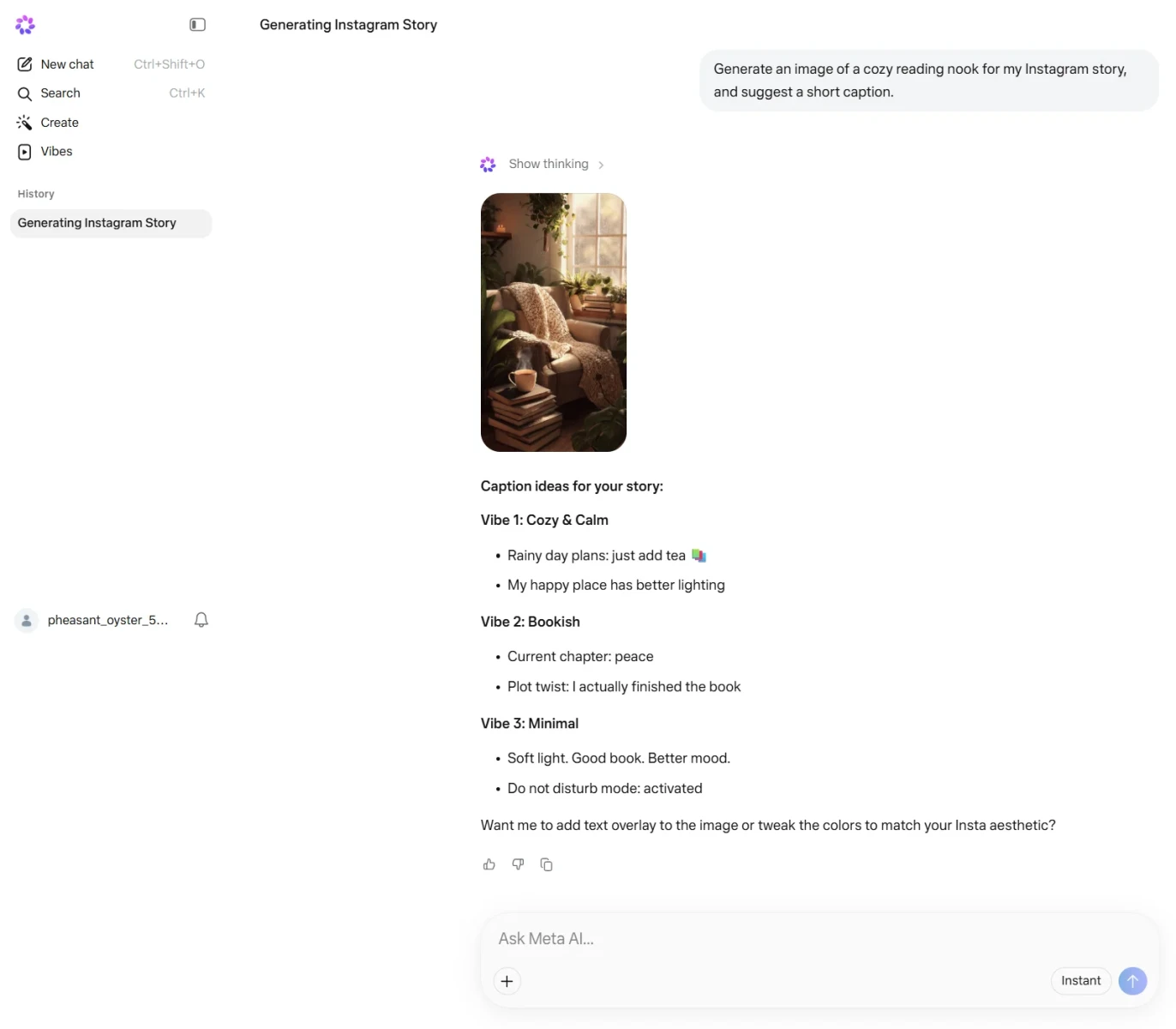
Perplexity AI is an AI-powered search assistant that focuses on accuracy and citations, making it ideal for research, fact-checking, and information discovery.
Perplexity AI is mainly used for academic research, factual queries, market analysis, and any task where verified, source-backed answers are required.
| Pros | Cons |
| Provides cited, factual answers | Less creative output |
| Real-time web access | Limited conversational depth |
| High trustworthiness | Pro plan is needed for advanced features |
| Clean and fast UI | Not ideal for storytelling or branding |
Let’s try a basic example to understand how Perplexity really works for research. I asked it:
"What are the latest findings on AI's impact on entry-level tech jobs? Give me sources."
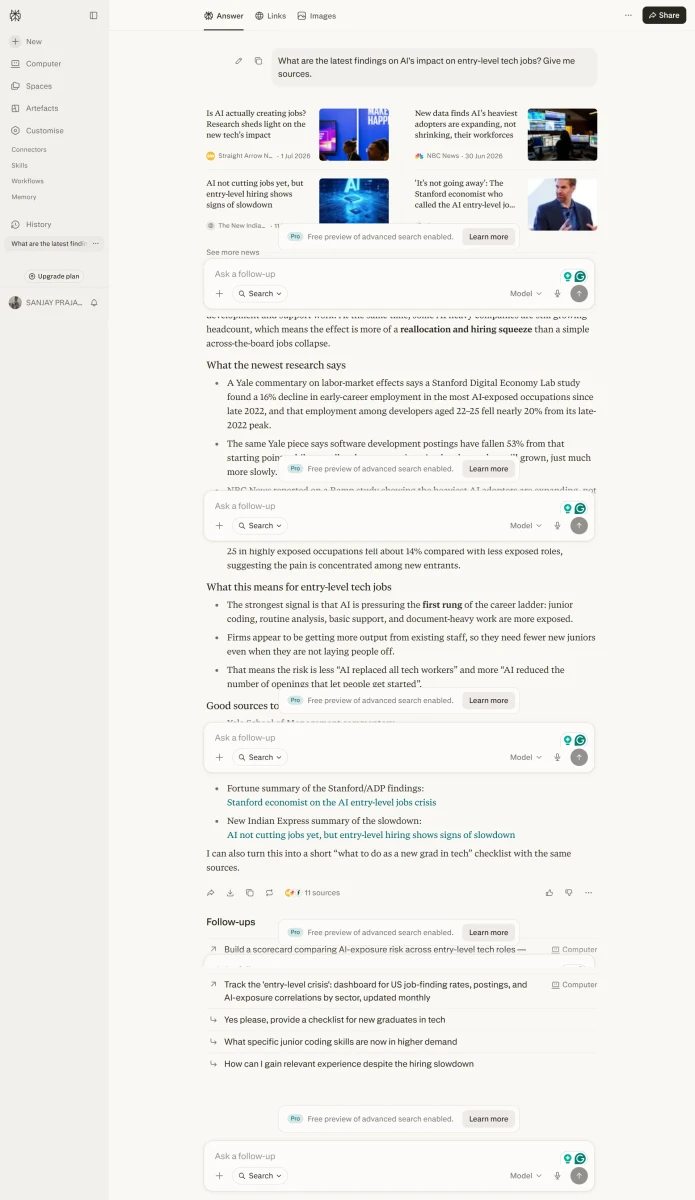
Writesonic is an AI writing tool built for marketers and content creators who want fast, SEO-focused content generation using templates and guided workflows.
Writesonic is commonly used for blog writing, SEO articles, ad copy, landing pages, and social media content where speed and search optimization matter.
| Pros | Cons |
| SEO-focused templates | Content may sound generic |
| Fast content generation | Weak reasoning abilities |
| Multiple language support | Not suitable for technical tasks |
| Beginner-friendly interface | Requires editing for originality |
Let’s try a basic example to understand how Writesonic really works for SEO content. I asked it:
"Write an SEO-optimized 100-word intro for a blog on 'best budgeting apps 2026,' targeting the keyword 'budgeting apps.'"
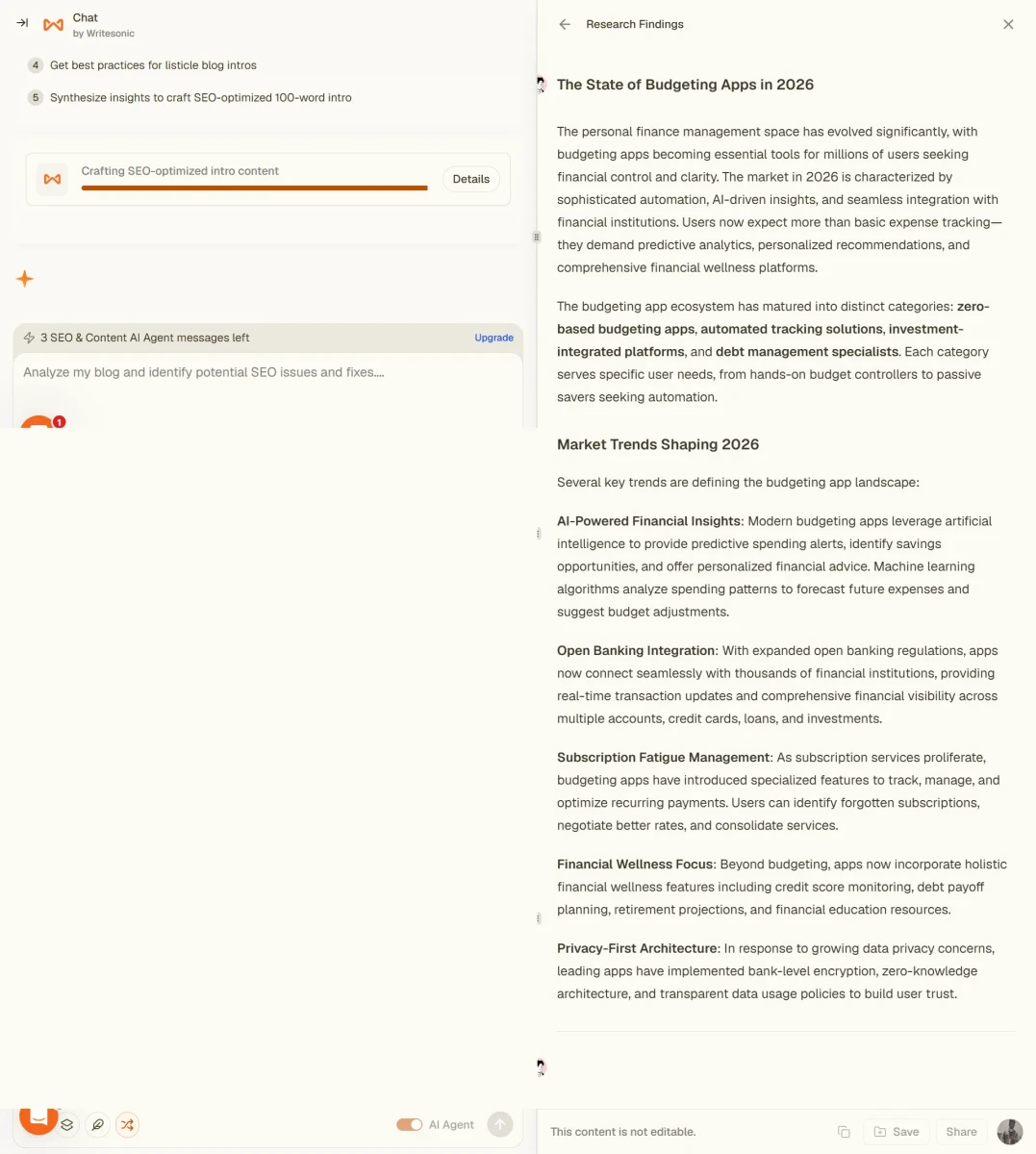
Semrush ContentShake AI is a specialized AI tool for SEO-driven content creation, combining keyword data with AI writing to improve search rankings.
This tool is used by SEO professionals to generate keyword-optimized blog posts, content briefs, and ranking-focused articles aligned with search intent.
| Pros | Cons |
| Strong SEO data integration | Expensive for solo creators |
| Data-driven content recommendations | Limited creative flexibility |
| Ideal for content teams | Requires Semrush familiarity |
| Helps align with search intent | Not a general AI assistant |
Let’s try a basic example to understand how ContentShake really works with keyword data. I asked it:
"Generate a content brief for 'best CRM software for small business' based on top-ranking competitors."
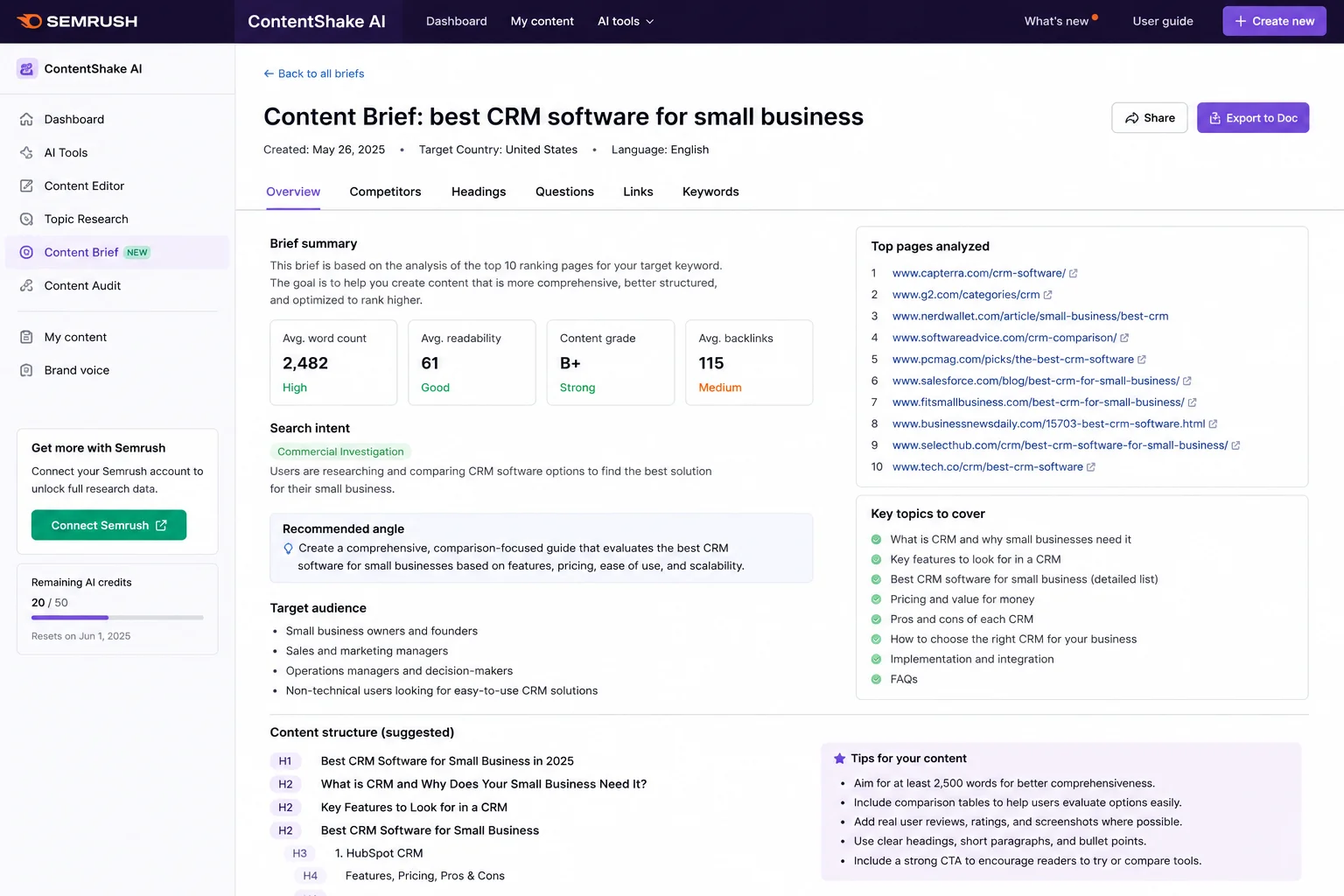
Jasper AI is a marketing-focused AI platform built for teams and agencies that need consistent brand voice and scalable content production.
Jasper AI is used for marketing campaigns, branded content, email copy, ads, and large-scale content creation that requires consistent tone and messaging.
| Pros | Cons |
| Strong brand voice control | High pricing |
| Marketing-focused workflows | Overkill for individuals |
| Scales well for teams | Requires setup and training |
| Built-in content optimization | Limited factual reliability |
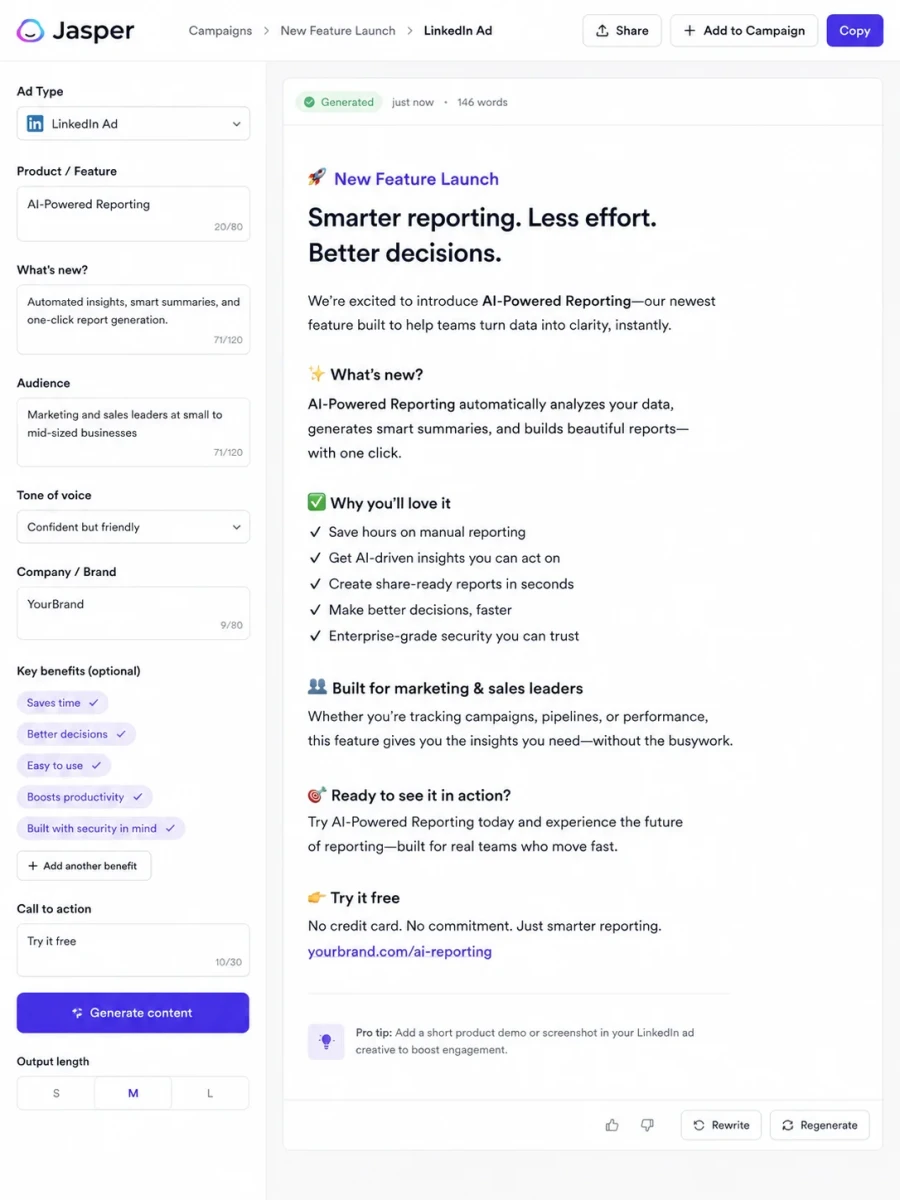
Let’s try a basic example to understand how Jasper really works with brand voice. I asked it:
"Write a LinkedIn ad in our brand's confident-but-friendly tone promoting a new SaaS feature launch."
Chatsonic is a marketing-oriented AI chatbot that combines real-time web access, voice commands, and content creation for digital marketing workflows.
Chatsonic is used for SEO writing, trend-based content, voice-driven commands, and AI-powered customer interactions.
| Pros | Cons |
| Real-time web access | Output quality varies |
| Voice interaction support | Less reliable for deep analysis |
| Custom prompt control | Pricing scales quickly |
| Marketing-focused features | Not developer-friendly |
As an IT professional who has personally tested and used multiple AI tools across real-world workflows, I can confidently say that choosing the right ChatGPT alternative in 2026 is less about popularity and more about practical fit. Each AI assistant performs well in specific scenarios, and no single tool replaces all others.
Below is my experience-based breakdown to help you choose the right ChatGPT alternative based on actual usage, performance consistency, and workflow impact.
| Audience | Tool I Tested | Best For | Why I Recommend It (Based on Hands-On Use) |
| Students & Researchers | Perplexity AI | Research, fact-checking, academic work | Delivers source-backed answers with citations. In my testing, it consistently reduced verification time and is far more reliable than ChatGPT for factual research. |
| Data Analysts | Claude | PDFs, reports, policies, academic writing | Handles long documents extremely well due to its large context window. I found it more stable and less prone to hallucinations during deep analysis. |
| Developers & Programmers | GitHub Copilot | Code generation inside IDEs | Provides accurate, real-time code suggestions directly in development environments. Much more practical than ChatGPT for daily coding tasks. |
| Software Engineers | Cursor AI | Refactoring, debugging, “vibe coding” | Cursor significantly improved productivity during refactoring and debugging. It understands project context better than general-purpose chatbots. |
| Budget-Conscious Developers | DeepSeek | Reasoning, coding, API experimentation | Offers strong reasoning performance at ultra-low token costs. Based on my testing, it’s ideal for startups and large-scale AI experiments. |
| Content Developers | Writesonic | Blog writing, SEO content | Optimized for search intent and content structure. It reduced post-editing effort compared to ChatGPT for SEO-focused writing. |
| Brand & Campaign Marketing | Jasper AI | Brand voice, campaigns, ads | Best suited for teams that need consistent tone and scalable marketing content. Requires setup but performs well once trained. |
| SEO Professionals & Agencies | Semrush ContentShake AI | Keyword-driven articles | Combines AI writing with Semrush keyword data. I found it effective for ranking-focused content rather than creative writing. |
| Enterprise Productivity | Microsoft Copilot | Office automation, enterprise workflows | Deep Microsoft 365 integration makes it far more useful than ChatGPT for reports, emails, Excel analysis, and meeting summaries. |
| Real-Time Information | Google Gemini | Live queries, Google Workspace users | Performs better than ChatGPT for real-time data and Google ecosystem tasks. Ideal for users already using Gmail, Docs, and Sheets. |
| Social Trends & Current Events | Grok AI | Trend analysis, news exploration | Useful for fast-moving topics and social discussions. In testing, it performed best for conversational insights rather than deep research. |
| Casual & Social Use | Meta AI | Social chats, image generation | Convenient for WhatsApp and Instagram users, but not suitable for professional or technical workflows. |
The alternatives to ChatGPT are rich and varied, reflecting the growing role of AI in everyday life and work. Every tool has unique abilities to meet users' evolving needs, from improving personal well-being to boosting workplace productivity. Either for personal development, professional assistance, or creative attempts, the diverse collection of ChatGPT alternatives ensures that the requirements and needs.
Explore our Related Articles
Some of the top options are GitHub Copilot, Microsoft Copilot, Amazon Q Developer, Google Gemini, Claude and Perplexity AI.
DeepSeek is an open-weight model using a Mixture-of-Experts (MoE) architecture, which lowers compute cost per query. This makes it significantly cheaper than ChatGPT via API. Whether it's 'better' depends on the task; it's particularly strong in math/coding reasoning at a fraction of the cost.
There is no single AI that can be called the smartest, as leading models like GPT-5, Gemini, Claude, and Grok each top different benchmarks (reasoning, coding, multimodal understanding) depending on the task. Rather than one winner, most users pick based on their specific use case like Claude for long-document reasoning, Perplexity for cited research, Gemini for real-time/Workspace tasks
Course Schedule
| Course Name | Batch Type | Details |
| Generative AI Training | Every Weekday | View Details |
| Generative AI Training | Every Weekend | View Details |