Today, software engineering jobs are playing a big role in our tech-driven world. They are changing the industries such as healthcare, finance and education with new solutions. These roles are important for designing, coding, testing, and maintaining software that solves real-world problems. From the 1960s the global demand for software engineering has grown by over 20% each year. For the future, we can say that this field is expected to grow around 2530% by 2030.
As these roles are high-paying and in high demand, it often causes confusion while preparing for Software engineering interviews. Therefore, in this guide, I have covered the most asked Software engineering interview questions from beginner level to advanced level from all my experience in this field. Let's prepare for your next software engineering interview together.
This section covers basic software engineering interview questions. These questions are great for beginners. Let’s look at the top questions.
Software engineering is the process of building software systems. It includes designing, coding, testing, and maintaining programs. Software engineers work through a structured process that makes sure the software is reliable and works well. This is a very important skill for jobs in technology.
Software re-engineering is about improving old software. It involves updating software applications so they can meet new requirements. This can include fixing bugs, adding new features, or making the software run better. Engineers look at the existing code. Then, they redesign or rewrite certain parts. This approach often saves time when compared to building new software from the beginning.
Software has special qualities that determine its quality. These traits make it different from hardware. Here are the main characteristics:
Software is available in different types. Each type has a specific job. Here are the main categories:
Verification checks if the software is being built the right way. It makes sure the code follows all the specified requirements. Validation checks if the software actually meets the user's needs. Both steps are very important for quality. Verification is about the process, while validation is about the final product.
SRS stands for Software Requirements Specification. It is a document that lists all the needs for a piece of software. It contains details on features, goals, and limitations. The SRS acts as a guide for developers and testers, ensuring everyone on the team understands the project.
Software prototyping means building a simple model of the software. This model shows how the software will work. Users can then test it and provide feedback. A POC, or Proof of Concept, is used to test an idea. It checks if a certain feature is possible to build. Both of these help in planning better software.
The software scope sets the project's boundaries. It lists everything the software is supposed to do. It also clearly states what the software will not do. A well-defined scope helps prevent extra work. It also helps keep projects on schedule and within their budget.
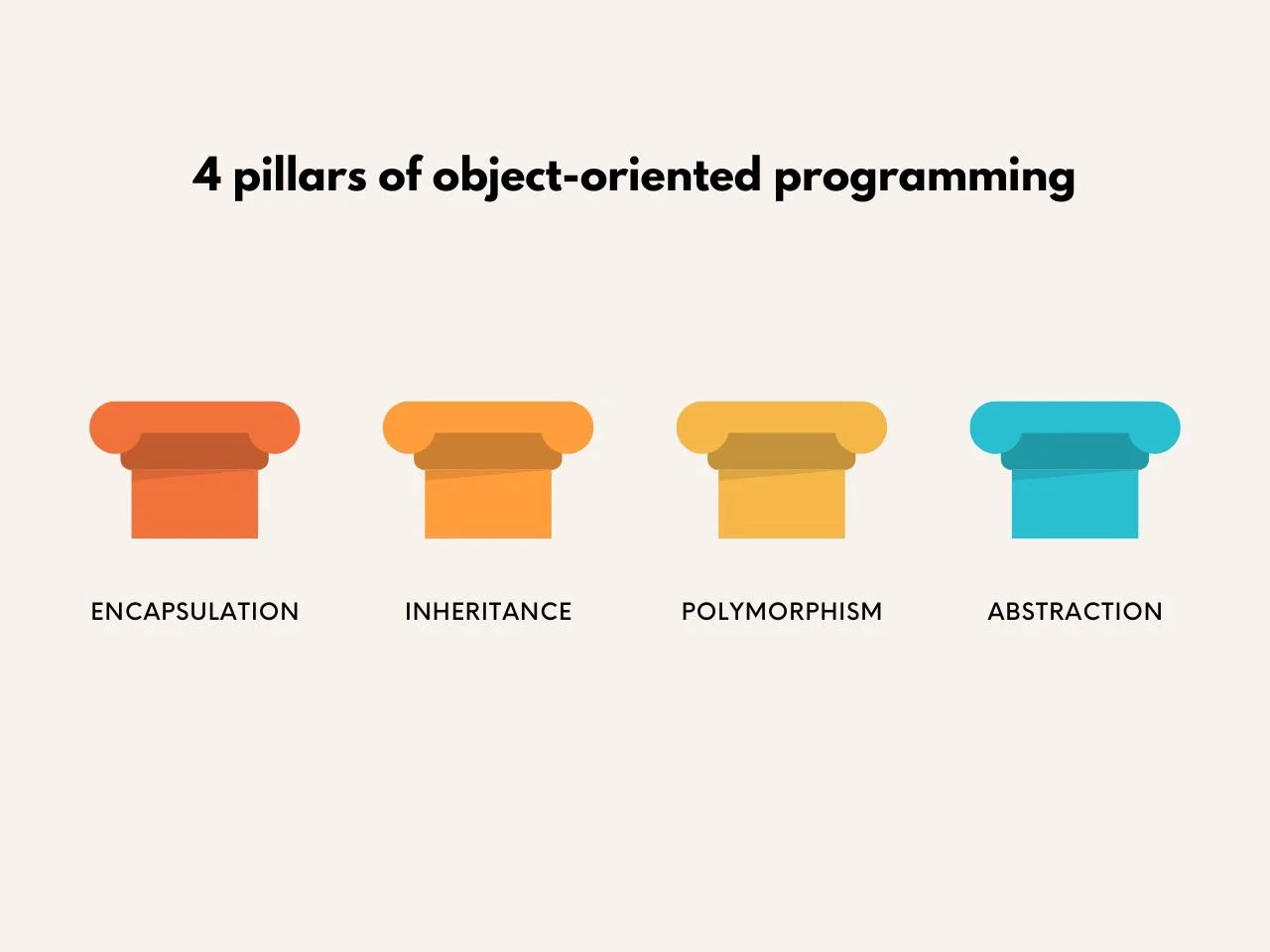
Object-oriented programming rests on four main pillars that help make coding more efficient.
A stack is last-in, first-out (LIFO). You can think of it like a stack of plates; you always remove the top one first. A queue, on the other hand, is first-in, first-out (FIFO). It is like a line at a store, where the first person in line is the first to leave. They both manage data, just in different ways.
Big O notation is a mathematical way to describe an algorithm's efficiency. It explains how the runtime or memory usage of an algorithm grows as the input size increases.
Think of it like this: If you need to find a specific page in a book:
O(n) - Linear Time: You read every single page from the beginning until you find the one you want. If the book doubles in size, it takes you twice as long.
O(1) - Constant Time: You already know it's on page 50. The size of the book doesn't matter; you can go straight to it.
O(log n) - Logarithmic Time: You open the book to the middle. If your page number is higher, you look in the second half. If it's lower, you look in the first half. You keep splitting the section in half. This is very efficient for large inputs.
It's important because it helps engineers choose the most efficient algorithm to solve a problem, ensuring the software runs fast and can handle large amounts of data without slowing down.
Read Also- Java Interview Questions
This section contains software engineering interview questions for intermediate-level professionals. These questions are good for professionals who have some experience. Preparing for these questions will help you do well in your interviews. Let’s begin.
CASE stands for Computer-Aided Software Engineering. CASE tools are applications that automate tasks during software development. These tools help make the work faster and improve its quality. They can help with designing, writing code, testing, and maintaining software. Examples include tools that draw diagrams or generate code automatically. Using CASE tools helps reduce errors and improve teamwork. They are essential for managing complex projects.
The Software Development Life Cycle (SDLC) is a structured process used for building high-quality software. The SDLC has clear steps that are followed from beginning to end. Each phase ensures that the software will meet the user's needs. It begins with planning and is complete after maintenance. Understanding the SDLC helps developers stay organized, and it is a key concept in software engineering interviews.
There are different SDLC models to guide software development. Each one is suited for certain types of projects.
The Waterfall Method is a straightforward SDLC model that follows a step-by-step process. Each phase must be completed before the next one can start. This makes it easy to follow and manage.
These are two important methods for testing. They both help ensure software quality.
A computer program is just a set of instructions designed to do one specific task. For example, a calculator application is a program. Computer software is a much broader term. It includes programs, data, and libraries. You can think of Microsoft Office as software, that contains many different programs and files. The main difference between them is their scope. Software is a full collection, while a program is just one part of it.
Debugging is the process of finding and fixing errors in code. For developers, this is a very important skill. When software does not work correctly, debugging helps find the cause of the problem. Developers run the code and watch for issues. They use tools like GDB or the browser console to help. The main goal is to make the software reliable. Debugging saves time and improves the quality.
A baseline is a fixed point of reference. It is used to mark a stable version of the software. Developers use it to keep track of any changes that are made. For example, a baseline could be a completed design document. It helps teams stay on the same page. Baselines ensure that everyone is working from the same version. They are very important for project management.
These are two design principles that lead to better code.
The Spiral Model is an approach to the SDLC. Its main focus is on managing risks. It combines both iterative and waterfall methods. The development happens in cycles, which are called spirals. Each cycle has planning, risk analysis, development, and testing. After each cycle, the progress is evaluated. The model is flexible and allows for changes. The Spiral Model is a good fit for large and complex projects. It is ideal for systems where risks are high, like aerospace software. This model makes sure that problems are found early.
To reverse a singly linked list, you iterate through the list and change the next pointer of each node to point to the previous node. You need to keep track of three nodes at each step: previous, current, and next_node.
Explanation:
a) Store the next node in a temporary variable (next_node = current.next).
b) Reverse the pointer of the current node to point to previous (current.next = previous).
c) Move previous and current one step forward for the next iteration.
class ListNode: def __init__(self, val=0, next=None): self.val = val self.next = next def reverseList(head: ListNode) -> ListNode: previous = None current = head while current: next_node = current.next # Store the next node current.next = previous # Reverse the current node's pointer previous = current # Move previous up to current current = next_node # Move current up to the stored next node return previous # `previous` is now the new head |
Read Also- Python Interview Questions
This section covers advanced software engineering interview questions. These are designed for candidates with more experience. They look into complex subjects and best practices. Preparing these will help sharpen your skills. Let’s understand each question.
Alpha and Beta testing are two types of user acceptance testing that happen before a product is released.
The RAD Model stands for Rapid Application Development. It focuses on building software quickly through iteration. Teams create prototypes very fast. They get feedback from users early in the process. This model often uses tools that help with rapid coding. It is a good choice for projects with requirements that are expected to change.
Regression Testing is done to check if recent changes have negatively affected existing features. It involves running old tests on the updated code. This makes sure that no new bugs have been created. It is a very important step to take after any updates or fixes. Automation tools can help run these tests quickly. Regression Testing helps keep the software stable over time.
Both Quality Assurance and Quality Control work to ensure software quality. However, they have different focuses and happen at different times.
Difference: QA is proactive, while QC is reactive. QA tries to build quality into the product, while QC checks for quality in the final product.
Software Configuration Management is the process of tracking and managing changes in the software. It handles different versions of code and documents. Teams use tools like Git for this purpose. It ensures there is consistency across the development process. It also helps solve conflicts when teams work together. This process is very important for large projects. It supports software releases and audits.
A Data Flow Diagram (DFD) is a chart that shows how data moves through a system. It uses symbols such as circles and arrows. It helps to visualize the system's inputs and outputs. DFDs are often used during the design phase. They help make the system requirements clear.
Software Metrics are used to measure different aspects of software. They help to check the quality and track progress.
The Software Development Process is a step-by-step way to build software. It usually follows a model like Agile or Waterfall.
Verification and Validation both ensure that software meets the required standards. Verification checks if the software was built correctly. It involves reviewing processes and documents. Validation checks if the software solves the right problem. It involves testing with users. The difference is their focus. Verification is about specifications, while validation is about needs.
A feasibility study is done to see if a project is workable. It looks at the technical, economic, and legal sides of the project. Teams review the available resources and potential risks. This happens very early in the planning stage. The study helps the team decide whether to move forward or not. It saves both time and money.
Read Also- Tableau Interview Questions And Answers
Horizontal scaling means adding more servers or instances to distribute the workload, while vertical scaling means increasing the CPU, memory, or other resources of an existing server. Horizontal scaling generally provides better availability and is commonly used for distributed and cloud-based applications. Vertical scaling is simpler to implement but has hardware and capacity limitations.
This section contains scenario-based software engineering interview questions. They are designed to test how you solve real-world problems. Preparing for these will help you perform well in interviews. Let's start.
Your client wants an app but only says, "make it easy to use," without providing any details. You need to develop a clear plan. This will keep the project focused. It will also save time and help meet the client's needs.
Your application takes too long to load, and users are getting upset. You need to make it faster. This question tests your ability to improve performance.
First, check the app to find the slow parts. Use performance tools to identify any issues. Then, fix slow database calls. You can add caching to save time. Test your changes before you release them. Finally, monitor the app after the updates. This will make the app fast and keep your users happy.
A bug has caused your app to stop working. Your users are not able to use it. You have to fix it quickly. This question tests how you manage emergencies. A fast fix and clear communication will solve the problem and prevent more issues.
Your project has a very tight deadline. The requirements are also changing frequently. You need to choose between Agile and Waterfall. This tests your decision-making skills.
Agile is good for projects where things change. It focuses on building small parts quickly. Waterfall is better for projects with a fixed plan because it follows clear steps. For this project, Agile would be the better choice since it handles changes well. You should explain your choice to the team.
Imagine your e-commerce site is about to launch a flash sale for a very popular product. You expect traffic to increase by 100 times the normal amount for a short period. Your current system can't handle that load. This tests your knowledge of scalable system design. You must prevent the website from crashing while ensuring a fair experience for users.
Your web application stores user data. Hackers might try to attack it. You need to protect this data. This question tests your security skills.
Check all inputs from users to block attacks. Always use secure connections like HTTPS. You should add strong login systems. Update the app's tools and libraries often to fix any weak spots. Test for security problems on a regular basis. These steps will help keep user data safe.
Your app is becoming very popular. More users are signing up every day, which is causing the app to slow down. You need to make it capable of handling more people. This will keep the app fast as the number of users grows and improve their experience.
The main goal is to make changes without breaking the existing system. The process must be safe and careful.
You have to add a new feature. The application must continue working for current users. This tests your safe coding practices. Following these steps will add the feature without causing problems and keep the app stable.
Your app depends on an outside API. It has suddenly failed, and users are seeing errors. You need a fast solution. This tests your problem-solving skills.
First, check if the API is down. Use backup data if you have it. You should tell your users about the issue. Contact the API provider. You can add code to retry any failed calls. You should also plan to use another API as a backup if needed. This will help keep your app running smoothly.
I would first compare the development and production environments, including configuration values, environment variables, database versions, dependencies, network settings, and external services. I would review production logs and monitoring data to identify the exact failure point. I would then reproduce the issue in a staging environment that closely matches production, fix the root cause, and validate the solution with automated tests before deploying it.
Read Also: Computer Science Interview Questions And Answers
Here are some of the most asked Coding-Based Software Engineering Interview Questions and answers. These will help you in your interview preparation.
Use XOR reduction — x ^ x = 0, x ^ 0 = x.
|
|
Use Floyd’s Tortoise and Hare: two pointers, one moves 1 step, other 2 steps — if they meet, a cycle exists. To find cycle start, reset one pointer to head and move both 1 step until they meet.
|
|
|
A race condition occurs when two or more threads access shared state concurrently, and at least one writes. The result depends on scheduling. Use locks (mutex) to serialize access.
|
|
Use resource-oriented routes:
|
Memoization caches function results to avoid recomputation. Great for overlapping subproblems.
|
A palindrome reads the same forward and backward. An efficient approach is to use two pointers, one starting at the beginning of the string and the other at the end. Compare the characters while moving both pointers toward the center.
|
The time complexity is O(n) because each character is checked at most once. The extra space complexity is O(1) because the algorithm uses only two pointers.
This section covers advanced scenario-based software engineering interview questions that hiring managers commonly ask for mid-level and senior roles. These questions evaluate your ability to design scalable systems, troubleshoot production issues, improve software quality and make sound architectural decisions under real-world constraints.
I would first compare application metrics before and after deployment using monitoring tools such as Prometheus, Grafana, or Datadog. Then I would inspect application logs, database query execution plans, CPU and memory utilization, and any recently introduced code changes. If the issue is confirmed to be deployment-related, I would roll back to the previous stable release while continuing root cause analysis. After identifying the bottleneck, I would optimize the affected component, perform load testing, and redeploy only after verifying performance improvements.
I would use feature flags so the new functionality remains disabled by default in production. After deployment, I would gradually enable the feature for a small percentage of users while monitoring application health, error rates, and customer feedback. If any issue appears, the feature can be disabled immediately without performing a complete rollback. This approach minimizes risk while ensuring a smooth release.
I would immediately activate the disaster recovery plan by switching traffic to a healthy replica or backup database if available. Next, I would identify whether the failure was caused by hardware, storage, network, or software issues. After restoring service, I would verify data consistency, monitor application behavior, and perform a root cause analysis. Finally, I would document the incident and implement preventive measures to reduce the chances of similar failures.
I would implement idempotency by assigning a unique request identifier to every client request. Before processing a request, the application would check whether the identifier has already been processed. If it exists, the previous response would be returned instead of executing the operation again. This prevents duplicate orders, payments, or transactions while maintaining data consistency across distributed systems.
I would establish a structured Git workflow with short-lived feature branches, mandatory pull requests, automated code reviews, and continuous integration pipelines. Every commit would trigger automated builds, unit tests, security scans, and static code analysis before merging into the main branch. Regular code reviews, coding standards, and smaller incremental changes would further reduce merge conflicts while improving software quality and release frequency.
I would treat AI-generated code the same way as code written by a developer and require it to pass the complete review and testing process. Developers should review the generated logic, check for security vulnerabilities, verify dependencies, and ensure the code follows the project's architecture and coding standards. Automated unit tests, integration tests, static analysis, and security scanning should also run before the code is merged. AI can speed up development, but engineers must remain responsible for validating the code before it reaches production.
I would apply the principle of least privilege and give the AI agent access only to the tools and data required for its specific tasks. High-risk actions should require human approval before execution. I would also validate all inputs and outputs, maintain detailed audit logs, and add limits to prevent repeated or unauthorized actions. The system should include monitoring and an emergency mechanism to disable the agent if abnormal behavior is detected. This approach allows the company to benefit from AI automation while maintaining security and control.
I would first review cloud billing and usage reports to identify which services are responsible for the increase. Then, I would check for over-provisioned resources, unused instances, unexpected data transfer, inefficient database queries, excessive logging, and incorrectly configured auto-scaling policies. After identifying the cause, I would right-size resources, remove unused infrastructure, optimize storage and data transfer, and introduce budgets and cost alerts. I would also continuously track cost-per-user or cost-per-request metrics so future increases can be detected early.
I would first identify every application and service using the vulnerable dependency and determine whether the affected functionality is exposed in our environment. If a secure version is available, I would update the dependency immediately and run automated and regression tests before deploying the fix. If no patch is available, I would apply recommended mitigations or temporarily disable the affected functionality. I would also use dependency scanning and a Software Bill of Materials (SBOM) to improve visibility into third-party components and respond faster to future software supply-chain vulnerabilities.
I would use distributed tracing and observability tools to follow requests across the complete microservices architecture. I would correlate traces with application logs and metrics to identify which service, database query, API call, or network dependency is introducing latency. I would also check error rates, resource utilization, queue delays, and service-level objectives. Once the bottleneck is identified, I would optimize the affected component and add appropriate alerts and dashboards so similar performance issues can be detected earlier.
I would design the application with redundancy across multiple servers and availability zones. A load balancer would distribute traffic across healthy instances, while health checks would automatically remove failed instances from service. The database would use replication or a managed high-availability configuration, and automated backups would provide an additional recovery option. I would also test failover regularly to verify that the system can continue operating during infrastructure failures.
This blog is a complete guide to software engineering interview questions. It has covered basic concepts like SDLC and OOP, practical skills such as debugging and testing, and real-world scenarios. By mastering these questions, you will be able to confidently handle interviews at any level.
To prepare well, you can review the core principles often and practice coding every day. The key to succeeding in this type of interview is to focus on clear communication, explain how you think, and connect your answers to the job requirements.
Now, you just try to stay current on industry trends like AI and cloud computing. You will be ready to succeed in any interview with dedication and structured preparation.
You can focus on core ideas like data structures, algorithms, SDLC, OOP principles, and different testing methods. These subjects are commonly tested at all interview levels.
Yes, they are very important. They test your ability to use concepts to solve real problems. This shows employers how you would handle practical challenges, such as bugs or requirements that are not clear.
Show that you can solve problems clearly. Explain your reasoning. You should also highlight any relevant projects or skills that are tailored to the job description.
Review core concepts, practice coding, and solve past Software Engineering Interview Questions.
They often include questions on SDLC, debugging, data structures, and basic algorithms.
New Batches
| Course Name | Batch Type | Details |
| Java Training | Every Weekday | View Details |
| Java Training | Every Weekend | View Details |