Jenkins is a powerful tool with automation capabilities, seamless integration and the ability to support continuous integration and continuous delivery (CI/CD). It is a go-to skill for DevOps engineers, software engineers, system administrators and more. Are you preparing for such job interviews? I have curated the most asked Jenkins interview questions and answers, along with MCQs that will help you prepare for your next interview.
These questions are designed with the help of experienced professionals, having more than 15 years of experience. The questions are delivered into 4 sections, catering to each experience level from beginners to advanced. It also includes a comprehensive list of top Jenkins MCQs. Let's begin!
Related Article- DevOps Interview Questions and Answers
The following are the most basic Jenkins interview questions and answers. These are specially designed for the freshers that have nearly no experience of the field.
Jenkins is an open-source server that has the capability to automate parts of the software development process. It is mostly used to automate Continuous Integration, Continuous Delivery and Continuous Deployment. Most of the developers use it to build, test and deploy their code automatically every time changes are made.
This helps to achieve faster and more reliable software releases. It is written in Java and supports hundreds of plugins that integrate with various tools used for version control, build automation, testing and deployment.
These are the key practices in modern DevOps and software development. Their goal is to automate and streamline the process of delivering software changes.
There are a number of ways to install Jenkins based on the requirements and system specifications. The table given below give an overview:
| Installation Method | Description |
| APT (Debian/Ubuntu) | Install via Advanced Package Tool for Debian-based systems. |
| YUM/DNF (RedHat/CentOS/Fedora) | Install using YUM or DNF package manager on RPM-based systems. |
| WAR File | Download the jenkins.war file and run it using Java. |
| Docker | Run Jenkins in a container using the official Docker image. |
| Docker Compose | Define multi-container Jenkins setup with Docker Compose. |
| Kubernetes (Helm) | Deploy Jenkins on Kubernetes using Helm charts. |
| Cloud Marketplace | One-click installation via AWS, Azure, or Google Cloud platforms. |
| Windows Installer (.msi) | Install Jenkins on Windows using the MSI setup file. |
| Automation Tools | Use Ansible, Terraform, Chef, or Puppet for automated installations. |
A Jenkins job or Jenkins project is basically a configured task or a predefined set of actions executed by the Jenkins automation server. These jobs are the fundamental building blocks for automating various stages within a CI/CD pipeline.
Jenkins Pipeline is a combination of different plugins that enables the implementation and integration of continuous delivery pipelines within the server. It represents an automated expression of the process for getting software from version control through to users and customers.
Poll SCM (Source Code Management) is a build trigger mechanism. Jenkins uses it to periodically check a configured Source Code Management repository (like Git, SVN, etc.) for changes. If any new commits or modifications are detected since the last check, Jenkins automatically triggers a new build for the associated project.
This open-source automation server provide the following feature:
Groovy is a scripting language that can define and automate CI/CD pipelines. It powers Jenkinsfiles. It is mostly used by developers to write pipelines as code using either declarative or scripted syntax. Groovy is also used in the Jenkins Script Console for automating administrative tasks. Its flexibility and integration make it a core part of its automation workflows.
There are mainly three types of pipeline in this tool including:
| Pipeline Type | Description |
| Declarative Pipeline | It is a more recent and structured way to write pipelines using a predefined syntax (pipeline { ... }). |
| Scripted Pipeline | It is a more flexible pipeline using full scripting capabilities. It is defined using node { ... } blocks. It offers greater control and customization. |
| Multibranch Pipeline | It automatically creates and manages pipelines for each branch in a source control repository. It is ideal for projects with multiple branches or pull requests. |
It can integrate with various components based on the purpose of the task. The table given includes all the integration and their purposes:
| Component | Purpose |
| Git/GitHub/GitLab/Bitbucket | Source code management and version control |
| Maven/Gradle/Ant | Build automation tools |
| Docker | Containerization and image building |
| Kubernetes | Orchestration of containerized applications |
| SonarQube | Code quality and static code analysis |
| Nexus/Artifactory | Artifact repository managers |
| Slack/Microsoft Teams | Notifications and communication |
| JUnit/TestNG | Automated testing frameworks |
| AWS/GCP/Azure | Cloud services and infrastructure deployment |
| Ansible/Chef/Puppet | Configuration management and infrastructure as code |
This section lists the most frequently asked Jenkins interview questions and answers for intermediate candidates. These are best for individuals with a certain years of experience in DevOps or software development. Let's begin:
There are several ways to trigger a Jenkins Job or Pipeline based on your automation needs. Below are the most common methods one can consider:
| Trigger Method | Description |
| Manual Trigger | Start the job by clicking "Build Now" in the Jenkins UI. |
| SCM Polling | Jenkins polls the Source Code Management system (e.g., Git) at regular intervals. |
| Webhooks | External systems (like GitHub, GitLab) trigger Jenkins when code is pushed. |
| Scheduled (CRON) | Jobs are triggered at specified times using cron syntax. |
| Upstream/Downstream Triggers | A job is triggered after another job finishes (dependency-based). |
| Build Triggers from Other Jobs | Use the "Build after other projects are built" option in job configuration. |
| Remote API Calls | Trigger jobs via HTTP request using Jenkins REST API. |
| Plugin-based Triggers | Plugins like Build Token Root, Parameterized Trigger, etc., enable additional trigger mechanisms. |
| Changes in a Specific File or Directory | Using plugins like File System SCM, to trigger on file changes. |
| Custom Scripts/CLI | Trigger via shell scripts or Jenkins CLI commands. |
Build cause is an object for which the build is created. It provides the context and triggering event for the execution of the job. For instance, a build could be caused by:
Build cause helps to create conditional logic in the Jenkins pipelines and provides an audit trail for troubleshooting. One can write scripts that behave differently depending on how the build was initiated. This makes the CI/CD process more flexible and robust.
This open-source automation server supports various core credential types. These can be further expanded significantly through plugins. The following are the most common credential types you can use:
These credentials have different scopes to control their visibility and accessibility. This is an important security feature that makes sure sensitive information is only available to the jobs and users who need it. The common types of these scopes are:
Shared Library is a way to create reusable version-controlled code for the Jenkins Pipelines. It is a Git repository that contains common functions, pipeline stages or even complete pipeline templates written in Groovy. It is useful for three main reasons:
CI/CD pipelines are written using a Domain Specific Language (DSL) based on Apache Groovy. While this open-source automation server itself is written in Java, the pipelines are defined using a Groovy-based syntax, which offers flexibility and allows for programmatic control over the pipeline execution. This DSL supports two main syntaxes:
Both of them are related practices but differ in some aspects. Here is how they are different:
| Feature | Continuous Delivery | Continuous Deployment |
| Final Deployment Step | Manual | Automatic |
| Goal | Ready for production at any time | Automatically deliver every change |
| Risk | Lower - final check by humans | Higher - requires bulletproof test coverage |
| Use Case | Regulated environments, careful rollouts | Startups, fast-moving teams, SaaS products |
A master-slave configuration is basically a central Jenkins master instance that handles and distributes build and test tasks to many slave nodes. This setup allows for parallel execution of tasks. It improves performance and scalability. The master handles scheduling, user interface and configuration and the slaves perform the actual build and test processes.
There are many reasons to integrate this open-source automation server with Selenium. Some of the common ones are:
Integrating Git with this open-source automation server involves the following steps:
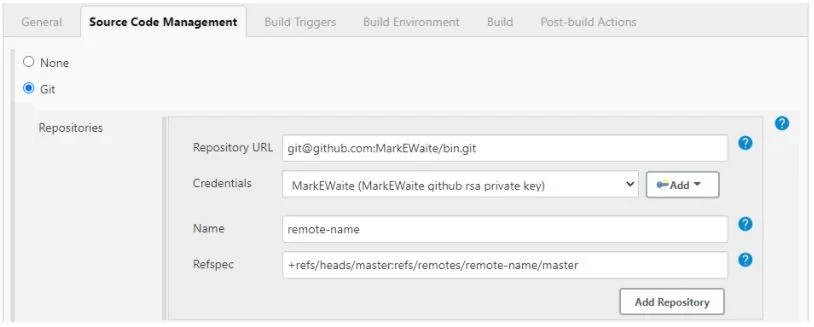
Source: https://plugins.jenkins.io/git/
Read Also- Ansible Interview Questions
Here we will discuss the most asked Jenkins interview questions for experienced professionals. These are based on the advanced concepts that can help experienced professionals to improve their career with promotions and better salary.
A Ping Thread is basically a mechanism that can detect and handle unresponsive connections between the Jenkins controller (master) and its agents (slaves). It is referred to as a heartbeat monitor that ensures the communication channel is always active and functional.
The ping thread is responsible for tracking the time taken by reply to arrive. It automatically assumes that connection is lost if the time escalates up to 4 minutes. This means the users will not have to face lagging issues. It also has a set timeout long enough to avoid close down.
The stash and unstash steps are used to temporarily store files and directories from one agent workspace. Then it retrieves them on another agent or in a later stage of the same pipeline. This is particularly useful for transferring artifacts between different agents or stages in a distributed build environment. Using them involve the following steps:
1. stash step: The stash step archives specified files or directories from the current workspace into a temporary storage area on the Jenkins master.
stash name: 'my-artifacts', includes: 'target/**/*.jar, src/**/*.java' |
2. unstash step: The unstash step retrieves files previously stashed using the stash step.
unstash 'my-artifacts' |
Example: Automation of a simple build and deploy process.
pipeline {
    agent any

    stages {
        stage('Build') {
            steps {
                sh 'mkdir -p target'
                sh 'echo "my_app.jar" > target/my_app.jar' // Simulate creating an artifact

                stash name: 'build-artifacts', includes: 'target/my_app.jar'
            }
        }

        stage('Deploy') {
            agent { label 'deploy-agent' } // Assuming a different agent for deployment
            steps {
                unstash 'build-artifacts'
                sh 'ls -l target' // Verify the stashed file is available

                // Add deployment steps here using the stashed artifact
            }
        }
    }
}
|
The node step is a fundamental construct available in the Scripted Pipelines. It allocates an executor on a specific Jenkins agent (also known as slave) or the Jenkins controller. Then it executes a block of code within the context of a workspace on that chosen machine. Here is an example of use in Scripted Pipeline:
node('build-agent-linux') {
    stage('Checkout') {
        git 'https://github.com/example/my-repo.git'
    }

    stage('Build') {
        sh 'mvn clean install'
    }

    stage('Test') {
        sh 'mvn test'
    }
}
|
Integrating this open-source automation server with AWS service includes the following steps:
The JaCoCo (Java Code Coverage) plugin is a tool that starts the integration of JaCoCo reports into its CI/CD pipelines. It is mostly used for measuring and visualizing code coverage for Java applications.
Both of these are different on following factors:
| Factors | Jenkins | Jenkins X |
| 1. Purpose | General-purpose CI/CD server | CI/CD for Kubernetes and cloud-native apps |
| 2. Architecture | Runs on servers or VMs | Built to run on Kubernetes |
| 3. Pipeline Config | Jenkinsfile (Groovy-based) | YAML-based, GitOps-driven |
| 4. Scalability | Manual setup for scaling | Auto-scales within Kubernetes |
| 5. Container Support | Optional via plugins | Native container and Helm support |
| 6. GitOps | Not supported natively | Core principle of the platform |
| 7. Installation | Easy (via WAR file or packages) | Requires Kubernetes and jx CLI |
Poll SCM and Webhook are two different methods that Jenkins uses to trigger builds when there are changes in the source code repository. Here is a clear comparison:
| Aspect | Poll SCM | Webhook |
| How it works | Jenkins periodically checks the repository for changes | The repository actively notifies Jenkins when changes occur |
| Trigger type | Pull-based (Jenkins pulls changes) | Push-based (Repo pushes notification to Jenkins) |
| Configuration | Set up in Jenkins (with a schedule like H/5 * * * *) | Configure in source control (e.g., GitHub, GitLab, Bitbucket) |
| Speed | Slower (runs on a schedule, may miss real-time changes) | Instant (triggers build immediately after code change) |
| Resource usage | Higher (frequent polling consumes Jenkins resources) | Lower (Jenkins stays idle until notified) |
| Reliability | More reliable in case of webhook/network failure | Can fail if webhook is not set up correctly |
| Best for | Simple setups, where webhook is not possible | Real-time CI/CD workflows with modern SCM tools |
The Jenkins Build Executor is basically a fundamental component of the Jenkins architecture. It is responsible for the actual execution of build jobs on a Jenkins agent or node. Key roles of a Jenkins Build Executor are:
Jenkins Pipeline as Code is a core practice of defining and managing the CI/CD pipelines through code using a Jenkinsfile. This Jenkinsfile is a text-based configuration file written in a Groovy-based DSL and is stored in a source control repository of the project alongside the application code.
There are various methods to install these plugins. The given one is the most preferred:
1. Log in to Jenkins: Open your Jenkins URL (e.g., http://localhost:8080) and sign in.
2. Go to Plugin Manager: Click on Manage Jenkins from the left sidebar < click Manage Plugins < find your Plugin < and click on the Available tab. You can also use the search bar to find the plugin you want.
3. Install the Plugin: Check the box next to the plugin name < click Install without restart < and wait for Installation. Jenkins will download and install the plugin.
Read Also- Docker Interview Questions and Answers
Now we will explore the most asked advanced Jenkins interview questions and answers. These are based on the advanced concepts, dedicated to help professionals in senior job role interviews.
Jenkins Shared Libraries allow you to define reusable pipeline code in a centralized Git repository. It enables modular CI/CD workflows. This involves creating a library with Groovy scripts (e.g., vars/commonPipeline.groovy) and configuring it in Jenkins under "Manage Jenkins > Configure System."
Example:
// vars/buildApp.groovy
def call(String repoUrl) {
    pipeline {
        agent any
        stages {
            stage('Clone') { steps { git repoUrl } }
            stage('Build') { steps { sh 'mvn clean package' } }
        }
    }
}
|
Jenkins integrates with Kubernetes via the Kubernetes plugin that enables dynamic provisioning of build agents as pods. It includes configuring the plugin in "Manage Jenkins > Manage Plugins" and defining a pod template in the Jenkinsfile:
pipeline {
    agent {
        kubernetes {
            yaml '''
            apiVersion: v1
            kind: Pod
            spec:
              containers:
              - name: maven
                image: maven:3.8.6
                command: ['cat']
                tty: true
            '''
        }
    }
    stages {
        stage('Build') { steps { container('maven') { sh 'mvn clean install' } } }
    }
}
|
Securing Jenkins in a zero-trust environment involves
1. Enabling Role-Based Access Control (RBAC) with plugins like Role Strategy to restrict user permissions.
2. Using the Credentials Plugin to store secrets (e.g., API keys, SSH credentials) securely.
3. Implementing pipeline script approval to prevent unauthorized Groovy code execution.
4. Enabling HTTPS and SSO (e.g., via Keycloak) for authentication.
5. Scanning Docker images for vulnerabilities using plugins like Anchore.
These practices mitigate risks like credential leaks or pipeline tampering.
Example credential usage:
| withCredentials([usernamePassword(credentialsId: 'my-creds', usernameVariable: 'USER', passwordVariable: 'PASS')]) { sh "curl -u $USER:$PASS https://api.example.com" } |
Observability in Jenkins involves integrating monitoring tools like Prometheus and Grafana for metrics, ELK Stack for logs and OpenTelemetry for tracing. Use the Prometheus plugin to expose Jenkins metrics (e.g., build duration, success rate) and configure Grafana dashboards for visualization. For logs, forward Jenkins logs ($JENKINS_HOME/logs) to ELK via Filebeat.
Example Prometheus setup:
pipeline {
    agent any
    stages {
        stage('Monitor') {
            steps {
                script { recordIssues tool: prometheus() }
            }
        }
    }
}
|
Jenkins can integrate AI-driven tools like Jenkins X with ML plugins or custom scripts to optimize pipelines by predicting build failures, auto-tuning resource allocation or suggesting pipeline improvements.
For example: Use a Python script in a pipeline to call an ML model hosted on a service like AWS SageMaker:
pipeline {
    agent any
    stages {
        stage('Predict Failure') {
            steps {
                script {
                    def prediction = sh(script: 'python predict_build.py', returnStdout: true).trim()
                    if (prediction == 'fail') { error 'Predicted build failure' }
                }
            }
        }
    }
}
|
Modern CI/CD pipelines must secure not only the application code but also every dependency, build artifact, and container image. I would integrate Software Composition Analysis (SCA), vulnerability scanning, SBOM generation, and artifact signing directly into the pipeline. Every build would be validated before deployment.
I would also use signed container images, scan dependencies with tools like Trivy or Snyk, enforce least-privilege credentials, and store artifacts in trusted repositories. These controls reduce the risk of introducing vulnerable or tampered components into production.
In a GitOps model, Jenkins is responsible for building, testing, and packaging the application whenever code changes are committed. Instead of deploying directly to Kubernetes, Jenkins updates deployment manifests stored in a Git repository after a successful build.
A GitOps controller such as Argo CD or Flux continuously monitors that repository and synchronizes the infrastructure with the desired state. This approach improves traceability, simplifies rollbacks, and ensures every deployment is version-controlled.
I would design the pipeline to deploy the new application version alongside the existing production version rather than replacing it immediately. Automated integration tests and health checks would verify the new deployment before any production traffic is redirected.
For canary deployments, only a small percentage of users would initially receive the new version. Monitoring tools would continuously evaluate application health, error rates, and latency. If any issue appears, Jenkins would automatically trigger a rollback to the previous stable release.
I would regularly back up the Jenkins home directory, pipeline configurations, credentials, plugins, and job definitions. Pipeline code would remain version-controlled inside Git repositories so it can be restored quickly if the controller becomes unavailable.
For enterprise environments, I would deploy Jenkins in a highly available infrastructure, automate infrastructure provisioning, and periodically test recovery procedures. This minimizes downtime and ensures business continuity during unexpected failures.
Within an Internal Developer Platform, Jenkins acts as the automation engine behind standardized software delivery. Developers trigger reusable pipelines through self-service templates instead of creating custom CI/CD workflows for every project.
I would combine Jenkins Shared Libraries, standardized Jenkinsfiles, RBAC, centralized credentials, and automated quality gates to provide a consistent developer experience. This reduces operational overhead, enforces engineering standards, and allows development teams to focus on building applications rather than maintaining CI/CD pipelines.
Read Also- 55 Best AWS DevOps Interview Questions and Answers
Jenkins plays an important role in DevOps by automating software integration, testing, delivery, and deployment processes. The following Jenkins DevOps interview questions focus on how Jenkins is used with popular DevOps tools and practices in real-world CI/CD environments.
Jenkins acts as an automation server in a DevOps environment. It helps automate different stages of the software development lifecycle, including code integration, building, testing, and deployment. Jenkins can integrate with tools such as Git, Docker, Kubernetes, Maven, SonarQube, and Ansible to create automated CI/CD workflows. This reduces manual work and enables development teams to deliver software changes faster and more consistently.
Jenkins can integrate with Docker to automate the process of building, testing, and deploying containerized applications. A Jenkins pipeline can build a Docker image after a code commit, run automated tests against the image, scan it for vulnerabilities, and push the approved image to a container registry. The image can then be deployed to a testing, staging, or production environment.
Jenkins can integrate with SonarQube to automatically analyze source code for bugs, vulnerabilities, code smells, and maintainability issues during the CI/CD process. A SonarQube analysis stage can be added to the Jenkins pipeline, and a Quality Gate can determine whether the pipeline should continue. If the code fails the defined quality standards, Jenkins can stop the pipeline before the application reaches deployment.
Build artifacts such as JAR files, WAR files, packages, and container images should be stored in dedicated artifact repositories instead of relying only on the Jenkins workspace. Jenkins can integrate with repositories such as JFrog Artifactory, Sonatype Nexus, or container registries. Each artifact can be assigned a unique version so that teams can track releases, reproduce deployments, and quickly roll back to a previous stable version when necessary.
Jenkins can execute Infrastructure as Code and configuration management tools such as Terraform and Ansible as part of a CI/CD pipeline. For example, Jenkins can trigger Terraform to provision cloud infrastructure and then run Ansible to configure the required servers. By managing infrastructure definitions in version control and executing them through controlled pipelines, teams can create more consistent and repeatable infrastructure deployments.
Jenkins can integrate with Terraform to automate infrastructure provisioning as part of a CI/CD workflow. A Jenkins pipeline can run Terraform commands such as terraform init, terraform plan, and terraform apply whenever infrastructure changes are committed to a version-controlled repository.
For production environments, I would add approval gates, validate the Terraform configuration before applying changes, securely manage cloud credentials through Jenkins Credentials Manager, and store Terraform state in a remote backend. This approach makes infrastructure deployments repeatable, auditable, and consistent across environments.
The following are some of the most asked scenario-based interview questions and answers. These are best suited for experienced professionals who want to apply for senior-level job roles.
To optimize Jenkins pipeline performance, I would first analyze build execution time using build logs and stage-level timing. Then I would introduce parallel stages where possible, enable dependency caching for tools like Maven and Docker, reduce unnecessary workspace cleanups and optimize executor usage. I would also move heavy jobs to dedicated agents and use ephemeral agents to avoid resource contention.
I would begin by checking build causes, node logs and agent connectivity. Intermittent failures are often caused by unstable agents, network issues or external dependencies. I would review system logs, validate plugin versions and check for workspace conflicts. If needed, I would isolate the pipeline on a clean agent and add retry logic for flaky steps.
I would implement Jenkins Shared Libraries to centralize reusable pipeline logic. Common stages like build, test, security scan and deployment would be written once and version-controlled. Teams would then consume these libraries in their Jenkinsfiles. This ensures consistency, reduces duplication and simplifies maintenance across all projects.
I would immediately move all sensitive data into Jenkins Credentials Manager. Credentials would be stored as secret text, files or SSH keys and accessed using the withCredentials block. I would also restrict credential scope, enable role-based access control and audit pipeline usage to prevent unauthorized access.
I would integrate Jenkins with Kubernetes using the Kubernetes plugin. This allows Jenkins to dynamically provision agents as Kubernetes pods. Each pipeline can define its own pod template, ensuring isolated and scalable builds. This approach improves resource utilization and eliminates the need for permanently running agents.
To prevent such failures, I would introduce quality gates and pre-deployment validation steps. This includes integrating automated testing, code coverage checks and static code analysis tools like SonarQube. I would also add approval gates or canary deployments for critical environments to reduce deployment risks.
I would first identify incompatible plugins and roll back to the last stable versions if required. In the future, I would maintain a staging Jenkins instance for testing plugin updates before applying them to production. I would also document plugin dependencies and avoid unnecessary plugins to reduce risk.
I would check network stability, agent logs and ping thread settings. Frequent disconnections may indicate resource exhaustion, firewall issues or Java version mismatches. I would increase agent timeout values, ensure consistent Java versions and consider using cloud-based or containerized agents for better reliability.
I would integrate Jenkins with monitoring tools like Prometheus and Grafana to track metrics such as build duration, failure rates and queue length. Logs would be forwarded to centralized logging systems and alerts configured for repeated failures. This helps detect issues early and improve system reliability.
I would enforce pipeline-as-code best practices by standardizing Jenkinsfile structure and using declarative pipelines wherever possible. Shared libraries would handle complex logic and documentation would be provided. Code reviews would be mandatory for Jenkinsfile changes to ensure consistency and quality.
Q1. What is the primary function of Jenkins's CI/CD system?
Q2. Which file defines a Jenkins Pipeline as code?
Q3. What is a key feature of Jenkins's Declarative Pipeline syntax?
Q4. Which plugin is essential for integrating Jenkins with Git repositories?
Q5. How does Jenkins support cloud-native CI/CD in 2025?
Q6. What is the purpose of the Jenkins Blue Ocean interface?
Q7. Which tool integrates with Jenkins for observability and monitoring?
Q8. What is a benefit of using Jenkins Shared Libraries?
Q9. How does Jenkins support GitOps workflows?
Q10. What is the role of the Jenkins Controller in a distributed setup?
We have discussed most of Jenkins Interview Questions and Answers along with the MCQs in this article. It will help you to perform well in your next DevOps engineer, Software engineer or system admin job interview. You can also refer to other resources like tutorials or documents for more in-depth knowledge. Continue learning and practicing to get career heights.
The questions you face will depend on the job role you are going for. You can expect the most fundamental questions as a fresher and advanced questions as an intermediate or experienced professional. This article has listed them all with answers.
You can start by installing Jenkins locally or using a cloud VM. Also do daily practice on creating freestyle jobs and pipeline jobs, using GitHub repositories, integrating build tools like Maven or Gradle and trigger builds using webhooks.
You might face different questions for the DevOps role. You can expect questions around pipeline scripting, deployment automation, integrations (Docker, Kubernetes) and infrastructure as code.
Jenkins is mainly used to automate building, testing and deploying software. It helps developers save time and work faster.
Yes, Jenkins is an open-source tool and anyone can download and use it.