MCP, also known as Model Context Protocol, is an open-source standard created by Anthropic in November 2024 that acts like a USB-C port for AI. It gives AI models a safe, universal way to connect to external data, tools, and workflows without requiring custom code for every single application.
It is not just a standard feature for AI tools. It can help you connect them to different tools, extract data from them, update dashboards, and even send emails, without any team. Implementing it in your daily work can help you improve your productivity and efficiency at the same time. Let’s dive deeper to understand how!
Related Article: 12 Best AI Chatbots For 2026
MCP is an open-source standard that acts like a USB-C port for AI. It provides AI models a safe, universal way to connect to external data or tools without coding. Its universal communication protocol allows AI assistants to interact with different services using a single, consistent interface instead of requiring custom integrations for every application. In simple terms, MCP acts as a bridge between an AI model and the outside world.
Now you may be wondering when we also have LLMs (large language models) then why need LLMs. The LLMs are excellent at understanding and generating text, they cannot access live data or perform actions on their own. MCP enables them to securely retrieve information. One of the best features is secure connection.
MCP also has a standardized client-server architecture, which makes it better than standard API where developers must write custom code for each AI application. The AI client communicates with one or more MCP servers, which expose tools and resources in a format the AI can understand. This approach makes integrations reusable, easier to maintain, and compatible across multiple AI platforms.
Custom integration was the traditional option to connect AI tools to external service. For example, if you wanted an AI assistant to access Slack, Google Drive, GitHub, Salesforce, and a database, developers had to build and maintain separate integrations for each platform. This process was time-consuming, expensive, and difficult to scale.
MCP comes as a great solution to this challenge by introducing a standardized communication protocol. It neglects the requirement of creating multiple custom connectors, meaning you just have to build an MCP server and then connect it to any MCP-compatible AI client. It basically:
Reduces development time for AI integrations
Improves interoperability between AI applications and tools
Makes AI assistants more capable and context-aware
Simplifies maintenance by using a common standard
Encourages an ecosystem of reusable integrations
Model Context Protocol is mostly about connecting AI applications to external systems in a secure way to perform different tasks. It allows AI models to retrieve live information and perform real-world actions. Some common capabilities of MCP include:
Access documents from Google Drive, Notion, or SharePoint
Query databases for real-time information
Read and summarize GitHub repositories
Send emails through Gmail or Outlook
Create Jira tickets automatically
Update CRM records in Salesforce or HubSpot
Execute workflows using automation platforms
Retrieve files from cloud storage
Connect with internal enterprise systems
For example, you can ask an AI assistant:
"Summarize all customer complaints received this week and create Jira tickets for critical issues."
Using MCP, the assistant can retrieve emails, analyze them, categorize issues, and create tickets without switching between multiple applications.
Read Also: What is AI Project Cycle?
The architecture of Model Context Protocol is what allows AI chatbots to connect with different sources. It follows a simple client-server model that includes the following components:
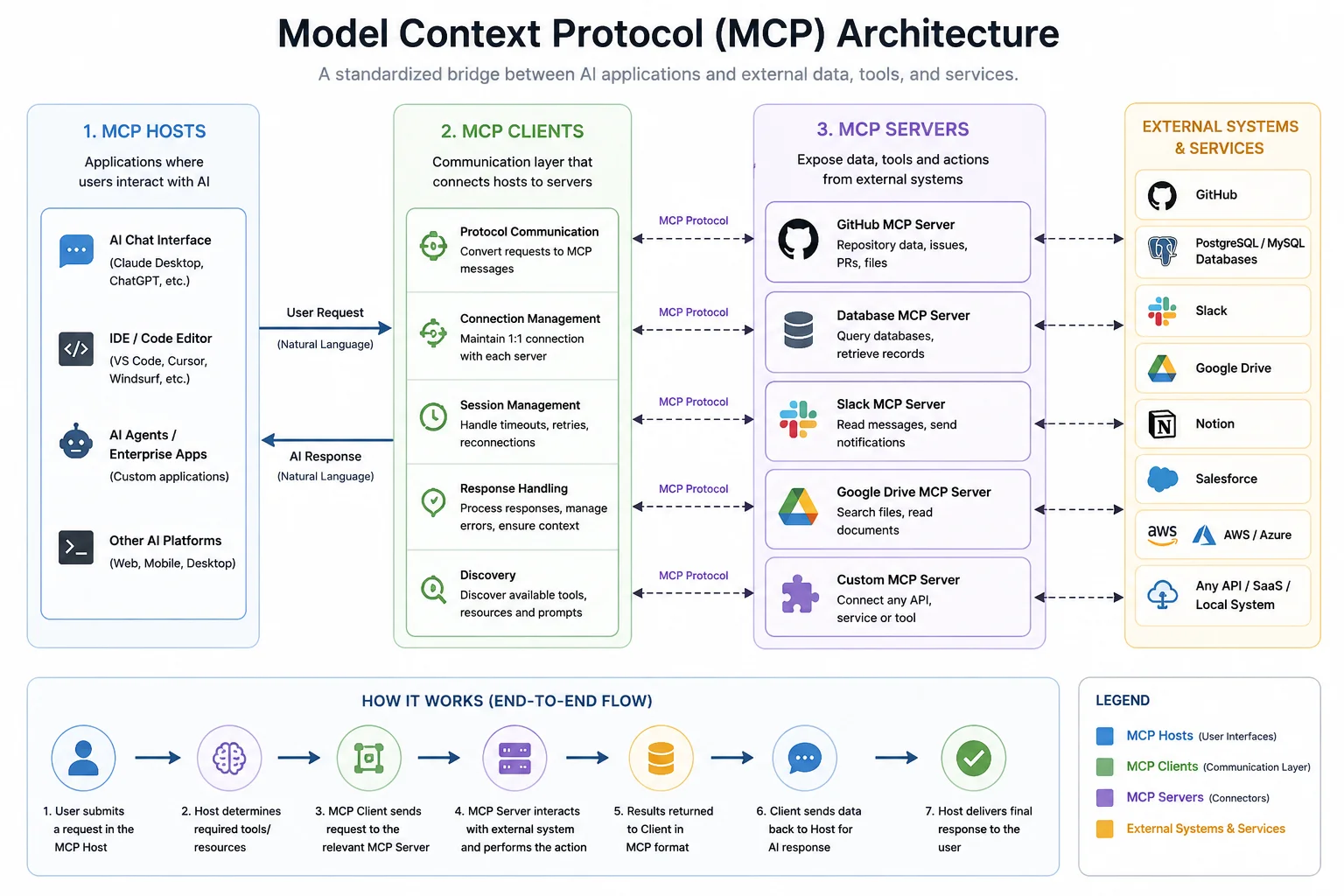
MCP Servers make external resources and capabilities available to AI systems. They serve as connectors between the AI application and services such as databases, cloud platforms, business software, and local resources. Whenever an AI needs real-time information or has to perform an action, the request is processed through an MCP Server. The primary responsibilities of an MCP Server include:
Establish connections with external systems, including APIs, databases, cloud services, and enterprise applications.
Receive requests from MCP Clients and return structured, machine-readable responses.
Expose resources (information), tools (operations the AI can perform), and prompt templates (predefined workflows or instructions).
Support integrations with development tools, collaboration platforms, CRMs, file systems, and other business applications.
Verify permissions before allowing access to sensitive data or operations.
MCP Clients are responsible for handling communication between the AI application and MCP Servers. They ensure that requests are transmitted using the Model Context Protocol and that responses are delivered back in a format the AI can understand. An MCP Client typically performs the following functions:
Transfer requests between the host application and the connected server.
Translate user instructions into standardized MCP messages.
Maintain a dedicated connection with an individual MCP Server, while the host can communicate with multiple servers through separate clients.
Manage communication sessions by handling retries, reconnections, interruptions, and request timeouts.
Process responses, detect errors, and return relevant information to the AI model.
Keep interactions organized so the AI receives accurate and contextual results.
MCP Hosts are the applications where users interact with AI. They receive prompts, determine which external tools are needed, coordinate communication with MCP Clients, and display the final response. Examples of MCP Hosts include AI coding assistants, desktop AI applications, IDE extensions, and enterprise AI platforms. Their main responsibilities include:
Provide the user interface for interacting with AI.
Coordinate requests across one or more MCP Clients.
Decide which servers or tools should be used to complete a task.
Orchestrate multi-step workflows involving several connected services.
Combine information from different sources into a single, coherent response.
Maintain conversation context throughout the interaction.
Also Read: Gemini vs. ChatGPT: Which AI is Better?
A typical MCP workflow follows these steps:
1. User submits a request: Ask you query –
"Show me the open GitHub issues assigned to me."
2. AI identifies the required tool: The AI understands that GitHub access is required.
3. MCP Client discovers available servers: The client checks whether a GitHub MCP server is available.
4. Request is sent: The MCP client sends a standardized request to the GitHub MCP server.
5. External tool performs the task: GitHub retrieves the requested issues.
6. Results are returned: The MCP server sends structured data back to the AI.
7. AI generates the response: Instead of raw JSON, the AI provides a user-friendly summary of the issues.
This standardized communication works similarly regardless of whether the AI is interacting with GitHub, Slack, Google Drive, databases, or enterprise software.
Implementing MCP is becoming increasingly straightforward because many AI tools now support it natively.
Popular clients include:
Claude Desktop
VS Code with MCP support
Continue.dev
Custom AI applications using MCP SDKs
Depending on your requirements, install an MCP server for:
GitHub
Filesystem
Slack
Google Drive
Notion
Many open-source servers are already available through the MCP community.
Read Also: What is Scala Programming Language?
Provide the necessary credentials such as:
API keys
OAuth tokens
Database credentials
Service account keys
This ensures secure access to external resources.
Configure your AI client to use the installed MCP servers. Most applications only require updating a configuration file.
Ask practical questions like:
"Show today's GitHub pull requests."
"Search my project documentation."
"List overdue Jira tickets."
"Summarize yesterday's Slack conversations."
If everything is configured correctly, the AI will retrieve live information from connected systems.
Model Context Protocol offers several advantages over traditional AI integrations by providing a standardized and scalable way to connect AI models with external tools and data sources. Here are some of the common ones you need to know about:
One of the biggest advantages of MCP is that it eliminates the need to build custom integrations for every AI application. Once an MCP Server is connected to a service, any MCP-compatible AI client can use it. This reduces development effort and simplifies future integrations.
Unlike standalone AI models that rely only on their training data, MCP allows AI systems to retrieve current information from connected databases, cloud storage, APIs, and business applications. This helps AI generate responses based on the latest available data.
MCP enables AI assistants to go beyond answering questions by interacting with external systems. They can perform tasks such as retrieving project information, creating support tickets, updating records, or triggering workflows. This makes everyday business processes more efficient.
Because MCP follows a standardized protocol, the same MCP Server can be reused across multiple AI applications. This reduces duplicate development work and makes it easier to expand AI capabilities as new tools or platforms are introduced.
Read Also: Top Prompt Engineering Techniques
As organizations adopt more AI-powered applications, MCP makes it easier to integrate additional services without redesigning the entire system. New servers can be added as needed. This allows AI capabilities to grow alongside business requirements.
MCP supports secure communication through authentication and permission-based access. Instead of giving AI unrestricted access to connected systems, organizations can define which resources and actions are available. This helps protect sensitive data and maintain compliance.
By allowing AI to retrieve information and perform actions across multiple connected systems, MCP creates a more seamless experience for users. Rather than switching between different applications, users can complete complex tasks through a single conversational interface.
Although MCP offers significant advantages, it is not without limitations. Here are some of the common ones:
Security Risks: Improperly configured servers could expose sensitive business data.
Authentication Complexity: Managing API keys, OAuth tokens, and enterprise permissions can become complicated.
Growing Ecosystem: Since MCP is relatively new, some software still lacks official support.
Performance Overhead: Multiple server calls can increase response times, particularly for complex workflows.
Server Maintenance: Organizations must maintain MCP servers, update dependencies, and monitor security.
Learning Curve: Developers need to understand MCP architecture, server configuration, and authentication before implementing production systems.
MCP and API are not exactly the same or substitute for each other, they have a lot of differences. APIs expose functionality, while MCP standardizes how AI systems discover and use that functionality. An MCP server often wraps one or more existing APIs rather than replacing them.
| Feature | MCP | API |
| Purpose | Standard communication protocol for AI | Interface between software applications |
| AI Optimized | Yes | No |
| Standard Tool Discovery | Yes | No |
| Context Sharing | Built-in | Must be implemented manually |
| Integration Effort | Lower | Higher |
| Multi-tool Support | Native | Requires custom orchestration |
| Security Model | Permission-aware | Depends on implementation |
| Best For | AI assistants and autonomous agents | General software development |
Also Read: What Is Google Antigravity?
Many people also confuse MCP with Retrieval-Augmented Generation (RAG), but they solve different problems.
| Feature | MCP | RAG |
| Primary Goal | Connect AI to tools and systems | Improve AI responses with retrieved knowledge |
| Uses Live Actions | Yes | No |
| Retrieves Documents | Yes | Yes |
| Executes Tasks | Yes | No |
| Updates External Systems | Yes | No |
| Works with APIs | Yes | Indirectly |
| Best Use Case | Automation and tool integration | Knowledge retrieval and question answering |
Model Context Protocol is quickly becoming one of the most important standards in the AI ecosystem. By providing a universal way for AI models to connect with external tools, databases, and enterprise applications, MCP eliminates the need for countless custom integrations while making AI systems more useful in real-world scenarios.
As AI assistants continue to evolve from chatbots into autonomous agents capable of completing complex workflows, standards like MCP will play a crucial role in enabling secure, scalable, and interoperable AI solutions. Whether you're a developer building AI applications or a business looking to automate workflows, understanding MCP will help you prepare for the next generation of AI-powered software.
No. MCP is not an API. Instead, it is a protocol that standardizes how AI applications discover and communicate with external tools. Many MCP servers internally use existing APIs to interact with services.
MCP can be used to connect AI assistants with GitHub, Slack, Google Drive, Gmail, Jira, databases, CRM platforms, cloud storage, and enterprise software for tasks such as retrieving information, generating reports, updating records, and automating workflows.
No. RAG and MCP serve different purposes. RAG helps AI retrieve relevant information from knowledge sources, while MCP enables AI to interact with external tools and perform actions. They are often used together in modern AI applications.