Best AI Browsers

9 Best AI Browsers in 2026

August 18th, 2026
2524
10:00 Minutes

The Internet has become a basic need for every individual, whether they are a student, an employee, or a business owner. We are also one of them. But have you ever thought about how you are using it? Is it the right way? Most of us browse the internet in very basic ways: search, open tabs, move between pages, and collect information.

Now imagine a browser that does not just show you information. But a browser that actually helps you to understand your information, summarising it and even helps you take action on it. That is exactly what AI browsers are developed to do.

Working on AI Browsers is like having a virtual assistant that helps you find what you need. You can ask questions, get instant answers, summarize articles, and even generate content without leaving your browser.

Here is one problem. There are already quite a few AI browsers out there, and not all of them are worth your time. Some are genuinely very useful, while others just add AI features without really improving your experience. So which one should you actually use?

In this guide, I will break down the best AI browsers, what they do well, where they fall short and which one makes the most sense for you.

Also Explore: Best ChatGPT Alternatives

What is an AI Browser and Why Do We Need Them?

An AI browser is a web browser that has artificial intelligence built directly into it. So instead of just showing you links, it helps you to understand, summarize, and even act on the information you find online. A traditional browser helps you find information, while an AI browser helps you use that information instantly.

A simple example

Suppose you are researching “best laptops for students.” In a regular browser, you will simply open multiple websites, compare specs, read reviews, and maybe even take notes.

In an AI browser, you can ask something like “What is the best laptop under ₹60,000 for students?” It will give you a summarized answer, key comparisons, and sometimes even recommendations in seconds.

This is where things start to feel different. Here you are interacting, asking, refining, and getting results much faster. That is exactly why AI browsers are becoming popular. They reduce manual effort, save time, and make the whole browsing experience feel smarter and more personalized.

The Best AI Browser At-A-Glance

The table below will give you at a glance of the best AI browsers right now:

AI Browser Best Use Case Key AI Features Pricing Availability
Perplexity Comet Research and quick answers Real-time AI search, cited answers, page summaries, follow-up questions Free + Paid plans Desktop and mobile
Dia Simple and distraction-free browsing Built-in AI assistance, summaries, content help, conversational browsing Free with limited access Desktop
ChatGPT Atlas Writing, productivity, and daily tasks ChatGPT integration, context-aware answers, page summaries, rewriting, agent mode Free + Paid plans Limited platform availability
Microsoft Edge Everyday browsing and productivity Copilot integration, page summaries, multi-tab analysis, AI assistance Free + Paid AI options Desktop and mobile
Opera One Multitasking and built-in tools Aria AI, content generation, summaries, Tab Islands, sidebar tools Free Desktop and mobile
Brave Leo Privacy-focused browsing Private AI assistant, webpage and PDF summaries, multiple AI models Free + Paid plans Desktop and mobile
DuckDuckGo Browser Private browsing Optional AI assistance, Duck.ai, Search Assist, tracker blocking Free Desktop and mobile
Google Chrome with Gemini Google ecosystem users Gemini integration, page assistance, multi-tab analysis, Google app integration Free + Paid AI plans Desktop
Maxthon Cross-device productivity AI assistance, cloud synchronization, notes, password management, productivity tools Free Desktop and mobile

Read Also: Gemini Vs. ChatGPT

1. Perplexity Comet: Best for Research and Quick Answers

Perplexity Comet feels less like a traditional browser and more like a research assistant built into your tabs. What makes it stand out is how naturally it blends real-time search with AI answers. So instead of digging through links, you get clear and cited responses right away. If your work involves a lot of reading, researching or verifying information, Comet will be the best choice.

Key Features of Perplexity Comet

  • Real-time AI answers with sources: You do not just get answers; you get citations alongside them. This makes it much easier to trust and verify what you are reading.
  • Ask follow-up questions directly: Instead of starting a new search every time, you can refine your query like a conversation and go deeper without losing context.
  • Summarizes web pages instantly: Open a long article and Comet can break it down into key points within seconds. It saves a lot of reading time.
  • Focused, clutter-free interface: It keeps distractions low and puts the AI interaction front and center. This makes the experience feel faster and more intentional.
  • Great for research workflows: Even if you are a student or working on content, it helps you gather, compare, and understand information much quicker.

Perplexity Comet Pros

  • It gives you accurate answers with proper sources.
  • It is excellent for research and learning.
  • It reduces the need to open multiple tabs.
  • It has a smooth follow-up questioning experience.
  • It has a clean and easy-to-use interface.

Perplexity Comet Cons

  • It is not ideal for general browsing or entertainment.
  • Comet is still evolving, so features can feel limited compared to full browsers.
  • It has a heavy reliance on AI. Therefore, it may not suit users who prefer manual browsing.

Perplexity Comet Pricing

Perplexity Comet offers a free version with basic features. For more advanced capabilities like better models and deeper research features, there is a paid plan available (typically under a Pro subscription).

Related Article: Perplexity vs. ChatGPT

2. Dia: Best for Simple and Distraction-Free Browsing

Dia takes a very different approach compared to most AI browsers. Instead of trying to do everything, it focuses on keeping things simple, clean and quietly helpful. The AI is there when you need it, but it does not overwhelm your browsing experience. If you like minimal tools that still make your work easier, Dia feels surprisingly smooth to use.

Key Features of Dia

  • Built-in AI assistance without clutter: The AI is integrated in a way that does not interrupt your browsing, so you can use it when needed without feeling distracted.
  • Clean and minimal interface: Dia removes unnecessary elements and keeps the focus on content. This makes browsing feel lighter and faster.
  • Quick summaries and assistance: You can highlight content or ask for help and Dia will simplify or explain it without needing extra tools.
  • Distraction-free experience: This is not like feature-heavy browsers. Dia avoids overloading you with panels and sidebars, which helps maintain focus.
  • Lightweight performance: It runs smoothly without consuming too many resources. This thing makes it ideal for everyday use.

Dia Pros

  • It is simple and easy to use.
  • It has a clean and distraction-free interface.
  • It is helpful AI and mainly it does not get overwhelming.
  • Good performance and speed.
  • It is ideal for focused work sessions.

Dia Cons

  • It has fewer advanced AI features compared to competitors.
  • It is not as powerful for deep research tasks.
  • It has a limited ecosystem and integrations.
  • It is still relatively new, so the feature set may grow over time.

Dia Pricing

Dia is currently available for free, though detailed pricing tiers or advanced plans are still limited or evolving as the product develops.
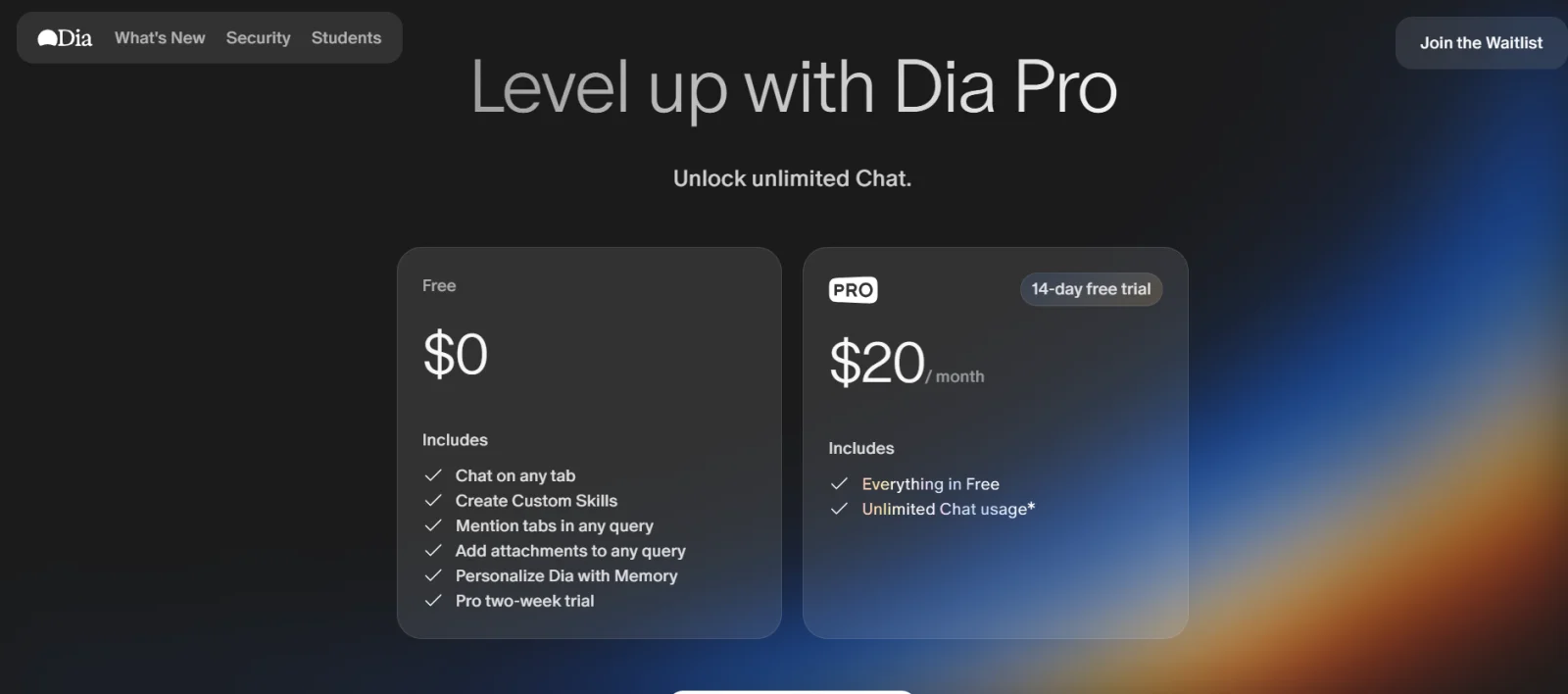
dia pricing

3. ChatGPT Atlas: Best for Writing, Productivity and Daily Tasks

ChatGPT Atlas is built around one simple idea. What if your browser did not just show websites, but actually worked with you while you browse? Instead of switching between tabs, tools and ChatGPT, Atlas brings everything into one place and lets the AI understand what you are looking at in real time.

What makes it unique is how deeply ChatGPT is integrated. It is not just an add-on or sidebar feature. It is the core of the browser, helping you read, write, analyze and even complete tasks without breaking your flow.

Key Features of ChatGPT Atlas

  • ChatGPT built directly into the browser: You do not need to copy-paste content anymore. Atlas understands the page you are on and helps you instantly, right where you are.
  • Context-aware answers and summaries: Ask questions about any webpage and it responds based on what you are currently viewing. This makes research and reading much faster.
  • Agent mode for task automation: This is where it gets interesting. Atlas can actually perform actions like clicking, navigating or completing tasks on websites for you (in paid plans).
  • Rewrite and content assistance: You can edit, simplify or rewrite text directly inside the browser without switching tools.
  • Memory and personalization: It can remember useful context from your browsing (with controls). It helps in giving more relevant answers over time.

ChatGPT Atlas Pros

  • It has deep integration with ChatGPT that makes everything faster.
  • No need to switch between tabs or tools.
  • It is excellent for writing, research and productivity.
  • It gives context-aware responses that feel more accurate.
  • It’s agent mode adds real automation power.

ChatGPT Atlas Cons

  • It is still in limited availability (mainly macOS for now).
  • Some advanced features locked behind paid plans.
  • It can raise privacy concerns due to memory and data usage.
  • It may reduce direct interaction with websites (AI summarizes instead).

ChatGPT Atlas Pricing

ChatGPT Atlas follows a freemium model. You can use basic features for free, but advanced capabilities like agent mode and enhanced AI features are available with ChatGPT Plus or Pro subscriptions.
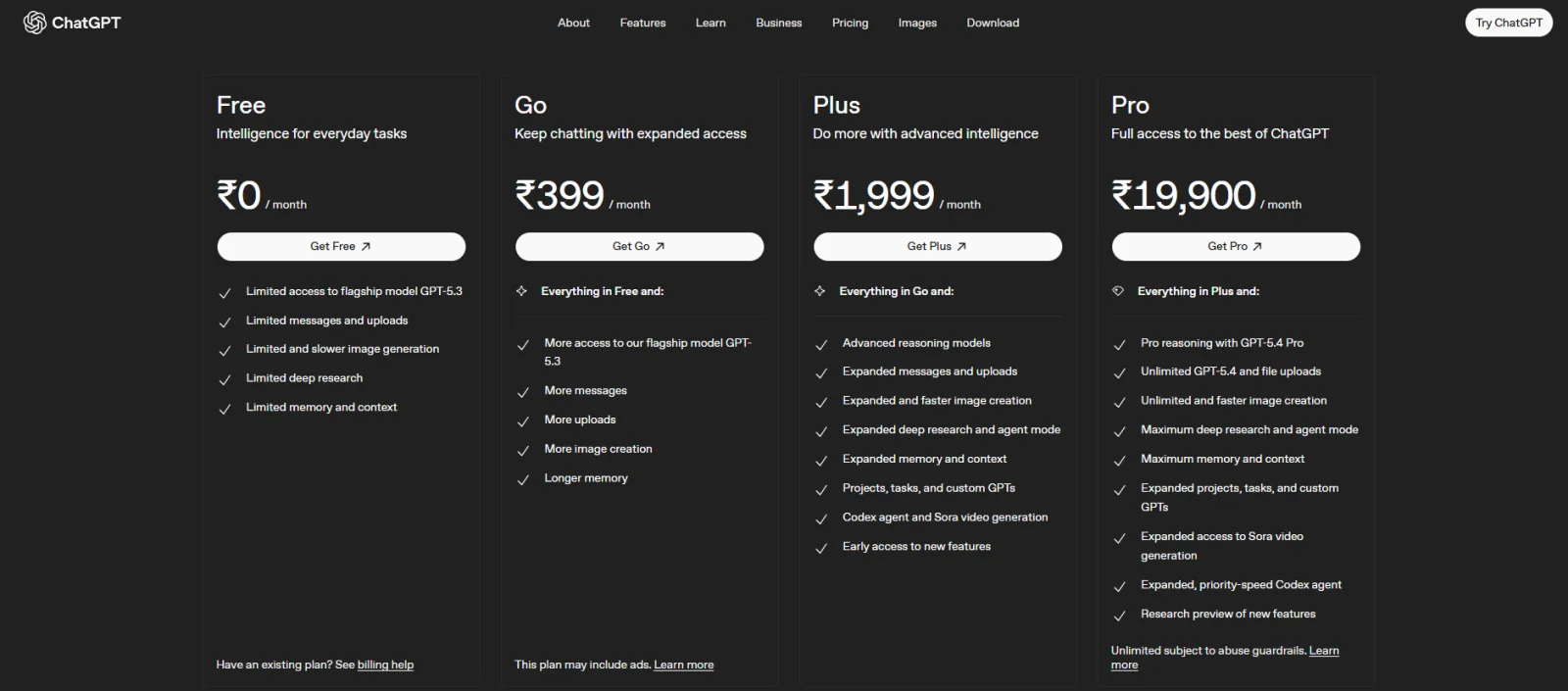
chatgpt atlas pricing

Also Explore: How to Use ChatGPT Atlas?

4. Microsoft Edge: Best for Everyday Use with AI

Microsoft Edge is probably the most familiar name on this list, but with Copilot built in, it is no longer just a regular browser. What makes it stand out is how naturally AI fits into your everyday browsing. You do not need to install anything extra. It is already there, ready to help you search, summarize, compare and even take actions while you browse.

If you want an AI browser that feels powerful but still familiar, Edge is one of the easiest to start with.

Key Features of Microsoft Edge

  • Built-in Copilot AI assistant: Copilot is integrated directly into Edge. So you can chat, ask questions and get help without leaving your browser.
  • Summarizes pages, PDFs and videos: You can instantly break down long content into simple insights. This saves a lot of time during research.
  • Multi-tab analysis and comparison: It can look across multiple tabs and help you compare information without switching back and forth.
  • Voice and chat interaction: You can talk to Copilot or type your queries. It makes browsing feel more interactive and flexible.
  • Deep integration with the Microsoft ecosystem: Works smoothly with tools like Word, Excel and other Microsoft services. This makes it great for productivity workflows.

Microsoft Edge Pros

  • It is completely free to use for most features.
  • It is easy to use, especially if you are already on Windows.
  • It has strong productivity features with Copilot.
  • It is great for research, summaries and quick tasks.
  • It is available across desktop and mobile.

Microsoft Edge Cons

  • AI features can feel slightly intrusive at times
  • It has limited memory compared to advanced AI tools
  • Privacy concerns if too many permissions are enabled
  • Not as “AI-first” as newer browsers like Comet or Atlas

Microsoft Edge Pricing

Microsoft Edge is completely free to use, including its built-in Copilot features. However, there is also Copilot Pro. It is a paid upgrade that offers faster performance and deeper integration with Microsoft tools.

Read Also: How to Become a Generative AI Developer?

5. Opera One: Best for Multitasking and Built-In Tools

Opera One takes a slightly different route compared to other AI browsers. Instead of focusing only on AI, it combines AI with a bunch of built-in tools that make browsing more efficient. You get an integrated assistant, smart tab management and useful features all in one place, so you do not have to rely on extensions.

What makes Opera One stand out is how it balances AI with everyday usability. It is not just about asking questions. It is about making your overall browsing experience smoother.

Key Features of Opera One

  • Built-in AI assistant (Aria): Opera includes its own AI assistant that you can use for searching, writing and quick help without leaving your browser.
  • Smart tab management (Tab Islands): Tabs are automatically grouped based on context. This makes multitasking much easier and less chaotic.
  • Integrated tools in the sidebar: You get quick access to apps, messengers and tools directly from the sidebar. It reduces the need to switch tabs.
  • Content generation and assistance: You can generate text, get summaries or refine content directly within the browser.
  • Lightweight and visually clean design: Despite having many features, Opera One manages to keep the interface smooth and user-friendly.

Opera One Pros

  • All-in-one browser with built-in tools.
  • AI assistants are easy to access and use.
  • It is great for multitasking and managing tabs.
  • There is no need for multiple extensions.
  • It has a smooth and visually appealing interface.

Opera One Cons

  • AI features are not as advanced as dedicated AI browsers.
  • It can feel feature-heavy for minimal users.
  • Some tools may not be useful for everyone.
  • AI accuracy can vary depending on queries.

Opera One Pricing

  • Opera One is completely free to use, including its built-in AI features like Aria.

Also Explore: Top Generative AI Tools

6. Brave Leo: Best for Privacy-Focused Users

Brave Leo is a good choice if privacy is one of your biggest concerns while using AI. Its AI assistant doesn't come as a separate tool. It puts Leo directly inside the browser. Here you can ask questions, summarize webpages, analyze PDFs, translate content and generate text without leaving the page.

What makes Leo different is its privacy-first approach. Brave says Leo does not retain or share your chats or use them for additional model training. The best thing here is that you do not need an account to use it. This makes it especially interesting for users who want AI assistance without giving up as much control over their data.

Key Features of Brave Leo

  • Built-in AI assistant: Leo is available directly inside the Brave browser, so you can ask questions without opening another AI tool.
  • Webpage and PDF summaries: Leo can summarize webpages and analyze documents, helping you understand lengthy content faster.
  • Privacy-focused AI: Brave says Leo does not retain or share chats or use them for additional model training.
  • Multiple AI models: Leo provides access to different AI models, with additional models and higher limits available through Leo Premium.
  • Brave Search integration: Leo can use Brave Search to provide richer and more up-to-date information.

Brave Leo Pros

  • Strong focus on privacy.
  • No account is required for basic Leo access.
  • Useful for summarizing webpages and documents.
  • Built directly into the Brave browser.
  • Available on desktop and mobile.

Brave Leo Cons

  • Advanced features require Leo Premium.
  • It may not offer the same ecosystem integrations as Chrome or Edge.
  • Users looking for advanced productivity automation may prefer more agentic AI browsers.

Brave Leo Pricing

Brave Leo is available for free with basic access. Leo Premium is available as a paid upgrade with access to more models, higher rate limits and early access to new features.

7. DuckDuckGo Browser: Best for Private Browsing

DuckDuckGo Browser is designed for people who want a simpler and more private way to browse the internet. It does not focus on turning browsing into a fully AI-driven experience. It combines privacy protections with optional AI features that gives you control over how much AI you want to use.

The browser blocks trackers and other invasive web elements while also providing access to optional AI features such as Duck.ai and Search Assist. This makes it a good choice if privacy matters more to you than having the most advanced AI automation features.

Key Features of DuckDuckGo Browser

  • Built-in tracker blocking: The browser blocks trackers to reduce the amount of personal information collected while you browse.
  • Private AI features: Duck.ai provides access to popular AI models while keeping the experience focused on privacy.
  • Optional AI: You can turn AI features off or adjust how much AI appears in your browsing experience.
  • Cookie and ad protection: DuckDuckGo includes built-in protections against invasive ads and cookie pop-ups.
  • Cross-platform availability: The browser is available on Windows, Mac, Android and iOS.

DuckDuckGo Browser Pros

  • Strong privacy-focused approach.
  • Built-in tracker blocking.
  • AI features are optional.
  • Free to use.
  • Available across desktop and mobile platforms.

DuckDuckGo Browser Cons

  • It is not as powerful for advanced AI workflows.
  • AI automation features are more limited than browsers such as Atlas or Gemini in Chrome.
  • Users looking for a large browser ecosystem may prefer Chrome or Edge.

DuckDuckGo Browser Pricing

DuckDuckGo Browser is free to use. Its optional AI features, including Duck.ai and Search Assist, are also available without requiring an account.

8. Google Chrome with Gemini: Best for Google Ecosystem Users

Google Chrome with Gemini is aimed at users who already depend heavily on Google's ecosystem. Instead of switching between Chrome, Gemini and different Google apps, you can use Gemini directly within your browsing experience to understand pages, compare information, and complete certain tasks.

What makes this combination particularly useful is its connection with Google's services. Gemini in Chrome can work with tools such as Gmail, Google Maps, Calendar, and YouTube. This makes it a strong option for people who already use Google services throughout their daily workflow.

Key Features of Google Chrome with Gemini

  • Gemini built into Chrome: You can interact with Gemini directly from the browser without opening a separate AI application.
  • Page summarization: Gemini can help you understand lengthy webpages and extract important information.
  • Multi-tab assistance: Gemini can compare and consolidate information from multiple open tabs.
  • Google app integration: It can work with services such as Gmail, Maps, Calendar and YouTube.
  • AI-powered productivity: Gemini can help with tasks such as drafting emails, understanding videos and organizing information.

Google Chrome with Gemini Pros

  • Excellent integration with Google's ecosystem.
  • Useful for research and productivity.
  • Can work across multiple tabs.
  • Available on major desktop platforms.
  • Familiar Chrome browsing experience.

Google Chrome with Gemini Cons

  • Some advanced AI features depend on eligibility and subscription plans.
  • Privacy-conscious users may prefer a more privacy-focused browser.
  • The number of AI features can make the browser feel more complex.

Google Chrome with Gemini Pricing

Chrome itself is free to use, while access to some advanced Gemini and Google AI capabilities can depend on supported plans and eligibility.

9. Maxthon: Best for Cross-Device Productivity

Maxthon is a good option for users who regularly move between different devices and want their browsing environment to stay synchronized. It doesn't primarily focus on AI. Maxthon puts more emphasis on productivity features such as cloud synchronization, notes, password management, and cross-device access.

This makes it particularly useful if you work across Windows, macOS, Android or iOS and want your bookmarks, settings and other browsing information to follow you between devices.

Key Features of Maxthon

  • Cross-device synchronization: Maxthon can synchronize important browsing information across supported devices and platforms.
  • Cloud Sync: Your browsing data can stay synchronized so you can continue your workflow across different devices.
  • Passkeeper: The built-in password manager helps store and synchronize passwords and other information.
  • Split-screen browsing: You can work with multiple pages more efficiently using the built-in split-screen feature.
  • Notes and productivity tools: Maxthon includes features designed to help users save, organize and access information while browsing.

Maxthon Pros

  • Strong cross-device synchronization.
  • Useful productivity features.
  • Built-in password management.
  • Supports multiple desktop and mobile platforms.
  • Good choice for users who work across several devices.

Maxthon Cons

  • Its AI capabilities are not as advanced as dedicated AI browsers.
  • It has a smaller ecosystem compared to Chrome.
  • Some users may prefer simpler browsers for everyday browsing.

Maxthon Pricing

Maxthon is available as a free browser, with its core browsing and synchronization features available across supported platforms.

Which AI Browser is Best for You?

By now, you have probably noticed something. There is no single best AI browser for everyone and for doing everything. Each one is built for a slightly different type of user and workflow.

AI browsers are evolving fast, but most of them fall into two categories. Some act like smart assistants that help you browse better, while others go further and actually perform tasks for you. So instead of asking which is the best, the better question is: which one fits how you work?

Best for Research and Studying: Perplexity Comet

  • If you spend a lot of time reading articles, doing assignments or gathering information, then Comet is easily the strongest option for you.
  • It does not just show results; it explains, summarizes and cites sources. This makes it perfect for learning and research-heavy work.

Best for Writing, Productivity, and Daily Tasks: ChatGPT Atlas

  • If your work involves writing, content creation or managing tasks, then Atlas will be a natural fit for you.
  • It can read pages, rewrite content, and even automate actions by making it more like a productivity assistant than just a browser.

Best for Everyday Use: Microsoft Edge

  • If you do not want to switch to something completely new, then Edge is the easiest option for you.
  • You get AI features like summaries, chat and content help, but inside a browser that already feels familiar.

Best for Simple and Distraction-Free Browsing: Dia

  • If you do not like complicated tools and just want something clean with light AI help, then Dia is a good pick.
  • It focuses on minimalism and clarity, rather than packing in too many features.

Best for Multitasking and Built-in Tools: Opera One

  • If you juggle a lot of tabs, tools, and apps, Opera One stands out. It is designed to keep everything organized in one place with features like tab grouping and a built-in AI assistant.

Also Read: How to Learn Generative AI?

Wrapping Up

As you all know now, AI browsers are changing how we search, read, and work online. They help you understand information and use it faster. Each of them offers something different from their research-focused tools.

The best choice among them totally depends on your needs. First, you need to understand what your needs are. Then, if you want faster answers, better multitasking or built-in assistance, there is an option that fits your workflow. As AI keeps evolving, these browsers will quickly become a smarter way to browse the web.

Related Article: Agentic AI vs. Generative AI

Frequently Asked Questions

1. What is the best AI browser today?

The best AI browser depends on what you need most. Perplexity Comet is a strong choice for research and quick answers, ChatGPT Atlas is great for writing and productivity, and Microsoft Edge is a good option for everyday browsing with AI features.

2. Which AI browser is best for research?

Perplexity Comet is one of the best AI browsers for research because it provides real-time AI search, cited answers, and multi-tab support. It helps you compare sources and understand information faster.

3. Which AI browser is best for privacy?

Brave Leo is a strong option for privacy-focused users. It offers built-in AI assistance while keeping a strong focus on user privacy and account-free browsing.

4. Which AI browser is best for everyday use?

Microsoft Edge is one of the best AI browsers for everyday use because it combines a familiar browser experience with Copilot features for summaries, productivity, and quick assistance.

5. Which AI browser is best for writing and productivity?

ChatGPT Atlas is a good choice for writing and productivity because it integrates ChatGPT directly into the browser. It can help with rewriting, summarizing, and task support without switching tabs.

6. Are AI browsers safe to use?

AI browsers are generally safe, but users should still review privacy settings, permissions, and data usage policies. Since some AI browsers can access browsing content and open tabs, it is important to use them carefully, especially for sensitive tasks.

7. Do I need technical knowledge to use an AI browser?

No, most AI browsers are designed for regular users. You can usually start using them for browsing, summarizing, and asking questions without technical knowledge. Some advanced automation features may take time to learn.

8. Are AI browsers free?

Many AI browsers offer free versions, but some advanced features may require a paid plan. For example, certain browsers may keep basic AI tools free while charging for agent mode, premium models, or extra productivity features.


About the Author
Nehal Somani
About the Author

Nehal Somani has worked on applied AI projects, from NLP tools to recommendation systems, giving her a practical sense of where AI models succeed and fall short. She reads current research and experiments with new architectures rather than following headlines. Her writing demystifies AI concepts while helping practitioners understand the reasoning behind AI systems.

Drop Us a Query
Fields marked * are mandatory
×

Your Shopping Cart


Your shopping cart is empty.