Java keywords are the reserved words that give the Java compiler its instructions, and every developer runs into them from their very first line of code. Words like public, class, if, and try each carry a fixed, predefined meaning within Java's syntax, which means they can never be reused as variable names, method names, or class names. Getting comfortable with these keywords is one of the first real milestones on the way to writing clean, compiler-friendly Java code.
In this guide, you'll find a complete breakdown of keywords in Java organized by category, including access modifiers, data types, control flow, exception handling, concurrency, and module-related keywords. Beyond definitions, we'll look at how these keywords influence program logic, performance, and thread safety, walk through a real-world code example, and clear up common points of confusion like deprecated keywords and the difference between fully reserved and contextually reserved words.
Keywords in Java are the predefined elements that can be used in code for a specific meaning only. It is also important to ensure that these are used accurately due to Java's case-sensitive nature. This means developers can not use them directly but can customize them by adding a number or changing their letters to define any other variable, method, or class.
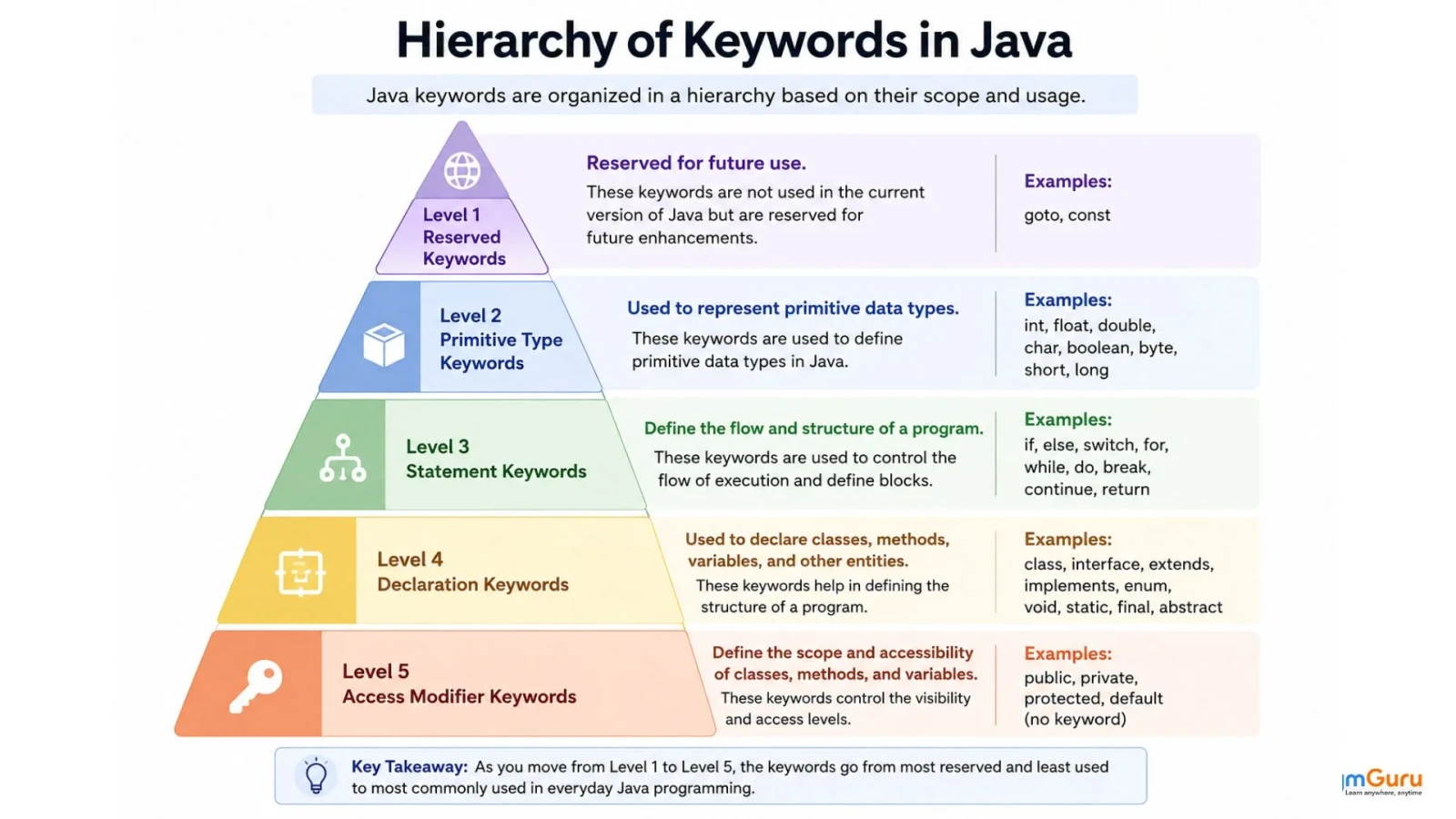
Java keywords can be categorized based on their role in the language. Grouping them into different types makes it easier to understand their purpose and helps developers learn Java syntax more effectively. The following sections explain the major categories of keywords in Java along with their usage.
| Keyword | Usage |
| public | Allows access from any class. |
| private | Restricts access to within the same class. |
| protected | Allows access within the package and subclasses. |
| Keyword | Usage |
| boolean | Stores true or false values. |
| byte | Stores an 8-bit signed integer. |
| short | Stores a 16-bit signed integer. |
| int | Stores a 32-bit signed integer. |
| long | Stores a 64-bit signed integer. |
| float | Stores a single-precision floating-point number. |
| double | Stores a double-precision floating-point number. |
| char | Stores a Unicode character. |
| void | Indicates that a method does not return any value. |
| Keyword | Usage |
| class | Declares a class. |
| interface | Declares an interface. |
| extends | Enables inheritance between classes or interfaces. |
| implements | Specifies that a class implements an interface. |
| this | Refers to the current object. |
| super | Refers to the parent class. |
| new | Creates objects and arrays. |
| abstract | Declares abstract classes or methods. |
| final | Prevents inheritance, overriding, or reassignment. |
| static | Belongs to the class rather than an instance. |
| native | Declares methods implemented in another language. |
| record | Declares a record class. |
| sealed | Restricts inheritance to specific classes. |
| permits | Lists permitted subclasses of a sealed class. |
| Keyword | Usage |
| if | Executes code when a condition is true. |
| else | Executes alternative code when a condition is false. |
| switch | Selects one block from multiple conditions. |
| case | Defines a branch inside a switch statement. |
| default | Executes if no switch case matches. |
| for | Creates a loop with initialization, condition, and update. |
| while | Repeats execution while a condition is true. |
| do | Executes code at least once before checking a condition. |
| break | Terminates a loop or switch statement. |
| continue | Skips the current iteration of a loop. |
| return | Exits a method and optionally returns a value. |
| yield | Returns a value from a switch expression. |
| Keyword | Usage |
| try | Defines a block where exceptions may occur. |
| catch | Handles exceptions thrown in a try block. |
| finally | Executes regardless of whether an exception occurs. |
| throw | Explicitly throws an exception. |
| throws | Declares exceptions that a method may throw. |
| Keyword | Usage |
| package | Declares a package. |
| import | Imports classes and packages. |
| module | Defines a module. |
| requires | Declares a dependency on another module. |
| exports | Makes a package accessible to other modules. |
| open | Opens an entire module for reflection. |
| opens | Opens a specific package for reflection. |
| uses | Declares service usage. |
| provides | Provides a service implementation. |
| with | Specifies a service implementation class. |
| to | Restricts package access to specific modules. |
| transitive | Exposes module dependencies transitively. |
| Keyword | Usage |
| synchronized | Ensures only one thread accesses code at a time. |
| volatile | Ensures visibility of variable updates across threads. |
| transient | Excludes a field from serialization. |
| strictfp | Ensures consistent floating-point calculations. |
| Keyword | Usage |
| true | Represents the boolean value true. |
| false | Represents the boolean value false. |
| null | Represents the absence of an object reference. |
| Keyword | Usage |
| const | Reserved but not implemented in Java. |
| goto | Reserved but not implemented in Java. |
| _ | Reserved for future use. |
Java keywords are not just syntactic elements. They actively shape how programs behave, perform and interact with system resources. Understanding their impact is essential for writing robust, efficient, and maintainable Java applications.
Keywords such as if, else, switch, case, break, continue, and return are fundamental in directing program execution. Their correct placement determines which code blocks run and under what conditions.
Certain keywords are critical for managing concurrent execution and ensuring thread safety:
Serialization in Java allows objects to be converted into a byte stream for storage or transmission. The transient keyword plays a vital role here:
Excluding Fields from Serialization: Fields marked as transient are skipped during serialization. This is important for excluding sensitive data (like passwords) or fields that are not serializable, preventing errors or security risks.
Some keywords have a direct or indirect impact on program performance:
Misapplying or misunderstanding keywords can lead to:
Java has a few keywords that still exist in the language specification but are rarely used or no longer relevant in modern Java development. These keywords are not removed to maintain backward compatibility, but developers are generally advised to avoid them in new applications. Here are some of them:
Understanding these obsolete or unused keywords helps learners avoid confusion and focus on keywords that actually matter in real-world Java programming.
Not all keywords of Java behave in the same way. Some words are fully reserved keywords, while others are contextually reserved. In simple terms, they act like keywords only in specific situations.
Keywords like class, public, static, and void are always treated as keywords. You cannot use them as variable names, method names, or class names anywhere in your code. These are called fully reserved keywords.
Keywords like module, requires, exports, opens, and permits are treated as keywords only when used in specific contexts. They behave differently. Examples of contexts are module declarations or sealed classes. Outside those contexts, they can still be used as identifiers.
Now that you know each type of keyword in Java, let's explore an example on how to use them:
|
This code example prints messages to your console. It demonstrates fundamental concepts like defining a class, the entry point and how to display output. It is a foundational example for anyone starting with the Java programming language. The following keywords are used in this code:
We have explored all keywords in Java in this article along with a hands-on example. Now you know how to use them effectively in code to build a robust application. Well, this is not it, as you have to learn many more concepts. Continue to explore our Java tutorial to build a strong foundation in this programming language.
Explore Our Related Articles
These are used to
The super keyword is a variable or immediate parent class object. It is often used in subclasses to access members of the superclass. It is mostly used when members are overridden in the subclass.
A constructor is a special method that is automatically called when you create an object. It is responsible for setting the initial state of an object. It does so by assigning values to its attributes or performing other setup operations.
Keywords are special words in Java that are used to perform specific tasks. Reserved words are words that Java keeps aside and cannot be used as identifiers, even if they are not currently in use.
Keywords define the structure and behavior of Java programs and help the compiler understand the code.