Anyone who has experience working with data can appreciate how easy it is to become frustrated when trying to make sense out of your data. In my experience testing Julius AI on a poultry species sales record with roughly 5,000 total records, the most impressive thing about the software was its ability to quickly convert raw, disorganized data into useful information.
The first thing I discovered when testing Julius AI was that the quality of the information returned was related to the level of accuracy in the raw data provided. For example, when I uploaded a dataset with inconsistent column headings, the output was less accurate. Once I normalized my data set based upon the same headings throughout, I saw significant improvements in the accuracy of the returned results.
This guide will not only discuss what Julius does, but will also identify how well it works, where it has difficulties, and how it stacks up against other programs such as ChatGPT, Rows, Excel Copilot and Google Sheets with Gemini based upon real-world experience.
Let’s start!
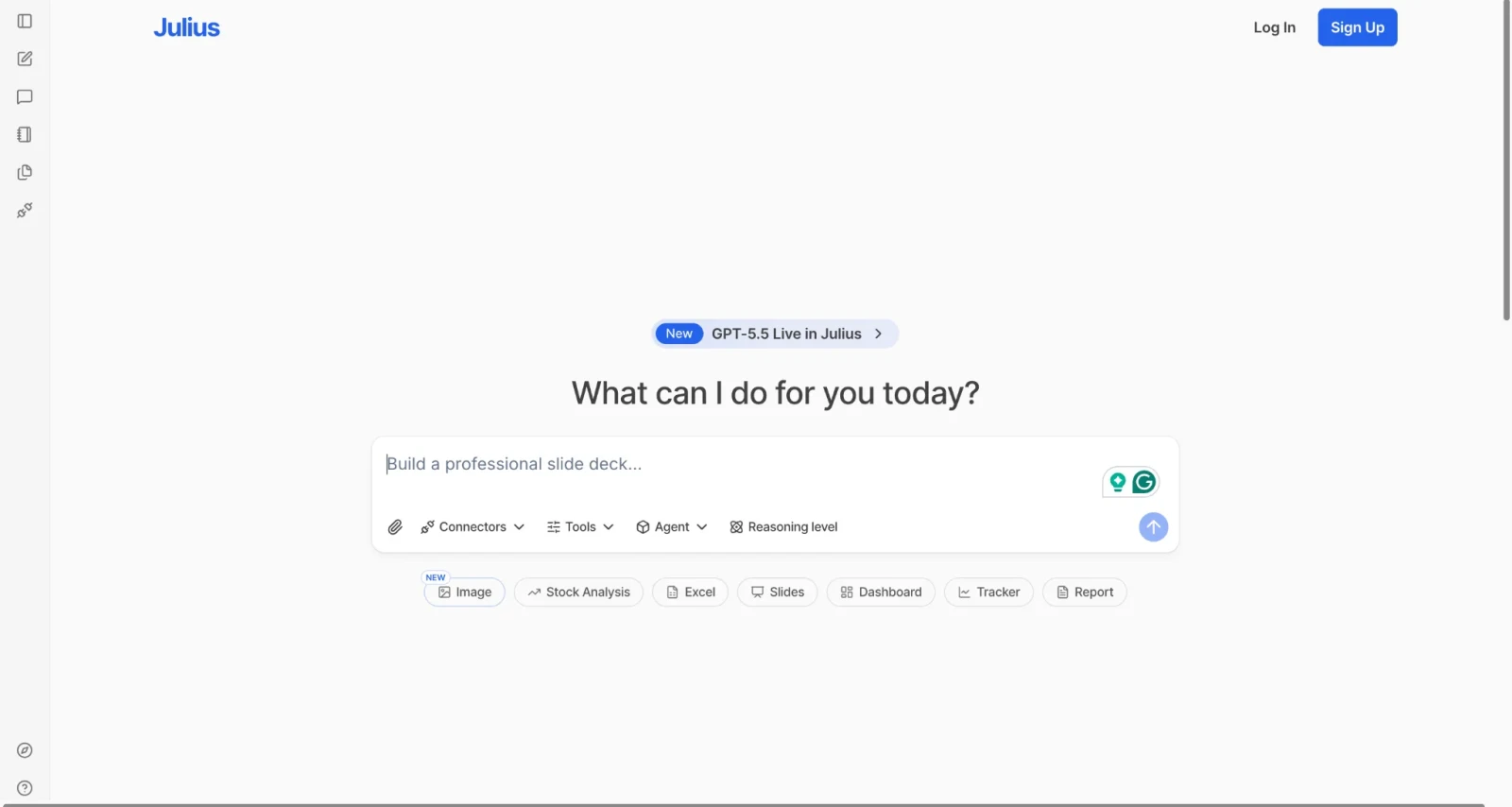
Julius AI is an AI-powered data analysis platform. It lets you upload your data files and ask questions about them in plain English. No code. No formulas. No complicated dashboards.
You upload a CSV, Excel, PDF, or connect your Google Sheets. Then you type something like "What were my top-selling products last month?" and Julius reads your data, runs the analysis and gives you a chart or a written answer within seconds.
Backstage, Julius writes Python or R code to process your data. It runs that code in a secure environment and presents the output in a clean, readable format. You get the answers without ever seeing the code, though you can view it if you want to.
Julius AI serves over 500,000 users worldwide. It works for business analysts, researchers, marketers, students and anyone who works with data but does not want to become a programmer to understand it.
The platform is browser-based. There is no software to install. You sign up, upload your file and start asking questions.
Read Also: Top Artificial Intelligence Interview Questions
Julius AI has evolved its own AI capabilities over time to improve data analysis, reasoning, visualization, and automated workflows. The platform has also introduced different Julius model versions for handling tasks with different levels of complexity.
| Model | Description | Best Features |
|---|---|---|
| Julius 1.0 Lite | A lightweight version of Julius designed for faster and simpler AI tasks. | Fast responses, simple questions, and lightweight analysis. |
| Julius 1.0 | The standard Julius model designed for everyday data analysis and AI-powered workflows. | Data analysis, natural language queries, visualization, and general reasoning. |
| Julius 1.0 Max | An advanced Julius model designed for more complex and demanding tasks. | Complex analysis, multi-step reasoning, and advanced data workflows. |
Note: Julius also provides access to third-party AI models such as OpenAI and Anthropic models. However, those models are separate from Julius' own model lineup. The models available to you can also vary depending on your Julius plan.
Now that you know what Julius AI is, let's see what it actually does. Each feature solves a real problem that people face when working with data. Let me walk you through each.
This is the core feature. You type a question in plain English and Julius returns an answer. You do not need to know SQL, Python, or any other technical language. Julius interprets your question and figures out how to query your data.
Julius does not just return numbers. It creates visual charts automatically based on what you ask. Bar charts, line graphs, scatter plots, heatmaps, box plots. It picks the right chart type for your question and the data type you are working with.
Julius accepts Excel files (.xlsx), CSV files, PDFs, Google Sheets and even images with data. You can upload multiple files and work across them in the same session.
One of the most useful features in Julius are their Notebooks. These are reusable analysis templates. You create a workflow once and you can run it again every time you get fresh data. Instead of starting from scratch every month for your sales report, you just update the data file and run the notebook.
Notebooks include different cell types. Prompt cells hold your analysis questions. File cells hold your datasets. User input cells let you collect custom values like a date range or a filter condition. Code cells let you write custom Python for advanced operations.
After you get an answer, Julius suggests relevant follow-up questions. If you ask for a revenue trend, it might suggest "Break this down by region?" or "Compared with the previous quarter?" This makes the analysis process feel more like a conversation and less like a search engine query.
The Pro plan connects Julius directly to live databases. Snowflake, BigQuery and Postgres are supported. This means you do not need to export files manually. Julius pulls fresh data whenever you run an analysis.
Julius provides a library of pre-built notebooks for common analysis tasks. Sales reporting, financial analysis, HR metrics, marketing analytics and academic research templates are all available. You pick a template, replace the sample data with your own and start running your analysis.
You can set custom instructions that apply to every analysis. For example, you can tell Julius to always use a log scale for skewed data or to always group results by a specific column. You can also choose plot themes so your charts always match your branding or presentation style.
Julius also includes a feature called Models Lab. This lets you experiment with the latest AI models in a chat format, similar to using ChatGPT or Claude directly. It gives you flexibility to use Julius for both specialized data analysis and general AI conversations.
Explore Our Article: Best AI Agent Frameworks
Understanding how the tool works under the hood helps you use it more effectively and get better results. Many people just start uploading files without knowing what is happening behind the scenes. Let me break it down step by step so there are no surprises.
You upload your data or connect a source. Julius accepts Excel, CSV, PDF and Google Sheets files. On the Pro and Enterprise plans, you can connect to live databases like Snowflake or Postgres.
Julius reads your data and generates a preview. As soon as you upload, Julius scans your dataset and shows you a preview. It also generates suggested questions based on your data structure. These suggestions help you get started quickly even if you are not sure what to ask first.
You type a question in plain English. You ask something like "What is the average revenue by product category?" or "Show me a trend of sales from January to June."
Julius writes code in the background. Julius translates your natural language question into Python or R code. It runs that code in a secure, isolated container. You never see it unless you choose.
You receive a chart, table, or written answer. Julius returns a visual or written output based on your question. It also adds a short explanation of what the result means.
You ask follow-up questions or refine the output. You can keep asking questions in the same session. Julius maintains context throughout, so it understands follow-up questions without you repeating yourself.
Read Also: What is Black Box AI
If you are new to Julius and you are wondering where to begin, do not overthink it. The setup process is genuinely simple and takes less than five minutes from start to your first analysis. Here is exactly what to do, one step at a time.
Go to the official website and click Sign Up. You can use your Google or Apple account for faster onboarding. The process takes under a minute.
Julius has a free plan that gives you 15 messages per month. That is enough to explore the platform. If you need more, you can upgrade to a paid plan after you have tried it.
On the main workspace, click the paperclip icon to upload a file. Choose an Excel spreadsheet, a CSV file, or any other supported format. You can also link your Google Sheets directly.
Julius immediately shows you a data preview. It also displays suggested questions based on your file structure. If you are new to data analysis, these suggestions are a great starting point.
Type a simple question in the chat box. Start with something basic like "Summarize this dataset" or "What are the top 5 values in column X?" Julius will respond by replying and visualizing.
Read the chart or table Julius generates. Then ask a follow-up question to go deeper. You can also click suggested questions that Julius shows after each response.
If you want to repeat this analysis in the future, save it as a Notebook. You can run the same workflow on new data without setting everything up again.
One of the most common questions people ask is whether Julius AI is the right tool for them specifically. The honest answer is that it works well for a wide range of people, but it works best for certain roles. Let me walk you through who gets the most value from it.
Business analysts spend a lot of time pulling reports, cleaning data and answering questions from stakeholders. Julius speeds up that process dramatically. You can get a visual answer to a business question in seconds instead of building a pivot table manually.
Marketers track campaign performance, conversion rates, customer segments and budget allocation. Julius lets marketers ask data questions without waiting for a data analyst to help. You can upload your campaign data and ask "Which channel had the highest conversion rate last quarter?" and get an instant response.
Finance teams work with large, complex datasets. Revenue, expenses, forecasts and variances all require careful analysis. Julius handles correlation analysis, trend detection and pattern spotting through simple conversation.
Researchers often need to perform statistical tests and generate visualizations for papers. Julius runs statistical significance tests, generates confidence intervals and creates publication-quality charts without requiring knowledge of R or Python. Students get a 50% discount by emailing Julius before subscribing.
Small business owners often do not have a dedicated analyst on staff. Julius gives them direct access to their data without hiring a specialist. You upload your sales data and ask questions in plain English.
Operations teams track KPIs, inventory movement and processing times. HR teams analyze headcount, attrition and performance metrics. Julius builds these reports quickly through reusable Notebooks.
Julius is a strong learning tool. Students can upload assignment datasets and explore them without needing to code. The 50% discount for students and educators makes it accessible at a lower price.
Read Also: Claude vs. ChatGPT
Every tool has strengths and weaknesses. Before you decide whether Julius AI is worth your time and money, you deserve a clear and honest look at both sides. Let us start with what it does well.
You do not need Python, R, or SQL. You ask questions and get answers. This removes a massive barrier for non-technical users who would otherwise depend on someone else for every analysis.
You get charts and answers in seconds, not hours. There is no setup time beyond uploading your file and no waiting for a report to be built by someone else on your team.
You build a workflow once and run it repeatedly on fresh data. This is a genuine time-saver for anyone who produces recurring reports on a regular schedule.
Excel, CSV, PDF, Google Sheets and database connections on Pro plans. Most data sources you already use are supported without any conversion needed.
The platform actively helps you dig deeper into your data instead of just answering one question and stopping. It keeps the analysis moving forward.
Your data is processed in isolated containers that close after your session ends. Files are not used to train the underlying AI models. Your data stays yours.
You can upgrade compute resources for large datasets. This prevents timeouts and slowdowns during intensive analyses on big files.
Julius AI works as a data analyst instead of only being a response assistant. Also, it remembers how you have worked before and utilizes that information when adapting to your data sets while providing better response quality through experience throughout your entire session with it.
As a result, conversations will be much easier, quicker, more efficient and enjoyable than other tools are able to accomplish.
Now let us be equally honest about the limitations. No tool is perfect and Julius AI has some real gaps you should know about before you commit.
15 messages per month is not much for regular use. You will hit that cap quickly in any real work scenario and need to upgrade sooner than you might expect.
Direct connections to Snowflake, BigQuery and Postgres are only available on Pro and Enterprise. Free and Plus users are limited to manual file uploads only.
The platform handles standard analysis well. But complex models like regression, forecasting and machine learning still require specialized tools or manual coding by a data scientist.
It is entirely browser-based. You cannot analyze data without an internet connection, which can be a limitation in certain work environments.
The Plus plan has seen price increases in the past. Users who rely on the platform regularly need to account for the possibility of future pricing changes.
Read Also: Copilot vs. ChatGPT
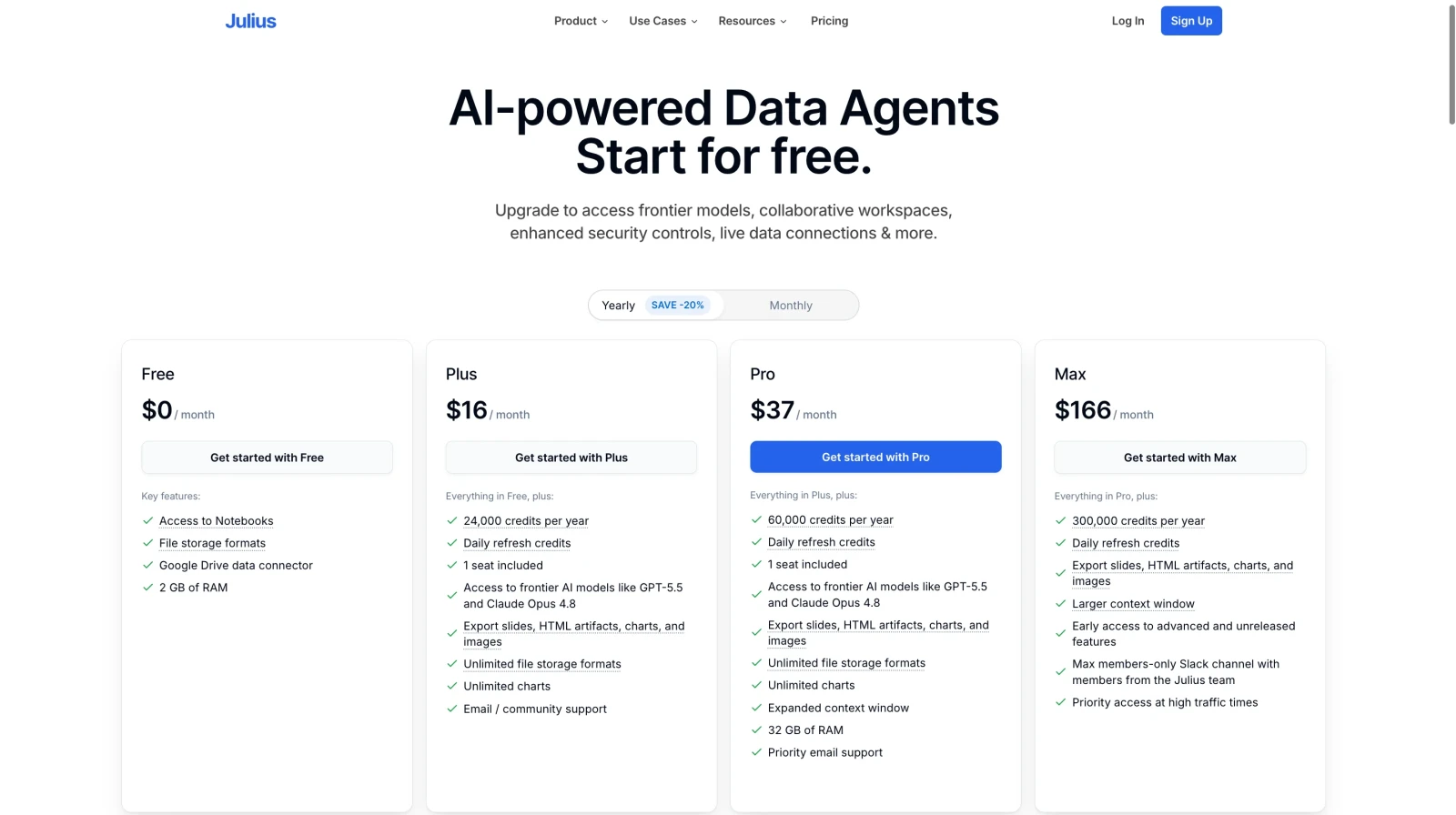
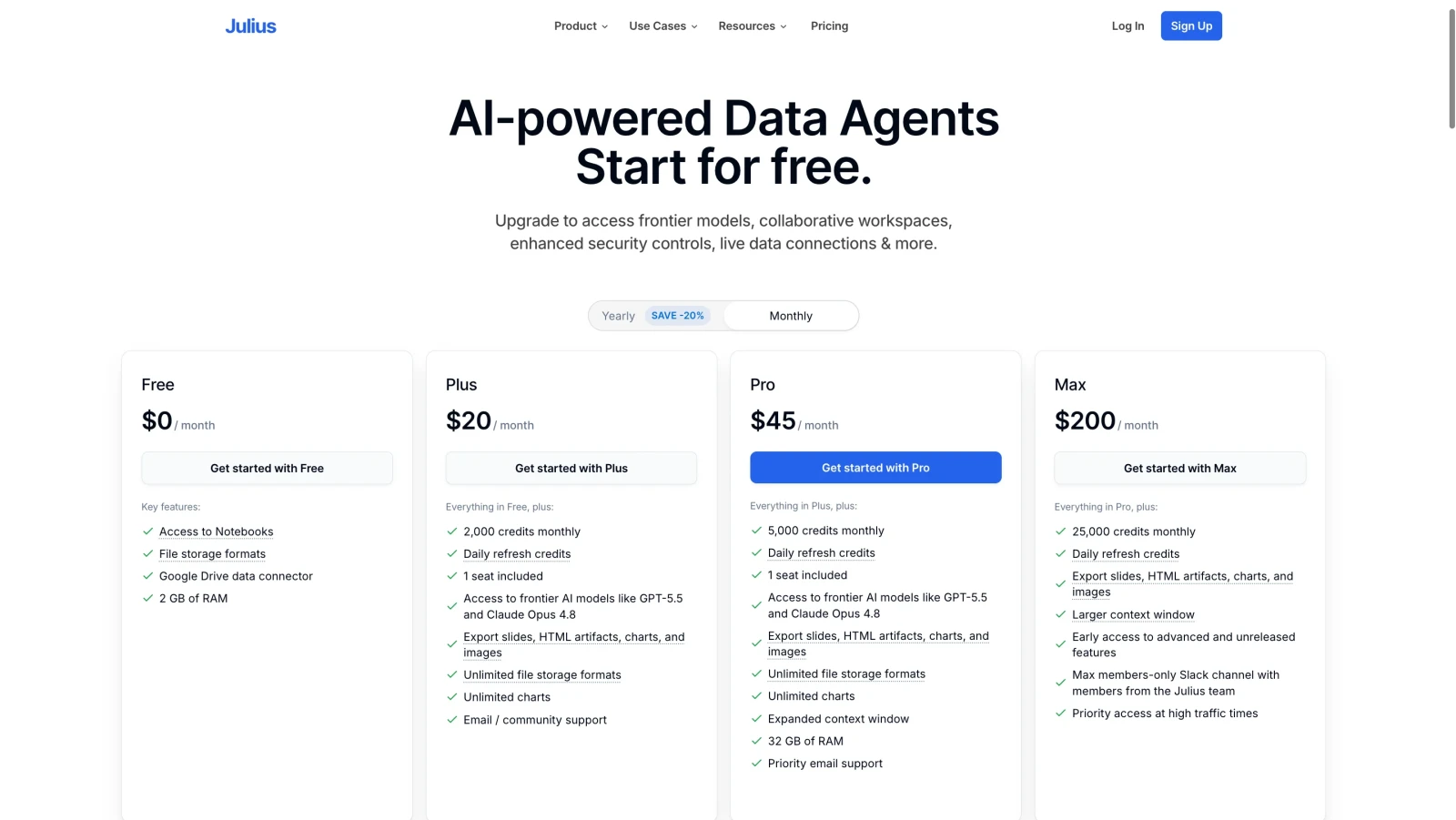
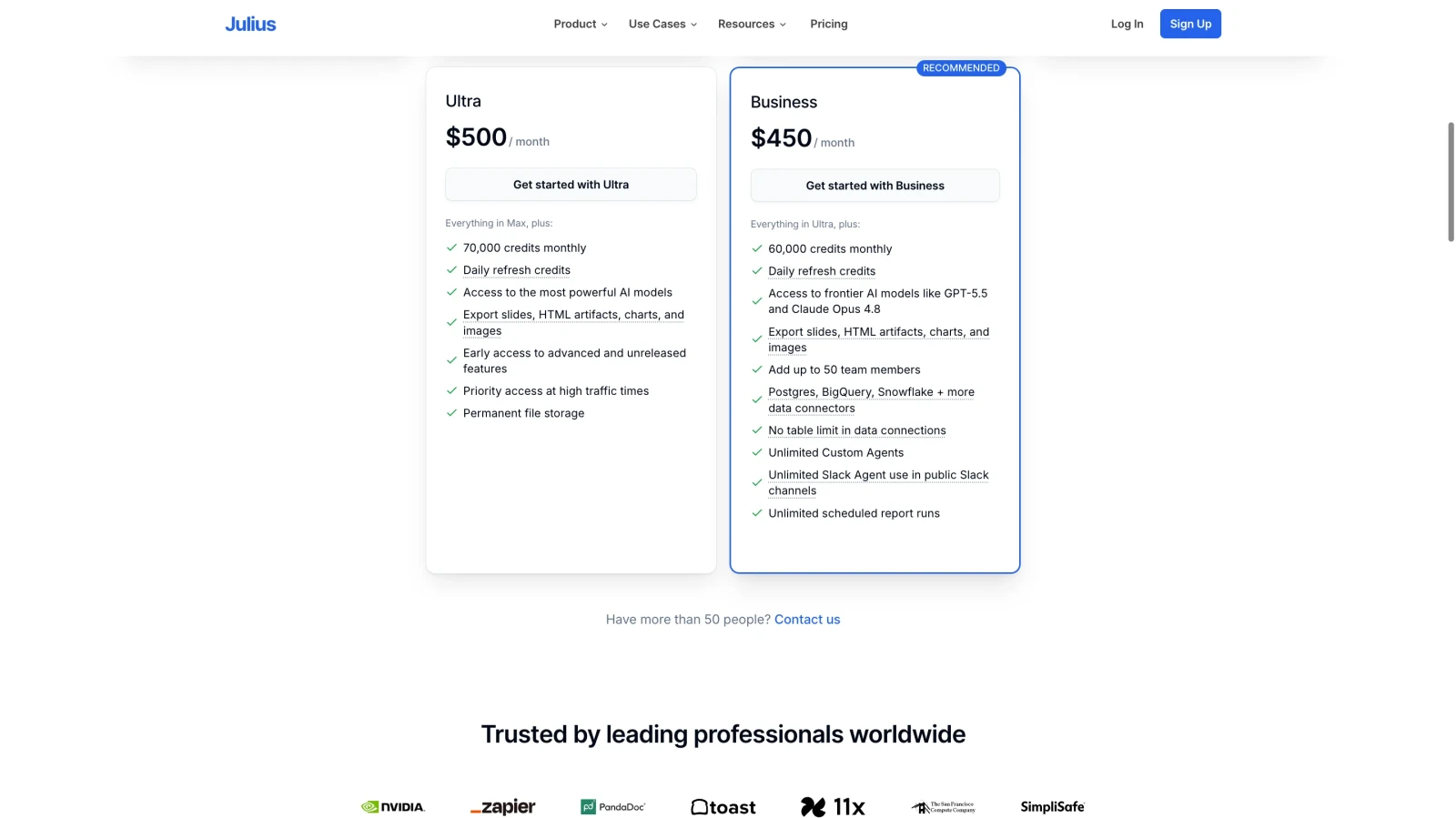
Before you commit to any tool, you need to understand what you are actually paying for and whether the price matches the value. Julius AI uses a freemium model, so you can start for free and upgrade when you are ready. Here is a clear breakdown of Julius pricing and every plan available in 2026.
1. Yearly Plan:
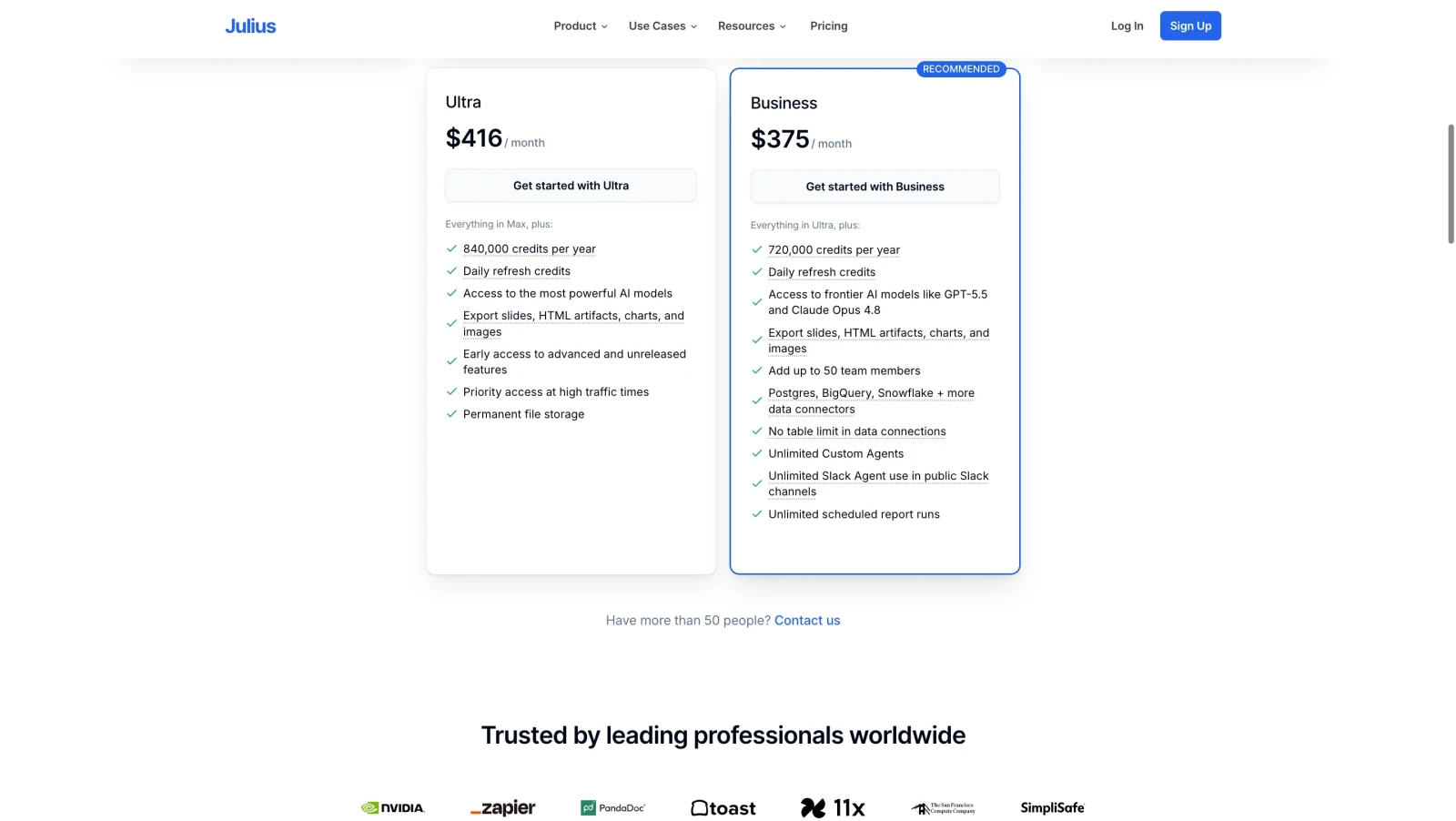
2. Monthly Plan:
When you are uploading business data or research files to any online platform, security should be one of your first questions. Many people skip this section, but it matters. Here is exactly how Julius AI handles your data and what protections are in place.
Your data is analyzed inside a secure container that is created when your session starts and terminated when it ends. Your data does not persist beyond your session unless you explicitly save files yourself.
The platform does not use your uploaded files to train its underlying AI models. Your proprietary data stays proprietary. This is a significant distinction compared to some other AI tools on the market.
The Pro plan includes SOC II compliance, which is the standard security certification most businesses require when handling sensitive data. This gives organizations a formal, auditable guarantee of security practices.
Enterprise customers get dedicated deployments, SSO, audit logs and custom data residency options. This meets the requirements of most regulated industries including finance and healthcare.
Custom data residency options let Enterprise customers control where their data is stored and processed, which matters for businesses operating under strict regional data laws.
NOTE: Always review the current privacy policy before uploading highly sensitive information, especially health records or financial data covered by specific regulations like HIPAA or FINRA.
Read Also: Best ChatGPT Prompts For Daily Use
This AI-powered data analyst performs well on standard data analysis tasks. It handles summary statistics, correlation analysis, trend visualization and basic statistical testing with solid accuracy. Most everyday business questions get correct, useful answers.
That said, Julius is not perfect. Here are the situations where accuracy tends to drop.
If your column headers are unclear or your data is inconsistently formatted, Julius can misinterpret what you are asking. Always clean your data and use clear, descriptive column names before uploading.
When your data has too few rows or many missing values, Julius may produce hallucinated summary statistics. Double-check key numbers against your raw data for any high-stakes reporting.
Julius handles basic statistics well. Advanced techniques like multivariate regression, time-series forecasting, or machine learning models are outside its reliable range. You will need a dedicated tool or a data scientist for those.
Julius claims to outperform GPT-4 by over 31% in mathematical accuracy benchmarks. Independent users report strong performance on standard calculations and data transformations.
When Julius encounters errors in its own generated code, it identifies them and adapts its approach. This step-by-step error recovery makes it more reliable than tools that simply fail and ask you to try again.
Best practice tip: Use clear column headers, remove irrelevant rows before uploading and always verify critical numbers manually, especially for financial or research reporting.
There are several AI data analysis tools on the market in 2026 and choosing the right one depends entirely on your specific workflow. Let me break down how Julius AI compares to its four closest competitors so you can make a truly informed decision without having to test every tool yourself.
You have probably already heard of ChatGPT. Its Advanced Data Analysis feature, available on ChatGPT Plus at $20 per month, is one of the most direct comparisons to Julius AI. Both tools let you upload files and analyze data through natural language. But they are built for very different primary purposes and that difference matters.
| Aspect | Julius AI | ChatGPT Advanced Data Analysis |
| Primary purpose | Built exclusively for data analysis. Every feature is designed to help you understand data faster. | A general-purpose AI assistant. Data analysis is one of many things it can do, not its core focus. |
| Session context | Maintains full dataset context throughout the session. You never have to re-explain your data mid-analysis. | The context window can drift in long sessions. Complex multi-step analyses sometimes lose track of earlier data points. |
| Visualizations | Automatically picks the right chart type for your question. Generates cleaner, more targeted visuals out of the box. | Generates charts but requires more specific prompting to get the right chart type and formatting for your data. |
| Reusable workflows | Notebooks let you build an analysis once and run it repeatedly on new data without starting from scratch each time. | No equivalent to Notebooks. Every analysis session starts fresh. There is no native way to save and rerun workflows. |
| File upload size | Supports large files with hardware upgrades on paid plans. Performance scales with your plan tier. | Supports up to 512 MB file uploads natively. Also integrates directly with Google Drive, OneDrive and Dropbox. |
| Versatility | Specialized for data. Not designed for writing, coding help, or general conversation outside of analysis tasks. | Handles writing, coding, research, brainstorming and conversation alongside data analysis. One tool for many use cases. |
NOTE: Choose Julius if data analysis is your primary daily task. Choose ChatGPT if you need a versatile assistant that handles data work among many other responsibilities.
Rows.com is a spreadsheet-based tool that adds live data integrations and automation to a familiar grid interface. It sits much closer to a smart spreadsheet than a conversational analyst, which is an important distinction to understand before comparing the two.
| Aspect | Julius AI | Rows.com |
| Interface style | Fully conversational. You type questions and get answers. No grid, no formulas, no spreadsheet knowledge needed at any point. | A smart spreadsheet interface. You work inside a grid just like Excel or Google Sheets, just with added AI and automation features. |
| Learning curve | Practically zero learning curve. If you can type a question, you can use it immediately. No onboarding required. | Familiar to spreadsheet users but has a steeper curve for automation and live integration features. It takes time to master. |
| File format support | Works with Excel, CSV, PDF, Google Sheets and images. You are not limited to spreadsheet formats at all. | Designed around spreadsheet data. PDF and image-based data inputs are not natively supported the same way. |
| Standalone charts | Generates clean, exportable charts from any analysis. Easy to copy into presentations or reports without extra steps. | Charts exist within the spreadsheet document. Exporting them separately requires additional steps and formatting work. |
| Collaboration | Share chat links and Notebooks. Collaboration features are basic compared to a full document-sharing platform. | Built for team collaboration. Multiple users can view, edit and contribute to the same spreadsheet document in real time. |
| Live data pipelines | Database connections available on Pro and Enterprise plans. Good for pulling fresh data but not for building complex pipelines. | Strong live data integrations are its core feature. Connects to APIs, databases and external services to keep your spreadsheet always current. |
| Team workflows | Good for individual analysts and small teams running repeated analyses through Notebooks. Not built for large team document management. | Designed for teams that build shared documents. Better for ongoing collaborative workflows that many people contribute to regularly. |
NOTE: Choose Julius for fast, one-off analysis and question-answering. Choose Rows.com for building ongoing, collaborative spreadsheet workflows that your whole team maintains together.
Microsoft Excel Copilot is an AI assistant embedded directly inside Excel. It is available as part of Microsoft 365 Copilot at $30 per user per month on top of an existing Microsoft 365 subscription. If your organization already runs on Microsoft, you have probably already considered this one seriously.
| Aspect | Julius AI | Microsoft Excel Copilot |
| Setup required | Sign up, upload a file and start asking questions. No subscription to an existing suite, no admin setup, no IT involvement needed. | Requires an active Microsoft 365 subscription plus a Microsoft 365 Copilot add-on at $30 per user per month. Setup often involves IT administrators. |
| Data source flexibility | Works with data from any source. Excel, CSV, PDF, Google Sheets and live databases on Pro plans. Not locked into one ecosystem. | Works best with Excel files stored in Microsoft 365 or SharePoint. Data from outside the Microsoft ecosystem requires extra steps to bring in. |
| Analysis depth | Handles complex multi-step analysis, statistical testing, correlation, trend detection and richer visualization than Excel Copilot currently supports. | Handles formula generation, cell suggestions and basic summaries well. Advanced statistical analysis is limited compared to a purpose-built tool. |
| Cost for individuals | Starts at $29.16 per month on annual billing. No minimum seat count. Pay per user, use per user. | $30 per user per month on top of an existing Microsoft 365 plan. Total cost can exceed $50 to $60 per month per person when stacked with the base subscription. |
| Data security | SOC II compliance on Pro plan. Data processed in isolated containers. Strong for most business use cases. | Data stays inside the Microsoft tenant. Nothing leaves your organization's cloud environment, which is critical for heavily regulated industries. |
| Familiar interface | Clean and easy to learn, but it is a new tool and a new interface. Some users need a brief adjustment period. | Works inside Excel, which your team already knows. No new interface to learn, no workflow changes, no tool switching required. |
| Enterprise compliance | SOC II on Pro, custom data residency on Enterprise. Covers most compliance needs for mid-market companies. | Deep integration with Microsoft Purview, audit logging and data governance tools. The strongest option for organizations with strict enterprise compliance requirements. |
NOTE: Choose Julius for individuals and small teams who want powerful data analysis without a Microsoft commitment. Choose Excel Copilot if your organization is already Microsoft-first and data governance is a top priority.
Gemini in Google Sheets is the newest addition to this comparison. It adds a sidebar AI assistant that helps with formulas, summaries and simple data tasks. It is included in Google Workspace plans, so many users already have access to it without paying anything extra. But do not let the free access mislead you about its actual capabilities.
| Aspect | Julius AI | Google Sheets + Gemini |
| Analysis capability | Performs deep, multi-step data analysis including statistical testing, correlation analysis, trend detection and complex aggregations. | Primarily assists with formula writing and basic cell-level tasks. Deep data analysis across large datasets is not where Gemini in Sheets excels. |
| Large dataset handling | Handles large files with upgraded computers on paid plans. Designed to process thousands of rows without performance issues on Pro. | Struggles with very large datasets. Performance drops noticeably when Gemini tries to process or summarize data across many thousands of rows at once. |
| Chart quality | Generates standalone, exportable charts automatically. Picks the right chart type for your question and produces clean visuals ready to share. | Chart generation through Gemini is basic. You still need to configure most chart settings manually inside Google Sheets after Gemini creates a draft. |
| Multi-format support | Works with Excel, CSV, PDF, Google Sheets and images. You are not limited to data that is already inside a Google Sheet. | Works only within Google Sheets. PDF, Excel (unless imported) and image-based data are not natively analyzable by Gemini in the Sheets interface. |
| Cost | Paid plans start at $29.16 per month. Free plan available with 15 messages per month for light exploration. | Included in Google Workspace plans that many users already pay for. Effectively free for anyone already on a Workspace subscription. |
| Ecosystem lock-in | Works independently of any specific ecosystem. You can use data from Google, Microsoft, databases, or any file format without restrictions. | Tightly tied to the Google ecosystem. Best results come when your data is already inside Google Sheets and Google Drive. Moving data from other sources adds friction. |
| Formula assistance | Can help with formulas as part of broader analysis but is not specifically optimized for spreadsheet formula writing as a standalone task. | Excellent at suggesting, explaining and fixing Google Sheets formulas. This is one of its strongest and most reliable use cases for everyday spreadsheet users. |
NOTE: Choose Julius when you need serious data analysis capabilities. Use Google Sheets with Gemini when you need quick formula help inside a spreadsheet you are already working in.
Read Also: ChatGPT Tutorial
Before I give you my final verdict, let me tell you what it actually felt like to use this AI data analyst as someone who works with data regularly. As reading about features is one thing. Sitting down and using a tool for the first time is a completely different experience.
The first thing I noticed was how fast the setup was. There was no tutorial to sit through, no complicated onboarding flow and no settings to configure before I could start. I signed up, uploaded a CSV file with about 3,000 rows of sales data and within seconds the platform showed me a preview and suggested five questions I could ask about my own data. That was a genuinely good first impression.
My first real question was simple. I asked "Which product category had the highest revenue last quarter?" I expected it to take a few seconds and maybe ask me to clarify something. Instead, it returned a bar chart and a written answer in under three seconds. The chart was clean, the answer was accurate and I did not have to do anything other than type that one sentence.
Where it really surprised me was the follow-up question feature. After I got that first answer, the platform suggested "Would you like to break this down by region?" I clicked it and within seconds I had a new chart showing regional performance by category. That kind of guided analysis is something I did not expect. It felt less like using a tool and more like working with someone who actually understood what I was trying to figure out.
I also tested the Notebooks feature with a monthly reporting task I normally do manually. I built the workflow once, set up the data input cell and saved it. The following week I uploaded fresh data and ran the same Notebook. It produced the same analysis, with the new numbers, in about 90 seconds. That alone would save me close to two hours a month.
The one area where I noticed a limitation was with a dataset that had poorly named columns. Two of my columns were labeled "Data 1" and "Data 2" from an old export. When I asked a question that involved those columns, the platform gave me an answer that did not fully make sense. As soon as I renamed the columns to something descriptive and re-uploaded, the same question produced a perfectly accurate result. So the lesson here is clear: clean data in, clean analysis out.
Overall, my experience was genuinely positive. The tool does exactly what it promises. It removes the friction between having data and understanding data. I did not miss having coding skills at any point during my testing. And for anyone who regularly spends time wrestling with spreadsheets, that is worth a lot.
This is the question everything comes down to. You have read about the features, the pricing and the comparisons. Now let me give you a straight answer based on who you are and how you actually work with data day to day.
For most people who work with data regularly, yes, it is absolutely worth it. Here is how to know for sure where you land.
The free plan is generous enough to test the platform properly before spending a single dollar. The Plus plan at $29.16 per month on annual billing is a solid entry point for individuals. The Pro plan at $37 per month on annual billing is the best value for power users who need unlimited messages and direct database connectivity.
For students and educators, the 50% discount brings the Pro plan down to around $20 per month, which is outstanding value for that level of analytical capability.
Julius AI removes the technical barrier between you and your data. In 2026, it continues to be one of the most practical AI tools for anyone who works with data but does not want to write code to understand it. You upload a file, ask a question and get an answer you can actually use. It is not a replacement for a full-stack data analyst or a business intelligence platform, but it fills a real gap for the millions of people who need answers from their data quickly.
If you are tired of spending hours in spreadsheets trying to find answers you should be able to get in seconds, Julius AI is worth trying. Start with the free plan and see how much time it saves you before committing to a subscription.
Yes. Julius AI offers a free plan with 15 messages per month. That is enough to test the platform. For regular use, you will need a paid plan starting at $29.16 per month (billed annually).
Julius AI supports Excel (.xlsx), CSV, PDF, Google Sheets and most common text and image formats. Pro and Enterprise users can also connect directly to Snowflake, BigQuery and Postgres databases.
A Julius AI Notebook is a reusable analysis template. It combines data inputs, prompt cells, user input cells and optional code cells into a structured workflow. You build it once and run it again on fresh data every time, which is ideal for recurring reports.