


Consider the number of online accounts that you log into each day. These are diverse accounts, including email, banking apps, social media accounts and your workplace portal. Then picture someone breaching those accounts simply with your password.
With cyber threats on the rise, password theft keeps rising with the increase in the rate of phishing attacks, data hacks and other activities on the dark web. That’s why a person is no longer able to rely solely on a password. To secure their accounts, companies opted to use a new solution called multi-factor authentication (MFA). MFA complicates the process of breaching personal or business accounts by providing two-factor authentication.
In this guide, you will learn what multi-factor authentication is, how it works, and why it matters. We will also cover its types, benefits, real-world uses, and how you can turn it on for your own accounts today.
Read Also: Introduction To Cybersecurity
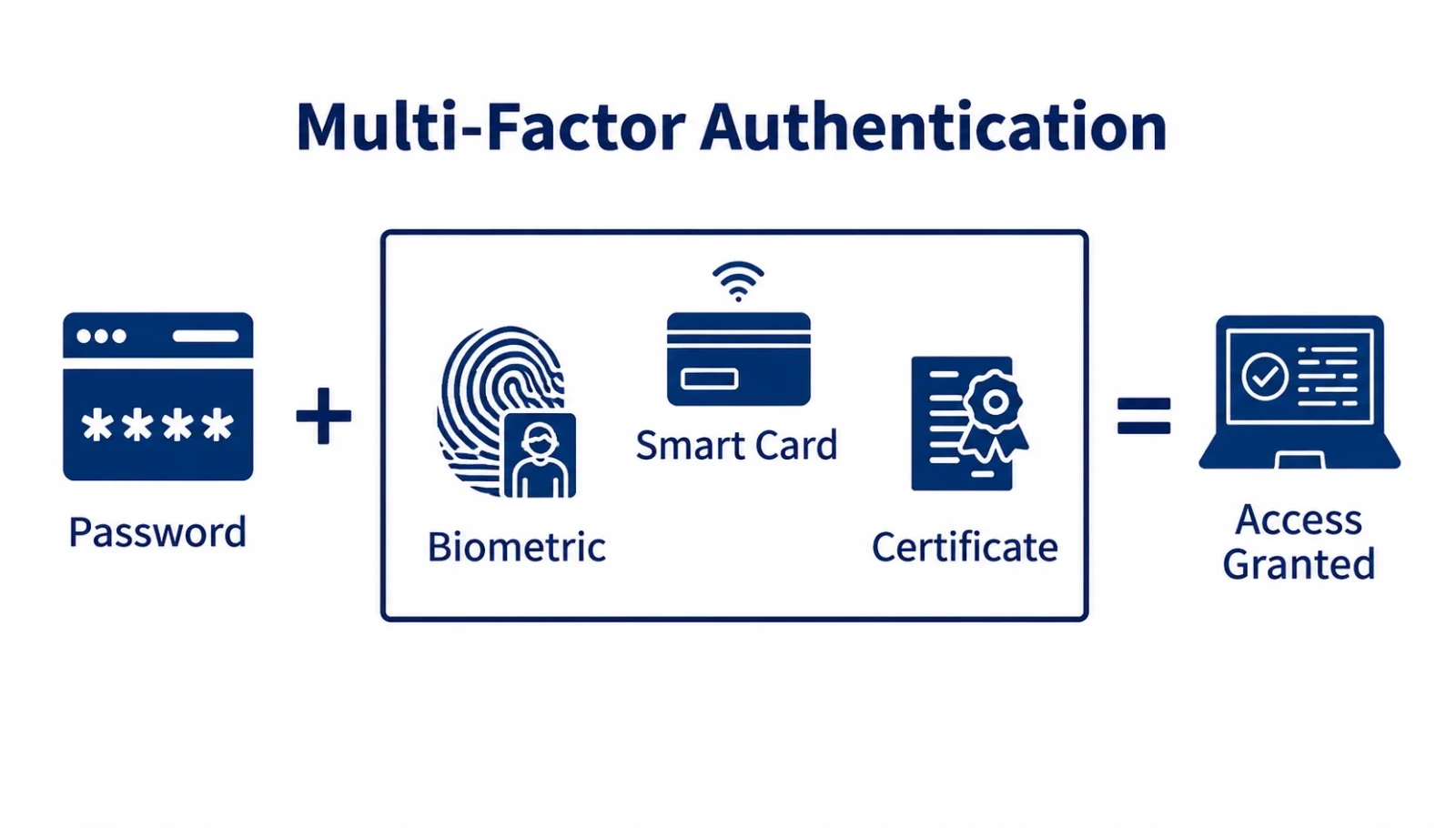
Multi-factor authentication (MFA) is a security method that requires users to provide two or more forms of verification to log into an account or system. Instead of using only a password, you must also provide additional proof, such as a code sent to your phone or a fingerprint scan, to verify your identity.
Every MFA method falls into one of three categories. Together, these are known as the three factors of authentication.
Something you know: Information that only you should know, such as a password, PIN, or the answer to a security question.
Something you have: A physical device or item you possess, such as a smartphone, a one-time verification code, or a USB security key.
Something you are: Unique biological characteristics used to verify your identity, including a fingerprint, facial recognition, or an iris scan.
A true MFA setup combines factors from at least two of these categories. Entering a password and then answering a security question does not count as MFA, because both are "something you know." A password followed by a fingerprint scan does count, because it combines two different factor types.
Also Read: What Is a Firewall?
When you log in with MFA, the process usually happens in a few quick steps.
This is the first factor, something you know. The system checks it against your stored credentials before moving forward.
If the password is wrong, the login stops right here. If it is correct, the system does not grant access yet. It moves on to ask for a second factor.
Depending on your settings, this could be a one-time code, a push notification, a hardware key tap, or a biometric scan.
You might type in a code from your authenticator app, tap "Approve" on your phone, insert a security key, or scan your fingerprint or face.
It checks whether the code, device, or biometric data matches what is on file for your account. This step usually happens within seconds.
If both factors match, you are logged in. If either factor fails, the system blocks the login and may alert you or lock the account after repeated failed attempts.
This layered approach means a stolen password alone is not enough to break into your account. The attacker would also need your phone, your security key, or your fingerprint, which is much harder to obtain.
Related Article: What Is Password Salting and How Does It Work?
There are several ways to complete the second step of MFA. Here are the most common methods you will come across.
The system sends a numeric code to your phone through a text message. You enter this code within a short time window to complete your login. It is easy to use, but text messages can be intercepted, so it is considered one of the weaker MFA options.
Similar to SMS, a code is sent to your registered email address. You copy the code and enter it on the login screen. This works well as a backup method, though it depends on your email account staying secure.
Apps like Google Authenticator or Microsoft Authenticator generate a new code every 30 seconds directly on your phone. Since the code is not sent over the network, it is harder for attackers to steal compared to SMS.
Instead of typing a code, you simply tap "Approve" or "Deny" on a notification sent to your phone. This method is fast and user friendly, and it is widely used by workplace login systems.
A small USB or NFC device, such as a YubiKey, that you plug in or tap to confirm your identity. Hardware keys are one of the most phishing-resistant MFA methods available today.
This uses your fingerprint, face, or iris to confirm who you are. Most smartphones and laptops now include built-in biometric sensors, making this method quick and convenient.
A physical card embedded with a chip that you insert into a reader to verify your identity. Smart cards are common in government offices, healthcare systems, and large enterprises.
Passkeys use cryptographic keys stored on your device instead of a traditional password. They combine possession and biometric verification in a single step, and they are quickly becoming the standard for secure, low-friction logins
Read Also: What Is Post-Quantum Cryptography?
Beyond individual methods, MFA can also be set up in different ways depending on the level of security and convenience an organization needs.
Two-factor authentication is the most common form of MFA. It requires exactly two factors, usually a password plus a code or biometric scan. All 2FA is MFA, but not all MFA is limited to two factors.
Adaptive MFA adjusts what it asks for based on the situation. If you log in from your usual device and location, you might not be asked for a second factor at all. If you log in from a new country or an unfamiliar network, the system will demand extra verification. This balances security with convenience.
Passwordless MFA removes the password entirely and relies on other factors instead, such as a passkey plus a biometric scan. This approach reduces the risk of password theft while keeping the login process fast and simple.
MFA offers real, measurable protection for both individuals and organizations.
It blocks most automated and credential-based attacks, since a stolen password alone is not enough to gain access.
It protects your accounts even if your password is exposed in a data breach.
It builds trust with customers and partners who expect strong security practices.
It helps organizations meet compliance requirements such as GDPR, HIPAA, and PCI DSS.
It reduces the financial and reputational damage caused by account takeovers.
MFA has become standard across many industries and platforms. Here are some of the most common places you will encounter it.
1. Online Banking: Banks use MFA to protect your money and personal financial data during login and transactions.
2. Email Accounts: Providers like Gmail and Outlook offer MFA to stop unauthorized access to your inbox, which often holds password reset links for other accounts.
3. Social Media Platforms: Platforms such as Facebook, Instagram, and X use MFA to prevent account hijacking and impersonation.
4. Enterprise Applications: Businesses use MFA to secure internal tools, employee data, and sensitive company systems.
5. VPN Access: Remote workers often need MFA to connect to a company VPN, adding a layer of protection when accessing internal networks from outside the office.
6. Cloud Services: Platforms like AWS, Microsoft Azure, and Google Cloud require MFA to protect servers, databases, and stored data.
7. E-commerce Websites: Online stores use MFA to secure customer accounts, payment details, and order history from fraud.
People often use these terms interchangeably, but there is a small technical difference.
| Feature | Multi-Factor Authentication (MFA) | Two-Factor Authentication (2FA) |
| Definition | A security method that requires two or more authentication factors to verify a user's identity. | A type of MFA that requires exactly two authentication factors. |
| Number of Factors | Two or more factors. | Exactly two factors. |
| Authentication Methods | Can combine passwords, biometrics, security keys, smart cards, authenticator apps, or one-time passcodes. | Usually combines a password with one additional verification method, such as an OTP or fingerprint. |
| Security Level | Higher because it can use multiple layers of verification. | Stronger than password-only security but offers fewer layers than MFA. |
| Flexibility | Supports a wide range of authentication factor combinations. | Limited to only two authentication factors. |
| Example | Password + fingerprint + one-time passcode (OTP). | Password + OTP sent to a mobile device. |
| Common Use Cases | Enterprise systems, banking, healthcare, government portals, and cloud platforms. | Personal email accounts, social media, online banking, and e-commerce websites. |
| Relationship | An umbrella term that includes 2FA as one of its forms. | A specific type of MFA that uses exactly two factors. |
Also Read: What Is Penetration Testing?
MFA is one of the strongest defenses against account takeover. Here are the key benefits it offers.
Significantly reduces the risk of unauthorized access
Works across most modern apps, websites, and devices
Offers flexible methods to match different security needs
Helps meet industry compliance standards
MFA is not perfect. It comes with a few trade-offs worth knowing about.
Adds an extra step to the login process, which can feel inconvenient
SMS-based codes can be intercepted through SIM swapping
Users can lose access if they lose their device or backup codes
Attackers can sometimes trick users into approving fake push notifications, known as MFA fatigue attacks
To get the most protection from MFA, follow these practices.
Choose an authenticator app or hardware key over SMS whenever possible, since these methods are harder to intercept.
Save your backup codes in a secure location, such as a password manager, in case you lose access to your device.
Turn on MFA for every account that offers it, especially email, banking, and cloud services.
Never approve a login request you did not personally initiate.
Update your recovery phone number and email regularly so you never get locked out.
Read Also: What Is SailPoint?
Turning on MFA usually takes just a few minutes. The exact steps vary slightly by platform, but the general process looks like this.
1. Access your account's security settings: Log in to your account and look for a section labeled "Security" or "Login Settings."
2. Turn on MFA: Find the option for multi-factor or two-factor authentication and select "Enable" or "Turn On."
3. Choose a verification method: Pick from options like an authenticator app, SMS, email, or a security key.
4. Verify your device: Follow the on-screen steps to link your phone, app, or key to your account.
5. Save recovery or backup codes: Store these codes somewhere safe in case you lose access to your primary device.
6. Test your MFA setup: Log out and log back in to confirm the second step works correctly before you close the setup screen.
Here is how some of the most widely used platforms apply MFA in practice.
1. Microsoft Account: Microsoft lets users enable MFA through its Authenticator app, offering push notifications, biometric approval, or one-time codes for both personal and business accounts.
2. AWS Management Console: Amazon Web Services strongly recommends MFA for root and IAM users, supporting hardware keys, authenticator apps, and virtual MFA devices to protect cloud infrastructure.
3. Google Account: Google offers 2-Step Verification through prompts on trusted devices, authenticator apps, security keys, and passkeys to protect Gmail, Drive, and other Google services.
4. Online Banking Applications: Most banks combine a password with an OTP sent by SMS or app, and some add biometric checks for high-value transactions, keeping customer funds secure.
Even with strong benefits, MFA adoption comes with a few common hurdles.
Lost devices: Keep backup codes stored safely, and register more than one recovery method where possible.
User resistance to extra steps: Use push notifications or biometrics instead of manual codes to keep the process fast.
SIM swapping risks: Switch from SMS codes to an authenticator app or hardware key for stronger protection.
MFA fatigue attacks: Only approve login requests you personally started, and report repeated unexpected prompts to your IT or security team.
Multi-factor authentication is one of the simplest and most effective ways to protect your online accounts. By combining something you know, something you have, and something you are, MFA makes it far harder for attackers to break in, even if your password gets stolen. Whether you are securing a personal email account or an entire company network, turning on MFA is a small step that delivers a major boost in security. If you have not enabled it yet, now is a good time to start.
MFA greatly reduces the risk of account takeover, but it is not completely unbreakable. Attackers sometimes use phishing, SIM swapping, or MFA fatigue attacks to trick users into approving fake requests. Using authenticator apps or hardware keys instead of SMS lowers this risk significantly.
Most platforms let you regain access using backup codes, a secondary recovery method, or identity verification through customer support. This is why it is important to save your backup codes in a safe place when you first set up MFA.
MFA blocks many phishing attempts, but it does not stop every type. Advanced attacks can intercept codes in real time. Phishing-resistant methods like hardware security keys and passkeys offer the strongest protection against these advanced threats.


