Have you ever thought about why Java Collections interview questions appear in almost every Java interview? Or maybe you have prepared for Java for months, but still feel unsure when someone asks about ArrayList vs LinkedList or HashMap vs HashSet?
Many developers face this exact problem. Even experienced programmers sometimes struggle to clearly explain how Java collections work in interviews. The truth is, understanding the Java Collections Framework is essential because it is the most widely used part of Java in real-world applications.
In this blog, I have shared commonly asked Java Collections interview questions along with clear explanations and answers to help you confidently tackle interviews. Whether you are preparing for your first Java job, you want to switch roles, or you simply want to strengthen your fundamentals.
Let’s begin!
The following are some questions that will test your basic knowledge of Java Collections:
A Collection in Java is a framework that provides an architecture to store, retrieve, manipulate, and manage groups of objects dynamically.
Collection is an interface used to store groups of objects, while Collections is a utility class that provides methods to perform operations on collection objects in Java.
| Parameters | Collection (Interface) | Collections (Utility Class) |
| Type | It is an interface in Java. | It is a utility class in Java. |
| Purpose | Used to store and manage a group of objects as a single unit. | Used to perform operations on collection objects. |
| Package | Present in the java.util package and is the root of the collection framework. | Also part of Java.util package, but it contains helper methods. |
| Usage | Implemented by classes like List, Set and Queue. | Provides static methods like sort(), reverse(), shuffle(). |
| Functions | Defines the structure and basic operations for collections. | Provides algorithms and utility methods to manipulate collections. |
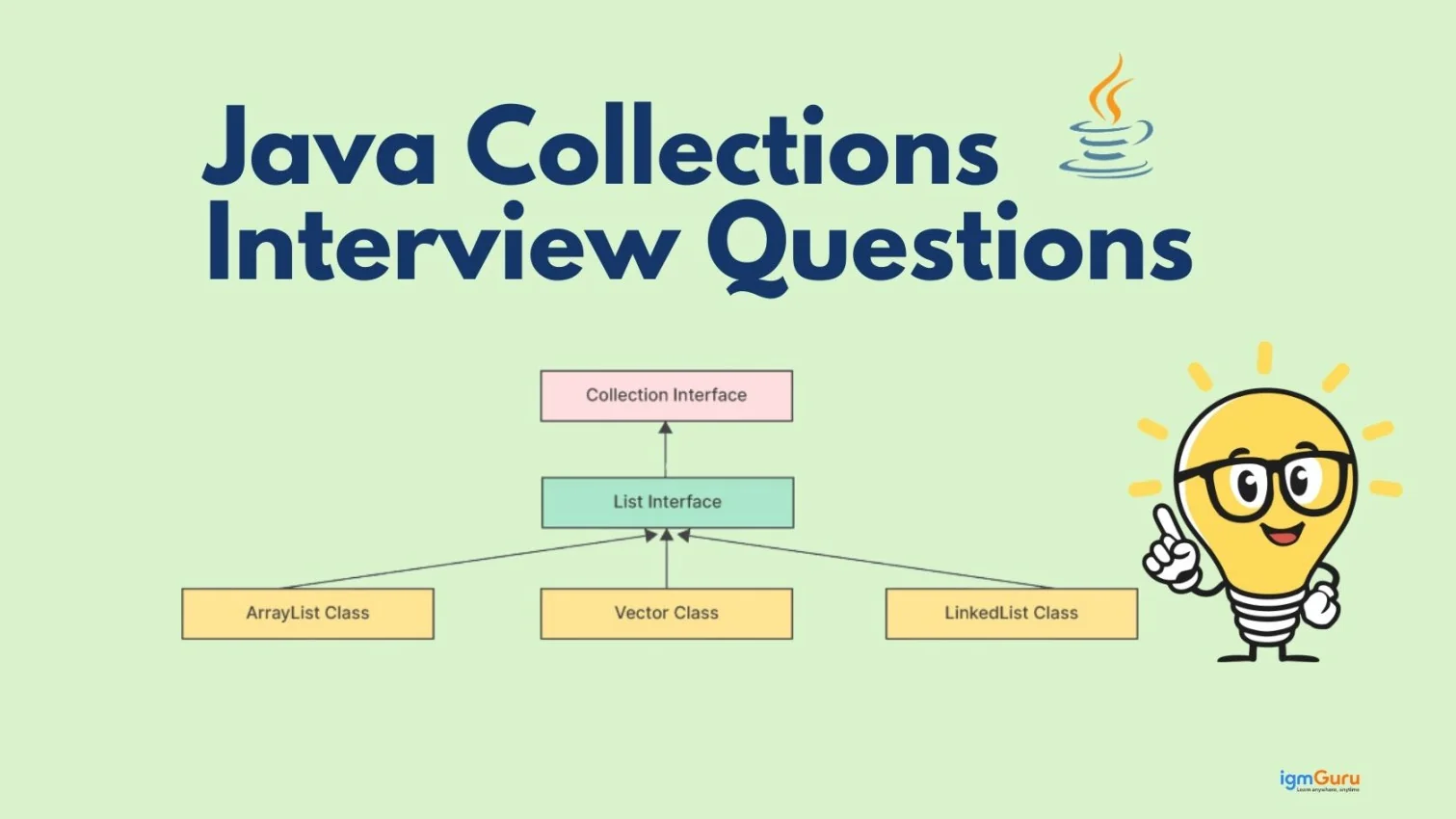
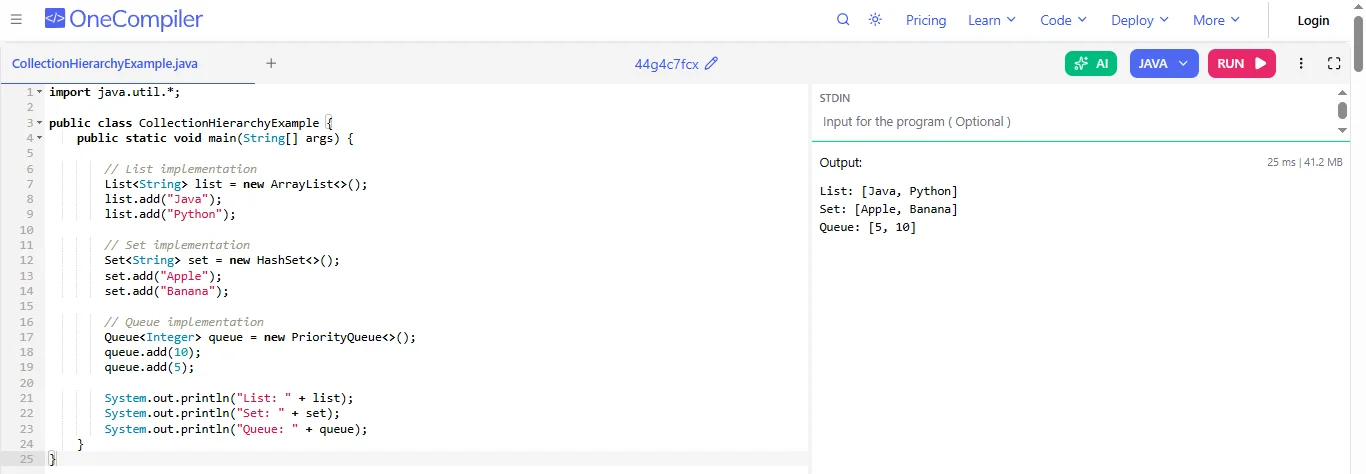
The Collection framework hierarchy starts with the Iterable interface, followed by the Collection interface. The Collection interface has three main subinterfaces: List, Set and Queue. Classes like ArrayList, LinkedList, HashSet, TreeSet and PriorityQueue implement these interfaces to store and manage data.
Code Example:
|
The Collection framework has numerous benefits, such as:
The Java Collection Framework includes several interfaces that define how different types of data collections are stored, accessed and managed efficiently in Java programs.
| Interface | Explanation |
| Collection | The root interface of the Collection framework that represents a group of objects. |
| List | An ordered collection that allows duplicate elements. |
| Set | A collection that does not allow duplicate elements. |
| Queue | A collection used to store elements in FIFO (First In First Out) order. |
| Deque | A double-ended queue that allows insertion and deletion from both ends. |
| Map | Stores data in key-value pairs, where each key is unique. |
ArrayList and LinkedList are two important classes in the Java Collection Framework used to store and manage dynamic lists of elements.
| Parameters | ArrayList | LinkedList |
| Structure | Uses a dynamic array to store elements | Uses a doubly linked list to store elements. |
| Access Time | Faster for accessing elements using an index. | Slower for accessing elements because traversal is needed. |
| Insertion & Deletion | Slower when inserting or deleting in the middle because elements shift. | Faster insertion and deletion since only links are updated. |
| Memory Usage | Uses less memory because it only stores data. | Uses more memory because it stores data and link references. |
| Performance Use | Better when frequent searching or accessing is required. | Better when frequent insertion and deletion are required. |
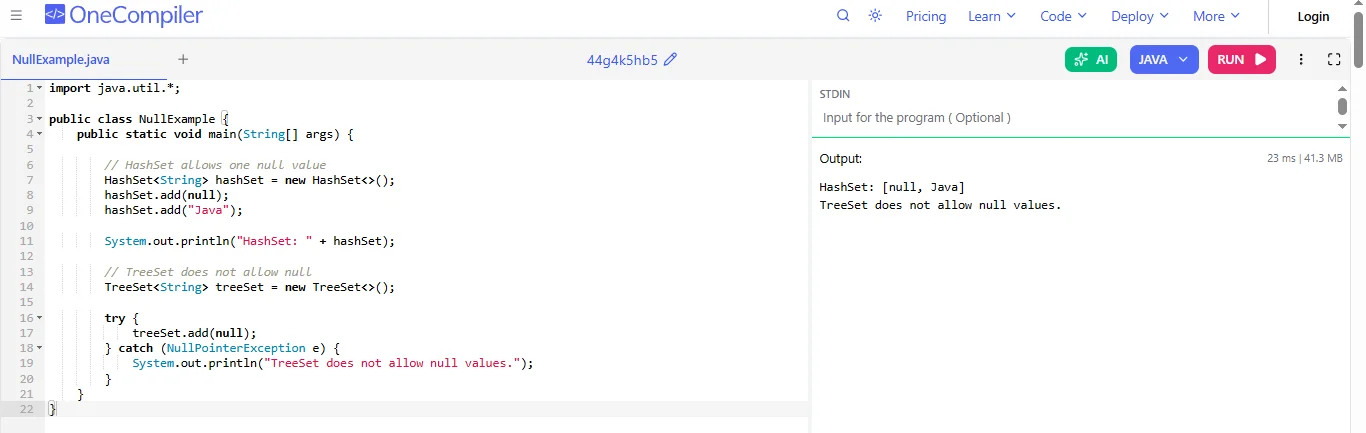
Yes, you can add one null element to a HashSet because it allows a single null value. But TreeSet does not allow null elements. TreeSet sorts its elements, and null cannot be compared with other objects, so it throws a NullPointerException if you try to add null.
Code Example:
|
In the Java Collection Framework, List and Set are interfaces used to store groups of elements. They differ in how they store, organize, and manage data.
| Parameters | List | Set |
| Duplicate Elements | Allows duplicate elements. | Does not allow duplicate elements. |
| Order | Maintains the order of insertion. | Usually does not maintain order (except for some types like LinkedHashSet). |
| Index | Elements can be accessed using an index. | Does not support index-based access. |
| Use | Used when duplicate values are needed. | Used when only unique values are required. |
| Example | ArrayList, LinkedList, Vector. | HashSet, TreeSet, LinkedHashSet. |
An Iterator is an object used to go through the elements of a collection one by one. It helps to read and remove elements safely while moving forward in the collection. Common methods of Iterator are hasNext(), next() and remove().
Code Example:
|
A PriorityQueue is a special type of queue where elements are processed based on their priority instead of the order they are added. The smallest element usually comes first. It is useful when some tasks must be handled before others based on importance or priority.
HashMap and Hashtable both store data as key-value pairs, but they differ in several ways. HashMap is not synchronized, which makes it faster but not thread-safe. Hashtable is synchronized and can be safely used by multiple threads. HashMap allows one null key and multiple null values, whereas Hashtable does not allow any null keys or values. Because of better performance and modern alternatives like ConcurrentHashMap, HashMap is used more frequently in Java applications.
Iterator and ListIterator are both used to traverse collections. An iterator can move only in the forward direction and can be used with most collection types. ListIterator is available only for List implementations and supports both forward and backward traversal. It also provides methods to add, update, and replace elements while iterating. Because of these additional features, ListIterator offers more flexibility when working with lists.
ArrayList and Vector both use dynamic arrays to store elements and allow duplicate values. The main difference is that Vector is synchronized, making it thread-safe, while ArrayList is not synchronized and generally performs better in single-threaded applications. ArrayList is commonly preferred in modern Java applications, while Vector is considered a legacy collection class.
Read Also: Java Tutorial for Beginners
The following questions are asked of candidates to check what they have learned in their previous job:
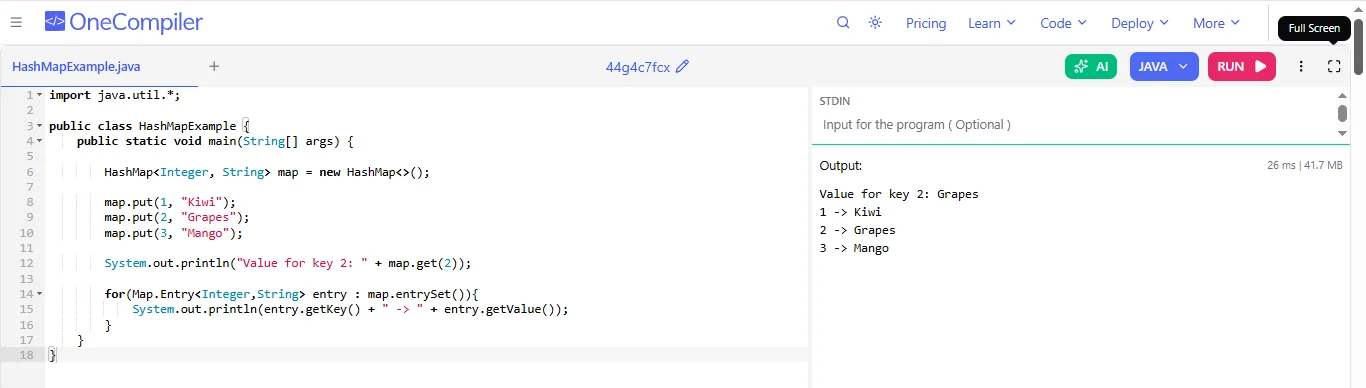
A HashMap stores data as key-value pairs. When a key is added, Java uses the key’s hashCode() method to create a number. This number helps find the correct position, called a bucket, in an internal array. The value is stored there. If two keys get the same bucket, they are stored together using a linked list or tree. When searching, HashMap again uses the hash code to quickly find the value.
Code Example:
|
The load factor shows how full a HashMap can get before its size increases. The default value is 0.75, which means the map will resize when it becomes 75% full. This is important because if the map becomes too full, many keys may go into the same bucket. That can slow down searching and inserting. A good load factor keeps the HashMap fast and efficient.
Rehashing is the process of increasing the size of a HashMap and redistributing its elements. When the number of elements becomes greater than the limit defined by the load factor, Java creates a larger array. Then it recalculates the hash for each key and places them into new buckets. This helps reduce collisions and keeps operations like searching and inserting fast and efficient.
In Java, equals() checks whether two objects are logically the same. hashCode() returns a number used to store objects in hash-based collections like HashMap. If two objects are equal according to equals(), they must return the same hash code. If only one method is overridden, collections may behave incorrectly. Overriding both methods ensures objects are stored and found correctly in collections.
Comparable is an interface used to define the natural sorting order of objects in a class. A class implements Comparable and overrides the compareTo() method. This method compares the current object with another object. It is used when objects need to be sorted automatically, such as when using Collections.sort() or TreeSet. For example, it can sort students by ID, marks or name.
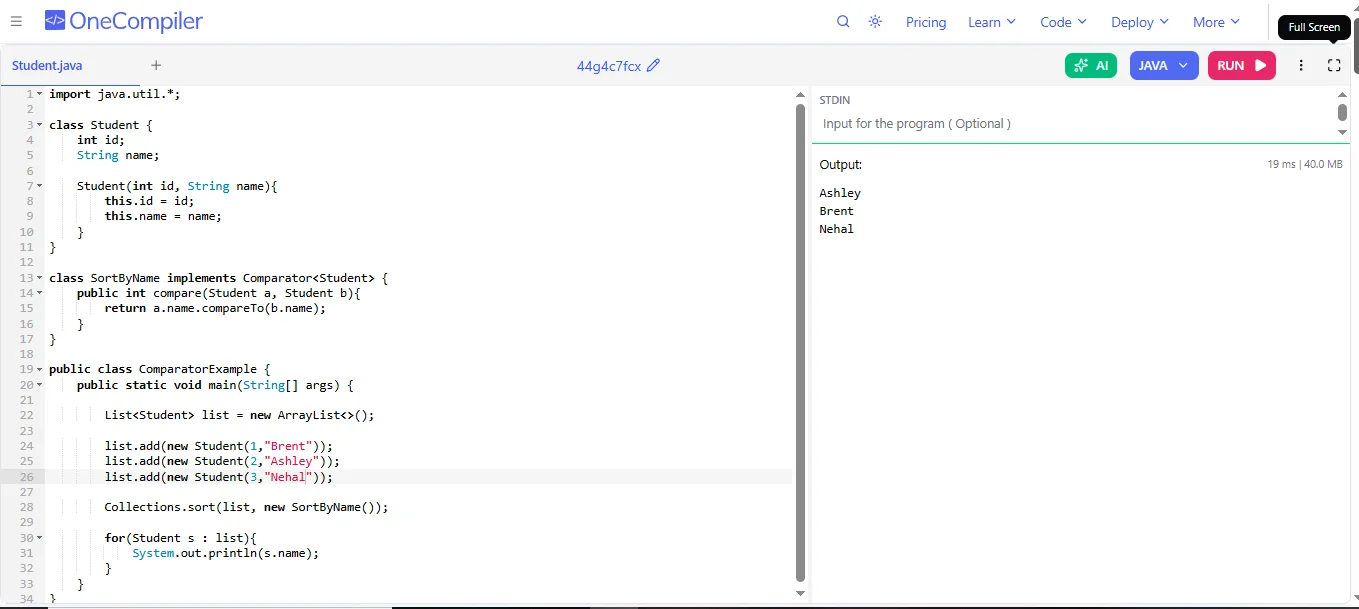
The Comparator interface allows developers to create custom sorting rules for objects. It uses the compare() method to compare two objects. Unlike Comparable, a class does not need to change its original code. Different Comparator classes can sort the same objects in different ways. For example, a list of students can be sorted by name, age or marks using different Comparator implementations.
Code Example:
|
Fail-fast iterators are used to loop through collections like ArrayList or HashMap. They check if the collection is modified while it is being iterated. If the collection changes after the iterator is created, Java throws a ConcurrentModificationException. This happens to prevent incorrect results during iteration. Fail-fast behavior helps detect programming errors early when working with collections.
CopyOnWriteArrayList is a thread-safe version of ArrayList used in multi-threaded programs. When a modification like add or remove happens, it creates a new copy of the internal array instead of changing the original one. This makes reading operations safe for multiple threads. It should be used when the program has many read operations and very few write operations.
A TreeMap keeps its keys in sorted order automatically. It uses a special data structure called a Red-Black Tree, which is a self-balancing binary search tree. When a new key is added, the tree adjusts itself to keep the order correct. By default, keys are sorted using their natural order, but a Comparator can also be used to define custom sorting.
Synchronized collections are collections that are made thread-safe so that multiple threads can access them safely. Java provides synchronized versions using methods in the Collections class, such as Collections.synchronizedList() and Collections.synchronizedMap(). These collections allow only one thread at a time to access the data. This prevents data errors when many threads try to modify the collection simultaneously.
Comparable and Comparator are both used for sorting objects in Java. Comparable provides a natural sorting order by implementing the compareTo() method inside the class itself. A comparator allows custom sorting by implementing the compare() method in a separate class. Comparable supports only one sorting sequence, while multiple Comparator implementations can be created to sort the same objects in different ways.
HashSet, LinkedHashSet, and TreeSet all store unique elements but differ in ordering and performance. HashSet does not guarantee any iteration order and generally provides O(1) average-time operations. LinkedHashSet maintains insertion order while offering similar average performance. TreeSet keeps elements sorted according to their natural ordering or a Comparator, with common operations taking O(log n) time.
Read Also: What are Classes and Objects in Java?
The following are the questions for those candidates who have 5+ years of work experience:
In Java 8 and later, when two keys produce the same bucket index, a collision occurs. HashMap first stores these elements in a linked list within that bucket. If the number of elements in the list becomes more than 8, Java converts the linked list into a balanced tree (Red-Black Tree). This improves search performance from O(n) to O(log n). When the number of elements becomes small again, it may convert back to a linked list. This method helps maintain good performance even when many collisions happen.
ConcurrentHashMap provides thread safety by using fine-grained locking instead of locking the whole map. In older versions, it divided the map into segments and each segment had its own lock. In Java 8 and later, it uses CAS (Compare-And-Swap) operations and locks only small parts called bins when needed. This allows multiple threads to read and write data at the same time without blocking the entire map. As a result, ConcurrentHashMap gives better performance and scalability in multi-threaded programs.
ArrayList uses a dynamic array internally. When the array becomes full, Java creates a larger array and copies all elements into the new one. This resizing operation takes extra time but allows fast access using indexes. LinkedList, on the other hand, stores elements in nodes, where each node keeps data and references to the next and previous nodes. New elements are added by creating a new node without resizing. LinkedList is better for insertions and deletions, while ArrayList is faster for random access.
Fail-fast iterators work by using a variable called modCount, which tracks structural changes in a collection. When an iterator is created, it stores the current value of modCount in a variable called expectedModCount. During iteration, the iterator checks if modCount has changed. If the collection is modified directly while iterating, modCount becomes different from expectedModCount. When this difference is detected, Java throws a ConcurrentModificationException. This mechanism quickly detects unsafe modifications and prevents unpredictable behavior during iteration.
TreeMap stores elements using a Red-Black Tree, which is a self-balancing binary search tree. Each node contains a key, value and references to child nodes. When a new element is inserted or removed, the tree performs rotations and color changes to keep the tree balanced. Because the height of the tree remains balanced, operations like insert, search and delete take O(log n) time. TreeMap automatically keeps keys sorted either by their natural ordering or by using a Comparator.
Weakly consistent iterators are used in concurrent collections like ConcurrentHashMap and CopyOnWriteArrayList. These iterators do not throw ConcurrentModificationException when the collection changes during iteration. Instead, they show the elements as they existed when the iterator was created and may also reflect some changes made during iteration. They do not guarantee to show all updates, but they allow iteration without blocking other threads. This makes them useful in multi-threaded environments where collections are modified frequently.
CopyOnWriteArrayList provides thread safety by creating a new copy of the array whenever a modification like add or remove occurs. This makes read operations very fast because readers do not need locks. However, write operations become slower because copying the entire array takes extra time and memory. Therefore, it is best used in situations where reads happen frequently but writes are rare. If many modifications occur, the copying overhead can reduce performance.
A HashSet is internally implemented using a HashMap. When an element is added to a HashSet, it is stored as a key in the internal HashMap. The value associated with that key is a constant dummy object called PRESENT. This means only the keys matter, which ensures that all elements in HashSet are unique. Operations like add, remove and contains in HashSet work by calling the corresponding methods of the internal HashMap.
When a key is added to a HashMap, Java first calls the hashCode() method of the key to generate a hash value. Then Java applies a hash function to improve the distribution of bits. After that, it calculates the bucket index using the formula (n - 1) & hash, where n is the size of the internal array. This operation quickly determines the correct bucket. Good hashing helps distribute keys evenly across buckets and improves performance.
When choosing a collection, several performance factors should be considered. These include time complexity of operations, memory usage and thread safety requirements. For example, ArrayList is fast for reading but slower for insertions in the middle. LinkedList is better for frequent insertions and deletions. HashMap provides fast key-based access, while TreeMap keeps elements sorted. In multi-threaded programs, collections like ConcurrentHashMap or synchronized collections may be required for safe access.
HashMap is not thread-safe and should only be used in single-threaded environments unless external synchronization is applied. ConcurrentHashMap is designed for multi-threaded applications and allows multiple threads to access and modify data safely. It achieves better concurrency by locking only small portions of the map when necessary. As a result, ConcurrentHashMap provides higher performance than synchronized alternatives in concurrent applications.
ConcurrentHashMap does not allow null keys or null values. In a concurrent environment, allowing null could create ambiguity because a null result from get() might mean either that the key does not exist or that the key is mapped to null. By preventing null keys and values, ConcurrentHashMap makes concurrent lookups clearer and avoids this ambiguity when multiple threads access and modify the map.
The following questions are asked to evaluate how well a candidate understands and applies Java Collections in real-world situations:
I would use an ArrayList when my application needs fast random access to elements using an index. ArrayList stores elements in a dynamic array, so getting an element by index is very fast, usually O(1) time. It is also more memory efficient than LinkedList. If the program mostly reads data or iterates through the list, ArrayList performs better. However, inserting or deleting elements in the middle can be slower because elements need to be shifted. So I choose ArrayList when reads are frequent, and modifications are less frequent.
I would choose ConcurrentHashMap when my application has multiple threads accessing the map at the same time. HashMap is not thread-safe, so concurrent access may cause inconsistent data. ConcurrentHashMap solves this by allowing multiple threads to read and write safely without locking the entire map. It uses segment-level or bucket-level locking, which improves performance in multi-threaded environments. This makes it ideal for high-concurrency applications like caching, counters or shared data storage. If thread safety is not required, HashMap is usually faster and simpler.
To implement a thread-safe cache, I would use ConcurrentHashMap because it supports safe access by multiple threads. The cache key would represent the object identifier and the value would store the cached data. Since ConcurrentHashMap allows concurrent reads and updates, it works well in high-traffic applications. I can also use methods like putIfAbsent() to avoid overwriting values when multiple threads try to insert data simultaneously. If cache eviction is needed, I might combine it with LinkedHashMap or a custom policy to remove old entries.
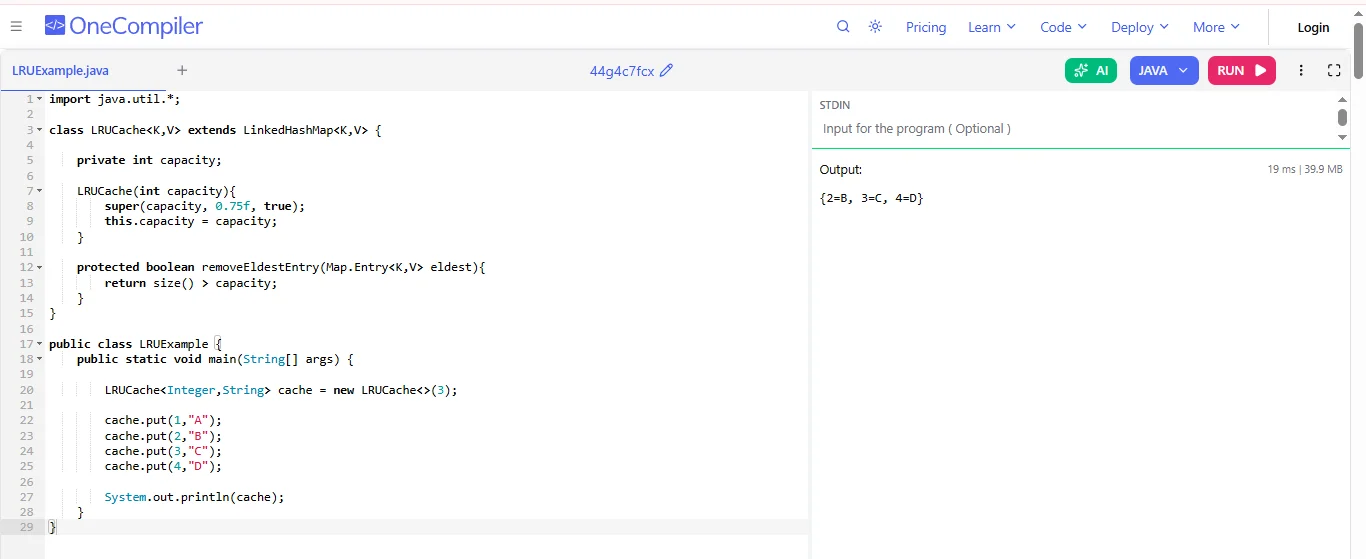
For LRU (Least Recently Used) caching, I would use LinkedHashMap. LinkedHashMap maintains the order of elements and it also supports access-order mode, which means elements move to the end whenever they are accessed. This makes it easy to track the least recently used item. By overriding the removeEldestEntry() method, we can automatically remove the oldest entry when the cache size exceeds a limit. This approach is simple, efficient and commonly used to implement LRU caches in Java.
Code Example:
|
I would use CopyOnWriteArrayList when my application has many read operations and very few write operations. This collection creates a new copy of the underlying array whenever a modification happens, so read operations do not require locking and are very fast. It is useful in multi-threaded environments where threads frequently read data but rarely modify it. For example, it works well for event listeners or configuration lists. However, because it copies the array on each modification, it is not suitable when updates happen frequently.
To remove duplicates while keeping the original insertion order, I would use a LinkedHashSet. First, I would pass the list elements into a LinkedHashSet because a Set automatically removes duplicates and a LinkedHashSet maintains insertion order. After that, if I still need a list, I can convert the LinkedHashSet back into an ArrayList. This approach is simple and efficient because LinkedHashSet provides constant-time performance for add operations while preserving the order in which elements were originally inserted.
I would use a TreeSet or TreeMap for this scenario. These collections store elements in a sorted order using a balanced tree structure. Whenever new data is inserted, the collection automatically places it in the correct sorted position. The insertion, deletion and search operations usually take O(log n) time. TreeSet is used when we only need unique sorted elements, while TreeMap is useful when we need key-value pairs sorted by keys. This makes them ideal for applications that require continuously sorted data.
For a leaderboard system, I would use a TreeMap or a PriorityQueue, depending on the requirement. TreeMap can keep scores automatically sorted by key, which makes it easy to retrieve the top players quickly. If multiple players have the same score, I can store a list of players as the value. Another option is PriorityQueue, which efficiently keeps the highest scores at the top. This allows quick access to top rankings. Using these collections ensures that whenever a new score is added, the leaderboard remains sorted automatically.
In this scenario, I would use CopyOnWriteArrayList. It is designed for cases where read operations happen very often but write operations are rare. The collection creates a new copy of the array whenever a modification occurs, which ensures that readers are not blocked by writers. This makes read operations very fast and thread-safe without locking. It is commonly used in systems like configuration lists, event subscribers or observer patterns, where data rarely changes but is frequently accessed.
I would use PriorityQueue when my application needs to process elements based on their priority instead of their insertion order. PriorityQueue stores elements in a heap structure, where the element with the highest priority is always available at the head of the queue.
This makes it very efficient for tasks where we repeatedly need to retrieve the smallest or highest-priority element. Operations like insertion and removal usually take O(log n) time, while accessing the top element is O(1).
A common use case is task scheduling, job processing systems or algorithms like Dijkstra’s shortest path, where elements must always be processed according to priority. If a custom priority is required, I can provide a Comparator to define the ordering
I would use LinkedHashSet for this requirement. LinkedHashSet combines the advantages of HashSet and LinkedList. It automatically removes duplicate elements while preserving the order in which elements were inserted. This makes it useful for applications where uniqueness and predictable iteration order are both important. Examples include maintaining unique user actions, search history or menu items.
I would use a HashMap where each word is stored as a key and its frequency is stored as the corresponding value. For each word, I can update the count using methods such as merge() or compute(). HashMap provides O(1) average-time lookup and update operations, making it suitable for processing large datasets efficiently. If multiple threads process the data concurrently, I would consider using ConcurrentHashMap instead.
Explore Our Trending Articles-
In this blog, I have given the most common Java Collections interview questions along with simple explanations to help you understand important concepts such as List, Set, Map, ArrayList, LinkedList, HashMap and TreeMap. I have also included topics like internal working, performance, thread safety, and real-world scenarios.
This guide is helpful for both freshers and experienced developers who want to prepare confidently for Java interviews and strengthen their understanding of the Java Collections Framework.
Yes, Java Collections questions are commonly asked in fresher interviews. Basic questions usually include topics like Collection vs Collections, List vs Set, ArrayList vs LinkedList and the hierarchy of the Java Collection Framework.
You should start by understanding the internal working of major classes like ArrayList, HashMap and TreeMap. Practicing coding examples, understanding time complexity and learning real-world use cases of collections can help you perform better in interviews.
Java Collections are widely used in real-world Java applications for storing and manipulating data. Interviewers ask these questions to evaluate a candidate’s understanding of data structures, performance optimization and efficient data handling.