Encapsulation in Java

Encapsulation in Java

April 6th, 2026
3793
8:00 Minutes

When you are working on real projects, you always want your data inside a class to remain protected from unwanted access. You can definitely do it with the help of Encapsulation in Java. It is an object-oriented concept that combines data and methods in one class. By keeping variables private and using public methods, encapsulation improves security, control and code maintenance in real-world applications.

I have worked on many Java projects, and I know how important encapsulation is in building secure and maintainable applications.

In this blog, I will explain to you what is encapsulation in Java, how it works and much more.

Let’s begin!

What is Encapsulation in Java?

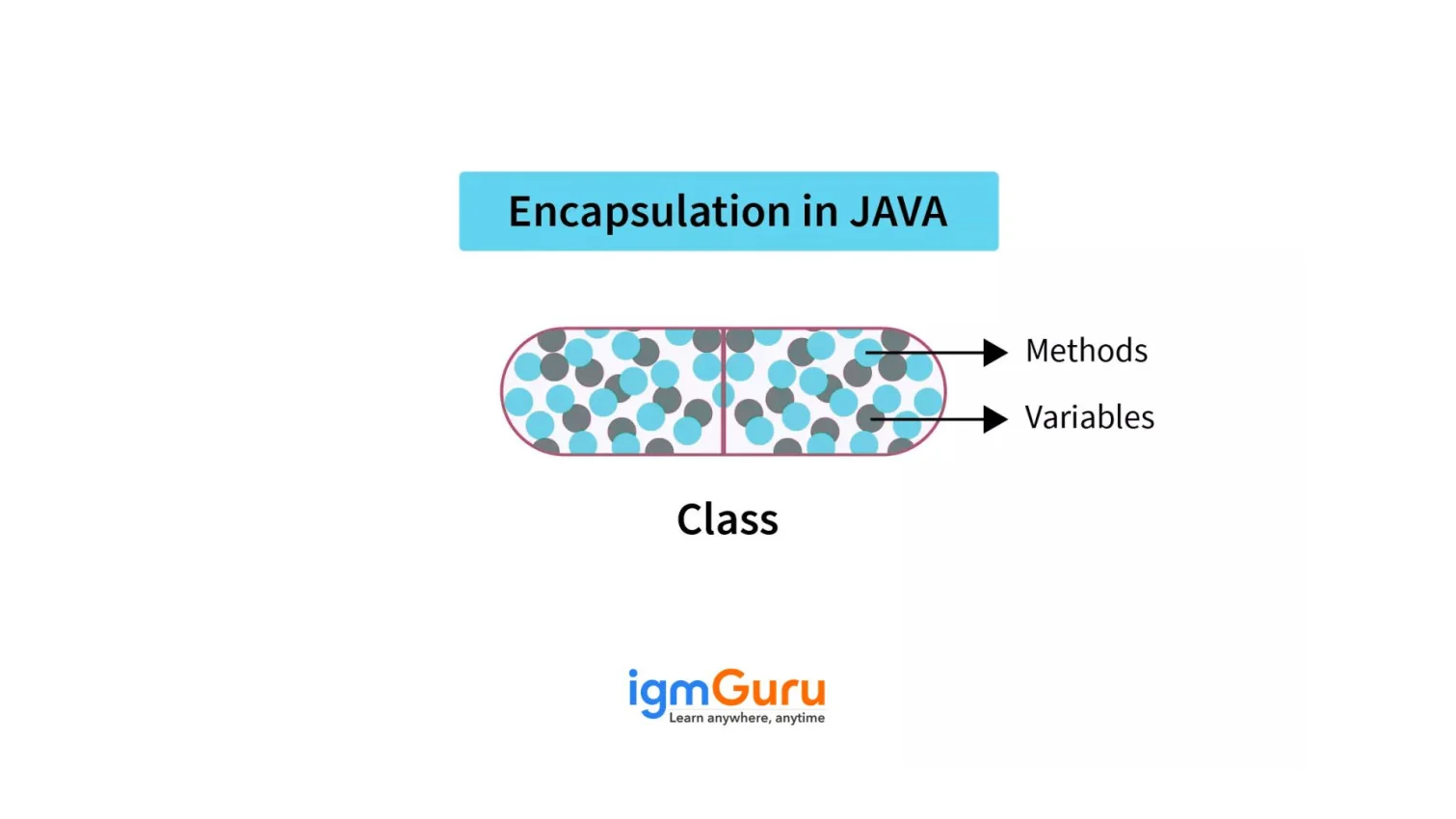
It is the process of bundling data and methods that operate on that data into a single unit, typically a class and restricting direct access to some of the components. This mechanism is also referred to as data hiding because it protects the internal state of an object from unauthorized external access.

Master Java Programming with Java Training

Boost your coding skills and gain hands-on knowledge in Java.

Explore Now

Why Encapsulation Matters

You need to understand its importance as it will help you protect your data and control how it is used. It will keep your program safe from unwanted changes and errors. Let me explain why encapsulation plays such an important role in Java programming:

  • Keeps data safe: It protects the data from direct access, so that other classes cannot change the data directly, which keeps it safe from mistakes.
  • Improves security: It controls who can see or change the data by using private variables and public methods.
  • Better control over data: It decides how data is accessed or updated by writing getter and setter methods.
  • Prevents unwanted changes: No one can change important data without permission. This reduces errors in the program.
  • Makes code easy to maintain: If you want to change how something works, it changes it inside the class without affecting other parts of the program.
  • Improves flexibility: This OOP concept changes the internal implementation of a class without changing the outside code.
  • Supports modular programming: This divides the program into small parts, which makes the program easier to understand and manage.
  • Makes debugging easier: Since data is controlled in one place, it is easier to find and fix errors.

How Encapsulation Works in Java

This programming approach means hiding data and controlling how it is used inside a class. Now let’s understand how it works in Java and it is done by using:

  • Private variables (data hiding): It makes variables private so no one can change them directly from outside the class.
  • Public getter and setter methods (controlled access): They create special methods to read or update the private data safely.

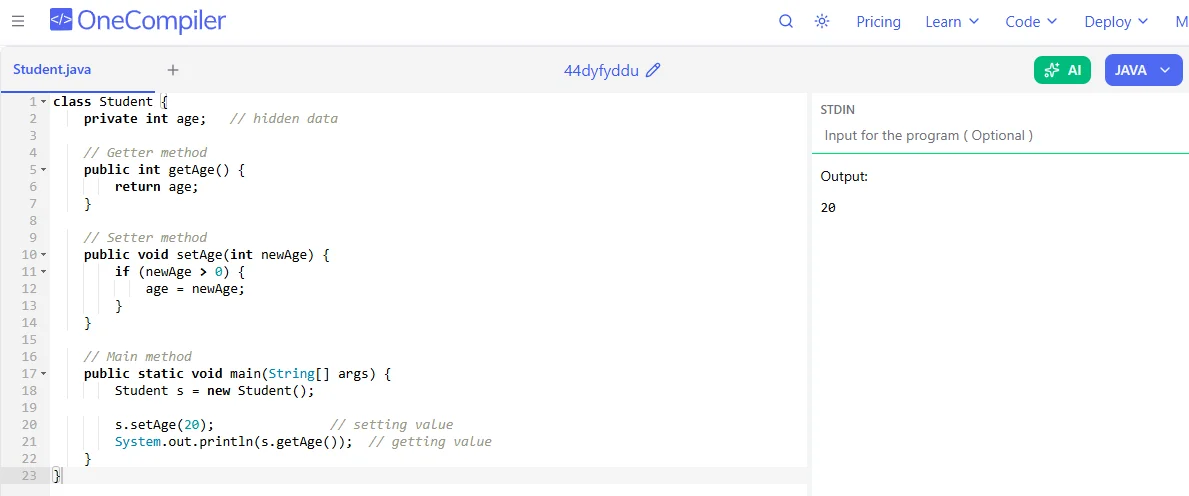
For Example:

class Student {
    private int age;   // hidden data

    // Getter method
    public int getAge() {
        return age;
    }

    // Setter method
    public void setAge(int newAge) {
        if (newAge > 0) {
            age = newAge;
        }
    }

    // Main method
    public static void main(String[] args) {
        Student s = new Student();

        s.setAge(20);               // setting value
        System.out.println(s.getAge());  // getting value
    }
}


What it does:

  • Creates an object s of the Student class.
  • Sets age using setAge(20).
  • Prints the age using getAge().
  • Now the program runs successfully because it has a main() method.

Read Also- Java Interview Questions and Answers

Steps to Achieve Encapsulation in Java

This is achieved by restricting direct access to class data and providing controlled access through methods. Here are some standard steps to implement encapsulation properly:

1. Declare Class Variables as Private

You cannot allow direct access to your variables from outside the class. When the variable is private, it can only be used inside that class.

WRONG WAY:

class Student {
    public String name;
    public int age;
}

In this, anyone can change the name and age directly:

This is unsafe:

Student s = new Student();
s.age = -5;   // Invalid age, but allowed!

With Encapsulation:

class Student {
    private String name;
    private int age;
}

Now it is totally protected.

2. Provide Public Getter Methods

A getter method is used to read or get the value of a private variable.

For example:

class Student {
    private String name;

    public String getName() {
        return name;
    }
}

Now we can safely read the value:

Student s = new Student();
System.out.println(s.getName());

We accessed the data using a method, but we cannot directly access or modify the actual variable.

3. Provide Public Setter Methods

A setter is a method that lets you update the value of a private variable.

For example:

class Student {
    private int age;

    public void setAge(int age) {
        if (age > 0) {   // Validation
            this.age = age;
        } else {
            System.out.println("Age must be positive!");
        }
    }
}

Now if someone tries:

Student s = new Student();
s.setAge(-10);  // Not allowed

Output:

Age must be positive!

4. Access Data Through Methods Only

Always use getters and setters instead of accessing variables directly.

Complete Example (All Steps Together)

class Student {

    // Step 1: Private variables
    private String name;
    private int age;

    // Step 2: Getter
    public String getName() {
        return name;
    }

    // Step 3: Setter
    public void setName(String name) {
        this.name = name;
    }

    // Step 2: Getter
    public int getAge() {
        return age;
    }

    // Step 3: Setter with validation
    public void setAge(int age) {
        if (age > 0) {
            this.age = age;
        } else {
            System.out.println("Invalid age!");
        }
    }
}

Using the Class:

public class Main {
    public static void main(String[] args) {

        Student s = new Student();

        s.setName("Nehal");   // Setting value
        s.setAge(20);

        System.out.println(s.getName());  // Getting value
        System.out.println(s.getAge());
    }
}

Read Also: Java MCQs

Encapsulation Using Getters and Setters

When you write a class in Java, you usually don’t want other parts of the program to directly change its data. Instead of allowing direct access to variables, this uses special methods called getters and setters to control how the data is read and modified, which makes the code safer and more organized.

For example:

class Student {
    private int age;   // private variable

    // Getter method
    public int getAge() {
        return age;
    }

    // Setter method
    public void setAge(int age) {
        if(age > 0) {   // condition to control data
            this.age = age;
        }
    }
}

Let me explain you how it works:

  • The variable age is private, so it cannot be accessed directly from outside the class.
  • getAge() allows us to read the value.
  • setAge() allows us to change the value, but only if it is valid (greater than 0).

Using the Class:

public class Main {
    public static void main(String[] args) {
        Student s = new Student();
        s.setAge(20);          // setting value using setter
        System.out.println(s.getAge());  // getting value using getter
    }
}

In simple words, it acts like a controlled access point to your class data. They help you decide how the data can be viewed or changed, which makes your program more secure and flexible.

Read Also- Java Tutorial

Access Modifiers and Encapsulation

In Java, a class contains data and methods. But not everything inside a class should be open for direct use. Some parts need to be restricted so they are used properly. That’s where access modifiers come in. Let me explain you more about this:

What are Access Modifiers?

Access modifiers are those keywords in Java that decide the visibility of class members, such as variables, methods, constructors, etc. They control where these members can be accessed from. Java has four main access modifiers:

  • Private: This is accessible only inside the same class, as it is the most important modifier for encapsulation.
  • Default (No modifier): Accessible only within the same package, so if you don’t write any modifier, Java automatically uses default access.
  • Protected: It is accessible within the same package and also in subclasses.
  • Public: Anyone can use it as this is accessible from anywhere in the program.

How Access Modifiers Support Encapsulation?

Here’s how they work together:

  • Variables are declared as private so they cannot be accessed directly from outside the class.
  • Public getter and setter methods are provided to read and update the values.
  • This ensures that data is accessed and modified in a proper and controlled way.

For Example:

class Student {
    private String name;

    public void setName(String name) {
        this.name = name;
    }

    public String getName() {
        return name;
    }

    public static void main(String[] args) {
        Student s = new Student();   // create object
        s.setName("Nehal");          // set value
        System.out.println(s.getName());  // print value
    }
}

Advantages of Encapsulation

This OOP concept helps protect data by keeping it safe inside a class and allowing access only through controlled methods. That is why it gives many benefits in programming:

1. Data Security: It hides the internal data of a class by making variables private. This prevents other classes from directly changing the data in the wrong way.

2. Better Control Over Data: Since data is accessed through getter and setter methods, we can add conditions before updating values.

3. Easy Maintenance: If we need to change how something works inside the class, we can do it without affecting other parts of the program.

4. Improved Code Flexibility: We can modify internal implementation without changing how other classes use it.

5. Increased Code Reusability: Encapsulated classes are structured and easier to reuse in different programs.

Disadvantages of Encapsulation

As this Java feature has many benefits, it also comes with limitations. Let us understand it as well, for your better understanding:

1. More Code: We need to write getter and setter methods for each variable, which increases the amount of code.

2. Slightly Slower Performance: Accessing data through methods instead of directly may take a tiny bit more time.

3. Can Make Code Complex: If there are too many private variables and methods, the class may become harder to understand for beginners.

Common Mistakes in Encapsulation

There are various mistakes beginners make that can reduce data security, break proper object-oriented design and even make the code harder to maintain. Here are some common mistakes beginners make while using encapsulation:

  • Making variables public: If variables are public, then anyone can change them directly, which breaks encapsulation.
  • Providing getters and setters for every variable unnecessarily: Not every variable needs both a getter and a setter. Some data should be read only.
  • Not adding validation in setter methods: Writing setters without checking values can allow invalid data, for example, negative age.
  • Making setter methods public when not required: Sometimes, data should not be modified after initialization.
  • Breaking encapsulation using default access: Forgetting to use private and relying on default access reduces protection.

Best Practices for Encapsulation

To avoid those common mistakes, here are some best practices you should follow to use encapsulation properly:

  • Always make variables private: This ensures proper data hiding.
  • Add validation inside setter methods: Always check input before assigning values.
  • Provide only necessary getters and setters: Do not expose data unless it is actually required.
  • Make variables read-only when needed: If a value is not supposed to change after it is set, then do not provide a setter method. Just give a getter so others can read it but not modify it.
  • Keep class responsibilities clear: One class should manage one specific responsibility.
  • Use meaningful method names: Clear naming improves readability and maintenance.

Encapsulation vs Abstraction

In OOP, encapsulation and abstraction are two important features that help in organizing code and making programs more secure and easier to understand. Some beginners get confused as they both are related to hiding data, they focus on different features and serve different purposes.

Here is a deep comparison between them:

Feature Encapsulation Abstraction
Basic Idea Wraps data and methods together in one unit (class). Hides internal details and shows only essential information.
Main focus Protecting data from direct access Hiding complexity from the user.
Level Works at the class level. Works at the design level.
Implementation Implemented using private variables and public getter/setter methods. Implemented using abstract classes and interfaces.
Type of Hiding Hides data (data hiding). Hides implementation details (implementation hiding).
Purpose To increase security and control over data To reduce complexity and improve understanding.
Example Feature Prevents direct modification of variables from outside the class. Allows users to use functionality without knowing the internal workings (like an ATM).

Wrapping Up

In this blog, I have explained everything about encapsulation in Java. It covered how encapsulation bundles data and methods into a single class and restricts direct access using private variables and public getter and setter methods. I also discussed its importance, advantages, disadvantages, common mistakes and how access modifiers support data hiding.

After reading this, you should practice using private variables and getter/setter methods in your own classes.

Explore Our Trending Articles-

FAQs on Encapsulation in Java

Q1. What is data hiding in Java?

Data hiding is where class variables are declared as private so they cannot be accessed directly from outside the class.

Q2. Is encapsulation mandatory in Java?

Encapsulation is not technically mandatory, but it is considered a best practice in OOP. Most Java applications use encapsulation to ensure security, maintainability and clean code structure.

Q3. What happens if we don’t use encapsulation in Java?

If we don’t use encapsulation, class variables can be accessed and modified directly from outside the class. This can lead to:

  • Invalid or inconsistent data
  • Security risks
  • Hard to maintain code
  • Increased debugging difficulty

About the Author
Author Nehal Sharma
About the Author

Nehal Sharma is a skilled content writer with expertise in Java, mobile development, and data analytics. She transforms complex data into actionable insights and has experience in business intelligence, data science, and Salesforce. She also simplifies technical concepts into clear, engaging content for learners and professionals.

Drop Us a Query
Fields marked * are mandatory
×

Your Shopping Cart


Your shopping cart is empty.