Do you feel confident about your knowledge of HTML, CSS, JavaScript, browser behavior and modern frameworks when preparing for a frontend developer interview? These interviews test both your theoretical understanding and your ability to solve real UI problems. Based on my experience working with frontend technologies and preparing for technical interviews, I have seen that many questions reflect real development scenarios such as debugging layouts, optimizing performance and building responsive interfaces. In this blog, I will share common frontend developer interview questions along with clear answers to help you strengthen your concepts and prepare with confidence.
The following questions are commonly asked by interviewers to check a candidate’s basic knowledge.
These are the main technologies used to build websites. HTML creates structure, CSS styles the design and JavaScript adds interactivity to make web pages dynamic and functional. Here is a brief differentiation between them:
| Parameters | HTML | CSS | JavaScript |
| Purpose | Creates the structure of a webpage. | Controls the style and design. | Adds interactivity and functionality. |
| Type | Markup Language | Style Sheet Language | Programming Language |
| What it controls | Page content (text, images, links) | Colors, fonts, layout and spacing | Actions like clicks, animations and updates |
| Example | <h1>Hello</h1> | h1 { color: pink; } | alert("Hello"); |
| Simple Analogy | Skeleton of a website | Clothes/design of a website | Brain/behavior of a website |
Semantic HTML elements clearly describe the meaning of the content inside them. Examples include header, article, section and footer. They improve readability, accessibility and SEO and help browsers and developers understand the webpage structure.
In HTML, class and id are attributes used to identify elements for styling and scripting, but they have different uniqueness and usage.
| Parameter | Class | ID |
| Usage | Used for multiple elements | Used for one unique element |
| Reusability | Can be reused many times | Should be used only once per page |
| CSS Selector | Uses .classname | Uses #idname |
| JavaScript Access | getElementsByClassName() | getElementById() |
| Priority | Lower CSS priority | Higher CSS priority |
Git is a version control system used to track code changes. In this, developers can save versions, collaborate with teams, manage code history and revert changes if needed. It is commonly used with platforms like GitHub.
Inline, block and inline-block are CSS display types that control how HTML elements appear, take space and behave in webpage layouts. Here is a brief differentiation of them:
| Parameter | Inline | Block | Inline-Block |
| Line Behavior | Does not start on a new line. | Starts on a new line | Does not start on a new line |
| Width | Takes only required width. | Takes full width of container | Takes only required width |
| Height & Width Setting | Cannot set width and height easily. | Width and height can be set | Width and height can be set |
| Common Examples | <span>, <a> | <div>, <p> | <button>, <img> |
| Layout Use | Used for small content inside text. | Used for section/layout structure | Used for aligned elements with custom size |
Responsive web design makes a website adapt to different screen sizes like mobile, tablet and desktop. It can be implemented using CSS media queries, flexible layouts (Flexbox/Grid), responsive images and relative units like percentage, vw and vh.
In JavaScript, == and === are comparison operators used to compare values, but they differ in type checking behavior.
| Parameter | == (Loose Equality) | === (Strict Equality) |
| Type Conversion | Converts data types before comparing. | Does not convert data types |
| Comparison | Compares only values | Compares value and data type |
| Accuracy | Less strict comparison | More strict and accurate |
| Example | 5 == "5" → true | 5 === "5" → false |
| Usage | Used when type conversion is acceptable | Preferred for safer comparisons |
The DOM is a programming interface for HTML and XML documents. It represents the webpage as a tree structure that allows JavaScript to access, modify and update elements dynamically.
For example:
|

Functions are blocks of reusable code designed to perform a specific task. They help organize code, reduce repetition and make programs easier to maintain.
For example:
|
In JavaScript, var, let and const are keywords that are used to declare variables. They differ in scope, reassignment ability and modern usage.
| Parameters | var | let | const |
| Scope | Works inside a function. If written inside { }, it can still be used outside the block. | Works only inside the block { } where it is declared. | Also works only inside the block { } where it is declared. |
| Reassignment | Value can be changed later. | Value can be changed later. | Value cannot be changed after assigning. |
| Redeclaration | You can declare the same variable again. | You cannot declare the same variable again in the same block. | You cannot declare it again. |
| Usage | Old JavaScript. Not recommended now. | Commonly used for variables that may change. | Used for values that should not change. |
| Example | var age = 20; | let score = 90; | const PI = 3.14; |
localStorage is capable of retaining information indefinitely until it is deleted while sessionStorage can hold data only for a browsing session and cookies store very limited data that is transmitted with each request. Data storage is generally used for user preferences, sessions, and authentication.
Read Also: Java Tutorial for Beginners
The following questions are asked to candidates to check what they have learned in their previous job:
Debouncing and throttling are techniques used to control how frequently a function executes during repeated events like typing, scrolling or resizing. It delays the execution until the event stops for a specified time, commonly used in search inputs. Throttling limits the function to run at fixed intervals while the event continues. Both techniques improve performance by reducing unnecessary function calls and optimizing browser resources.
Flexbox and CSS Grid are modern CSS layout systems used to design responsive webpages by arranging elements efficiently in different structures.
| Parameters | Flexbox | CSS Grid |
| Layout Type | One dimensional (row OR column). | Two dimensional (rows AND columns) |
| Control | Content-based layout | Layout-based structure |
| Best for | Aligning items in a single direction | Complex layouts |
| Uses |
|
|
The Virtual DOM is a lightweight copy of the real DOM kept in memory. When a change occurs, frameworks like React update the Virtual DOM first, compare it with the previous version and then update only the changed parts in the real DOM. This process is called diffing that reduces unnecessary DOM operations and improves application performance.
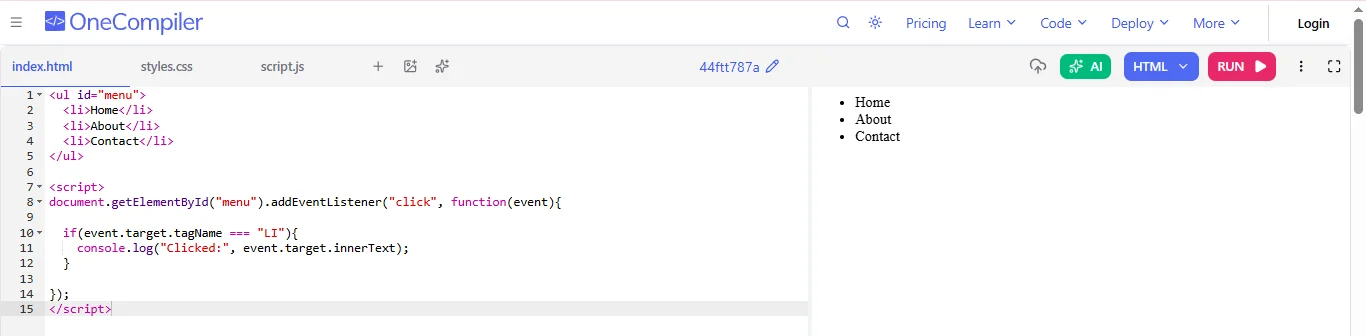
Event delegation is a technique where a single event listener is attached to a parent element instead of multiple child elements. The parent listens for events that bubble up from its children. This improves performance, reduces memory usage and works well for dynamically added elements.
For example:
|
Synchronous programming executes tasks one after another, blocking further execution. Asynchronous programming runs tasks independently, which allows other operations to continue simultaneously. Here is a brief differentiation of them:
| Parameters | Synchronous Programming | Asynchronous Programming |
| Execution | Code runs step by step in order. Each task must finish before the next one starts. | Code can run tasks in the background while other code continues executing. |
| Blocking | It is blocking in nature, which means the next operation waits until the current one completes. | It is non blocking in nature, which means other tasks can continue without waiting. |
| Performance | Can slow down the application if a task takes a long time. | Improves performance by handling time consuming tasks efficiently. |
| Use cases | Simple calculations or operations that finish quickly. | API calls, file loading, timers and network requests. |
| Example | Normal function calls and loops. | Promises, async/await, setTimeout and fetch API. |
Promises represent the result of an asynchronous operation that may complete in the future with either success or failure. Async/await is a modern syntax built on promises that makes asynchronous code look like synchronous code. It improves readability, simplifies error handling and makes complex async logic easier to manage.
Media queries are CSS techniques used to apply styles based on device characteristics like screen width, height or orientation. They help create responsive designs by adjusting layouts, font sizes and elements for different devices such as mobiles, tablets and desktops.
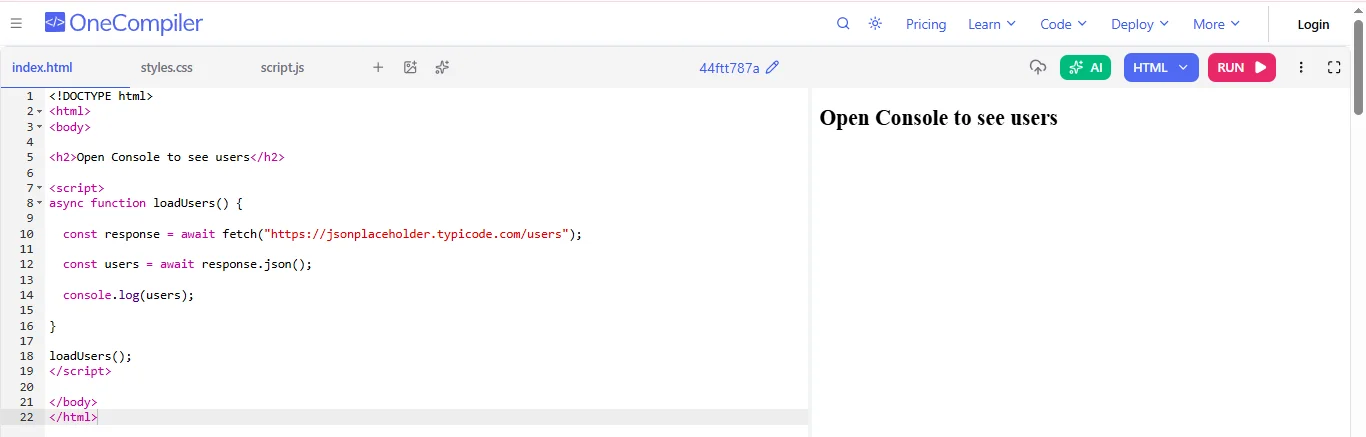
REST APIs allow communication between the frontend and backend using HTTP methods like GET, POST, PUT and DELETE. Frontend applications send requests using tools like fetch or Axios and receive data usually in JSON format. This data is then used to display dynamic content on the user interface.
Example:
|
Browser caching stores static resources such as images, CSS and JavaScript files in the user’s browser. When the user revisits the site, the browser loads these files from local storage instead of downloading them again. This reduces server requests, speeds up page loading and improves overall performance.
Frontend frameworks provide structured development, reusable components and better state management. They improve development speed, maintainability and scalability of applications. Features like Virtual DOM, two-way data binding and in built tools also help create efficient and interactive user interfaces.
CORS stands for Cross-Origin Resource Sharing, which is a security mechanism implemented in web browsers for the sake of limiting traffic between different domains. CORS is relevant when a frontend application requires accessing some resources from the third party (the other origin).
Servers must set certain CORS headers to allow such requests.
The following interview questions are for those candidates who have 5+ years of work experience:
To optimize performance in large frontend applications, I focus on reducing bundle size, minimizing re-renders and improving loading speed. I use techniques like code splitting and lazy loading to load only necessary components. I optimize images using compression and modern formats like WebP. For rendering performance, I use memoization techniques such as React.memo, useMemo and useCallback to avoid unnecessary re-renders. I also implement virtualization for large lists using libraries like react-window and I monitor performance using tools like Chrome DevTools, Lighthouse and Web Vitals, which help identify bottlenecks and optimize runtime performance.
JavaScript is single-threaded, which executes one task at a time. The event loop allows it to handle asynchronous operations without blocking the main thread. When synchronous code runs, it is executed in the call stack. Asynchronous tasks like API calls, timers or promises are handled by Web APIs in the browser. Once completed, their callbacks are placed into queues. Promises go to the microtask queue, while timers and other callbacks go to the callback queue. The event loop continuously checks if the call stack is empty and then pushes tasks from these queues to be executed. This process enables efficient non-blocking asynchronous programming.
In large applications, I use a combination of state management strategies based on data complexity. For local UI states, I use useState or useReducer. For sharing simple global data like themes or authentication, I use the Context API. For complex applications with many components interacting with shared state, I prefer Redux Toolkit, which provides predictable state management and powerful debugging tools. For managing server data, I often use tools like React Query that provide caching, synchronization and automatic refetching. This layered approach helps maintain scalability, improves performance and keeps state management organized in large applications.
When I am designing a scalable frontend architecture, I focus on modularity, maintainability and separation of concerns. I typically follow a feature-based folder structure, where each feature contains its components, services and styles. I separate UI components from business logic to improve reusability. Shared components are placed in a common component library. For state management, I implement tools like Redux or Context depending on complexity. I also created a dedicated API service layer to handle backend communication. Using TypeScript improves type safety and maintainability and I also enforce consistent coding standards with linting tools and documentation to ensure the project remains scalable as the team grows.
To improve website loading speed, I implement several optimization techniques. Lazy loading ensures components and images load only when they are needed, reducing the initial load time. Code splitting divides large JavaScript bundles into smaller chunks so that users only download the code required for the current page. Tree shaking removes unused code during the build process, reducing bundle size. I also optimize assets by compressing images and using modern formats. Implementing caching strategies, using CDNs for static assets and enabling file minification further improve performance. When you combine these techniques, it will definitely reduce page load time and enhance the overall user experience.
React Lazy Loading Example:
|
To ensure cross-browser compatibility, I start by using web standards and widely supported features. I use tools like Babel to transpile modern JavaScript into versions supported by older browsers. For unsupported features, I include polyfills to provide compatibility. I also use CSS resets or normalize.css to maintain consistent styling across browsers. Vendor prefixes may be added when necessary for CSS properties. During development, I regularly test the application on different browsers such as Chrome, Firefox, Safari and Edge. Tools like BrowserStack or LambdaTest help simulate multiple browser environments, which make sures that the application behaves consistently across platforms.
Server-side rendering (SSR) is a technique where the server generates the complete HTML of a page and sends it to the browser. This allows the user to see content immediately when the page loads. In contrast, client-side rendering (CSR) loads a JavaScript bundle first and the browser then generates the UI dynamically. SSR improves SEO and initial loading performance, especially for content-heavy websites. However, it increases server workload. CSR provides a more interactive user experience after the application loads but may have slower initial rendering. Frameworks like Next.js support SSR, while many single-page applications rely primarily on CSR.
Handling security issues in frontend development involves preventing common vulnerabilities like XSS (Cross-Site Scripting) and Cross-Site Request Forgery. To prevent XSS attacks, I avoid directly inserting untrusted data into the DOM using innerHTML. Frameworks like React automatically escape user input, which reduces risk. I also use Content Security Policy and sanitize user inputs when necessary. To prevent CSRF attacks, I implement CSRF tokens, use secure authentication methods and configure cookies with SameSite attributes. I ensure all communication happens over HTTPS and follow secure coding practices to protect sensitive user data.
A strong testing strategy includes multiple levels of testing to ensure application reliability. I write unit tests using tools like Jest and React Testing Library to verify that individual components and functions work correctly. For integration testing, I test interactions between components and ensure they function together as expected. I also perform end-to-end testing using tools like Cypress or Playwright, which simulate real user behavior in the browser. I focus on testing user interactions rather than internal implementation details. Integrating these tests into CI/CD pipelines ensures code quality and helps detect issues early during development.
To manage reusable components and maintain consistency, I follow a component-based architecture and create a shared component library. Common UI elements like buttons, forms, modals and layouts are built as reusable components. I often follow the Atomic Design methodology, which organizes components into atoms, molecules and organisms. Tools like Storybook help document and test components independently. I also implement a design system that defines consistent colors, typography, spacing and UI patterns. Enforcing coding standards with linting tools and maintaining clear documentation ensures that all developers follow the same practices across the project.
Web Workers are used for running JavaScript codes in a separate background thread while the main thread is running the User Interface (UI) changes. The worker is ideal for running heavy tasks such as processing data, making complex computations, and parsing files without interfering with the user interface.
Read Also: Java Interview Questions and Answers
The following scenario-based questions test how developers solve real UI problems:
If my React web application takes 5 to 6 seconds to load on mobile, the first step would be identifying the exact performance bottleneck. I would start by using tools like Chrome DevTools, Lighthouse and WebPageTest to analyze metrics such as First Contentful Paint, Largest Contentful Paint and Time to Interactive. I would also check the Network tab to identify large JavaScript bundles, slow API calls or unoptimized images.
After identifying the issue, I would apply several optimization techniques. I would implement code splitting and lazy loading using React. lazy and Suspense so that only the required components load initially instead of the entire application bundle. I would also reduce the bundle size by removing unused dependencies and enabling tree shaking. Then I would optimize images using compressed formats such as WebP and responsive image loading and implement caching and use a CDN to improve asset delivery speed. To improve rendering performance, I would use React.memo, useMemo and useCallback to prevent unnecessary re-renders. These optimizations together can significantly improve the loading time and overall user experience on mobile devices.
In a large e-commerce platform, it is very important to manage shared state efficiently because multiple components rely on data such as product listings, cart items and user preferences.
First, I would categorize the state into local state, global state and server state. Local state, such as UI toggles or form inputs, can be managed using React’s useState or useReducer. However, shared data like cart or authentication should be stored in a global state management system.
For global state, I would use Redux Toolkit or Zustand because they provide predictable state updates and better scalability in large applications. Redux Toolkit also simplifies Redux development by reducing boilerplate code and organizing state into feature-based slices.
For server-related data like product listings or user information fetched from APIs, I would use React Query (TanStack Query). It efficiently handles data fetching, caching, background updates and synchronization with the server, which improves performance and reduces unnecessary API calls.
Finally, I would structure the application into modular feature-based folders, where each feature manages its own state and logic. This architecture keeps the system scalable, maintainable and easier for multiple developers to work on simultaneously.
If users relying on screen readers cannot navigate the dashboard, the first step would be performing an accessibility audit using tools such as Lighthouse, Axe DevTools or WAVE to identify accessibility issues.
I would also add ARIA attributes such as aria-label, aria-labelledby and aria-expanded to provide additional context for assistive technologies where semantic HTML alone is not enough.
Another important step is ensuring keyboard accessibility. All interactive elements should be navigable using the Tab key and focus states should be clearly visible. I would also make sure form elements have proper labels and error messages for screen readers.
Finally, I would test the application using screen readers like NVDA, VoiceOver or JAWS and ensure it follows WCAG accessibility guidelines. These improvements ensure the application is usable for all users and provides an inclusive user experience.
For a large enterprise platform where multiple teams work on different modules such as payments, analytics and user management, I would design the frontend architecture using a Micro-Frontend architecture.
In this approach, the application is divided into smaller independent frontend applications. Each team owns a specific module and can develop, test and deploy it independently without affecting other teams' work.
To implement this, I could use tools like Webpack Module Federation or frameworks that support micro-frontends. Each module would expose its components or features, which can then be integrated into a shell or host application.
I would also ensure that shared dependencies such as UI libraries, authentication services and design systems are standardized across teams to maintain consistency.
Using component libraries and design systems ensures that all modules follow the same UI patterns. This architecture improves scalability, allows teams to work independently and makes the application easier to maintain as it grows.
For a website where SEO and fast loading times are critical, I would choose Server-Side Rendering (SSR) or Static Site Generation (SSG) depending on the nature of the content.
If the content does not change frequently, such as blogs or marketing pages, I would use Static Site Generation. With SSG, pages are generated at build time and served as static HTML files through a CDN. This results in very fast loading times and excellent SEO because search engines can easily crawl the fully rendered HTML.
If the content changes frequently, such as user dashboards or dynamic product data, I would use Server-Side Rendering. In SSR, the server generates the HTML for each request, ensuring that users and search engines receive fully rendered pages immediately.
Frameworks like Next.js support both SSR and SSG, making it easy to implement hybrid rendering strategies. These approaches improve initial page load speed, search engine visibility and overall user experience compared to traditional client side rendering.
This is a race condition caused by multiple asynchronous requests completing in a different order than they were initiated. I would ensure that only the response from the most recent request is used to update the user interface.
One approach is to use the AbortController API to cancel the previous request whenever the user changes a filter or starts a new search. This prevents unnecessary requests from continuing in the background and ensures that outdated responses do not update the application state.
I would also implement debouncing for inputs such as search fields so that an API request is triggered only after the user stops typing for a short period. If I am using a data-fetching library such as TanStack Query, I can use its built-in query management and caching capabilities to handle changing requests more efficiently.
Combining request cancellation, debouncing and proper state management prevents stale data from appearing in the UI while also reducing unnecessary network requests.
If a single-page application gradually becomes slower, I would first investigate whether unused resources are remaining in memory after components are removed. I would use the Memory and Performance tools in Chrome DevTools to monitor memory usage, capture heap snapshots and identify objects that are not being garbage collected.
Common causes of frontend memory leaks include event listeners that are never removed, active timers, WebSocket connections, subscriptions and asynchronous operations that continue after a component has been unmounted.
In a React application, I would use the cleanup function inside useEffect to remove event listeners, clear timers and close subscriptions when a component unmounts. I would also cancel unnecessary network requests and ensure that references to unused DOM elements or large objects are released.
After making these changes, I would repeat the same navigation flow while monitoring memory usage to verify that memory returns to a stable level instead of continuously increasing.
I would first analyze real-user performance data because laboratory tests do not always represent the experience of users on slower mobile devices and networks. I would use tools such as PageSpeed Insights, the Chrome User Experience Report and Chrome DevTools to identify the elements and interactions causing poor performance.
To improve LCP, I would optimize the largest visible content element by compressing images, using modern image formats, preloading critical resources and reducing render-blocking CSS and JavaScript. I would also improve server response time and use a CDN where appropriate.
For poor INP, I would identify long tasks that block the browser's main thread. I would break large JavaScript tasks into smaller operations, reduce unnecessary JavaScript execution and optimize expensive event handlers. Heavy computations can also be moved to Web Workers when appropriate.
I would then continue monitoring real-user Core Web Vitals after deployment to confirm that the changes improve performance across actual devices and network conditions.
I would design the application so that network failures do not leave users with blank screens or unclear error messages. Every API-dependent interface should include clear loading, success, empty and error states.
For temporary network failures, I would implement retry logic with appropriate limits and exponential backoff instead of repeatedly sending requests immediately. Previously fetched data can be cached so users can continue viewing useful information while fresh data is being requested.
For actions such as submitting forms, I would disable duplicate submissions and clearly show whether the request is processing, successful or unsuccessful. Where appropriate, I could implement optimistic UI updates while providing a rollback mechanism if the server request fails.
For applications that require stronger offline capabilities, I would consider using service workers and local storage technologies such as IndexedDB to cache important resources and data. The goal is to make the application remain understandable and usable even when network conditions are unreliable.
I would avoid storing sensitive long-lived authentication tokens in localStorage when the application's security requirements make token theft through XSS a significant concern. A common approach is to store session or refresh credentials in Secure, HttpOnly and appropriately configured SameSite cookies so that JavaScript running in the browser cannot directly access them.
I would use short-lived access tokens and implement a secure token refresh mechanism on the server. All communication containing authentication data should use HTTPS, and the application should implement a strong Content Security Policy to reduce the risk of malicious scripts executing in the browser.
I would also avoid inserting untrusted content directly into the DOM and sanitize user-generated content when necessary. Authentication and authorization should always be enforced on the backend because frontend route protection alone cannot prevent unauthorized API access.
Finally, I would handle session expiration securely by clearing client-side authentication state and redirecting the user to the login page when authentication can no longer be refreshed. This approach combines secure credential storage, XSS protection and server-side authorization to create a stronger authentication flow.
This article has covered a comprehensive list of Frontend Developer interview questions with detailed answers. Exploring them will make you ready to tackle your next interview with full confidence. Keep practicing and exploring new trending technologies to stay updated with real-time knowledge to get your desired job.
There are basically 3 to 5 rounds that take around 1 to 2 hours each. Small startups may have 2 to 3 rounds, while FAANG or large tech companies require 4 to 5+ rounds.
You should have a comprehensive experience that balances your core fundamentals (HTML, CSS and JS) with modern frameworks (React, Vue and Angular) and increasingly, frontend-specific system design
No, React is not strictly required for every frontend interview. In most modern frontend roles, it is expected for mid-level and senior positions.
Explore Our Trending Articles-