Today's fast-moving tech world has become highly competitive, DevOps has become an important method for companies seeking to streamline their software development and deployment procedures. Deep down this method lies in Linux, the open-source operating system. This gives power to the DevOps engineers to accomplish scalability, flexibility and automation. In this blog, we will discover the basics of Linux for DevOps, what Linux is for DevOps, basic commands of Linux for DevOps, and much more with real-life examples.
Linux is an open-source operating system that was initially made as a free substitute to proprietary Unix-based systems. This has grown into a strong and widely adopted operating system which is used in multiple sectors, like servers, embedded systems, desktops and mobile phones.
Linux is famous for its stability, security, flexibility and scalability, which makes it an amazing choice for DevOps practices. Now, let me tell you why Linux is important for DevOps, it is important because:
Linux is open-source in nature, allowing DevOps engineers to access and refine the source code, authorizing customization and improvement to achieve specific needs and requirements. This flexibility is important for customizing the operating system to meet the needs of different software development and deployment workflows.
Linux is commonly used for stability and reliability, which makes it an amazing choice for critical systems and large-scale deployments. Its strong architecture and continuous enhancements via community-driven development ensure a strong base for DevOps workflows.
This interface is an important feature of Linux, offering strong tools and utilities for handling and automating multiple tasks. The DevOps engineers usually grip the CLI for writing scripts, automating procedures and performing system administration and allowing efficient and smooth operations.
Linux possesses an extensive ecosystem of accessible software and tools that align perfectly with DevOps principles. Whether it is configuration management tools such as Ansible and Puppet or containerization platforms such as Docker and Kubernetes, Linux offers an extensive ecosystem for applying DevOps practices.
Linux provides broad hardware and software compatibility, which makes it adaptable to vast ecosystems. The DevOps engineers can very easily deploy applications on multiple Linux distributions and cloud platforms, making sure of portability and lessening compatibility issues throughout the development and deployment stages.
Read Also: DevOps Tutorial For Beginners
Before learning each Linux command in detail, it is helpful to understand what the most commonly used commands do and where they are used in DevOps. The following table provides a quick overview of essential Linux commands that DevOps engineers use daily for file management, process monitoring, networking, automation, and system administration.
| Linux Command | Purpose | Common DevOps Use |
|---|---|---|
pwd |
Displays the current working directory. | Identify your current project or deployment location. |
ls |
Lists files and directories. | View application files, configuration files, and logs. |
cd |
Change the current directory. | Navigate between project folders and system directories. |
mkdir |
Creates a new directory. | Create folders for deployment scripts, backups, or projects. |
rm |
Deletes files and directories. | Remove temporary files, old logs, or unused backups. |
cat |
Displays file contents. | View configuration files and application logs. |
grep |
Searches for specific text. | Find errors, warnings, or keywords in log files. |
find |
Locates files and directories. | Search configuration files, scripts, or log files. |
chmod |
Change file permissions. | Grant execute permissions to deployment scripts. |
chown |
Change the file ownership. | Assign correct ownership to users and services. |
ps |
Displays running processes. | Monitor applications and running services. |
top / htop |
Monitors system resources. | Check CPU and memory usage during deployments. |
systemctl |
Manages Linux services. | Start, stop, restart, or check application services. |
journalctl |
Views system logs. | Troubleshoot application and server issues. |
curl |
Sends HTTP requests. | Test REST APIs and verify application endpoints. |
ssh |
Connects to remote servers. | Manage cloud servers securely. |
scp |
Copies files securely between servers. | Transfer deployment packages and configuration files. |
rsync |
Synchronizes files and directories. | Perform efficient backups and deployments. |
cron |
Schedules automated tasks. | Run backups, maintenance jobs, and deployment scripts automatically. |
DevOps engineers make use of Linux every day as it's an open-source, fast and easy to personalize. Above all, most of the DevOps tools, such as Docker, Kubernetes, Ansible, Terraform, and Jenkins, are made to operate best on Linux.
So, if you want a career in DevOps, learning Linux is among the first and foremost crucial steps. It assists you to work faster, solve problems easily and make use of tools which DevOps teams depend upon every day. Now, let us look at the basic commands with examples I made of Linux for DevOps which are important and useful for DevOps.
This shows the current directory, assisting you in identifying your current location in the file system. pwd stands for Print working directory.
pwd # /home/devops/project |
This command is for listing files and directories in the current directory.
ls -l # long format ls -a # show hidden files |
This command is for changing the directory, stands for 'change directory'
| cd /var/log |
This command is for creating/removing directories
mkdir deploy_scripts rmdir old_logs |
This command is for creating empty files.
| touch app.log |
This command is for deleting files/directories.
rm file.txt rm -rf old_backups/ |
This command displays file contents.
| cat config.yaml |
It is for viewing large files, page by page.
| less /var/log/syslog |
This command is for editing files.
| nano nginx.conf |
This command shows the running processes.
| ps aux | grep nginx |
This one is for monitoring systems in real-time.
This command stops a process.
| kill -9 1234 # kill process by PID |
This command changes file permissions.
| chmod 755 script.sh |
It has the ability to change file owners.
| chown devops:devops script.sh |
It is for checking the connectivity.
| ping google.com |
This very command is for sending requests to endpoints.
| curl -I https://igmguru.com |
This shows the open ports and connections.
| ss -tuln |
sudo apt update && sudo apt upgrade sudo apt install docker.io |
| sudo yum install git |
This command is used for archiving files.
tar -cvf backup.tar /var/www/ tar -xvf backup.tar |
This command is for compressing files.
gzip log.txt gunzip log.txt.gz |
This command creates users.
| sudo adduser deploy |
This command is for setting/changing passwords.
This command runs as another user or root.
This one is for searching text in files.
| grep "ERROR" app.log |
This command is for locating files.
| find /var/log -name "*.log" |
This one is for processing text (automation pipelines).
awk '{print $1}' access.log sed 's/dev/prod/g' config.yaml |
This command shows the disk usage.
It shows the size of the folder.
This command shows the memory usage.
These basic commands are basically the foundation for daily life DevOps tasks; they are for monitoring systems, troubleshooting, deploying code and automation with scripts.
The advanced commands assist you with automation, troubleshooting, security hardening and monitoring. These advanced commands are basically the bread and butter of DevOps. Now, we will take a look at the advanced command for Linux for DevOps with the examples I produced to make things easier for you to understand.
This runs the process in the background with &.
| ./deploy.sh & |
| jobs |
| fg %1 |
systemctl status nginx systemctl start docker systemctl enable jenkins |
This command is for viewing system logs.
| journalctl -u nginx --since "10 min ago" |
This command is for Kernel logs which is useful for crashes.
This one traces system calls.
| strace -p 1234 |
This command is for capturing network packets.
| sudo tcpdump -i eth0 port 80 |
This command debugs ports and connections.
| nc -zv myserver 22 |
This command is for the Firewall rules.
| cat access.log | grep "500" | awk '{print $1}' | sort | uniq -c |
It counts unique IPs that caused HTTP 500 errors.
It runs commands on input.
| cat servers.txt | xargs -n1 ping -c1 |
These commands are put to use for performance metrics.
This monitors the usage of I/O.
This is for listing open files and ports.
| lsof -i :8080 |
This command is for syncing directories efficiently.
| rsync -avz /var/www/ user@server:/backup/ |
It secures the file copy.
| scp file.txt user@server:/tmp/ |
This command sets process priority.
| nice -n 10 ./build.sh |
It runs commands immune to hangups.
| nohup ./deploy.sh & |
This command manages the sudo permissions.
Whereas this one is for user activity logs.
ssh-keygen & ssh-copy-id → Setup passwordless SSH ssh-keygen -t rsa ssh-copy-id user@server |
This command is for scheduled jobs.
crontab -e # Run backup every night at 2 AM 0 2 * * * /scripts/backup.sh |
This is for running one-time jobs.
| echo "reboot" | at now + 5 minutes |
Also Explore: Linux Command Cheat Sheet
Now, let us take a look at some of the additional commands of Linux for DevOps, and to make things easier for you to understand, I made a table to ease up your understanding of these additional commands.
| Command | Purpose / Usage | Example |
| uptime | This shows system uptime & load averages. | uptime |
| hostnamectl | It displays or sets hostname details | hostnamectl set-hostname dev-server |
| env | This shows environment variables. | env |
| export | It sets the environment variable. | export APP_ENV=production |
| alias | This is for creating shortcuts for commands. | alias ll='ls -la' |
| history | This command shows command history. | `history |
| which | It is for finding command locations. | which python3 |
| whereis | This locates binary, source, and man page. | whereis nginx |
| du | It shows directory/file size. | du -sh /var/log |
| df | This command represents disk space usage. | df -h |
| uptime | It checks how long the system has been running. | uptime |
| whoami | This command displays the current logged-in user. | whoami |
| groups | It represents the groups of a user. | groups devops |
| id | It displays the UID/GID info. | id devops |
| scp | This command copies files safely over SSH. | scp file.txt user@host:/tmp/ |
| wget | It downloads files from the web. | wget https://example.com/file.tar.gz |
| curl | It is for API testing/file transfer. | curl -X GET https://api.github.com |
| tee | This command writes the output to file and screen. | `echo "deploy success" |
| diff | This command compares two files. | diff config1.yaml config2.yaml |
| cmp | This is for Byte-by-byte comparison. | cmp script1.sh script2.sh |
| uniq | It is for filtering duplicate lines. | `sort users.txt |
| sort | This is for sorting lines in a file. | sort -nr access.log |
| watch | It runs the command repeatedly. | watch -n 5 df -h |
| uptime | This command has a fast server load summary. | uptime |
| ss | This command is for pocket statistics and is better than netstat. | ss -tuln |
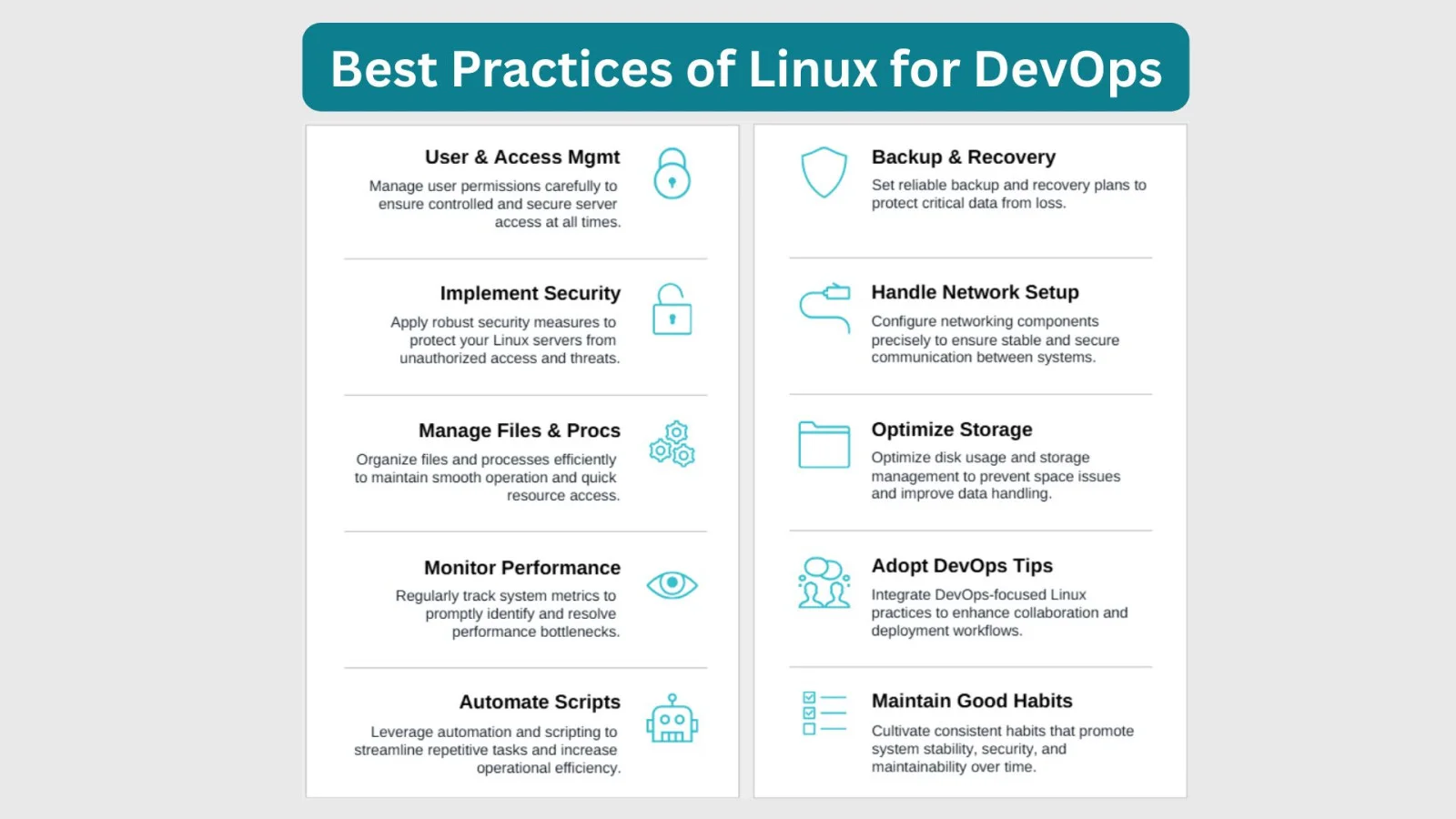
These best practices of Linux for DevOps assist you in ensuring stability, security, automation and efficiency while managing servers. Read on to know these best practices.
Read Also: Top DevOps Interview Questions and Answers
When I started working with DevOps tools and cloud platforms, one thing became obvious very quickly: Linux is everywhere. Whether I was deploying applications on cloud servers, configuring Docker containers, setting up Kubernetes clusters, or automating infrastructure, Linux was almost always the operating system running behind the scenes. This is one of the main reasons Linux has become a fundamental skill for every DevOps engineer.
In my experience, the majority of production environments use Linux because it is stable, secure, and efficient. Cloud providers such as AWS, Microsoft Azure, and Google Cloud offer a wide range of Linux-based virtual machines and managed services. As a result, DevOps engineers frequently work with Linux servers throughout the application lifecycle.
DevOps relies heavily on automation, and Linux provides powerful command-line tools and scripting capabilities for this purpose. Tasks such as deployments, log analysis, backups, monitoring, and configuration management can be automated using Bash scripts and Linux utilities. This significantly reduces manual effort and improves operational efficiency.
Many popular DevOps tools were originally designed to run on Linux. Docker, Kubernetes, Jenkins, Ansible, Terraform, Git, and numerous monitoring solutions work seamlessly in Linux environments. Because of this compatibility, Linux often becomes the preferred platform for building CI/CD pipelines and managing infrastructure.
One reason organizations trust Linux for critical workloads is its strong security model. Features such as file permissions, user access controls, secure remote administration, and frequent community updates help maintain secure environments. In addition, Linux systems are known for their reliability and ability to run continuously for long periods without interruption.
Compared to many desktop-oriented operating systems, Linux typically consumes fewer system resources. This allows organizations to maximize server performance and reduce infrastructure costs. I have often seen Linux used in environments where efficiency and scalability are critical business requirements.
Another advantage is flexibility. Since Linux is open source, organizations can customize the operating system to suit their specific requirements. Different distributions such as Ubuntu, Debian, Rocky Linux, and Red Hat Enterprise Linux allow teams to choose an environment that matches their operational needs and support requirements.
From my perspective, learning Linux is one of the highest-value investments a DevOps professional can make. The deeper your understanding of Linux commands, system administration, networking, permissions, and automation, the easier it becomes to work with modern DevOps tools, cloud platforms, and large-scale production environments.
Mastering the basics of Linux for DevOps is more than just learning commands; it's about building a solid foundation for automation, security and efficient system management too. From file handling to process monitoring and networking, these skills give power to the DevOps engineers to smooth out deployments and troubleshoot with confidence. Through practicing regularly and blending Linux with modern DevOps tools, you'll be prepared to handle real-life obstacles. Remember, strong Linux fundamentals are the stepping stones to becoming a reliable and potent DevOps professional.
Linux is for moving files, checking logs, installing software, operating scripts and fixing problems in DevOps.
The 'best' Linux distro relies on your needs and requirements but Ubuntu is amazing for freshers and general development because of its user friendliness and expanded software environment.
Their salaries range from ₹3.4Lacs to ₹19Lacs, many top companies and special roles might offer higher compensation.
Linux for DevOps is important because most servers, containers, and cloud platforms run on Linux.
Key skills include Linux commands, shell scripting, process management, file permissions, and networking.
Yes, DevOps engineers widely use Linux because most servers, cloud platforms and DevOps tools run on Linux. It offers better control, automation and stability for development and deployment tasks.
Course Schedule
| Course Name | Batch Type | Details |
| DevOps Training | Every Weekday | View Details |
| DevOps Training | Every Weekend | View Details |