Docker is an open-source platform that provides a unique feature of packaging the application and all its dependencies into a container. Over the last few years, Docker has become a transformative force in the software development world. This progressive tool significantly simplifies the entire application lifecycle, from software development to deployment.
Docker is a leading force in containerization technologies, holding a significant 33% market share according to 2024 statistics. In this blog, we'll break down what is Docker, its core functionality, and explore its key components in detail. This comprehensive article will equip readers with an in-depth understanding of Docker's architecture, tools, use cases, and much more.
Enroll in igmGuru's Docker training program to learn with industry experts.
Have you ever thought about why Docker containers are so popular? Before Docker came along, developers often faced a big problem: their code would work fine on their own computers but fail when they tried to run it on the server. This usually happens because apps require specific environments to run, like the right operating system, libraries, and settings. If something was different between a developer's machine and the server, things would go wrong. Docker was created to fix this common issue.
Docker is an open-source platform that lets you package your application and all its dependencies into a single unit called a container. These containers are lightweight and can run on any machine where this open-source platform is installed, no matter the operating system, because they are isolated from the host system and each other.
This container engine has two main components:
Originally, the open-source platform was built for Linux, but it has since been adapted to work better with other operating systems like Windows and Mac. You can also find versions of the container engine designed for Amazon Web Services and Microsoft Azure.
It enables you to package and run applications in containers. A container bundles everything an application requires, including configuration files, libraries, and any other necessary bits for an efficient process. All the containers share the same underlying operating system. Docker images pack all the dependencies required to run code within a container. In other words, this allows containers moving between Docker environments with the same OS to function without any alters.
It lets you run several containers on the same operating system by isolating resources in the OS kernel. This is different from virtual machines, which include a whole OS along with the necessary code and sit on top of a layer that abstracts hardware resources.
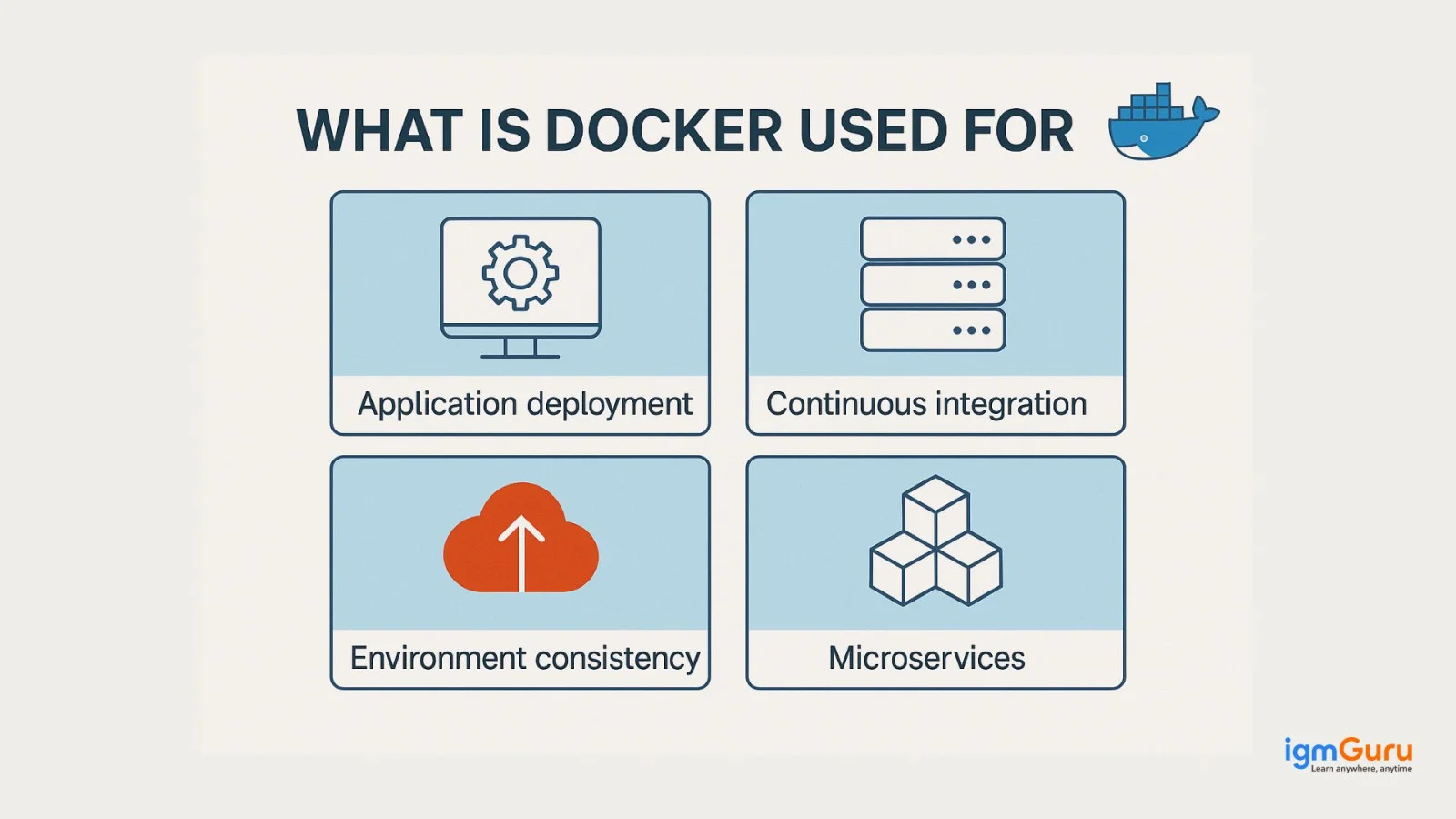
Developers use container engine in a bunch of ways throughout software development, testing, and deployment. They break applications down into smaller parts, make their CI/CD pipelines easier, simplify software testing, and ensure apps work well in different environments. Here are more use cases of this platform.
Developers can set up CI/CD pipelines with Docker in DevOps. This allows them to merge code changes into the main project branch and make sure users always have a working app with the latest software. It makes the CI/CD process smoother by letting DevOps engineer or developer give operations teams an app that's packaged as an image. This image can run on any Docker host.
Docker works really well for deploying microservices by breaking an application into separate, independent services.
With Docker containers, DevOps teams can test their code without worrying about messing up the whole application since each microservice has its own isolated environment. Each container runs on its own with its own resources, so if something goes wrong in one container, it won't affect the others. This makes it easier to manage than using bare metal servers, where changes can cause problems for the entire system. With this open-source platform, development becomes quicker and more efficient, leading to better reliability, easier scaling, faster deployments, and smoother adoption of microservices.
While microservices simplify individual parts by focusing on specific functions, managing many of these services can be tricky. That's where Docker comes into play. Tools like Compass and Kubernetes can help keep everything under control. Compass organizes all your software components in one spot, while Kubernetes helps you manage, deploy, and scale your containerized applications across multiple machines.
Developers can definitely create containers without Docker, but Docker makes it easier to handle the whole process with its tools. Docker images are lightweight packages that bundle everything needed to run an app, like code, settings, and libraries.
These images keep the software separate from its environment, letting different containers run smoothly even if they come from different setups. The contanier enginer uses parts of the operating system to manage multiple containers at once.
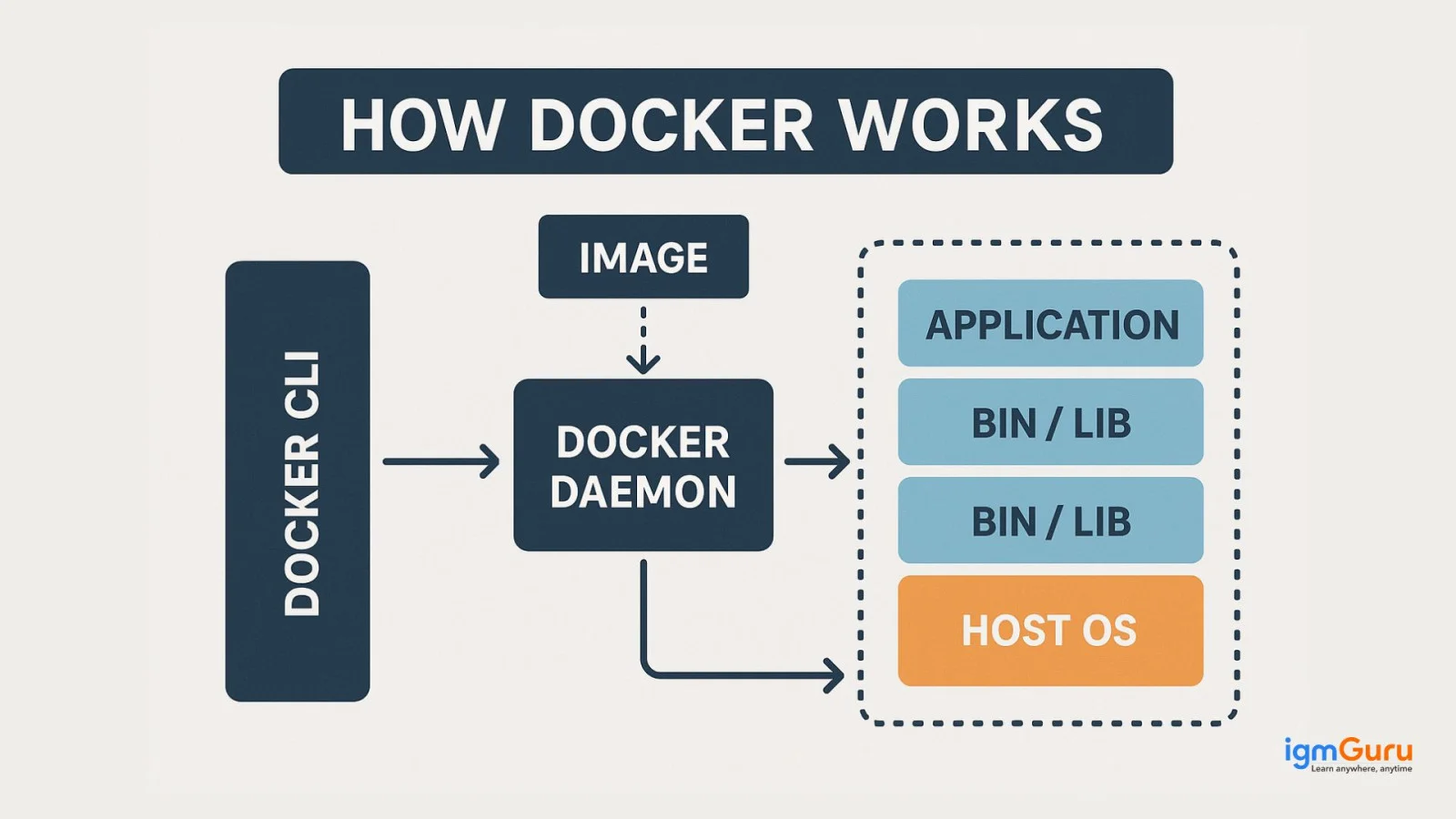
When you create a Docker image, you start with a base layer and add what you need on top of it. Once it's ready, that image can work on any system that has Docker running, no matter the OS. The container talks to the host OS through the Docker daemon, giving you some flexibility in your setup.
Plus, Docker makes it quicker to move and set up new instances, which helps with keeping everything running smoothly across different environments.
It is utilized in cloud computing for creating scalable apps. It enables easy scaling of apps by deploying extra containers or by managing container orchestration with tools such as Kubernetes.
Explore our blog on Kubernetes vs Docker: What's the Difference?
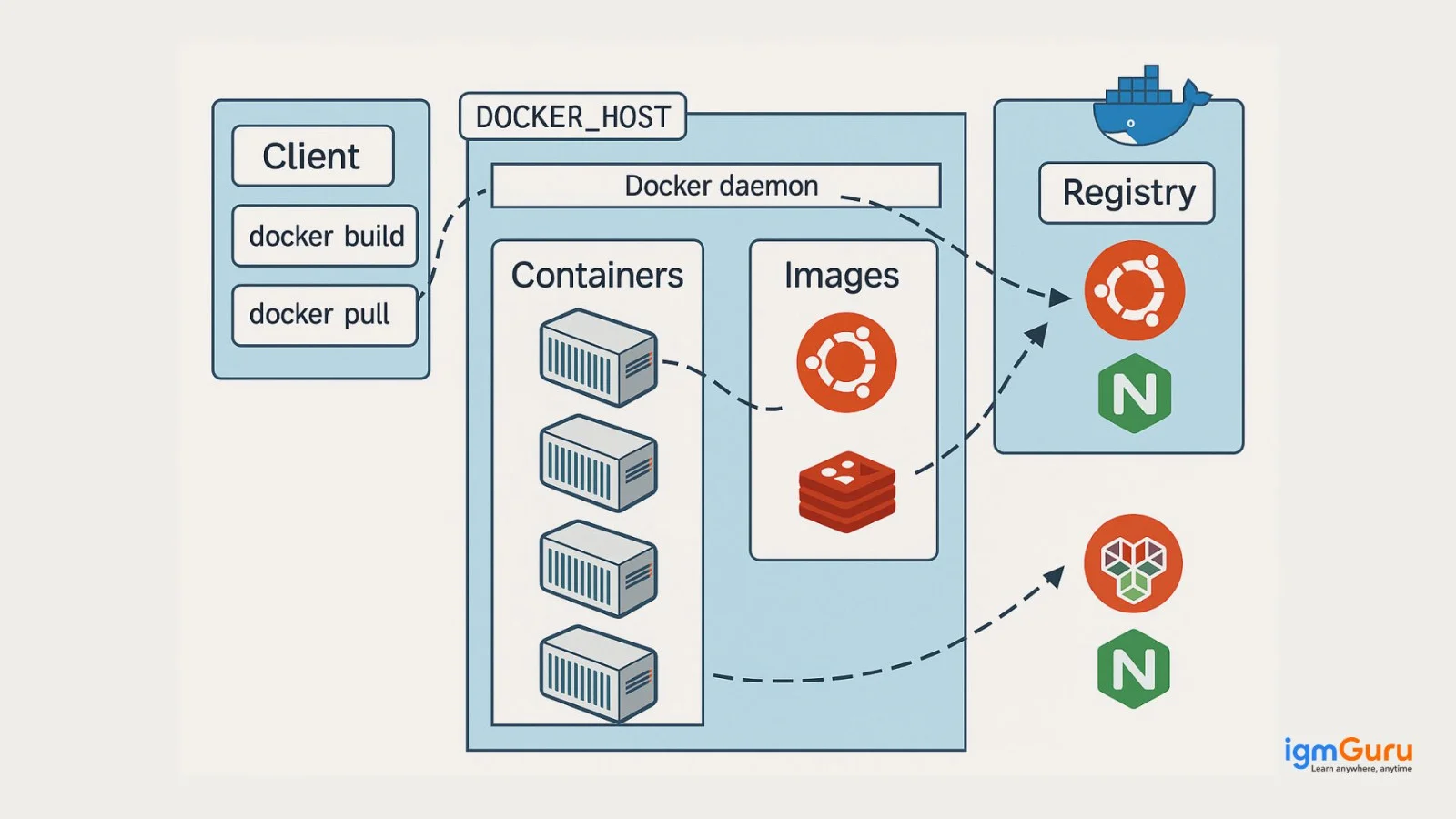
Docker works with a client-server setup. The Docker client talks to the Docker daemon, which handles most of the heavy lifting. It helps create, run, and share Docker Containers. Both the Docker client and daemon can run on the same machine, but you can also connect the client to a remote daemon if needed.
They communicate using the REST API, so the network interface and UNIX sockets aren't the main focus anymore. There's also Docker Compose, another client that lets you manage applications made up of different container sets. Here's a quick rundown of the key parts of the Docker architecture.
The open-source platform comes equipped with many features, some of which are listed below -
It aims to speed up the time it takes to go from writing code to having it tested, deployed, and ready to use. It makes your apps portable and easy to build and collaborate on.
This Security Management feature keeps secrets safe right in the swarm. Containers offer a strong barrier between different apps, meaning they can't interfere with each other. This makes them a reliable choice for running several applications on one machine.
A key benefit of being open-source is that you can choose the tech that works best for your needs. If you're a solo developer in need of a lightweight environment for testing, the Docker engine is perfect. The container engine Community Edition (docker-ce) is a great starting point if Docker is already on your system and your peers are familiar with it.
It uses images to hold the files and dependencies required to run apps. These images are built using a Dockerfile, which is a set of instructions for Docker. Developers can use these images to create or update containers. There's also Docker Hub, a central place to store and share images.
Docker has a volume management system that lets developers keep data generated by containers. This is handy for apps that need a database or storage. Docker volumes are saved on the host machine and can be shared across containers.
Read Also: Docker Interview Questions
To get a good grip on how Docker works, you should familiarize yourself with the tools and commands that go along with it. These tools and commands are key to making Docker function smoothly.
This includes libraries, tools, dependencies and application source code which are executable. When you run a Docker image, it creates one or more containers from it. Developers can build these images starting from any base image they choose. They can also share the common parts of their setup. Each layer in a Docker image represents a different version of that image, and whenever developers make changes to the app, it adds a new layer to the image.
A Dockerfile refers to a text file comprising a set of instructions regarding how to build a Docker image. It includes the meaning of the environment in which the app will run. It also specifies the dependencies, application code, base image and all other essential configurations. Every single line in a Dockerfile reflects a step in the process of building the image. This includes installing packages, running commands and copying files.
It can also be stated as the blueprint that helps in creating a Docker image. This guarantees that the environment stays consistent every single time the image is built. Developers use Dockerfiles to automate the process of image creation, which makes it easier to deploy and manage apps.
This packs all the important parts of Docker containers into one easy-to-use application. This makes it a simple platform for developers to build and share their containerized apps and microservices.
These are basically live versions of Docker images, which are read-only. Containers are where the action happens - they're temporary and users can interact with them. Admins can change settings and conditions using Docker commands.
There's also an open-source storage system for Docker images, known as the Docker Registry. It's scalable and helps keep track of different image versions in repositories using tags for easy identification.
This command is used to start a container. Each container is an instance of an image, and you can run multiple instances from the same image at the same time using this command.
Let's discuss the advantages and disadvantages of Docker in the table given below.
| ADVANTAGES | DISADVANTAGES |
| Security - Docker ensures that applications running in containers are kept separate and isolated from each other, giving us full control over how traffic flows and is managed. | Hurdles with the Container - When a container goes down, it's important to have a backup and recovery plan in place. The available options to help with this are not fully automated or easily scalable. |
| Continuous Integration - When it comes to Continuous Integration, Docker fits in nicely with pipelines that use tools like Travis, Wercker and Jenkins. | Limited Features - Docker lacks a number of features for now. Some features are currently being worked upon including container self-registration, self-inspection functions, and the ability to copy files from the host to the container, among other s. |
| Quick Setup - By cutting out unnecessary installations and configurations, getting things up and running is fast and simple. | Old Docs - Docker's documentation doesn't always match up with the latest updates. |
| Portability - Containers are easy to move around, so you can run applications in the same way whether you're in development or production. | Learning Curve - Docker tools like Kubernetes can be tough to figure out for beginners, so you'll need some decent training and experience. |
| Packages - Docker packs up applications and their dependencies into containers that work the same everywhere. This makes development easier and helps avoid the classic problem of 'it works on my machine.' | Resource Overhead - If you don't manage your containers well, running a lot of them on one host can really use up a lot of CPU, memory, and disk space. |
Related Article - Docker Tutorial: A Guide For Beginners
Here are some use cases that can help you understand the strength of this platform.
The container engine makes it easy and quick to move things to the cloud, whether you're shifting data, apps, or workloads from your local data center to the cloud or hopping between cloud services.
A lot of big companies (over 85% according to Statista) are using microservices for building their apps. It helps by letting each microservice be containerized, so they can be scaled and managed separately without tricky setup issues.
This open-source platform works great with CI/CD pipelines since it ensures a reliable environment for testing and deploying apps, cutting down on potential errors during rollout.
Combining microservices with Docker gives DevOps teams a strong base. It helps them embrace agile methods, adapting quickly to deliver software and services as fast as the market needs.
With this platform, moving apps across different setups is simple. Most major cloud providers support Docker, making it easier to run in a mix of on-premises, public, private cloud, and edge setups.
CaaS helps developers launch and manage containerized apps easily, allowing them to run Docker containers on a larger scale. Top cloud providers include CaaS in their offerings alongside other services like IaaS and SaaS.
Docker speeds up AI and ML development by making it simple to create and move apps quickly, boosting innovation and time-to-market. Docker Hub also has loads of AI/ML images to help development teams. In 2023, Docker introduced Docker AI, which gives developers helpful, automated tips while working on Dockerfiles or Docker Compose files.
Docker has completely changed how apps are developed, managed and deployed. This platform containerized applications to ensure efficiency, scalability and consistency across different environments. It's apt for everyone who's working on a small project or even those who're managing large-scale apps in the cloud.
The Docker platform is known for simplifying the complexities of software deployment and development. Understanding its key concepts and aspects such as images, containers and Dockerfiles is extremely essential. It is important for developers and IT professionals to learn everything about them.
Docker is a tool that helps developers package their applications with everything needed to run them - like code, libraries, and settings - into something called a container. These containers work the same anywhere, so you won't hear "It works on my machine!" anymore.
Before Docker, developers often ran into issues where their app would work on their own computer but crash elsewhere due to environment differences. Docker fixes this by creating a consistent environment that works everywhere.
Containers are lightweight and share the host system's OS, whereas virtual machines (VMs) come with their own OS and are heavier. Containers start faster, use fewer resources, and are easier to manage compared to VMs.
Course Schedule
| Course Name | Batch Type | Details |
| Cloud Computing Certification Courses | Every Weekday | View Details |
| Cloud Computing Certification Courses | Every Weekend | View Details |