Imagine deploying entire cloud environments with just a few lines of code, no clicking through dashboards, no manual setup, no missed configurations. That’s the power of Terraform. It is one of the most widely used Infrastructure as Code (IaC) tools in the DevOps world today.
Whether you build on AWS, Azure, GCP, or a hybrid setup, Terraform lets you automate infrastructure with speed, reliability, and version control. This Terraform Cheat Sheet is your quick, practical guide to commands, syntax, workflows, and best practices. It is perfect for beginners getting started and professionals who need a fast reference while working on real deployments.
Terraform is a powerful Infrastructure as Code tool used to automate the creation, modification, and deletion of cloud resources using declarative configuration files. It automates the lifecycle of servers, networks, storage, and security components while maintaining state for consistency. It supports multi-cloud provisioning, environment management, and large-scale automation pipelines.
Terraform works across multiple providers and environments, which makes it ideal for DevOps automation, scalable deployments, production readiness, and multi-region orchestration of infrastructure systems. It supports various cloud providers, including AWS, Azure, GCP, Kubernetes, Oracle, VMware, DigitalOcean, GitHub, and 100+ more.
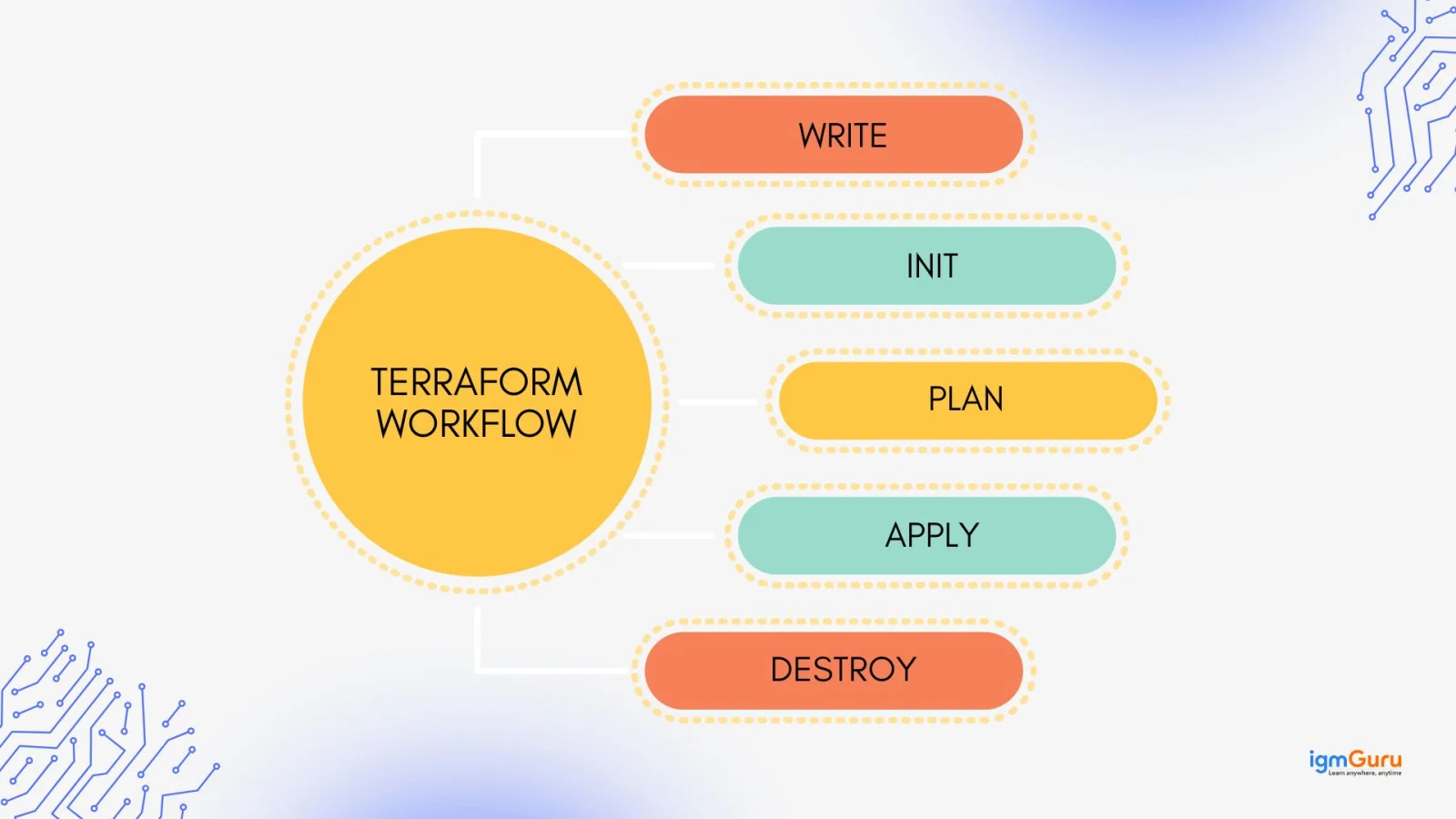
Terraform follows a simple workflow where infrastructure is written as code, initialized, planned, applied to production, and destroyed when no longer needed. It compares the desired state with the actual state and ensures consistent, repeatable deployments through execution planning and idempotency.
Terraform revolves around providers, resources, data sources, variables, locals, outputs, modules, and state. These pieces connect together to define, structure, and execute infrastructure operations. Understanding them enables scalable, repeatable deployments across development, staging, and production.
Providers are plugins that allow Terraform to communicate with cloud APIs. You only have to select a provider, authenticate, and then Terraform provisions supported resources for you.
|
Resources are the infrastructure components created by Terraform such as servers, networks, or storage. These form the core of your deployment.
|
Data sources retrieve details of already existing cloud assets so you can reference or reuse them without deploying new ones.
|
Input variables allow dynamic configuration without editing code repeatedly. You can override values through CLI flags or .tfvars files.
|
Output values return useful results after deployment like IP addresses or ARNs, which can be consumed by other modules or tools.
|
Local values store computed or repetitive values for cleaner, shorter Terraform code.
|
Modules are reusable Terraform building blocks used to standardize deployments across multiple environments.
|
Terraform tracks infrastructure details inside state files to detect changes and build incremental updates. Remote state is often used for teams and CI/CD.
Terraform projects are usually split into logical files for resources, variables, and outputs. Clear file separation improves readability, scalability, and environment management.
| File | Purpose |
|---|---|
main.tf | Core resources and configuration |
variables.tf | Input variable definitions |
outputs.tf | Output values |
providers.tf | Provider configuration & authentication |
terraform.tfvars | Input values for variables |
backend.tf | Remote state configuration |
| Path | Purpose |
|---|---|
/modules | Reusable Terraform modules |
/env/dev | Development environment configuration |
/env/prod | Production environment configuration |
Root .tf files | Main execution entry and shared config |
Terraform uses HashiCorp Configuration Language (HCL), a declarative, readable syntax supporting expressions, functions, maps, lists, and dynamic values. It forms the foundation of Terraform configurations.
| Element | Meaning |
|---|---|
| Blocks | Define things like resource, provider, variable |
| Arguments | Key-value pairs inside blocks |
| Data types | string, number, bool, list, map |
| Expressions | References like var.name, module.vpc.id |
| Comments | # or // for single line, /* ... */ for multi-line |
Terraform commands manage initialization, validation, planning, application, destruction, formatting, state review, variable output, tainting, and resource import. Mastering these commands is essential for real deployment workflows and environment management.
| Command | What It Does? |
|---|---|
terraform init | Initializes working directory, downloads providers & modules |
terraform plan | Shows execution preview before applying changes |
terraform apply | Creates or updates infrastructure as per configuration |
terraform destroy | Destroys all managed infrastructure resources |
terraform refresh | Syncs real infrastructure state (older versions) |
terraform show | Displays the current state or plan output |
terraform validate | Checks configuration syntax & structure correctness |
terraform fmt | Formats .tf files to standard style |
terraform graph | Generates dependency graph of resources |
terraform providers | Lists provider requirements and configurations |
terraform providers mirror | Downloads providers locally for offline use |
terraform output | Prints output values after apply |
terraform console | Interactive shell for evaluating expressions |
terraform get | Downloads or updates module source code |
terraform import | Brings existing infrastructure under Terraform control |
terraform taint | Marks a resource for forced recreation |
terraform untaint | Removes taint to avoid forced replacement |
terraform state | Main command for state management operations |
terraform state list | Lists tracked resources in the state file |
terraform state show | Displays details of a specific resource from state |
terraform state pull | Downloads the state file locally |
terraform state push | Uploads or replaces remote state file |
terraform state rm | Removes resource from state without destroying infra |
terraform state mv | Moves items between modules or renames resources |
terraform state replace-provider | Replaces one provider with another in state |
terraform unlock | Unlocks a previously locked state |
terraform force-unlock | Forces unlock when normal unlock fails |
terraform workspace | Creates & manages multiple workspaces/environments |
terraform login | Authenticates to Terraform Cloud or Enterprise |
terraform logout | Clears stored Terraform Cloud credentials |
terraform version | Shows installed Terraform version |
terraform cloud | Terraform Cloud operations (runs, config, state etc.) |
terraform update (varies) | Updates providers or modules where supported |
Variables pass input, locals store reusable logic, and outputs expose results after provisioning. When used together, they build modular and scalable infrastructure across multiple cloud deployments.
| Type | Purpose |
|---|---|
variable | Defines input configuration values |
.tfvars | Overrides variable values per environment |
| Sensitive variable | Hides secrets and prevents them from printing |
locals | Stores shortcuts or computed values |
outputs | Returns values after apply (IPs, IDs, ARNs) |
Resources and data sources are core to cloud platforms. Resources create infrastructure such as compute, networks, and load balancers. Data sources fetch existing ones for reuse. Using them together helps integrate legacy and active deployments without rewriting code.
| Resource Type | Example |
|---|---|
| Instance | aws_instance |
| VPC | aws_vpc |
| Storage | aws_s3_bucket |
| Database | aws_rds_instance |
| Data Source | Usage Example |
|---|---|
aws_ami | Fetch latest AMI |
aws_vpc | Reference an existing VPC |
aws_subnet | Use an existing subnet |
Modules are behind code reusability in Terraform. They group resources into reusable packages, reduce repetition, enforce standards, and simplify multi-environment deployments. You can import modules from registries or write local modules for enterprise-grade structure.
|
|
Terraform supports string templating, arithmetic, logical operators, built-in functions, conditional evaluation, and for-expressions to generate dynamic resources. These enable smarter automation and configuration flexibility.
| Feature | Example |
|---|---|
| Interpolation | "app-${var.env}" |
| Conditionals | var.env == "prod" ? 2 : 1 |
| Built-in functions | join(), merge(), lookup() |
for_each | Loop over maps or sets to create many resources |
The integration of Terraform with Git and CI/CD pipelines is a common and highly effective practice in IaC management. This combination enables automation, version control, and consistent deployments of infrastructure. CI/CD can integrate with GitHub Actions, GitLab CI, Terraform Cloud, Azure DevOps, or Jenkins for automated provisioning pipelines.
This snippet provisions a lightweight EC2 instance on AWS. The provider block configures Terraform to use AWS and sets the region. The aws_instance resource deploys a virtual machine using a chosen AMI and instance type, ideal for testing or creating a basic server quickly.
|
This configuration stores Terraform state in an S3 bucket instead of locally. The bucket holds your state file, and the DynamoDB table enables state locking to prevent two users or pipelines from modifying infrastructure simultaneously. It is mostly required for team environments, CI/CD usage, and production setups.
|
Terraform enables predictable, scalable, and reusable infrastructure without manual provisioning. This Terraform cheat sheet covers concepts, syntax, commands, modules, state, CI/CD usage, and snippets you can apply instantly. As you continue practicing, try modules for environment separation, remote backends for team collaboration, and automation pipelines for enterprise workflows. The more you experiment, the faster you master real-world deployment workflows, giving you strong control over infrastructure at cloud scale.
Yes. Terraform is easy to learn because configuration is written in simple HCL syntax. Beginners can start with variables, resources, and apply/destroy commands, then gradually move toward modules, remote backend, and CI/CD automation.
The most frequently used commands are terraform init, terraform plan, terraform apply, terraform destroy, terraform validate, and terraform fmt. These handle setup, provisioning, formatting, cleanup, and planning. This makes them essential for everyday usage.
Terraform state tracks deployed infrastructure so Terraform knows what exists and what needs to change. Without a state file, Terraform wouldn't detect drift, update resources correctly, or safely manage environments across teams.
Articles You Can Also Read:
Course Schedule
| Course Name | Batch Type | Details |
| Terraform Training | Every Weekday | View Details |
| Terraform Training | Every Weekend | View Details |