Imagine a software tool that offers effective automation for cross-platform computer support? Ansible does exactly that. It is known as the DevOps 'buddy' for software automation. A report claims that more than 50000 companies are utilizing this software tool, with big names like Apple and NASA adopting it.
This article is curated to shed light on Ansible and highlight its essence by discussing its history, how it works, its architecture, use cases, advantages and disadvantages. Let's dive right in.
TL;DR
Alteryx is a self-service data analytics and visualization platform that enables users to prepare, analyze, and automate data workflows with minimal coding. It belongs to the Data Analytics and Business Intelligence category. This blog explains what Alteryx is, its uses, key features, benefits, automation capabilities, and the career opportunities available for professionals skilled in the platform.
Ansible is capable of deploying software on various servers at a time with no human intervention. Specifically designed for professionals in IT, this tool enables them to perform several tasks. These tasks include cloud provisioning, application deployment, updates on workstations, configuration management and much more.
One does not require to install the software in nodes as this tool is an agentless software. The way to perform necessary operations on the servers is by doing the SSH to connect the nodes. The deployment process with Ansible is quite easy as it does not rely on agent software and does not consist of an additional security infrastructure.
Users do not require extensive programming knowledge as this tool is developed using Python language itself. A single ansible is capable of handing and taking control of thousands of nodes.

Michale DeHaan, a software developer created Ansible in 2012 to achieve his intention of simplifying real-world server automation problems. An interesting fact that everyone must know about Ansible is that this term is coined from a science fiction novel named 'Ender's Game'. A fictional device capable of instant communication across large distances known as 'Ansible' is mentioned in this book.
This tool aims at simplifying and streamlining the management and automation of configuration tasks across multiple servers. It got the deserved recognition for its agentless architecture and simplicity soon after its release. Red Hat acquired Ansible in 2015 for its robust automation powers and potential. Ansible is still kept up as an open-source project, and Red Hat has a commercial version called Ansible Tower, which is now known as Red Hat Ansible Automation Platform. This version comes with extra features and support for businesses.
Since getting bought, Ansible has really taken off in popularity. It's now one of the go-to automation tools in IT, and there's a big, active community around it. In 2021, when IBM acquired Red Hat, Ansible became part of IBM's collection of open-source tools.
Read Also: Ansible Interview Questions and Answers
Over the years, Ansible has grown into a go-to tool for automation, helping operators, admins, and IT leaders across different tech areas. It's a top choice for enterprise automation, with a strong open-source community and has become a common standard in IT automation. Ansible works on various Unix-like systems and can handle both Unix and Microsoft setups. It uses a simple language to describe system configurations. Michael DeHaan started Ansible, and Red Hat picked it up in 2015.
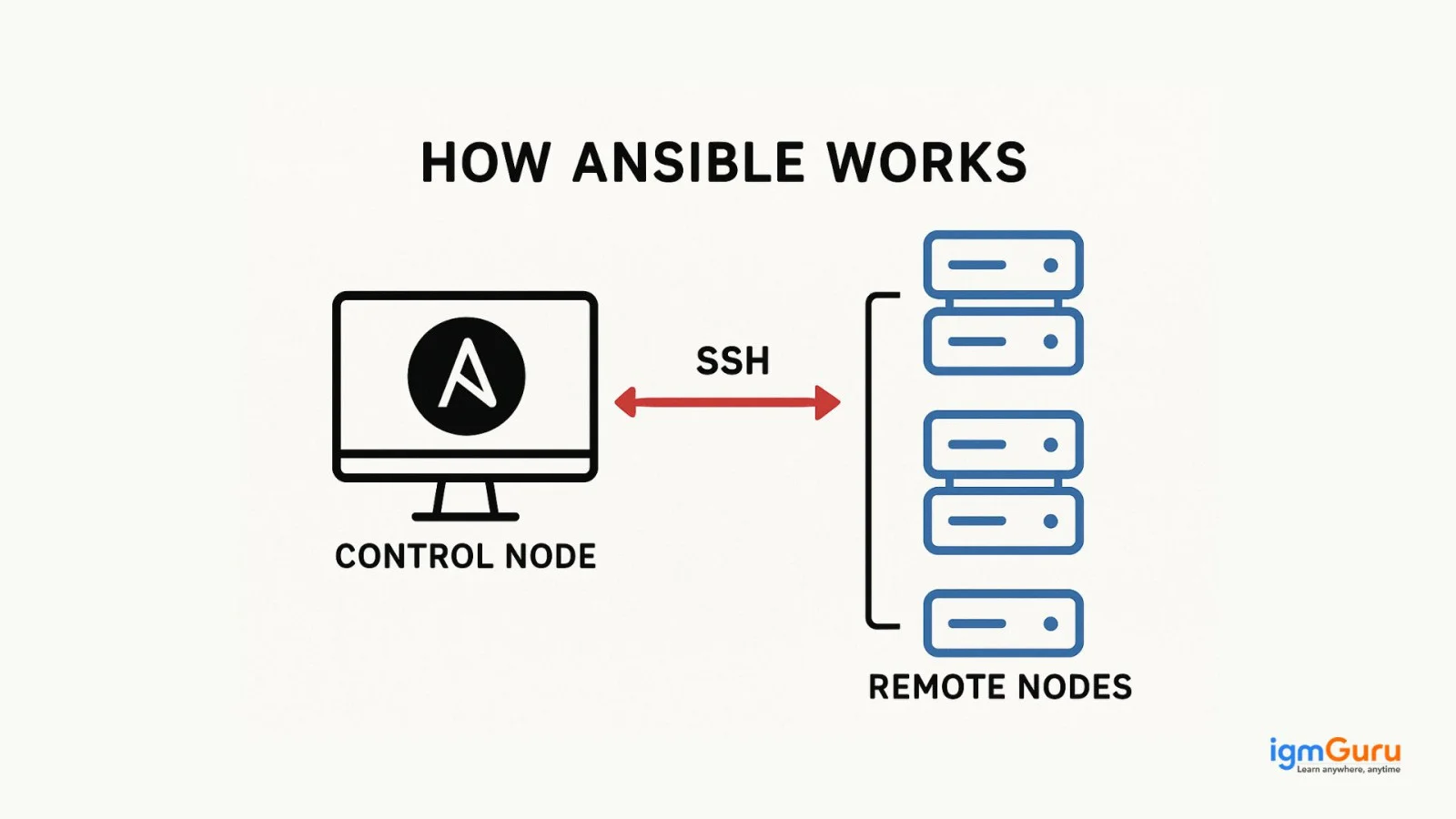
Ansible doesn't require any agents; it runs actions over remote SSH or Windows Remote Management, which lets you use PowerShell from a distance. As an open-source IT automation engine, it's designed to save you time at work while making your IT setup more scalable and reliable.
It's made for IT pros who need it for things like app deployment, system integration, and other routine tasks managed by IT admins or network managers. With today's tech environment being so complex and fast-moving, it would be tough for sys admins and developers to manage everything by hand.
By automating tricky tasks, Ansible lets engineers focus on work that truly benefits the organization. This means saving time and boosting productivity. Ansible is quickly becoming a key tool in automation, systems management, and DevOps, while also being useful for developers in their daily tasks. It allows quick setup of a whole network of devices without needing to know how to code.
Unlike simpler management tools, Ansible users can automate software installation, manage daily tasks, provision infrastructure, and improve security and compliance, all while sharing automation across their organization.
Read Also- Best DevOps Tools
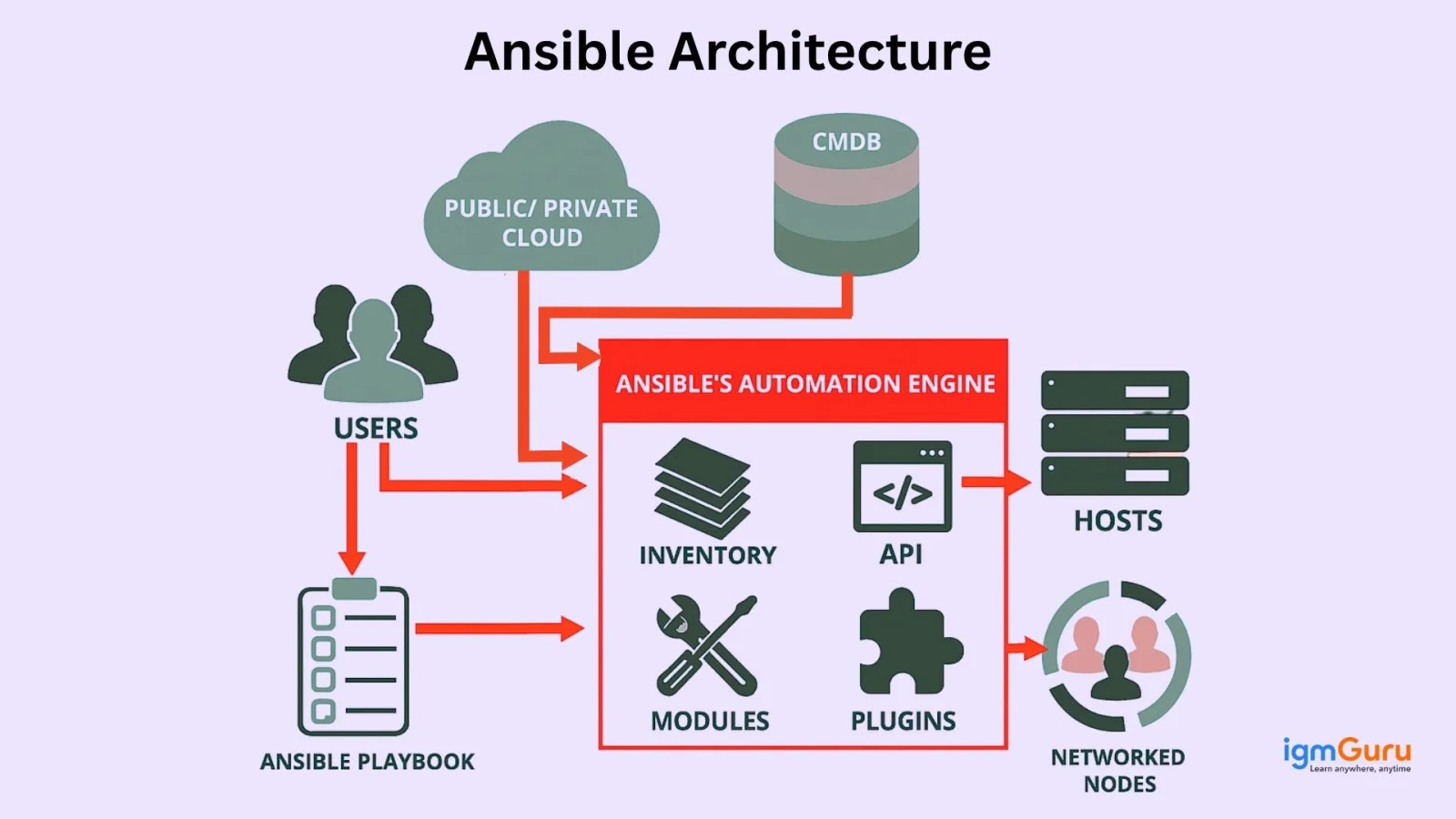
Ansible has a straightforward design that packs a punch, made up of a few important parts that work together to automate tasks. Here's how it breaks down.
The control node is where Ansible lives and operates. This is the machine where you install Ansible, and it's where administrators run playbooks. Playbooks are scripts written in YAML that outline what tasks need to be done. The cool part is that you don't need to install anything on the systems you want to manage, which keeps things light and makes it easy to scale up.
Managed nodes are the devices and servers that Ansible looks after. The control node connects to these nodes using SSH for Linux/Unix systems or WinRM for Windows ones. Again, there's no need to install agents on these nodes; Ansible uses existing security setups to communicate.
The inventory is basically a list of all the managed nodes that Ansible can automate. You can set this up in a simple text file or have it generated from other sources. It also tells you how to reach the nodes and lets you sort them into groups for easier management when creating playbooks.
Modules are the building blocks of what Ansible can do. There are loads of modules ready to handle various tasks, like managing files or working with different cloud services and APIs. You can run these modules straight from the command line or within playbooks.
Playbooks are what make Ansible's automation work. They're written in YAML, so they're pretty easy to read and write. Playbooks outline what the desired state of your systems should be, the tasks needed to get there, and the order in which to do them. They can also use variables and templates, allowing for more complex automation.
Plugins add extra functionality to Ansible, letting you create custom features or work with other software. There are different types of plugins, such as those for connecting with managed nodes, pulling in data from external sources, or processing data within playbooks.
Ansible is designed to be flexible and easy to integrate with other tools using its APIs. You can also create your own custom modules and plugins to expand what Ansible can do, making it suitable for almost any automation project.
Read Also- Top DevOps Certifications
It's time to get familiar with some amazing features of Ansible which are as follows -
The best part about using Ansible is that one does not need to install any software on the machines it manages. This option prevents security risks and other potential issues while also saving server resources. All the interactions are managed by Ansible using the Paramiko module (a Python implementation of SSH2) or standard SSH. The performance is maintained well while saving maintenance costs as this tool does not need agents installed on remote networks.
Methods such as SSH and Windows Remote Management are behind Ansible's agentless capability. These methods do not run Unix commands but rather send automatically generated modules to remote workstations that are built to remove themselves after use. These modules provide JSON data, specifying the desired states and the order of operations.
This approach is indeed impressive as it needs less network traffic and makes efficient reuse of connections. With Ansible, managing the management system is not a concern anymore. Added benefits of this setup include non-root access and a reduced attack surface.
Ansible can be used in different ways from an API perspective. You can use the Ansible Python API to manage nodes, extend Ansible to react to different Python events, create plugins, and import inventory information from external sources. Ansible is written in Python, which means it has a gentler learning curve for many users.
Ansible's installation is straightforward, requiring no extra software, servers, or client processes. It's designed to work in parallel, managing nodes through SSH. Ansible, unlike some competitors developed in languages such as Ruby, is based on Python. This often makes setup and operation easier, since Python libraries are preinstalled on most Linux computers. Many programmers and system administrators are more familiar with Python than Ruby. Also, users can create Ansible modules to extend the tool's features in any language as long as the data is in JSON format.
SSH is a way to enable secure network authentication, without a password. You need to provide this key to each user. Ansible works by connecting to clients using SSH, so there's no need for a dedicated client agent, and it pushes modules to the clients, which then run locally. The result is then sent back to the Ansible server. Ansible uses the SSH protocol to connect to remote computers, similar to how SSH itself connects using native OpenSSH and your current username.
SSH also simplifies the setup. Client details, like hostnames, IP addresses, and SSH ports, are stored in inventory files. Once an inventory file is set up, Ansible can use it to communicate with all listed nodes over SSH using the same username. If needed, you can add your public SSH key to the authorized_keys file on those systems. Ansible uses SSH for running tasks on local Linux systems, so the SSH connection needs to be configured to automatically bypass password requests for Ansible to work.
Ansible allows users to write down all settings and then send them to the nodes, which shows how efficiently changes can be made to thousands of servers quickly. In configuration management systems like this, the central server sends, or pushes, the configuration to the nodes. This means the primary server starts the communication, not the nodes, so each node may or may not have an agent installed. Ansible is a push-based configuration management solution, meaning it doesn't need an agent installed on the nodes.
The central server starts the contact, delivering configuration information to the nodes, without them asking for it in both situations. Because the central server pushes the design to the nodes, you have more control over which nodes are configured, the operations are more in sync, and it's easier to manage errors because you can find and fix them immediately.
The setup feature organizes playbooks, roles, inventories, and variable files by function, with tags at the play and task level for more specific control. While this is a useful and flexible method, there are other ways to organize Ansible data. Ansible simplifies task completion by automating tasks, removing the need for manual deployment. It can configure systems, install software, and handle other complex operations, such as continuous delivery and zero-downtime deployments when rolling out new features.
Following continuous integration, continuous deployment is the process of automatically deploying software to a server. To start using Ansible, just install the Ansible package on one system; then, you can use it from the command line. There is no database or running processes to set up. Two machines are needed: one is the Server, which is a managed node; the other is the Node, which acts as a controller node.
Ansible is pretty flexible and can automate a lot of IT tasks. Here are some common ways people use it:
Ansible is great for keeping servers and systems set up just the way you want them. It helps prevent mistakes and makes handling lots of servers easier.
Example
Web Servers: Automate installing and setting up web servers like Apache or Nginx on several machines at once.
It makes it a breeze to roll out applications on different systems, whether they're in-house or on the cloud. With Ansible playbooks, you can automate everything from installation to updates.
Example
CI/CD Pipelines: Use Ansible with your CI/CD process to automatically deploy new app versions after code changes.
Ansible can help coordinate complex tasks where different systems need to work together. It handles dependencies and helps manage multi-layer app deployments.
Example
Multi-Tier App Deployment: Manage the deployment sequence of apps that rely on a database and other services.
It's commonly used for setting up cloud instances with providers like AWS or Azure. Ansible can automate tasks like creating virtual machines and setting up networks.
Example
AWS EC2 Instances: Automate creating and configuring EC2 instances and their network settings across regions.
Ansible can help with security tasks, such as applying patches and setting up firewalls. It's often used to keep systems aligned with security rules.
Example
Security Audits: Make sure all servers have the latest patches and correct firewall settings.
You can also use Ansible for network automation, streamlining the setup of network devices like routers and switches. It ensures consistent configurations across many devices.
Example
Network Configuration: Automate settings for routers and switches, including VLANs and firewall rules.
Read Also- How To Become A DevOps Engineer?
As IT automation becomes more important these days, Ansible has gained popularity as a go-to tool for managing IT infrastructure. Whether you're handling just one server or a bunch of systems, Ansible makes automation easier, helping teams work faster and reduce mistakes. Let's look at the main reasons why Ansible is a must-have for system admins, DevOps pros, and IT teams all over.
One of the best things about Ansible is how simple it is. Unlike other configuration management tools, Ansible is built for usability. Its syntax is straightforward, so you don't need to be a programming whiz to get started. Many people appreciate how newcomers can pick it up quickly thanks to its easy learning curve.
There's plenty of helpful documentation, tutorials, and an active online community to support new users. Writing playbooks and automating tasks is pretty straightforward, and its step-by-step execution makes troubleshooting a breeze. Even those who aren't experts in automation can feel comfortable managing large-scale IT setups.
Ansible's playbook language is designed to be clear and readable, so whether you're automating server setups, application launches, or security policies, you can get things done easily.
Another plus for Ansible is that it's written in Python, a programming language known for being easy to read and understand. This makes it a favorite among system admins and developers. Because it uses Python, users can take advantage of the many libraries and tools that come with most Linux systems.
Python works well with other systems, boosting Ansible's usefulness. If your organization uses Python scripts for automation or works with third-party tools, Ansible makes everything connect smoothly. Since Python libraries are usually included with Linux, Ansible is ready to go without needing a lot of setup.
For system admins, this Python background makes transitioning to automation feel more familiar. Plus, since a lot of people in the field use Python, Ansible gets good support from the community, which helps make it more effective.
One of the most appealing features of Ansible is that it doesn't require installing agents on target systems. It connects through SSH for Linux and Unix systems and WinRM for Windows, which means you don't have to mess with agent software on every machine.
This agentless approach has two big benefits: it simplifies management since there's no software to install or update, and it boosts security by cutting down on potential vulnerabilities. Because Ansible only uses SSH or WinRM, you don't need to worry about opening extra ports or exposing your systems.
This simplicity leads to quicker deployments and more flexibility, especially in environments where systems may change frequently. You can automate tasks without having to maintain software on individual machines.
Ansible playbooks are written in YAML, which is a user-friendly format. YAML is popular for configuration management because it's easy to read and write. Unlike some other tools that use complicated languages, YAML makes it easy to document automation steps.
The readability of YAML is a big deal. It has a clean syntax that's both easy for people to understand and friendly for machines. This means teams can work together better and share configurations easily. YAML files are just text files, so they can be tracked using common version control tools like Git. This way, everyone is on the same page with the latest configurations.
For system admins, this easy readability means managing configurations and troubleshooting is much simpler. Writing playbooks for configurations, deployments, and tasks becomes a natural part of the job.
Ansible Galaxy is a community hub where users can find and share Ansible roles and collections. Roles are reusable bits of configuration that define tasks for specific services or applications. By using roles from Galaxy, users can speed up automation tasks like setting up web servers or database configs.
This extensive collection helps organizations build and deploy complex infrastructures more quickly using community-contributed pieces in their playbooks. Galaxy lets users customize these roles to fit their needs, so teams can focus on what really matters.
Plus, it's easy for users to give back to the community by sharing their roles and playbooks. This helps grow the knowledge base and benefits everyone in the Ansible community.
Read Also- DevOps Tutorial For Beginners
Ansible has its pros, but it also comes with some challenges that you should keep in mind, especially for larger businesses or complicated setups that need special features. Here are a few drawbacks to consider before deciding if Ansible is right for you:
A common issue with Ansible is that it mainly uses the command line for automation. While seasoned users might like this control, newbies or those used to graphical interfaces might find it a bit overwhelming and not user-friendly. Ansible Tower does offer a web interface that's easier to use, but it still doesn't measure up to some other automation tools out there. The visual management in Ansible Tower doesn't always match what you can do with the command line, which can make things tricky and could lead to mistakes in larger setups.
Ansible works in a stateless way, which means it doesn't keep track of the current state of the systems it manages, unlike tools like Puppet and Chef that do. This lack can be a downside when you need to track configurations or revert to a previous state if something goes wrong. While keeping it simple is a benefit, not having state management can be a hassle in environments that need more control, especially if changes happen often.
Ansible does work with both Linux/Unix and Windows, but its Windows integration isn't as strong. It relies on PowerShell for managing Windows systems, which means you need a Linux machine to control those Windows hosts. This can make setup more complicated, especially if you have a lot of Windows machines. Users might also face issues or glitches when managing Windows environments since the support isn't as developed. If your organization mostly uses Windows, you might find other tools like Chef or Puppet easier to work with.
While Ansible is handy, it doesn't have all the features that bigger businesses may need compared to tools like Puppet or Chef. Ansible Tower does bring some enterprise features, but the core tool lacks things like automated testing and advanced reporting, which can be important for managing complex environments. Since it's relatively newer, there might be fewer established best practices, which can lead to limitations as your infrastructure grows.
Although Ansible is popular and gaining users, it's still newer compared to some other options. This means its community isn't as large, which can be a downside if you need help with tricky problems or specific modules. Plus, as Ansible is still developing, you might run into bugs or issues that haven't been fully sorted out yet. This rapidly changing nature can make it harder to have consistent stability, which is crucial for businesses that need reliable systems.
To wrap things up, Ansible offers a straightforward way to handle configuration management and automation. It's new on the scene, though, and faces competition from well-established options. The lack of plenty of documentation can make learning Ansible a bit tough.
On the bright side, the buzz around Ansible is growing, especially with big names like NASA using it. Its various features - like provisioning, orchestration, app deployment, and keeping things secure - show what it can do. How Ansible develops will really come down to building on its strengths while addressing the challenges it faces.
Yes, Ansible is free because it's open-source and falls under the GNU General Public License (GPL). This means small teams, solo developers, and anyone who needs automation can use it without paying any licensing fees.
No, it's not a language. Ansible is a tool made with Python and it uses YAML, which is a simple way to write out the configuration and state you want for your devices.
Course Schedule
| Course Name | Batch Type | Details |
| DevOps Training | Every Weekdays | View Details |
| DevOps Training | Every Weekend | View Details |