Jenkins can be defined as an open-source solution with an automation server for continuous integration and continuous delivery (CI/CD). It automates the software development stages like build, deployment, and test. This article explains what is Jenkins, its uses, plugins, and security.
Let's dive into it.
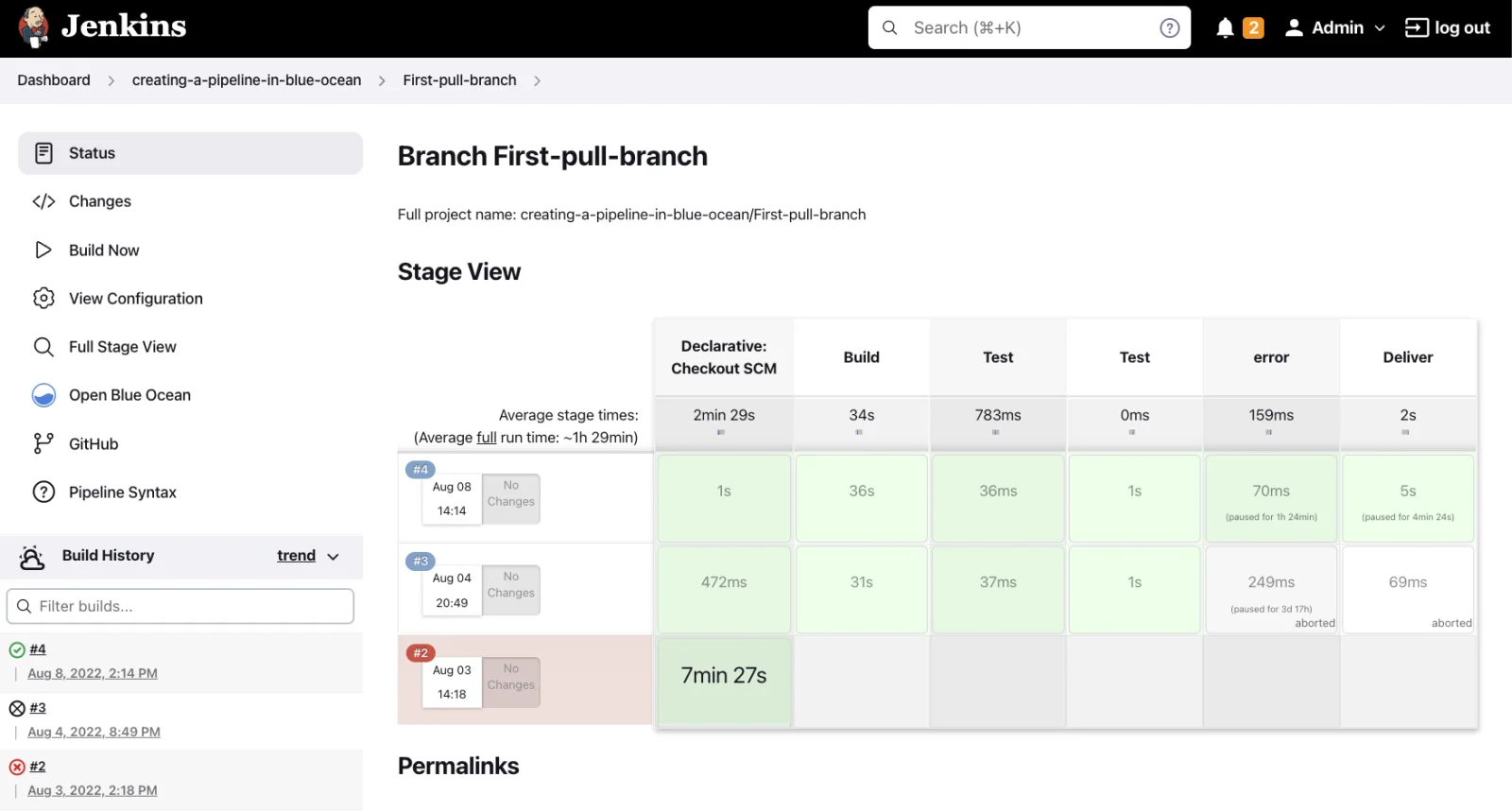
Souece- Wikimedia Commons
Jenkins is an open source continuous integration (CI), continuous delivery (CD), and deployment automation tool. It's written in the Java programming language and is used for implementing CI/CD workflows referred to as DevOps pipelines.
CI/CD pipelines are responsible for automating testing and reporting on isolated changes taking place in a broader codebase in real time. Disparate branches of the code are integrated into a main key branch. Pipelines detect defects in a codebase, automate testing of builds, build the software, prepare the codebase for deployment & delivery and deploy code to VMs & containers along with bare-metal and cloud servers.
Explore our Jenkins Training program and learn with industry experts.
Jenkins and CI/CD go hand in hand. The former uses the CI/CD pipeline methodology for streamlining the DevOps teams' work. The said pipeline can be bifurcated down into two main parts-
The initial CI process is for developers to add new code on a continuous basis for improving the software project. This part is great for detecting defects and bugs before the new code is integrated into the existing codebase.
Continuous delivery is the next step after continuous integration. It automates the packaging & building of code for deployment for testing, production & staging environments. Continuous deployment carries out the task of automating software delivery processes by deploying the code where it's supposed to be.
Jenkins and CI/CD bring automation to the table for reduced errors. This happens because of the adoption of best practices and the right steps being encoded into software.
Jenkins has brilliant CI/CD capabilities that benefit other software projects via integrations. It also integrates well with Docker for building software as containers. It integrated with Kubernetes for orchestrating these Docker containers into apps. It streamlines the development via continuous testing, deployment and building.
Another important question that follows next is 'what is Jenkins used for?'. There are many that it is popular for and some of these are-
If every test that's developed for a release branch or feature is green, then this tool automatically publishes code to production or staging. This is usually known as continuous deployment. Changes carried out prior to a merging action are also viewable. This could be done in a dynamic staging environment. After this, it's distributed to a pre-production system, a central staging system or a production environment upon amalgamation.
This CI system often communicates with other DevOps tools to notify users as a merge request becomes ready to merge. This is usually after passing all the tests and having satisfied other conditions. The merging request may point towards the code coverage's difference. It shortens the duration for examining a merge request in two separate parts. The quantity of lines of code in a component and the number of them that are executed finally decides the code coverage. This tool supports a transparent development process within team members by lessening the code review time.
It automates workflows and tasks. A developer working on different environments will have to install/upgrade an item on every single of them. If these processes include over 100 steps for completion then they'll be error-prone upon being done manually. All these steps can be written down instead in Jenkins. It is way less time consuming and the installation or update will be completed without any difficulty.
The software goes through a series of complex processes before a change can be released. The pipeline interconnects many tasks and events in a sequence for driving continuous integration. The collection of plugins makes implementing and integrating continuous integration as well as delivery pipelines a breeze. Every single job or assignment is reliant on another job or task.
Console output from stderr and stdout parameters is collected as Jenkins tasks run. This makes troubleshooting extremely straightforward and easy. The run timing is assessed to find the slowest step by using the time stamper plugin. This can be used to make changes to each operation's performance.
Read Also- Jenkins Interview Questions
Before you start with Jenkins, it's important to understand some of the core concepts that make Jenkins tick. Following are the core concepts of Jenkins-
Think of a job in Jenkins as a task that you want Jenkins to do. And the task could be anything from compiling code, running tests, to deploying to production. Jenkins supports various types of jobs:
A Jenkinsfile, the most important component of Jenkins, is just a plain text file that lives in your code repo. It defines the build, test, and deploy steps in a CI/CD pipeline using a special Jenkins DSL (Domain-Specific Language). Here is how Jenkinsfile works -
pipeline { agent any stages { stage('Build') { steps { echo 'Building...' } } stage('Test') { steps { echo 'Testing...' } } stage('Deploy') { steps { echo 'Deploying...' } } } } |
Plugins are the heart and soul of Jenkins. They extend Jenkins' functionality and allow it to integrate with pretty much anything- Git, Docker, Slack, AWS, Maven, and more.
There's a plugin for just about everything. Want to send build alerts to your team's Slack? There's a plugin. Need to deploy to Kubernetes? There's a plugin for that too.
Here are few plugins and their uses-
| Plugin Name | What It Does |
| Git Plugin | Integrates Jenkins with Git repositories, allowing you to pull code for builds. |
| Pipeline Plugin | Enables the creation of scripted or declarative Jenkins pipelines. |
| Blue Ocean | Provides a modern, visual interface for Jenkins pipelines. |
| GitHub Integration | Connects Jenkins to GitHub for triggering builds via webhooks, pull requests, etc. |
| Maven Integration | Allows Jenkins to run Apache Maven builds. |
| Docker Plugin | Let Jenkins build and manage Docker containers as part of the pipeline. |
| Slack Notification | Sends build status notifications to Slack channels. |
| JUnit Plugin | Publishes test results in Jenkins using JUnit reports. |
| Email Extension Plugin | Sends customized email notifications after builds or failures. |
| Credentials Binding | Helps manage and securely use credentials like API keys or passwords in jobs. |
| AnsiColor Plugin | Adds color to console output for better readability. |
| SSH Agent Plugin | Allows jobs to use SSH credentials to connect to remote servers. |
| Active Directory Plugin | Integrates Jenkins with Windows Active Directory for user authentication. |
| Role-based Authorization Strategy | Assigns different roles and permissions to users or groups. |
| Build Timeout Plugin | Automatically stops builds that run longer than expected. |
Jenkins needs a reason to start a job. These reasons are called triggers. Some common ones include:
Artifacts are the output of your build. Could be .jar files, .zip files, reports, logs, or anything else your project generates. Jenkins can archive and share them for later stages or for download.
Jenkins provides a pretty flexible user management system to its users. You can assign specific roles and permissions in Jenkins, so each team member, be it's a tester, developer, or admin, only has access to the features and jobs they need for their work. You can also integrate Jenkins with LDAP, GitHub OAuth, or Active Directory.
The Jenkins dashboard shows you all your jobs and their current status. You can also create custom views to organize jobs by project, team, or environment. It's super handy when you have dozens of jobs running.
In Jenkins Pipelines, stages represent major sections of the build (like Build, Test, Deploy). Steps are the actual commands that get run.
This structured approach makes your CI/CD process more readable, traceable, and easier to maintain.
Want a modern, sleek UI? Jenkins Blue Ocean plugin provides a visual interface for pipelines. It's great for beginners who want to see the flow of their builds instead of just reading console logs.
Jenkins is a big name in the DevOps world. It's one of the most popular tools for Continuous Integration and Continuous Delivery (CI/CD). But like any tool, Jenkins has its pros and cons. If you're just getting started or thinking about optimizing your CI/CD pipeline, it's worth knowing both sides of the story.
Let's break it down.
Following are the advantages of Jenkins-
One of the biggest perks? Jenkins is completely free. Since it's open source, there's no licensing cost, and you can customize it to fit your exact needs.
Jenkins has thousands of plugins. Whether you want to integrate with GitHub, Docker, AWS, or Slack - chances are, there's already a plugin for it. This makes Jenkins incredibly flexible and powerful.
Jenkins is language-agnostic. If you are building a Java app, Python script, Node.js service, or something else, Jenkins can handle it all.
You can tailor Jenkins exactly how you want - from simple UI-based freestyle jobs to complex multi-branch pipelines written in code. It gives you full control over your build and deployment processes.
No more manually building, testing, or deploying code. Jenkins automates repetitive tasks, helping teams move faster and with fewer errors.
You can add multiple agents (nodes) to handle jobs in parallel, making Jenkins scalable even for large enterprise projects.
Following are the disadvantages of Jenkins-
Let's be honest - setting up Jenkins for the first time can feel overwhelming. There are many moving parts, and the interface isn't the most beginner-friendly out of the box.
Yes, plugins are a big strength but also a weakness. Some plugins aren't maintained, might break after updates, or conflict with others. Managing and updating them can be time-consuming.
While Jenkins gets the job done, its default user interface is quite dated and not as intuitive as some modern CI/CD tools. Blue Ocean helps a bit, but it's still not the slickest experience.
Creating complex Jenkins pipelines especially using Groovy scripting can take time to learn and master, especially for folks who aren't developers.
As projects grow, Jenkins can slow down if not properly configured. Without things like distributed builds or proper cleanup strategies, the server might become sluggish.
Jenkins is considered to be amongst the most commonly used developer tools on a global level. Companies are using it for automating code build processes, speeding up software production as well as enabling learning while working with new technologies and software. This blog gives a peek into 'what is Jenkins' along with its uses and other aspects.
Explore These Trending Articles:
It automates various tasks by making CI/CD pipeline tasks more repeatable, efficient and reliable.
It's a great tool for DevOps workflows as it automates different tasks related to testing and building code.
The three stages in this tool's pipeline are build, test and deploy.
Course Schedule
| Course Name | Batch Type | Details |
| Cloud Computing Certification Courses | Every Weekdays | View Details |
| Cloud Computing Certification Courses | Every Weekend |