Code clarity, reusability and modularity are the necessities in software development. Python gives us powerful tools to achieve these and at the heart of this lies object-oriented programming (OOP). Central to OOP are classes and objects that let us bundle data and create maintainable code.
I believe diving deep into classes and objects is not just about mastering syntax. This is why I have created this blog for you to unlock a more powerful way to write Python. My blog will not only make you understand classes and objects in Python, but it will also give you the confidence to design your own custom types in your Python projects.
TL;DR
Classes and Objects in Python are fundamental object-oriented programming concepts where a class acts as a blueprint for creating objects, and an object is an instance of that class containing specific data and behavior. This blog, from the Python Programming category, explains classes and objects, the __init__() constructor, the self parameter, the __str__() method, class and instance variables, getters and setters, method overriding, static and class methods, abstract classes, and their importance in building modular, reusable, and maintainable Python applications.
A class in Python is a programmer-defined blueprint for creating objects. It brings together data (attributes based on different data types in Python) and behavior (methods) under one design, which makes those related elements easier to handle. When you define a new class, you're introducing a new object type and from that type, you can create as many individual instances as you want, each holding its own values.
In Python, you make classes with the `class` keyword. Attributes are like variables inside a class, while behavior is usually defined using Python functions called methods. You can get to them by using a dot, like this: `MyClass.my_attribute`. Here is an example
# define a class class Cat: sound = "meow" # class attribute |

An object is a concrete instance of a class. It stores its own data in instance variables and can call the methods defined by its class. You can create multiple objects from the same class, with each object having its own distinct state and attributes. Let's create an object from the Cat class.
class Cat: sound = "Meow" Cat1 = Cat() # Creating object from class print(Cat1.sound) # Accessing the class |
This is what your output would look like
| meow |
Sound is a class attribute, meaning it belongs to the class itself rather than any individual instance. Because of this, it is shared among all instances of the Cat class and can be accessed directly via an instance like Cat1.sound.
Also Read: Python Tutorial for Beginners
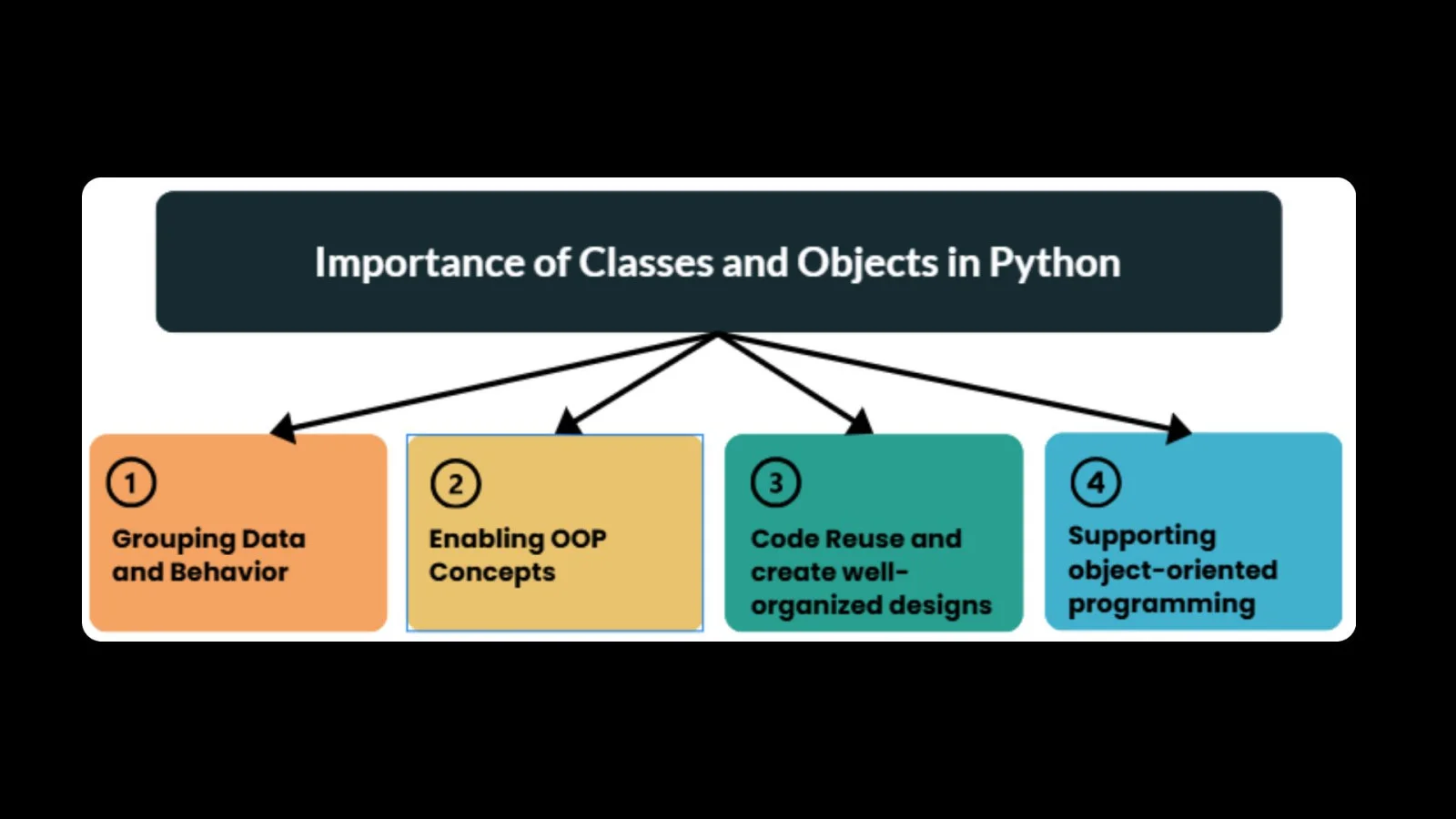
Here are a few points to highlight the importance of classes and objects in Python.
In Python, the __init__() function is a special method in classes. It automatically sets up the attributes of an object when the object is created. Think of it as the constructor for the class. Here's how you can create a class using __init__() to set initial attributes when an object is made:
class Cat: species = "Felines" # Class attribute def __init__(self, name, age): self.name = name # Instance attribute self.age = age # Instance attribute |
Here is a short explanation for you to understand the above program better.
Let's try making an object with the __init__() method and see how it sets up the attributes.
class Cat: species = "Feline" # Class attribute def __init__(self, name, age): self.name = name # Instance attribute self.age = age # Instance attribute # Creating an object of the Cat class Cat1 = Cat("Shiri", 3) print(Cat1.name) print(Cat1.species) |
Take a look at the given output:
Shiri Feline |
Here is a short explanation for you to understand the above program better:
The self parameter points to the current instance of a class, letting you get to its attributes and methods. Here's how self works when you're grabbing attributes and methods:
class Cat: def __init__(self, name, age): self.name = name self.age = age def meow(self): print(f"{self.name} is meowing!") # Creating an instance of Cat Cat1 = Cat("Shiri", 3) Cat1.Meow() |
This is your expected output:
| Shiri is meowing! |
Take a look at the given explanation:
In Python, the `__str__` method lets you decide how an object should be shown as a string. Usually, when you print an object or turn it into a string with `str()`, Python gives you something like `<__main__.ClassName object at 0x00000123>`. Here's how you can use `__str__()` to make an object's string output easier to read:
class Cat: def __init__(self, name, age): self.name = name self.age = age def __str__(self): return f"{self.name} is {self.age} years old." cat1 = Cat("Shiri", 3) cat2 = Cat("Charmy", 5) print(cat1) print(cat2) |
The following explanation will help you understand the above program:
In Python, knowing the difference between class and instance variables is key to object-oriented programming. Variables in a class are either class variables, instance variables, or sometimes related to global variables in Python, depending on scope.
These variables are shared by all instances of a class. They're defined at the class level, outside of any method. Every object in the class shares the same value for a class variable, unless you change it for a specific object.
These variables are unique to each object in a class. They are defined inside the `__init__()` method or other methods. Each object has its own copy of these variables, separate from the others.
This code will show you how class variables are shared, while instance variables are unique.
class Cat: # Class variable species = "Feline" def __init__(self, name, age): # Instance variables self.name = name self.age = age # Create objects cat1 = Cat("Shiri", 3) cat2 = Dog("Charmy", 5) # Access class and instance variables print(cat1.species) # (Class variable) print(cat1.name) # (Instance variable) print(cat2.name) # (Instance variable) # Modify instance variables cat1.name = "Eline" print(cat1.name) # (Updated instance variable) # Modify class variable cat.species = "Feline" print(cat1.species) # (Updated class variable) print(cat2.species) |
Go through the given explanation for the above code:
Also Read: Top Python Interview Questions And Answers
Getters and setters let you control how you access an object's properties and help prevent errors using proper Python exception handling. In Python, they're used to get or change the values of private attributes, which helps keep your data safe.
Python doesn't have built-in getter and setter methods like some languages do. Instead, it uses property decorators to achieve the same thing.
Getter: Accesses an attribute's value.
Setter: Modifies an attribute's value.
Here's how to use @property decorators to make getter and setter methods:
class Cat: def __init__(self, name, age): self._name = name # Conventionally private variable self._age = age # Conventionally private variable @property def name(self): return self._name # Getter @name.setter def name(self, value): self._name = value # Setter @property def age(self): return self._age # Getter @age.setter def age(self, value): if value < 0: print("Age cannot be negative!") else: self._age = value # Setter |
Method overriding is when a subclass gives its own version of a method that's already in its superclass. It lets subclasses change or add to what inherited methods do. Here's an example of how method overriding works, showing a subclass changing how an inherited method acts:
class Animal: def sound(self): print("Some sound") class Cat(Animal): def sound(self): # Method overriding print("meowf") cat = Cat() cat.sound() |
Static and class methods link to the class itself, not particular examples of that class.
Static Method: This kind of method doesn't need to know about the class or its examples. Use the `@staticmethod` tag to make one.
Class Method: This method gets the class itself as the first thing you send it (usually called `cls`). You create it with the `@classmethod` tag.
Here's how you set up and use `@staticmethod` and `@classmethod` in Python:
class Cat: @staticmethod def info(): print("Cats are sharp animals.") @classmethod def count(cls): print("There are many cats of class", cls) cat = Cat() cat.info() # Static method call cat.count() # Class method call |
Cats are sharp animals. There are many cats of class <class '__main__.Cat'> |
Abstract classes give you a blueprint for other classes. You can't create them directly. They have abstract methods, which subclasses must use. In Python, you make abstract classes with the abc module. Below is how to use an abstract class to set up a required method for subclasses:
from abc import ABC, abstractmethod class Animal(ABC): @abstractmethod def sound(self): pass class Cat(Animal): def sound(self): print("meow") cat = Cat() cat.sound() |
| Meow |
In conclusion, classes and objects form the core of Python's object-oriented programming model. A class acts as a blueprint defining attributes (data) and methods (behavior), while an object (an instance of that class) embodies those definitions with real, unique state. Through these constructs, Python enables abstraction, encapsulation, inheritance, and polymorphism, and works closely with concepts like data structures in Python. This facilitates more organized, modular, and reusable code. If you want a quick reference for Python syntax and concepts, you can also review this Python cheat sheet.
A class is a blueprint defining attributes and methods. An object is an instance of that class with its own state.
self refers to the current instance of the class and is used to access the object's attributes and methods from within class methods.
No as you can't define two __init__ methods, but you can use default arguments, *args / **kwargs, or class methods as alternative constructors.
A class defines the blueprint, while an object is an instance of that class containing specific data.
They make code modular, easier to debug, and are considered essential Python developer skills for building scalable applications.