In today's fast-paced world of software development, writing code is just the beginning. As projects grow larger and more complex, getting lost in tangled modules or duplicate logic becomes a serious risk. Python packages provide a clean way to organize code into reusable components. Understanding them becomes easier once you are familiar with Python modules.
In this blog, we'll dig into how Python packages work, when to use them, and real-world examples where they've made a difference. If you're new to the language, starting with a Python tutorial helps you understand how modules and packages fit into the overall structure of Python programs.
Python packages help structure and organize code by grouping related modules into directories. A package is simply a folder that includes an _ init__.py file along with one or more Python modules. This layout promotes better code management and reuse, particularly in larger projects. It also enables features to be shared and distributed easily across applications. Think of packages as toolboxes that neatly store functions and classes for efficient access and reuse.
In Python, a package is a way to organize and structure your code by grouping together related modules under a common namespace. Packages let you scale your projects cleanly: as your codebase grows, you can break related logic into modules and arrange them hierarchically inside packages (and sub-packages).
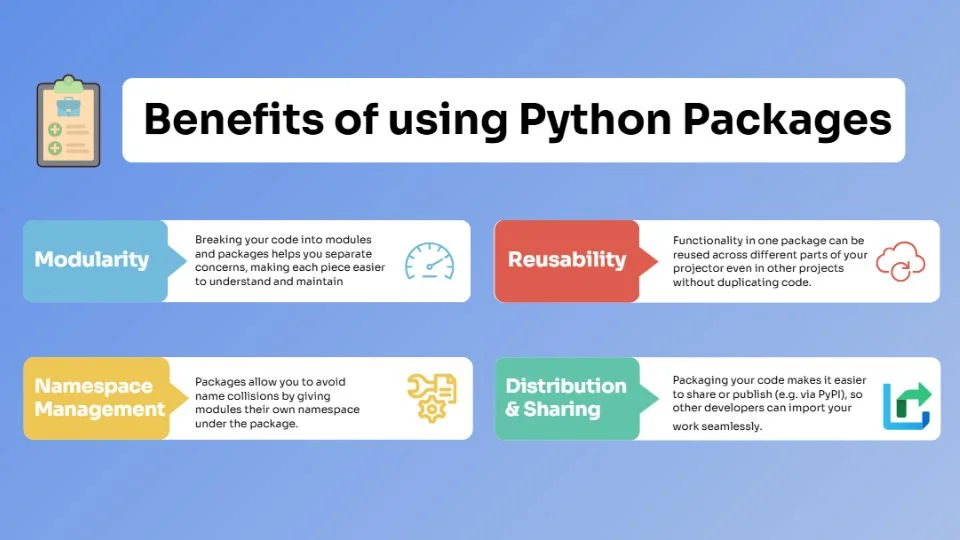
What are the benefits of using Python packages? Using packages gives you several benefits. Here are some for you-
Let's discuss a few important Python package elements-
In this section, we'll look at various Python packages that facilitate web development. From lightweight, flexible frameworks like Flask and Bottle to full-featured options like Django and Pyramid, these tools offer solutions for building everything from small web apps to high-performance APIs.
Related Article: Python Frameworks for Web Development
Let's dive into Python's game development ecosystem using powerful libraries and frameworks to turn your ideas into fun, playable experiences.
Let me teach you how to build and use packages in Python through the given steps-
| from mypackage.module1 import greet |
Example
Creating a “Math Operations” Package
Here's how you could structure a math_operations package with two sub-packages:
# Initialize the main package from .calculate import calculate from .basic import add, subtract from .advanced import multiply, divide |
Each arithmetic operation is defined in its own module. This modular approach keeps the code clean, reusable, and easy to maintain.
A Python package manager is a tool that automates the process of installing, upgrading, and managing external libraries (called "packages") for your projects. These packages contain pre-written code created by others, allowing you to add features like data analysis, web development, or machine learning without starting from scratch. Here are some of the important Python Package Managers you should know about:
Although they are related concepts, modules and packages serve different roles in Python's architecture:
Let's first begin by understanding what a module is-
Now let's understand what a package is-
Key point- A module is one file and a package is a directory of modules (plus metadata) that defines a namespace hierarchy.
Here is a comprehensive Python Packages Cheat Sheet featuring the 25 most popular Python packages used by developers, data analysts, AI engineers, and DevOps professionals. Whether you're building websites, analyzing data, developing AI and machine learning applications, creating REST APIs, or automating repetitive tasks, these packages can significantly improve your productivity. The following table serves as a quick reference to help you choose the right package based on your project requirements.
| Package | Category | Primary Use Case | Common Alternatives |
|---|---|---|---|
| NumPy | Data Analysis | Fast numerical computing and multidimensional arrays. | CuPy |
| Pandas | Data Analysis | Data cleaning, manipulation, and DataFrame operations. | Polars |
| Matplotlib | Data Visualization | Create charts, graphs, and reports. | Plotly |
| Seaborn | Data Visualization | Statistical charts and advanced visualizations. | Plotly Express |
| Plotly | Interactive Visualization | Interactive dashboards and business reports. | Bokeh |
| Scikit-learn | Machine Learning | Classification, regression, clustering, and predictive analytics. | XGBoost |
| TensorFlow | Deep Learning | Build neural networks and AI applications. | PyTorch |
| PyTorch | Deep Learning | Train deep learning and generative AI models. | TensorFlow |
| Transformers | Natural Language Processing | Develop LLM-powered applications and chatbots. | spaCy |
| spaCy | Natural Language Processing | Production-ready NLP pipelines. | NLTK |
| NLTK | Natural Language Processing | Text preprocessing and language analysis. | spaCy |
| Requests | Networking | Work with REST APIs and HTTP requests. | HTTPX |
| HTTPX | Networking | Asynchronous API development. | Requests |
| BeautifulSoup4 | Web Scraping | Extract structured information from websites. | lxml |
| Scrapy | Web Scraping | Large-scale web crawling projects. | BeautifulSoup4 |
| FastAPI | Web Development | Build modern REST APIs. | Flask |
| Flask | Web Development | Create lightweight web applications. | FastAPI |
| Django | Web Development | Develop scalable web applications. | Flask |
| SQLAlchemy | Database | Object Relational Mapping (ORM). | Peewee |
| PyMySQL | Database | Connect Python applications with MySQL. | mysql-connector-python |
| OpenCV | Computer Vision | Image processing and object detection. | Pillow |
| Pillow | Image Processing | Edit and manipulate images. | OpenCV |
| Streamlit | Data Applications | Create interactive dashboards using Python. | Gradio |
| Gradio | AI Applications | Build machine learning demos and interfaces. | Streamlit |
| Pytest | Testing | Automated testing and test automation. | unittest |
I have given some real-world examples of Python packages that are currently in action.
Astropy is a collection of Python software packages designed for astronomy applications. It provides tools to work with celestial coordinate systems, handle FITS files (common in astronomy), manipulate units, perform time calculations, etc. Institutions like observatories and large astronomy surveys use Astropy to analyze telescope data and process images.
River is a library for ML on streaming data. If you have time-series data or continuous incoming data (e.g. sensor readings, logs, live user events), River provides tools to train models incrementally, evaluate performance over time, and adapt to concept drift.
gCastle is a toolbox for causal structure learning: it enables generating data (simulated or real), learning causal structures, and evaluating the results. It's useful in domains where you want to understand cause and effect rather than just correlation, for example telecoms, healthcare, or economics.
Fermipy is built on top of other scientific Python packages (e.g. NumPy, SciPy, Matplotlib, Astropy) and is focused on making the analysis of data from the Fermi Large Area Telescope easier. It provides higher-level functions for extracting spectra, generating maps, fitting source models, etc. This allows astronomers to focus on scientific questions rather than boilerplate code.
The requests package is one of the most popular HTTP libraries in Python. It simplifies making web request calls (GET, POST, etc.), handling headers, cookies, redirects, and more. Real-world use cases include: scraping data from websites, interacting with web APIs for services (e.g. payment gateways, social media), automating uploads/downloads, etc. It has very high download rates and is often a go-to package for anything involving HTTP interaction.
It is safe to conclude that Python packages give your projects structure, clarity, and reusability. With them, your code becomes easier to maintain, extend, and share. Whether you're building a small script or a large-scale application, understanding how to organize modules into packages is a skill that pays off. If you're just getting started, a structured guide on how to learn Python can help you build these concepts step by step.
A namespace package is a special type of package that can span multiple directories and doesn't require an __init__.py file. Multiple distributions can contribute modules to the same namespace.
When you import, Python looks first among built-in modules, then goes through the paths listed in sys.path in order. If it finds a matching module or package, it loads it, otherwise, you get an ImportError.
Beyond signaling that a directory is a package, __init__.py can execute initialization code, define a package-level API (by importing specific items), or manage what gets exposed when someone does from package import *.
Python packages are used to organize large projects and avoid name conflicts between modules.
Popular Python packages include NumPy, Pandas, Matplotlib and Requests.