The Python
programming language is known for its simplicity, readability, and powerful
features that make it beginner-friendly. Whether you're a student, a
data science beginner, a software developer, or just curious about
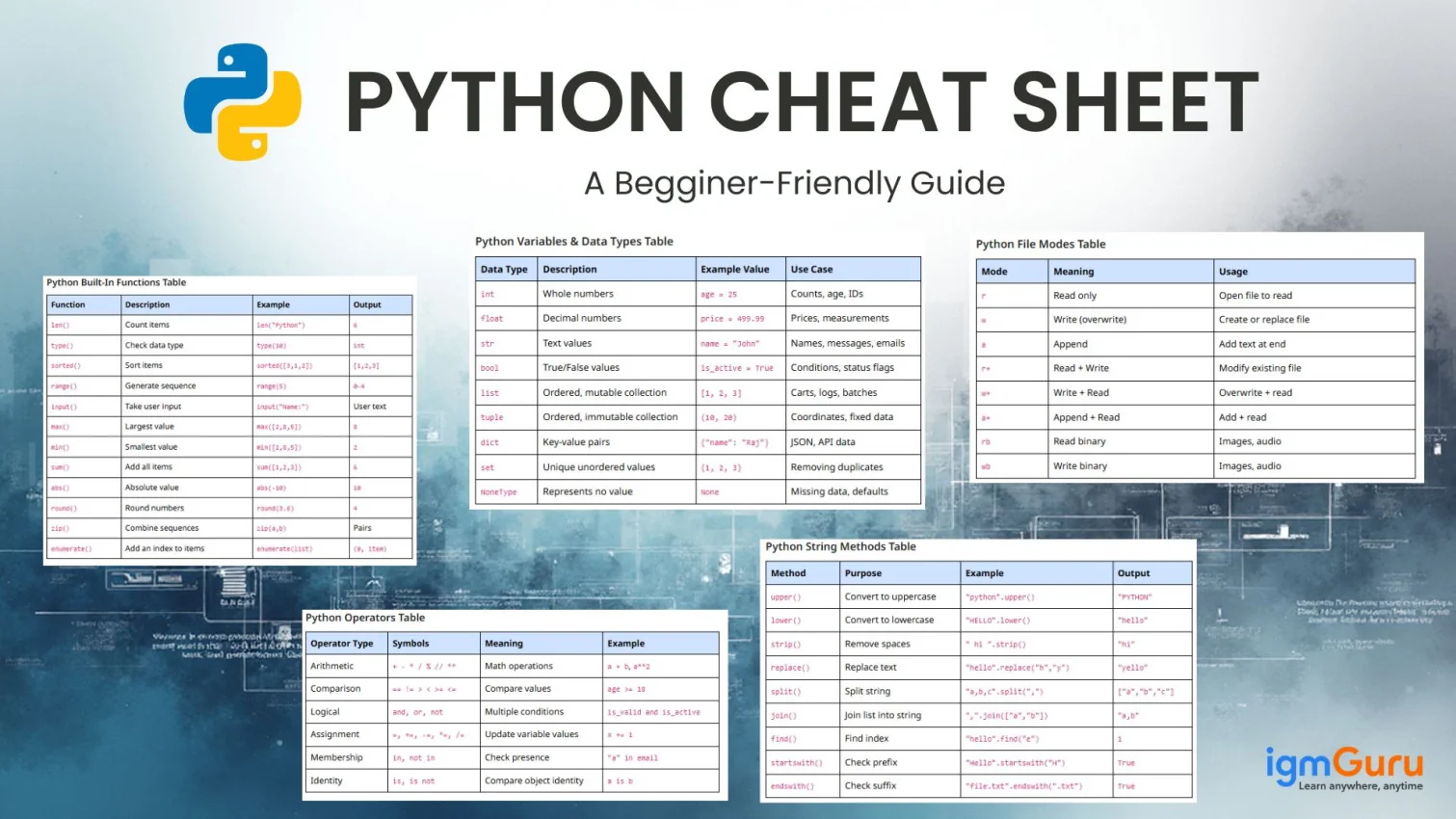
coding, Python can be a great tool for you. This Python Cheat Sheet gives you a quick, practical, and example-packed reference guide. Unlike normal cheat sheets, this one focuses on real-world examples you’ll actually use in projects.
Who Can Benefit from the Python Cheat Sheet?
This Python Cheat Sheet is designed for:
- Complete beginners
- Students preparing for exams
- Professionals brushing up on Python basics
- Anyone building small apps, data scripts, or automation tasks
Here you will learn Python syntax with real-world examples to understand why you are writing a piece of code, not just how.
Master Python Programming with Python Training
Boost your coding skills and gain hands-on knowledge in Python.
Explore Now
Python Basics
Let’s begin with the foundation of every Python program. Understanding simple concepts like printing output, writing comments, and executing basic commands helps beginners get comfortable with syntax. These essentials make your code readable, organized, and ready for more complex programming tasks.
Print Statement
print("Welcome to Python!")
|
Example: Printing logs in a script that processes customer data
print("Customer data processing started...")
|
# This is a single-line comment

"""
This is a multi-line comment
Useful for documentation
"""
|
Example: Adding explanations to data-cleaning code.
# Removing empty rows from the dataset
|
Python Variables & Data Types
Variables and data types in Python help to store, process, and manipulate information. Whether you're handling numbers, text, or user data, mastering data types is essential. This section helps beginners understand how Python interprets and categorizes different kinds of values in real-world applications.
Python Variables & Data Types Table
| Data Type |
Description |
Example Value |
Use Case |
int | Whole numbers | age = 25 | Counts, age, IDs |
float | Decimal numbers | price = 499.99 | Prices, measurements |
str | Text values | name = "John" | Names, messages, emails |
bool | True/False values | is_active = True | Conditions, status flags |
list | Ordered, mutable collection | [1, 2, 3] | Carts, logs, batches |
tuple | Ordered, immutable collection | (10, 20) | Coordinates, fixed data |
dict | Key-value pairs | {"name": "Raj"} | JSON, API data |
set | Unique unordered values | {1, 2, 3} | Removing duplicates |
NoneType | Represents no value | None | Missing data, defaults |
name = "Sanjay"
age = 22
price = 19.99
is_valid = True
|
Real-world example: Storing product data in an e-commerce application.
product_name = "Wireless Mouse"
product_price = 799.0
in_stock = True
|
Python Type Conversion Cheat Sheet
Type conversion in Python allows you to change a value from one data type to another. It is commonly used when processing user input, performing calculations, or preparing data for analysis. Python provides several built-in functions that make converting strings, numbers, lists, tuples, and sets simple.
Common Python Type Conversion Functions
| Function |
Purpose |
Example |
Result |
int() | Convert to integer | int("25") | 25 |
float() | Convert to decimal number | float("10.5") | 10.5 |
str() | Convert to string | str(100) | "100" |
list() | Convert to list | list((1, 2, 3)) | [1, 2, 3] |
tuple() | Convert to tuple | tuple([1, 2]) | (1, 2) |
set() | Convert to set | set([1, 1, 2]) | {1, 2} |
Real-world example: Converting user input before performing a calculation.
age = input("Enter your age: ")
age = int(age)

print(age + 1)
|
Strings in Python
Strings are used everywhere, from usernames and email IDs to log messages and search queries. Learning how to slice, modify, and format strings helps you manage text efficiently. Advanced text processing is often done using Python regular expressions. This section covers essential operations you'll use daily in real projects.
Python String Methods Table
| Method |
Purpose |
Example |
Output |
upper() | Convert to uppercase | "python".upper() | "PYTHON" |
lower() | Convert to lowercase | "HELLO".lower() | "hello" |
strip() | Remove spaces | " hi ".strip() | "hi" |
replace() | Replace text | "hello".replace("h","y") | "yello" |
split() | Split string | "a,b,c".split(",") | ["a","b","c"] |
join() | Join list into string | ",".join(["a","b"]) | "a,b" |
find() | Find index | "hello".find("e") | 1 |
startswith() | Check prefix | "Hello".startswith("H") | True |
endswith() | Check suffix | "file.txt".endswith(".txt") | True |
1. Indexing & Slicing
text = "Python"
print(text[0])      # P
print(text[1:4])    # yth
|
2. Common String Functions
text = "  hello world  "
print(text.strip().upper())
|
Real-world example: Cleaning user input in a signup form.
email = "  user@example.com   "
clean_email = email.strip().lower()
|
Read Also: Python Tutorial for Beginners
Python Operators
Operators allow you to perform calculations, compare values, and build logic. Understanding them helps you automate decisions and analyze data in Python programs. This section introduces operators that become fundamental building blocks in analytics, automation, and application development.
Python Operators Table
| Operator Type |
Symbols |
Meaning |
Example |
| Arithmetic | + - * / % // ** | Math operations | a + b, a**2 |
| Comparison | == != > < >= <= | Compare values | age >= 18 |
| Logical | and, or, not | Multiple conditions | is_valid and is_active |
| Assignment | =, +=, -=, *=, /= | Update variable values | x += 1 |
| Membership | in, not in | Check presence | "a" in email |
| Identity | is, is not | Compare object identity | a is b |
I. Arithmetic
a = 10
b = 3
print(a + b)
|
II. Comparison
age = 20
print(age >= 18)   # True
|
Real-world example: Calculating the bill total with tax.
amount = 500
tax = amount * 0.18
total = amount + tax
|
Master Data Science with Python with Our Training Program
Boost your coding skills and gain hands-on knowledge in Data Science with Python.
Explore Now
Python Lists
Lists are one of Python’s most powerful and flexible data structures. They let you store multiple items and process them efficiently. Whether you're building a shopping cart or handling API responses, lists will be part of almost every project you create.
Python List Methods Table
| Method |
Purpose |
Example |
Output |
append() | Add item | fruits.append("kiwi") | Adds "kiwi" |
insert() | Insert at index | fruits.insert(1,"orange") | New list |
remove() | Remove element | fruits.remove("apple") | Removes "apple" |
pop() | Remove by index | fruits.pop(0) | First item |
sort() | Sort list | nums.sort() | Sorted list |
reverse() | Reverse list | nums.reverse() | Reversed list |
count() | Count occurrences | nums.count(2) | Number of 2’s |
extend() | Add multiple items | a.extend(b) | Combined list |
fruits = ["apple", "banana", "mango"]
fruits.append("orange")
|
Real-world example: Storing items in a shopping cart.
cart = ["laptop", "mouse"]
cart.append("keyboard")
|
Python Tuples
Tuples are similar to lists but immutable, meaning they cannot be changed. They’re perfect for storing fixed data like coordinates, configuration values, or dates. Learning tuples helps you manage data that must remain constant throughout your program.
colors = ("red", "green", "blue")
|
Real-world example: Storing fixed coordinates of a map location.
location = (28.7041, 77.1025) # Latitude, Longitude
|
Python Dictionaries
Dictionaries store data in key-value format, making them ideal for structured, readable data. From API responses to user profiles, dictionaries appear in almost every Python project. You should learn them to have a solid foundation of data manipulation and fast lookups.
student = {"name": "Amit", "age": 21}
print(student["name"])
|
Real-world example: Storing API response data.
user = {
    "id": 101,
    "username": "techguru",
    "is_verified": True
}
|
Python Dictionary Methods Cheat Sheet
Python dictionary methods help you access, update, and remove key-value pairs efficiently. They are especially useful when working with structured data such as user profiles, application configurations, and API responses. Methods like get() and items() also make dictionary operations safer and easier to read.
Common Python Dictionary Methods
| Method |
Purpose |
Example |
get() | Get the value of a key safely | user.get("name") |
keys() | Return all dictionary keys | user.keys() |
values() | Return all dictionary values | user.values() |
items() | Return key-value pairs | user.items() |
update() | Add or update dictionary values | user.update({"age": 25}) |
pop() | Remove a specified key | user.pop("age") |
clear() | Remove all dictionary items | user.clear() |
Real-world example: Updating user profile information.
user = {
    "name": "Amit",
    "email": "amit@example.com"
}

user.update({"is_verified": True})

print(user.get("email"))
|
Python Sets
Sets are used to store unique items and perform mathematical operations like union or intersection. They’re extremely useful when removing duplicates or analyzing distinct data points. Understanding sets gives you more control over data-cleaning and comparison tasks.
unique_ids = {101, 102, 103}
unique_ids.add(104)
|
Real-world example: Removing duplicate items from a list.
emails = ["a@mail.com", "b@mail.com", "a@mail.com"]
unique_emails = set(emails)
|
Conditional Statements
Conditional statements are the reasons behind the decision-making capabilities in Python. Whether you're validating login credentials or checking discount eligibility, conditionals power the logic behind every dynamic application. This section teaches you how to guide program flow effectively.
age = 18
if age >= 18:
    print("Eligible to vote")
|
Real-world example: Checking discount eligibility.
amount = 1200
if amount > 1000:
    print("You get a 10% discount!")
|
Python Reserved Keywords
Reserved words in Python are those keywords that cannot be used as variable names. Each keyword has a special purpose in Python’s syntax and logic. Here is a complete list of them:
| Keyword |
Purpose / Meaning |
False | Boolean false value |
True | Boolean true value |
None | Represents null/empty value |
and | Logical AND operator |
or | Logical OR operator |
not | Logical NOT operator |
if | Conditional statement |
elif | Else-if condition |
else | Default condition block |
for | Looping construct |
while | Looping construct |
break | Exit loop immediately |
continue | Skip to next loop iteration |
pass | Do nothing (placeholder) |
def | Define a function |
return | Return value from a function |
class | Define a class |
try | Try a block of code |
except | Handle an exception |
finally | Run cleanup code |
raise | Manually raise exceptions |
from | Import specific items from the module |
import | Import a module |
as | Alias module or variable |
with | Context manager block |
lambda | Anonymous function |
del | Delete object or variable |
yield | Produce value from the generator |
assert | Debugging check |
global | Declare a global variable |
nonlocal | Access outer (non-global) variable |
in | Membership operator |
is | Identity comparison |
Loops in Python
Loops help you execute tasks repeatedly without writing duplicate code. They're essential for processing lists, sending notifications, analyzing logs, and more. Mastering loops is key to writing efficient and scalable Python scripts.
1. For Loop
users = ["Amit", "Riya", "Sam"]
for user in users:
    print(f"Notification sent to {user}")
|
2. While Loop
count = 1
while count <= 5:
    print(count)
    count += 1
|
Learn AI with Python with Our Latest Training Program
Boost your coding skills and gain hands-on knowledge in AI with Python.
Explore Now
Python Functions
Python Functions let you break programs into reusable pieces, improving structure and readability. They’re vital in automation, APIs, data processing, and complex applications. This section teaches how functions simplify your code and reduce repetition.
def greet(name):
    return f"Hello, {name}"
|
Real-world example: Reusable tax calculation function.
def add_tax(amount):
    return amount + (amount * 0.18)

print(add_tax(1000))
|
Read Also: Python MCQ (Multiple Choice Questions) with Answers
Python Async Programming Cheat Sheet
Asynchronous programming in Python allows applications to handle multiple tasks efficiently without waiting for each task to finish before starting another. It is especially useful for API calls, network requests, web applications, database operations, and other I/O-heavy workloads. Python provides async and await syntax along with the asyncio module to build asynchronous programs.
Common Python Asyncio Functions
| Function / Keyword |
Purpose |
Example |
async def |
Define an asynchronous function |
async def fetch_data(): |
await |
Wait for an asynchronous operation |
await fetch_data() |
asyncio.run() |
Run an asynchronous entry-point function |
asyncio.run(main()) |
asyncio.create_task() |
Schedule a coroutine as a task |
asyncio.create_task(task()) |
asyncio.gather() |
Run multiple awaitable tasks concurrently |
await asyncio.gather(task1(), task2()) |
Basic Async Function
import asyncio

async def greet():
    print("Hello from async Python")

asyncio.run(greet())
|
Real-world example: Running multiple independent tasks concurrently.
import asyncio

async def fetch_data(name):
    await asyncio.sleep(1)
    return f"{name} completed"

async def main():
    results = await asyncio.gather(
        fetch_data("API 1"),
        fetch_data("API 2"),
        fetch_data("API 3")
    )

    print(results)

asyncio.run(main())
|
When to use: Use asynchronous programming when your application spends significant time waiting for network responses, APIs, files, databases, or other external operations. It is generally more useful for I/O-bound workloads than for CPU-intensive calculations.
Modules & Packages in Python
Modules and packages allow you to use pre-written programs in Python that save time and effort. They extend Python’s capabilities—from math and dates to web requests and automation. Understanding them allows you to build powerful programs with minimal coding.
import math
print(math.sqrt(16))
|
Real-world example: Getting today’s date in automation scripts.
from datetime import date
print("Today is:", date.today())
|
Python Date and Time Cheat Sheet
Python provides the datetime module for working with dates and times. It can be used to get the current date, calculate date differences, format timestamps, and convert strings into date objects. These operations are common in automation scripts, reporting systems, log processing, and scheduling applications.
Common Python Date and Time Operations
| Operation |
Example |
Purpose |
| Current date | date.today() | Get today's date |
| Current date and time | datetime.now() | Get the current timestamp |
| Add days | today + timedelta(days=7) | Calculate a future date |
| Format date | date.strftime("%d-%m-%Y") | Convert a date to a formatted string |
| Parse date | datetime.strptime("21-07-2026", "%d-%m-%Y") | Convert a string to a datetime object |
Real-world example: Calculating a delivery date seven days from today.
from datetime import date, timedelta

today = date.today()
delivery_date = today + timedelta(days=7)

print("Delivery Date:", delivery_date)
|
File Handling in Python
File handling in Python allows your program to read, write, and modify files. It’s crucial for tasks like saving reports, loading datasets, or logging activity. This section explains how Python interacts with files safely and efficiently.
Python File Modes Table
| Mode |
Meaning |
Usage |
r | Read only | Open file to read |
w | Write (overwrite) | Create or replace file |
a | Append | Add text at end |
r+ | Read + Write | Modify existing file |
w+ | Write + Read | Overwrite + read |
a+ | Append + Read | Add + read |
rb | Read binary | Images, audio |
wb | Write binary | Images, audio |
with open("notes.txt", "r") as file:
    print(file.read())
|
Real-world example: Reading customer feedback from a file.
with open("feedback.txt") as f:
    feedback = f.readlines()
|
Python JSON Handling Cheat Sheet
JSON is a popular data format used by APIs, web applications, and configuration files. Python's built-in json module allows you to convert JSON data into Python objects and Python objects into JSON. Understanding these operations is particularly useful when exchanging data between Python applications and external services.
Common Python JSON Functions
| Function |
Purpose |
Usage |
json.loads() | Convert JSON string to Python object | Parse API or string data |
json.dumps() | Convert Python object to JSON string | Create JSON-formatted data |
json.load() | Read JSON data from a file | Load configuration or stored data |
json.dump() | Write Python data to a JSON file | Save structured data |
Real-world example: Converting an API-style JSON response into a Python dictionary.
import json

response = '{"name": "Amit", "age": 25}'

user = json.loads(response)

print(user["name"])
|
Exceptions in Python
Exceptions help you handle errors gracefully and prevent your program from crashing. Whether dealing with missing files or invalid inputs, exception handling ensures reliability. This section teaches you to build error-tolerant applications.
try:
    print(10 / 0)
except ZeroDivisionError:
    print("Error: Cannot divide by zero")
|
Real-world example: Handling missing files.
try:
    open("data.csv")
except FileNotFoundError:
    print("File not found. Please upload again.")
|
Python OOP Cheat Sheet
Object-Oriented Programming (OOP) helps you structure code using classes and objects. It’s used in large applications, frameworks, and scalable projects. This section introduces OOP concepts that make your programs modular, clean, and reusable.
1. Classes & Objects in Python
class Car:
    def __init__(self, brand):
        self.brand = brand

my_car = Car("Tesla")
|
Real-world example: Representing a bank account.
class Account:
    def __init__(self, owner, balance):
        self.owner = owner
        self.balance = balance
|
2. Inheritance in Python
Related Article: Classes and Objects in Python
Python Built-In Functions
Built-in functions are ready-to-use tools that Python provides to simplify your work. From calculating lengths to sorting lists, they save effort and speed up development. Learning them strengthens your core Python skills and improves productivity.
Python Built-In Functions Table
| Function |
Description |
Example |
Output |
len() | Count items | len("Python") | 6 |
type() | Check data type | type(10) | int |
sorted() | Sort items | sorted([3,1,2]) | [1,2,3] |
range() | Generate sequence | range(5) | 0-4 |
input() | Take user input | input("Name:") | User text |
max() | Largest value | max([2,8,5]) | 8 |
min() | Smallest value | min([2,8,5]) | 2 |
sum() | Add all items | sum([1,2,3]) | 6 |
abs() | Absolute value | abs(-10) | 10 |
round() | Round numbers | round(3.6) | 4 |
zip() | Combine sequences | zip(a,b) | Pairs |
enumerate() | Add an index to items | enumerate(list) | (0, item) |
List Comprehension in Python
List comprehensions provide a smart way to build lists using loops and conditions. They make your code cleaner and faster, especially for data filtering and transformation tasks. This section helps you write efficient one-line list operations.
emails = ["a@gmail.com", "b@yahoo.com"]
domains = [email.split("@")[1] for email in emails]
|
Python Data Structures Comparison Chart
This chart helps you understand the differences between Python’s most common data structures: lists, tuples, sets, and dictionaries.
| Feature |
List |
Tuple |
Set |
Dictionary |
| Ordered | Yes | Yes | No | Yes (Python 3.7+) |
| Mutable | Yes | No | Yes | Yes |
| Allows Duplicates | Yes | Yes | No | Keys: No, Values: Yes |
| Indexing Supported | Yes | Yes | No | Keys instead of index |
| Typical Use | Collections of items | Fixed collections | Unique items | Key-value mapping |
| Syntax | [1,2,3] | (1,2,3) | {1,2,3} | {"a":1} |
| Best For | Dynamic data | Constant data | Removing duplicates | Fast lookups |
| Performance | Fast | Fastest | Very fast | Fastest for lookups |
Popular Python Libraries
Python’s real power comes from its rich ecosystem of libraries. These libraries make Python popular for web development. Tools like NumPy, Pandas, Seaborn, and Matplotlib help you analyze data, automate tasks, and build applications. This section highlights essential libraries you’ll use in real-world projects.
1. NumPy
import numpy as np
arr = np.array([1,2,3])
|
2. Pandas
import pandas as pd
df = pd.DataFrame({"name": ["A","B"]})
|
3. Matplotlib
import matplotlib.pyplot as plt
plt.plot([1,2,3],[4,5,6])
plt.show()
|
4. Requests
import requests
response = requests.get("https://api.github.com")
|
Python AI and Generative AI Cheat Sheet
Python is widely used for artificial intelligence, machine learning, data science, and generative AI applications because of its readable syntax and extensive ecosystem of libraries and frameworks. Python developers can work with machine learning models, large language models (LLMs), embeddings, APIs, vector databases, and AI application frameworks using a combination of Python packages and external services.
Common Python AI and Generative AI Libraries
| Library / Tool |
Common Use |
Example |
NumPy |
Numerical computing and array operations |
np.array([1, 2, 3]) |
Pandas |
Data cleaning and analysis |
pd.DataFrame(data) |
scikit-learn |
Traditional machine learning |
model.fit(X, y) |
PyTorch |
Deep learning and neural networks |
torch.tensor([1, 2, 3]) |
Transformers |
Working with pretrained transformer models |
from transformers import pipeline |
OpenAI-compatible APIs |
Building applications with generative AI models |
client.responses.create(...) |
Basic Machine Learning Workflow
from sklearn.model_selection import train_test_split
from sklearn.linear_model import LinearRegression

X_train, X_test, y_train, y_test = train_test_split(
    X, y, test_size=0.2, random_state=42
)

model = LinearRegression()
model.fit(X_train, y_train)

predictions = model.predict(X_test)
|
Generative AI Application Workflow
| Step |
Purpose |
Typical Python Component |
| Input |
Accept a user question or application request |
input() or API request |
| Prompt |
Prepare instructions and context for the model |
Python strings |
| Model API |
Send the request to an AI model |
Python SDK or HTTP client |
| Response |
Receive and process the generated output |
Python objects / JSON |
| Application |
Use the model output in an application workflow |
Backend, automation, chatbot, or data pipeline |
Simple Generative AI API Pattern
from openai import OpenAI

client = OpenAI()

response = client.responses.create(
    model="your-model-name",
    input="Explain Python in simple terms."
)

print(response.output_text)
|
Real-world example: Building an AI-powered content or customer-support assistant.
def create_prompt(question):
    return f"Answer this customer question clearly: {question}"

question = "How can I reset my password?"
prompt = create_prompt(question)

# Send the prompt to your selected AI model or API
|
Common Python AI use cases:
- Machine learning and predictive analytics
- Natural language processing (NLP)
- Generative AI applications and chatbots
- Retrieval-Augmented Generation (RAG) applications
- AI-powered automation
- Text classification and summarization
- Data analysis and intelligent reporting
Want to Get Certified in Cybersecurity with Python?
Boost your coding skills and gain hands-on knowledge in CyberSecurity with Python.
Explore Now
Python Virtual Environments and pip Commands
Virtual environments help you create isolated Python environments for different projects. This prevents package version conflicts and keeps project dependencies organized. Python's venv module can create virtual environments, while pip is commonly used to install, update, and manage third-party Python packages.
Python venv and pip Commands Cheat Sheet
| Command |
Purpose |
python -m venv myenv | Create a virtual environment |
myenv\Scripts\activate | Activate the environment on Windows |
source myenv/bin/activate | Activate the environment on macOS/Linux |
deactivate | Exit the active virtual environment |
pip install package_name | Install a Python package |
pip uninstall package_name | Uninstall a Python package |
pip list | List installed packages |
pip freeze > requirements.txt | Save project dependencies |
pip install -r requirements.txt | Install dependencies from a requirements file |
Real-world example: Setting up an isolated environment for a new Python project.
python -m venv myenv

# Activate the environment

myenv\Scripts\activate

# Install project dependencies

pip install pandas requests

# Save dependencies

pip freeze > requirements.txt
|
Python Developer Daily Workflow Examples
Learning syntax is important, but understanding how Python is used in real projects is even more valuable. In real-world development, Python is often used for automation, data cleaning, API integration, reporting, and backend scripting. These mini workflows help beginners understand how multiple Python concepts work together in practical scenarios.
1. Reading and Cleaning CSV Data
Python is widely used in data analytics and reporting workflows. Developers often clean CSV files before generating reports or dashboards.
import pandas as pd

data = pd.read_csv("sales.csv")

data["email"] = data["email"].str.strip().str.lower()

print(data.head())
|
Real-world example: Cleaning customer email records before email marketing campaigns.
2. Automating File Backup
Python automation scripts are commonly used for file management, backups, and server maintenance. This workflow copies files from one folder to another automatically.
import shutil

source = "project_data/"
destination = "backup/project_data/"

shutil.copytree(source, destination)
|
Real-world example: Automatically backing up important project folders every day.
3. Fetching Data from an API
APIs are heavily used in web development, automation, and analytics applications. Python’s Requests library makes API communication simple and beginner-friendly.
import requests

response = requests.get("https://api.github.com")

print(response.status_code)
|
Real-world example: Fetching weather, stock market, or social media data from external services.
Common Python Errors and Solutions
Beginners often face syntax mistakes, import problems, indentation issues, and runtime errors while learning Python. Understanding these common errors helps you debug programs faster and improve coding confidence. Troubleshooting sections also improve practical learning and help developers avoid repetitive mistakes in real-world projects.
Python Errors Cheat Sheet
| Error |
Meaning |
Solution |
SyntaxError |
Invalid Python syntax |
Check missing brackets, colons, or quotation marks |
IndentationError |
Incorrect spacing or indentation |
Use consistent spaces or tabs throughout the file |
NameError |
Variable not defined |
Declare the variable before using it |
TypeError |
Unsupported operation between data types |
Convert values using functions like int() or str() |
ValueError |
Invalid value passed to function |
Validate user input before processing |
IndexError |
List index out of range |
Check list length before accessing indexes |
KeyError |
Dictionary key does not exist |
Use dict.get() or verify keys first |
ModuleNotFoundError |
Python package is missing |
Install the package using pip install |
ZeroDivisionError |
Division by zero |
Validate numbers before division |
FileNotFoundError |
File path does not exist |
Verify file location and filename |
Related Article:
Python Exception Handling Tutorial
Python List vs Tuple vs Set vs Dictionary
One of the most confusing topics for beginners is deciding which Python data structure to use. Lists, tuples, sets, and dictionaries all solve different problems. Understanding their differences helps you write cleaner, faster, and more scalable Python programs.
| Feature |
List |
Tuple |
Set |
Dictionary |
| Mutable |
Yes |
No |
Yes |
Yes |
| Ordered |
Yes |
Yes |
No |
Yes |
| Duplicates Allowed |
Yes |
Yes |
No |
Keys Only Unique |
| Best Use Case |
Dynamic collections |
Fixed data |
Unique values |
Key-value storage |
| Performance |
Fast |
Very Fast |
Fast Lookups |
Fastest Lookups |
| Common Example |
Shopping cart |
Coordinates |
Unique emails |
User profiles |
Python for Data Science
Python is considered the most popular language for data science, machine learning, and analytics because of its powerful ecosystem and easy syntax. Data scientists use Python for data cleaning, visualization, statistical analysis, predictive modeling, and AI applications.
Libraries like NumPy, Pandas, Matplotlib, and Scikit-learn simplify complex calculations and help developers build intelligent systems faster.
| Library |
Purpose |
Use Case |
| NumPy |
Numerical computing |
Array operations |
| Pandas |
Data manipulation |
Data cleaning and analysis |
| Matplotlib |
Visualization |
Charts and graphs |
| Scikit-learn |
Machine learning |
Prediction models |
| TensorFlow |
Deep learning |
AI and neural networks |
Also Read:
Why Python is Popular for AI and Machine Learning
Python Interview Preparation Notes
Python interview questions often focus on essential Python developer skills. This section summarizes key concepts and facts that help you confidently answer Python-related interview questions for fresher and experienced roles.
- Python is interpreted and dynamically typed
- Supports procedural, functional, and OOP paradigms
- Extensively used in AI, ML, automation, and backend development
Wrapping Up
Python becomes easy when you learn it with examples that reflect real-world use. This Python cheat sheet is designed to provide a quick reference guide, whether you're learning Python for automation, data science, backend development, or a college project.
Explore Our Related Articles:
Python Cheat Sheet FAQs
1. How long does it take to learn Python?
Most beginners can learn Python basics within a few weeks with regular practice. Advanced topics like automation, web development, and machine learning take additional time and project experience.
2. Which Python version should beginners use?
Beginners should use the latest stable Python 3 version because it includes modern features, better security, and long-term support.
3. Is Python enough to get a developer job?
Python is widely used in backend development, automation, AI, machine learning, and analytics. Learning Python along with projects, Git, SQL, and APIs can help you prepare for developer roles.
4. Which IDE is best for Python development?
Popular Python IDEs include VS Code, PyCharm, Jupyter Notebook, and Spyder. Beginners usually prefer VS Code because it is lightweight and beginner-friendly.
5. Is Python used in cybersecurity?
Yes, Python is commonly used in cybersecurity for automation, ethical hacking, scripting, malware analysis, and penetration testing workflows.
6. Can I learn Python without coding experience?
Absolutely. Python is one of the easiest programming languages for beginners because of its readable syntax and simple learning curve.